Free
Trial
To see Dynamic Web TWAIN in action, we strongly recommend you try this
-
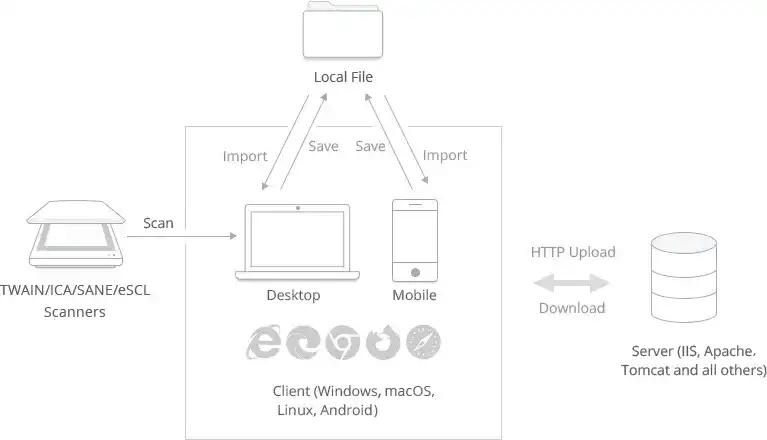
Q: What is the big picture?
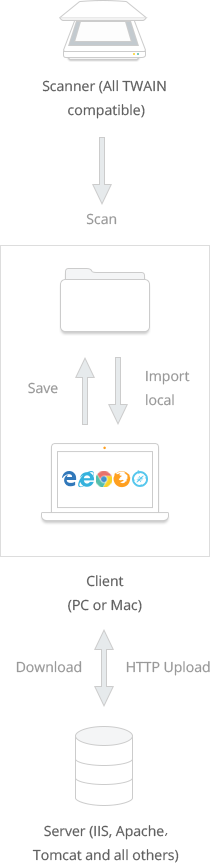
Note: The browser support includes Internet Explorer x86/x64, Edge, Firefox, Chrome and Safari on Windows, macOS, Linux and Android.
-
Q: How do we install the licensed product on the server?
The workflow might be like this:
Step 1. Development Server
Install Dynamic Web TWAIN on the Development Server, so that developers can write document scanning and imaging related code.
Step 2. Testing and Staging Server
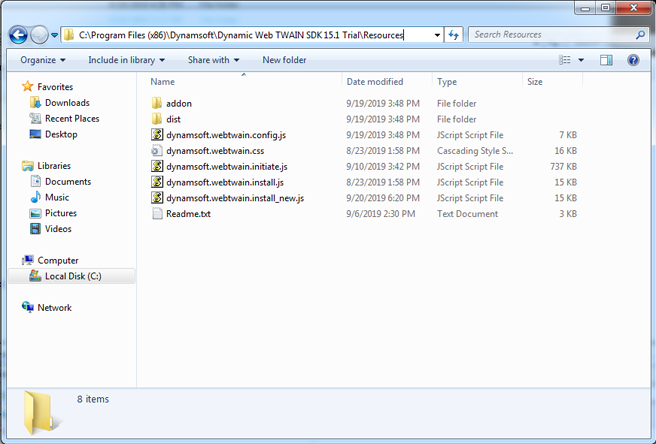
Copy all files under the Resources folder and your code onto the Testing Server for testing. Before the website is put into production, you might bring everything together on the Staging Server for a final testing and approval.
Step 3. Production Server
Final approvals are received and the entire site is pushed to the Production Server.
-
Q: How do we install the licensed product on each desktop client?
When your client visits the scan page for the first time, they will be asked to download an installer based on the browser they are using. It's a one-time installation. Below is how the prompt might look like:
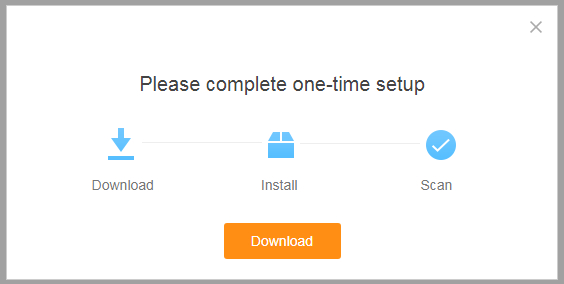
Note: All the elements in the prompt box are customizable.
-
Q: From the trial version, we can see that there is a license key. Should it go into the server, and each client? How so?
After you purchase Dynamic Web TWAIN, we will send you the product keys. You can put the ProductKey in the JavaScript file (dynamsoft.webtwain.config.js) for license verification.
Manual license verification process is not involved at the client side.