# How to Read Barcodes from Images with Textures
In some scenes, the background of images may appear textured, such as a patterned background, screen stripes, etc. As shown below, the barcode background has an odd texture due to the computer screen it is being displayed on.
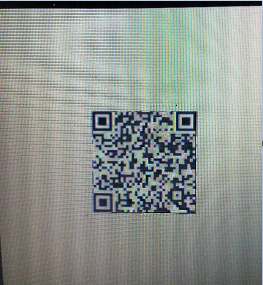
Figure 1 – Sample barcode image with texture
This may extend the barcode localization time or even lead to localization errors. The texture detection feature of Dynamsoft Barcode Reader (DBR) works on images with textured backgrounds. The following two images demonstrate the binarized images used for localization without and with texture detection enabled:
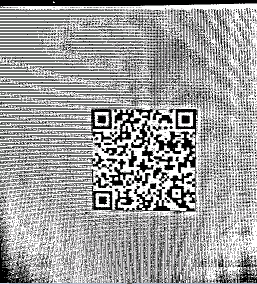
Figure 2 – Binarized image without texture detection enabled
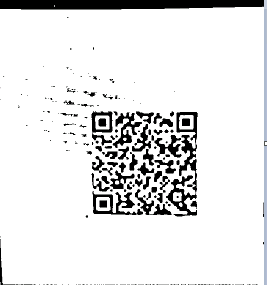
Figure 3 – Binarized image with texture detection enabled
As we can see, the binarized image with texture detection enabled is much better. Now we will demonstrate how to configure the parameter [`TextureDetectionModes`](/capture-vision/docs/core/parameters/reference/image-parameter/texture-detection-modes.html) to enable texture detection.
## Example
Below is an example illustrating how to configure the parameter `TextureDetectionModes`.
* Update parameter `TextureDetectionModes` in your JSON template
```json
{
"CaptureVisionTemplates": [
{
"Name": "CV_0",
"ImageROIProcessingNameArray": ["TA_0" ]
}
],
"TargetROIDefOptions" : [
{
"Name": "TA_0",
"TaskSettingNameArray": [ "BR_0" ]
}
],
"BarcodeReaderTaskSettingOptions": [
{
"Name" : "BR_0",
"SectionArray": [
{
"Section": "ST_REGION_PREDETECTION",
"ImageParameterName": "IP_0"
},
{
"Section": "ST_BARCODE_LOCALIZATION",
"ImageParameterName": "IP_0"
},
{
"Section": "ST_BARCODE_DECODING",
"ImageParameterName": "IP_0"
}
]
}
],
"ImageParameterOptions": [
{
"Name": "IP_0",
"ApplicableStages":[
{
"Stage": "SST_DETECT_TEXTURE",
"TextureDetectionModes": [
{
"Mode": "TDM_GENERAL_WIDTH_CONCENTRATION",
"Sensitivity": 5
}
]
},
{
"Stage": "SST_REMOVE_TEXTURE_FROM_GRAYSCALE"
}
]
}
]
}
```
* Apply the above settings following the article [Use Templates for Configuring Parameters](https://www.dynamsoft.com/barcode-reader/docs/core/programming/features/use-runtimesettings-or-templates.md#json-template).