## Additional Settings for BarcodeScanner
The article will show you how to add additional settings for BarcodeScanner.
### Auto Zoom Feature
Enable the camera to zoom-in automatically when:
- The barcodes are too small.
- The barcodes are farway from the camera.
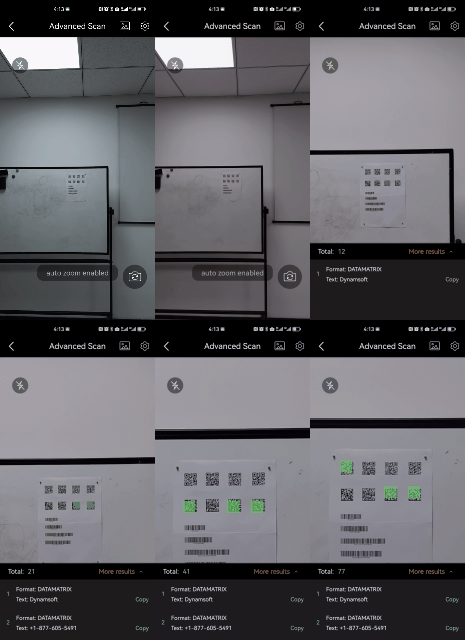
Auto Zoom
>- Java
>- Kotlin
>
>1.
```java
BarcodeScannerConfig config = new BarcodeScannerConfig();
config.setAutoZoomEnabled(true);
```
2.
```kotlin
val config = BarcodeScannerConfig().apply {
isAutoZoomEnabled = true
}
```
**Related API**
- [`setAutoZoomEnabled`](https://www.dynamsoft.com/barcode-reader/docs/mobile/programming/android/api-reference/barcode-scanner/barcode-scanner-config.md#setautozoomenabled)
### Beep
Let the app to trigger a beep sound when a barcode is decoded.
>- Java
>- Kotlin
>
>1.
```java
BarcodeScannerConfig config = new BarcodeScannerConfig();
config.setBeepEnabled(true);
```
2.
```kotlin
val config = BarcodeScannerConfig().apply {
isBeepEnabled = true
}
```
**Related API**
- [`setBeepEnabled`](https://www.dynamsoft.com/barcode-reader/docs/mobile/programming/android/api-reference/barcode-scanner/barcode-scanner-config.md#setbeepenabled)