# Improve the Performance of BarcodeScanner
Using a template file is the quickest way to improve the performance of BarcodeScanner. A template file is a JSON file (or JSON string) that includes a series of algorithm parameter settings. [Contact us](https://www.dynamsoft.com/company/customer-service/#contact) to get a customized template for your scanner.
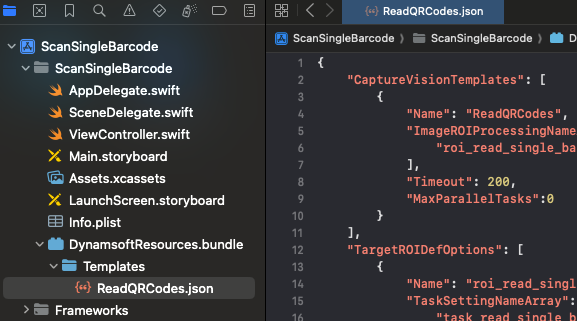
1. Add a **Templates** folder to the assets folder of your project at **src\main\assets\Templates**. Put your JSON file in the **Templates** folder. Here we use a **ReadQRCode.json** file as an example.
2. Specify the template file via property `templateFile`
>- Objective-C
>- Swift
>
>1.
```objc
DSBarcodeScannerConfig *config = [[DSBarcodeScannerConfig alloc] init];
config.templateFile = @"ReadQRCodes.json";
```
2.
```swift
let config = BarcodeScannerConfig()
config.templateFile = "ReadQRCodes.json"
```
**Related APIs**
- [`templateFile`](/barcode-reader/docs/mobile/programming/objectivec-swift/api-reference/barcode-scanner/barcode-scanner-config.html#templatefile)