# TextLineSpecification Object

Set the `CharacterModel`, `TextLineRecModel`, `ImageProcessing` parameters and other configurations for the specified text lines. This is the parameter that defines how the algorithm extract characters from each text lines of a `LabelRecognizer` task. You can leave this area empty to use the default character recognizing settings.

## Parameters Summary

| Parameter Name | Type | Description |
|---------------|------|-------------|
| [`Name`](https://www.dynamsoft.com/capture-vision/docs/core/parameters/reference/text-line-specification/name.md) | *String* | Unique identifier for this specification |
| [`BaseTextLineSpecificationName`](https://www.dynamsoft.com/capture-vision/docs/core/parameters/reference/text-line-specification/base-text-line-specification-name.md) | *String* | Inherit settings from another specification |
| [`CharacterModelName`](https://www.dynamsoft.com/capture-vision/docs/core/parameters/reference/text-line-specification/character-model-name.md) | *String* | Name of the character recognition model |
| [`TextLineRecModelName`](https://www.dynamsoft.com/capture-vision/docs/core/parameters/reference/text-line-specification/text-line-rec-model-name.md) | *String* | Name of the text line recognition model |
| [`ApplicableTextLineNumbers`](https://www.dynamsoft.com/capture-vision/docs/core/parameters/reference/text-line-specification/applicable-text-line-numbers.md) | *String* | Specify which text lines use this specification |
| [`CharHeightRange`](https://www.dynamsoft.com/capture-vision/docs/core/parameters/reference/text-line-specification/char-height-range.md) | *Array* | Valid character height range |
| [`StringLengthRange`](https://www.dynamsoft.com/capture-vision/docs/core/parameters/reference/text-line-specification/string-length-range.md) | *Array* | Valid string length range |
| [`StringRegExPattern`](https://www.dynamsoft.com/capture-vision/docs/core/parameters/reference/text-line-specification/string-regex-pattern.md) | *String* | Regular expression for result validation |
| [`GrayscaleEnhancementModes`](https://www.dynamsoft.com/capture-vision/docs/core/parameters/reference/text-line-specification/grayscale-enhancement-modes.md) | *Array* | Grayscale image enhancement settings |
| [`BinarizationModes`](https://www.dynamsoft.com/capture-vision/docs/core/parameters/reference/text-line-specification/binarization-modes.md) | *Array* | Binarization processing settings |
| [`CharacterNormalizationModes`](https://www.dynamsoft.com/capture-vision/docs/core/parameters/reference/text-line-specification/character-normalization-modes.md) | *Array* | Character normalization settings |
| [`ConcatResults`](https://www.dynamsoft.com/capture-vision/docs/core/parameters/reference/text-line-specification/concat-results.md) | *Int* | Enable/disable result concatenation |
| [`ConcatSeparator`](https://www.dynamsoft.com/capture-vision/docs/core/parameters/reference/text-line-specification/concat-separator.md) | *String* | Separator for concatenated results |
| [`ConcatStringLengthRange`](https://www.dynamsoft.com/capture-vision/docs/core/parameters/reference/text-line-specification/concat-string-length-range.md) | *Array* | Length range for concatenated results |
| [`ConcatStringRegExPattern`](https://www.dynamsoft.com/capture-vision/docs/core/parameters/reference/text-line-specification/concat-string-regex-pattern.md) | *String* | Regex pattern for concatenated results |
| [`ConfusableCharactersCorrection`](https://www.dynamsoft.com/capture-vision/docs/core/parameters/reference/text-line-specification/confusable-characters-correction.md) | *Object* | Confusable character correction settings |
| [`ExpectedGroupsCount`](https://www.dynamsoft.com/capture-vision/docs/core/parameters/reference/text-line-specification/expected-groups-count.md) | *Int* | Expected number of text line groups |
| [`OutputResults`](https://www.dynamsoft.com/capture-vision/docs/core/parameters/reference/text-line-specification/output-results.md) | *Int* | Control result output |
| [`ReferenceGroupName`](https://www.dynamsoft.com/capture-vision/docs/core/parameters/reference/text-line-specification/reference-group-name.md) | *String* | Reference to another group |
| [`SubGroups`](https://www.dynamsoft.com/capture-vision/docs/core/parameters/reference/text-line-specification/sub-groups.md) | *Array* | Sub-group definitions |
| [`TextLinesCount`](https://www.dynamsoft.com/capture-vision/docs/core/parameters/reference/text-line-specification/text-lines-count.md) | *Int* | Expected number of text lines |
| [`FirstPoint`](https://www.dynamsoft.com/capture-vision/docs/core/parameters/reference/text-line-specification/position.md#firstpoint) | *Array* | First corner of target area |
| [`SecondPoint`](https://www.dynamsoft.com/capture-vision/docs/core/parameters/reference/text-line-specification/position.md#secondpoint) | *Array* | Second corner of target area |
| [`ThirdPoint`](https://www.dynamsoft.com/capture-vision/docs/core/parameters/reference/text-line-specification/position.md#thirdpoint) | *Array* | Third corner of target area |
| [`FourthPoint`](https://www.dynamsoft.com/capture-vision/docs/core/parameters/reference/text-line-specification/position.md#fourthpoint) | *Array* | Fourth corner of target area |

## Example

```json
{
    "Name" : "tls_default",
    "CharacterModelName" : "NumberLetterCharRecognition",
    "ApplicableTextLineNumbers" : "1-3",
    "CharHeightRange" : [20, 1000, 1],
    "StringLengthRange" : [3, 50],
    "StringRegExPattern" : "",
    "BinarizationModes" : [
        {
            "Mode" : "BM_LOCAL_BLOCK",
            "BlockSizeX" : 11,
            "BlockSizeY" : 11,
            "ThresholdCompensation" : 10
        }
    ],
    "GrayscaleEnhancementModes" : [
        {
            "Mode" : "GEM_GENERAL",
            "Sensitivity" : 5
        }
    ],
    "CharacterNormalizationModes" : [
        {
            "Mode" : "CNM_AUTO",
            "MorphOperation" : "Close",
            "MorphArgument" : "3"
        }
    ],
    "OutputResults" : 1
}
```

For a complete list of all available parameters and their detailed descriptions, see the Parameters Summary table above.

## Usage Instructions

### Parameter Configurations

**Select CharacterModel**

Select one of the `CharacterModel` for the text line(s) by specifying the name of the model. View [`CaptureVisionModel`](https://www.dynamsoft.com/capture-vision/docs/core/parameters/file/auxiliary/capture-vision-model.md) page for how to configure the models.

**Select TextLineRecModel**

Select one of the `TextLineRecModel` for the text line(s) by specifying the name of the model. View [`TextLineRecModel`](https://www.dynamsoft.com/capture-vision/docs/core/parameters/file/auxiliary/capture-vision-model.md) page for how to configure the models.

**Set Targeting Text Lines**

Parameter `ApplicableTextLineNumbers` defines which text lines shall apply the settings of this `TextLineSpecification` object.

- If `ApplicableTextLineNumbers` is null, all the text lines will use the default settings.
- If `ApplicableTextLineNumbers` is not applied to all the text lines, the remaining text lines will use the default settings.

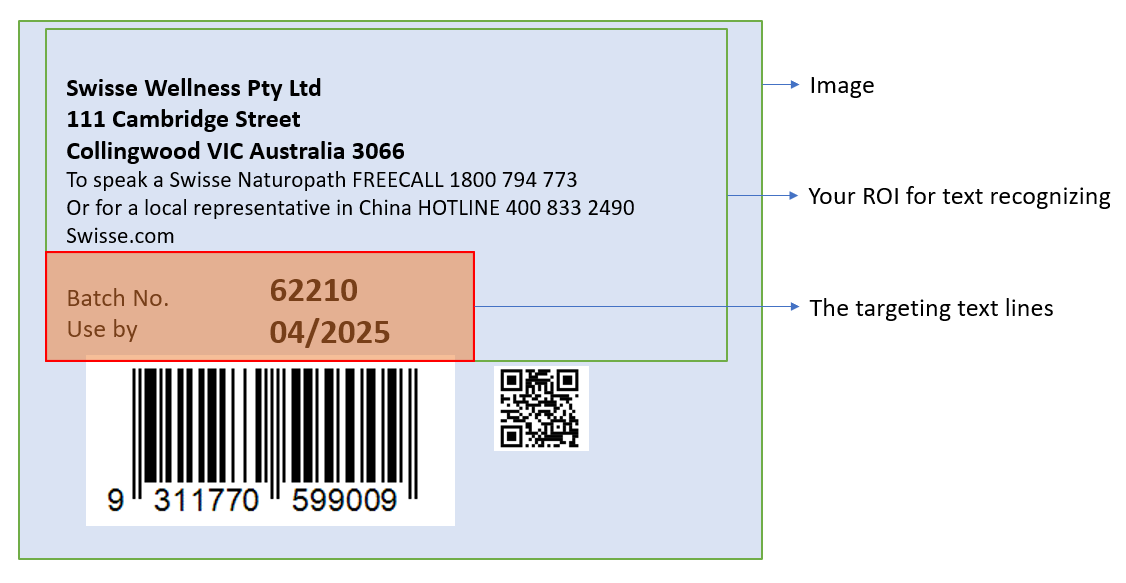
You can also specify the location of the targeting text lines with 4 point coordinates. The targeting text line is filtered based on the combination of `ApplicableTextLineNumbers` and area definition. For example:

<div align="center">
   <p><img src="../assets/example-text-line-specification.png" alt="text-line-specification" width="60%" /></p>
   Example Text Line Specification
</div>

You can use the following parameters to process the above image:

```json
{
    "ApplicableTextLineNumbers" : "7,8",
    "FirstPoint" : [ 0, 60 ],
    "SecondPoint" : [ 70, 60 ],
    "ThirdPoint" : [ 70, 100 ],
    "FourthPoint" : [ 0, 100 ]
}
```

If your set the `ApplicableTextLineNumbers` as "1-8", the text line from 1 to 6 are not recognized because they are not in the specified area.

**Configure ImageProcessing Modes**

`GrayscaleEnhancementModes` enhance the quality of the grayscale image.

`BinarizationModes` configurations finally reflect in the quality of the binary image. It determines how the characters are presented on the text areas before they recognized by the library. The higher quality of the binary image, the higher read rate and accuracy of the character recognition result.

`CharacterNormalizationModes` are additional settings that further improve the quality of characters. Generally, they are **morphological transformations**. You can view more about them from <a href="https://docs.opencv.org/4.x/d9/d61/tutorial_py_morphological_ops.html" target="_blank">Image-Processing in OpenCV - Morphological Transformations</a>.

### Quick Settings

Based on a existing `TextLineSpecification` object, you can use `BaseTextLineSpecificationName` with other minor changes to configure a new `TextLineSpecification` object. For example；

```json
{
    "Name":"LS_0",
    "CharacterModelName" : "NumberLetterCharRecognition",
    "ApplicableTextLineNumbers":"1-3",
    "BinarizationModes" : [
        {
            "Mode": "BM_LOCAL_BLOCK",
            "BlockSizeX": 5,
            "BlockSizeY": 5,
        }
    ],
    "CharacterNormalizationModes" : [
        {
            "Mode": "CNM_MORPH",
            "MorphOperation": "Close",
            "MorphArgument": "3",
        }
    ],
    "StringLengthRange" : [44,44],
    "StringRegExPattern" : "Dynamsoft",
    "CharHeightRange" : [ 800, 1000, 1 ]
},
{
    "Name":"LS_1",    
    "BaseTextLineSpecificationName" : "LS_0", // Use the same settings with LS_0 but add some changes.
    "ApplicableTextLineNumbers":"4-7",
    "CharHeightRange" : [ 600, 800, 1 ]
}
```

### Result Concatenation

When multiple text lines need to be combined into a single result, use the following parameters:

- **`ConcatResults`**: Set to 1 to enable concatenation of multiple text line results into a single output.
- **`ConcatSeparator`**: Defines the separator string used between concatenated text lines (e.g., "\n" for newline).
- **`ConcatStringLengthRange`**: Specifies the valid length range [min, max] for the concatenated result.
- **`ConcatStringRegExPattern`**: Regular expression pattern that the concatenated result must match.

### Grouping and Filtering

- **`ExpectedGroupsCount`**: Specifies the expected number of text line groups to be recognized.
- **`ReferenceGroupName`**: References another group for relative positioning or filtering.
- **`SubGroups`**: Defines sub-groups within the text line specification for hierarchical organization.
- **`TextLinesCount`**: Specifies the expected number of text lines to be processed.

### Output Control

- **`OutputResults`**: Set to 1 to include this text line's results in the final output, or 0 to process internally without outputting.

### Character Correction

- **`ConfusableCharactersCorrection`**: Configuration for correcting commonly confused characters (e.g., 0 vs O, 1 vs I).
