# Why does the camera preview render incorrectly on iOS 27?

## Applicable Products

This article applies to:

- Dynamsoft Barcode Reader (DBR) JavaScript SDK (`dynamsoft-barcode-reader-bundle`) 11.6.3000 and earlier
- Dynamsoft Capture Vision (DCV) JavaScript SDK (`dynamsoft-capture-vision-bundle`) 3.6.3000 and earlier

## Summary

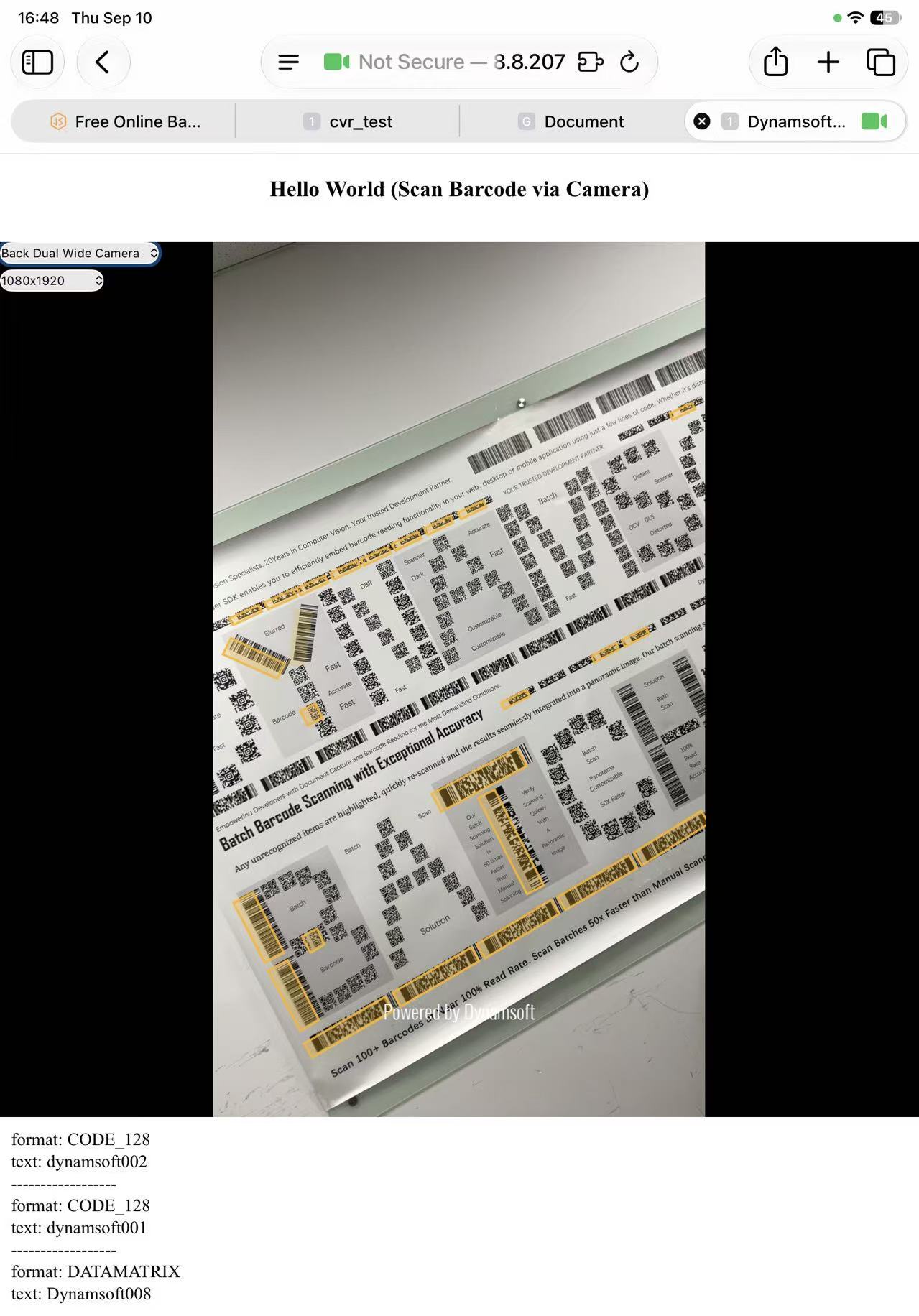
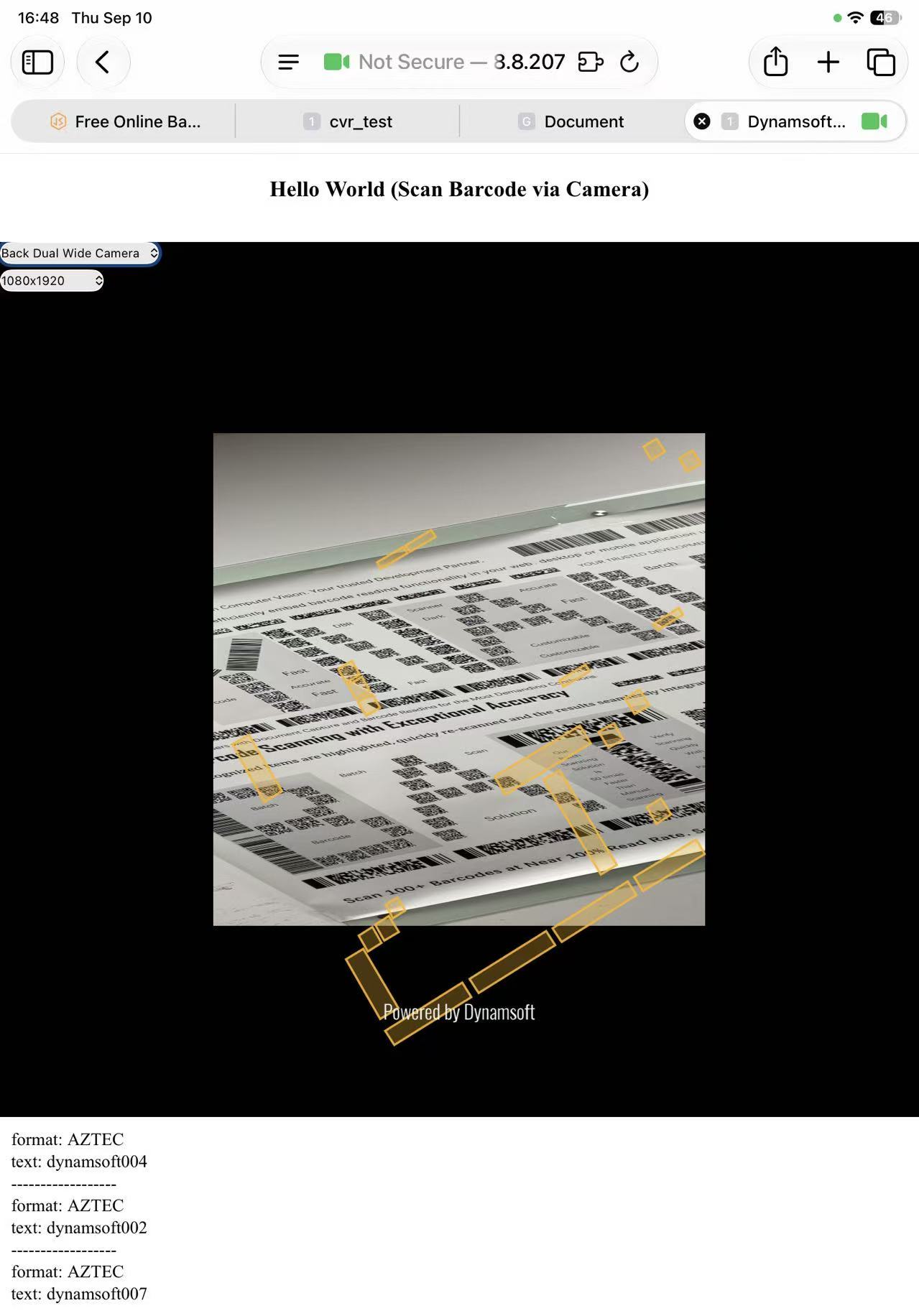
On iOS 27, switching cameras or changing resolution can make the live camera preview render incorrectly. The exact behavior depends on the SDK version:

| Version | Behavior |
|---|---|
| DBR 11.4 – 11.6.3000 (DCV 3.4 – 3.6.3000) | The preview renders distorted — squeezed or stretched instead of filling its container. Intermittent: the same switch can render correctly on one attempt and distorted on the next. |
| DBR 11.2 and earlier (DCV 3.2 and earlier) | The preview isn't distorted, but it no longer fits its container — shown at the wrong zoom or size and not extending to the borders. |

It's reproducible on Safari, Chrome, Edge, and Firefox — all iOS browsers share WebKit's camera implementation, so we suspect the issue originates there rather than in any Dynamsoft SDK. It does not occur on iOS 26.

> [!NOTE]
> Reported to Apple, but not confirmed as an Apple bug and still open as of iOS 27 RC. Details here may change if Apple ships a fix.

<div style="display: flex; flex-wrap: wrap; gap: 16px; margin: 16px 0;">
  <figure style="flex: 1 1 260px; max-width: 320px; margin: 0; text-align: center;">
    <img src="/faq/assets/img/ios-27-switching-camera-expected.jpg" alt="Camera video rendering correctly on iOS" style="width: 100%; height: auto;">
    <figcaption><strong>Expected</strong></figcaption>
  </figure>
  <figure style="flex: 1 1 260px; max-width: 320px; margin: 0; text-align: center;">
    <img src="/faq/assets/img/ios-27-switching-camera-distorted.jpg" alt="Camera video rendering distorted after switching cameras on iOS 27" style="width: 100%; height: auto;">
    <figcaption><strong>Distorted after switching cameras</strong></figcaption>
  </figure>
</div>

## Resolution

### Recommended: upgrade

Upgrade to `dynamsoft-barcode-reader-bundle` **11.6.3200+** or `dynamsoft-capture-vision-bundle` **3.6.3200+**, which include a built-in workaround.

### If you can't upgrade yet

Both workarounds below are temporary and version-specific — neither replaces upgrading.

**DBR 11.4 – 11.6.3000 (DCV 3.4 – 3.6.3000)**

The distortion requires `object-fit: fill` on the video element plus an ancestor using `display: flex` with `flex: 0 0 auto`, so overriding `object-fit` with `cover` on the `<video>` element that [Dynamsoft Camera Enhancer](https://www.dynamsoft.com/camera-enhancer/docs/web/index.md) renders avoids it:

```css
.dm-camera-core-container video {
  object-fit: cover !important;
}
```

`!important` is needed because the SDK sets `object-fit` inline. The JavaScript equivalent, via [`cameraView.getVideoElement()`](https://www.dynamsoft.com/camera-enhancer/docs/web/programming/javascript/api-reference/cameraview.md#getvideoelement):

```javascript
let videoElement = cameraView.getVideoElement();
videoElement?.style.setProperty('object-fit', 'cover', 'important');
```

> [!WARNING]
> `cover` crops rather than stretches to preserve the aspect ratio — confirm that trade-off works for your UI.

**DBR 11.2 and earlier (DCV 3.2 and earlier)**

Reset the video element's dimensions whenever the camera or resolution changes, registering the handlers before `cameraEnhancer.open()`:

```javascript
const resetVideoWH = () => {
  const videoEl = cameraEnhancer.getVideoEl();
  videoEl.style.width = "";
  videoEl.style.height = "";

  requestAnimationFrame(() => {
    requestAnimationFrame(() => {
      videoEl.style.width = "100%";
      videoEl.style.height = "100%";
    });
  });
};
cameraEnhancer.on("cameraChange", resetVideoWH);
cameraEnhancer.on("resolutionChange", resetVideoWH);

cameraView.createDrawingLayer(2); // layer ID depends on the product — see below

// Normal startup routine, shown here only to indicate placement
await cameraEnhancer.open();
await cvRouter.startCapturing();
```

The `createDrawingLayer` call is part of the workaround. Pass the layer ID for your product:

| Product | Layer ID |
|---|---|
| Dynamsoft Barcode Reader (DBR) | 2 |
| Mobile Document Scanner (MDS — DDN layer) | 1 |
| MRZ Scanner (DLR layer) | 3 |

## Need more help?

[Contact the Dynamsoft Support team](https://www.dynamsoft.com/contact).