# Build a Remote Scan Page

> Before you start, please make sure you've downloaded and installed `Dynamic Web TWAIN`. If you haven't done so, you can get the 30-day free trial installer [here](https://www.dynamsoft.com/customer/download).

The following steps show you how to create your remote scan application in a few minutes!

## Start a Web Application

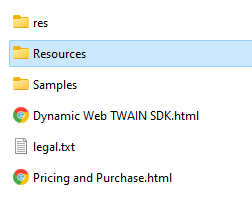
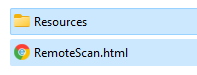
Create a `remotescan.html` anywhere and copy the `Resources` folder to the same location. You can typically find this folder in `C:\Program Files (x86)\Dynamsoft\Dynamic Web TWAIN SDK {Version Number}\`
* Resources

<img src="../assets/imgs/helloworld-1.png" width="30%" height="50%">

* The project

 <img src="../assets/imgs/helloworld-2.png" width="30%" height="50%">

## Include the Library

Embed the script of the library and add a `div` element for the library on the page.

```html
<script src="Resources/dynamsoft.webtwain.config.js"></script>
<script src="Resources/dynamsoft.webtwain.initiate.js"></script>
```

```html
<div id="dwtcontrolContainer" style="width: 350px; height: 380px;"></div>
```

> Width and height can be changed.

## List Connected Scanner Devices

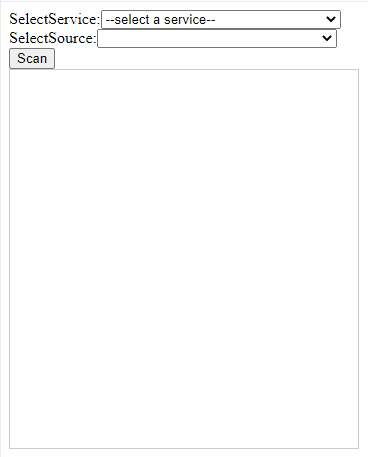
Create a remote scan object to get the list of Dynamic Web TWAIN Services with Bonjour Service enabled from Proxy Server. Then, list the scanner devices connected to the selected service.

``` html
<div>SelectService:<select size="1" id="selServices" style="position: relative; width: 240px;" onchange="onServiceSelected();"></select></div>
<div>SelectSource:<select size="1" id="selDevices" style="position: relative; width: 240px;"></select></div>

<script type="text/javascript">

    var DWRemoteScanObject, allServices, allDevices;
    var serverurl = 'https://demo.scannerproxy.com'; // A public proxy server provided by Dynamsoft. You can also change to your own proxy server.
    Dynamsoft.DWT.AutoLoad = false; // Disable the loading of Web TWAIN in the default mode
    Dynamsoft.DWT.ProductKey = "LICENSE-KEY"; //apply for a 30-day trial here: https://www.dynamsoft.com/customer/license/trialLicense/?product=dwt
    Dynamsoft.DWT.CreateRemoteScanObjectAsync(serverurl)
        .then(function (rsObject) {
            DWRemoteScanObject = rsObject;

            var element = document.getElementById("dwtcontrolContainer");
            DWRemoteScanObject.Viewer.bind(element); // Bind viewer
            DWRemoteScanObject.Viewer.show(); // Show viewer

            return DWRemoteScanObject.getServices();
        })
        .then(function (services) {
            allServices = services;
            var ddlService = document.getElementById("selServices");
            if (ddlService) {
                ddlService.options.length = 0;
                ddlService.options.add(new Option("--select a service--", "-1"));
                for (var i = 0; i < services.length; i++) {
                    var serverInfo = services[i];
                    if (serverInfo.attrs.name.length > 0)
                        ddlService.options.add(new Option(serverInfo.attrs.name, i));
                    else
                        ddlService.options.add(new Option(serverInfo.attrs.UUID, i));
                }
                ddlService.selectedIndex = 0;
            }
        })
        .catch(function (exp) {
            console.error(exp);
        });

    function onServiceSelected() {
        var ddlService = document.getElementById("selServices");
        if (ddlService.selectedIndex >= 0 && allServices && allServices.length > 0) {
            var devicetype =
                Dynamsoft.DWT.EnumDWT_DeviceType.TWAINSCANNER |
                Dynamsoft.DWT.EnumDWT_DeviceType.WIASCANNER |
                Dynamsoft.DWT.EnumDWT_DeviceType.TWAINX64SCANNER |
                Dynamsoft.DWT.EnumDWT_DeviceType.ICASCANNER |
                Dynamsoft.DWT.EnumDWT_DeviceType.SANESCANNER |
                Dynamsoft.DWT.EnumDWT_DeviceType.ESCLSCANNER |
                Dynamsoft.DWT.EnumDWT_DeviceType.WIFIDIRECTSCANNER;
            DWRemoteScanObject.getDevices({
                serviceInfo: allServices[ddlService.selectedIndex - 1],
                deviceType: devicetype,
            })
                .then(function (devices) {
                    allDevices = devices;
                    var ddlDevice = document.getElementById("selDevices");
                    if (ddlDevice) {
                        ddlDevice.options.length = 0;
                        ddlDevice.options.add(new Option("--select a device--", "-1"));
                        for (var i = 0; i < devices.length; i++) {
                            var device = devices[i];
                            if (device.displayName.length > 0)
                                ddlDevice.options.add(new Option(device.displayName, i));
                            else
                                ddlDevice.options.add(new Option(device.name, i));
                        }
                        ddlDevice.selectedIndex = 0;
                    }
                })
                .catch(function (exp) {
                    console.error(exp);
                });
        }
    }

</script>
```

## Scan an Image

Add a scan button to scan an image using the selected device.

``` html
<button onclick="AcquireImage();">Scan</button>
<script type="text/javascript">
    function AcquireImage() {
        if (DWRemoteScanObject) {
            var selDevices = document.getElementById("selDevices");
            if (selDevices) {
                if (selDevices.selectedIndex - 1 >= 0) {
                    DWRemoteScanObject.acquireImage(
                        allDevices[selDevices.selectedIndex - 1],
                        {
                            IfCloseSourceAfterAcquire: true, // Scanner source will be closed automatically after the scan.
                        }
                    ).catch(function (exp) {
                        alert(exp.message);
                    });
                }
            }
        }
    }
</script>
```


## Review the Complete Code

``` html
<html>

<head>
    <title>Hello World</title>
    <script src="Resources/dynamsoft.webtwain.config.js"></script>
    <script src="Resources/dynamsoft.webtwain.initiate.js"></script>
</head>

<body>
    <div>SelectService:<select size="1" id="selServices" style="position: relative; width: 240px;" onchange="onServiceSelected();"></select></div>
    <div>SelectSource:<select size="1" id="selDevices" style="position: relative; width: 240px;"></select></div>
    <div><button onclick="AcquireImage();">Scan</button></div>
    <div id="dwtcontrolContainer" style="width: 350px; height: 380px;"></div>
    <script type="text/javascript">
        var DWRemoteScanObject, allServices, allDevices;
        var serverurl = 'https://demo.scannerproxy.com'; // A public proxy server provided by Dynamsoft. You can also change to your own proxy server.
        Dynamsoft.DWT.AutoLoad = false; // Disable the loading of Web TWAIN in the default mode
        Dynamsoft.DWT.ProductKey = "LICENSE-KEY"; //apply for a 30-day trial here: https://www.dynamsoft.com/customer/license/trialLicense/?product=dwt
        Dynamsoft.DWT.CreateRemoteScanObjectAsync(serverurl)
            .then(function (rsObject) {
                DWRemoteScanObject = rsObject;

                var element = document.getElementById("dwtcontrolContainer");
                DWRemoteScanObject.Viewer.bind(element); // viewer bind element xxx
                DWRemoteScanObject.Viewer.show(); // viewer show

                return DWRemoteScanObject.getServices();
            })
            .then(function (services) {
                allServices = services;
                var ddlService = document.getElementById("selServices");
                if (ddlService) {
                    ddlService.options.length = 0;
                    ddlService.options.add(new Option("--select a service--", "-1"));
                    for (var i = 0; i < services.length; i++) {
                        var serverInfo = services[i];
                        if (serverInfo.attrs.name.length > 0)
                            ddlService.options.add(new Option(serverInfo.attrs.name, i));
                        else ddlService.options.add(new Option(serverInfo.attrs.UUID, i));
                    }
                    ddlService.selectedIndex = 0;
                }
            })
            .catch(function (exp) {
                console.error(exp);
            });

        function onServiceSelected() {
            var ddlService = document.getElementById("selServices");
            if (ddlService.selectedIndex >= 0 && allServices && allServices.length > 0) {
                var devicetype =
                    Dynamsoft.DWT.EnumDWT_DeviceType.TWAINSCANNER |
                    Dynamsoft.DWT.EnumDWT_DeviceType.WIASCANNER |
                    Dynamsoft.DWT.EnumDWT_DeviceType.TWAINX64SCANNER |
                    Dynamsoft.DWT.EnumDWT_DeviceType.ICASCANNER |
                    Dynamsoft.DWT.EnumDWT_DeviceType.SANESCANNER |
                    Dynamsoft.DWT.EnumDWT_DeviceType.ESCLSCANNER |
                    Dynamsoft.DWT.EnumDWT_DeviceType.WIFIDIRECTSCANNER;
                DWRemoteScanObject.getDevices({
                    serviceInfo: allServices[ddlService.selectedIndex - 1],
                    deviceType: devicetype,
                })
                .then(function (devices) {
                    allDevices = devices;
                    var ddlDevice = document.getElementById("selDevices");
                    if (ddlDevice) {
                        ddlDevice.options.length = 0;
                        ddlDevice.options.add(new Option("--select a device--", "-1"));
                        for (var i = 0; i < devices.length; i++) {
                            var device = devices[i];
                            if (device.displayName.length > 0)
                                ddlDevice.options.add(new Option(device.displayName, i));
                            else ddlDevice.options.add(new Option(device.name, i));
                        }
                        ddlDevice.selectedIndex = 0;
                    }
                })
                .catch(function (exp) {
                    console.error(exp);
                });
            }
        }

        function AcquireImage() {
            if (DWRemoteScanObject) {
                var selDevices = document.getElementById("selDevices");
                if (selDevices) {
                    if (selDevices.selectedIndex - 1 >= 0) {
                        DWRemoteScanObject.acquireImage(
                            allDevices[selDevices.selectedIndex - 1],
                            {
                                IfCloseSourceAfterAcquire: true, // Scanner source will be closed automatically after the scan.
                            }
                        ).catch(function (exp) {
                            alert(exp.message);
                        });
                    }
                }
            }
        }
    </script>
</body>

</html>
```

## See the Remote Scan Page in Action

* Open the page in your browser

<img src="../assets/imgs/helloworld-3.png" width="40%" height="40%">

  > If you see a license notice, please make sure you have a valid trial license. Contact [Dynamsoft Support](https://www.dynamsoft.com/company/customer-service#contact){:target="_blank"} if you need help.

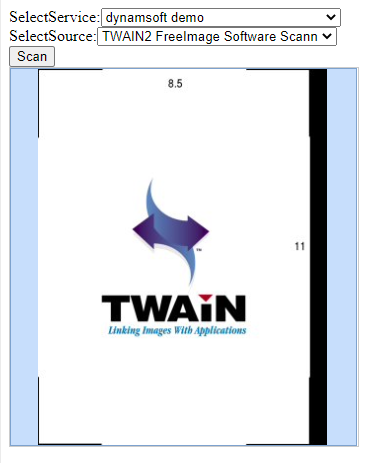
* Select a service and a scanner source and then press the Scan button

<img src="../assets/imgs/helloworld-4.png" width="50%" height="50%">

* After scan

    The scanned documents will show up in the page.
<img src="../assets/imgs/helloworld-5.png" width="40%" height="40%">

## Samples

You can find the sample projects on [GitHub](https://github.com/Dynamsoft/web-twain-samples/#remote-scan).

## Online Demo 

<a href="https://demo.dynamsoft.com/Samples/dwt/RemoteScan/HelloWorld.html" target="_blank">Online Remote Scan Demo</a>