---
layout: default-layout
noTitleIndex: true
needAutoGenerateSidebar: true
needGenerateH3Content: true
title: Error message - Local network access permission denied
keywords: Dynamic Web TWAIN, Error Troubleshooting, CORS, unknown address space, Chromium, 142, Firefox, 153, Local Network Access
breadcrumbText: Error message - Local network access permission denied
description: Local network access permission denied in Chromium and Firefox
date: 2025-11-04 17:21:42 +0000
last_modified: 2026-09-01 08:31:31 +0000
---
# Error Troubleshooting
> [!IMPORTANT]
> This is an evolving browser security behavior. Details in this article may change as Chromium and Firefox continue updating their Local Network Access implementations.
## Error message - Local network access permission denied
### Overview
Local Network Access (LNA) is a browser security model that restricts requests from public network origins to local or loopback destinations - including `localhost` / `127.0.0.1` - unless the user explicitly grants permission. Dynamic Web TWAIN relies on a locally installed service that listens on a loopback address, so if this permission is not granted, DWT cannot communicate with that service.
When a page first requests local access, the browser shows an LNA permission prompt. The symptoms and resolution steps below apply when a user dismisses this prompt or clicks **Block**.
Both Chromium-based browsers (Chrome, Edge, Brave, Opera) and Firefox now enforce LNA, but on different rollout timelines and with different permission names - choose your browser below.
### Root Cause
A page hosted on a public origin (for example, `https://your-domain.com`) is attempting to reach a loopback address (`127.0.0.1`), which is now treated as a protected local-network request. Under this model, such requests are blocked by default unless the required permission has been granted.
> [!WARNING]
> This is driven by browser security policy decisions. Dynamic Web TWAIN cannot bypass these restrictions programmatically.
> Browser behavior will continue evolving, and temporary workarounds may be removed in future versions. You should plan your deployment and UX flow around current browser permission requirements.
> [!NOTE]
> Browser permission popup UI changes frequently. Starting with Dynamic Web TWAIN **v19.3.1**, static popup screenshots were removed from this FAQ - for the latest browser-specific screenshots, see:
> [https://dynamsoft.github.io/Dynamic-Web-TWAIN/local-network-access.html](https://dynamsoft.github.io/Dynamic-Web-TWAIN/local-network-access.html)
- [Chromium 142+](#chromium142plus)
- [Firefox 153+](#firefox153plus)
Local Network Access has been enforced in Chromium-based browsers since version 142 (released October 28, 2025), including Chrome, Edge, Brave, and Opera.
> [!NOTE]
> For Chromium's background and design rationale, see [Chrome's developer blog](https://developer.chrome.com/blog/local-network-access) and the [Chrome Platform Status entry](https://chromestatus.com/feature/5152728072060928).
Starting in **Chrome 145**, the site-setting label changed from one local network access permission to two:
- `loopback-network` shown as **Apps on device**
- `local-network` shown as **Local Network**
Dynamic Web TWAIN Service communicates with `localhost` / `127.0.0.1`, so **Apps on device** (`loopback-network`) is the key permission for most deployments.
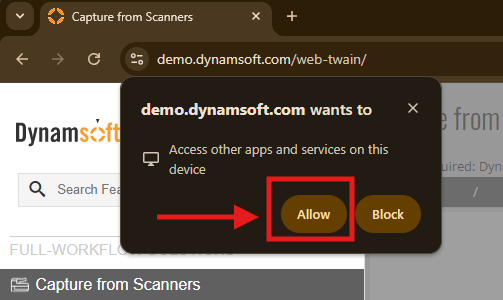
### Symptoms
If the initial LNA prompt is dismissed or blocked, you may experience one or more of the following:
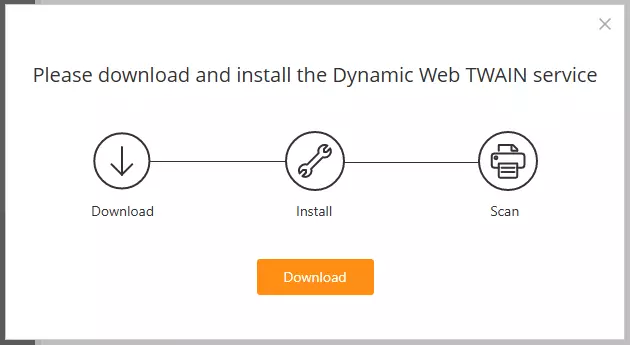
#### **1) Browser repeatedly prompts to download the service**
The browser asks the user to download/install the Dynamic Web TWAIN Service even though it is already installed.
#### **2) Initialization succeeds, but scanning / loading returns blank**
Initialization appears successful, but scanned or loaded images are blank.
The browser console (`F12` -> `Console`) may show a CORS denial similar to:
```shell
Access to fetch at 'https://127.0.0.1:18623/fa/VersionInfo?ts=1761893667670'
from origin 'https://your-domain.com' has been blocked by CORS policy:
Permission was denied for this request to access the `unknown` address space.
```
This is the Local Network Access restriction described in Root Cause above.
---
#### Version-Specific Behavior
Observed behavior depends on Chromium version and Dynamic Web TWAIN (DWT) version:
| Browser Version | DWT Version | Resulting Symptom |
|------------------|-------------|-----------------------------|
| Chromium 142+ | < 18.5.0 | Service Installation Prompt |
| Chromium 142+ | >= 18.5.0, < 19.3 | Blank Images after Scanning |
| Chromium 142+ | >= 19.3 | Permission Prompt |
| Chromium future version blocking WebSocket(*) | Any | Service Installation Prompt |
> [!NOTE]
> (*) Blocking WebSocket requests is on Chromium's roadmap, and may be enforced in a future release.
> Firefox has already begun enforcing Local Network Access, including blocking WebSocket connections starting in Firefox 154 - see the Firefox tab above.
### Resolution
***1. To manually correct this in Chrome***
- Navigate to your Dynamic Web TWAIN page.
- Click the lock/settings icon in the browser address bar.
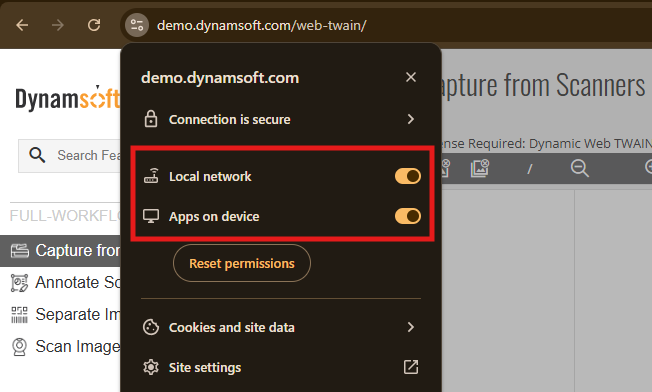
- In **Chrome 142-144**, ensure **Local Network Access** (`local-network-access`) is `Allow`.
- In **Chrome 145+**, check:
- **Apps on device** (`loopback-network`) is `Allow` (required for `localhost` / `127.0.0.1`)
- **Local Network** (`local-network`) is `Allow` only if your app also needs private-network device access
***2. (For Admins) Apply this setting across an enterprise***
Enterprise administrators can deploy Chrome and/or Edge policies to set local-network permission to `Allow` for your website.
Please refer to:
- [Chrome Enterprise Policy List and Management Documentation](https://chromeenterprise.google/policies/#LocalNetworkAccessAllowedForUrls)
- [Microsoft Edge Browser Policy Documentation](https://learn.microsoft.com/en-us/deployedge/microsoft-edge-browser-policies/localnetworkaccessallowedforurls)
### Product Improvements Related to Local Network Access
Starting from v19.3, Dynamic Web TWAIN now includes UX enhancements to better surface local-service connectivity and permission issues.
These changes do not alter or bypass Chromium's security model. They make permission-related failures easier to identify and guide users to the correct browser settings.
The key improvements include:
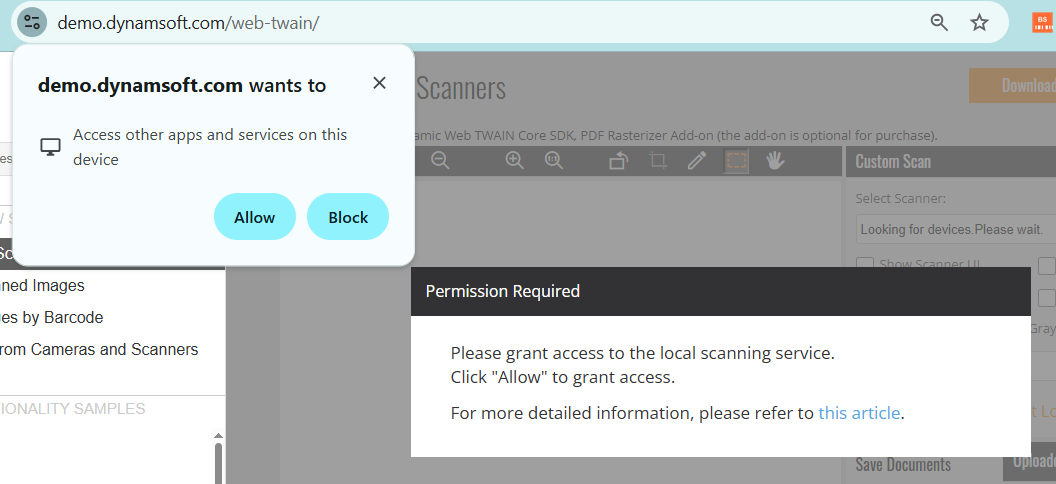
- **Guide the user to grant local network access**
If the service is installed (detected via WebSocket) but access to the local service is failing, and the detected permission state is "prompt", DWT prompts the user to grant access.
*Dialog 1 - Permission Granting Guidance*
- **Explicit detection of blocked local network access**
If the permission can be detected and is "denied", a clear dialog explains the cause and directs users to a guide, which tells how to enable the permission in site settings.
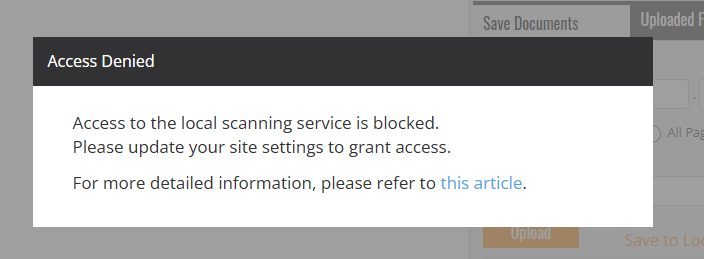
*Dialog 2 - Site Settings Guidance*
- **Clearer messaging during service installation**
The service installation dialog explains that connection failure may be caused either by missing service installation or denied local-network permission.
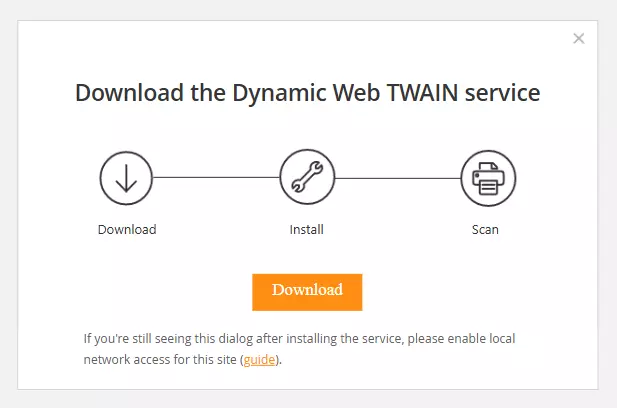
*Dialog 3 - Service Installation*
These improvements are available starting with Dynamic Web TWAIN v19.3.
For older versions, a supplemental JavaScript file can be provided on request by contacting [Dynamsoft Support](mailto:support@dynamsoft.com).
> [!NOTE]
> This supplemental JavaScript file improves user guidance only and does not change browser permission requirements.
Firefox is rolling out its own Local Network Access protections, with a similar goal to Chromium's but on a different timeline and with different permission names.
> [!NOTE]
> For background and configuration details, see Mozilla's documentation: [Control personal device and local network permissions in Firefox](https://support.mozilla.org/en-US/kb/control-personal-device-local-network-permissions-firefox).
Rollout timeline:
| Firefox Version | Behavior |
|------------------|------------------------------------------------------------------------|
| 149 | LNA enforced only for users with Enhanced Tracking Protection set to **Strict** |
| 151 | Gradual rollout begins for all users |
| **153** | Enforced **by default** for all desktop users |
| **154** | Enforcement extended to **WebSocket** connections |
Dynamic Web TWAIN Service communicates with the browser over WebSocket, so **Firefox 154+** is the version that directly affects DWT, in the same way Chromium's LNA does.
Firefox groups this permission differently than Chromium:
- **Device apps and services** - access to your own computer / localhost and apps running on it. This is the permission relevant to DWT Service.
- **Local network devices** - access to other hardware on the same LAN (printers, routers, IoT devices, etc.). Not required for DWT Service.
### Symptoms
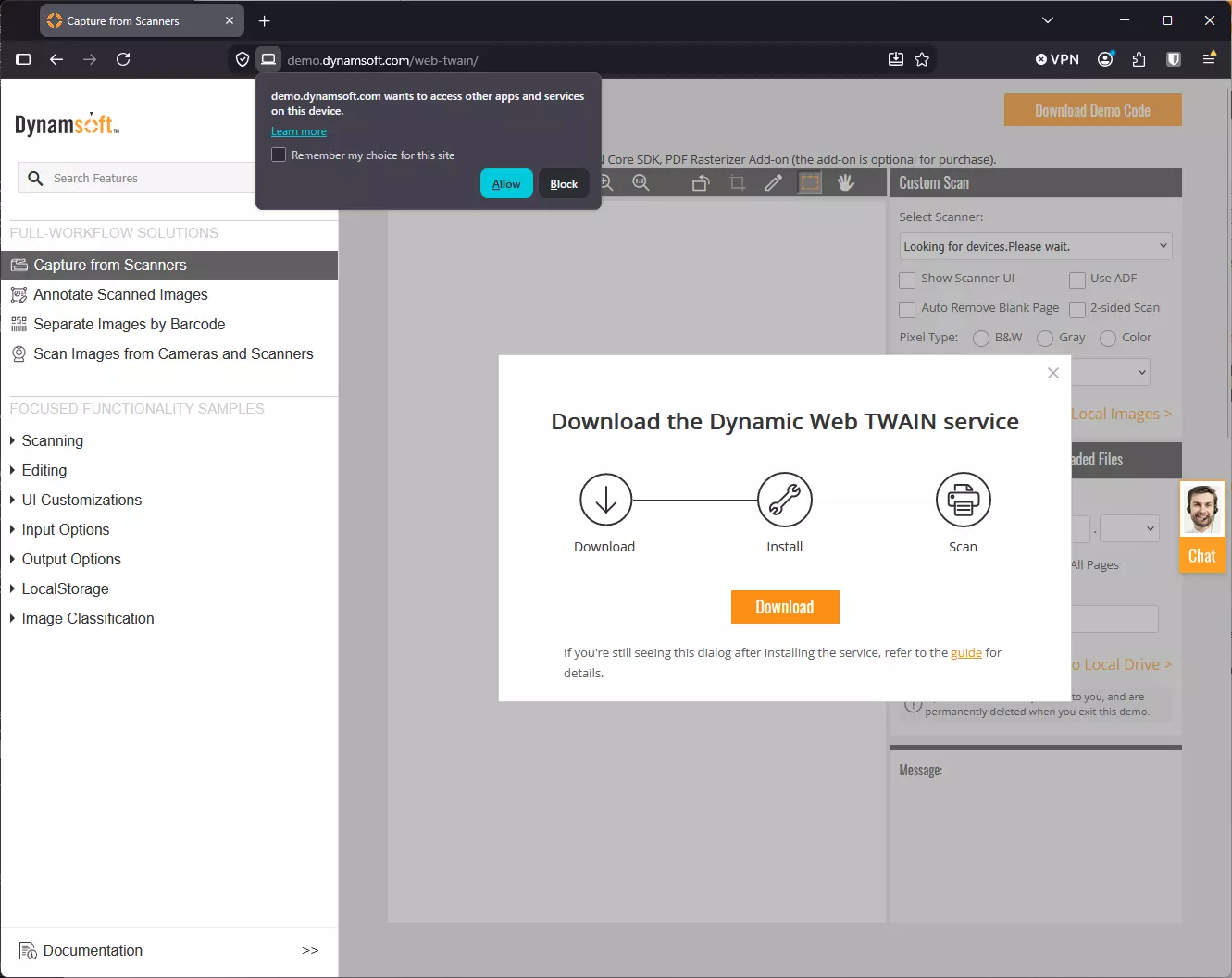
Because Firefox blocks the WebSocket connection itself (rather than a subset of requests, as Chromium currently does), DWT cannot distinguish "service not installed" from "service installed but permission blocked." As a result, Firefox users who dismiss or block the LNA prompt will consistently see:
**Browser repeatedly prompts to download the service**, even though it is already installed - regardless of DWT version.
> [!NOTE]
> As observed on Firefox 153+, DWT currently shows this generic service-installation dialog on Firefox rather than the enhanced guidance dialogs described under "Product Improvements Related to Local Network Access" in the Chromium tab - even though Firefox does support querying the underlying permission (see Developer Notes below). Until DWT's guided dialogs are extended to Firefox, use the manual steps below to resolve this.
### Resolution
***1. To manually correct this in Firefox***
- Navigate to your Dynamic Web TWAIN page.
- When Firefox shows the permission prompt near the address bar ("**\ wants to access other apps and services on this device**"), click **Allow**.
- To fix it after dismissing/blocking the prompt, or to manage it in advance: open Firefox **Settings → Privacy & Security → Permissions → Device apps and services → Settings...**, find your site, and set it to **Allow**.
***2. (For Admins) Apply this setting across an enterprise***
Firefox Enterprise / ESR supports the `LocalNetworkAccess` policy via `policies.json`, which works differently from Chrome/Edge's `LocalNetworkAccessAllowedForUrls` - it uses a `SkipDomains` exception list rather than an allow-list:
```json
{
"policies": {
"LocalNetworkAccess": {
"SkipDomains": ["your-domain.com", "*.your-domain.com"]
}
}
}
```
Please refer to: [Firefox LocalNetworkAccess policy documentation](https://firefox-admin-docs.mozilla.org/reference/policies/localnetworkaccess/)
## Developer Notes
These notes apply to Dynamic Web TWAIN deployments on both Chromium-based browsers and Firefox, since both implement Local Network Access against the same underlying permission model.
### If running inside an `iframe`
> [!IMPORTANT]
> If Dynamic Web TWAIN runs inside a cross-origin iframe, `loopback-network` permissions must be explicitly allowed in the iframe `allow` attribute.
> If the iframe is same-origin, no additional iframe permission configuration is required.
For Chrome 145+, use `loopback-network` (and `local-network` only if needed). For older Chromium versions, include `local-network-access`.
```html
```
> [!NOTE]
> Firefox implements the same underlying Local Network Access specification as Chromium and reuses the `loopback-network` permission name, so the same `allow` attribute pattern above is expected to carry over. This has not been explicitly confirmed against a cross-origin iframe in Firefox - test before relying on it in production, and contact [Dynamsoft Support](https://www.dynamsoft.com/contact/) if you run into issues.
### Permission check for improved UX
You can optionally query LNA permissions at runtime. This is not required, but it can help you guide users before initialization fails. The permission name `loopback-network` is shared by Chrome 145+ and Firefox 153+; the code below also falls back to the older Chromium 142-144 name.
```javascript
// Helper: query the first supported permission name from a list.
async function queryFirstSupportedPermission(names) {
for (const name of names) {
try {
const result = await navigator.permissions.query({ name });
return { name, state: result.state };
} catch (_) {
// Not supported in this browser version.
}
}
return null;
}
(async () => {
// Chrome 145+ and Firefox 153+: loopback-network; Chrome 142-144: local-network-access.
const loopbackPerm = await queryFirstSupportedPermission([
"loopback-network",
"local-network-access"
]);
if (!loopbackPerm) {
console.log("This browser does not expose the Local Network permission API.");
// Fallback: initialize DWT directly.
return;
}
console.log(`Loopback permission (${loopbackPerm.name}): ${loopbackPerm.state}`);
if (loopbackPerm.state === "denied") {
const currentSite = encodeURIComponent(window.location.origin);
const chromeSettingsUrl = `chrome://settings/content/siteDetails?site=${currentSite}`;
console.log(
"Local network permission is denied.\n" +
`Chrome/Edge: open ${chromeSettingsUrl} and allow Local Network / Apps on device.\n` +
"Firefox: open Settings -> Privacy & Security -> Permissions -> Device apps and services, and allow this site."
);
return;
}
if (loopbackPerm.state === "prompt") {
alert(
"To connect with the local scanning service, your browser may ask for Local Network permission. " +
"Please click Allow when prompted."
);
}
// Proceed with DWT initialization.
// e.g., Dynamsoft.DWT.Load() or CreateDWTObjectEx(...)
})();
```
## Other Causes of Failure to Connect to the Service
There are other causes of service connection failure. See [another FAQ](https://www.dynamsoft.com/web-twain/docs/faq/service-prompting-to-install-repeatedly.md).