---
layout: default-layout
noTitleIndex: true
needAutoGenerateSidebar: true
title: How to test if your camera is DirectShow compliant
keywords: Dynamic Web TWAIN, DirectShow compliant, Camera
breadcrumbText: How to test if your camera is DirectShow compliant
description: How to test if your camera is DirectShow compliant
date: 2021-07-14 18:55:57 +0000
last_modified: 2026-01-21 16:11:13 -08:00
---
# Capture/Image Source
## How to test if your camera is DirectShow compliant?
- [Recommended] Take advantage of our official demo page
- Open the demo page on Windows
> If you haven't installed the Dynamic Web TWAIN Service, a dialog will show up for you to download and install it.
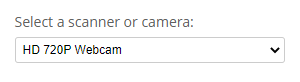
- Make sure the camera shows up in the device list
- Try showing the video stream and try capturing a frame to see if it works without any errors
* You can also test with a DirectShow utility such as Amcap (obtainable from third-party sources) to confirm the camera works correctly.