Inspect an unreadable barcode and test which changes affect decoding. Image measurements provide clues; they cannot establish every failure cause. Your image stays on this device.
Bring an image.Upload, drop a file, use a sample or capture a frame.
Mark the problem area.Select a detected barcode or draw a box around the unreadable one.
Understand & test.Review image evidence, retry the selected area, or continue in Parameter Tuner.
Loading a sample…
Image & barcode regions
If the barcode is unreadable or missing from the detected regions, draw a box around the whole symbol with a small clear margin. Image analysis does not require a successful decode.
Draw a region, or edit its coordinates. Image measurements update when you leave a field.
Crop decoding has not been tested.
Green: decoded. Orange: unconfirmed candidate. Blue: your selection. Choose a region below to inspect it.
Scanability report
Ready for an image
Run an analysis to see decoding evidence and capture recommendations.
Controlled decoding tests
Each test uses the same selected area and default reader settings. Check the decoded text to confirm it is your intended barcode.
Possible contributing factors
What the statuses mean
⚠ Potential issue
A possible scanning risk. Review the evidence and recommended actions.
Measurement only
A measured value, without a pass or fail verdict.
Inconclusive
Not enough evidence to judge this issue. This does not count as a pass.
Decoded symbol measurements
These measurements were reported by the reader after decoding the selected area.
Recommended actions
How to read this report
This is a software-based scanability diagnostic, not an ISO-certified barcode verifier or a print-quality grade. Decode success applies to this image and this reader's default settings; it does not guarantee other scanners will read it.
Manual selections are analyzed directly from image pixels, even if the reader fails. Contrast measures grayscale differences; broad brightness transitions can suggest soft edges, while dim lighter pixels can suggest poor lighting. These are possible contributing factors, not proof of why decoding failed. A rectangular box does not establish barcode format, module size, orientation or perspective. Include the complete symbol and a small clear margin; avoid large areas of unrelated background.
For detected symbols, the SDK supplies location, module size and rotation. Selection-border and quiet-zone estimates are separate: a manual box checks its inner border, while a localized symbol checks surrounding pixels. Neither verifies format-specific quiet-zone compliance. White paper can resemble glare, and valid patterns can resemble damage. Unknown values are never counted as passes.
The optional selected-area decode test uses an unmodified crop at original resolution. If it succeeds after a full-image failure, restricting the area changed the result; this does not prove the original cause. Image evidence remains available when crop decoding fails or the SDK cannot activate.
No images or decoded text are sent to analytics. The SDK downloads its engine and contacts Dynamsoft for license activation. The hosted demo uses the CodePool domain license; local and self-hosted previews use the SDK trial license.
When a barcode will not scan, this page measures the image instead of
guessing: contrast range, edge softness, margin and brightness, read straight from the source pixels.
Draw a box around the symbol and it also runs five bounded experiments — crop, inversion, contrast
stretch, rotation and enlargement — and reports which of them this reader decoded. It is a diagnostic
preflight, not an ISO-certified verifier.
Worked example: what the numbers mean, and where each one stops
Every row in the report carries a status, and the status vocabulary is the important part:
Potential issue is a possible scanning risk, Measurement only is a
value with no verdict attached, and Inconclusive means the evidence was not there —
it never counts as a pass. The thresholds below are the ones the page actually applies:
Heuristic thresholds as implemented in this page. They are practical prompts for recapture and
tuning, not normative print-quality limits.
Measurement
How it is taken
What trips a cue
Edge transition width
Nine scan lines per axis; monotonic changes of at least 40 grayscale levels count as transitions.
The axis with the stronger total change is used.
With at least eight transitions, a median 10–90% width over 3 px flags soft edges.
Sample density
Transitions are sampled in source pixels.
Profiles finer than 1.5 source pixels per sample are reported inconclusive rather than
measured.
Surrounding margin
Dark content in the inner border of a manual selection.
Over 20% dark content with a grayscale range of at least 70 raises a selection/margin cue.
Contrast
Percentile grayscale range and lighter-pixel brightness across the region.
Always a measurement — the report never labels overall brightness as a pass.
Module size, angle, format
Reported by the reader, only after it has decoded the symbol.
Unknown until then. A drawn box never substitutes for symbol geometry.
That last row is the one people argue with. Selecting a region tells the page where to look; it does
not tell it how wide a module is, which way the symbol runs or what format it is. Those three come from
the decoder or they stay unknown, and an empty value is shown as unavailable rather than filled in from
the box.
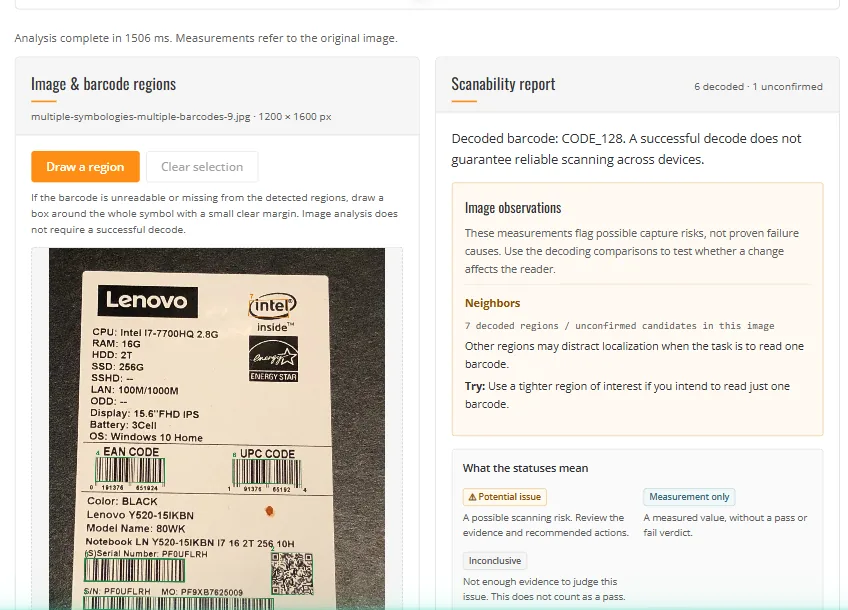
The default bundled sample produces a report before you draw anything:
The default sample analysed in Chrome on 26 October 2026. Six regions decoded and one
remained unconfirmed; the report describes measurements and suggested checks, not a pass or fail
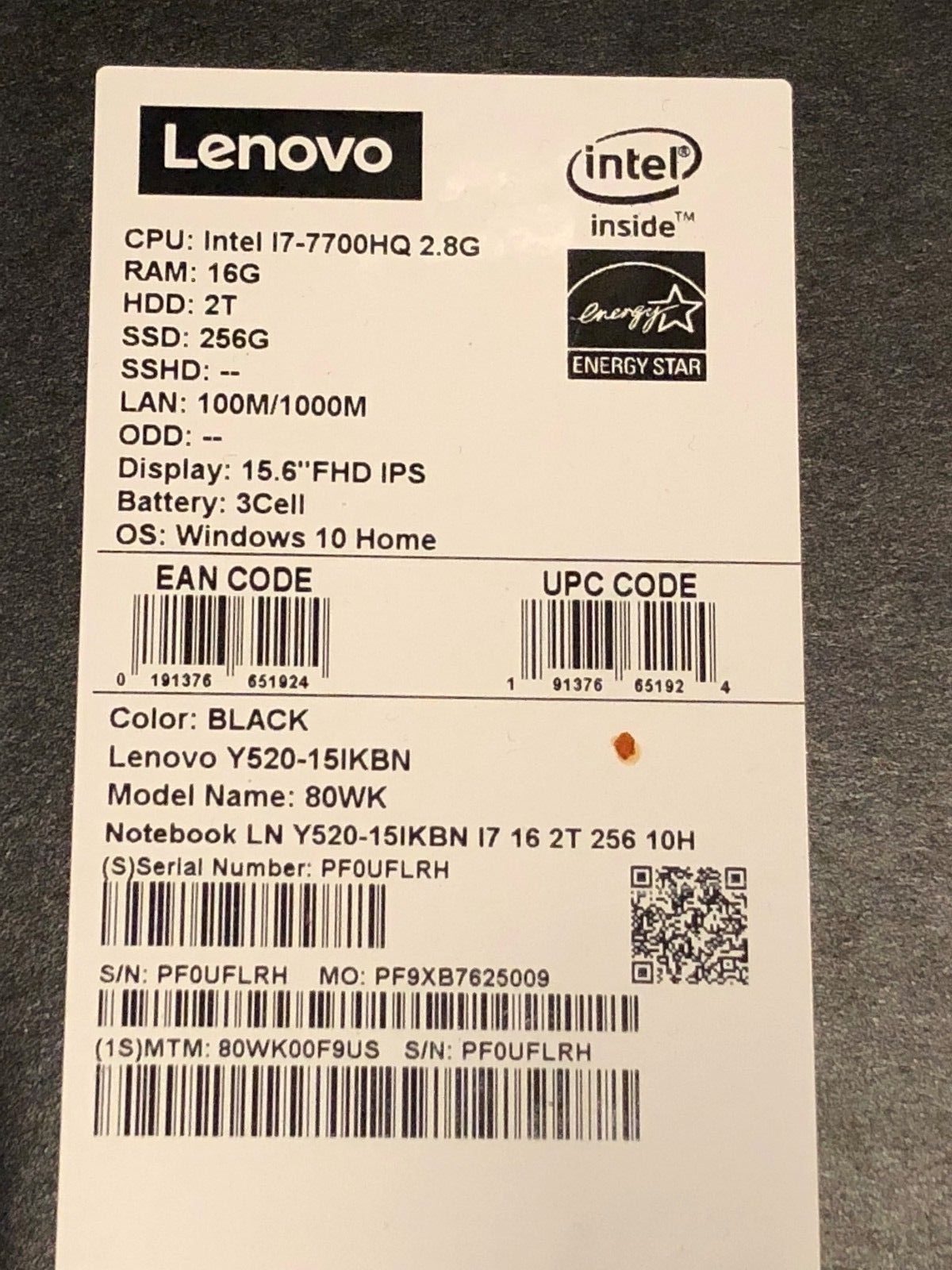
grade. The input is the
bundled sample photo,
reused from Parameter Tuner with its original provenance.
Failure case: the crop decodes, and that still is not the answer
The optional Try decoding selected area test crops the region at original resolution with
default reader settings. If it succeeds after a full-image failure, one thing is established: restricting
the scan area changed this reader's behaviour. It does not establish why the full image failed —
a neighbouring symbol may have captured the localization, or the crop may simply have removed competing
detail. The report says so instead of claiming a cause, and when every experiment fails it states that
the failure is unexplained rather than nominating a suspect.
The five comparison tests are bounded on purpose: colour inversion, grayscale percentile stretch, a
90-degree rotation and 2× nearest-neighbour enlargement, each on the same selected area. Scaling is
skipped when the output would exceed 8 megapixels, and a flat crop cannot be stretched at all. An
unavailable test is reported separately from a test that decoded nothing.
Supported and not supported
Capability
This tool
Input
Bundled tuner samples, PNG/JPEG/WebP/BMP upload or drop, or a captured camera frame. Up to 30 MB
and 24 megapixels; transparency is composited on white and original resolution is kept. Camera
capture needs HTTPS or localhost and browser permission.
PDF, TIFF and large files
PDF and TIFF are not accepted; rasterize the page to PNG or JPEG first. Accepted images are
capped at 30 MB and 24 megapixels.
Analysis without a working decoder
Manual region analysis reads source pixels directly, so it still works if the SDK cannot
initialise, localize or decode.
Comparison experiments
Five, each shown with the exact operation applied, the decoded text and the processing time.
Export
JSON report: image findings, your selection coordinates and crop-test status. Unknown decode
results are null, never false.
Handoff to the parameter tuner
The selected image is passed through same-origin IndexedDB, consumed once and expired after an
hour.
An overall quality grade
Not offered. There is no aggregate score, and a clean measurement set does not certify a
symbol.
Motion blur, glare, inversion or damage as diagnosed causes
Not diagnosed automatically, and no placeholder metric is shown for them. Inversion is tested as
an experiment instead.
Format-specific quiet-zone compliance
Not established. The margin cue measures dark content around a box, which is not a quiet-zone
measurement for any particular symbology.
Privacy and network
Images stay in the browser and are not uploaded; decoded text never reaches analytics — though the
downloaded report does contain it. The SDK contacts Dynamsoft for licence activation.
Use the tool, or build it into your app
Use the free hosted tool
No account and no key: the page activates a licence bound to dynamsoft.com. Upload the
photo that would not scan at the till, in the warehouse or on the line.
"Free" describes the hosted demo, not the source code. The measurements come from the SDK's
localization results plus the page's own heuristics, so a self-hosted build needs its own
licence.
Can I use this report as an ISO verification grade?
No. ISO/IEC verification uses a calibrated device, a defined aperture and graded parameters. This is
a software preflight on the pixels you have, which is useful before a recapture and not evidence in a
compliance argument.
Why does a row say Inconclusive instead of passing?
Because the measurement was not available at usable resolution. A flat or low-contrast region may
have no strong transitions at all, so softness cannot be judged even while contrast itself gives
something actionable. Inconclusive is deliberately not a pass.
Why is the module size blank on my manually drawn box?
Module size is supplied by the reader after it localizes and decodes a symbol. A hand-drawn
rectangle carries no symbol geometry, so the value stays unknown rather than being estimated from the
box — an estimate there would look like evidence and be wrong.
Does a successful crop test mean the barcode is fine?
It means this reader decoded the cropped region with default settings. It does not reproduce your
original failure cause, and it says nothing about the scanners your customers use.