A free online MRZ and passport scanner powered by Dynamsoft Capture Vision — read MRZ data
and crop the portrait from a passport or ID card image, or score a whole synthetic dataset against
its ground truth
Documents stay on your device.
An uploaded image, PDF or TIFF is decoded in this browser tab, and a multi-page
document is scanned page by page until the Machine Readable Zone is found. Nothing is
uploaded anywhere.
Ready
No dataset loaded.
Drag & Drop an Image, PDF or TIFF Here Select Source, or Press Ctrl+V to Paste
1 / 1
Face Detection
MRZ Raw Text
Waiting for scan...
MRZ Parsed Data
Waiting for scan...
Dataset
Nothing loaded yet.
Build one in the MRZ generator
— its Test image dataset mode exports a ZIP of synthetic passport, ID card and
visa images plus the ground truth for every one of them.
Score
Run the benchmark to score this dataset.
Per image
No results yet.
Selected image
Click a row to see what was read and what was
expected.
What this MRZ scanner does
It reads the machine-readable zone on a passport, ID card or visa —
from an image, a PDF, a multi-page TIFF or a captured camera frame — and parses the MRZ lines
into fields: document number, surname, given names, nationality, date of birth, sex and expiry
date. It also finds the document border and crops the portrait. A second mode scores a whole
synthetic dataset field by field.
Worked example: two templates, and why the order matters
Reading an MRZ is not one model call. This page runs two templates in a fixed order, and the
order explains most of the odd results people report:
The second pass exists for the documents the first cannot map. It never overwrites a
successful first pass.
Pass
Template
Returns
Runs when
1
ReadPassportAndId
MRZ text, document border, portrait — it knows where each zone sits on the
layout.
Always.
2
ReadMRZ
MRZ text only. No border, no portrait.
When pass 1 reports a detected document but no text — typical of an ID card or a
visa, whose zones sit somewhere the passport layout does not predict.
Take an ID card: pass 1 finds the card, reports no text, and the page falls back. The MRZ is read
and the fields are parsed correctly — and the portrait stays empty. That empty portrait is not
a bug in the crop; it is the honest outcome for a capture the layout-aware pass could not map.
If you need the portrait from an ID card, crop it yourself or use a capture whose layout the
first pass recognises.
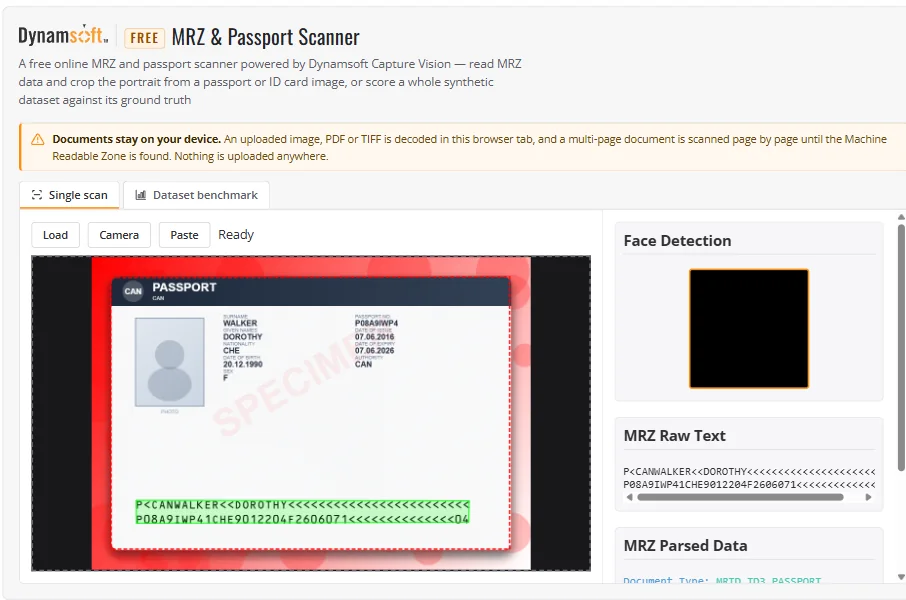
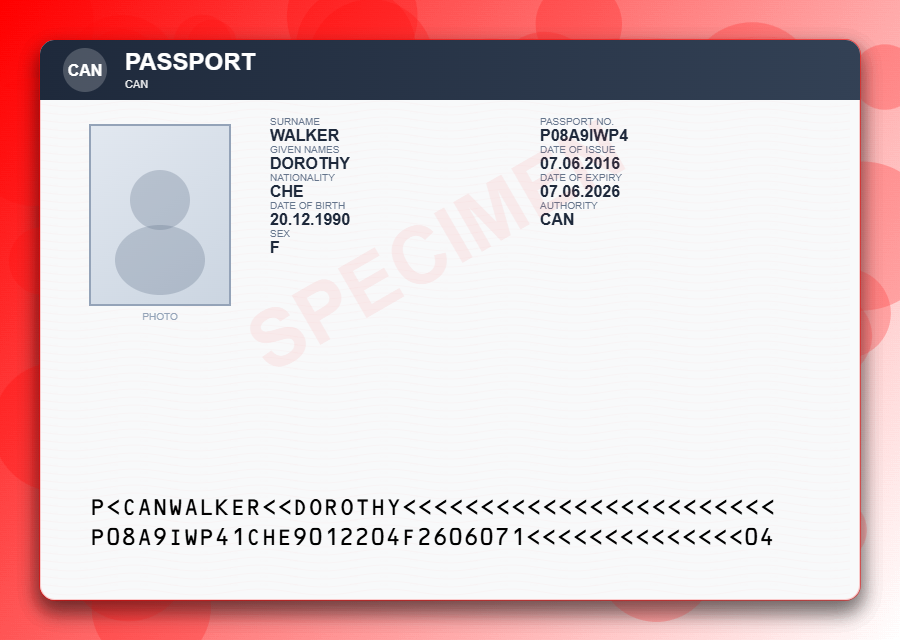
The screenshot below uses a synthetic passport generated by the companion
MRZ generator, not a real
identity document. The same 900 × 640 PNG is available as
sample-mrz.png, with a visible SPECIMEN mark and a fixed
synthetic record. The recogniser returned the two 44-character lines, which the parser then
decoded:
The single-scan path in Chrome on 26 October 2026. The input is a
SPECIMEN document generated from a fixed seed; the document border and both
MRZ lines come from the reader, and the parsed panel sits directly below.
Failure case: a TIFF that arrives as a black frame
Documents rasterized by a video pipeline — a MIDV500 frame, for instance — are often YCbCr 4:2:2
in PackBits strips. UTIF's own converter covers grey, RGB, palette and CMYK, not YCbCr, so a
straight decode renders black and the reader has nothing to read. This page converts those
frames itself, using the file's own ReferenceBlackWhite tag, before the image
reaches the reader. The failure is silent otherwise: a black page looks like a document with no
MRZ rather than a colour-model problem.
Supported and not supported
Capability
This tool
MRZ on passports and ID cards
Located and read without asking you to pick a layout or draw a band — the reader finds
the zone itself.
Input types
Single image, PDF, multi-page TIFF, clipboard paste, drag & drop, camera frame. A
document is rasterized page by page until the page carrying the MRZ is found, with a
navigator for the rest.
Large files and documents
PDF and TIFF are capped at 50 pages and a 2000 px long edge per page. Decoding happens
in the tab, so multi-page memory use grows with the document; nothing is uploaded.
Camera
Live document-outline preview; Capture freezes the full-resolution frame and
reads MRZ text and portrait from it. Needs HTTPS or localhost.
Portrait crop
Yes, from the area the identity processor returns — only on a pass-1 capture.
Dataset benchmark
Scores a ZIP from the MRZ generator: per-image ticks per field, accuracy per field and
per image, MRZ lines verbatim, results.json / results.csv
export.
Proving the document is genuine
Not offered. This extracts text; it does not verify a passport's security features,
read its chip or match the portrait to a live face.
Liveness or face comparison
Not offered. The portrait is a crop of pixels, not an identity check.
Generating test documents
Not in this tool — use the
MRZ generator to
build synthetic images with ground truth.
Privacy and network
Images and documents are decoded on the device and are not uploaded. The page does
fetch the SDK bundle, the licence, pdf.js/UTIF on first document, and demo
analytics.
Use the tool, or build it into your app
Use the free hosted tool
No account and no key: the page activates a licence bound to dynamsoft.com.
Works from a phone camera, or from a file you already have.
No document to hand? Build a synthetic one in the
MRZ generator
Benchmark mode scores a full dataset without writing code
Integrate it in your application
"Free" describes the hosted demo, not the source code. Cloned and served elsewhere, the
same files need your own licence before the SDK will activate.
Is a correctly parsed MRZ proof that the document is real?
No. The MRZ is printed text with check digits; a good forgery reproduces both. Check digits
catch transcription errors in a genuine document, and this page does not evaluate security
features, chip data or issuance records.
Why did the nationality come back as CAN instead of "Canada"?
The parser returns the raw three-letter code alongside a display form. Benchmark scoring
compares the raw value, so a parser that maps the code to a country name is not penalised
for the mapping — and a consumer that needs the name should do that mapping itself.
Why is the portrait empty on my ID card?
Because the fallback template returns MRZ text only. The portrait comes from the identity
processor on the layout-aware pass, which does not map an ID card's zones. An empty portrait
is the disclosed outcome, not a failed crop.
Does a two-digit year mean 19xx or 20xx?
The MRZ does not say. Which century a reader assumes is its own convention, so the dataset
benchmark compares dates inside the century the MRZ encodes rather than inventing one.