


How to Build a Cross-Platform C++ Barcode and QR Code Reader with Dynamsoft Capture Vision v11
Dynamsoft Barcode Reader SDK v11, part of the Dynamsoft Capture Vision (DCV) framework, brings a major architectural upgrade for building barcode and QR code scanning applications on desktop, mobile, and web platforms. The v11 C++ SDK introduces the CCaptureVisionRouter as the central orchestration engine. As an enterprise-class C++ barcode and QR code scanning SDK, it supports Windows, Linux, macOS, Raspberry Pi, and Jetson Nano. This article helps developers build barcode and QR code reading applications in C++ using the new v11 API.
What you’ll build: A CMake-based command-line C++ application that decodes barcodes and QR codes from image files and directories — including multi-page TIFFs and PDFs — running natively on Windows, Linux, macOS, Raspberry Pi, and Jetson Nano using Dynamsoft Capture Vision v11.
Key Takeaways
- The Dynamsoft Capture Vision v11 C++ SDK replaces the older
CBarcodeReaderAPI withCCaptureVisionRouteras the central orchestration engine — all barcode decoding calls go through it. CaptureMultiPages()handles single images, multi-page TIFFs, and PDFs in a single call with no per-format branching required.- The same CMake project compiles natively on Windows (MSVC x64), Linux x64/ARM64, macOS, Raspberry Pi, and NVIDIA Jetson Nano without any source code changes.
CLicenseManager::InitLicense()must be called globally before anyCCaptureVisionRouterinstance is created, or decoding will fail silently.
Common Developer Questions
- How do I decode barcodes and QR codes from image files in C++ on Linux and Windows?
- How do I use Dynamsoft Capture Vision v11 with CMake on multiple platforms?
- How do I read barcodes from a multi-page TIFF or PDF in C++?
About Dynamsoft C++ Barcode and QR Code Reader SDK
SDK Download
SDK License
Get a 30-day free trial license to start building with the Dynamsoft C++ SDK. Initialize it before creating any capture vision router instance:
char szErrorMsg[256];
CLicenseManager::InitLicense("LICENSE-KEY", szErrorMsg, 256);
Note: CLicenseManager::InitLicense() must be called globally before creating a CCaptureVisionRouter instance.
Build a Cross-Platform C++ Barcode and QR Code Reader
To conveniently build our C++ application on different platforms, we create a CMake project. The v11 SDK ships as a unified DCV package under the dcv/ directory. In CMakeLists.txt, we configure include paths, library directories per platform, and link the necessary DCV modules — DynamsoftCore, DynamsoftLicense, DynamsoftCaptureVisionRouter, DynamsoftUtility, and DynamsoftBarcodeReader. C++17 is required:
cmake_minimum_required(VERSION 3.8)
project(main)

if(CMAKE_HOST_WIN32)
    set(WINDOWS 1)
elseif(CMAKE_HOST_APPLE)
    set(mac 1)
elseif(CMAKE_HOST_UNIX)
    set(LINUX 1)
endif()

# Require C++17
if(WINDOWS)
    set(CMAKE_CXX_STANDARD 17)
    set(CMAKE_CXX_STANDARD_REQUIRED ON)
else()
    SET(CMAKE_CXX_FLAGS "-std=c++17 -O3 -Wl,-rpath=$ORIGIN")
endif()

MESSAGE(STATUS "CPU architecture ${CMAKE_SYSTEM_PROCESSOR}")
if(WINDOWS)
    link_directories("${PROJECT_SOURCE_DIR}/../../dcv/lib/win")
elseif(LINUX)
    if(CMAKE_SYSTEM_PROCESSOR STREQUAL x86_64)
        link_directories("${PROJECT_SOURCE_DIR}/../../dcv/lib/linux/x64")
    elseif(CMAKE_SYSTEM_PROCESSOR STREQUAL aarch64)
        link_directories("${PROJECT_SOURCE_DIR}/../../dcv/lib/linux/arm64")
    endif()
elseif(mac)
    link_directories("${PROJECT_SOURCE_DIR}/../../dcv/lib/mac")
endif()

include_directories("${PROJECT_BINARY_DIR}" "${PROJECT_SOURCE_DIR}/../../dcv/include/")

add_executable(${PROJECT_NAME} main.cpp)

if(WINDOWS)
    target_link_libraries(${PROJECT_NAME}
        "DynamsoftCorex64" "DynamsoftLicensex64"
        "DynamsoftCaptureVisionRouterx64" "DynamsoftUtilityx64"
        "DynamsoftBarcodeReaderx64")
else()
    target_link_libraries(${PROJECT_NAME}
        "DynamsoftCore" "DynamsoftLicense"
        "DynamsoftCaptureVisionRouter" "DynamsoftUtility"
        "DynamsoftBarcodeReader" pthread)
endif()
Here are the C++ coding steps:
-
Include the DCV v11 header files:
#include "DynamsoftCaptureVisionRouter.h" #include "DynamsoftUtility.h" using namespace dynamsoft::license; using namespace dynamsoft::cvr; using namespace dynamsoft::dbr; using namespace dynamsoft::utility; using namespace dynamsoft::basic_structures; -
Initialize the license and create a
CCaptureVisionRouterinstance:char szErrorMsg[256]; CLicenseManager::InitLicense("LICENSE-KEY", szErrorMsg, 256); CCaptureVisionRouter *cvr = new CCaptureVisionRouter; -
Decode barcodes from an image file (including multi-page TIFF/PDF):
CCapturedResultArray *captureResultArray = cvr->CaptureMultiPages("image-file", CPresetTemplate::PT_READ_BARCODES); -
Iterate captured results per page and retrieve the barcode result:
int count = captureResultArray->GetResultsCount(); for (int i = 0; i < count; i++) { const CCapturedResult *result = captureResultArray->GetResult(i); if (result->GetErrorCode() != 0) continue; CDecodedBarcodesResult *barcodeResult = result->GetDecodedBarcodesResult(); if (barcodeResult != nullptr && barcodeResult->GetErrorCode() == 0) { int itemCount = barcodeResult->GetItemsCount(); cout << "Decoded " << itemCount << " barcodes" << endl; for (int j = 0; j < itemCount; j++) { const CBarcodeResultItem *item = barcodeResult->GetItem(j); cout << "Barcode Format: " << item->GetFormatString() << endl; cout << "Barcode Text: " << item->GetText() << endl; } } if (barcodeResult) barcodeResult->Release(); } captureResultArray->Release(); -
Release resources:
delete cvr;
Get your free 30-day trial license key and replace "LICENSE-KEY" above to run this against your own images.
Build and Run on Windows, Linux, macOS, and Raspberry Pi
Windows (MSVC x64)
mkdir build
cd build
cmake -DCMAKE_GENERATOR_PLATFORM=x64 ..
cmake --build . --config release
.\release\main.exe [image-file-or-directory]
Linux / Raspberry Pi / Jetson Nano
mkdir build
cd build
cmake ..
cmake --build . --config release
./main [image-file-or-directory]
macOS
brew install cmake   # if not already installed
mkdir build
cd build
cmake ..
cmake --build . --config release
./main [image-file-or-directory]
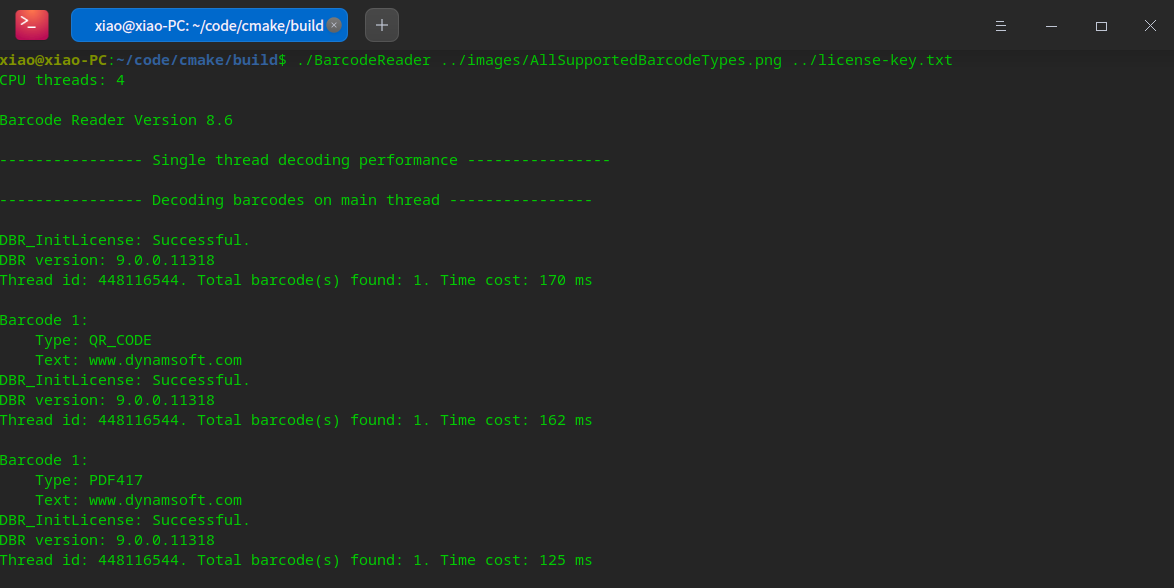
The application supports both a single image file and a directory of images (JPG, PNG, BMP, TIFF, PDF). Run it without arguments to enter interactive mode.
Common Issues and Edge Cases
- License not initialized before router creation: Calling
new CCaptureVisionRouterbeforeCLicenseManager::InitLicense()causes silent decoding failures. Always initialize the license globally as the very first step. - Missing shared libraries at runtime on Linux: If the executable can’t find
.sofiles, either copy the libs fromdcv/lib/linux/x64/next to the binary or setLD_LIBRARY_PATH. TheCMakeLists.txtalready sets-Wl,-rpath=$ORIGINto handle the co-located case automatically. - TIFF or PDF not decoded: Multi-page support requires
DynamsoftUtilityto be linked and its header included. If decoding silently returns zero results on a PDF, verify the link step and check that the file path contains no Unicode characters (use ASCII-only paths on Windows).
Download the Dynamsoft Capture Vision SDK and request a 30-day free trial license to integrate barcode and QR code decoding into your own C++ project.
Source Code
https://github.com/yushulx/cmake-cpp-barcode-qrcode-mrz/tree/main/examples/command-line