


How to Scan Barcodes and OCR Text from Shipping Labels in JavaScript
In today’s fast-paced world, efficiently managing and tracking parcels is crucial for businesses. The use of 1D and 2D barcodes has revolutionized the way parcels are labeled, scanned, and processed. Additionally, Optical Character Recognition (OCR) technology has enabled the digitization of text on parcels, facilitating automated data extraction and processing. Most OCR technologies can only recognize text in a horizontal orientation. However, in real-world scenarios, a barcode and its surrounding text label can appear in any orientation on a parcel. This article aims to address this challenge using Dynamsoft Capture Vision SDKs.
What you’ll build: A browser-based parcel scanner that reads 1D barcodes and recognizes surrounding text labels in any orientation using Dynamsoft Barcode Reader and Dynamsoft Label Recognizer in JavaScript.
Key Takeaways
- Dynamsoft Capture Vision JavaScript SDK can scan 1D barcodes and OCR adjacent text from shipping labels simultaneously in a single camera feed.
- The
ReadBarcode&AccompanyTextcustom template chains Dynamsoft Barcode Reader and Dynamsoft Label Recognizer so that recognized text is anchored to a detected barcode region — enabling any-orientation reading. - WASM modules for barcode decoding (
dbr) and label recognition (dlr) must be preloaded to avoid first-scan latency in production deployments. - This approach works on standard shipping labels (UPS, FedEx, DHL) where the text label surrounds or accompanies a 1D barcode at any rotation angle.
Common Developer Questions
How do I scan barcodes and OCR text from shipping labels in JavaScript?
Create a CaptureVisionRouter in the browser, connect it to CameraEnhancer, and run a template that decodes barcodes plus recognizes nearby text in one pass. The result callbacks can then render both the barcode value and the associated OCR text in the same page.
Can Dynamsoft Capture Vision read barcode and text labels rotated at 90 or 180 degrees?
Yes. The combined barcode-and-text workflow is designed for arbitrary label orientation, so rotated shipping labels can still be decoded as long as the barcode and text remain visible and within the camera frame.
How do I combine Dynamsoft Barcode Reader and Label Recognizer in a single web page?
Load the dbr and dlr WebAssembly modules up front, create one router, and run a custom template such as ReadBarcode&AccompanyText that chains both tasks. That gives one JavaScript page a unified pipeline for barcode decoding and text recognition.
This article is Part 1 in a 2-Part Series.
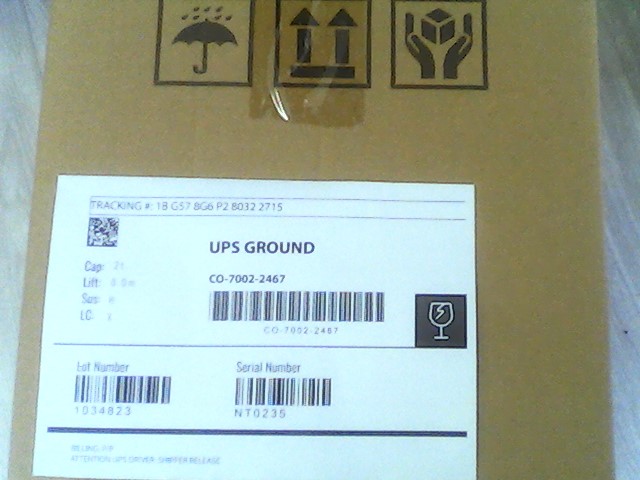
Try the Online Demo
https://yushulx.me/javascript-barcode-qr-code-scanner/examples/barcode_ocr_text
Prerequisites
- Get a 30-day free trial license for Dynamsoft Capture Vision.
How Dynamsoft Capture Vision Works
If this is your first time hearing about Dynamsoft Capture Vision, you may wonder how it works. The following diagram illustrates the architecture of Dynamsoft Capture Vision:
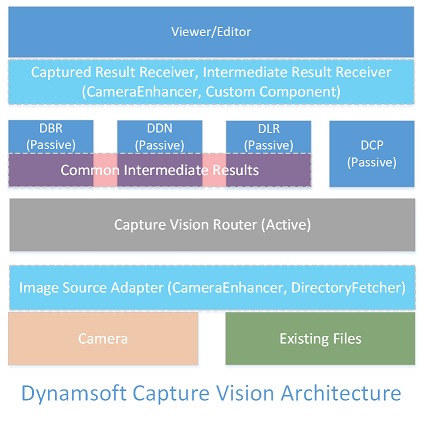
Dynamsoft Capture Vision consists of several key modules: Dynamsoft Barcode Reader, Dynamsoft Label Recognizer, Dynamsoft Document Normalizer, Dynamsoft Code Parser, and Dynamsoft Camera Enhancer. These modules can function independently or collaboratively, providing a comprehensive solution for barcode scanning, OCR, document processing, and image enhancement.
In the parcel management scenario discussed in this article, we focus on Dynamsoft Barcode Reader and Dynamsoft Label Recognizer. The former is used to scan 1D barcodes, while the latter is used to recognize text on parcels. In the subsequent sections, you will learn how to integrate these two modules into a web application.
Scan 1D Barcodes and OCR Text Simultaneously in JavaScript
Step 1: Include the Dynamsoft SDK Modules
Create an HTML file and include the script tags generated in the prerequisites section.
<!DOCTYPE html>
<html lang="en">

<head>
    <meta charset="UTF-8">
    <meta name="viewport" content="width=device-width, initial-scale=1.0">
    <script src="https://cdn.jsdelivr.net/npm/dynamsoft-capture-vision-bundle@3.6.3200/dist/dcv.bundle.min.js"></script>

    <title>Dynamsoft Capture Vision Example</title>
    <link rel="stylesheet" href="main.css">
</head>

<body>
</body>

</html>
Step 2: Initialize Dynamsoft Barcode Reader and Dynamsoft Label Recognizer
-
Set the license key:
Dynamsoft.License.LicenseManager.initLicense(license); -
Load the wasm files actively:
Dynamsoft.Core.CoreModule.loadWasm(["cvr", "dbr", "dlr",]);Downloading WASM files may take some time. Without calling this method, the SDK will load the WASM files automatically when needed. However, this may cause a delay when scanning barcodes or recognizing text.
-
Pick a suitable OCR model for the label recognizer:
await Dynamsoft.CVR.CaptureVisionRouter.appendModelBuffer("LetterCharRecognition"); -
Create instances of
CaptureVisionRouter,CameraView,CameraEnhancerandCapturedResultReceiver. TheCapturedResultReceiverprovides callbacks for handling different types of results, such as barcode results and text results.let router = await Dynamsoft.CVR.CaptureVisionRouter.createInstance(); let view = await Dynamsoft.DCE.CameraView.createInstance(); let cameraEnhancer = await Dynamsoft.DCE.CameraEnhancer.createInstance(view); document.querySelector("#cameraViewContainer").append(view.getUIElement()); router.setInput(cameraEnhancer); const resultsContainer = document.querySelector("#results"); const resultReceiver = new Dynamsoft.CVR.CapturedResultReceiver(); resultReceiver.onCapturedResultReceived = (result) => { if (result.items.length == 0) { resultsContainer.textContent = ''; } } resultReceiver.onDecodedBarcodesReceived = (result) => { if (result.barcodeResultItems.length > 0) { for (let item of result.barcodeResultItems) { resultsContainer.textContent += `Barcode Type: ${item.formatString}, Value: ${item.text}\n\n`; } } } resultReceiver.onRecognizedTextLinesReceived = (result) => { if (result.textLineResultItems.length > 0) { for (let item of result.textLineResultItems) { resultsContainer.textContent += `Text: ${item.text}\n`; } } }; router.addResultReceiver(resultReceiver); -
Define a custom template for image processing logics and set it to the router:
await router.initSettings("./template.json");There are several preset templates defined in the SDK. If none of them fits your scenario, you can create a custom template like the one above.
-
Start the camera and the router:
 await cameraEnhancer.open();
 await router.startCapturing("ReadBarcode&AccompanyText");
The
ReadBarcode&AccompanyTextstring is the name of the custom template defined in the previous step. -
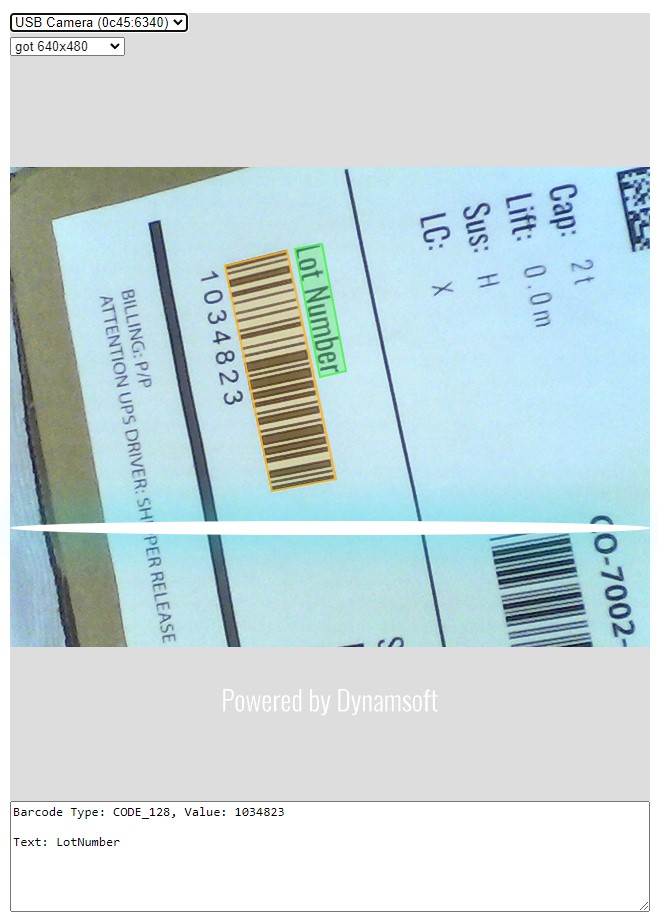
Run the application in a browser. Point the camera at a parcel with a 1D barcode and text label. The application will scan the barcode and recognize the text simultaneously.
Common Issues and Edge Cases
- WASM loading delay on first scan: If you skip the
Dynamsoft.Core.CoreModule.loadWasm()preload call, the first barcode scan or text recognition attempt will stall while WASM modules download. Always preloadcvr,dbr, anddlrmodules during page initialization. - Text not recognized when label is upside-down (180°): Ensure you are using the
ReadBarcode&AccompanyTextcustom template, which anchors OCR to the detected barcode region and handles arbitrary rotation. The default preset templates do not chain label recognition to barcode detection. - Camera permission denied or black video feed: On HTTPS-only browsers,
CameraEnhancer.open()will fail silently if the page is served over HTTP. Always deploy over HTTPS or uselocalhostduring development.