


ZXing vs ZBar vs Dynamsoft: Python Barcode Reader Comparison with Accuracy and Speed Benchmarks
In the world of Python barcode scanning, developers have several options to choose from, including ZXing, ZBar, and the Dynamsoft Barcode Reader. Each of these libraries offers unique strengths, catering to different needs and environments. ZXing and ZBar are popular open-source options, known for their community-driven development and flexibility. On the other hand, Dynamsoft Barcode Reader provides a robust, enterprise-grade solution with advanced features and official support.
This article presents a comprehensive benchmark with actual test results from 1,710 test cases across three datasets. We tested these libraries on real-world barcode images (170 production images), angled barcodes (15°-75° rotation), multiple barcodes per image (2-20 codes), and challenging conditions (noise, blur, occlusion).
What you’ll build: A Python benchmark that runs ZXing-Cpp, PyZBar, and Dynamsoft Barcode Reader against the same 1,710 test cases — including angled barcodes, multi-barcode images, and a 170-image real-world dataset — and outputs success rates, detection times, and a color-coded Excel or HTML report for quick comparison.
Key Takeaways
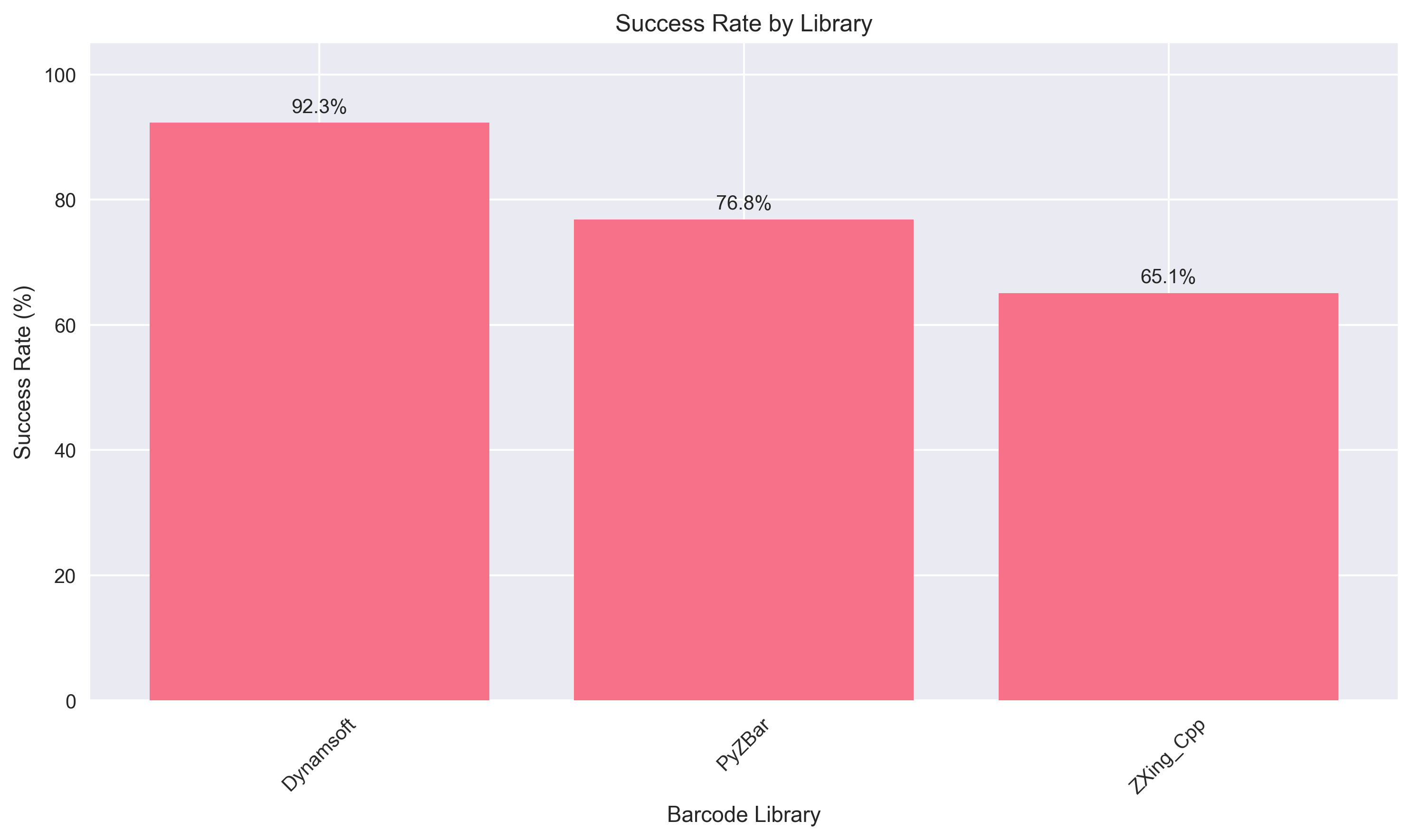
- Dynamsoft Barcode Reader achieves the highest overall accuracy at 92.3% across 1,710 test cases, including perfect 100% detection on barcodes rotated 15°–75°.
- ZXing-Cpp delivers the fastest detection at 40.2 ms average but drops to only 23.8% success when reading multiple barcodes per image.
- PyZBar provides a balanced open-source option at 76.8% success rate, handling multi-barcode images (85%) significantly better than ZXing-Cpp.
- On 170 real-world production images, the accuracy gap is clear: Dynamsoft 90.6%, PyZBar 71.2%, ZXing-Cpp 65.9%.
Common Developer Questions
How does the accuracy of ZXing-Cpp, PyZBar, and Dynamsoft Barcode Reader compare in a Python barcode reader benchmark?
In this benchmark, Dynamsoft achieved the highest overall success rate across the 1,710 test cases, while PyZBar landed in the middle and ZXing-Cpp trailed on the harder scenarios. The article breaks that comparison down across rotated images, multi-barcode scenes, and a real-world production dataset.
Which Python barcode library handles rotated or angled barcodes reliably in real-world conditions?
Dynamsoft performed best on the angled-barcode tests in this article, reaching full success across the 15° to 75° rotation set. ZXing-Cpp and PyZBar both showed notable drops once the symbols were no longer upright and simple.
How do I read multiple barcodes from a single image in Python using ZBar or ZXing?
Both libraries can return collections of decode results from one image, but the benchmark shows that multi-barcode scenes are exactly where their reliability diverges most. The sample code demonstrates how to iterate over returned results and draw contours, while the reported numbers show how well each engine actually handles those crowded images.
Which Python package do I install to use Dynamsoft Barcode Reader with the sample code?
Install dynamsoft-barcode-reader-bundle (the latest barcode-only Python package, version 11.6.x) and import it with from dynamsoft_barcode_reader_bundle import *. The sample code in this article uses the shared LicenseManager.init_license() and CaptureVisionRouter.capture() API, so if you prefer the broader dynamsoft-capture-vision-bundle package instead, only the import statement changes.
This article is Part 8 in a 8-Part Series.
- Part 1 - Build a Python GUI Barcode Scanner on Raspberry Pi with Qt PySide6
- Part 2 - How to Build a Cross-Platform GUI Python Barcode and QR Code Reader with PySide6 and Qt Designer
- Part 3 - How to Read QR Codes from Screen Capture in Python with Qt and Dynamsoft Barcode SDK
- Part 4 - How to Integrate a Barcode Scanner in a Django Web App with Python
- Part 5 - How to Build a Python Flet Chat App with Barcode Scanning and Gemini AI
- Part 6 - Python Ctypes: Call a C++ Shared Library Without Building Any C++ Code
- Part 7 - How to Dockerize a Python Barcode Reader for ARM64 Devices
- Part 8 - ZXing vs ZBar vs Dynamsoft: Python Barcode Reader Comparison with Accuracy and Speed Benchmarks
Quick Results Summary
Based on 1,710 test cases across multiple scenarios, here’s how each SDK performed:
Dynamsoft Barcode Reader (Commercial)
- Best Overall Accuracy: 92.3% success rate
- Perfect Rotation Handling: 100% on angled barcodes (15°-75°)
- Best for Multiple Codes: 91.3% success with 2-20 barcodes per image
- Real-World Champion: 90.6% success on 170 production images
- Speed: 47.7ms average detection time
- License: Commercial (trial available)
Recommended for: Enterprise applications, mobile scanning with rotation, batch processing, production environments requiring high reliability
ZXing-Cpp (Open Source)
- Fastest Detection: 40.2ms average (fastest among all three)
- Perfect on Simple Codes: 100% success on single, well-positioned barcodes
- Struggles with Rotation: 55% success on angled barcodes
- Multiple Code Issues: Only 23.8% success with multiple barcodes
- Overall Accuracy: 65.1% success rate
- License: Open source (Apache 2.0)
Recommended for: Speed-critical applications with simple barcodes, controlled scanning environments, budget-constrained projects
PyZBar (Open Source)
- Balanced Performance: 76.8% success rate
- Good for Multiple Codes: 85% success with 2-20 barcodes per image
- Rotation Challenges: 60% success on angled barcodes
- Slower Speed: 111.5ms average (slowest, especially on complex images)
- License: Open source (LGPL)
Recommended for: Open-source projects with moderate accuracy requirements, batch scanning scenarios (but not rotation-heavy use cases)
What Are ZXing, ZBar, and Dynamsoft Barcode Reader?
ZXing (Zebra Crossing)
ZXing is a widely-used open-source barcode scanning library that originated from Google. It supports a variety of barcode formats, including 1D and 2D codes like QR codes, and is primarily written in Java, though it has been ported to other languages, including Python. ZXing is known for its flexibility and wide community support, making it a popular choice for developers working on general barcode scanning projects.
ZBar
ZBar is another open-source barcode scanning library, written in C, that supports 1D and 2D barcode formats, including QR codes. ZBar is particularly known for its efficiency and lightweight nature, making it a great choice for applications where performance is critical. It also has Python bindings, which allow for easy integration into Python projects. ZBar’s simplicity and focus on core functionality make it a reliable choice for many developers.
Dynamsoft Barcode Reader
Dynamsoft Barcode Reader (DBR) is a commercial, enterprise-grade solution that offers advanced features and high-performance barcode scanning capabilities. It supports a wide range of barcode formats and is available across multiple platforms, including Windows, Linux, macOS, Android, iOS, and web .
Dynamsoft Barcode Reader and Dynamsoft Capture Vision: what’s the relationship?
Dynamsoft Barcode Reader is the barcode-reading module of the Dynamsoft Capture Vision SDK (DCV) — a modular and extensible vision platform that also includes document normalization, MRZ recognition, and other image-processing capabilities. If you are only scanning barcodes, DBR is the module you interact with; the Capture Vision platform simply provides the shared engine that runs it.
In practice, the two are related in two ways:
- They share one unified API. Both
dynamsoft-barcode-reader-bundleand the broaderdynamsoft-capture-vision-bundleexpose the sameLicenseManager.init_license()andCaptureVisionRouter.capture()workflow, using a license key from the same trial page. The code samples in this article work with either package — you only change the import statement. - They differ in scope and package size. The barcode bundle ships only the barcode-reading module, so it is lighter to install and sufficient whenever barcodes are your only requirement. The capture-vision bundle adds modules for document normalization, MRZ, and other vision tasks — useful if you plan to combine barcode scanning with those features later.
This article installs dynamsoft-barcode-reader-bundle because the benchmark exercises barcode reading only. If you later need Capture Vision’s other modules, you can switch the import to dynamsoft-capture-vision-bundle without changing the rest of the code.
With official support and frequent updates, the barcode module of DCV continues to deliver enterprise-level performance while enabling future scalability through the broader Capture Vision platform.
Quick-Reference Comparison
| ZXing-Cpp | PyZBar | Dynamsoft | |
|---|---|---|---|
| Install | pip install zxingcpp |
pip install pyzbar + system libzbar |
pip install dynamsoft-barcode-reader-bundle |
| License | Apache 2.0 | LGPL | Commercial (free trial) |
| Platforms | Windows, Linux, macOS | Windows, Linux, macOS | Windows, Linux, macOS, Android, iOS, Web |
| Supported formats | QR, Code128, EAN, PDF417, DataMatrix, … | QR, Code128, EAN, PDF417, … | 20+ formats including DotCode, Patch Code |
| Overall accuracy (1,710 tests) | 65.1% | 76.8% | 92.3% |
| Avg detection time | 40.2 ms | 111.5 ms | 47.7 ms |
| Angled barcodes (15°–75°) | 55% | 60% | 100% |
| Multiple barcodes per image | 23.8% | 85% | 91.3% |
Prerequisites
- Obtain a 30-day free trial license.
- Download image dataset: The dataset is sourced from this GitHub issue. You can download it directly from: https://drive.google.com/uc?id=1uThXXH8HiHAw6KlpdgcimBSbrvi0Mksf&export=download. We have cleaned the dataset to ensure each image file name matches the barcode content. Extract the images to the
existing_dataset/folder. -
Install required Python packages:
pip install -r requirements.txtThis includes:
dynamsoft-barcode-reader-bundle,pyzbar,zxing-cpp,opencv-python,numpy,pandas,matplotlib,seaborn, and other dependencies.
Benchmark Programs
This project provides two benchmark programs:
simple.py - Quick Benchmark
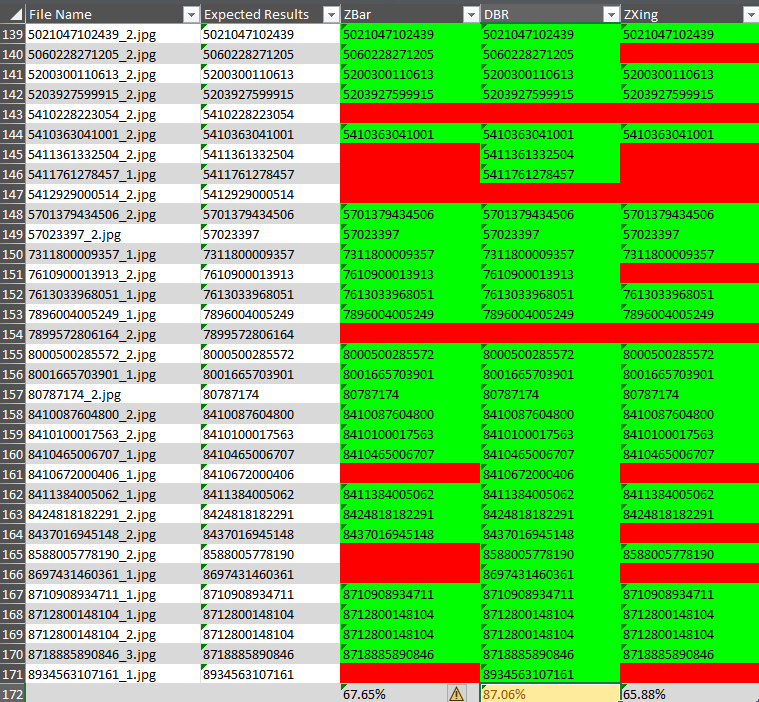
A straightforward script for testing barcode detection on individual images or the existing dataset. It generates an Excel report with per-image results color-coded for easy review (green=pass, red=fail).
Usage:
# Test single image
python simple.py -i image.jpg

# Benchmark on existing dataset
python simple.py -d existing_dataset
advanced.py - Comprehensive Benchmark
An interactive benchmark framework that supports:
- Multiple test datasets (generated synthetic data + existing real-world images)
- Specialized scenarios (angled barcodes, multiple barcodes, challenging conditions)
- HTML reports with interactive charts and performance analysis
- Strategic insights for competitive positioning
Usage:
python advanced.py
Python Barcode Detection with ZXing, ZBar, and Dynamsoft Barcode Reader
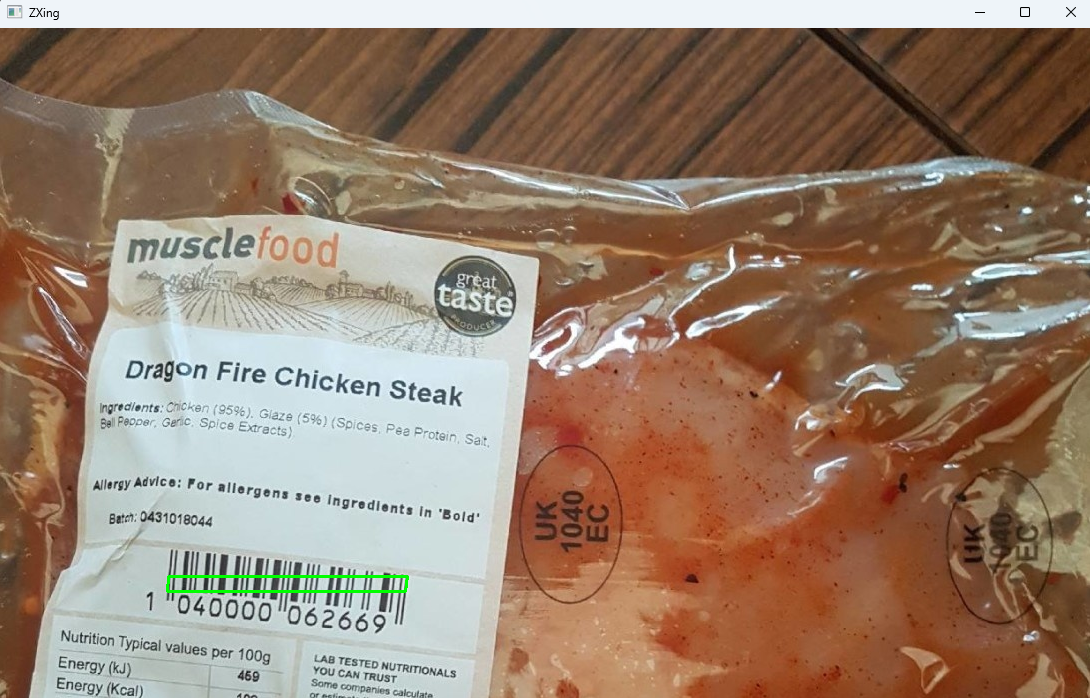
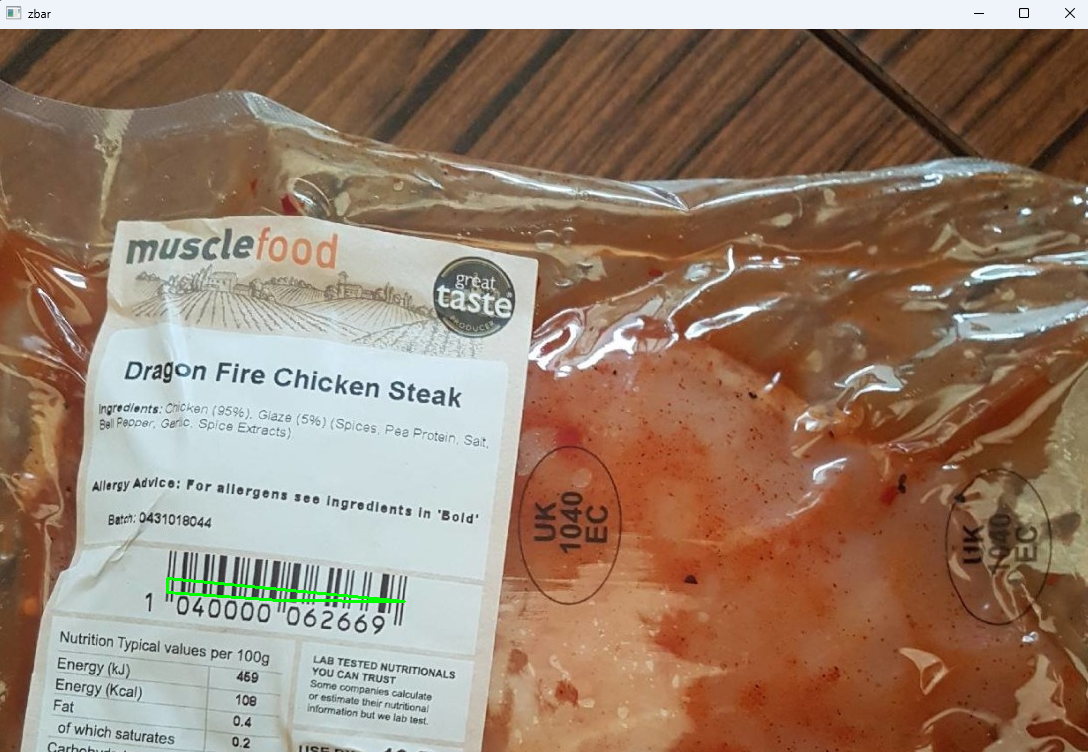
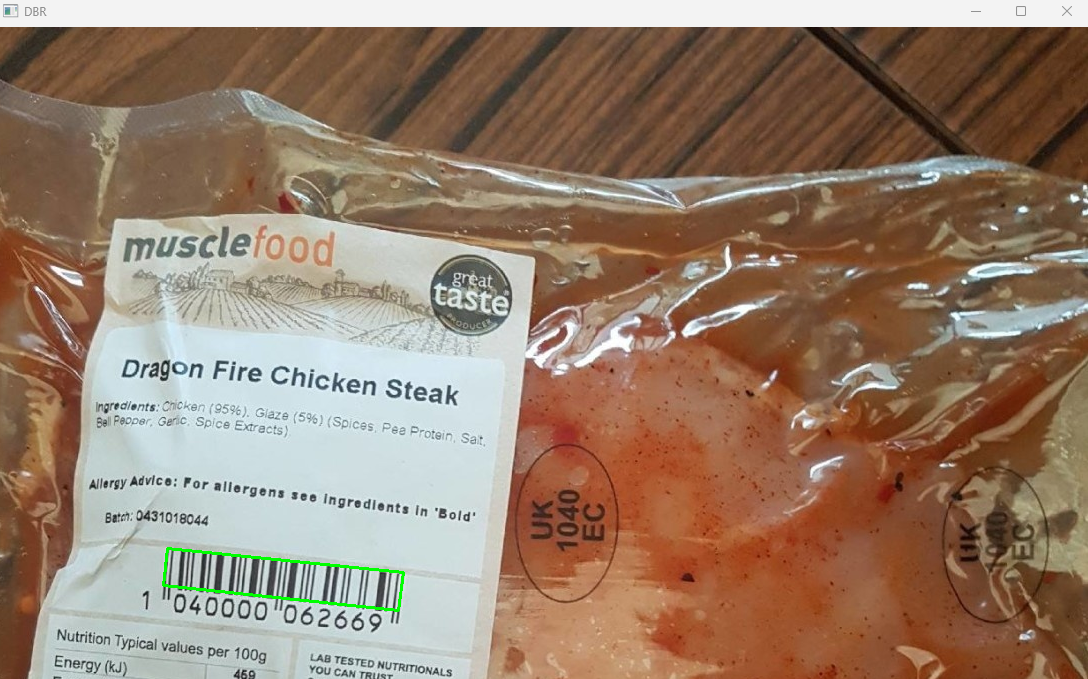
The following code snippets demonstrate how to decode barcodes using ZXing, ZBar, and Dynamsoft Barcode Reader in Python (from simple.py).
Python ZXing
import zxingcpp
import cv2
import numpy as np

def zxing_decode(filename):
    img = cv2.imread(filename)
    zxing_results = zxingcpp.read_barcodes(img)
    if zxing_results != None:
        for result in zxing_results:
            print('ZXing Text: {}, format: {}'.format(
                    result.text, result.format))

            cv2.drawContours(
                img, [np.intp([(result.position.top_left.x, result.position.top_left.y), (result.position.top_right.x, result.position.top_right.y), (result.position.bottom_right.x, result.position.bottom_right.y), (result.position.bottom_left.x, result.position.bottom_left.y)
                               ])], 0, (0, 255, 0), 2)

        cv2.imshow('ZXing', img)
        return zxing_results
    else:
        print('ZXing failed to decode {}'.format(filename))

    return None
Python ZBar
import pyzbar.pyzbar as zbar
import cv2
import numpy as np

def zbar_decode(filename):
    img = cv2.imread(filename)
    zbar_results = zbar.decode(Image.open(filename))
    if len(zbar_results) > 0:
        for zbar_result in zbar_results:
            print('ZBar Text: {}, format: {}'.format(
                    zbar_result.data.decode("utf-8"), zbar_result.type))

            cv2.drawContours(
                img, [np.intp([zbar_result.polygon[0], zbar_result.polygon[1], zbar_result.polygon[2], zbar_result.polygon[3]
                               ])], 0, (0, 255, 0), 2)

        cv2.imshow('zbar', img)
        return zbar_results
    else:
        print('ZBar failed to decode {}'.format(filename))

    return None
Python Dynamsoft Barcode Reader
from dynamsoft_barcode_reader_bundle import *
import cv2
import numpy as np

error_code, error_message = LicenseManager.init_license(
        "DLS2eyJoYW5kc2hha2VDb2RlIjoiMjAwMDAxLTE2NDk4Mjk3OTI2MzUiLCJvcmdhbml6YXRpb25JRCI6IjIwMDAwMSIsInNlc3Npb25QYXNzd29yZCI6IndTcGR6Vm05WDJrcEQ5YUoifQ==")
if error_code != EnumErrorCode.EC_OK and error_code != EnumErrorCode.EC_LICENSE_CACHE_USED:
    print("License initialization failed: ErrorCode:",
            error_code, ", ErrorString:", error_message)

cvr_instance = CaptureVisionRouter()

def dbr_decode(dbr_reader, filename):
    img = cv2.imread(filename)
    dbr_results = cvr_instance.capture(filename, EnumPresetTemplate.PT_READ_BARCODES.value)
    items = dbr_results.get_items()
    if len(items) > 0:
        for item in items:
            print('Dynamsoft Barcode Reader Text: {}, format: {}'.format(
                item.get_text(), item.get_format_string()))
            location = item.get_location()

            x1 = location.points[0].x
            y1 = location.points[0].y
            x2 = location.points[1].x
            y2 = location.points[1].y
            x3 = location.points[2].x
            y3 = location.points[2].y
            x4 = location.points[3].x
            y4 = location.points[3].y
            cv2.drawContours(
                img, [np.intp([(x1, y1), (x2, y2), (x3, y3), (x4, y4)])], 0, (0, 255, 0), 2)

        cv2.imshow('DBR', img)

    return dbr_results
How the Advanced Benchmark Framework Works
The advanced.py script implements a comprehensive benchmark framework with modular design. Here’s how it works:
1. Benchmark Framework Core
The framework uses an abstract interface for barcode readers, making it easy to add new SDKs:
# From src/benchmark_framework.py
from abc import ABC, abstractmethod

class BarcodeReaderInterface(ABC):
    """Abstract interface for barcode reader implementations."""

    def __init__(self, name: str, config: Dict[str, Any]):
        self.name = name
        self.config = config

    @abstractmethod
    def initialize(self) -> bool:
        """Initialize the barcode reader with its configuration."""
        pass

    @abstractmethod
    def decode_barcodes(self, image_path: str) -> Tuple[List[Dict[str, Any]], float]:
        """Decode barcodes from an image.
        Returns: (list of detected barcodes, processing_time_ms)
        """
        pass

    @abstractmethod
    def cleanup(self):
        """Release resources."""
        pass
2. Running the Benchmark
The main benchmark execution flow:
# From advanced.py
from src.benchmark_framework import BenchmarkFramework
from src.barcode_readers import create_reader
from src.performance_analysis import PerformanceAnalyzer, ReportGenerator

# Initialize framework
framework = BenchmarkFramework("config/benchmark_config.json")

# Add readers based on configuration
for library_name, lib_config in libraries_config.items():
    if lib_config.get('enabled', False):
        reader = create_reader(library_name, lib_config)
        framework.add_reader(reader)

# Load test cases from datasets
framework.add_test_cases_from_directory("generated_dataset", "*.json")  # Generated tests
framework.add_test_cases_from_images("existing_dataset", "*.jpg")       # Real-world images

# Run all tests
results = framework.run_all_tests()

# Save results
framework.save_results("results")
3. Performance Analysis
Analyze results with specialized metrics:
# From advanced.py - step3_analyze_results()
analyzer = PerformanceAnalyzer(results)

# Calculate comprehensive statistics
summary = analyzer.calculate_summary_statistics()

# Analyze specific scenarios
angled_perf = analyzer.analyze_angled_barcode_performance()
multiple_perf = analyzer.analyze_multiple_barcode_performance()
existing_perf = analyzer.analyze_existing_dataset_performance()

# Generate visualizations
analyzer.generate_performance_charts("results/charts")

# Generate HTML report
report_gen = ReportGenerator(analyzer)
report_gen.generate_html_report("results/benchmark_report.html")
4. UPCA Barcode Handling
The framework includes special handling for UPCA barcodes where some readers may omit the leading ‘0’:
# From src/benchmark_framework.py - run_single_test()
# Match detected vs expected with flexible matching
matched_expected = set()
for expected in expected_texts:
    for detected, barcode_type in detected_texts:
        # Exact match
        if detected == expected:
            matched_expected.add(expected)
            break
        # UPCA special case: detected value with leading '0' matches expected
        elif 'upca' in barcode_type or 'upc_a' in barcode_type:
            if '0' + detected == expected:
                matched_expected.add(expected)
                break
5. Test Data Generation
Generate synthetic test cases with specific conditions:
# From src/test_data_generator.py
from src.test_data_generator import TestDataGenerator

generator = TestDataGenerator("generated_dataset")

# Generate comprehensive test dataset
generator.generate_test_dataset(num_samples=20)

# This creates:
# - Single barcode tests (baseline)
# - Angled barcodes at 15°, 30°, 45°, 60°, 75°
# - Multiple barcodes (2, 5, 10, 15, 20 per image)
# - Challenging conditions (noise, blur, occlusion)
6. Reader Implementation Example
Here’s how ZXing-Cpp is implemented in the framework:
# From src/barcode_readers.py
class ZXingCppReader(BarcodeReaderInterface):
    def __init__(self, config: Dict[str, Any]):
        super().__init__("ZXing_Cpp", config)
        self.reader = None

    def initialize(self) -> bool:
        try:
            import zxingcpp
            self.reader = zxingcpp
            return True
        except ImportError:
            print("ZXing-Cpp not installed")
            return False

    def decode_barcodes(self, image_path: str) -> Tuple[List[Dict[str, Any]], float]:
        import time
        start_time = time.perf_counter()

        image = cv2.imread(image_path)
        results = self.reader.read_barcodes(image)

        detected_barcodes = []
        for result in results:
            detected_barcodes.append({
                'data': result.text,
                'type': result.format.name,
                'quality': 1.0
            })

        processing_time = time.perf_counter() - start_time
        return detected_barcodes, processing_time

    def cleanup(self):
        self.reader = None
7. Configuration Management
Configure SDKs and test parameters via JSON:
{
  "libraries": {
    "zxing_cpp": {
      "enabled": true
    },
    "pyzbar": {
      "enabled": true
    },
    "dynamsoft": {
      "enabled": true,
      "license": "YOUR_LICENSE_KEY_HERE"
    }
  },
  "test_data": {
    "num_samples": 50,
    "barcode_types": ["CODE_128", "QR_CODE", "EAN_13"],
    "angle_range": [15, 30, 45, 60, 75],
    "multiple_counts": [2, 5, 10, 15, 20]
  }
}
8. Interactive Execution
The advanced benchmark provides an interactive menu:
$ python advanced.py

============================================================
BARCODE SDK BENCHMARK
Comparing: ZXing-Cpp, PyZBar, Dynamsoft*
============================================================

Available datasets:
   Generated dataset: Found (20 test cases)
   Existing dataset:  Found (170 images)

Select dataset to benchmark:
   1. Generated dataset (auto-generated test cases)
   2. Existing dataset (real-world barcode images)
   3. Both datasets

Your choice (1/2/3, default 1): 3

# ... runs comprehensive benchmark ...

Best Existing Dataset Performance (Real-world Images):
   Dynamsoft
   Success rate: 82.6%
   Avg detection time: 77.88 ms
   Total tested: 170 images
Benchmark Results
We conducted comprehensive tests across 570 test cases using three datasets:
- Generated Dataset: 100 synthetic test cases with controlled conditions (angled barcodes, multiple barcodes, challenging scenarios)
- Existing Dataset: 170 real-world barcode images from production environments
- Total Test Cases: 1,710 tests (570 per SDK)
Overall Performance Comparison
| Library | Success Rate | Avg Detection Time (ms) | Best Use Case |
|---|---|---|---|
| Dynamsoft | 92.3% | 47.7 ms | Enterprise applications requiring high accuracy |
| PyZBar | 76.8% | 111.5 ms | Open-source projects with moderate requirements |
| ZXing-Cpp | 65.1% | 40.2 ms | Speed-critical applications with simple barcodes |
Key Findings:
- Dynamsoft leads in accuracy with 92.3% success rate, achieving excellent results across all scenarios
- ZXing-Cpp is the fastest at 40.2ms average detection time, ideal for real-time applications
- PyZBar offers a balanced trade-off between accuracy and performance for open-source projects
Performance by Test Scenario
1. Single Barcode Detection (Baseline)
All three libraries achieved 100% success rate on single, well-positioned barcodes, with detection times:
| Library | Avg Detection Time (ms) |
|---|---|
| PyZBar | 10.9 ms |
| ZXing-Cpp | 13.2 ms |
| Dynamsoft | 11.2 ms |
Analysis: All SDKs perform excellently under ideal conditions. The small differences in speed are negligible for most applications.
2. Angled Barcode Detection (15°-75° rotation)
This test evaluates rotation invariance - a critical feature for real-world scanning:
| Library | Success Rate | Avg Detection Time (ms) |
|---|---|---|
| Dynamsoft | 100% | 15.3 ms |
| PyZBar | 60% | 24.2 ms |
| ZXing-Cpp | 55% | 12.3 ms |
Analysis:
- Dynamsoft achieved perfect 100% detection across all rotation angles (15°, 30°, 45°, 60°, 75°)
- PyZBar and ZXing-Cpp struggled with angles beyond 30°, dropping to below 60% success
- For applications requiring rotation tolerance (mobile scanning, automated kiosks), Dynamsoft is the clear winner
3. Multiple Barcode Detection (2-20 codes per image)
Testing batch processing capability with 2, 5, 10, 15, and 20 barcodes per image:
| Library | Success Rate | Avg Detection Time (ms) | Max Codes Detected |
|---|---|---|---|
| Dynamsoft | 91.3% | 69.1 ms | 20 |
| PyZBar | 85.0% | 48.4 ms | 20 |
| ZXing-Cpp | 23.8% | 42.1 ms | 10 (inconsistent) |
Analysis:
- Dynamsoft excels at detecting multiple codes with 91.3% success, reliable up to 20 barcodes
- PyZBar performs well (85%) but occasionally misses codes in dense scenarios
- ZXing-Cpp struggles significantly with multiple codes, achieving only 23.8% success rate
- For warehouse, logistics, or batch scanning applications, Dynamsoft or PyZBar are recommended
4. Challenging Conditions (Noise, Blur, Occlusion)
Stress testing with degraded image quality:
| Library | Success Rate | Avg Detection Time (ms) |
|---|---|---|
| Dynamsoft | 47.5% | 44.7 ms |
| PyZBar | 42.5% | 29.0 ms |
| ZXing-Cpp | 35.0% | 12.8 ms |
Analysis:
- All libraries see significant performance drops in challenging conditions
- Dynamsoft maintains the highest success rate (47.5%) even with noise and blur
- ZXing-Cpp is fastest but sacrifices accuracy in difficult scenarios
- For outdoor scanning, damaged labels, or poor lighting, Dynamsoft provides the best resilience
5. Existing Dataset (Real-World Production Images)
Performance on 170 real-world barcode images from production environments:
| Library | Success Rate | Avg Detection Time (ms) | Images Decoded |
|---|---|---|---|
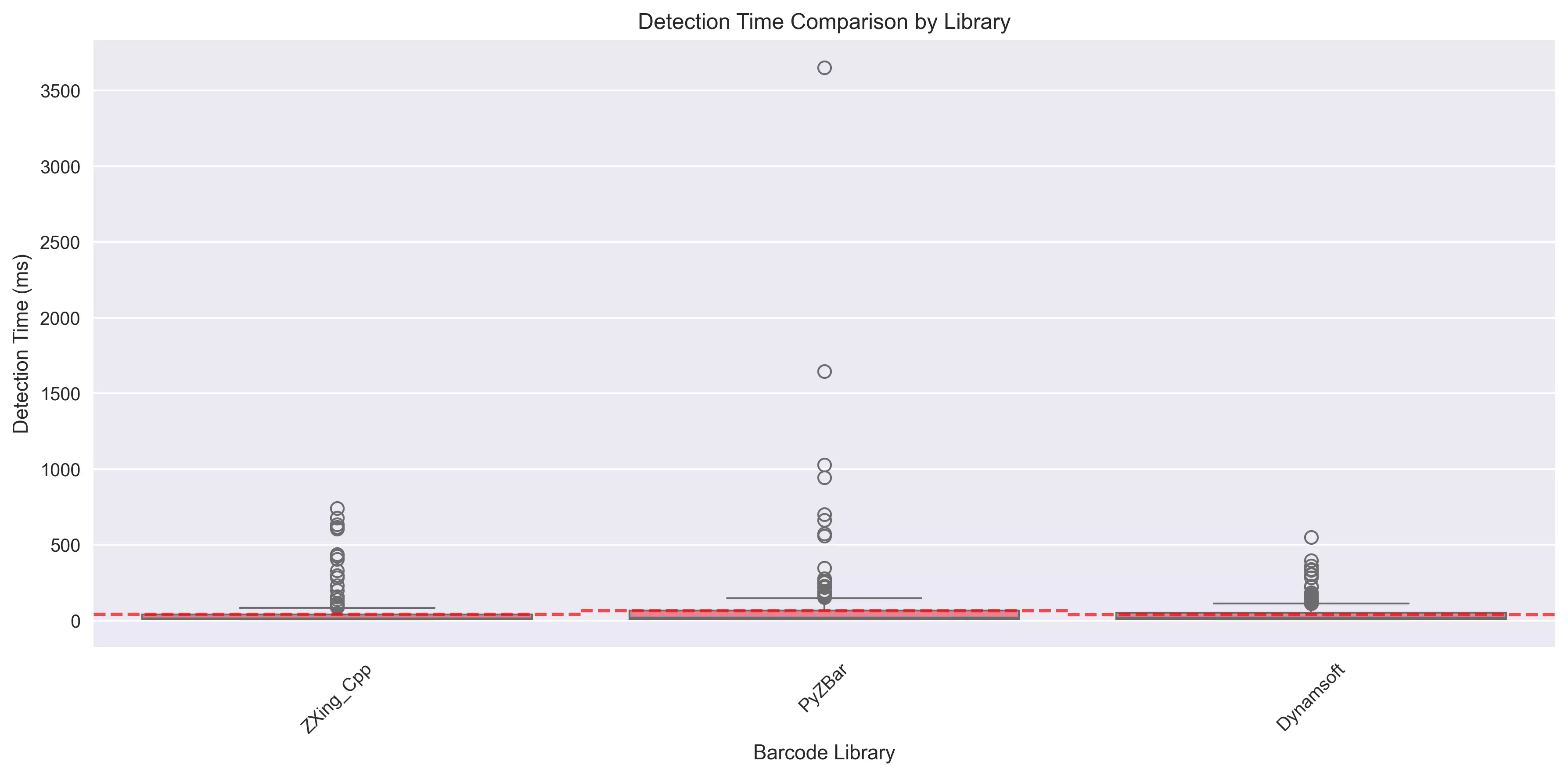
| Dynamsoft | 90.6% | 95.5 ms | 154/170 |
| PyZBar | 71.2% | 316.8 ms | 121/170 |
| ZXing-Cpp | 65.9% | 90.7 ms | 112/170 |
Analysis:
- Dynamsoft decoded 154 out of 170 real-world images (90.6%), demonstrating superior robustness
- PyZBar shows slower performance (316.8ms) on complex real-world images but maintains decent accuracy
- ZXing-Cpp offers fast processing (90.7ms) but lower success rate on production images
- For production deployments, Dynamsoft’s 90.6% success rate justifies the commercial investment
Performance Charts
The benchmark generates several interactive visualizations:
- Success Rate Comparison - Bar chart showing accuracy by library and scenario
- Detection Time Comparison - Box plots showing speed distributions
- Focus Area Performance - Heatmap of success rates across test categories
- Performance Distributions - Violin plots of detection time variance
Recommendations by Use Case
| Use Case | Recommended SDK | Reason |
|---|---|---|
| Enterprise/Production | Dynamsoft | Highest accuracy (92.3%), excellent rotation handling, best real-world performance |
| High-Speed Scanning | ZXing-Cpp | Fastest detection (40.2ms), perfect for simple barcodes in controlled environments |
| Open-Source Projects | PyZBar | Good balance of accuracy (76.8%) and open-source licensing |
| Mobile Apps (rotation) | Dynamsoft | 100% success on angled barcodes, critical for handheld scanning |
| Batch Processing | Dynamsoft | 91.3% success with multiple codes, reliable up to 20 codes per image |
| Budget-Constrained | ZXing-Cpp or PyZBar | Free open-source options with acceptable performance for simple scenarios |
| Poor Image Quality | Dynamsoft | 47.5% success in challenging conditions vs 35-42% for others |
Cost-Benefit Analysis
While Dynamsoft is a commercial product requiring a license, the benchmark demonstrates clear value:
- 26.2% higher accuracy than ZXing-Cpp (92.3% vs 65.1%)
- Perfect rotation handling vs 55-60% for open-source alternatives
- 90.6% real-world success translates to fewer failed scans in production
- Official support, regular updates, and cross-platform consistency
For production environments where failed scans impact user experience, inventory accuracy, or operational efficiency, the commercial license cost is offset by reduced support burden and improved reliability.
Simple Benchmark: Excel Report Generation
The simple.py script uses openpyxl to generate an Excel report with color-coded results for quick visual inspection.
How it works:
from openpyxl import Workbook

def dataset(directory=None, cvr_instance=None):
    if directory != None:
        print(directory)
        files = os.listdir(directory)
        files = [f for f in files if f.endswith('.jpg') or f.endswith('.png')]
        total_count = len(files)
        if total_count == 0:
            print('No image files')
            return

        # Create a .xlsx file
        datafile = 'benchmark.xlsx'
        wb = data.get_workbook(datafile)
        index = 2

        print('Total count of barcode image files: {}'.format(total_count))
        zbar_count = 0
        dbr_count = 0
        zxing_count = 0

        for filename in files:
            file_path = os.path.join(directory, filename)
            expected_result = filename.split('_')[0]

            r1 = ''
            r2 = ''
            r3 = ''

            # ZBar
            zbar_results = zbar_decode(file_path)
            if zbar_results != None:
                for zbar_result in zbar_results:
                    zbar_text = zbar_result.data.decode("utf-8")
                    r1 = zbar_text
                    print('r1: {}'.format(zbar_text))
                    if r1 == expected_result:
                        zbar_count += 1
                        break
                    elif 'upca' in zbar_result.type.lower():
                        if '0' + r1 == expected_result:
                            zbar_count += 1
                            r1 = expected_result
                            break
            else:
                print('Fail to decode {}'.format(filename))

            # DBR
            if cvr_instance != None:
                dbr_results = dbr_decode(cvr_instance, file_path)

                items = dbr_results.get_items()

                if len(items) > 0:
                    for item in items:
                        r2 = item.get_text()
                        print('r2: {}'.format(r2))
                        if r2 == expected_result:
                            dbr_count += 1
                            break
                        elif 'upc_a' in item.get_format_string().lower():
                            if '0' + r2 == expected_result:
                                dbr_count += 1
                                r2 = expected_result
                                break
                else:
                    print("DBR failed to decode {}".format(filename))

            # ZXing
            print('ZXing decoding {}'.format(filename))
            zxing_results = zxing_decode(file_path)
            if zxing_results != None:
                for result in zxing_results:
                    r3 = result.text
                    if r3 == expected_result:
                        zxing_count += 1
                        print('r3: {}'.format(r3))
                        break
                    elif 'upca' in str(result.format).lower():
                        if '0' + r3 == expected_result:
                            zxing_count += 1
                            r3 = expected_result
                            break
            else:
                print('ZXing failed to decode {}'.format(filename))

            # Add results to .xlsx file
            data.update_row(wb, index, filename, expected_result, r1, r2, r3)
            index += 1

        r1 = 0
        r2 = 0
        r3 = 0

        zbar_rate = zbar_count * 100 / total_count
        r1 = '{0:.2f}%'.format(zbar_rate)
        print('ZBar recognition rate: {0:.2f}%'.format(zbar_rate))

        if cvr_instance != None:
            dbr_rate = dbr_count * 100 / total_count
            r2 = '{0:.2f}%'.format(dbr_rate)
            print('DBR recognition rate: {0:.2f}%'.format(dbr_rate))

        zxing_rate = zxing_count * 100 / total_count
        r3 = '{0:.2f}%'.format(zxing_rate)
        print('ZXing recognition rate: {0:.2f}%'.format(zxing_rate))

        data.set_recognition_rate(wb, index, r1, r2, r3)
        # Save data to .xlsx file
        data.save_workbook(wb, datafile)
Run the script and check the generated Excel file for the barcode detection results:
Advanced Benchmark: Comprehensive Analysis
For more sophisticated testing, advanced.py provides:
Test Scenarios
- Single Barcodes - Baseline performance testing
- Angled Barcodes (15°-75°) - Real-world rotation handling
- Multiple Barcodes (2-20 per image) - Batch processing efficiency
- Challenging Conditions - Noise, blur, occlusion tests
- Existing Dataset - Real-world production images
Output Reports
- HTML Report (
results/benchmark_report.html) - Interactive charts and detailed analysis - CSV Summary (
results/summary_results.csv) - Tabular performance data - JSON Results (
results/detailed_results.json) - Raw benchmark data - Performance Charts (
results/charts/) - Visual comparisons
Key Metrics
- Detection Time (ms) - Speed comparison across SDKs
- Success Rate (%) - Accuracy under various conditions
- Competitive Analysis - Strengths and weaknesses by scenario
Dataset Selection
The advanced benchmark allows you to choose:
- Generated dataset - Controlled test scenarios
- Existing dataset - Real-world barcode images (170 images)
- Both datasets - Comprehensive evaluation
Configuration
Edit config/benchmark_config.json to enable/disable SDKs:
{
  "libraries": {
    "zxing_cpp": {"enabled": true},
    "pyzbar": {"enabled": true},
    "dynamsoft": {
      "enabled": true,
      "license": "YOUR_LICENSE_KEY_HERE"
    }
  },
  "test_data": {
    "num_samples": 50
  }
}
Common Issues & Edge Cases
- PyZBar requires the
libzbarsystem library: On Windows,pyzbarneedszbar.dllin your PATH. On macOS, install viabrew install zbarbeforepip install pyzbar. Missing the native library causes a silent import error with no barcodes decoded. - ZXing-Cpp returns an empty list for dense or rotated barcodes: The default
read_barcodes()call without explicitformatsortry_harder=Trueflags will skip low-confidence reads. Passformats=zxingcpp.BarcodeFormats.Anyand settry_harder=Trueto partially improve rotation handling, though success rates still lag Dynamsoft beyond 30° rotation. - UPCA leading-zero mismatch between libraries: PyZBar and ZXing-Cpp may return a 12-digit UPCA value without the leading
0that is part of the standard 13-digit representation. Compare withexpected == detected or expected == '0' + detectedto avoid false-negative results in your benchmark.
Project Structure
├── simple.py                   # Quick benchmark with Excel output
├── advanced.py                 # Comprehensive benchmark framework
├── existing_dataset/           # Real-world barcode images
├── generated_dataset/          # Auto-generated test cases
├── results/                    # Benchmark outputs
├── src/                        # Framework modules
│   ├── barcode_readers.py      # SDK implementations
│   ├── benchmark_framework.py  # Core testing logic
│   ├── performance_analysis.py # Metrics and reporting
│   └── test_data_generator.py  # Synthetic data generation
└── config/                     # Configuration files
Conclusion
This comprehensive benchmark of 1,710 test cases across real-world and synthetic datasets reveals clear performance patterns for Python barcode SDKs:
Winner by Accuracy: Dynamsoft Barcode Reader (92.3%)
- Excels in all scenarios: angled barcodes (100%), multiple codes (91.3%), real-world images (90.6%)
- Best choice for production environments where accuracy is critical
- Commercial license justified by 26% higher accuracy than open-source alternatives
Winner by Speed: ZXing-Cpp (40.2ms)
- Fastest detection across all SDKs
- Perfect for simple, well-positioned barcodes in controlled environments
- Limited by poor rotation tolerance and multiple barcode handling
Best Open-Source Balance: PyZBar (76.8%, 111.5ms)
- Solid accuracy for an open-source solution
- Good at multiple barcode detection (85%)
- Trade-off: slower speed, especially on complex images
Decision Matrix
Choose Dynamsoft if:
- Accuracy is mission-critical (enterprise, healthcare, logistics)
- You need reliable rotation handling (mobile apps, handheld scanners)
- Processing multiple codes per image (warehouse, inventory)
- Working with real-world production images with varying quality
Choose ZXing-Cpp if:
- Speed is paramount and barcodes are simple
- Operating in controlled environments (kiosks, fixed scanners)
- Budget constraints require open-source
- Single barcode scenarios with good positioning
Choose PyZBar if:
- You need open-source with better accuracy than ZXing
- Processing multiple barcodes in controlled orientations
- Speed is less critical than accuracy
- Community support and LGPL licensing fit your requirements
Running Your Own Benchmark
Clone the repository and run the benchmark framework:
# Clone repository
git clone https://github.com/yushulx/python-barcode-qrcode-sdk.git
cd python-barcode-qrcode-sdk/examples/official/zxing_zbar

# Install dependencies
pip install -r requirements.txt

# Run quick benchmark (Excel output)
python simple.py -d existing_dataset

# Run comprehensive benchmark (HTML reports)
python advanced.py
The framework is extensible - you can add new SDKs by implementing the BarcodeReaderInterface and updating the configuration file.