


How to Detect Duplicate Document Images in JavaScript Using OCR and Levenshtein Distance
When digitizing documents, we may accidentally scan a document image twice. Finding the duplicate images manually is painstaking. In this article, we are going to use JavaScript to detect duplicate document images automatically.
What you’ll build: A JavaScript library that uses Tesseract.js OCR and Levenshtein distance to automatically detect and flag duplicate scanned document images.
Key Takeaways
- Duplicate document images can be detected by comparing their OCR text using Levenshtein distance, achieving reliable results without pixel-level comparison.
- Tesseract.js provides browser-based OCR that extracts text lines with bounding boxes and confidence scores from scanned documents.
- A similarity threshold of 0.7 (70% text match) effectively identifies duplicates while tolerating minor OCR variations.
- Dynamsoft Document Normalizer can pre-crop document regions before OCR, improving both detection speed and accuracy.
Common Developer Questions
How do I detect duplicate scanned document images in JavaScript?
Run OCR on each scanned document, normalize the extracted text lines, and compare the resulting text content instead of comparing raw pixels. This article uses Levenshtein distance on OCR output so small scan noise does not prevent true duplicates from being matched.
What is the best way to compare two document images for similarity using OCR?
Extract the text lines from both documents, join them into comparable strings, and then compute a similarity score from their edit distance. For document images, this is usually more useful than direct pixel comparison because the same page can be rescanned with different lighting, skew, or cropping.
How do I use Tesseract.js and Levenshtein distance to find duplicate documents?
Use Tesseract.js to read each page, filter out weak or tiny text lines, concatenate the remaining OCR text, and then compare the strings with a Levenshtein library such as leven. The resulting similarity threshold can then be used to flag likely duplicate scans automatically.
Prerequisites
To follow this tutorial, you need:
- Node.js installed on your machine
- Basic knowledge of TypeScript and HTML
- Get a 30-day free trial license if you want to use Dynamsoft Document Normalizer for document cropping in the online demo
How OCR-Based Image Similarity Detection Works
We need to compare two images to check whether they share the same content.
There are many ways to calculate the similarity between two images. Mainly, they can be divided into two categories.
- Calculate the diff of pixels (e.g. pixelmatch, MSE).
- Extract features and check whether the features match (e.g. SIFT, Convolutional Neural Network).
In this article, we are going to use the most obvious feature of document images: text. We are going to use OCR to extract the text of the images and use Levenshtein distance to calculate the similarity.
Implement Duplicate Detection with JavaScript and Tesseract.js
Here are the key code snippets to do this in JavaScript.
-
Extract the text using
tesseract. Store the text line results and filter out small and low-confidence lines.import { createWorker,Worker } from 'tesseract.js'; async function recognize(imageSource:HTMLImageElement){ let tess = await createWorker("eng", 1, { logger: function(m:any){console.log(m);} }); const result = await tess.recognize(imageSource); const textLines:TextLine[] = []; const threshold = 50; const lines = result.data.lines; for (let index = 0; index < lines.length; index++) { const line = lines[index]; const width = line.bbox.x1 - line.bbox.x0; const height = line.bbox.y1 - line.bbox.y0; if (line.confidence > threshold && width > 10) { const textLine:TextLine = { x:line.bbox.x0, y:line.bbox.y0, width:width, height:height, text:line.text } textLines.push(textLine); } } return textLines; } -
Calculate the text similarity of two pieces of text.
import leven from "leven"; function textSimilarity(lines1:TextLine[],lines2:TextLine[]):number { const text1 = textOfLines(lines1); const text2 = textOfLines(lines2); const distance = leven(text1,text2); const similarity = (1 - distance / Math.max(text1.length,text2.length)); return similarity; } function textOfLines(lines:TextLine[]){ let content = ""; for (let index = 0; index < lines.length; index++) { const line = lines[index]; content = content + line.text + "\n"; } return content; } -
Iterate all the scanned images and find the duplicate ones.
async find(images:HTMLImageElement[]):Promise<HTMLImageElement[]> {

  let textLinesOfImages = [];
  for (let index = 0; index < images.length; index++) {
    const image = images[index];
    const lines = await recognize(image);
    textLinesOfImages.push(lines);
  }

  let indexObject:any = {};
  for (let index = 0; index < textLinesOfImages.length; index++) {
    if (index + 1 < textLinesOfImages.length) {
      const textLines1 = textLinesOfImages[index];
      const textLines2 = textLinesOfImages[index+1];
      const similarity = textSimilarity(textLines1,textLines2);
      if (similarity > 0.7) {
        indexObject[index] = "";
        indexObject[index+1] = "";
      }
    }
  }
  let duplicateImages:HTMLImageElement[] = [];
  const keys = Object.keys(indexObject);
  for (let index = 0; index < keys.length; index++) {
    const key:number = parseInt(keys[index]);
    duplicateImages.push(images[key]);
  }
  return duplicateImages;
}
Try the Online Demo
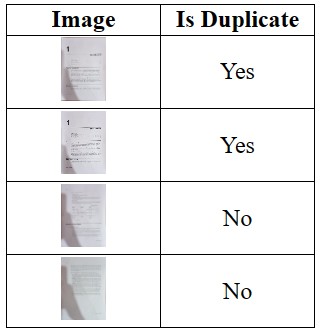
You can visit the online demo to have a try. The demo can crop document images using Dynamsoft Document Normalizer to increase the efficiency and accuracy of OCR.
Common Issues and Edge Cases
- Low OCR confidence on poor-quality scans: If documents are scanned at low DPI or have heavy noise, Tesseract.js may return garbled text, causing false negatives. Pre-process images with contrast enhancement or use Dynamsoft Document Normalizer to crop and deskew before OCR.
- Non-adjacent duplicates are missed: The current implementation only compares consecutive images. For large batches where duplicates may appear at arbitrary positions, extend the loop to compare every pair or use a text-hash index for O(n) lookup.
- Multilingual documents: The default Tesseract.js worker is initialized with
"eng". For documents in other languages, load the appropriate language data (e.g.,"chi_sim"for Simplified Chinese) or use"eng+chi_sim"for mixed-language pages.