


How to Decode EAN-13 Barcodes Using Python and OpenCV: Step-by-Step Tutorial
The International Article Number (also known as European Article Number or EAN) is a standard describing a barcode symbology and numbering system used in global trade to identify a specific retail product type. The most commonly used EAN standard is the thirteen-digit EAN-13. 1
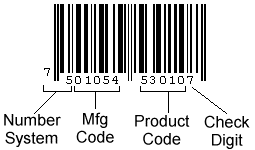
The 13-digit EAN-13 number consists of four components:
- GS1 prefix
- Manufacturer code
- Product code
- Check digit
An EAN-13 barcode has 95 areas (also known as modules) of equal width. Each area can be either white (represented here as 0) or black (represented as 1). Continuous areas form a black or white bar. There are 59 bars in an EAN-13 barcode.
From left to right, there are:
- 3 areas for the start guard (101)
- 42 left-hand areas (seven per digit) to encode the 2nd to 7th digits. Each digit is represented by four bars. The first digit can be then inferred from the 6 digits.
- 5 areas for the center guard (01010)
- 42 right-hand areas (seven per digit) to encode the 8th to 13th digits. Each digit is represented by four bars.
- 3 areas for the end guard (101)
The encoding of the digit can be known by looking up the following table.
| Digit | Left-hand (Odd) | Left-hand (Even) | Right-hand |
|---|---|---|---|
| 0 | 0001101 | 0100111 | 1110010 |
| 1 | 0011001 | 0110011 | 1100110 |
| 2 | 0010011 | 0011011 | 1101100 |
| 3 | 0111101 | 0100001 | 1000010 |
| 4 | 0100011 | 0011101 | 1011100 |
| 5 | 0110001 | 0111001 | 1001110 |
| 6 | 0101111 | 0000101 | 1010000 |
| 7 | 0111011 | 0010001 | 1000100 |
| 8 | 0110111 | 0001001 | 1001000 |
| 9 | 0001011 | 0010111 | 1110100 |
The left-hand digits have a parity property which is odd and even. The initial digit can be inferred by checking the following table.
| First digit | The parity of the 6 left-hand digits |
|---|---|
| 0 | OOOOOO |
| 1 | OOEOEE |
| 2 | OOEEOE |
| 3 | OOEEEO |
| 4 | OEOOEE |
| 5 | OEEOOE |
| 6 | OEEEOO |
| 7 | OEOEOE |
| 8 | OEOEEO |
| 9 | OEEOEO |
What you’ll build: A Python-based EAN-13 barcode reader that locates barcodes in images using OpenCV morphology and contour detection, then decodes the 13-digit number with checksum verification.
Key Takeaways
- EAN-13 barcodes encode 13 digits across 95 equal-width modules with start, center, and end guard patterns — Python can decode them by reading one scan line and matching 7-bit digit patterns.
- OpenCV thresholding, dilation with an elongated kernel, and contour detection reliably locate EAN-13 barcodes in photographs.
- This DIY approach achieves 57.21% accuracy on mobile-phone images; it fails on flipped, shadowed, or deformed barcodes where commercial SDKs like Dynamsoft Barcode Reader succeed.
- The full working source code is available on GitHub for learning and experimentation.
Common Developer Questions
How do I decode EAN-13 barcodes from an image using Python and OpenCV?
Threshold the image, read a barcode scan line into a 0/1 bit pattern, split that pattern into the EAN-13 guard sections and 7-bit digit chunks, and then map those chunks back to digits using the parity tables. The article then adds OpenCV morphology and contour detection so the barcode region can be located automatically in a larger photo before decoding.
Why does my OpenCV barcode reader fail on printed or noisy EAN-13 barcodes?
This OpenCV pipeline works best on clean, well-aligned barcodes and becomes fragile when the symbol is blurred, shadowed, rotated, flipped, or printed with uneven bars. The article’s own benchmark shows that simple morphology plus one-line decoding misses many real-world cases that a commercial SDK can still read.
What is the EAN-13 encoding structure and how is the check digit calculated?
EAN-13 uses 95 equal-width modules with a start guard, six left-side digits, a center guard, six right-side digits, and an end guard. After decoding the 12 payload digits, the final digit is verified from the weighted checksum rule so invalid reads can be rejected.
Prerequisites
To follow this tutorial, you need:
- Python 3.x installed
- OpenCV for Python (
pip install opencv-python) - NumPy (
pip install numpy) - Get a 30-day free trial license if you want to compare results with Dynamsoft Barcode Reader.
Decode EAN-13 Barcodes from an Image
Based on the specification of EAN-13, we can create an EAN-13 barcode decoder.
Here is a test barcode images generated with an online tool:
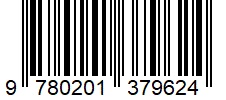
Step 1: Extract the Data Sequence
Since it is a generated image, we can directly read the barcode data from it.
-
Create a thresholded image.
img = cv2.imread("generated.jpg") gray = cv2.cvtColor(img, cv2.COLOR_BGR2GRAY) ret, thresh =cv2.threshold(gray, 200, 255, cv2.THRESH_BINARY + cv2.THRESH_OTSU) -
The value of the white pixels of the thresholded images is 255 and the black pixels 0. We need to invert it and replace 255 with 1 to conform to the 0 and 1 pattern. Only one line of the barcode is needed and here, we use the middle line.
thresh = cv2.bitwise_not(thresh) line = thresh[int(img.shape[0]/2)] for i in range(len(line)): if line[i] == 255: line[i] = 1 -
Read the 95 areas and detect the module size. The module size is the length of the smallest bar.
def read_bars(line): bars = [] current_length = 1 for i in range(len(line)-1): if line[i] == line[i+1]: current_length = current_length + 1 else: bars.append(current_length * str(line[i])) current_length = 1 #remove quite zone bars.pop(0) return bars def detect_module_size(bars): size = len(bars[0]) for bar in bars: size = min(len(bar),size) return size module_size = detect_module_size(read_bars(line)) -
Get the data string.
 def array_as_string(array, module_size):
     s = ""
     for value in array:
         s = s + str(value)
     s=s.replace("1"*module_size,"1")
     s=s.replace("0"*module_size,"0")
     print("Data string: " + s)
     return s

 data_string = array_as_string(line,module_size)
The data string of the test image:
00000000000101011101100010010100111001001101001110011001010101000010100010011101001010000110110010111001010000000
Step 2: Decode the Barcode Data
Now we can separate the data string by the fixed width of digits and guard markers and decode them according to the encoding table.
-
Decode the left half.
def decode_left_bar_pattern(pattern): left_pattern_dict = {} left_pattern_dict["0001101"] = {"code":0,"parity":"O"} left_pattern_dict["0100111"] = {"code":0,"parity":"E"} left_pattern_dict["0011001"] = {"code":1,"parity":"O"} left_pattern_dict["0110011"] = {"code":1,"parity":"E"} left_pattern_dict["0010011"] = {"code":2,"parity":"O"} left_pattern_dict["0011011"] = {"code":2,"parity":"E"} left_pattern_dict["0111101"] = {"code":3,"parity":"O"} left_pattern_dict["0100001"] = {"code":3,"parity":"E"} left_pattern_dict["0100011"] = {"code":4,"parity":"O"} left_pattern_dict["0011101"] = {"code":4,"parity":"E"} left_pattern_dict["0110001"] = {"code":5,"parity":"O"} left_pattern_dict["0111001"] = {"code":5,"parity":"E"} left_pattern_dict["0101111"] = {"code":6,"parity":"O"} left_pattern_dict["0000101"] = {"code":6,"parity":"E"} left_pattern_dict["0111011"] = {"code":7,"parity":"O"} left_pattern_dict["0010001"] = {"code":7,"parity":"E"} left_pattern_dict["0110111"] = {"code":8,"parity":"O"} left_pattern_dict["0001001"] = {"code":8,"parity":"E"} left_pattern_dict["0001011"] = {"code":9,"parity":"O"} left_pattern_dict["0010111"] = {"code":9,"parity":"E"} return left_pattern_dict[pattern] guard_pattern = "101" center_guard_pattern = "01010" begin_index = data_string.find(guard_pattern)+len(guard_pattern) data_string_left = data_string[begin_index:-1] left_codes = [] for i in range(6): start_index = i*7 bar_pattern = data_string_left[start_index:start_index+7] decoded = decode_left_bar_pattern(bar_pattern) left_codes.append(decoded) -
Get the initial digit.
def get_first_digit(left_codes): parity_dict = {} parity_dict["OOOOOO"] = 0 parity_dict["OOEOEE"] = 1 parity_dict["OOEEOE"] = 2 parity_dict["OOEEEO"] = 3 parity_dict["OEOOEE"] = 4 parity_dict["OEEOOE"] = 5 parity_dict["OEEEOO"] = 6 parity_dict["OEOEOE"] = 7 parity_dict["OEOEEO"] = 8 parity_dict["OEEOEO"] = 9 parity = "" for code in left_codes: parity = parity + code["parity"] return parity_dict[parity] -
Decode the right half.
def decode_right_bar_pattern(pattern): right_pattern_dict = {} right_pattern_dict["1110010"] = {"code":0} right_pattern_dict["1100110"] = {"code":1} right_pattern_dict["1101100"] = {"code":2} right_pattern_dict["1000010"] = {"code":3} right_pattern_dict["1011100"] = {"code":4} right_pattern_dict["1001110"] = {"code":5} right_pattern_dict["1010000"] = {"code":6} right_pattern_dict["1000100"] = {"code":7} right_pattern_dict["1001000"] = {"code":8} right_pattern_dict["1110100"] = {"code":9} return right_pattern_dict[pattern] center_index = data_string_left.find(center_guard_pattern)+len(center_guard_pattern) data_string_left = data_string_left[center_index:-1] right_codes = [] for i in range(6): start_index = i*7 bar_pattern = data_string_left[start_index:start_index+7] decoded = decode_right_bar_pattern(bar_pattern) right_codes.append(decoded) -
Check if the code is valid.
We can calculate the checksum and see if it matches the final digit.
 def verify(ean13):
     weight = [1,3,1,3,1,3,1,3,1,3,1,3,1,3]
     weighted_sum = 0
     for i in range(12):
         weighted_sum = weighted_sum + weight[i] * int(ean13[i])
     weighted_sum = str(weighted_sum)
     checksum = 0
     units_digit = int(weighted_sum[-1])
     if units_digit != 0:
         checksum = 10 - units_digit
     else:
         checksum = 0
     print("The checksum of "+ean13 + " is " + str(checksum))
     if checksum == int(ean13[-1]):
         print("The code is valid.")
         return True
     else:
         print("The code is invalid.")
         return False
Step 3: Handle Noisy and Printed Barcodes
The above decoding method has high requirements of image qualities. It cannot decode barcodes in the real world.
Here is a scan of a printed EAN-13 barcode and its thresholded images. We can see that the bars have many noises and the width of areas is affected by the printing.
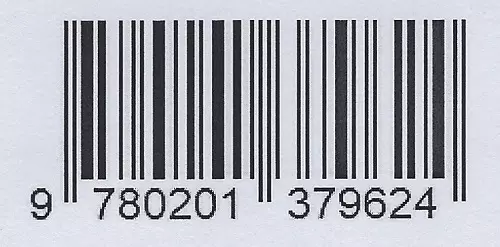
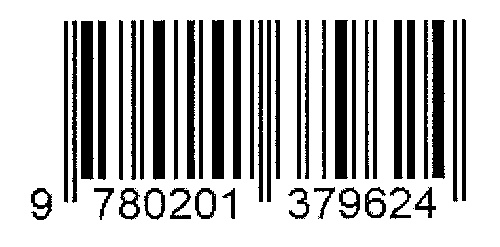
For example, the left guard pattern should be 101 while in the scan, it is 1011, which makes it impossible to correctly detect where the barcode starts.
There are ways to improve the decoding like median blur, smooth and scanning every line. One of the ways which prove effective is using a similar edge distance algorithm to normalize the length of digit areas since they have a fixed width of 7.
You can check out this repo to learn more.
Detect EAN-13 Barcodes in an Image with OpenCV
Let’s take a step further to detect barcodes in an image.
A basic detection method based on morphology and contours finding is used in this article.
Here is a sample image from the Artelab Medium Barcode 1D Collection:
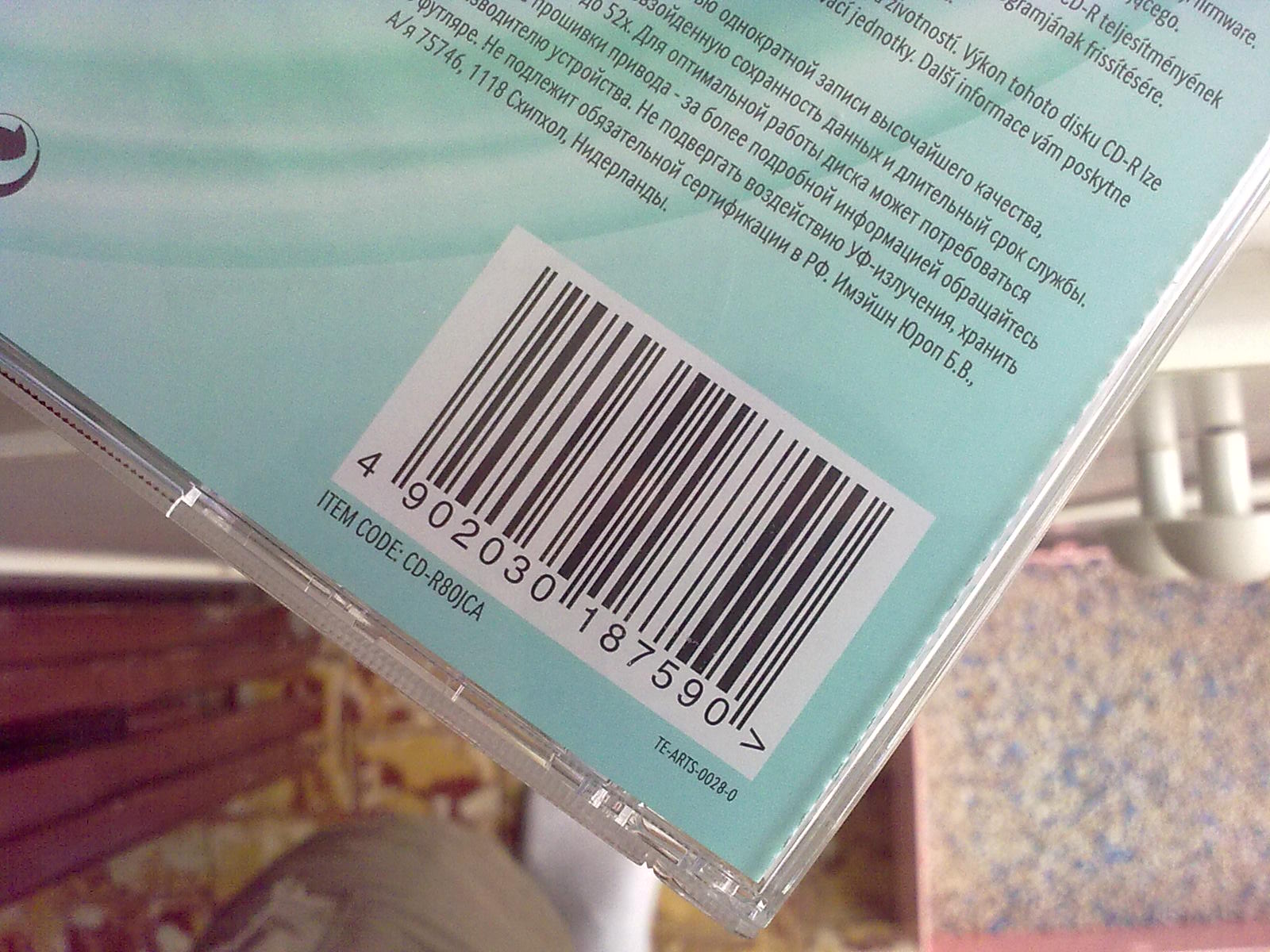
We can see that the barcode has parallel lines, white background and quiet zones, making it very different from the rest of the content.
Let’s try to detect the barcode.
-
Resize the image for normalization.
img = cv2.imread("05102009081.jpg") scale_percent = 640/img.shape[1] width = int(img.shape[1] * scale_percent) height = int(img.shape[0] * scale_percent) dim = (width, height) resized = cv2.resize(img, dim, interpolation = cv2.INTER_AREA) -
Create a thresholded image.
 gray = cv2.cvtColor(resized, cv2.COLOR_BGR2GRAY)
 ret, thresh =cv2.threshold(gray, 200, 255, cv2.THRESH_BINARY + cv2.THRESH_OTSU)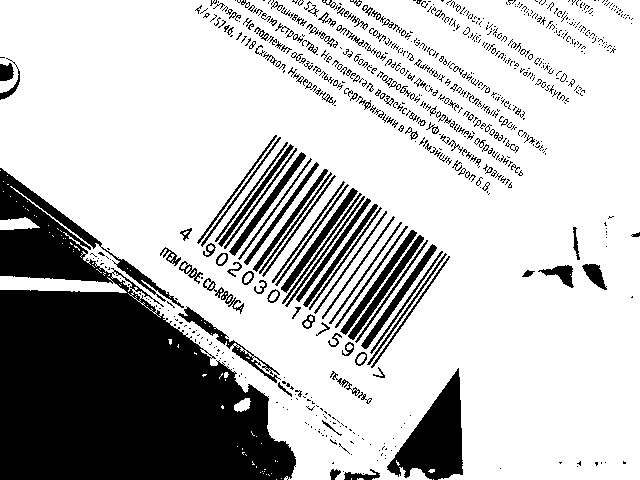
-
Invert and dilate.
 thresh = cv2.bitwise_not(thresh)
 kernel = np.ones((3, 20), np.uint8)
 thresh = cv2.dilate(thresh, kernel)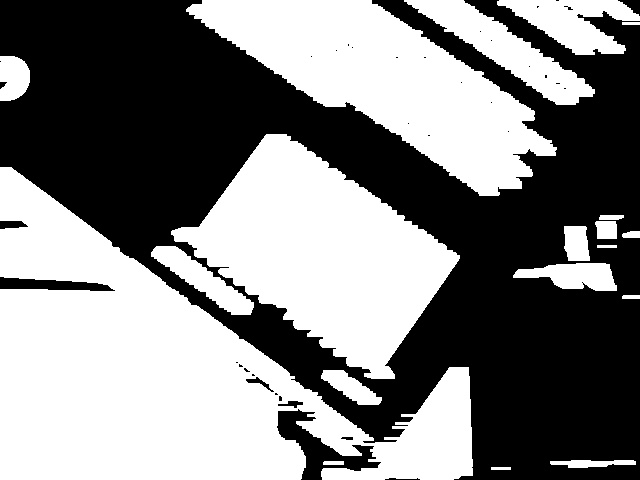
-
Find contours and get the cropped and rotated candidate areas.
 def crop_rect(rect, box, img):
     W = rect[1][0]
     H = rect[1][1]
     Xs = [i[0] for i in box]
     Ys = [i[1] for i in box]
     x1 = min(Xs)
     x2 = max(Xs)
     y1 = min(Ys)
     y2 = max(Ys)

     # Center of rectangle in source image
     center = ((x1+x2)/2,(y1+y2)/2)
     # Size of the upright rectangle bounding the rotated rectangle
     size = (x2-x1, y2-y1)
     # Cropped upright rectangle
     cropped = cv2.getRectSubPix(img, size, center)

     angle = rect[2]
     if angle!=90: #need rotation
         if angle>45:
             angle = 0 - (90 - angle)
         else:
             angle = angle
         M = cv2.getRotationMatrix2D((size[0]/2, size[1]/2), angle, 1.0)

         cropped = cv2.warpAffine(cropped, M, size)
         croppedW = H if H > W else W
         croppedH = H if H < W else W
         # Final cropped & rotated rectangle
         croppedRotated = cv2.getRectSubPix(cropped, (int(croppedW),int(croppedH)), (size[0]/2, size[1]/2))
         return croppedRotated
     return cropped

 original_sized = cv2.resize(thresh, (img.shape[1],img.shape[0]), interpolation = cv2.INTER_AREA)
 contours, hierarchy = cv2.findContours(original_sized,cv2.RETR_TREE,cv2.CHAIN_APPROX_SIMPLE)
 candidates = []
 index = 0
 added_index = []
 for cnt in contours:
     rect = cv2.minAreaRect(cnt)
     box = cv2.boxPoints(rect)
     box = np.int0(box)
     cropped = crop_rect(rect,box,img)
     width = cropped.shape[1]
     child_index = hierarchy[0][index][2]
     #the min width of EAN13 is 95 pixel
     if width>95:
         has_overlapped = False
         if child_index in added_index:
             has_overlapped = True
         if has_overlapped == False:
             added_index.append(index)
             candidate = {"cropped": cropped, "rect": rect}
             candidates.append(candidate)
     index = index + 1
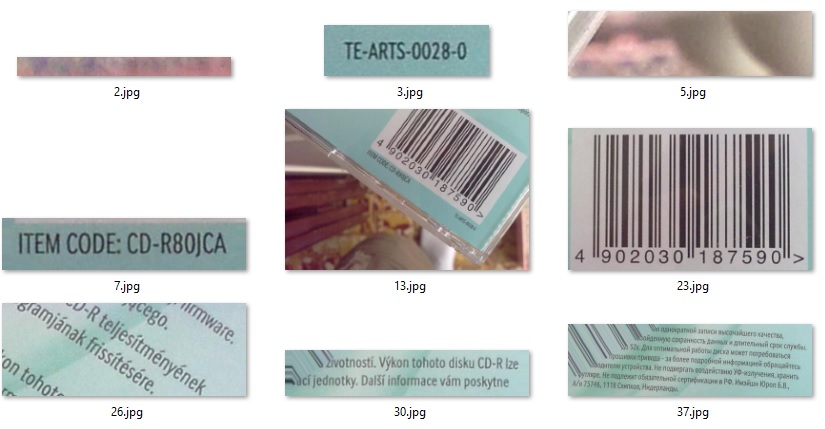
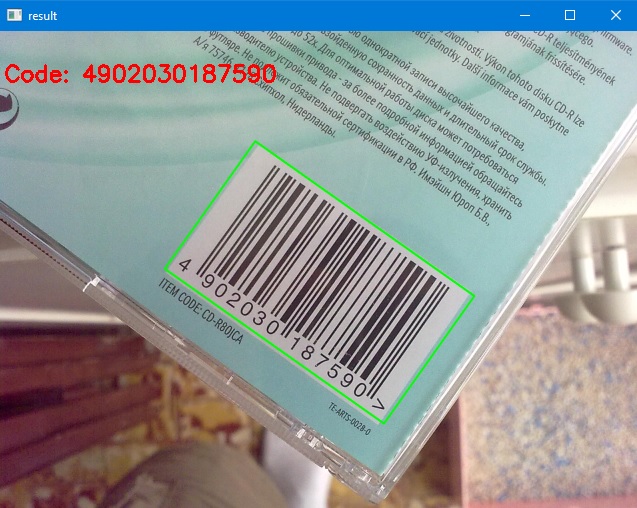
We can get the following candidates. We can later send them to decode.
Build a Complete EAN-13 Barcode Reader
Now, we can create an EAN-13 reader combining the detecting and decoding parts.
import decode as decoder
import detect as detector
import cv2
import numpy as np

def decode_image(image):
    result_dict = {}
    results = []

    candidates = detector.detect(image)
    for i in range(len(candidates)):
        candidate = candidates[i]
        cropped = candidate["cropped"]
        rect = candidate["rect"]
        box = cv2.boxPoints(rect)
        box = np.int0(box)
        ean13, is_valid, thresh = decoder.decode(cropped)
        if is_valid:
            result = {}
            result["barcodeFormat"] = "EAN13"
            result["barcodeText"] = ean13
            result["x1"] = int(box[0][0])
            result["y1"] = int(box[0][1])
            result["x2"] = int(box[1][0])
            result["y2"] = int(box[1][1])
            result["x3"] = int(box[2][0])
            result["y3"] = int(box[2][1])
            result["x4"] = int(box[3][0])
            result["y4"] = int(box[3][1])
            results.append(result)

    result_dict["results"] = results
    return result_dict

if __name__ == "__main__":
    image = cv2.imread("multiple.jpg")
    result_dict = decode_image(image)
    results = result_dict["results"]
    text = "No barcode found"
    if len(results) > 0:
        for result in results:
            if text == "No barcode found":
                text = "Code: "
            ean13 = result["barcodeText"]
            text = text + ean13 + " "
            cv2.line(image,(result["x1"],result["y1"]),(result["x2"],result["y2"]),(0,255,0),3)
            cv2.line(image,(result["x2"],result["y2"]),(result["x3"],result["y3"]),(0,255,0),3)
            cv2.line(image,(result["x3"],result["y3"]),(result["x4"],result["y4"]),(0,255,0),3)
            cv2.line(image,(result["x4"],result["y4"]),(result["x1"],result["y1"]),(0,255,0),3)
    scale_percent = 640/image.shape[1]
    width = int(image.shape[1] * scale_percent)
    height = int(image.shape[0] * scale_percent)
    dim = (width, height)
    resized = cv2.resize(image, dim, interpolation = cv2.INTER_AREA)
    cv2.putText(resized, text, (5,50), cv2.FONT_HERSHEY_SIMPLEX, 0.75, (0, 0, 255), 2)
    cv2.imshow("result", resized);
    cv2.waitKey(0);
    cv2.destroyAllWindows();
Benchmark Results and Known Limitations
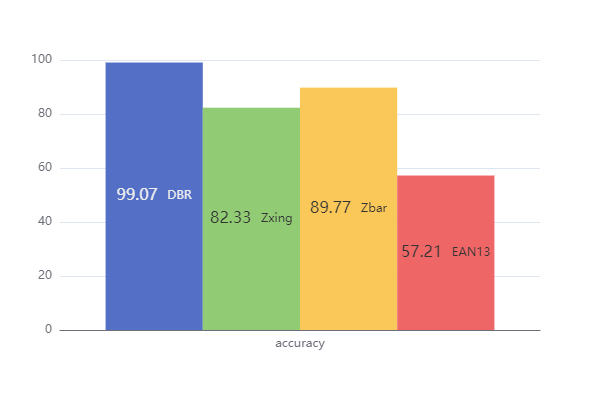
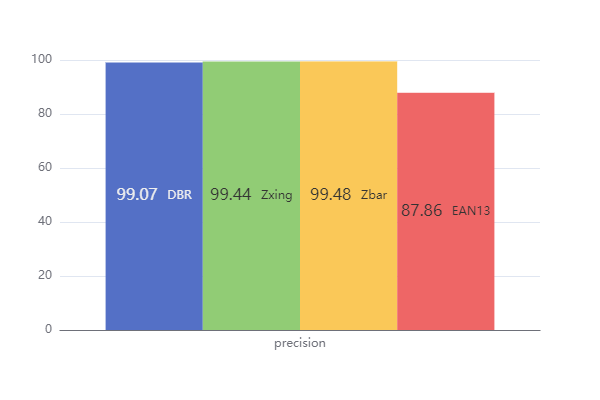
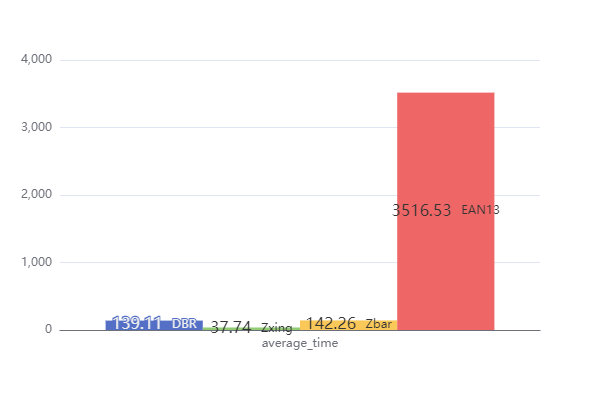
A benchmark is run on dataset 1 in the Artelab Medium Barcode 1D Collection using this performance test tool.
The dataset contains 215 images taken by mobile phones.
We can see that it has a 57.21% accuracy and a 87.86% precision. It is fairly good but worse than commercial and open-source barcode reading libraries. Its processing speed is also slow, which takes about 3.5 seconds to decode an image.
By observing what it cannot read, we can find its limitations.
- It cannot read flipped barcodes.
- It cannot read barcodes partially covered by shadows.
- It cannot read barcodes without enough quiet zones.
- It cannot read deformed barcodes.
Common Issues and Edge Cases
- Module size detection fails on low-resolution images: If the barcode is too small in the image, the smallest bar may be only 1 pixel wide, making module size ambiguous. Resize your input so the barcode region spans at least 200 pixels wide.
- Thresholding produces broken bars on unevenly lit photos: Otsu’s method assumes bimodal intensity. Use adaptive thresholding (
cv2.adaptiveThreshold) or histogram equalization before binarization when the image has shadows or gradients across the barcode. - Contour detection returns too many candidates: Noisy backgrounds generate false contours. Filter candidates by aspect ratio (EAN-13 barcodes are roughly 3:2 width-to-height) and by checking that the candidate region contains the expected number of vertical transitions.
Dynamsoft Barcode Reader
Dynamsoft Barcode Reader (DBR) is a sophisticated barcode reading SDK which can read 1D and 2D barcodes even in various bad conditions. In the benchmark, only Dynamsoft Barcode Reader can read images like the following one.
Why Choose Dynamsoft Barcode Reader
Here are the highlights of why you should choose Dynamsoft Barcode Reader:
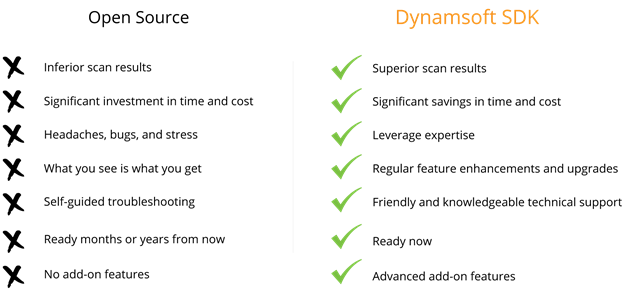
- Enterprise grade SDKs trusted by industry-leading companies
- Powerful barcode decoding can scan over 50 barcodes at once
- Exceptional performance in various usage scenarios
- Decodes problematic barcodes from out-of-focus, skewed, wrinkled, curved, glare, distorted, grainy, poor contrast and more
- Detects barcodes at any orientation and rotation angle
- Multi-thread barcode processing
- 100+ APIs to enable advanced customization
- Supports multiple platforms — iOS, Android, Windows, Linux, Web, Raspberry Pi
Try Dynamsoft Barcode Reader
If you’re at the stage where you’re testing different options, try Dynamsoft Barcode Reader online demo or download a 30-day free trial. There’s no commitment necessary.
Dynamsoft was founded in 2003 in Vancouver, Canada. Since then, we have earned the trust of many Fortune 500 companies, including Lockheed Martin, HP, IBM, Intel, Disney, the US Government, NASA, Siemens, and many more.
Try Online Barcode Scanner Demo
Source Code
Get the complete sample project source code on GitHub
References
-
https://en.wikipedia.org/wiki/International_Article_Number ↩