


Build a Rust CLI Barcode Scanner with Dynamsoft Capture Vision SDK
Rust’s popularity continues to surge in the systems programming world due to its unique combination of memory safety, performance, and concurrency. This comprehensive article demonstrates how to integrate Rust with the Dynamsoft Capture Vision Router SDK using FFI (Foreign Function Interface) bindings. We’ll build a command-line barcode reader that works across Windows, Linux, and macOS, then add a Slint desktop GUI on top of the same native decoding core.
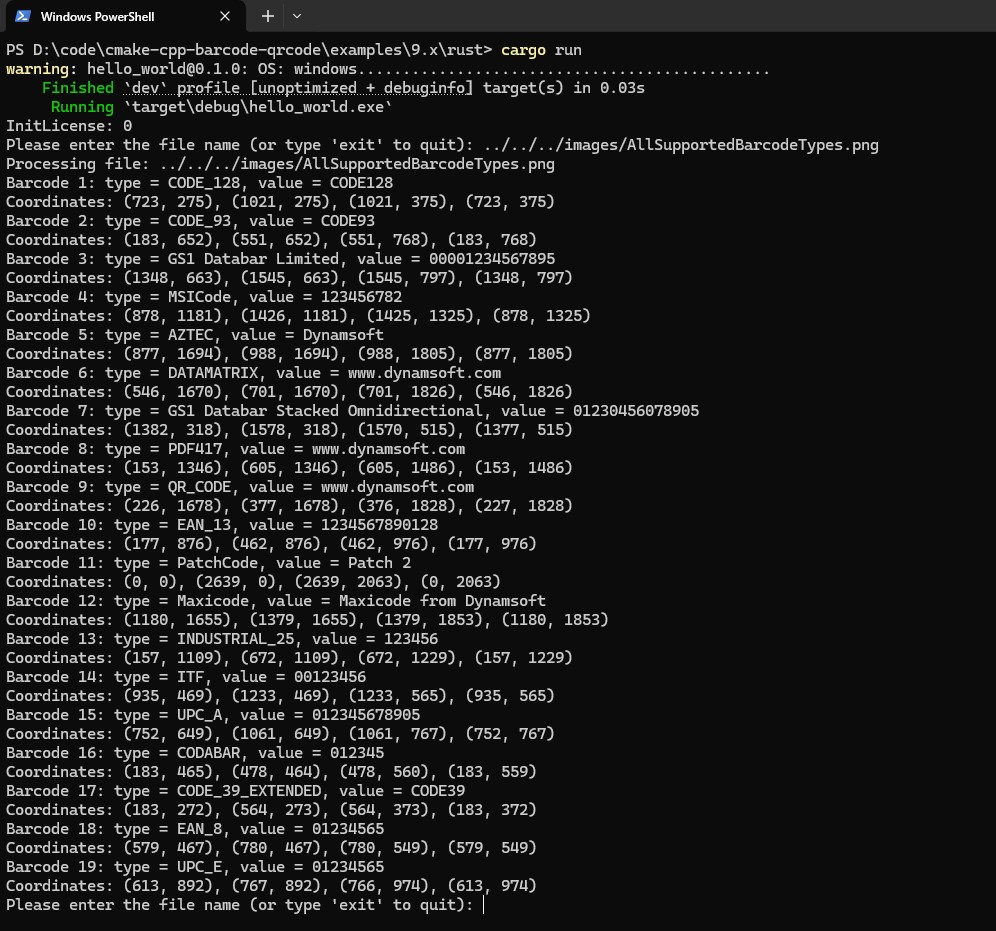
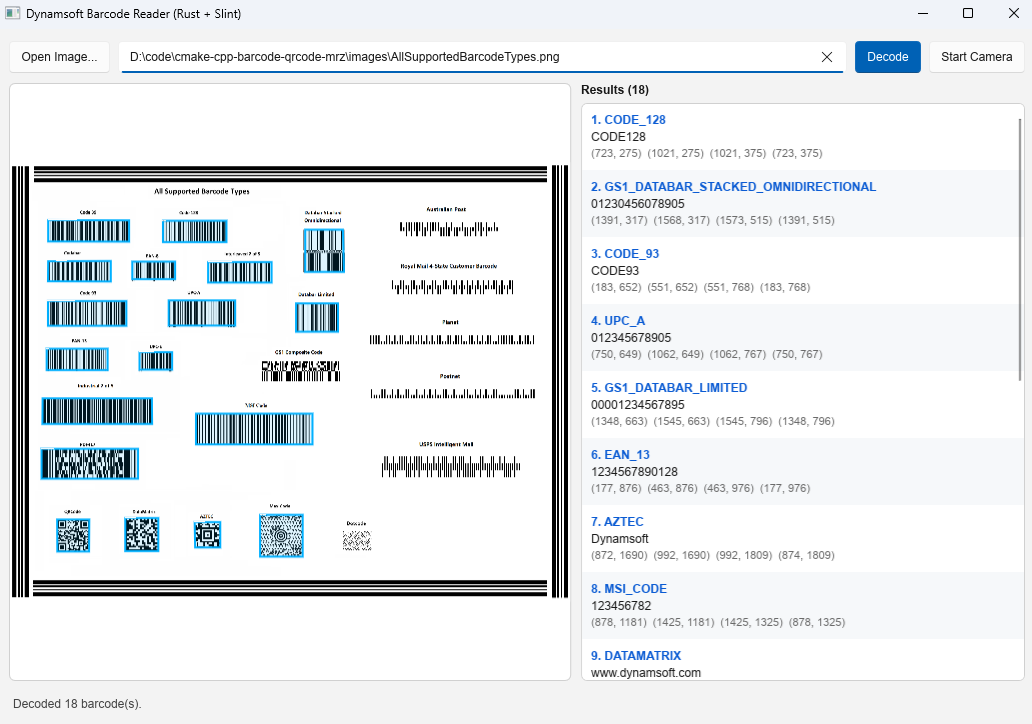
The CLI supports interactive mode for testing individual images and batch processing mode for automated workflows. The desktop GUI adds an image preview, a per-barcode result list, corner coordinates, and live camera scanning, so you can inspect what the SDK actually read instead of parsing terminal output.
What you’ll build: A cross-platform Rust barcode scanner shipping two binaries — a CLI for interactive and batch decoding, and a Slint desktop GUI that previews images, highlights decoded barcodes, lists formats/text/coordinates, and streams a webcam feed — both built on FFI bindings to the Dynamsoft Capture Vision C++ SDK.
Key Takeaways
- Rust FFI (
extern "C") can call the Dynamsoft Capture Vision Router C++ SDK directly, achieving near-native barcode decoding speed with Rust’s memory safety guarantees. - The C++ bridge pattern (
bridge.h/bridge.cpp) wrapsCCaptureVisionRouterbehind a flat C API so Rust’s#[repr(C)]structs map cleanly to the SDK’s barcode result types. - A single
build.rsscript handles Windows.dll, Linux.so, and macOS.dyliblinking plus automatic copying of the SDK’sTemplatesandModelsresource directories. - The CLI supports two modes — interactive (stdin loop) for development testing and argument-based batch mode for CI/CD or scripted pipelines.
- A single
Cargo.tomlships two binaries:barcode-scanner(CLI) andbarcode-reader-ui(Slint GUI). Both use the sameBarcodeReaderwrapper insrc/scanner.rs, so the native SDK is initialized exactly once per process. - Decode the exact RGB buffer that the GUI displays (
decode_barcode_buffer→CImageDatawithIPF_RGB_888). Overlay coordinates then stay aligned even for EXIF-rotated photos, and the same code path handles live camera frames.
Common Developer Questions
How do I call a C++ barcode SDK from Rust using FFI?
Use a small C++ bridge layer that wraps CCaptureVisionRouter behind a flat C API. Rust then talks to that bridge through extern "C" declarations and #[repr(C)] data structures so barcode results can move across the boundary safely.
How do I build a cross-platform Rust CLI barcode and QR code reader for Windows, Linux, and macOS?
Start with a Cargo CLI project, keep the user-facing logic in Rust, and compile the bridge code during the build. The same project layout supports both interactive stdin mode and argument-based batch mode across Windows, Linux, and macOS.
How do I link the Dynamsoft Capture Vision SDK in a Rust build.rs script?
Use build.rs to compile the bridge code, declare platform-specific link libraries, and copy the SDK resource folders your binary needs at runtime. That keeps Windows .dll, Linux .so, and macOS .dylib handling in one build step instead of scattering it through manual setup instructions.
How do I add a desktop GUI to a Rust barcode scanner?
Add Slint plus slint-build, declare a second [[bin]] that points at src/gui.rs, and compile ui/app.slint from build.rs. Keep the FFI calls in a shared module (src/scanner.rs) so the CLI and the GUI both talk to the same BarcodeReader wrapper instead of duplicating unsafe code.
How do I draw barcode bounding boxes over an image in Slint?
Pass the four corner points from the SDK as a BarcodeItem struct, compute the preview’s fit scale in .slint, and draw each item as a Path with MoveTo/LineTo/Close over the preview Image. Because the decoder runs on the same RGB buffer that is displayed, the points need no extra rotation or offset.
Can a Rust barcode reader decode from a live camera stream?
Yes. Wrap a native camera library behind a C ABI, copy each RGB frame into a Rust Vec<u8>, and call decode_barcode_buffer instead of the file-based API. In this sample the camera thread sends frames over an mpsc channel and a Slint Timer repaints the preview and results roughly every 33 ms; the camera path is wired for Windows through the bundled litecam (Media Foundation) library.
This article is Part 4 in a 7-Part Series.
- Part 1 - How to Link MSVC-Compiled DLLs with MinGW GCC Using a C Shim DLL
- Part 2 - Build a Raspberry Pi 4 Barcode Scanner with C++ and Dynamsoft Capture Vision (Headless, No OpenCV)
- Part 3 - How to Scan Barcodes in a C++ Win32 Application with Dynamsoft Barcode SDK
- Part 4 - Build a Rust CLI Barcode Scanner with Dynamsoft Capture Vision SDK
- Part 5 - Read Barcodes from a Desktop Webcam in C++ with OpenCV and CMake
- Part 6 - How to Build a Cross-Platform C++ Barcode and QR Code Reader with Dynamsoft Capture Vision v11
- Part 7 - How to Build a Desktop Barcode Scanner with Tauri and Rust
Prerequisites
- Rust: A systems programming language renowned for memory safety, speed, and fearless concurrency
- Dynamsoft Capture Vision Trial License: Get a 30-day free trial license delivered via email
- Dynamsoft Capture Vision SDK: The latest cross-platform SDK supporting barcode reading, document scanning, and more
- Visual Studio Build Tools (Windows only): Required for C++ compilation and FFI bindings
- Development Tools:
cccrate: For compiling C++ bridge codewalkdircrate: For directory traversal and file operations
Project Features and Architecture
Our Rust barcode scanner features:
- Dual Operation Modes: Interactive mode for testing and batch mode for automation
- Cross-Platform Support: Windows, Linux, and macOS compatibility
- Modern SDK Integration: Uses the latest Capture Vision Router API
- Resource Management: Automatic copying of required SDK resources
- Memory Safety: Rust’s ownership system prevents common C++ pitfalls
- Performance: Near-native speed with zero-cost abstractions
Step 1: Set Up the Rust Project
-
Initialize a new Rust project using Cargo:
cargo new dynamsoft-barcode-cli cd dynamsoft-barcode-cli -
Configure
Cargo.tomlwith modern dependencies for a robust CLI application:[package] name = "dynamsoft-barcode-cli" version = "0.1.0" edition = "2021" description = "Rust command-line barcode scanner using Dynamsoft SDK" authors = ["Your Name <your.email@example.com>"] [dependencies] clap = { version = "4.0", features = ["derive"] } anyhow = "1.0" thiserror = "1.0" serde = { version = "1.0", features = ["derive"] } serde_json = "1.0" image = "0.24" walkdir = "2.0" path-absolutize = "3.0" # For Windows FFI bindings to Dynamsoft SDK [target.'cfg(windows)'.dependencies] windows = { version = "0.52", features = [ "Win32_Foundation", "Win32_System_LibraryLoader", ] } [build-dependencies] cc = "1.0" walkdir = "2.0" [[bin]] name = "barcode-scanner" path = "src/main.rs"Key Dependencies Explained:
clap: Modern command-line argument parsing with derive macrosanyhow&thiserror: Robust error handling and propagationserde: Serialization support for configuration filesimage: Image processing utilities and format supportcc: Cross-platform C/C++ compiler integration
Step 2: Configure the Dynamsoft Capture Vision SDK
-
Download and extract the Dynamsoft Capture Vision SDK to create the following directory structure:
examples/rust/ ├── Cargo.toml ├── build.rs ├── src/ │ ├── main.rs │ └── bindings.rs ├── lib/ │ ├── bridge.cpp │ └── bridge.h └── ../../dcv/ ├── include/ │ ├── DynamsoftCaptureVisionRouter.h │ ├── DynamsoftBarcodeReader.h │ ├── DynamsoftCore.h │ ├── DynamsoftLicense.h │ └── DynamsoftUtility.h ├── lib/ │ ├── win/ │ │ ├── *.dll │ │ └── *.lib │ ├── linux/x64/ │ │ └── *.so │ └── mac/ │ └── *.dylib └── resource/ ├── Templates/ └── Models/ -
Create the FFI bridge structure in the
libdirectory:The bridge code serves as the interface between Rust and the C++ Capture Vision SDK, providing a clean C-style API that Rust can easily interact with through FFI.
-
Configure the build system in
build.rsto handle cross-platform compilation:use std::env; use cc::Build; use std::fs; use walkdir::WalkDir; use std::path::{Path, PathBuf}; fn main() { // Determine the target operating system let target_os = env::var("CARGO_CFG_TARGET_OS").unwrap(); println!("cargo:warning=OS: {}", target_os); match target_os.as_str() { "windows" => { // Link Dynamsoft Capture Vision Router for Windows println!("cargo:rustc-link-search=../../dcv/lib/win"); println!("cargo:rustc-link-lib=static=DynamsoftCaptureVisionRouterx64"); println!("cargo:rustc-link-lib=static=DynamsoftBarcodeReaderx64"); println!("cargo:rustc-link-lib=static=DynamsoftCorex64"); println!("cargo:rustc-link-lib=static=DynamsoftLicensex64"); println!("cargo:rustc-link-lib=static=DynamsoftUtilityx64"); // Copy DLL files and resources let src_dir = Path::new("../../dcv/lib/win"); copy_shared_libs_from_dir_to_out_dir(src_dir, &get_out_dir(), "dll"); copy_resource_directories(&get_out_dir()); }, "linux" => { // Link for Linux println!("cargo:rustc-link-search=../../dcv/lib/linux/x64"); println!("cargo:rustc-link-lib=dylib=DynamsoftCaptureVisionRouter"); println!("cargo:rustc-link-lib=dylib=DynamsoftBarcodeReader"); println!("cargo:rustc-link-lib=dylib=DynamsoftCore"); println!("cargo:rustc-link-lib=dylib=DynamsoftLicense"); println!("cargo:rustc-link-lib=dylib=DynamsoftUtility"); // Set rpath and copy files println!("cargo:rustc-link-arg=-Wl,-rpath,../../dcv/lib/linux/x64"); let src_dir = Path::new("../../dcv/lib/linux/x64"); copy_shared_libs_from_dir_to_out_dir(src_dir, &get_out_dir(), "so"); copy_resource_directories(&get_out_dir()); }, "macos" => { // Similar configuration for macOS println!("cargo:rustc-link-search=../../dcv/lib/mac"); // ... macOS-specific linking copy_resource_directories(&get_out_dir()); }, _ => panic!("Unsupported target OS: {}", target_os), } // Compile the C++ bridge code Build::new() .cpp(true) .include("../../dcv/include") .file("lib/bridge.cpp") .compile("bridge"); println!("cargo:rustc-link-lib=static=bridge"); println!("cargo:rustc-link-search=native={}", env::var("OUT_DIR").unwrap()); }Critical Addition: Resource Directory Copying
The build script now includes a crucial function to copy the SDK’s resource directories (
TemplatesandModels) to the output directory. These resources are essential for the Capture Vision SDK to function properly:fn copy_resource_directories(out_dir: &Path) { // Copy Templates directory let templates_src = Path::new("../../dcv/resource/Templates"); let templates_dest = out_dir.join("Templates"); if templates_src.exists() { if templates_dest.exists() { let _ = fs::remove_dir_all(&templates_dest); } copy_dir_recursive(templates_src, &templates_dest) .expect("Failed to copy Templates directory"); println!("Copied Templates directory to {}", templates_dest.display()); } // Copy Models directory let models_src = Path::new("../../dcv/resource/Models"); let models_dest = out_dir.join("Models"); if models_src.exists() { if models_dest.exists() { let _ = fs::remove_dir_all(&models_dest); } copy_dir_recursive(models_src, &models_dest) .expect("Failed to copy Models directory"); println!("Copied Models directory to {}", models_dest.display()); } }
Step 3: Implement the C++ Bridge for FFI
The bridge code has been updated to use the latest Capture Vision Router API instead of the deprecated Barcode Reader API. This provides better performance and future-proofing.
Declare FFI Structures and Functions in bridge.h
Create lib/bridge.h with the FFI interface declarations:
#ifndef BRIDGE_H
#define BRIDGE_H

#ifdef __cplusplus
extern "C"
{
#endif

    typedef struct
    {
        const char *barcode_type;
        const char *barcode_value;
        int x1;
        int y1;
        int x2;
        int y2;
        int x3;
        int y3;
        int x4;
        int y4;
    } Barcode;

    typedef struct
    {
        Barcode *barcodes;
        int count;
    } BarcodeResults;

    // Core API functions
    Barcode *create_barcode(const char *type, const char *value,
                           int x1, int y1, int x2, int y2, int x3, int y3, int x4, int y4);
    BarcodeResults *decode_barcode_file(void *instance, const char *filename);
    void free_barcode(BarcodeResults *results);
    int init_license(const char *license);

    // Capture Vision Router instance management
    void* CVR_CreateInstance();
    void CVR_DestroyInstance(void* instance);

#ifdef __cplusplus
}
#endif

#endif // BRIDGE_H
Implement Bridge Functions in bridge.cpp
Create lib/bridge.cpp with the modern Capture Vision Router implementation:
#include "bridge.h"
#include <cstring>
#include <cstdlib>
#include <stdio.h>

#include "DynamsoftCaptureVisionRouter.h"
#include "DynamsoftUtility.h"

using namespace std;
using namespace dynamsoft::license;
using namespace dynamsoft::cvr;
using namespace dynamsoft::dbr;
using namespace dynamsoft::utility;
using namespace dynamsoft::basic_structures;

Barcode *create_barcode(const char *type, const char *value,
                       int x1, int y1, int x2, int y2, int x3, int y3, int x4, int y4)
{
    Barcode *barcode = (Barcode *)std::malloc(sizeof(Barcode));
    barcode->barcode_type = _strdup(type);  // Use _strdup for Windows compatibility
    barcode->barcode_value = _strdup(value);
    barcode->x1 = x1; barcode->y1 = y1;
    barcode->x2 = x2; barcode->y2 = y2;
    barcode->x3 = x3; barcode->y3 = y3;
    barcode->x4 = x4; barcode->y4 = y4;
    return barcode;
}

void free_barcode(BarcodeResults *results)
{
    if (!results) return;

    for (int i = 0; i < results->count; i++)
    {
        std::free((void *)results->barcodes[i].barcode_type);
        std::free((void *)results->barcodes[i].barcode_value);
    }
    std::free(results->barcodes);
    std::free(results);
}

int init_license(const char *license)
{
    char szErrorMsg[256];
    int iRet = CLicenseManager::InitLicense(license, szErrorMsg, 256);
    if (iRet != EC_OK)
    {
        printf("License initialization failed: %s\n", szErrorMsg);
    }
    return iRet;
}

BarcodeResults *decode_barcode_file(void *instance, const char *filename)
{
    CCaptureVisionRouter *cvr = (CCaptureVisionRouter *)instance;
    BarcodeResults *all_barcodes = NULL;

    // Use the modern Capture Vision Router API
    CCapturedResult *result = cvr->Capture(filename, CPresetTemplate::PT_READ_BARCODES);

    if (result && result->GetErrorCode() == 0)
    {
        CDecodedBarcodesResult *barcodeResult = result->GetDecodedBarcodesResult();
        if (barcodeResult)
        {
            int count = barcodeResult->GetItemsCount();
            if (count > 0)
            {
                all_barcodes = (BarcodeResults *)std::malloc(sizeof(BarcodeResults));
                all_barcodes->count = count;
                all_barcodes->barcodes = (Barcode *)std::malloc(sizeof(Barcode) * count);

                for (int i = 0; i < count; i++)
                {
                    const CBarcodeResultItem *barcodeItem = barcodeResult->GetItem(i);
                    if (barcodeItem)
                    {
                        CQuadrilateral location = barcodeItem->GetLocation();
                        CPoint *points = location.points;

                        const char *text = barcodeItem->GetText();
                        const char *format = barcodeItem->GetFormatString();

                        // Access coordinates using the modern API
                        Barcode *barcode = create_barcode(
                            format ? format : "Unknown",
                            text ? text : "",
                            (int)points[0][0], (int)points[0][1],  // Top-left
                            (int)points[1][0], (int)points[1][1],  // Top-right
                            (int)points[2][0], (int)points[2][1],  // Bottom-right
                            (int)points[3][0], (int)points[3][1]   // Bottom-left
                        );
                        all_barcodes->barcodes[i] = *barcode;
                        std::free(barcode);
                    }
                }
            }
        }
    }

    if (result)
    {
        result->Release();
    }

    return all_barcodes;
}

// Modern Capture Vision Router instance management
void* CVR_CreateInstance()
{
    return new CCaptureVisionRouter();
}

void CVR_DestroyInstance(void* instance)
{
    if (instance)
    {
        delete (CCaptureVisionRouter*)instance;
    }
}
Key improvements in the modern implementation:
- Uses
CCaptureVisionRouterinstead of the deprecatedDBR_*functions - Proper coordinate access using
points[i][0]andpoints[i][1] - Better error handling and resource management
- Support for the latest SDK features and templates
Step 4: Create Rust FFI Bindings
Create src/bindings.rs with the Rust FFI interface that matches our C++ bridge:
use std::ffi::c_void;
use std::os::raw::c_char;
use std::os::raw::c_int;

#[repr(C)]
pub struct Barcode {
    pub barcode_type: *const c_char,
    pub barcode_value: *const c_char,
    pub x1: c_int,
    pub y1: c_int,
    pub x2: c_int,
    pub y2: c_int,
    pub x3: c_int,
    pub y3: c_int,
    pub x4: c_int,
    pub y4: c_int,
}

#[repr(C)]
pub struct BarcodeResults {
    pub barcodes: *mut Barcode,
    pub count: c_int,
}

extern "C" {
    // Bridge functions for barcode operations
    pub fn free_barcode(barcode: *mut BarcodeResults);
    pub fn init_license(license: *const c_char) -> c_int;
    pub fn decode_barcode_file(instance: *mut c_void, filename: *const c_char) -> *mut BarcodeResults;

    // Modern Capture Vision Router instance management
    pub fn CVR_CreateInstance() -> *mut c_void;
    pub fn CVR_DestroyInstance(instance: *mut c_void);
}
Key Changes from Legacy Implementation:
- Updated function names to use
CVR_*prefix for Capture Vision Router - Simplified interface focusing on essential barcode operations
- Proper memory management with clear ownership semantics
Step 5: Build the Rust CLI Application
Create a comprehensive command-line application in src/main.rs with both interactive and batch processing modes:
mod bindings;

use std::io::{self, Write};
use std::ffi::CString;
use std::path::Path;
use std::env;
use bindings::*;

fn main() {
    // Check for command line arguments
    let args: Vec<String> = env::args().collect();

    if args.len() > 1 {
        // Non-interactive mode - process file(s) directly
        for file_path in &args[1..] {
            process_file_non_interactive(file_path);
        }
    } else {
        // Interactive mode
        run_interactive_mode();
    }
}

fn run_interactive_mode() {
    println!("*************************************************");
    println!("Welcome to Dynamsoft Barcode Demo (Rust Version)");
    println!("*************************************************");
    println!("Hints: Please input 'Q' or 'q' to quit the application.");

    // Initialize license with your trial key
    let license = "DLS2eyJoYW5kc2hha2VDb2RlIjoiMjAwMDAxLTE2NDk4Mjk3OTI2MzUiLCJvcmdhbml6YXRpb25JRCI6IjIwMDAwMSIsInNlc3Npb25QYXNzd29yZCI6IndTcGR6Vm05WDJrcEQ5YUoifQ==";

    let ret = unsafe {
        let license_cstr = CString::new(license).expect("CString::new failed");
        init_license(license_cstr.as_ptr())
    };

    if ret != 0 {
        println!("License initialization failed with code: {}", ret);
        return;
    }

    // Create Capture Vision Router instance
    let reader_ptr = unsafe { CVR_CreateInstance() };
    if reader_ptr.is_null() {
        println!("Failed to create barcode reader instance");
        return;
    }

    // Main processing loop
    loop {
        print!("\n>> Step 1: Input your image file's full path:\n");
        io::stdout().flush().unwrap();

        let mut input = String::new();
        io::stdin().read_line(&mut input).expect("Failed to read line");

        // Clean and validate input
        let input = input.trim()
            .trim_start_matches([' ', '\t', '\n', '\r', '"', '\''])
            .trim_end_matches([' ', '\t', '\n', '\r', '"', '\'']);

        // Check exit conditions
        if input.eq_ignore_ascii_case("q") {
            break;
        }

        if input.is_empty() {
            continue;
        }

        // Validate file exists
        let path = Path::new(input);
        if !path.exists() {
            println!("Please input a valid path.");
            continue;
        }

        // Process the file
        process_image(reader_ptr, input);
    }

    // Cleanup
    unsafe {
        CVR_DestroyInstance(reader_ptr);
    }
}

fn process_file_non_interactive(file_path: &str) {
    // Initialize license for batch processing
    let license = "DLS2eyJoYW5kc2hha2VDb2RlIjoiMjAwMDAxLTE2NDk4Mjk3OTI2MzUiLCJvcmdhbml6YXRpb25JRCI6IjIwMDAwMSIsInNlc3Npb25QYXNzd29yZCI6IndTcGR6Vm05WDJrcEQ5YUoifQ==";

    let ret = unsafe {
        let license_cstr = CString::new(license).expect("CString::new failed");
        init_license(license_cstr.as_ptr())
    };

    if ret != 0 {
        eprintln!("License initialization failed with code: {}", ret);
        return;
    }

    // Create instance for batch processing
    let reader_ptr = unsafe { CVR_CreateInstance() };
    if reader_ptr.is_null() {
        eprintln!("Failed to create barcode reader instance");
        return;
    }

    // Validate and process file
    let path = Path::new(file_path);
    if !path.exists() {
        eprintln!("File not found: {}", file_path);
        unsafe {
            CVR_DestroyInstance(reader_ptr);
        }
        return;
    }

    process_image(reader_ptr, file_path);

    // Cleanup
    unsafe {
        CVR_DestroyInstance(reader_ptr);
    }
}

fn process_image(reader_ptr: *mut std::ffi::c_void, file_path: &str) {
    println!("Processing file: {}", file_path);

    let path_cstr = match CString::new(file_path) {
        Ok(cstr) => cstr,
        Err(e) => {
            println!("Invalid file path: {}", e);
            return;
        }
    };

    unsafe {
        let results_ptr = decode_barcode_file(reader_ptr, path_cstr.as_ptr());

        if results_ptr.is_null() {
            println!("No barcode found.");
        } else {
            let results = &*results_ptr;

            if results.count == 0 {
                println!("No barcode found.");
            } else {
                let barcodes = std::slice::from_raw_parts(results.barcodes, results.count as usize);

                println!("Decoded {} barcodes", results.count);

                for (i, barcode) in barcodes.iter().enumerate() {
                    let barcode_format = std::ffi::CStr::from_ptr(barcode.barcode_type)
                        .to_string_lossy();
                    let barcode_text = std::ffi::CStr::from_ptr(barcode.barcode_value)
                        .to_string_lossy();

                    println!("Result {}", i + 1);
                    println!("Barcode Format: {}", barcode_format);
                    println!("Barcode Text: {}", barcode_text);
                    println!("Point 1: ({}, {})", barcode.x1, barcode.y1);
                    println!("Point 2: ({}, {})", barcode.x2, barcode.y2);
                    println!("Point 3: ({}, {})", barcode.x3, barcode.y3);
                    println!("Point 4: ({}, {})", barcode.x4, barcode.y4);
                }
            }

            free_barcode(results_ptr);
        }
    }

    println!();
}
Step 6: Add a Slint Desktop GUI Binary
The command-line tool is enough for scripts, but inspecting a decoded image needs a window. The sample now builds two binaries from one crate:
| Need | Binary | Entry point |
|---|---|---|
| Interactive or batch decoding for scripts and CI | barcode-scanner |
src/main.rs |
| Image preview, result list, and corner overlays | barcode-reader-ui |
src/gui.rs |
| Live webcam scanning (Windows) | barcode-reader-ui → Start Camera |
src/gui.rs + src/camera.rs |
The project grows by four files:
examples/rust/
├── Cargo.toml
├── build.rs
├── src/
│   ├── main.rs             # barcode-scanner (CLI)
│   ├── gui.rs              # barcode-reader-ui (Slint)
│   ├── scanner.rs          # shared FFI wrapper + DEFAULT_LICENSE
│   └── camera.rs            # litecam FFI (Windows only)
├── ui/
│   └── app.slint           # declarative window
├── lib/
│   ├── bridge.h
│   ├── bridge.cpp
│   └── camera_bridge.cpp   # C ABI over litecam
└── run-ui.bat
Both binaries now declare mod scanner; instead of repeating the FFI declarations. The shared wrapper owns the CCaptureVisionRouter pointer and destroys it in Drop:
// src/scanner.rs — excerpt, shared by both binaries
#[derive(Clone, Debug)]
pub struct BarcodeResult {
    pub format: String,
    pub text: String,
    pub points: [(i32, i32); 4],
}

pub struct BarcodeReader {
    instance: *mut c_void,
}

impl BarcodeReader {
    pub fn new(license: &str) -> Result<Self, String> {
        // init_license(...) then CVR_CreateInstance()
    }

    pub fn decode(&self, file_path: &str) -> Result<Vec<BarcodeResult>, String> {
        // decode_barcode_file(self.instance, path)
    }

    pub fn decode_buffer(&self, rgb: &[u8], width: i32, height: i32)
        -> Result<Vec<BarcodeResult>, String>
    {
        let stride = width * 3;
        let results_ptr = unsafe {
            decode_barcode_buffer(self.instance, rgb.as_ptr(), width, height, stride)
        };
        Ok(unsafe { collect_results(results_ptr) })
    }
}

impl Drop for BarcodeReader {
    fn drop(&mut self) {
        unsafe { CVR_DestroyInstance(self.instance) };
    }
}
decode_buffer maps to a new C ABI function in lib/bridge.cpp, which wraps raw pixels in CImageData:
BarcodeResults *decode_barcode_buffer(void *instance, const unsigned char *bytes,
                                      int width, int height, int stride)
{
    CCaptureVisionRouter *cvr = (CCaptureVisionRouter *)instance;
    CImageData image((unsigned long long)stride * height, bytes,
                     width, height, stride, IPF_RGB_888);
    CCapturedResult *result = cvr->Capture(&image, CPresetTemplate::PT_READ_BARCODES);
    return extract_barcodes(result);
}
Add the GUI dependencies and the second binary in Cargo.toml:
[dependencies]
slint = { version = "1.18.1", features = ["image-default-formats"] }
rfd = "0.18"

[build-dependencies]
cc = "1.0"
walkdir = "2.5.0"
slint-build = "1.18.1"

[[bin]]
name = "barcode-scanner"
path = "src/main.rs"

[[bin]]
name = "barcode-reader-ui"
path = "src/gui.rs"
rfd supplies the native Open Image… dialog. slint-build compiles the .slint markup at build time, so add one line to the end of build.rs:
slint_build::compile("ui/app.slint").expect("Slint build failed");
On Windows the same build script links the bundled litecam library and compiles lib/camera_bridge.cpp next to lib/bridge.cpp:
println!("cargo:rustc-link-search=../../litecam/dist/lib/windows/release");
println!("cargo:rustc-link-lib=dylib=litecam");
cpp.include("../../litecam/dist/include")
   .file("lib/camera_bridge.cpp");
Step 7: Describe the Window in Slint
ui/app.slint declares the data model, the properties, and the callbacks. Rust only sets properties and handles callbacks — there is no imperative widget construction:
export struct BarcodeItem {
    format: string, text: string, location: string,
    x1: float, y1: float, x2: float, y2: float,
    x3: float, y3: float, x4: float, y4: float,
}

export component MainWindow inherits Window {
    title: "Dynamsoft Barcode Reader (Rust + Slint)";
    preferred-width: 1040px;
    preferred-height: 700px;

    in-out property <string> file-path;
    in-out property <image> preview;
    in-out property <bool> has-preview: false;
    in-out property <float> image-w: 0;
    in-out property <float> image-h: 0;
    in-out property <bool> camera-on: false;
    in-out property <[BarcodeItem]> results;
    in-out property <string> status: "Open an image to start.";

    callback open-file();
    callback decode-file();
    callback path-edited(string);
    callback toggle-camera();
    // VerticalBox: toolbar, preview rectangle, results ListView, status bar
}
The preview pane letterboxes the image and computes a scale factor, so each result quad can be drawn directly in image coordinates:
property <length> fit: Math.min(self.width / iw, self.height / ih);
property <length> dw: iw * fit;
property <length> dh: ih * fit;
property <float> sx: dw / iw / 1px;
property <float> sy: dh / ih / 1px;

for item in root.results: Path {
    stroke: #00b0ff;
    stroke-width: 2px;
    fill: #00b0ff20;
    MoveTo { x: item.x1 * preview-box.sx; y: item.y1 * preview-box.sy; }
    LineTo { x: item.x2 * preview-box.sx; y: item.y2 * preview-box.sy; }
    LineTo { x: item.x3 * preview-box.sx; y: item.y3 * preview-box.sy; }
    LineTo { x: item.x4 * preview-box.sx; y: item.y4 * preview-box.sy; }
    Close {}
}
The right pane is a ListView bound to root.results: each row shows the index and format, the decoded text, and the four corner coordinates. The status bar is a single Text bound to root.status.
Step 8: Decode the Displayed Pixels and Update the Model
src/gui.rs starts with slint::include_modules!(); and connects four callbacks: open-file, decode-file, path-edited, and toggle-camera. The important detail is that the decoder receives the same RGB bytes that Slint displays:
fn decode_and_show(ui: &MainWindow, reader: &Rc<BarcodeReader>, path: &str) {
    let loaded = Image::load_from_path(Path::new(path));
    let decoded = match &loaded {
        Ok(image) => match image.to_rgb8() {
            Some(rgb) => reader.decode_buffer(
                rgb.as_bytes(), rgb.width() as i32, rgb.height() as i32),
            None => reader.decode(path),   // non-raster input, e.g. PDF
        },
        Err(_) => reader.decode(path),
    };

    if let Ok(image) = loaded {
        let size = image.size();
        ui.set_image_w(size.width as f32);
        ui.set_image_h(size.height as f32);
        ui.set_preview(image);
        ui.set_has_preview(true);
    }

    match decoded {
        Ok(barcodes) => {
            let count = barcodes.len();
            let items: Vec<BarcodeItem> = barcodes.into_iter().map(to_item).collect();
            ui.set_results(ModelRc::new(Rc::new(VecModel::from(items))));
            let summary = if count == 0 { "No barcode found.".to_string() }
                          else { format!("Decoded {count} barcode(s).") };
            ui.set_status(SharedString::from(summary));
        }
        Err(err) => ui.set_status(SharedString::from(format!("Decode error: {err}"))),
    }
}
This matters because the SDK applies EXIF orientation when it reads a file directly, while Slint shows the raw pixels. Decoding the file would place the blue quads in the wrong position on rotated photos. PDFs are decoded but not previewed, so they fall back to BarcodeReader::decode.
rfd::FileDialog starts in the repository’s images/ folder and filters for jpg, jpeg, png, bmp, tif, tiff, gif, webp, and pdf. Pasting a full path into the field and clicking Decode takes the same code path.
Step 9: Add Live Camera Scanning on Windows
The Start Camera button starts a worker thread. src/camera.rs calls a small C ABI (lib/camera_bridge.cpp) over the bundled litecam library, copies each RGB frame into a Rust Vec<u8>, and releases the native buffer immediately:
pub fn grab(&mut self) -> Option<Frame> {
    let mut width = 0; let mut height = 0; let mut size = 0;
    let ptr = unsafe { litecam_grab(self.handle, &mut width, &mut height, &mut size) };
    if ptr.is_null() || width <= 0 || height <= 0 || size <= 0 {
        unsafe { litecam_release(self.handle) };
        return None;
    }
    let rgb = unsafe { std::slice::from_raw_parts(ptr, size as usize) }.to_vec();
    unsafe { litecam_release(self.handle) };
    Some(Frame { rgb, width, height })
}
Each frame is decoded with decode_buffer, sent over an mpsc channel, and consumed by a slint::Timer every 33 ms. Only the newest frame is applied, so a slow decode never blocks painting:
timer.start(TimerMode::Repeated, Duration::from_millis(33), move || {
    while let Ok(msg) = rx.try_recv() { latest = Some(msg); }  // keep the newest frame
    if let Some(msg) = latest {
        let mut buffer = SharedPixelBuffer::<Rgb8Pixel>::new(msg.width as u32, msg.height as u32);
        buffer.make_mut_bytes().copy_from_slice(&msg.rgb);
        ui.set_preview(Image::from_rgb8(buffer));
        ui.set_results(ModelRc::new(Rc::new(VecModel::from(items))));
        ui.set_status(SharedString::from(format!("Camera: {count} barcode(s)")));
    }
});
The stop flag is an Arc<AtomicBool>; pressing Stop Camera (or opening a file) sets it and drops the receiver. Non-Windows builds still show the button but report that camera capture is wired for Windows in this example.
Run the Desktop GUI
cd examples/rust
cargo build --release
cargo run --release --bin barcode-reader-ui
On Windows, double-click run-ui.bat; it runs target\release\barcode-reader-ui.exe and falls back to cargo run when the binary has not been built yet. Then:
- Click Open Image… — the dialog starts in the repository’s
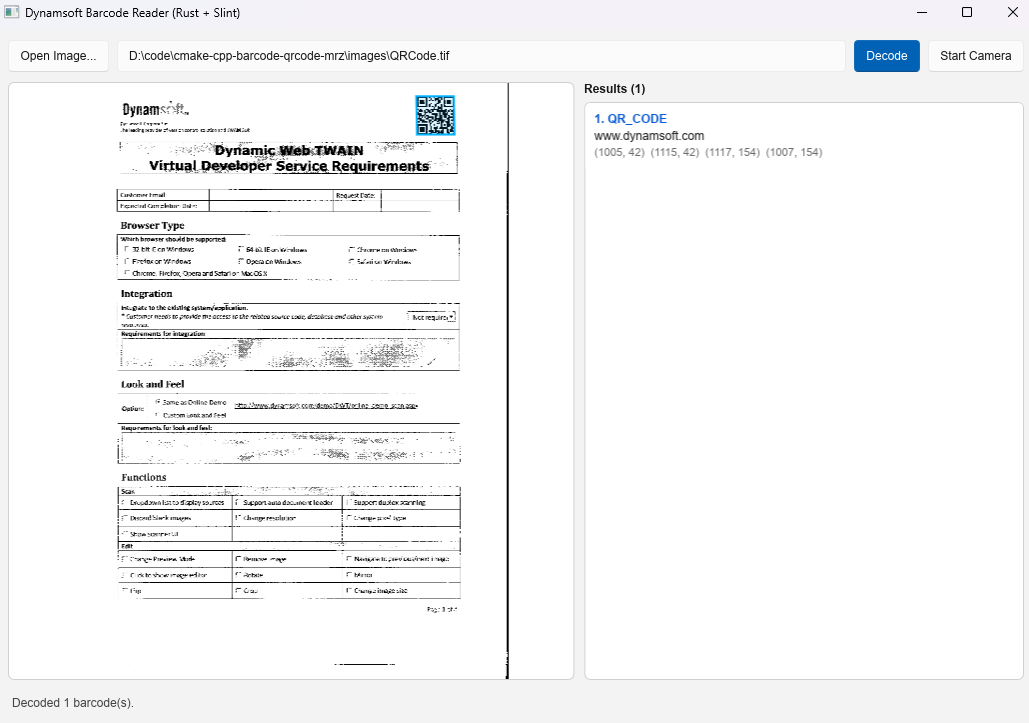
images/folder — or paste a full path into the field and click Decode. - The left pane shows the image with a blue quad around every detected barcode; the right pane lists format, text, and the four corner coordinates.
- The status bar reports the decoded count. Click Start Camera to switch to live frames, and Stop Camera to return to file decoding.
Set your own trial key in src/scanner.rs (DEFAULT_LICENSE); both binaries read the same constant.
Common Issues and Edge Cases
- Missing
TemplatesorModelsdirectories at runtime: The Capture Vision SDK requires its resource folders alongside the binary. Ifbuild.rsdoes not copy them to the output directory, the SDK silently fails to initialize templates and returns no results. Verify thatcopy_resource_directoriesruns successfully during the build. _strdupis Windows-only: The bridge code uses_strdupfor string duplication. On Linux and macOS, replace it with POSIXstrdupor guard it with#ifdef _WIN32to avoid compilation errors on non-Windows targets.- License initialization returns a non-zero code: This usually means the trial key has expired or the machine has no internet access for online validation. Check the error message printed by
init_licenseand request a new trial key if needed. The GUI shows the same error in its status bar instead of exiting. - Blue quads are offset from the barcodes: This happens when the GUI displays raw pixels but decodes the file directly, because the SDK applies EXIF orientation to files. Decode the
to_rgb8()buffer withdecode_barcode_buffer, asdecode_and_showdoes, so both share one coordinate space. include_modules!()cannot findMainWindow:build.rsmust callslint_build::compile("ui/app.slint")andslint-buildmust be listed under[build-dependencies], not[dependencies]. The first release build downloads and compiles Slint, so it takes noticeably longer than later builds.- A PDF decodes but shows no preview: Only raster formats get an image preview. Non-raster inputs fall back to
BarcodeReader::decode(path)and the results list still fills normally. - “Camera capture is only wired for Windows”: The live preview uses the bundled litecam library built on Media Foundation. On Linux and macOS the file-decoding GUI works unchanged, but the camera thread is not compiled.
Source Code
Get the complete sample project source code on GitHub. The repository contains both binaries described above: barcode-scanner for the CLI and barcode-reader-ui for the Slint desktop GUI.