


Dynamsoft vs ML Kit: Barcode Accuracy on 68 Images, 514 Codes
On 68 challenging Android test images holding 514 annotated barcodes, Google ML Kit matched 120 and Dynamsoft Barcode Reader matched 416 — 23.3% against 80.9%. Both SDKs were handed the same bitmap, in the same app, one after the other: no camera between them, no resizing, no per-SDK pre-processing.
The gap is not uniform. On single clean barcodes the two SDKs tie at 100%, they tie again on the five incomplete codes, and ML Kit averages 50 ms per image against Dynamsoft’s 75 ms. The 3.5× difference in matched codes comes from frames that hold several codes at once.
What you’ll build: A reproducible Android benchmark app that tests Dynamsoft Barcode Reader and Google ML Kit side-by-side across image, video, and remote web server modes — so you can quantify detection accuracy differences with your own barcode samples.
Key Takeaways
- Measured on this dataset: 68 images, 514 annotated barcodes. Dynamsoft matched 416 (80.9%), ML Kit 120 (23.3%). Mean time per image: 75 ms against 50 ms.
- The gap sits in multi-barcode frames. 19 of the images carry 432 of the 514 codes; there Dynamsoft matched 79.4% and ML Kit 14.8%.
- The 80.9% is a preset, not a ceiling. A read-rate template lifts Dynamsoft to 439/514 — 97.8% of the 449 distinct codes the file describes — including 68 of 68 vials and 96 of 96 Code 128, at 3.5–5× the time.
- Single clean barcodes are a tie. Low light, strong light, crumpled, poorly printed and dense-QR sets score 100% for both SDKs — 11 images, 16 codes.
- Nothing reverses. The closest categories are incomplete barcodes (3 of 5 each) and tiny barcodes (1 of 2 each), where the two SDKs land on the same count.
- Every number is re-runnable. Two full runs on the same device returned identical counts; the dataset, the app and the scoring rule are linked below.
Common Developer Questions
How accurate is Google ML Kit barcode scanning compared to Dynamsoft Barcode Reader on Android?
In this 68-image benchmark containing 514 expected barcodes, Dynamsoft Barcode Reader matched 416, an 80.9% detection rate, and Google ML Kit matched 120, or 23.3%. The largest differences appeared in multi-barcode scenes and domain-specific labels, while ML Kit processed each image faster on average (50 ms vs. 75 ms).
How do I benchmark two barcode SDKs objectively on Android without a live camera?
Use the same saved image or video input for both SDKs and run them through a shared benchmark harness rather than comparing live camera scans. That removes environmental noise such as lighting, motion, and framing differences, making the detection counts repeatable.
Which Android barcode SDK works best for damaged, blurred, or low-light barcodes?
In this dataset the easy categories do not separate the two SDKs: the single low-light image, the three strong-light images and the two crumpled labels score 100% for both Dynamsoft and ML Kit. Dim and damaged labels stay close as well — shadowed 71.4% against 57.1% (7 codes), tiny 50% against 50% (2 codes), incomplete 60% against 60% (5 codes). Where the two SDKs do separate is healthcare labels (11 of 11 against 5 of 11) and the custom-parameter set (6 of 6 against 3 of 6); the fourfold gaps in the full table come from multi-code sheets, not from damaged labels.
Can I re-run this benchmark on my own barcode images?
Yes. The sample app runs both SDKs on the same bitmap in image, video and HTTP-server modes, and the 68-image dataset ships an annotations.json that lists the expected text, format and corner points of all 514 codes. Score a returned value as a match only when its text equals the annotation for that code, count one match per annotated code, and the pinned versions reproduce 416/514 and 120/514.
Related Guides in This Cluster
- Browse comparison guides
- Run the iOS counterpart: ML Kit, Apple Vision, ZXing-CPP and Dynamsoft in SwiftUI
- See desktop barcode SDK trade-offs with ZXing
- Browse migration and alternatives guides
Demo Video: Dynamsoft vs. Google MLKit Barcode Scanner
Prerequisites
- Get a 30-day free trial license for Dynamsoft Barcode Reader.
How Each SDK Works: A Side-by-Side Overview
Google ML Kit Barcode Scanning
ML Kit is Google’s machine learning SDK for mobile applications, offering barcode scanning among other vision capabilities:
- Licensing: Free to use with no licensing costs
- Integration: Simple API with minimal setup required
- Support: Community-based support through documentation and forums
- Customization: Preset configurations with limited tuning options
- Use Cases: Consumer applications, prototyping, projects with budget constraints
Dynamsoft Barcode Reader
Dynamsoft Barcode Reader is a specialized SDK focused specifically on barcode recognition:
- Licensing: Commercial licensing model with free trial period available
- Integration: Comprehensive API with extensive configuration options
- Support: Direct technical support from engineering team
- Customization: Fine-grained control over recognition parameters and algorithms
- Use Cases: Enterprise applications, scenarios requiring high detection rates, challenging scanning conditions
Set Up the Benchmark Project
The project below is the one that produced the numbers on this page: one activity, both SDKs, the same bitmap.
Add Dependencies
dependencies {
    // Dynamsoft Barcode Reader
    implementation 'com.dynamsoft:barcodereaderbundle:11.6.4000'

    // Google ML Kit
    implementation 'com.google.mlkit:barcode-scanning:17.3.0'

    // For web server benchmark (optional)
    implementation 'org.nanohttpd:nanohttpd:2.3.1'
}
Project Structure
mlkit-dbr-benchmark/
├── app/
│   ├── src/main/java/
│   │   ├── fragments/
│   │   │   ├── ImageBenchmarkFragment.java
│   │   │   ├── VideoBenchmarkFragment.java
│   │   │   └── BenchmarkResultFragment.java
│   │   ├── server/
│   │   │   └── BenchmarkWebServer.java
│   │   └── BenchmarkConfig.java
│   └── res/layout/
└── README.md
Benchmark Methodology
One bitmap reaches both SDKs in the same process: cvRouter.capture(bitmap, EnumPresetTemplate.PT_READ_BARCODES) for Dynamsoft and BarcodeScanning.getClient(...).process(InputImage.fromBitmap(bitmap, 0)) for ML Kit. Neither engine sees a different frame, a different scale or a pre-processed copy, so a difference in the counts is a difference between the engines.
The app exposes three input modes:
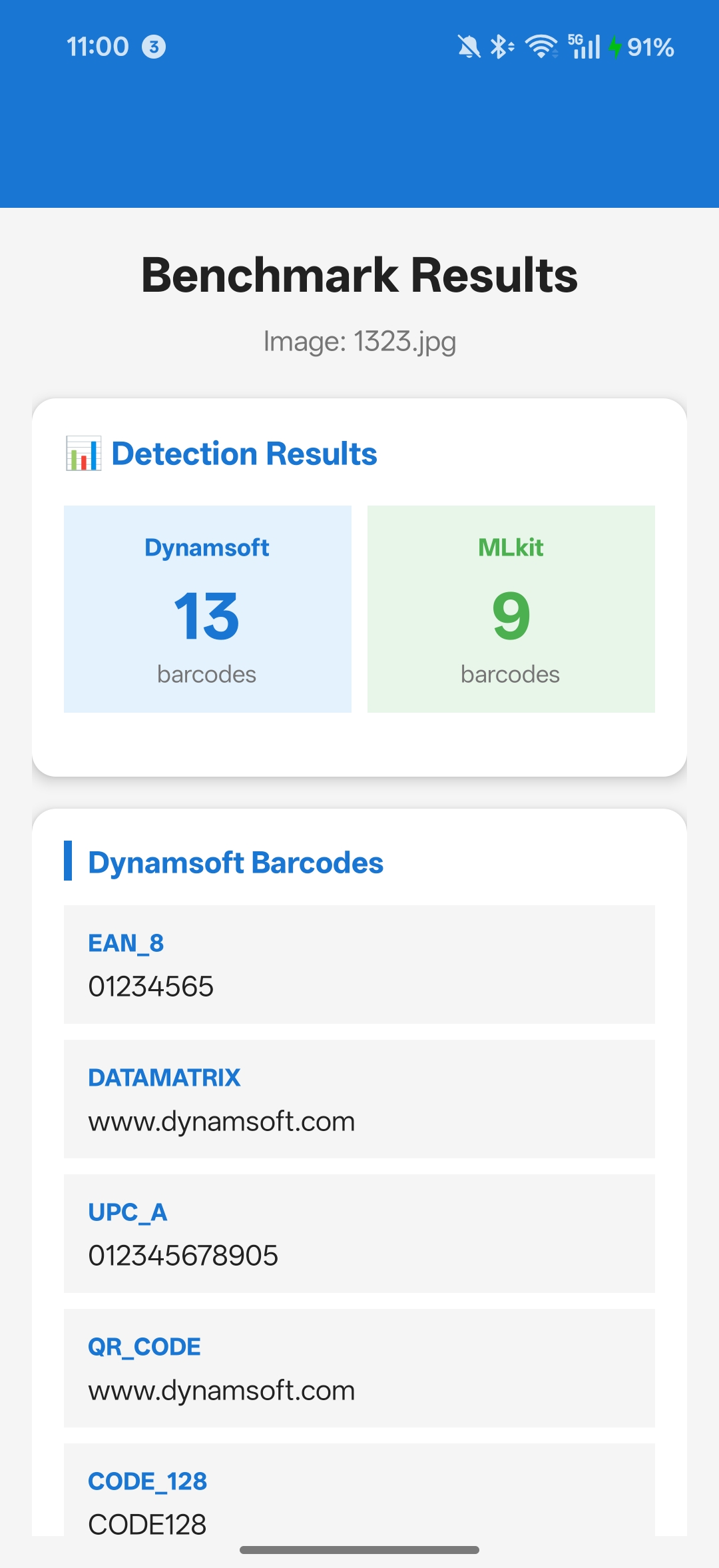
1. Image Benchmark
- Test with individual images containing various barcode types
- Evaluate detection under different conditions (blur, rotation, lighting)
- Compare detection counts and reliability
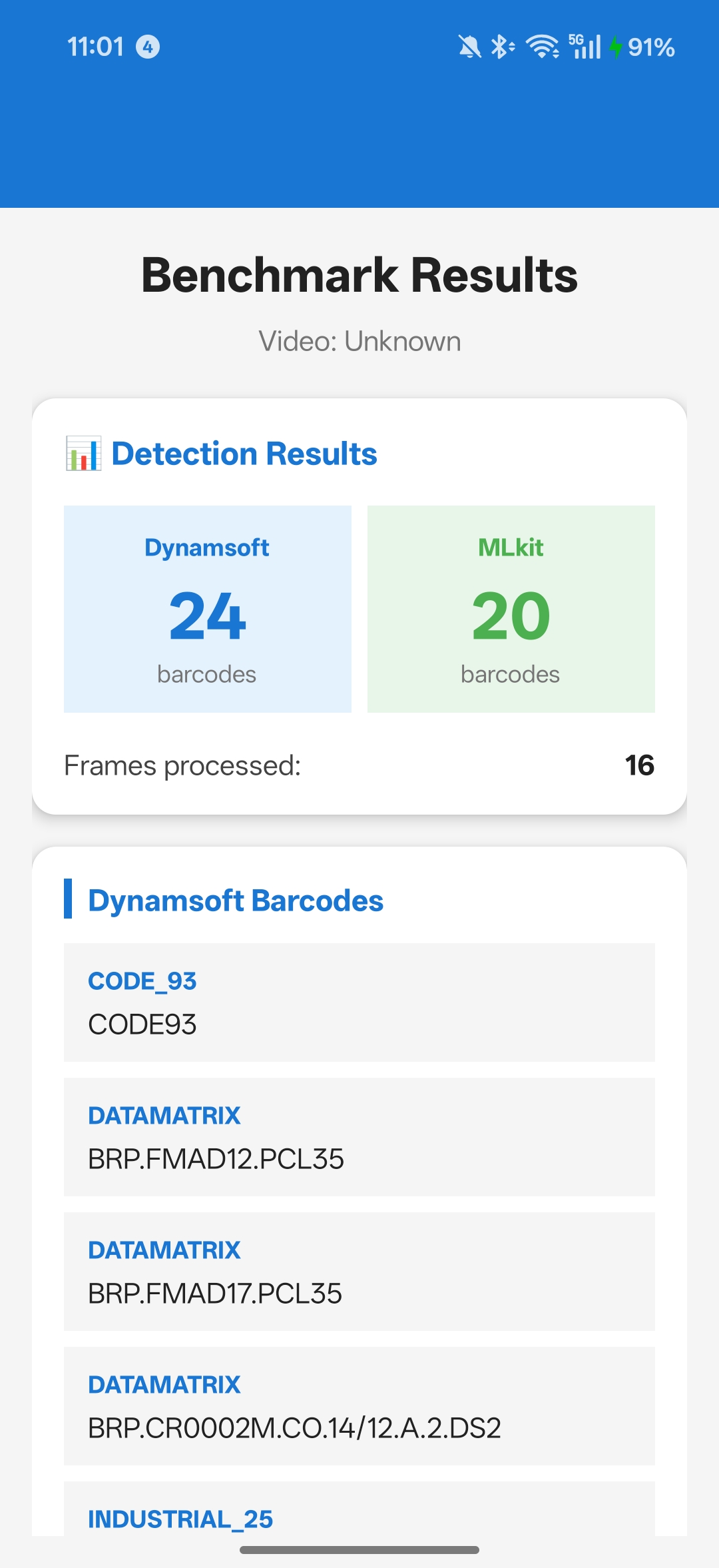
2. Video Benchmark
- Process video files frame-by-frame
- Test real-world scanning scenarios
- Measure consistency across frames
3. Web Server Benchmark
- Upload test images/videos from any device
- Batch processing capabilities
- Remote testing for team collaboration
Important: We intentionally exclude camera-based real-time scanning from this benchmark because live camera tests cannot provide objective, repeatable comparisons. Environmental factors (lighting, hand stability, device variations) introduce too many variables.
How the numbers in this article are counted
| Term | Rule applied to this dataset |
|---|---|
| Expected | the 514 barcodes listed in the dataset’s annotations.json, across 68 images |
| Matched | a returned value whose text equals the annotated text of that code, counted once per annotated code |
| Detection rate | matched ÷ expected |
| Precision | matching values ÷ all values returned, so a duplicate or a misread lowers precision without moving the detection count |
| Time | mean wall-clock per image, averaged over two passes on one device |
Versions. The measurement ran on the versions pinned above — com.dynamsoft:barcodereaderbundle:11.6.4000 and com.google.mlkit:barcode-scanning:17.3.0 — on an OPPO PLG110 running Android 17, in November 2026. Two full passes over the 68 images, submitted through the app’s HTTP mode, produced identical detection counts on both engines.
Image Benchmark: Step-by-Step Guide
Implementation
First, create a global configuration class to manage SDK settings:
public class BenchmarkConfig {
    // Control whether to use custom Dynamsoft template
    public static boolean USE_CUSTOM_TEMPLATE = false;

    // Dynamsoft template for optimized performance
    public static final String DYNAMSOFT_TEMPLATE_JSON = "{ /* template config */ }";
}
Initialize Both SDKs
public class ImageBenchmarkFragment extends Fragment {
    private CaptureVisionRouter cvRouter; // Dynamsoft
    private BarcodeScanner mlkitScanner;  // ML Kit

    private void initializeScanners() {
        // Initialize Dynamsoft
        cvRouter = new CaptureVisionRouter(requireContext());
        if (BenchmarkConfig.USE_CUSTOM_TEMPLATE) {
            cvRouter.initSettings(BenchmarkConfig.DYNAMSOFT_TEMPLATE_JSON);
        }

        // Initialize ML Kit
        BarcodeScannerOptions options = new BarcodeScannerOptions.Builder()
                .setBarcodeFormats(Barcode.FORMAT_ALL_FORMATS)
                .build();
        mlkitScanner = BarcodeScanning.getClient(options);
    }
}
Run the Benchmark
private void runBenchmark() {
    if (selectedBitmap == null) return;

    // Test Dynamsoft
    BenchmarkResult dynamsoftResult = testDynamsoft(selectedBitmap);

    // Test ML Kit
    BenchmarkResult mlkitResult = testMLKit(selectedBitmap);

    // Display comparison
    displayResults(dynamsoftResult, mlkitResult);
}

private BenchmarkResult testDynamsoft(Bitmap bitmap) {
    BenchmarkResult result = new BenchmarkResult("Dynamsoft");

    CapturedResult capturedResult = cvRouter.capture(
        bitmap,
        EnumPresetTemplate.PT_READ_BARCODES
    );

    if (capturedResult != null) {
        DecodedBarcodesResult barcodesResult =
            capturedResult.getDecodedBarcodesResult();
        if (barcodesResult != null && barcodesResult.getItems() != null) {
            for (BarcodeResultItem item : barcodesResult.getItems()) {
                result.barcodes.add(new BarcodeInfo(
                    item.getFormatString(),
                    item.getText()
                ));
            }
        }
    }

    return result;
}

private BenchmarkResult testMLKit(Bitmap bitmap) {
    BenchmarkResult result = new BenchmarkResult("MLkit");

    InputImage image = InputImage.fromBitmap(bitmap, 0);
    List<Barcode> barcodes = Tasks.await(mlkitScanner.process(image));

    if (barcodes != null) {
        for (Barcode barcode : barcodes) {
            result.barcodes.add(new BarcodeInfo(
                getBarcodeFormatName(barcode.getFormat()),
                barcode.getRawValue()
            ));
        }
    }

    return result;
}
Choose Image Test Scenarios That Reflect Production Conditions
Test with various image types to evaluate real-world performance:
- High-Quality Images: Perfect lighting, sharp focus, direct angle
- Blurred Images: Motion blur, out-of-focus scenarios
- Low Light: Dark environments, shadows
- Rotated/Skewed: Angled barcodes, perspective distortion
- Damaged Codes: Partially obscured, worn labels
- Multiple Barcodes: Several codes in one image
- Small Barcodes: Codes from distance or low resolution
Run the Video Benchmark to Simulate Continuous Scanning
Video testing simulates continuous scanning scenarios like conveyor belt scanning or mobile scanning workflows.
Process Frames at a Fixed Interval
public class VideoBenchmarkFragment extends Fragment {
    private static final long FRAME_INTERVAL_MS = 500; // 2 frames per second

    private void processVideo(Uri videoUri) {
        MediaMetadataRetriever retriever = new MediaMetadataRetriever();
        retriever.setDataSource(requireContext(), videoUri);

        String durationStr = retriever.extractMetadata(
            MediaMetadataRetriever.METADATA_KEY_DURATION
        );
        long videoDurationMs = Long.parseLong(durationStr);

        // Extract frames at regular intervals
        List<Bitmap> frames = new ArrayList<>();
        for (long time = 0; time < videoDurationMs * 1000;
             time += FRAME_INTERVAL_MS * 1000) {
            Bitmap frame = retriever.getFrameAtTime(
                time,
                MediaMetadataRetriever.OPTION_CLOSEST
            );
            if (frame != null) frames.add(frame);
        }
        retriever.release();

        // Run benchmark on all frames
        BenchmarkResult dynamsoftResult = testDynamsoftVideo(frames);
        BenchmarkResult mlkitResult = testMLKitVideo(frames);

        displayVideoResults(dynamsoftResult, mlkitResult, frames.size());
    }

    private BenchmarkResult testDynamsoftVideo(List<Bitmap> frames) {
        BenchmarkResult result = new BenchmarkResult("Dynamsoft");
        Set<String> uniqueBarcodes = new HashSet<>();

        for (int i = 0; i < frames.size(); i++) {
            CapturedResult capturedResult = cvRouter.capture(
                frames.get(i),
                EnumPresetTemplate.PT_READ_BARCODES
            );

            if (capturedResult != null) {
                DecodedBarcodesResult barcodesResult =
                    capturedResult.getDecodedBarcodesResult();
                if (barcodesResult != null && barcodesResult.getItems() != null) {
                    for (BarcodeResultItem item : barcodesResult.getItems()) {
                        String key = item.getFormatString() + ":" + item.getText();
                        if (!uniqueBarcodes.contains(key)) {
                            uniqueBarcodes.add(key);
                            result.barcodes.add(new BarcodeInfo(
                                item.getFormatString(),
                                item.getText(),
                                i // frame index
                            ));
                        }
                    }
                }
            }
        }

        result.framesProcessed = frames.size();
        return result;
    }
}
Video Test Scenarios That Reveal Real-World Differences
- Conveyor Belt Simulation: Items moving past camera
- Handheld Scanning: Natural movement and rotation
- Batch Scanning: Multiple items in sequence
- Varying Distance: Objects moving closer/farther from camera
Enable Remote Batch Testing via the Built-in Web Server
The web server mode enables team-wide testing and batch processing without requiring Android device access.
Implement the Server Endpoint
public class BenchmarkWebServer extends NanoHTTPD {
    private CaptureVisionRouter cvRouter;
    private BarcodeScanner mlkitScanner;

    public BenchmarkWebServer(Context context, int port) {
        super(port);
        this.context = context;
        initializeScanners();
    }

    @Override
    public Response serve(IHTTPSession session) {
        String uri = session.getUri();

        if (uri.equals("/api/benchmark") &&
            session.getMethod() == Method.POST) {
            return handleBenchmarkRequest(session);
        }

        if (uri.equals("/")) {
            return newFixedLengthResponse(
                Response.Status.OK,
                "text/html",
                getIndexHtml()
            );
        }

        return newFixedLengthResponse(
            Response.Status.NOT_FOUND,
            "text/plain",
            "Not Found"
        );
    }

    private Response handleBenchmarkRequest(IHTTPSession session) {
        // Parse uploaded file
        Map<String, String> files = new HashMap<>();
        session.parseBody(files);

        String filePath = files.get("file");
        File uploadedFile = new File(filePath);

        // Process with both SDKs
        JSONObject result = processFile(uploadedFile);

        return newFixedLengthResponse(
            Response.Status.OK,
            "application/json",
            result.toString()
        );
    }

    private JSONObject processFile(File file) throws Exception {
        Bitmap bitmap = BitmapFactory.decodeFile(file.getAbsolutePath());

        JSONObject result = new JSONObject();
        result.put("dynamsoft", runDynamsoftBenchmark(bitmap));
        result.put("mlkit", runMLKitBenchmark(bitmap));

        bitmap.recycle();
        return result;
    }
}
Web Interface Features
The benchmark includes a responsive web interface accessible from any browser:
- Drag & Drop Upload: Upload single images or entire folders
- Batch Processing: Test multiple files automatically
- Real-time Results: See detection counts as files are processed
- Cross-Platform: Test from desktop, tablet, or mobile
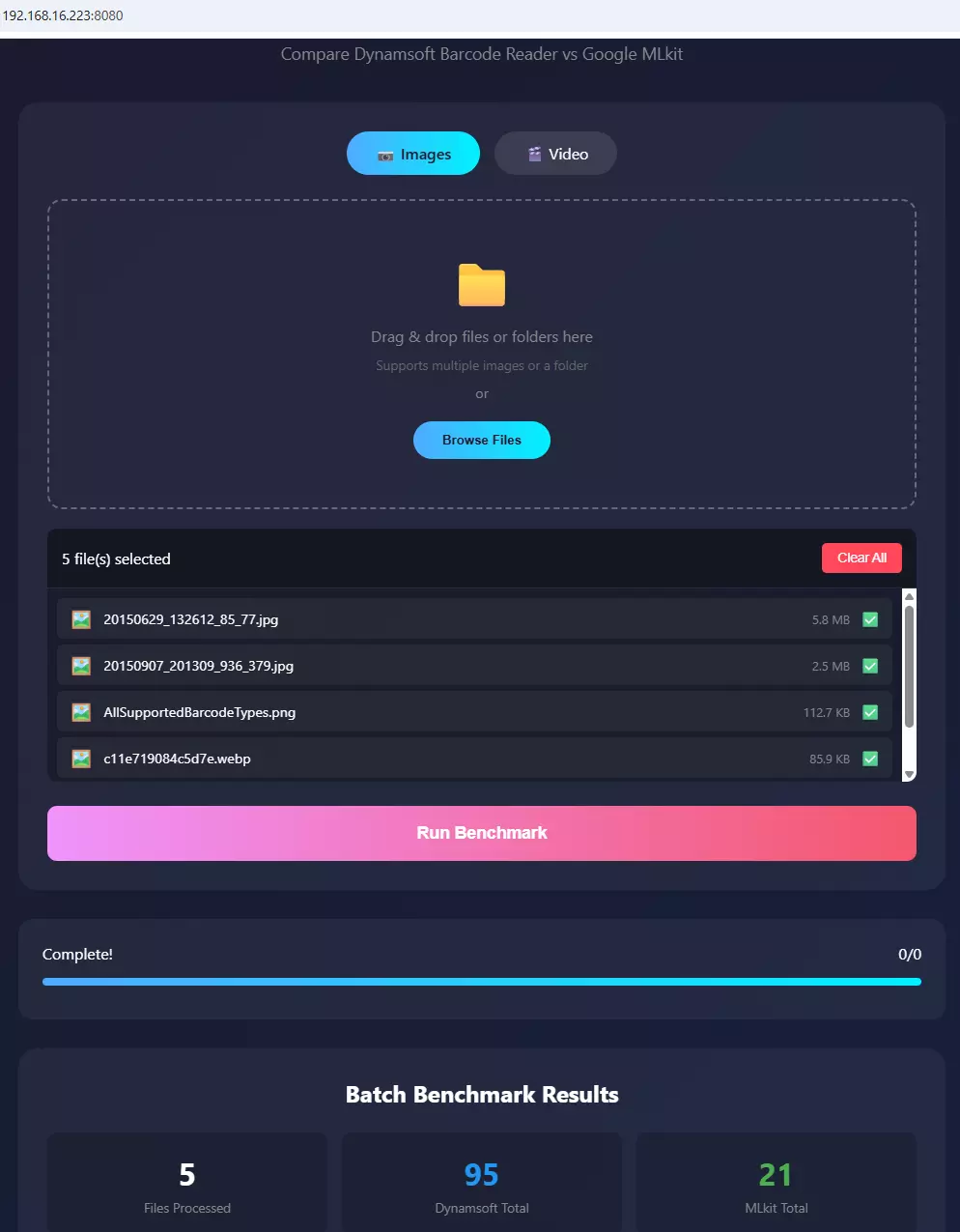
Steps to Run a Remote Batch Test
- Enable web server in the app
- Note the displayed IP address and port (e.g.,
http://192.168.1.100:8080) - Open the URL in any browser on your network
- Upload test images or videos
- Review comprehensive results showing barcode detection for both SDKs
Benchmark Results: Dynamsoft vs. ML Kit on Challenging Images
To quantify the accuracy gap with objective data, the benchmark app was run against the Dynamsoft challenging-images open dataset — 68 real-world images spanning lighting extremes, multi-barcode layouts, domain-specific labels, DataMatrix codes, and damaged or incomplete barcodes. Its annotations.json states 68 images and 514 barcodes, and lists the text, format and corner points of every one, which is where both totals below come from.
Aggregate Results (68 Images, 514 Expected Barcodes)
| SDK | Matched | Detection Rate | Precision | Mean Time / Image |
|---|---|---|---|---|
| Dynamsoft Barcode Reader 11.6.4000 | 416 / 514 | 80.9% | 99.0% (416/420) | 75 ms |
| Google ML Kit barcode-scanning 17.3.0 | 120 / 514 | 23.3% | 96.8% (120/124) | 50 ms |
Dynamsoft matched 3.5× more annotated barcodes than ML Kit across this dataset. ML Kit was 1.5× faster on the mean — 1.3× on the median, 40 ms against 52 ms — and still left more than three out of four expected codes unread.
Detection Rate by Category
Counts in brackets are matched ÷ annotated, so every rate in the table divides out on its own.
| Category | Images | Dynamsoft | Google ML Kit |
|---|---|---|---|
| Low light | 1 | 100.0% (1/1) | 100.0% (1/1) |
| Strong light | 3 | 100.0% (3/3) | 100.0% (3/3) |
| Crumpled barcodes | 2 | 100.0% (2/2) | 100.0% (2/2) |
| Poorly printed | 2 | 100.0% (2/2) | 100.0% (2/2) |
| Dense barcodes | 3 | 100.0% (8/8) | 100.0% (8/8) |
| Healthcare labels | 2 | 100.0% (11/11) | 45.5% (5/11) |
| Retail | 3 | 100.0% (3/3) | 66.7% (2/3) |
| Air travel (ticket & luggage) | 2 | 100.0% (3/3) | 33.3% (1/3) |
| Off-screen barcodes | 2 | 100.0% (2/2) | 50.0% (1/2) |
| Barcode with shadow | 4 | 71.4% (5/7) | 57.1% (4/7) |
| Custom scan parameters | 6 | 100.0% (6/6) | 50.0% (3/6) |
| DataMatrix | 15 | 85.2% (23/27) | 74.1% (20/27) |
| Multi-symbology / multi-barcode | 10 | 98.6% (73/74) | 40.5% (30/74) |
| Single-symbology / multi-barcode | 7 | 91.3% (116/127) | 18.9% (24/127) |
| Batch scanning | 2 | 66.7% (154/231) | 4.3% (10/231) |
| Tiny barcodes | 2 | 50.0% (1/2) | 50.0% (1/2) |
| Incomplete barcodes | 2 | 60.0% (3/5) | 60.0% (3/5) |
| Total | 68 | 80.9% (416/514) | 23.3% (120/514) |
Analysis
Multi-barcode scenes expose the largest gap. Batch scanning is the starkest case: the sheet holds 68 vials, and the annotation file carries two entries for most of the labels — the same digits with a leading zero at the same corner points, UPC-A read as EAN-13 — 136 entries on a sheet of 68 vials. Dynamsoft matched 64 of those labels with the default preset and ML Kit matched none. On the 95-code QR sheet Dynamsoft matched 90 and ML Kit 10. Across the three multi-barcode categories — 19 images, 432 annotations — Dynamsoft matched 343 (79.4%) and ML Kit 64 (14.8%).
Domain-specific labels consistently favor Dynamsoft. Healthcare medication labels (5 of 11 for ML Kit), airline boarding passes (1 of 3) and retail product labels (2 of 3) all follow the same pattern: ML Kit struggles when barcodes appear in unconventional sizes, angles, or print quality typical of real-world packaging and documents.
Both SDKs achieve 100% on clean single barcodes. Low light, strong light, crumpled paper, poorly printed, and dense-data QR codes all score 100% for both SDKs when each image contains one clearly framed barcode — 11 images, 16 codes. If your app scans one code at a time under predictable conditions, ML Kit’s speed advantage is meaningful and accuracy is not a differentiator.
Damaged and tiny codes do not separate them either. The two incomplete images put both SDKs on 3 of 5, and the two tiny-barcode images put both on 1 of 2. Only five and two codes are involved, so treat those rows as anecdote rather than a ranking; nothing in this dataset reverses the overall result.
What this measurement covers. 68 images from one public dataset, decoded on one OPPO PLG110 running Android 17, with the two versions pinned above. The files went in through the app’s HTTP mode, which decodes each image and calls the same two methods the image screen calls. It does not speak for live-camera behaviour, where focus, motion and exposure add their own failure modes, nor for other datasets or for either SDK’s current release. The time column is a single-device wall clock: comparable between the two SDKs in this app, not a throughput guarantee.
How an Accuracy Template Lifts the Read Rate
The 80.9% above is one configuration — PT_READ_BARCODES, the preset the sample calls whenever no template is loaded. A preset that has to answer any query in a few milliseconds stops early on a sheet of 68 labels: it read 64 of the 68 vials. The Android bundle also ships a read-rate preset, and CaptureVisionRouter.initSettings() accepts a template JSON at runtime, so the same app can run a different configuration without a rebuild.
Same 68 images, same device, one file uploaded through the app’s template panel:
| Default preset | Accuracy template | |
|---|---|---|
| Annotations matched | 416 / 514 (80.9%) | 439 / 514 (85.4%) |
| Distinct codes matched | 416 / 449 (92.7%) | 439 / 449 (97.8%) |
| Mean time per image | 77 ms | 273 ms |
| Vial sheet / 95-QR sheet / 96-Code 128 sheet | 64 / 90 / 89 | 68 / 95 / 96 |
The two denominators are different things. annotations.json lists 514 annotations, but 65 of them sit on the same corner points as another entry with the same digits and only a leading zero of difference — so the file describes 449 distinct codes, not 514. On that base the template reads 97.8%, and the vial sheet at 68 of 68 is complete; the 68 annotations it cannot match on that sheet are the duplicate entries, not missed labels.
The time column is the least stable number here. The default preset measured 77 ms on every pass; the template measured 273 ms when the device was fresh and 427–587 ms after an hour of benchmarking, so read the ratio as 3.5× at best and plan for 5×.
Nine images change, eight up and one down:
| Image | Default | Template |
|---|---|---|
| batch-scanning-2.jpg — 95 QR codes | 90 / 95 | 95 / 95 |
| single-symbology-multiple-barcodes-2.jpg — 96 Code 128 | 89 / 96 | 96 / 96 |
| batch-scanning-1.jpg — 68 vials, 136 annotations | 64 labels | 68 labels |
| single-symbology-multiple-barcodes-3.png — 13 codes | 10 / 13 | 12 / 13 |
| datamatrix-1.jpg — 5 codes | 2 / 5 | 5 / 5 |
| incomplete-1.jpg — 4 codes | 3 / 4 | 4 / 4 |
| single-symbology-multiple-barcodes-4.jpg — 2 codes | 1 / 2 | 2 / 2 |
| datamatrix-15.jpg — 1 code | 0 / 1 | 1 / 1 |
| custom-scan-parameters-10.jpg — 1 code | 1 / 1 | 0 / 1 |
Why the Template Stops at 439
Ten distinct codes stay unmatched — 75 annotations in total, because 65 of those are the vial-sheet duplicates — and none of the ten is a tuning failure:
- Three are annotation slips on the vial sheet. They are EAN-13 entries whose digits match no label the camera can see, while the UPC-A entry at the same corner points reads fine. Nobody can satisfy them.
- Two are behind a specular highlight on
barcode-with-shadow-1.jpg, where a blown-out band crosses both symbols. The upper one does decode once the region is cropped and contrast-stretched. - Two need more pixels per module than the frame offers. The code in
tiny-barcodes-4.jpgis about 30 px tall and decodes at 3× upscale;incomplete-2.jpgis only 201×200 px and also decodes only when upscaled. - One each in the 13-code and 6-code sheets sit at the frame edge, and one in
custom-scan-parameters-10.jpgis read by the default preset and lost by this template — the one regression in the run.
Everything past this point is about feeding the engine more pixels per module — upscaling small frames, tiling large ones, re-running the region that failed — which is a pipeline decision above the template, and a different article.
The template sets five things:
| Setting | Template value | What it changes |
|---|---|---|
ExpectedBarcodesCount |
999 |
keeps searching after the first codes are found, instead of stopping at “enough” |
LocalizationModes |
connected blocks, lines, statistics, scan directly | four ways to find a candidate region instead of one |
DeblurModes |
based on location bin, threshold, direct, smoothing, deep analysis | retries a symbol that failed on the first binarization |
GrayscaleTransformationModes |
original and inverted | white-on-black labels and glare |
BinarizationModes |
BM_LOCAL_BLOCK |
uneven lighting across one sheet |
The full file is dbr-android-read-all-barcodes.json (106 lines). Load it with cvRouter.initSettings(templateJson) and call capture(bitmap, "ReadAllBarcodes"), or drop it into the template panel of the app’s web UI and re-run the dataset — that second path is how the table above was produced.
Two things to know. initSettings() returns an error code rather than throwing, and the sample ignores it: a malformed template leaves the router without settings and every capture comes back empty, which looks exactly like a detection failure. And this section is Dynamsoft-only tuning — ML Kit exposes no comparable surface — so the comparison tables stay defaults against defaults; the template shows what the default leaves on the table, not a second head-to-head.
Reproducibility
The dataset, the app and the counting rule are all public, so every number on this page can be re-derived instead of taken on trust.
| What you need | Where it is |
|---|---|
| The 68 images and their ground truth | challenging-images — annotations.json declares total_images: 68 and total_barcodes: 514, then lists text, format and corner points per image |
| The app that produced the counts | examples/mlkit-dbr-benchmark — both SDKs behind one Bitmap, in image, video and HTTP-server modes; the current build also scores ZXing-C++ 3.0.2 in the same pass |
| The versions and the device | com.dynamsoft:barcodereaderbundle:11.6.4000, com.google.mlkit:barcode-scanning:17.3.0, OPPO PLG110 on Android 17 |
| The accuracy template | dbr-android-read-all-barcodes.json — upload it through the app’s template panel, or pass it to initSettings() |
git clone https://github.com/yushulx/android-camera-barcode-mrz-document-scanner.git
cd android-camera-barcode-mrz-document-scanner/examples/mlkit-dbr-benchmark
./gradlew.bat installDebug
Load the dataset through image mode or the built-in HTTP server, then compare each returned text with annotations.json under the rule in How the numbers in this article are counted: one match per annotated code, text equality only, duplicates counted once. That rule is what produces 416/514, 120/514 and every bracketed count in the category table. Running it twice on the same device returned the same 416 and 120; the template recipe returned 439 on each of its passes.
Common Issues & Edge Cases
- ML Kit returns no results on low-resolution frames: ML Kit requires a minimum image resolution for reliable detection. If frames extracted from video are smaller than ~640×480 px, use
OPTION_CLOSEST_SYNCwhen extracting frames and consider upscaling before processing. - Dynamsoft license not initialized before first scan: Calling
cvRouter.capture()before the license handshake completes will return an empty result silently. Always awaitLicenseManager.initLicense()completion before running benchmarks. Tasks.await()blocks the thread it is called on for ML Kit: the call insidetestMLKit()has to run on a background executor, not the UI thread, or the app stalls until the model returns and can trip an ANR on slower devices. Keep the frame loop in that executor and post only the result back to the view.initSettings()fails silently when the return code is ignored: it returns an error code instead of throwing, so a rejected template leaves the router without settings and everycapture()comes back empty. Check the code, and clear the template (resetSettings()) before re-uploading a changed one.
How to Decide Which SDK Fits Your Project
Verdict: everything above this line is measurement; this paragraph is the recommendation that follows from it, and it is an interpretation rather than another data point. If the scanner sees one clean barcode at a time in good light, either SDK works and ML Kit costs nothing. As soon as a frame carries several codes, a worn label or a difficult angle, the split on the 432 annotations inside multi-barcode frames is 79.4% to 14.8% — and 98.6% to 17.4% of the 367 distinct codes in those frames once Dynamsoft runs the accuracy template. That template is the configuration to plan around when a missed scan costs more than a few hundred extra milliseconds.
| Best fit | Poor fit | |
|---|---|---|
| ML Kit barcode-scanning 17.3.0 | Single-code scanning in controlled conditions; prototypes and proofs of concept; apps that must avoid a commercial licence | Multi-code frames; damaged, low-contrast or angled labels; workflows where a missed scan has an operational cost |
| Dynamsoft Barcode Reader 11.6.4000 | Multi-barcode capture, checkout and warehouse lanes, worn labels, configurable templates | A one-off utility where the bundled Google dependency is already enough |
Tested with: Android BarcodeReaderBundle 11.6.4000 and ML Kit barcode-scanning:17.3.0, submitted through the app’s HTTP mode on an OPPO PLG110 running Android 17. Benchmark date: November 2026.
Effort and licensing: both are a Gradle dependency and a similar capture call; ML Kit ships under Google’s terms at no cost, Dynamsoft needs a licence per application. The benchmark app runs both against the same images, so the comparison is like for like.
Google ML Kit May Be Appropriate When:
- Cost is a primary factor (no licensing fees)
- Building prototypes, proofs-of-concept, or personal projects
- Scanning environment is controlled (good lighting, stable positioning)
- Barcode quality is consistently high
- Integration simplicity is prioritized
- Your use case is single-barcode, controlled-environment scanning where both SDKs deliver near-100% detection
Dynamsoft Barcode Reader May Be Appropriate When:
- Higher detection accuracy is required — 80.9% against 23.3% over the 514 annotated codes, and 79.4% against 14.8% on the 432 codes inside multi-barcode frames
- Scanning conditions vary (lighting, angles, distances)
- Processing worn, shadowed or custom-configured labels — the shadow set is the narrowest lead in the run (5 of 7 against 4 of 7), while custom scan parameters land at 6 of 6 against 3 of 6
- Missed scans have operational or safety implications
- Advanced customization is needed
- Direct technical support is valuable
- Cross-platform deployment is planned