


How to Build a Go Barcode and QR Code Reader with Dynamsoft Capture Vision SDK
The goBarcodeQrSDK module reads barcodes and QR codes from images, PDFs, and TIFFs in Go by wrapping the Dynamsoft Capture Vision SDK (Barcode Reader 11.6.50) C++ API behind a pure-C bridge compiled with CMake and called through cgo. Because cgo cannot call C++ directly, the project compiles src/bridge.cpp into bridge.dll / libbridge.so / libbridge.dylib and exposes DBR_* functions that Go calls. PDFs take a second path: the Go layer renders each page to PNG with go-pdfium running as WebAssembly, then feeds the bitmap through the same bridge. The whole pipeline builds and runs on Windows x64, Linux x64, and macOS (Apple Silicon + Intel), and is verified by a cross-platform GitHub Actions workflow.
What you’ll build: a Go module (github.com/yushulx/goBarcodeQrSDK/v2) that wraps CCaptureVisionRouter, plus a command-line reader and web example, with DecodeFile, DecodeStream, and multi-page PDF support — and a Docker image that runs the reader in a container.
Key Takeaways
- The DCV SDK is C++-only from version 10 onwards; cgo needs a C bridge (
bridge.h+src/bridge.cpp) compiled as a shared library with CMake. - Go calls
DBR_DecodeFile/DBR_DecodeFileInMemory; both delegate toCCaptureVisionRouter::CaptureMultiPages, which reads single images and multi-page TIFFs in one call. - PDFs are the exception:
DecodeFilechecks the extension andDecodeStreamchecks the%PDFmagic number, then renders every page with go-pdfium at 3× scale before decoding the bitmaps. - The
Barcoderesult struct carriesText,Format, four corner coordinates (X1–Y4), andPageIdfor multi-page documents. - Shared libraries are resolved at runtime via
PATH(Windows),LD_LIBRARY_PATH(Linux), or@rpath(macOS); the repo shipsrun_windows_test.ps1,run_linux_test.sh, andrun_mac_test.sh. - A three-OS GitHub Actions workflow rebuilds the bridge and runs
go testplus both examples to catch platform regressions automatically.
Common Developer Questions
Can cgo call the Dynamsoft C++ SDK directly?
No. cgo can only call C (and using C++ struct layout across the boundary is unsafe for this API), so the module adds a C bridge: bridge.h declares plain DBR_* functions and src/bridge.cpp implements them in extern "C", forwarding to CCaptureVisionRouter. Go then links only the bridge library.
How do you read barcodes from images and PDFs in Go?
Call obj.DecodeFile(path) (this detects .pdf and reroutes to the PDFium renderer) or obj.DecodeStream(bytes), which applies the same routing by sniffing the %PDF signature so an upload never needs a temp file. Both return ([]Barcode, error); each barcode includes PageId so you know which page of a multi-page PDF or TIFF it came from.
Which barcode formats does the module support?
The default template enables 1D and 2D barcodes including QR Code, Micro QR, Data Matrix, PDF417 (and Micro PDF417), Aztec, DotCode, and all standard linear formats. You control the set via template.json (BarcodeFormatIds such as BF_QR_CODE, BF_DATAMATRIX, BF_ALL).
Why do I need CMake and a C++ compiler?
You must build the bridge shared library (bridge.dll, libbridge.so, libbridge.dylib) before using the module. Windows needs Visual Studio or MinGW, Linux needs g++, and macOS needs Xcode Command Line Tools — CMake generates the build for all three.
This article is Part 3 in a 3-Part Series.
Prerequisites
- Go Environment: Ensure you have Go installed and configured on your system. You can download it from the official Go website.
- Dynamsoft Capture Vision SDK: Download the SDK from the Dynamsoft website. A valid license key is required to use the SDK. You can obtain a free trial license from Dynamsoft.
- CMake: Required to build the C++ bridge shared library. Download from cmake.org.
- Development Tools: A C++17-compatible compiler is required.
- Windows: Visual Studio (MSVC) or mingw-w64 GCC.
- Linux: The default
g++from your distribution. - macOS: Xcode Command Line Tools (
xcode-select --install).
Step 1: Creating a Go Module for Reading Barcodes and QR Codes
As outlined in the Go documentation, we create a Go module named goBarcodeQrSDK using the terminal.
mkdir goBarcodeQrSDK
cd goBarcodeQrSDK
go mod init github.com/yushulx/goBarcodeQrSDK/v2
Executing this command generates a go.mod file, which is essential for tracking your code’s dependencies.
module github.com/yushulx/goBarcodeQrSDK/v2

go 1.24.0

require github.com/klippa-app/go-pdfium v1.17.2
go-pdfium is the only direct dependency. It brings in tetratelabs/wazero (a pure-Go WebAssembly runtime) and jolestar/go-commons-pool, which is how PDF pages get rendered without an extra native library.
Step 2: Preparing the Dynamsoft SDK and Building the C++ Bridge
The Dynamsoft Capture Vision SDK is compatible with multiple platforms, including Windows (x64), Linux (x64, ARM64), and macOS (x64, ARM64). This guide covers Windows x64, Linux x64, and macOS configurations.
2.1 Organising the SDK Files
Within the goBarcodeQrSDK directory, create a dcv folder. Copy the SDK’s shared libraries and header files into it following this layout:
|- goBarcodeQrSDK
    |- dcv
        |- include
            |- bridge.h                        (custom C bridge header)
            |- DynamsoftBarcodeReader.h
            |- DynamsoftCaptureVisionRouter.h
            |- DynamsoftCore.h
            |- DynamsoftLicense.h
            |- DynamsoftUtility.h
            |- (other DCV headers)
        |- lib
            |- win
                |- bridge.dll                  (built in step 2.4)
                |- DynamsoftBarcodeReaderx64.dll
                |- DynamsoftCaptureVisionRouterx64.dll
                |- DynamsoftCorex64.dll
                |- DynamsoftLicensex64.dll
                |- DynamsoftUtilityx64.dll
                |- (CodeParser, DocumentNormalizer,
                   IdentityUtility, LabelRecognizer,
                   ImageProcessing, NeuralNetwork,
                   DynamicPdf)
                |- Models\*.data                (decoder model files)
            |- linux
                |- libbridge.so
                |- libDynamsoftBarcodeReader.so
                |- libDynamsoftCaptureVisionRouter.so
                |- libDynamsoftCore.so
                |- libDynamsoftLicense.so
                |- libDynamsoftUtility.so
                |- (same extra components as Windows)
                |- Models\*.data
            |- mac
                |- libbridge.dylib
                |- libDynamsoftBarcodeReader.dylib
                |- libDynamsoftCaptureVisionRouter.dylib
                |- libDynamsoftCore.dylib
                |- libDynamsoftLicense.dylib
                |- libDynamsoftUtility.dylib
                |- (same extra components as Windows)
                |- Models\*.data
        |- resource
            |- Templates\DBR-PresetTemplates.json
            |- Models\*.data
            |- ParserResources\*.data
The repo ships all 13 of the SDK’s component libraries on each platform (the Windows folder also carries the matching .lib import libraries), plus bridge.* once you build it. The bridge links only the five that barcode decoding needs, so you can switch to an MRZ or document preset later without downloading the SDK again.
2.2 Creating the C Bridge Header (dcv/include/bridge.h)
Because Go’s CGo can interface with C but not directly with C++, we define a pure-C interface in bridge.h that the C++ implementation will expose via extern "C":
#pragma once

#ifdef __cplusplus
extern "C"
{
#endif

#define DBR_OK    0
#define DBR_ERROR -1

typedef struct
{
    char *text;
    char *format;
    int x1, y1, x2, y2, x3, y3, x4, y4;
    int pageId; // Page ID for multi-page documents (PDF, TIFF)
} BarcodeResultC;

typedef struct
{
    BarcodeResultC *results;
    int count;
} BarcodeResultArrayC;

// Core functions
int         DBR_InitLicense(const char *license, char *errorMsg, int errorMsgBufferLen);
void       *DBR_CreateInstance();
void        DBR_DestroyInstance(void *instance);
const char *DBR_GetVersion();

// Settings functions
int DBR_InitRuntimeSettingsWithString(void *instance, const char *content, int conflictMode, char *errorMsg, int errorMsgBufferLen);
int DBR_InitRuntimeSettingsWithFile  (void *instance, const char *fileName, int conflictMode, char *errorMsg, int errorMsgBufferLen);

// Decoding functions
int  DBR_DecodeFile        (void *instance, const char *fileName, BarcodeResultArrayC **results, char *errorMsg, int errorMsgBufferLen);
int  DBR_DecodeFileInMemory(void *instance, const unsigned char *buffer, int bufferLen, BarcodeResultArrayC **results, char *errorMsg, int errorMsgBufferLen);
void DBR_FreeTextResults   (BarcodeResultArrayC **results);

#ifdef __cplusplus
}
#endif
2.3 Creating the C++ Bridge Implementation (src/bridge.cpp)
The implementation wraps the Dynamsoft Capture Vision C++ API and exposes it through the C bridge defined above. The key class is CCaptureVisionRouter, which replaces the older CBarcodeReader from v9.x:
#include "../dcv/include/bridge.h"
#include "DynamsoftCaptureVisionRouter.h"
#include "DynamsoftLicense.h"
#include "DynamsoftBarcodeReader.h"
#include "DynamsoftUtility.h"
#include <string>
#include <vector>

using namespace dynamsoft::license;
using namespace dynamsoft::cvr;
using namespace dynamsoft::dbr;
using namespace dynamsoft::basic_structures;

struct BarcodeReaderInstance
{
    CCaptureVisionRouter *router;
    CCapturedResultArray *lastResultArray;
    std::vector<BarcodeResultC> results;
    std::vector<std::string> textStrings;
    std::vector<std::string> formatStrings;

    BarcodeReaderInstance() : router(nullptr), lastResultArray(nullptr) {}
};

extern "C"
{
    int DBR_InitLicense(const char *license, char *errorMsg, int errorMsgSize)
    {
        return CLicenseManager::InitLicense(license, errorMsg, errorMsgSize);
    }

    void *DBR_CreateInstance()
    {
        BarcodeReaderInstance *instance = new BarcodeReaderInstance();
        instance->router = new CCaptureVisionRouter();
        return instance;
    }

    void DBR_DestroyInstance(void *instance)
    {
        if (instance)
        {
            BarcodeReaderInstance *inst = static_cast<BarcodeReaderInstance *>(instance);
            if (inst->lastResultArray) inst->lastResultArray->Release();
            delete inst->router;
            delete inst;
        }
    }

    const char *DBR_GetVersion()
    {
        return CBarcodeReaderModule::GetVersion();
    }

    int DBR_InitRuntimeSettingsWithString(void *instance, const char *content, int conflictMode,
                                          char *errorMsg, int errorMsgSize)
    {
        BarcodeReaderInstance *inst = static_cast<BarcodeReaderInstance *>(instance);
        return inst->router->InitSettings(content, errorMsg, errorMsgSize);
    }

    int DBR_InitRuntimeSettingsWithFile(void *instance, const char *fileName, int conflictMode,
                                        char *errorMsg, int errorMsgSize)
    {
        BarcodeReaderInstance *inst = static_cast<BarcodeReaderInstance *>(instance);
        return inst->router->InitSettingsFromFile(fileName, errorMsg, errorMsgSize);
    }

    // DBR_DecodeFile and DBR_DecodeFileInMemory implementations use
    // inst->router->CaptureMultiPages() and iterate CCapturedResultArray
    // to populate BarcodeResultArrayC (see full source for details).
} // extern "C"
2.4 Building the Bridge Shared Library with CMake
A CMakeLists.txt at the project root compiles src/bridge.cpp into a shared library called bridge and places it next to the Dynamsoft SDK libraries:
cmake_minimum_required(VERSION 3.10)
project(bridge)

set(CMAKE_CXX_STANDARD 17)

include_directories(${CMAKE_CURRENT_SOURCE_DIR}/dcv/include)

if(WIN32)
    link_directories(${CMAKE_CURRENT_SOURCE_DIR}/dcv/lib/win)
    set(DYNAMSOFT_LIBS
        DynamsoftBarcodeReaderx64
        DynamsoftCaptureVisionRouterx64
        DynamsoftCorex64
        DynamsoftLicensex64
        DynamsoftUtilityx64
    )
elseif(APPLE)
    link_directories(${CMAKE_CURRENT_SOURCE_DIR}/dcv/lib/mac)
    set(DYNAMSOFT_LIBS
        DynamsoftBarcodeReader
        DynamsoftCaptureVisionRouter
        DynamsoftCore
        DynamsoftLicense
        DynamsoftUtility
    )
else()
    link_directories(${CMAKE_CURRENT_SOURCE_DIR}/dcv/lib/linux)
    set(DYNAMSOFT_LIBS
        DynamsoftBarcodeReader
        DynamsoftCaptureVisionRouter
        DynamsoftCore
        DynamsoftLicense
        DynamsoftUtility
    )
endif()

add_library(bridge SHARED src/bridge.cpp)
target_link_libraries(bridge ${DYNAMSOFT_LIBS})

if(WIN32)
    set_target_properties(bridge PROPERTIES
        RUNTIME_OUTPUT_DIRECTORY ${CMAKE_CURRENT_SOURCE_DIR}/dcv/lib/win
        LINK_FLAGS "/DEF:${CMAKE_CURRENT_SOURCE_DIR}/bridge.def"
    )
elseif(APPLE)
    set_target_properties(bridge PROPERTIES
        LIBRARY_OUTPUT_DIRECTORY ${CMAKE_CURRENT_SOURCE_DIR}/dcv/lib/mac
    )
else()
    set_target_properties(bridge PROPERTIES
        LIBRARY_OUTPUT_DIRECTORY ${CMAKE_CURRENT_SOURCE_DIR}/dcv/lib/linux
    )
endif()
The bridge.def half is Windows-only but not optional. MSVC exports nothing from a DLL by default, and extern "C" does not change that, so without a module-definition file listing DBR_* the cgo link step fails with undefined: DBR_CreateInstance. The file lists all nine exports explicitly:
EXPORTS
DBR_InitLicense
DBR_CreateInstance
DBR_DestroyInstance
DBR_GetVersion
DBR_InitRuntimeSettingsWithString
DBR_InitRuntimeSettingsWithFile
DBR_DecodeFile
DBR_DecodeFileInMemory
DBR_FreeTextResults
Build the library:
# Linux / macOS
cmake -B build .
cmake --build build

# Windows (Visual Studio)
cmake -B build .
cmake --build build --config Release
After a successful build, bridge.dll (Windows), libbridge.so (Linux), or libbridge.dylib (macOS) will appear inside the corresponding dcv/lib/<platform> directory alongside the Dynamsoft SDK libraries.
Step 3: Writing the CGo Wrapper for the Dynamsoft Capture Vision SDK
CGo enables Go programs to call C code directly, facilitating the integration of C/C++ libraries. Create a file named reader.go inside the goBarcodeQrSDK directory.
3.1 CGo Build Directives
package goBarcodeQrSDK

import (
    "errors"
    "strings"
    "unsafe"

    /*
       #cgo CFLAGS: -I${SRCDIR}/dcv/include
       #cgo darwin  LDFLAGS: -L${SRCDIR}/dcv/lib/mac   -lbridge -Wl,-rpath,${SRCDIR}/dcv/lib/mac
       #cgo linux   LDFLAGS: -L${SRCDIR}/dcv/lib/linux -lbridge -Wl,-rpath,${SRCDIR}/dcv/lib/linux
       #cgo windows LDFLAGS: -L${SRCDIR}/dcv/lib/win   -lbridge
       #include <stdlib.h>
       #include "bridge.h"
    */
    "C"
)
The CGo linker directives reference only the bridge shared library. The bridge library itself depends on the Dynamsoft Capture Vision DLLs, so the OS will load them transitively at runtime.
3.2 The Barcode Struct
type Barcode struct {
    Text   string
    Format string
    X1     int
    Y1     int
    X2     int
    Y2     int
    X3     int
    Y3     int
    X4     int
    Y4     int
    PageId int // Page ID for multi-page documents (PDF, TIFF)
}
The PageId field tracks which page of a multi-page PDF or TIFF a barcode was found on.
3.3 License Initialisation
func InitLicense(license string) (int, string) {
    c_license := C.CString(license)
    defer C.free(unsafe.Pointer(c_license))

    errorBuffer := make([]byte, 256)
    ret := C.DBR_InitLicense(c_license,
        (*C.char)(unsafe.Pointer(&errorBuffer[0])),
        C.int(len(errorBuffer)))

    return int(ret), string(errorBuffer)
}
DBR_InitLicense delegates to CLicenseManager::InitLicense in the DCV SDK.
3.4 Creating and Destroying a Reader Instance
type BarcodeReader struct {
    handler unsafe.Pointer
}

func CreateBarcodeReader() *BarcodeReader {
    handler := C.DBR_CreateInstance()
    if handler == nil {
        return nil
    }
    return &BarcodeReader{handler: handler}
}

func DestroyBarcodeReader(obj *BarcodeReader) {
    C.DBR_DestroyInstance(obj.handler)
}
Internally, DBR_CreateInstance allocates a CCaptureVisionRouter instance, which is the primary entry point of the DCV SDK.
3.5 Configuring the Barcode Reader
Two helpers load scanning parameters. The DCV SDK uses a JSON-based template format (see template.json in the repository):
// SetParameters applies a JSON template string.
func (reader *BarcodeReader) SetParameters(params string) (int, string) {
    errorBuffer := make([]byte, 256)
    c_params := C.CString(params)
    defer C.free(unsafe.Pointer(c_params))

    ret := C.DBR_InitRuntimeSettingsWithString(reader.handler, c_params,
        C.int(2),
        (*C.char)(unsafe.Pointer(&errorBuffer[0])),
        C.int(len(errorBuffer)))
    return int(ret), string(errorBuffer)
}

// LoadTemplateFile applies a JSON template from a file path.
func (reader *BarcodeReader) LoadTemplateFile(params string) (int, string) {
    errorBuffer := make([]byte, 256)
    c_params := C.CString(params)
    defer C.free(unsafe.Pointer(c_params))

    ret := C.DBR_InitRuntimeSettingsWithFile(reader.handler, c_params,
        C.int(2),
        (*C.char)(unsafe.Pointer(&errorBuffer[0])),
        C.int(len(errorBuffer)))
    return int(ret), string(errorBuffer)
}
3.6 Decoding Barcodes from a File
DecodeFile now returns ([]Barcode, error) instead of the old (int, []Barcode). A .pdf path short-circuits to DecodePDF; every other file goes to CaptureMultiPages, which handles a standard image or a multi-page TIFF in a single call:
func (reader *BarcodeReader) DecodeFile(filePath string) ([]Barcode, error) {
    if strings.HasSuffix(strings.ToLower(filePath), ".pdf") {
        return reader.DecodePDF(filePath)
    }

    c_filePath := C.CString(filePath)
    defer C.free(unsafe.Pointer(c_filePath))

    var resultArray *C.BarcodeResultArrayC
    errorBuffer := make([]byte, 256)
    ret := C.DBR_DecodeFile(reader.handler, c_filePath, &resultArray,
        (*C.char)(unsafe.Pointer(&errorBuffer[0])),
        C.int(len(errorBuffer)))

    barcodes := reader.processResults(resultArray)

    errorMsg := strings.TrimRight(string(errorBuffer), "\x00")
    if ret != 0 && len(barcodes) == 0 {
        if errorMsg == "" {
            errorMsg = "Decoding failed"
        }
        return barcodes, errors.New(errorMsg)
    }
    return barcodes, nil
}
3.7 Decoding Barcodes from a Memory Buffer
A new DecodeStream function reads barcodes directly from a byte slice, useful when the image data is already in memory. PDF bytes are recognised by their %PDF magic number and routed to the same renderer:
func (reader *BarcodeReader) DecodeStream(data []byte) ([]Barcode, error) {
    if len(data) == 0 {
        return []Barcode{}, errors.New("empty data buffer")
    }

    // Check for PDF signature
    if len(data) > 4 && string(data[:4]) == "%PDF" {
        return reader.DecodePDFStream(data)
    }

    cData := (*C.uchar)(unsafe.Pointer(&data[0]))
    length := C.int(len(data))

    var resultArray *C.BarcodeResultArrayC
    errorBuffer := make([]byte, 256)
    ret := C.DBR_DecodeFileInMemory(reader.handler, cData, length, &resultArray,
        (*C.char)(unsafe.Pointer(&errorBuffer[0])),
        C.int(len(errorBuffer)))

    barcodes := reader.processResults(resultArray)

    errorMsg := strings.TrimRight(string(errorBuffer), "\x00")
    if ret != 0 && len(barcodes) == 0 {
        if errorMsg == "" {
            errorMsg = "Decoding failed"
        }
        return barcodes, errors.New(errorMsg)
    }
    return barcodes, nil
}
Under the hood DecodePDF and DecodePDFStream hand the bytes to a WebAssembly PDFium pool, render each page at scale 3.0 (about 216 DPI — high enough that small QR codes survive the rasterisation), encode it as PNG, and call DBR_DecodeFileInMemory on the result. The pool defaults to 10 workers; SetPdfiumWorkerCount(n) resizes it and InitPdfium() pre-warms it, so a long-running server pays the per-worker startup cost at boot instead of on the first request.
3.8 SDK Version Query
func GetVersion() string {
    version := C.DBR_GetVersion()
    return C.GoString(version)
}
DBR_GetVersion forwards to CBarcodeReaderModule::GetVersion(), which reports the bundled core version — 11.6.50.9329 on Windows and 11.6.50.29329 on Linux and macOS with the current dcv folder.
Step 4: Building and Testing the Go Module
Now that you have set up the CGo wrapper alongside the barcode reading functions, compile and test the module using a _test.go file.
package goBarcodeQrSDK

import (
    "fmt"
    "os"
    "testing"
    "time"
)

func TestInitLicense(t *testing.T) {
    ret, _ := InitLicense("LICENSE-KEY")
    if ret != 0 {
        t.Fatalf(`InitLicense() = %d`, ret)
    }
}

func TestCreateBarcodeReader(t *testing.T) {
    obj := CreateBarcodeReader()
    if obj == nil {
        t.Fatalf(`Failed to create instance`)
    }
}

func TestDestroyBarcodeReader(t *testing.T) {
    obj := CreateBarcodeReader()
    DestroyBarcodeReader(obj)
}

func TestSetParameters(t *testing.T) {
    obj := CreateBarcodeReader()

    templateData, err := os.ReadFile("template.json")
    if err != nil {
        t.Fatalf("Failed to read template.json: %v", err)
    }

    ret, _ := obj.SetParameters(string(templateData))
    if ret != 0 {
        t.Fatalf(`SetParameters() = %d`, ret)
    }
}

func TestLoadTemplateFile(t *testing.T) {
    obj := CreateBarcodeReader()
    ret, _ := obj.LoadTemplateFile("template.json")
    if ret != 0 {
        t.Fatalf(`LoadTemplateFile() = %d`, ret)
    }
}

func TestDecodeFile(t *testing.T) {
    obj := CreateBarcodeReader()

    templateData, err := os.ReadFile("template.json")
    if err != nil {
        t.Fatalf("Failed to read template.json: %v", err)
    }

    obj.SetParameters(string(templateData))
    _, err = obj.DecodeFile("test.png")
    if err != nil {
        t.Fatalf(`DecodeFile() failed: %v`, err)
    }
}

func TestApp(t *testing.T) {
    ret, _ := InitLicense("LICENSE-KEY")
    if ret != 0 {
        t.Fatalf(`InitLicense() = %d`, ret)
    }
    obj := CreateBarcodeReader()

    templateData, err := os.ReadFile("template.json")
    if err != nil {
        t.Fatalf("Failed to read template.json: %v", err)
    }

    obj.SetParameters(string(templateData))
    startTime := time.Now()
    barcodes, err := obj.DecodeFile("test.png")
    elapsed := time.Since(startTime)
    fmt.Println("DecodeFile() time cost:", elapsed)

    if err != nil {
        t.Fatalf(`DecodeFile() failed: %v`, err)
    }

    for _, barcode := range barcodes {
        fmt.Printf("Page %d | %s | %s\n", barcode.PageId, barcode.Format, barcode.Text)
    }
}
The repository’s own goBarcodeQrSDK_test.go adds three cases on top of the snippet above: TestGetVersion, TestDecodeStream (decodes test_multi.pdf straight from memory) and TestDecodeFileParallel, which sets SetPdfiumWorkerCount(20) and decodes the same PDF in 20 goroutines — the test that catches PDFium pool regressions.
Running go test directly may fail because the OS cannot find the shared libraries at runtime:
exit status 0xc0000135 # Windows
Use the provided scripts to configure the library search path before running the tests.
-
PowerShell script for Windows (
run_windows_test.ps1):$originalPath = $env:PATH $dllPath = "dcv\lib\win" $env:PATH = "$dllPath;$originalPath" go test $env:PATH = $originalPath -
Shell script for Linux (
run_linux_test.sh):#!/bin/bash ORIGINAL_LD_LIBRARY_PATH=$LD_LIBRARY_PATH export LD_LIBRARY_PATH="dcv/lib/linux:$LD_LIBRARY_PATH" go test export LD_LIBRARY_PATH=$ORIGINAL_LD_LIBRARY_PATH -
Shell script for macOS (
run_mac_test.sh):#!/bin/bash ORIGINAL_DYLD_LIBRARY_PATH=$DYLD_LIBRARY_PATH export DYLD_LIBRARY_PATH="dcv/lib/mac:$DYLD_LIBRARY_PATH" go test export DYLD_LIBRARY_PATH=$ORIGINAL_DYLD_LIBRARY_PATH
After running these scripts, you should see all tests pass.
Step 5: Implementing a Go Barcode and QR Code Reader
Create a test.go file inside example/command-line and add the following code:
package main

import (
    "fmt"
    "os"
    "time"

    "github.com/yushulx/goBarcodeQrSDK/v2"
)

func main() {
    version := goBarcodeQrSDK.GetVersion()
    fmt.Println("SDK version:", version)

    filename := "test.png"
    license := "LICENSE-KEY"
    template := "template.json"

    if len(os.Args) > 1 {
        for i := 1; i < len(os.Args); i++ {
            switch i {
            case 1:
                if _, err := os.Stat(os.Args[1]); err == nil {
                    filename = os.Args[1]
                } else {
                    fmt.Println("Input file not found, using test.png instead.")
                }
            case 2:
                license = os.Args[2]
            case 3:
                if _, err := os.Stat(os.Args[3]); err == nil {
                    template = os.Args[3]
                } else {
                    fmt.Println("Template file not found, using template.json instead.")
                }
            }
        }
    } else {
        fmt.Println("Usage: reader [image] [license] [template]")
        return
    }

    ret, errMsg := goBarcodeQrSDK.InitLicense(license)
    if ret != 0 {
        fmt.Println("InitLicense():", ret, errMsg)
        return
    }

    obj := goBarcodeQrSDK.CreateBarcodeReader()
    ret, errMsg = obj.LoadTemplateFile(template)
    if ret != 0 {
        fmt.Println("LoadTemplateFile():", ret, errMsg)
    }

    startTime := time.Now()
    barcodes, err := obj.DecodeFile(filename)
    elapsed := time.Since(startTime)
    fmt.Println("DecodeFile() time cost:", elapsed)

    if err != nil {
        fmt.Printf("DecodeFile() failed: %v\n", err)
        return
    }

    for i, barcode := range barcodes {
        fmt.Printf("--- Barcode %d (Page %d) ---\n", i+1, barcode.PageId)
        fmt.Println("Text:  ", barcode.Text)
        fmt.Println("Format:", barcode.Format)
        fmt.Printf("Location: (%d,%d) (%d,%d) (%d,%d) (%d,%d)\n",
            barcode.X1, barcode.Y1, barcode.X2, barcode.Y2,
            barcode.X3, barcode.Y3, barcode.X4, barcode.Y4)
    }
}
Remember to substitute LICENSE-KEY with your own license key.
Utilise the provided scripts to load the necessary libraries and run the program on each platform.
-
PowerShell script for Windows (
example/command-line/run_windows.ps1):$originalPath = $env:PATH $LIBRARY_PATH = "../../dcv/lib/win" Write-Host "LIBRARY_PATH set to $LIBRARY_PATH" $env:PATH = "$LIBRARY_PATH;" + $env:PATH go run test.go test.png $env:PATH = $originalPath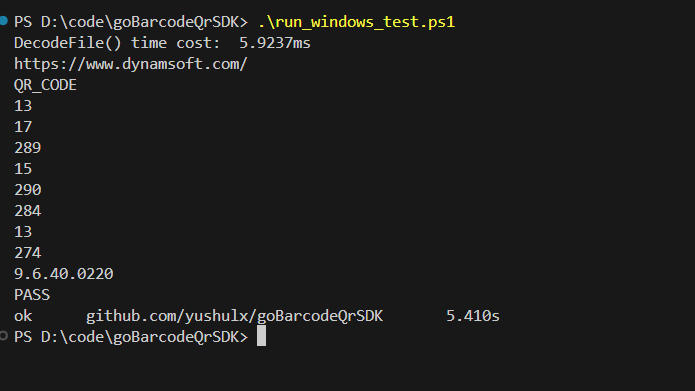
-
Shell script for Linux (
example/command-line/run_linux.sh):#!/bin/bash originalPath=$LD_LIBRARY_PATH LIBRARY_PATH="../../dcv/lib/linux" echo "LIBRARY_PATH set to $LIBRARY_PATH" export LD_LIBRARY_PATH="$LIBRARY_PATH:$originalPath" go run test.go test.png export LD_LIBRARY_PATH=$originalPath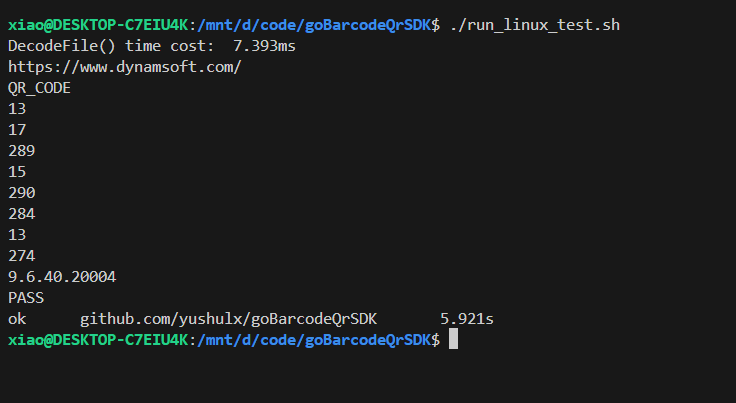
Step 6: Deploying the Go Barcode and QR Code Reader to Docker
-
Create a
Dockerfilefile in the root directory of your project:# Build stage FROM golang:1.24 AS builder COPY . /usr/src/myapp WORKDIR /usr/src/myapp/example/command-line # Copy Dynamsoft shared libraries into system library path so the # built goBarcodeQrSDK binaries can find them at runtime RUN cp -r ../../dcv/lib/linux/* /usr/lib/x86_64-linux-gnu/ RUN cp ../../template.json /usr/local/bin/ RUN go mod download RUN CGO_ENABLED=1 go build -v -o /usr/local/bin/reader . # Runtime stage FROM debian:bookworm-slim RUN apt-get update && apt-get install -y --no-install-recommends \ libc6 libstdc++6 libgomp1 ca-certificates \ && rm -rf /var/lib/apt/lists/* COPY --from=builder /usr/local/bin/reader /usr/local/bin/reader COPY --from=builder /usr/src/myapp/example/command-line/template.json /usr/local/bin/template.json # Dynamsoft SDK needs its model files COPY --from=builder /usr/src/myapp/dcv/lib/linux/Models /usr/local/share/dcv/Models WORKDIR /usr/local/bin ENTRYPOINT ["reader"]Three things are essential in this Dockerfile:
dcv/lib/linux/*(not the oldlib/linux) is copied into/usr/lib/x86_64-linux-gnu/so the Linux.sofiles load at runtime.- The
golang:1.24builder produces areaderbinary compiled withCGO_ENABLED=1. - The multi-stage runtime image ships the
Models/*.datafiles the SDK needs for accurate decoding.
-
Build your Docker image:
docker build -t golang-barcode-qr-reader . -
Run the container, mounting a local folder containing the image to scan:
docker run -it --rm -v <image-folder>:/app golang-barcode-qr-reader reader /app/<image-file> <license-key> <template-file>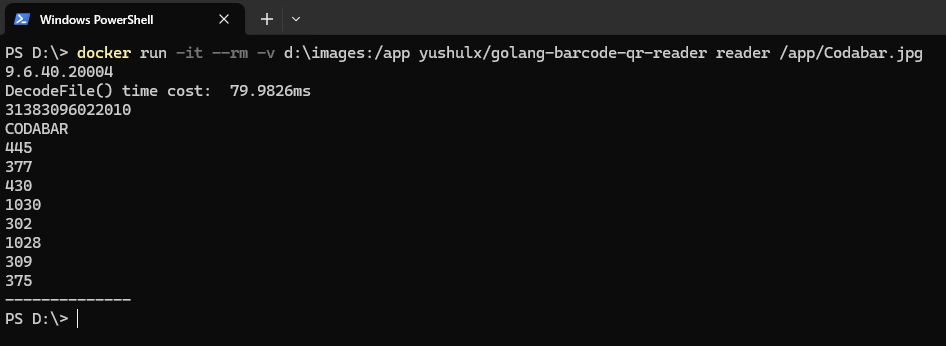
Docker Image with Golang Barcode QR Reader
https://hub.docker.com/r/yushulx/golang-barcode-qr-reader
docker run -it --rm -v <image-folder>:/app yushulx/golang-barcode-qr-reader:latest reader /app/<image-file> <license-key> <template-file>
Common Issues & Edge Cases
exit status 0xc0000135on Windows — the Dynamsoft DLLs are not onPATH. Runrun_windows_test.ps1or adddcv\lib\wintoPATHbeforego run.undefined: DBR_CreateInstancewhile building on Windows — the freshbridge.dllexported nothing. Wirebridge.definto the CMake target as shown in step 2.4 and rebuild; MSVC does not exportextern "C"symbols on its own.go: error loading shared libraries: libDynamsoftBarcodeReader.soon Linux — setLD_LIBRARY_PATH=dcv/lib/linux(seerun_linux_test.sh), or install the.sofiles into/usr/lib/x86_64-linux-gnu/.dyld: Library not loadedon macOS — add the@rpathwithinstall_name_tool -add_rpath dcv/lib/mac <binary>asrun_mac_test.shdoes;DYLD_LIBRARY_PATHcan be ignored on recent macOS.- License initialization fails — the license string in the examples is a sample; replace it with your own trial or commercial key before distributing your app.
- Multi-page PDFs — pass the file directly to
DecodeFile; the module renders each page with PDFium and setsPageIdon each result. Larger PDFs take longer because every page is rendered and decoded.
Source Code
Get the complete sample project source code on GitHub
Disclaimer:
The wrappers and sample code on Dynamsoft Codepool are community editions, shared as-is and not fully tested. Dynamsoft is happy to provide technical support for users exploring these solutions but makes no guarantees.