




Troubleshooting
If you run into any issues, feel free to contact us.
1. Initialization Issues
If you see one of the following errors, the app may have failed to initialize.
Please contact us directly and include the error code.
| Error Code Range | Description |
|---|---|
| -10002 – -10004 | No valid license for Barcode Decoding. |
| -10030 – -10059 | Failed to parse the template file template_cvr.json. |
| -70060 | No valid license for Batch Scanning. |
| -70063 | Failed to parse the template file template_panorama.json. |
| -80001 | Failed to parse the template file template_ui.json. |
2. Performance or Crash Issues
When reporting performance problems or crashes, please provide the following:
- A screen recording that reproduces the issue.
Tip: Enable Settings → Debug → Display Memory Debug Info during recording for more detail.
- Screenshots or a screen recording of the current settings.
- Debug images captured during scanning.
- Device information (model, OS version, available storage, etc.).
Capturing Original Images
- Go to Settings → Debug and enable
Save Original Images. - Return to the scan page and perform a typical scan.
- After scanning, the original images are saved to your photo album. Copy them to your desktop.
- Compress (ZIP) the images and share the file with Dynamsoft.
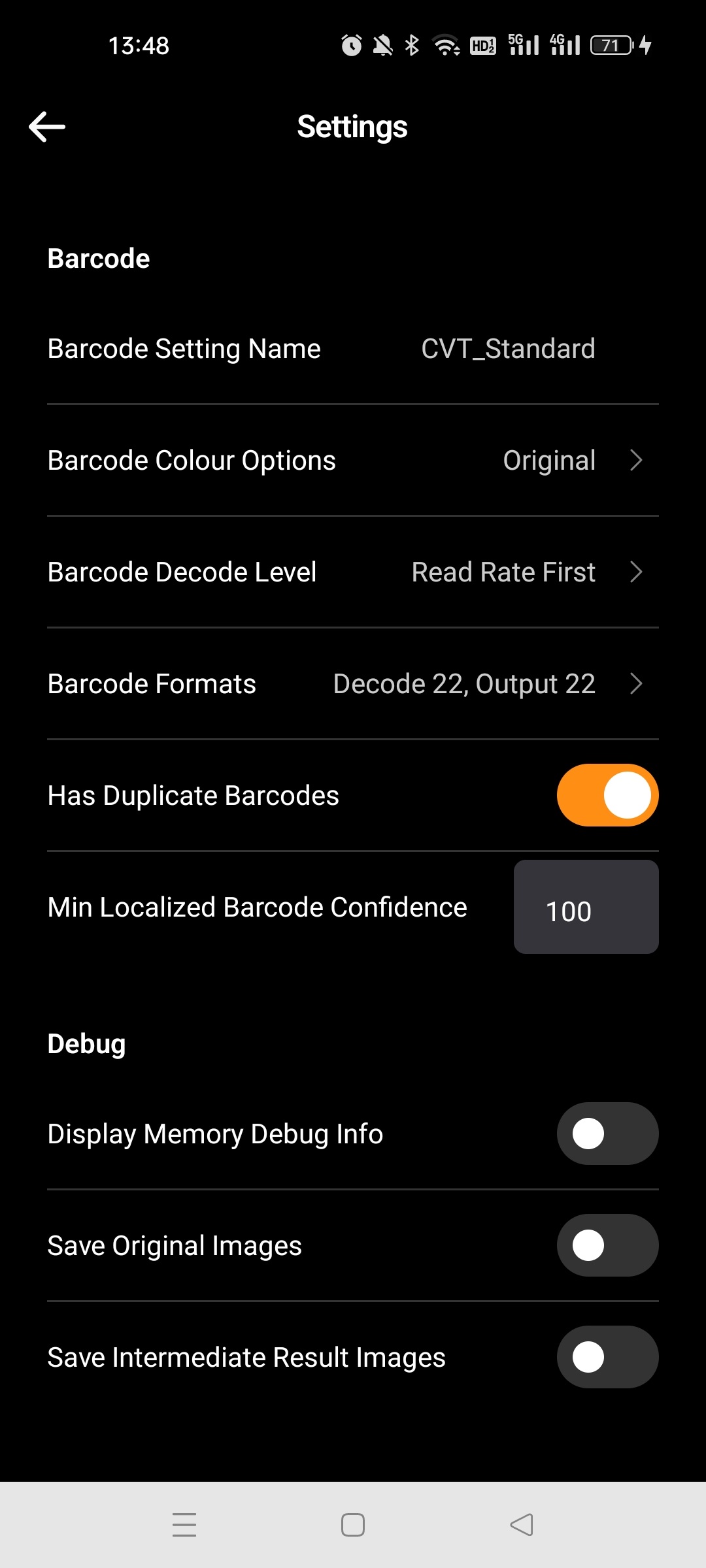
If requested, you may also need to provide:
- Original Images with Barcode Highlights
- Intermediate Result Images
These additional images are saved to the same folder once their respective options are enabled.
 Yes
Yes No
No