


How to Decode Barcodes and QR Codes in PHP Laravel with Dynamsoft Barcode SDK
When you need to decode barcodes and QR codes in a PHP Laravel application, you cannot call a C++ SDK directly from PHP without extra work. This tutorial shows how to bridge PHP and the Dynamsoft Capture Vision SDK through a standalone Python service, avoiding compiled PHP extensions and keeping the application compatible across PHP versions.
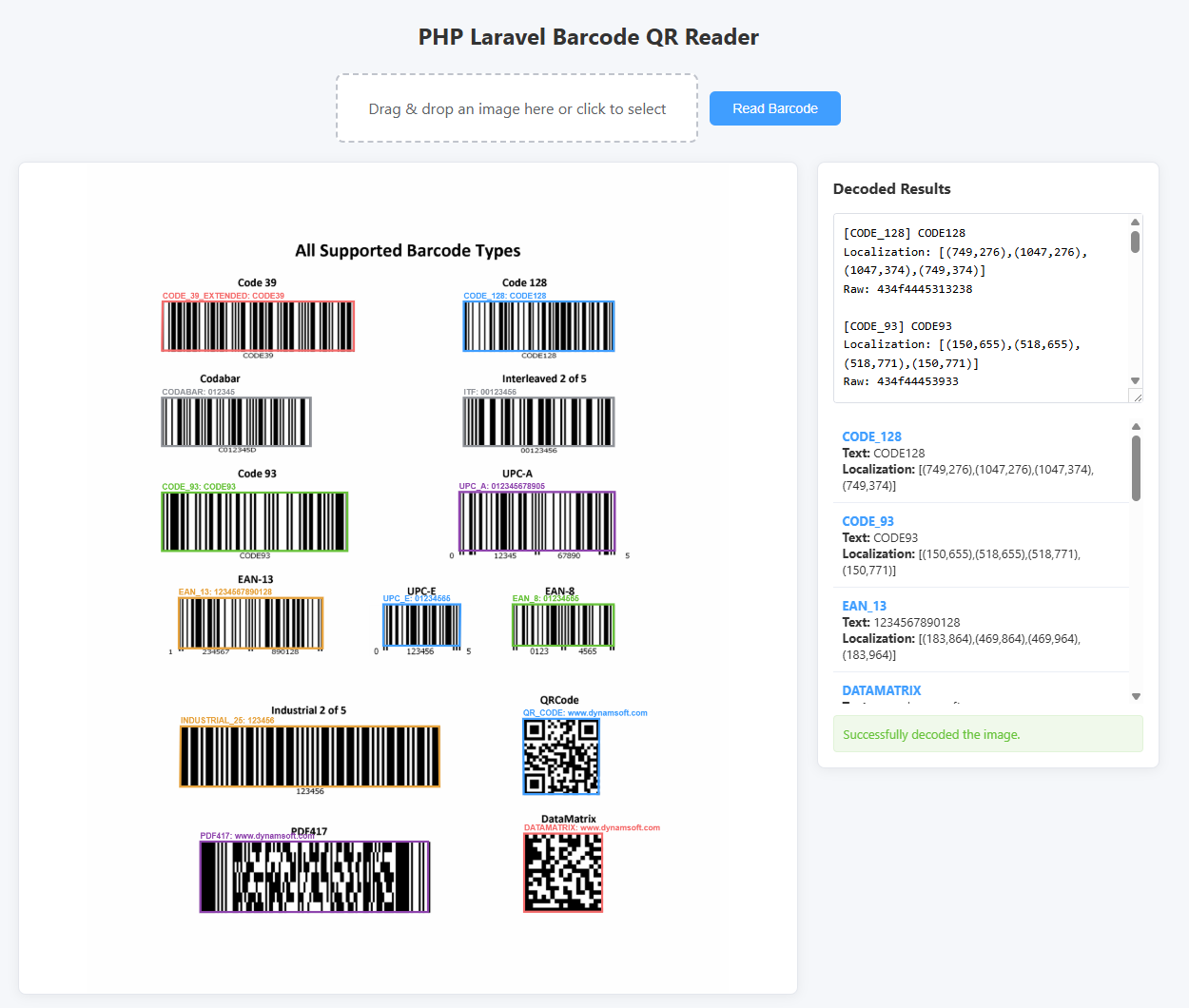
What you’ll build: A PHP Laravel web application that accepts image uploads via drag-and-drop or file selection, sends the image to a local Python barcode service, and renders the decoded results and bounding-box overlays on the page.
Demo Video: PHP Laravel Barcode Reader in Action
Key Takeaways
- PHP can consume a native C++ barcode SDK by delegating decoding to a standalone service and exchanging JSON over HTTP.
- A service-based architecture decouples the SDK version and lifecycle from the PHP runtime, so upgrades do not require recompiling extensions.
- The Dynamsoft Capture Vision Python SDK handles 1D, QR Code, DataMatrix, PDF417, and Aztec barcodes through a single
CaptureVisionRouterinstance. - The Laravel controller returns structured JSON that the frontend uses to draw barcode locations on a canvas overlay aligned to the uploaded image.
Common Developer Questions
How can PHP use a C++ barcode SDK if there are no official PHP bindings?
PHP offers several ways to integrate native SDKs. You can compile a PHP extension in C/C++, use exec or shell_exec to run external programs, call functions through PHP FFI (Foreign Function Interface), or offload the work to a separate service. This project uses a standalone Python service because it avoids version-locked compiled extensions, isolates SDK crashes from PHP-FPM workers, and works on Windows, Linux, and macOS without changes to the PHP runtime.
Why not just compile a PHP extension for Dynamsoft Barcode Reader?
A compiled PHP extension is tied to a specific PHP version and thread safety model, so upgrading PHP forces you to rebuild the extension. A standalone service can be upgraded independently, shared by multiple PHP-FPM workers, and restarted without affecting the web server process.
What happens if the uploaded image is larger than PHP’s default upload limit?
PHP defaults to a 2 MB upload limit, which causes silent upload failures in Laravel. You must raise upload_max_filesize and post_max_size in your php.ini file. This project sets the controller limit to 20 MB and documents the required PHP configuration changes.
Prerequisites
- PHP 7.4 or later and Composer
- Python 3.x with
pip - Laravel 8.x or compatible version
- A valid Dynamsoft license key. Get a 30-day free trial license.
Step 1: Choose an Integration Architecture for PHP and the Barcode SDK
PHP runs as a script or inside a web server process and cannot directly load most C++ SDKs. The common integration options are:
- PHP extension — write or compile a C extension. Fast, but version-specific and hard to maintain.
- Shell execution — run a CLI decoder with
exec(). Simple, but risky and slow due to process spawning. - PHP FFI — bind to shared libraries directly. Requires PHP 7.4+ and manual C declarations.
- Standalone service — run the SDK in another process and talk over HTTP, gRPC, or a Unix socket.
This project uses option 4. The Python service keeps the SDK state in memory, exposes a simple HTTP API, and returns JSON that PHP consumes with file_get_contents.
PHP 8.x / 7.x <--HTTP/JSON--> Barcode Service (Python + Dynamsoft DBR) <--SDK--> Dynamsoft DBR/DCV
Step 2: Create the Python Barcode Service
Create a service folder and add requirements.txt:
flask
dynamsoft-capture-vision-bundle
Install the dependencies:
cd service
pip install -r requirements.txt
Create service/app.py. The service initializes the Dynamsoft license once at startup, creates a single CaptureVisionRouter, and exposes /decode endpoints for file paths and uploaded files.
from flask import Flask, request, jsonify
import base64
import binascii
import os
import urllib.parse

from dynamsoft_capture_vision_bundle import (
    LicenseManager, CaptureVisionRouter, EnumPresetTemplate, EnumErrorCode
)

LICENSE_KEY = "LICENSE-KEY"

LicenseManager.init_license(LICENSE_KEY)
reader = CaptureVisionRouter()

app = Flask(__name__)


def decode_file_content(file_content):
    output = []
    try:
        results = reader.capture_multi_pages(file_content, EnumPresetTemplate.PT_READ_BARCODES)
        result_list = results.get_results()
        for result in result_list:
            if result.get_error_code() != EnumErrorCode.EC_OK:
                continue

            items = result.get_items()
            for item in items:
                format_str = item.get_format_string()
                text = item.get_text()
                raw_bytes = item.get_bytes() or b""
                raw_hex = binascii.hexlify(raw_bytes).decode("utf-8")

                location = item.get_location()
                points = location.points if location else []
                localization_str = ""
                if len(points) >= 4:
                    localization_str = "[(%d,%d),(%d,%d),(%d,%d),(%d,%d)]" % (
                        points[0].x, points[0].y,
                        points[1].x, points[1].y,
                        points[2].x, points[2].y,
                        points[3].x, points[3].y,
                    )

                output.append([format_str, text, raw_hex, localization_str])
    except Exception as error:
        return {"error": str(error)}

    return output


@app.route("/decode", methods=["GET"])
def decode_by_path():
    file_path = request.args.get("file", "")
    if not file_path:
        return jsonify({"error": "Missing 'file' parameter"}), 400

    file_path = urllib.parse.unquote(file_path)
    if not os.path.exists(file_path):
        return jsonify({"error": "File not found: " + file_path}), 404

    with open(file_path, "rb") as f:
        file_content = f.read()

    output = decode_file_content(file_content)
    if isinstance(output, dict) and "error" in output:
        return jsonify(output), 500

    return jsonify(output)


@app.route("/decode", methods=["POST"])
def decode_by_upload():
    file_content = None

    request_body = request.data.decode("utf-8") if request.data else ""
    if request_body:
        try:
            base64_content = urllib.parse.unquote(request_body)
            file_content = base64.b64decode(base64_content)
        except Exception:
            return jsonify({"error": "Invalid base64 string"}), 400
    elif "file" in request.files:
        file = request.files["file"]
        if file.filename == "":
            return jsonify({"error": "Empty file"}), 400
        file_content = file.read()

    if file_content is None:
        return jsonify({"error": "No file uploaded"}), 400

    output = decode_file_content(file_content)
    if isinstance(output, dict) and "error" in output:
        return jsonify(output), 500

    return jsonify(output)


if __name__ == "__main__":
    import sys
    host = "0.0.0.0" if "--host-all" in sys.argv else "127.0.0.1"
    port = int(os.environ.get("BARCODE_SERVICE_PORT", "8080"))
    print(f"Starting barcode service on http://{host}:{port}")
    app.run(host=host, port=port)
Start the service before launching the Laravel application:
cd service
python app.py
Step 3: Build the Laravel Upload Controller
Generate the controller:
php artisan make:controller ImageUploadController
Replace app/Http/Controllers/ImageUploadController.php with the following code. The controller validates the upload, moves the file to public/images, and calls the Python service through file_get_contents.
<?php

namespace App\Http\Controllers;

use Illuminate\Http\Request;
use Validator;

class ImageUploadController extends Controller
{
    private function decodeBarcodeFile($filePath)
    {
        $serviceUrl = env('BARCODE_SERVICE_URL', 'http://127.0.0.1:8080');
        $url = rtrim($serviceUrl, '/') . '/decode?file=' . urlencode($filePath);

        $context = stream_context_create([
            'http' => [
                'timeout' => 60,
            ],
        ]);

        $response = @file_get_contents($url, false, $context);
        if ($response === false) {
            return null;
        }

        $result = json_decode($response, true);
        if (!is_array($result)) {
            return null;
        }

        return $result;
    }

    function page()
    {
        return view('barcode_qr_reader');
    }

    function upload(Request $request)
    {
        $maxSizeKilobytes = env('BARCODE_IMAGE_MAX_SIZE_KB', 20480);

        $validation = Validator::make($request->all(), [
            'BarcodeQrImage' => 'required|file|max:' . $maxSizeKilobytes
        ]);

        if ($validation->fails()) {
            return response()->json([
                'success' => false,
                'message' => $validation->errors()->all()
            ], 422);
        }

        $image = $request->file('BarcodeQrImage');

        if (!$image->isValid()) {
            return response()->json([
                'success' => false,
                'message' => ['Upload failed: ' . $image->getErrorMessage()]
            ], 422);
        }

        $filename = $image->getClientOriginalName();
        $destinationPath = public_path('images');
        if (!is_dir($destinationPath)) {
            mkdir($destinationPath, 0755, true);
        }
        $image->move($destinationPath, $filename);
        $filePath = $destinationPath . DIRECTORY_SEPARATOR . $filename;

        $resultArray = $this->decodeBarcodeFile($filePath);

        if ($resultArray === null) {
            return response()->json([
                'success' => false,
                'message' => ['Failed to connect to barcode service. Is it running?']
            ], 503);
        }

        $results = [];
        if (is_array($resultArray)) {
            foreach ($resultArray as $result) {
                $results[] = [
                    'format' => $result[0] ?? '',
                    'text' => $result[1] ?? '',
                    'raw' => $result[2] ?? '',
                    'localization' => $result[3] ?? ''
                ];
            }
        }

        return response()->json([
            'success' => true,
            'message' => 'Successfully decoded the image.',
            'results' => $results
        ]);
    }
}
Add the routes in routes/web.php:
Route::get('/barcode_qr_reader', 'App\Http\Controllers\ImageUploadController@page');
Route::post('/barcode_qr_reader/upload', 'App\Http\Controllers\ImageUploadController@upload')->name('image.upload');
Step 4: Build the Modern Web UI with Canvas Overlay
Create resources/views/barcode_qr_reader.blade.php. The page uses a drag-and-drop drop zone, uploads the image with fetch, and draws barcode bounding boxes on a canvas layered over the image.
<!DOCTYPE html>
<html>

<head>
    <title>PHP Laravel Barcode QR Reader</title>
    <meta name="viewport" content="width=device-width, initial-scale=1.0">
    <meta name="_token" content="{{csrf_token()}}" />
    <style>
        * {
            box-sizing: border-box;
        }

        body {
            font-family: -apple-system, BlinkMacSystemFont, "Segoe UI", Roboto, "Helvetica Neue", Arial, sans-serif;
            margin: 0;
            padding: 20px;
            background-color: #f5f7fa;
            color: #333;
        }

        h1 {
            text-align: center;
            margin-bottom: 24px;
            font-size: 24px;
        }

        .container {
            max-width: 1200px;
            margin: 0 auto;
        }

        .toolbar {
            display: flex;
            gap: 12px;
            align-items: center;
            flex-wrap: wrap;
            margin-bottom: 20px;
            justify-content: center;
        }

        .drop-zone {
            border: 2px dashed #c0c4cc;
            border-radius: 8px;
            padding: 24px 32px;
            text-align: center;
            color: #606266;
            cursor: pointer;
            transition: border-color 0.2s, background-color 0.2s;
            background-color: #fff;
            min-width: 280px;
        }

        .drop-zone:hover,
        .drop-zone.drag-over {
            border-color: #409eff;
            background-color: #f0f9ff;
        }

        .drop-zone input {
            display: none;
        }

        .btn {
            padding: 10px 24px;
            border: none;
            border-radius: 6px;
            background-color: #409eff;
            color: #fff;
            font-size: 14px;
            cursor: pointer;
            transition: background-color 0.2s;
        }

        .btn:hover:not(:disabled) {
            background-color: #66b1ff;
        }

        .btn:disabled {
            background-color: #a0cfff;
            cursor: not-allowed;
        }

        .main {
            display: flex;
            gap: 20px;
            align-items: flex-start;
        }

        @media (max-width: 900px) {
            .main {
                flex-direction: column;
            }
        }

        .viewer-wrapper {
            flex: 1 1 0;
            min-width: 0;
        }

        .viewer {
            position: relative;
            display: block;
            width: 100%;
            background-color: #fff;
            border: 1px solid #e4e7ed;
            border-radius: 8px;
            overflow: hidden;
            box-shadow: 0 2px 12px rgba(0, 0, 0, 0.06);
        }

        .viewer img,
        .viewer canvas {
            display: block;
            width: 100%;
            height: auto;
            max-height: 70vh;
            object-fit: contain;
        }

        .viewer canvas {
            position: absolute;
            top: 0;
            left: 0;
            pointer-events: none;
        }

        .results-panel {
            flex: 0 0 360px;
            width: 360px;
            max-width: 100%;
            background-color: #fff;
            border: 1px solid #e4e7ed;
            border-radius: 8px;
            padding: 16px;
            box-shadow: 0 2px 12px rgba(0, 0, 0, 0.06);
        }

        @media (max-width: 900px) {
            .results-panel {
                flex: 1 1 auto;
                width: 100%;
            }
        }

        .results-panel h3 {
            margin-top: 0;
            font-size: 16px;
        }

        #resultText {
            width: 100%;
            height: 200px;
            resize: vertical;
            border: 1px solid #dcdfe6;
            border-radius: 4px;
            padding: 10px;
            font-family: monospace;
            font-size: 13px;
            line-height: 1.5;
        }

        .result-list {
            margin-top: 12px;
            max-height: 300px;
            overflow-y: auto;
        }

        .result-item {
            padding: 10px;
            border-bottom: 1px solid #ebeef5;
            font-size: 13px;
        }

        .result-item:last-child {
            border-bottom: none;
        }

        .result-format {
            font-weight: bold;
            color: #409eff;
        }

        .status {
            margin-top: 12px;
            padding: 10px;
            border-radius: 4px;
            font-size: 13px;
            display: none;
        }

        .status.error {
            display: block;
            background-color: #fef0f0;
            color: #f56c6c;
            border: 1px solid #fde2e2;
        }

        .status.success {
            display: block;
            background-color: #f0f9eb;
            color: #67c23a;
            border: 1px solid #e1f3d8;
        }

        .placeholder {
            color: #909399;
            text-align: center;
            padding: 80px 20px;
            min-height: 300px;
            display: flex;
            align-items: center;
            justify-content: center;
            background-color: #fafafa;
        }
    </style>
</head>

<body>
    <div class="container">
        <h1>PHP Laravel Barcode QR Reader</h1>

        <div class="toolbar">
            <div class="drop-zone" id="dropZone">
                <div>Drag & drop an image here or click to select</div>
                <input type="file" id="BarcodeQrImage" accept="image/*">
            </div>
            <button class="btn" id="readBtn" disabled>Read Barcode</button>
        </div>

        <div class="main">
            <div class="viewer-wrapper">
                <div class="viewer" id="viewer">
                    <div class="placeholder" id="placeholder">No image selected</div>
                    <img id="image" alt="Uploaded barcode image" style="display: none;">
                    <canvas id="overlay" style="display: none;"></canvas>
                </div>
            </div>

            <div class="results-panel">
                <h3>Decoded Results</h3>
                <textarea id="resultText" placeholder="Barcode results will appear here..."></textarea>
                <div class="result-list" id="resultList"></div>
                <div class="status" id="status"></div>
            </div>
        </div>
    </div>

    <script>
        const dropZone = document.getElementById('dropZone');
        const fileInput = document.getElementById('BarcodeQrImage');
        const readBtn = document.getElementById('readBtn');
        const viewer = document.getElementById('viewer');
        const placeholder = document.getElementById('placeholder');
        const image = document.getElementById('image');
        const overlay = document.getElementById('overlay');
        const resultText = document.getElementById('resultText');
        const resultList = document.getElementById('resultList');
        const status = document.getElementById('status');
        const token = document.querySelector('meta[name="_token"]').getAttribute('content');

        let currentFile = null;

        dropZone.addEventListener('click', () => fileInput.click());

        dropZone.addEventListener('dragover', (e) => {
            e.preventDefault();
            dropZone.classList.add('drag-over');
        });

        dropZone.addEventListener('dragleave', () => {
            dropZone.classList.remove('drag-over');
        });

        dropZone.addEventListener('drop', (e) => {
            e.preventDefault();
            dropZone.classList.remove('drag-over');
            const files = e.dataTransfer.files;
            if (files.length > 0) {
                handleFile(files[0]);
            }
        });

        fileInput.addEventListener('change', () => {
            if (fileInput.files.length > 0) {
                handleFile(fileInput.files[0]);
            }
        });

        function handleFile(file) {
            currentFile = file;
            readBtn.disabled = false;
            setStatus('', '');

            const reader = new FileReader();
            reader.onload = (e) => {
                image.src = e.target.result;
                image.style.display = 'block';
                placeholder.style.display = 'none';
                clearOverlay();
            };
            reader.readAsDataURL(file);
        }

        readBtn.addEventListener('click', () => {
            if (!currentFile) return;
            decodeImage(currentFile);
        });

        image.addEventListener('load', () => {
            resizeOverlay();
        });

        window.addEventListener('resize', () => {
            resizeOverlay();
        });

        function resizeOverlay() {
            if (image.naturalWidth === 0) return;
            overlay.width = image.naturalWidth;
            overlay.height = image.naturalHeight;
            overlay.style.display = 'block';
        }

        function clearOverlay() {
            const ctx = overlay.getContext('2d');
            ctx.clearRect(0, 0, overlay.width, overlay.height);
        }

        function drawOverlay(results) {
            clearOverlay();
            const ctx = overlay.getContext('2d');
            const colors = ['#409eff', '#67c23a', '#e6a23c', '#f56c6c', '#909399', '#8e44ad'];

            results.forEach((result, index) => {
                const points = parseLocalization(result.localization);
                if (points.length < 4) return;

                const color = colors[index % colors.length];

                ctx.beginPath();
                ctx.moveTo(points[0].x, points[0].y);
                for (let i = 1; i < points.length; i++) {
                    ctx.lineTo(points[i].x, points[i].y);
                }
                ctx.closePath();
                ctx.lineWidth = Math.max(2, overlay.width / 300);
                ctx.strokeStyle = color;
                ctx.stroke();

                ctx.fillStyle = color;
                ctx.font = `bold ${Math.max(12, overlay.width / 80)}px sans-serif`;
                const label = result.format + ': ' + result.text;
                ctx.fillText(label, points[0].x, Math.max(points[0].y - 6, 16));
            });
        }

        function parseLocalization(str) {
            const points = [];
            const regex = /\((-?\d+),\s*(-?\d+)\)/g;
            let match;
            while ((match = regex.exec(str)) !== null) {
                points.push({ x: parseInt(match[1], 10), y: parseInt(match[2], 10) });
            }
            return points;
        }

        function decodeImage(file) {
            readBtn.disabled = true;
            readBtn.textContent = 'Reading...';
            resultText.value = '';
            resultList.innerHTML = '';
            setStatus('', '');
            clearOverlay();

            const formData = new FormData();
            formData.append('_token', token);
            formData.append('BarcodeQrImage', file);

            fetch('{{ route('image.upload') }}', {
                method: 'POST',
                body: formData,
                headers: {
                    'X-Requested-With': 'XMLHttpRequest'
                }
            })
            .then(response => {
                if (!response.ok) {
                    return response.json().then(data => {
                        throw new Error((data.message || ['Upload failed']).join('\n'));
                    }).catch(() => {
                        throw new Error('Upload failed with status ' + response.status);
                    });
                }
                return response.json();
            })
            .then(data => {
                readBtn.disabled = false;
                readBtn.textContent = 'Read Barcode';

                if (!data.success) {
                    setStatus('error', Array.isArray(data.message) ? data.message.join('\n') : data.message);
                    return;
                }

                setStatus('success', data.message);

                if (data.results && data.results.length > 0) {
                    resultText.value = data.results.map(r => {
                        return `[${r.format}] ${r.text}\nLocalization: ${r.localization}\nRaw: ${r.raw}`;
                    }).join('\n\n');

                    resultList.innerHTML = data.results.map(r => {
                        return `<div class="result-item">
                            <div><span class="result-format">${escapeHtml(r.format)}</span></div>
                            <div><strong>Text:</strong> ${escapeHtml(r.text)}</div>
                            <div><strong>Localization:</strong> ${escapeHtml(r.localization)}</div>
                        </div>`;
                    }).join('');

                    drawOverlay(data.results);
                } else {
                    resultText.value = 'No barcode found.';
                }
            })
            .catch(error => {
                readBtn.disabled = false;
                readBtn.textContent = 'Read Barcode';
                setStatus('error', error.message);
            });
        }

        function setStatus(type, message) {
            status.className = 'status' + (type ? ' ' + type : '');
            status.textContent = message;
            status.style.display = type ? 'block' : 'none';
        }

        function escapeHtml(text) {
            const div = document.createElement('div');
            div.textContent = text;
            return div.innerHTML;
        }
    </script>
</body>

</html>
The canvas and image share the same container and CSS dimensions, so the overlay draws at the original pixel coordinates and scales with the displayed image.
Step 5: Configure PHP Upload Limits and Run the Application
The Laravel controller accepts files up to 20 MB, but PHP defaults to 2 MB. Edit your PHP php.ini (for example D:\php\php.ini on Windows) and restart the Laravel development server:
upload_max_filesize = 20M
post_max_size = 20M
memory_limit = 256M
max_execution_time = 60
Start both services:
# Terminal 1
cd service
python app.py

# Terminal 2
php artisan serve
Open http://127.0.0.1:8000/barcode_qr_reader in a browser, drag an image onto the drop zone, and click Read Barcode.
Step 6: Test the Service from the Command Line
A standalone test script is included at test_service.php. It calls the Python service directly so you can verify decoding without opening a browser.
<?php

if ($argc < 2) {
    echo "Usage: php test_service.php <path/to/image>\n";
    exit(1);
}

$filename = $argv[1];
$fullPath = realpath($filename);

if ($fullPath === false || !file_exists($fullPath)) {
    echo "The file $filename does not exist\n";
    exit(1);
}

echo "Barcode file: $fullPath \n";

$serviceUrl = "http://127.0.0.1:8080";
$url = $serviceUrl . "/decode?file=" . urlencode($fullPath);

$context = stream_context_create([
    "http" => [
        "timeout" => 60,
    ],
]);

$time = microtime(true);
$response = @file_get_contents($url, false, $context);
echo "Time: " . (microtime(true) - $time) . "s\n";

if ($response === false) {
    echo "Failed to call barcode service. Is the service running on $serviceUrl?\n";
    exit(1);
}

$resultArray = json_decode($response, true);
if (!is_array($resultArray)) {
    echo "Invalid response from service: $response\n";
    exit(1);
}

if (isset($resultArray["error"])) {
    echo "Service error: " . $resultArray["error"] . "\n";
    exit(1);
}

$resultCount = count($resultArray);
echo "Total count: $resultCount\n";
for ($i = 0; $i < $resultCount; $i++) {
    $result = $resultArray[$i];
    echo "Barcode format: $result[0], ";
    echo "value: $result[1], ";
    echo "raw: $result[2]\n";
    echo "Localization : $result[3]\n";
}
Run it against any barcode image:
php test_service.php path/to/your/barcode/image.png
Common Issues & Edge Cases
- Upload fails silently with “The barcode qr image failed to upload”: PHP’s
upload_max_filesizeis still set to 2 MB. Increase it inphp.iniand restart the server. - Service returns no results for a valid image: The Python service must be running before Laravel tries to decode. Start
python app.pyfirst and verify withcurl http://127.0.0.1:8080/health. - Canvas overlay is misaligned: Make sure the image and canvas share the same container and CSS width. The canvas intrinsic size is set to the image’s natural dimensions in the
loadevent handler.
Conclusion
You now have a PHP Laravel application that decodes barcodes and QR codes without a compiled PHP extension. By moving the Dynamsoft Capture Vision SDK into a standalone Python service, the project stays portable across PHP versions and isolates SDK crashes from the web server. Next, you can containerize the Python service or add PDF and document detection using the same CaptureVisionRouter pattern.