


How Much Damage Can a PDF417 Barcode Take? A Visual Guide to PDF417 Error Correction Levels
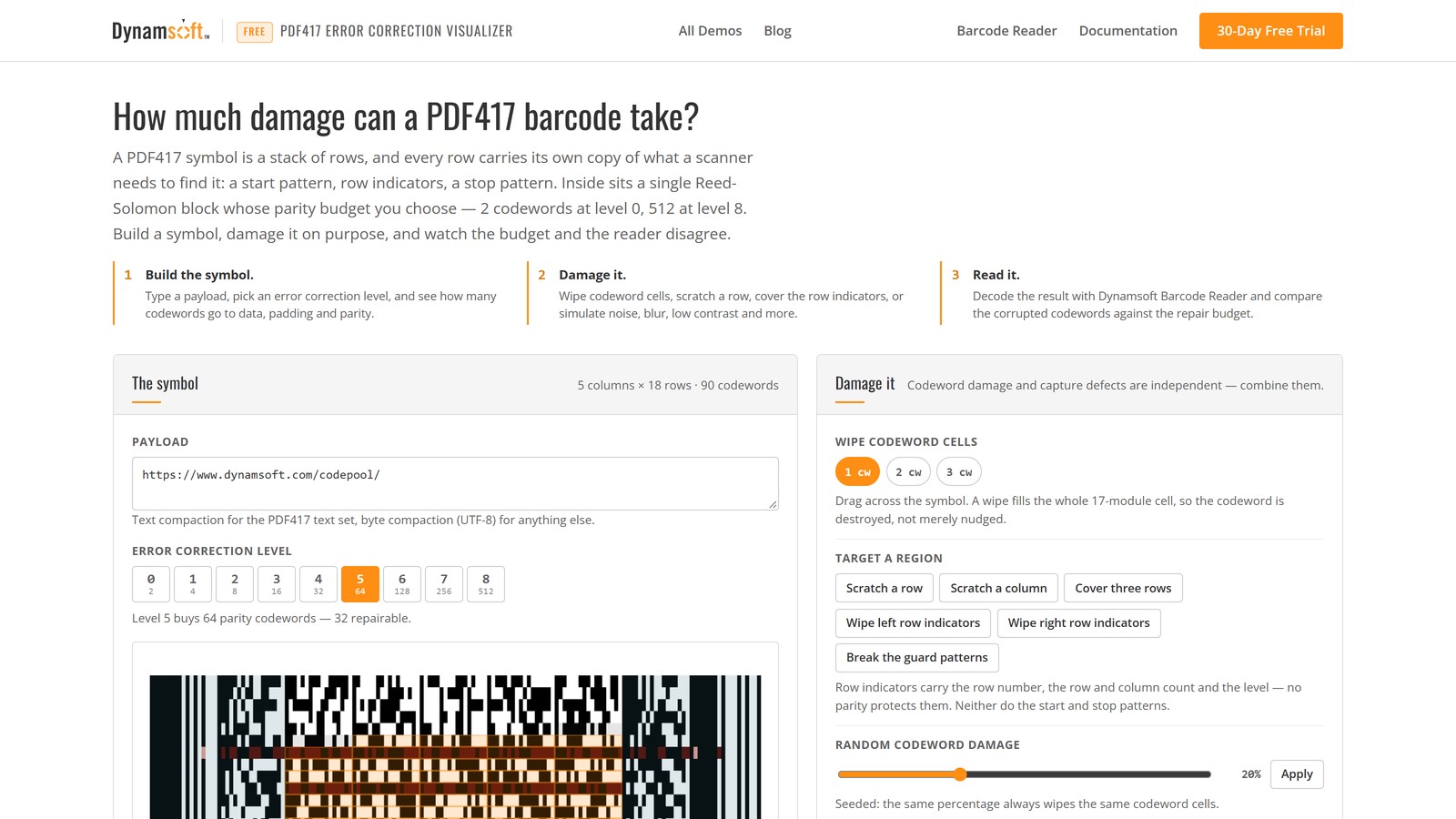
A PDF417 barcode on a driver’s license spends years in a wallet: folded, scuffed, printed on a card that gets wiped with a thumb every time someone checks an age. It still scans, because the symbol carries Reed-Solomon parity codewords that a reader can use to rebuild what the wear destroyed. So how much damage can a PDF417 barcode take? The honest answer is a number of codewords, not a percentage: level 0 spends 2 codewords on error correction, level 8 spends 512, and a single Reed-Solomon block repairs up to half of them when it has to find the errors itself — or all of them when it can tell which codewords are unreadable. Because the budget is a count and the symbol grows with the payload, the same level is 24% of a short symbol and 4% of a long one.
This article makes that budget visible. We encode PDF417 symbols in the browser with an encoder that exposes the codeword behind every 17-module cell, damage them on purpose, and decode the results with Dynamsoft Barcode Reader — including the cases where the parity budget is untouched and the decode still fails.
What you’ll learn: how a PDF417 symbol lays out its rows, codewords and row indicators; why its error correction levels are absolute counts rather than percentages; why guard patterns and row indicators fail outside the Reed-Solomon budget entirely; and what a seeded codeword sweep measures at levels 0, 2, 5 and 8 on the same payload.
Key Takeaways
- PDF417 levels are codeword counts. Level
Lcarries2^(L+1)parity codewords: 2 at level 0, 512 at level 8. A percentage is only a side effect of how big the symbol is — level 2 is 24% of the demo’s 33-codeword symbol and 4% of a 216-codeword symbol carrying 400 characters. - The repair budget has two bounds. A block of
kparity codewords repairs⌊k/2⌋unknown errors, or up tokerasures — codewords the reader can tell are unreadable. A wiped cell is unreadable by construction, so in this demo a level-2 symbol with a budget of 4 decoded through 6 corrupted codewords and failed at 7. - Most of a high-level symbol is parity. At level 8 the demo’s 546-codeword symbol carries 512 parity codewords; only 34 carry data, padding and the length descriptor. That is why level 8 tolerates 214 wiped codewords — 39% of the symbol — before it breaks.
- Three things protect a PDF417 row, and only one of them is parity. The start and stop patterns let a reader find the row, the left and right row indicators carry the row’s geometry twice, and the codewords carry Reed-Solomon parity. Wiping every row indicator on both sides produced 0 corrupted codewords and no decode; inverting every guard pattern produced the same, in 180 ms.
- A failed decode is not automatically “out of budget”. The demo reports corrupted codewords, damaged indicators and damaged guards separately, and says “exact cause not determined” when the budget was not exceeded — because a reader can lose a row before error correction is ever reached.
Common Developer Questions
What are the PDF417 error correction levels 0 to 8?
The nine PDF417 levels set how many Reed-Solomon parity codewords a symbol carries: level L carries 2^(L+1), from 2 at level 0 to 512 at level 8. Unlike QR Code levels, which are defined as a percentage of the symbol, a PDF417 level is a fixed count — so a large symbol at a low level spends almost nothing on redundancy, and a small symbol at a high level is mostly redundancy. The number of parity codewords also decides the repair budget: ⌊k/2⌋ unknown errors, or up to k erasures.
How much damage can a PDF417 barcode take before it stops scanning?
In this demo’s seeded sweep on a 35-character payload, decoding Dynamsoft Barcode Reader at default settings: a level-0 symbol (27 codewords, 2 parity) failed at the first corrupted codeword, level 2 (33 codewords, 8 parity) decoded through 6 corrupted codewords and failed at 7, level 5 (90 codewords, 64 parity) decoded through 34 and failed at 40, and level 8 (546 codewords, 512 parity) decoded through 214 and failed at 268. The limits are codeword counts, not percentages of the printed area, and they move with which codewords are hit.
Why does a PDF417 barcode sometimes fail even though error correction should cover it?
Because error correction only repairs codewords that a reader has already read as part of a row. If the start or stop patterns are gone, the row cannot be found; if both row indicators of a row are destroyed, the reader cannot tell which row it is looking at or how big the symbol is. Neither is protected by parity. In this demo, wiping the row indicators on both sides of every row left the corrupted-codeword count at 0 and the decode failed anyway. A reader can also lose a row to blur or low resolution long before the parity budget runs out.
Is a PDF417 barcode with 512 error correction codewords as good as it sounds?
It is as expensive as it sounds. Level 8 on a 35-character payload produces a 13-column by 42-row symbol in which 512 of 546 codewords are parity — about 94% of the ink is redundancy, and the symbol is roughly nine times the area of the level-2 version of the same payload. Level 8 is worth it for marks that will be abused, such as an ID card barcode read after years of handling; it is a poor default for a label printed on clean paper.
Which PDF417 error correction level should I use?
Pick the smallest level whose symbol still survives the damage you expect, because every step up spends codewords and area. At 35 characters, level 5 costs 90 codewords (64 of them parity) and level 8 costs 546 — nine times the printed area for eight times the repair budget. The demo makes the trade visible: switch levels, watch the parity share and the module width change, then run a sweep to see where each one actually breaks on the damage pattern you care about. If the symbol has to survive years in a wallet, buy the redundancy; if it is printed once on clean paper, level 2 or 3 is usually the better deal.
Online Demo
https://www.dynamsoft.com/codepool/demos/pdf417-error-correction-visualizer/
Demo Video: Damaging and Decoding PDF417 Symbols Live
The video walks the core loop: step through levels 0, 3 and 8 to see the symbol change size, scratch a level-5 symbol, cover three rows until the corrupted count passes the budget, then run a seeded codeword sweep and read the pass/fail boundary off the log.
Prerequisites
- A modern browser. The PDF417 encoder runs entirely client side; decoding needs a secure context (HTTPS or localhost) for license activation.
- A Dynamsoft Barcode Reader license for your own deployment. The hosted demo activates its Codepool license automatically.
Get a 30-day free trial license for Dynamsoft Barcode Reader.
PDF417 Anatomy: the Parts of a Stacked Symbol
A PDF417 symbol is not a grid of codewords with a border painted around it. Each row is a complete, self-describing line: a start pattern, a row indicator, the codewords, a row indicator, a stop pattern. A scanner can lock onto any row and read it without its neighbours, which is exactly why the format tolerates a torn or obscured edge.
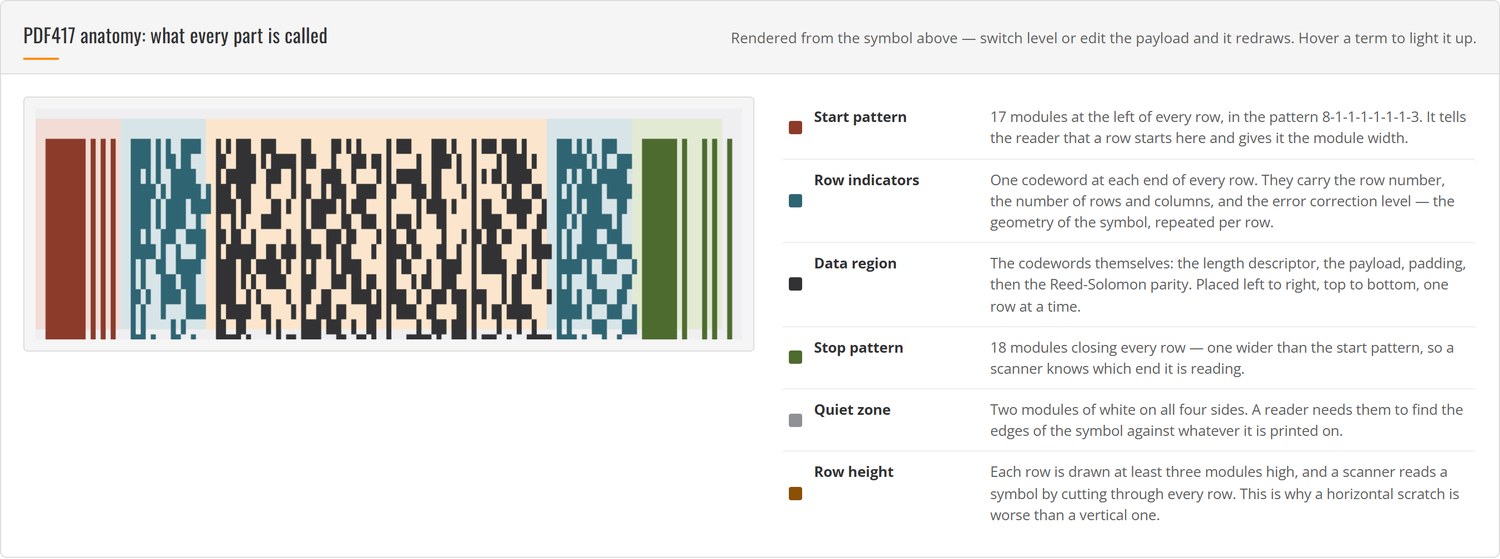
| Term | What it is | If it is damaged |
|---|---|---|
| Start pattern | 17 modules at the left of every row, in the pattern 8-1-1-1-1-1-1-3 | The row cannot be found; no parity applies |
| Stop pattern | 18 modules closing every row — one wider than the start pattern | Same: the row is not terminated where the reader expects |
| Left row indicator | One codeword carrying the row number, the row and column count and the level | The reader can use the right one instead |
| Right row indicator | The same geometry, repeated at the other end | The reader can use the left one instead |
| Length descriptor | The first codeword of the data region: how many data codewords follow | The reader cannot split data from parity |
| Data codewords | The payload, in text or byte compaction | Consumes the Reed-Solomon budget |
| Padding codewords | Value 900, filling the data region to its even size | Nothing: they are fill |
| Error correction codewords | 2^(L+1) Reed-Solomon parity codewords over GF(929) |
Consumes the same budget as a data codeword |
| Quiet zone | Two modules of white on all four sides | The reader may not find the symbol’s edges |
| Row height | Each row drawn at least three modules high | Below that, rows blur together when printed small |
The structure view in the demo paints that map onto the live symbol: white cells are payload, grey cells are padding, orange cells are parity, and the blue-grey strips at both ends are the indicators and guard patterns. Clicking a cell reports its codeword index and value.
How a PDF417 Symbol Spends Its Redundancy
Three separate mechanisms keep a PDF417 symbol readable, and they fail in different ways.
The guard patterns are the start and stop patterns of every row. They are not codewords, they carry no data, and they are not protected by anything. A PDF417 reader finds rows by looking for that 8-1-1-1-1-1-1-3 run and its 18-module counterpart, and if they are gone the row is not there as far as the reader is concerned.
The row indicators are codewords, but not Reed-Solomon codewords. Each one encodes the row number, the number of rows and columns in the symbol, and the error correction level — the geometry a reader needs to reconstruct the grid. Every row carries that information twice, at both ends, which is why wiping all the left indicators in a 42-row symbol still decodes: the reader reads the right ones instead. Wipe both and it has nothing to rebuild the grid from.
The Reed-Solomon block is the only part that repairs damage. PDF417 uses a single block over GF(929) — one block for the whole symbol, unlike QR Code’s interleaved blocks — and the parity codewords are the last 2^(L+1) codewords in the sequence. They are placed after the data in row-major order, so at a high level the bottom of the symbol is almost entirely parity.
That last point is what makes the parity share move. The level fixes the count, not the fraction:
| Payload | Level | Codewords | Parity | Share | Repair budget |
|---|---|---|---|---|---|
| 35-character URL | 2 | 33 | 8 | 24% | 4 |
| 35-character URL | 8 | 546 | 512 | 94% | 256 |
| 400 characters | 2 | 216 | 8 | 4% | 4 |
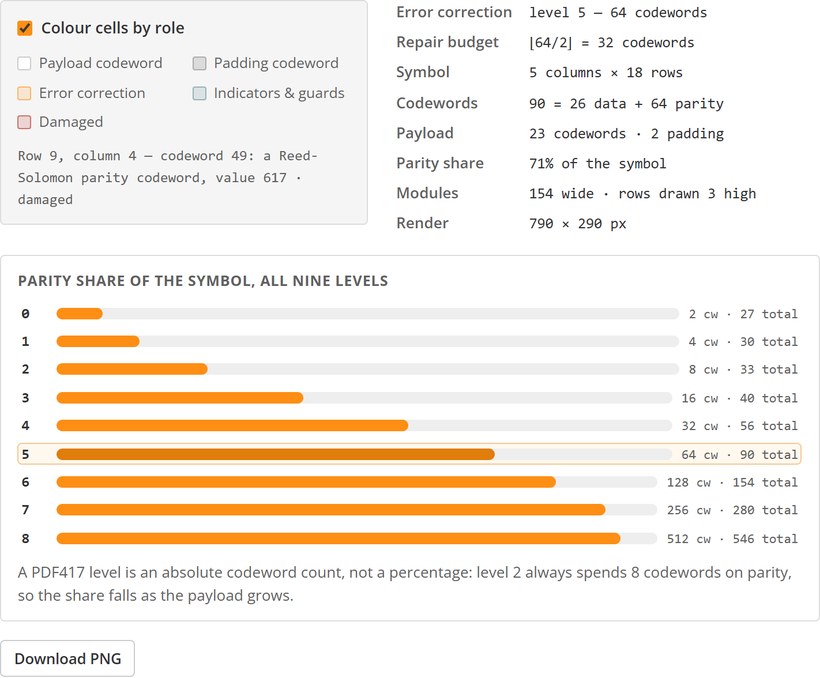
The demo’s level bar chart recomputes all nine rows for whatever payload is in the box, so the trade-off is a number rather than a rule of thumb: level 8 on a short payload is a wall of parity, and level 2 on a long one is a rounding error.
Step 1: Encode with the Codeword Map Exposed
The demo ships a dependency-free PDF417 encoder so the page can name every part of the symbol it draws. Its output is bit-identical to a reference BWIPP encoder for payloads inside the PDF417 text set — same codewords, same row indicators, same module matrix — which is how the encoder was checked.
var enc = PDF417Encoder.encode('https://www.dynamsoft.com/codepool/', { ecLevel: 2 });

// enc.columns, enc.rows        -> 3 x 11  (120 modules wide, 11 rows)
// enc.totalCodewords           -> 33
// enc.dataCodewords            -> 25   (length descriptor + payload + padding)
// enc.payloadCodewords         -> 23
// enc.ecCodewords              -> 8    (2^(level+1))
// enc.repairBudget             -> 4    (floor(8/2))
// enc.cells[row][col]          -> { index, role, value }
//                                 role: 'length' | 'data' | 'pad' | 'parity'
// enc.indicators[row]          -> { left, right, cluster }
// enc.matrix[row]              -> '11111111010101000...' for that row
Each cells entry is one 17-module codeword, and its role is what makes the budget meter possible: a cell is either payload, padding, the length descriptor, or parity. The index tells you where it sits in the codeword sequence, so the parity cells are exactly the ones at index dataCodewords and above.
The encoder also emits the row indicators with the formulas from ISO/IEC 15438: for row i, the cluster is i mod 3, and 30 * floor(i/3) is split across the row number, the column count and the level depending on the cluster. That is why a reader can reconstruct the grid from a single row.
Step 2: Turn Damage into a Codeword Count
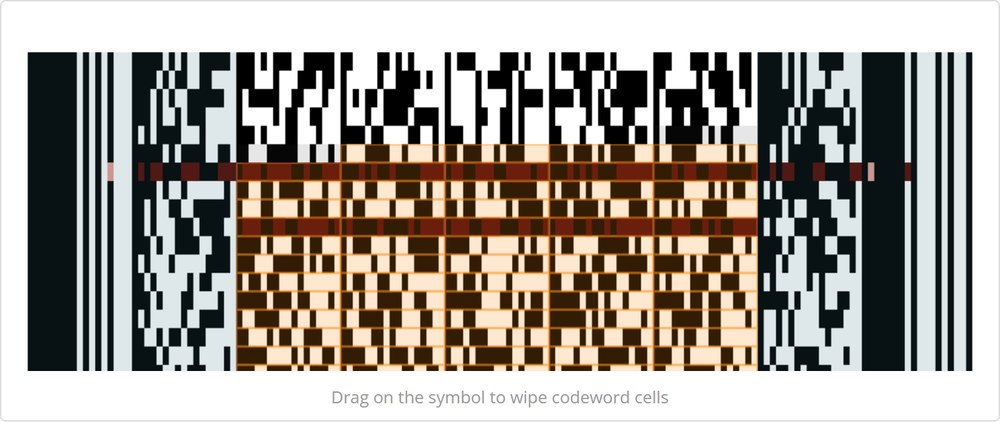
When you drag across the symbol, the demo wipes whole codeword cells: all 17 modules of a cell go dark, which turns a valid pattern into a solid bar that no decoder can read as the value it used to hold. Counting the damage is then a diff against the clean matrix, not an estimate:
function countCorruption(enc, damage) {
    var result = { cells: 0, leftRows: 0, rightRows: 0, startRows: 0, stopRows: 0 };

    for (var r = 0; r < enc.height; r++) {
        for (var c = 0; c < enc.columns; c++) {
            // does any module of this cell differ from the clean symbol?
            for (var k = 0; k < 17; k++) {
                var col = 34 + c * 17 + k;
                if (damage[r * enc.width + col]) { result.cells++; break; }
            }
        }
        // the guard patterns and indicators are counted separately: they are
        // not codewords, and damage there is a detection failure, not a parity one
    }
    return result;
}
Two consequences follow from that model, and the demo’s meter shows both.
Corrupting a parity codeword costs exactly as much as corrupting a data codeword. Reed-Solomon does not know which is which until it tries to decode; every corrupted codeword in the block is one error, wherever it sits.
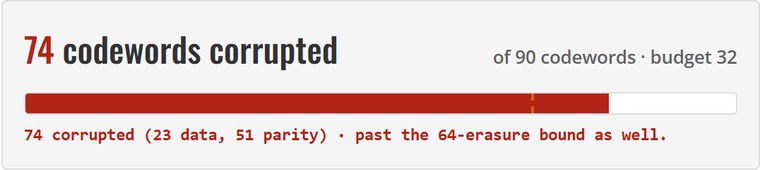
The budget has two bounds, and a wiped cell is the cheap kind. A block of k parity codewords repairs ⌊k/2⌋ errors it has to locate, or up to k erasures — codewords it knows are unreadable. A solid black cell is unreadable by construction, so the reader can often spend one parity codeword on it instead of two. The meter draws both marks: a solid tick at ⌊k/2⌋ and a dashed one at k.
Step 3: Decode the Damaged Render
The damaged render is decoded the way a camera would see it: the clean module grid plus the damage, drawn onto one canvas and passed to Dynamsoft Barcode Reader as a raw frame. Canvas ImageData is RGBA in byte order, which is exactly what the SDK calls IPF_ABGR_8888:
const W = canvas.width, H = canvas.height;
const image = canvas.getContext('2d').getImageData(0, 0, W, H);
const result = await cvr.capture({
    bytes: new Uint8Array(image.data),   // fresh copy: capture may detach the input
    width: W, height: H, stride: W * 4,
    format: 10                           // IPF_ABGR_8888
}, 'ReadBarcodes_Default');

const barcodes = (result.items || []).filter(item => item.type === 2);
const pdf417 = barcodes.find(item => /^pdf417$/i.test(item.formatString));
A successful read returns more than text. item.details is a PDF417Details object, and for the demo’s default symbol it reports 11 rows, 3 columns, error correction level 2, both row indicators present and 33 codewords read — the same geometry the encoder produced. That cross-check is worth having: it proves the encoder’s layout matches what a real decoder expects, rather than only matching itself.
The decoder runs on your device. The first decode downloads the WebAssembly engine (about 12–14 seconds on this connection, including license activation), and later decodes of a symbol this size settle around 20–60 ms — fast enough to decode automatically after every change.
What the Sweep Shows: Level 0 to Level 8
The sweep corrupts codewords one at a time, in a seeded order, and decodes after each step. The x-axis is the budget’s own unit, so the failure point reads directly against ⌊k/2⌋ and k. Same payload, same reader, same seeds:
| Level | Symbol | Parity k |
Error bound ⌊k/2⌋ |
Erasure bound k |
Decoded up to | First failure |
|---|---|---|---|---|---|---|
| 0 | 3 × 9 | 2 | 1 | 2 | 0 | 1 |
| 2 | 3 × 11 | 8 | 4 | 8 | 6 | 7 |
| 5 | 5 × 18 | 64 | 32 | 64 | 34 | 40 |
| 8 | 13 × 42 | 512 | 256 | 512 | 214 | 268 |
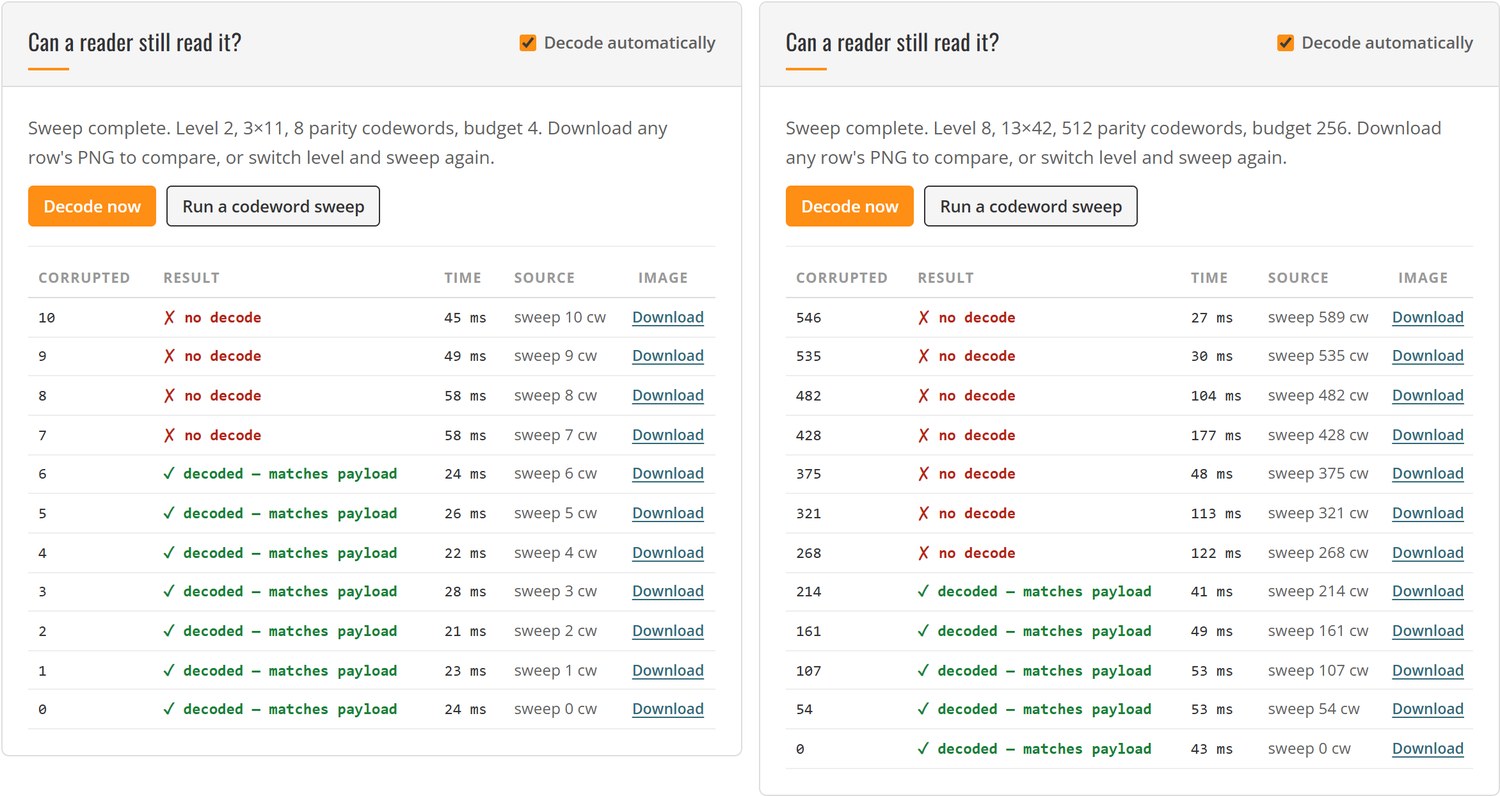
Read the table from top to bottom and four things stand out.
- Level 0 has no margin at all. Two parity codewords, a budget of one, and the very first corrupted codeword ended the decode. A level-0 PDF417 is a symbol that has decided not to be damaged.
- The failure point sits between the two bounds, and it moves. Level 2 reached 6 of its 8 erasure-equivalent codewords, level 5 reached 34 against a 32-error bound, level 8 reached 214 against a 256-error bound. The reader is using erasure information when it can tell a codeword is gone, and falling back to error decoding when it cannot — how much of each depends on the damage pattern.
- The percentages are misleading, the counts are not. Level 8’s 214 codewords are 39% of the symbol’s codewords and about 30% of its modules, while level 2’s 6 codewords are 18%. A single number like “PDF417 survives 30% damage” is an artefact of which symbol you printed.
- The boundary is repeatable but not universal. Every run uses fixed seeds, so these rows reproduce exactly. They are still one reader at default settings on one payload; a different reader, a print-and-scan round trip or a different damage order can move the cliff by several codewords.
Why a PDF417 Can Fail With Budget Left
The most instructive result in the demo is the one where the budget meter stays at zero.
Wipe every row indicator on both sides of every row — 36 indicator codewords of geometry at level 5 — and the corrupted-codeword count is 0, because indicators are not part of the Reed-Solomon block. The decode fails in about 300 ms. Do the same to only the left side and it still decodes, because every row repeats its geometry at the right end; the reader simply reads the other copy. Invert every start and stop pattern instead, and the decode fails in under 200 ms with the budget still untouched.
That is the boundary between correction and detection, and it is the reason the demo reports three numbers instead of one. Reed-Solomon repairs codewords. It cannot repair the row structure that tells a reader where those codewords are. When the budget is intact and the decode still fails, the page says so — “detection or sampling failed first, exact cause not determined” — rather than blaming error correction.
Common Issues & Edge Cases
- The corrupted count stays at 0 while the symbol gets visibly worse: that is the guard and indicator damage described above. The meter warns separately, because counting it as codeword damage would be wrong.
- A decode succeeds past the
⌊k/2⌋budget: expected. Wiped cells are erasures, and erasures cost half of what located errors cost. The dashed mark on the bar is the erasure bound,k. - A decode fails below the budget: also expected, for the reasons above, and for rows lost to blur, low contrast or resolution before any codeword is even read.
- The first decode takes seconds, the rest take milliseconds: the reader downloads its WebAssembly engine on first use. Preload it on page load if your application decodes on a user action.
- The symbol does not match the payload box: PDF417 has a hard capacity limit of 928 codewords, and at level 8 that leaves 415 for the payload. The page reports the overflow and keeps the previous symbol rather than drawing something that does not decode.
- Digits cost more than they should: this encoder implements text and byte compaction, not numeric compaction. Ten digits ride the Mixed sub-mode at about 1.33 codewords per digit instead of 0.41, so digit-heavy payloads come out larger than a production encoder would make them.
Real-World Constraints
The numbers in this article are measurements from this demo: one payload, one encoder, Dynamsoft Barcode Reader at default settings, damage applied at the codeword level to a rendered image. That isolates the error correction mechanism and nothing else. A real PDF417 on a driver’s license also faces print gain, laminating, scratches that smear rather than erase, and a camera at an angle — none of which are codeword-aligned, and all of which can push the failure point in either direction. A printed symbol also has module widths in tenths of a millimetre; a 13-column level-8 symbol on a 5 cm card leaves modules that a phone camera may not resolve, which is a resolution failure, not an error correction one.
Treat the sweep as a way to understand and compare the levels, not as a certified damage rating. If you need a print-quality verdict, that is a job for an ISO/IEC 15415 verifier, not a browser tool.
Conclusion
PDF417 error correction is a countable resource: 2^(L+1) parity codewords, one block, a budget of ⌊k/2⌋ unknown errors or k erasures. Because the level is a count rather than a percentage, the same setting can be 24% of a small symbol or 4% of a large one — and the interesting failures are not the ones where the budget runs out, but the ones where the guard patterns and row indicators are gone and the budget never gets used. Once you can see the codeword behind every cell, “how much damage can a PDF417 take” becomes an experiment instead of folklore: wipe cells, watch the count, and read the answer off a real decoder.
The natural next step is the QR Error Correction Visualizer, which runs the same experiment on a QR Code where the parity budget is a percentage — the comparison makes the PDF417 design choice obvious. If you need to generate the symbols in the first place, the Driver’s License Generator builds a synthetic AAMVA PDF417 barcode, and the Barcode Structure Diagram annotates the regions of other symbologies the same way.