


How Much Damage Can a QR Code Take? A Visual Guide to QR Error Correction Levels
A damaged QR code usually still scans — not because QR codes are magically robust, but because every symbol carries Reed-Solomon parity codewords that a scanner can use to rebuild what a scratch, a glare, or a coffee mug destroyed. How much damage a QR code can take has a concrete answer: it depends on the error correction level. Level L spends about 7% of its capacity on parity and recovers roughly 7% of its data, M about 15%, Q about 25%, and H about 30% — measured in codewords, not in pixels or modules, which is the detail most explanations skip. This article makes that budget visible: we build QR symbols in the browser with an encoder that exposes the codeword behind every module, damage them on purpose, and decode the results with Dynamsoft Barcode Reader to see exactly where each level stops recovering.
What you’ll learn: how a QR Code splits its payload into data and parity codewords across Reed-Solomon blocks, why the repair budget is ⌊EC/2⌋ corrupted codewords per block, why damage to finder or timing patterns sits outside that budget entirely, and how the four error correction levels compare when the same payload is damaged step by step and decoded live.
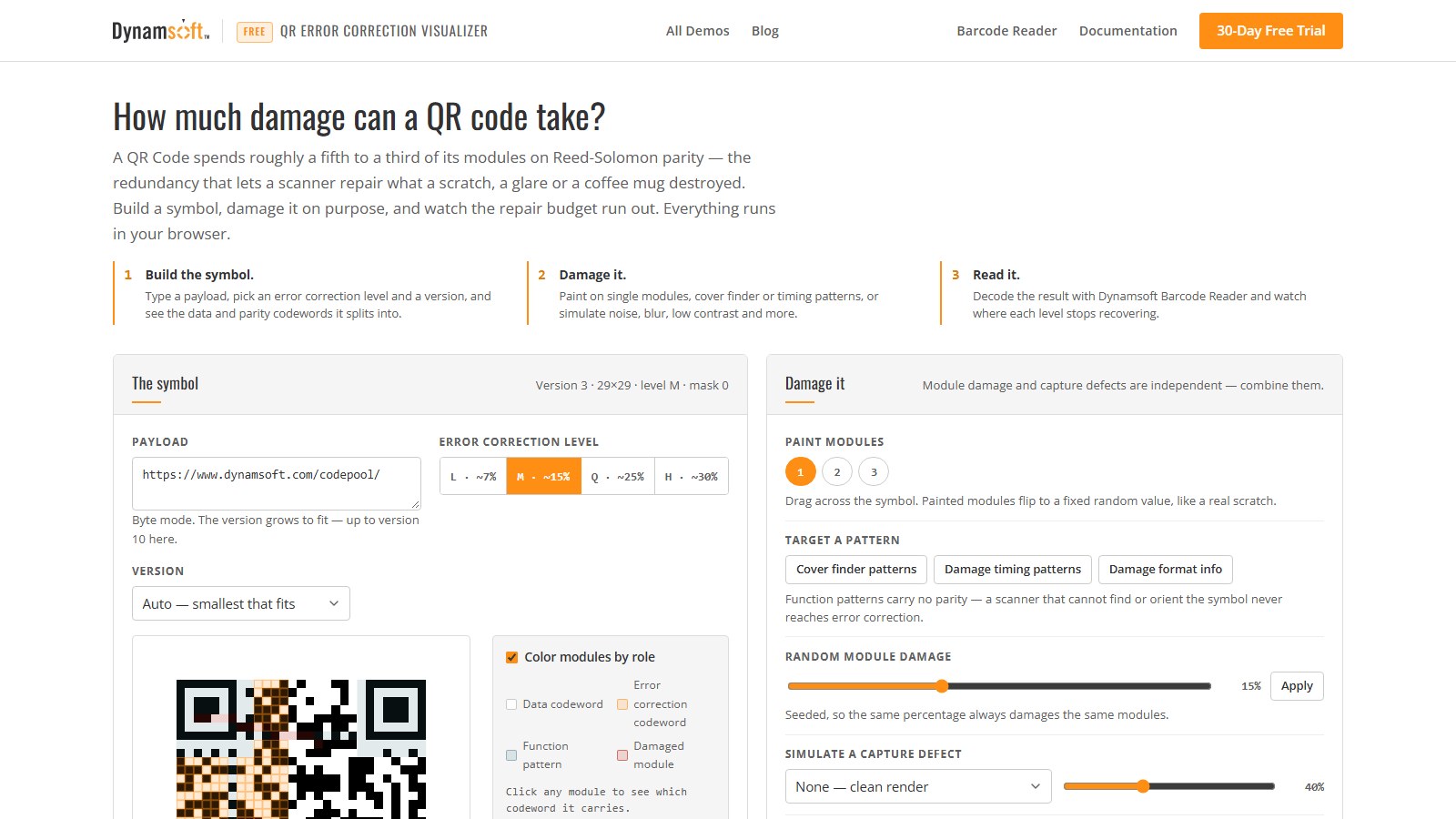
Key Takeaways
- QR error correction operates on codewords, not modules: a block of
eReed-Solomon parity codewords repairs up to⌊e/2⌋corrupted codewords, so one scratched module can consume a whole codeword from the budget. - The four levels spend very different shares on parity: for a 35-character URL, auto version selection produces 15 parity codewords at level L (21% of the symbol) but 88 at level H (66%), raising the repair budget from 7 to 44 codewords.
- Damage to function patterns — finder, timing, alignment, format, or the dark module — is uncorrectable by design: those modules carry no parity, and a scanner that cannot find or orient the symbol never reaches error correction.
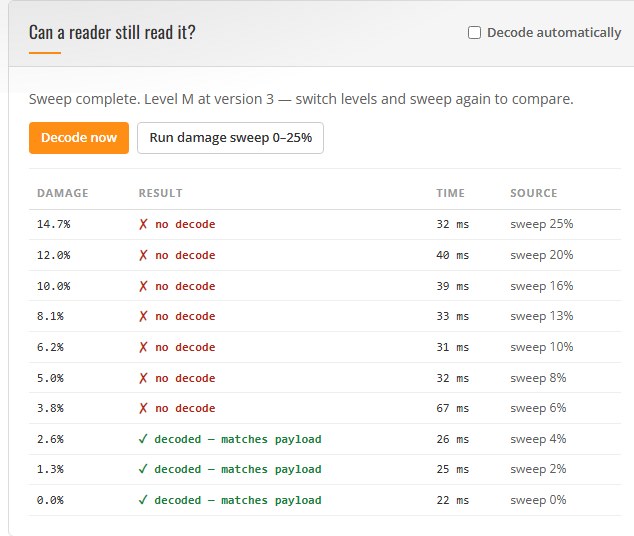
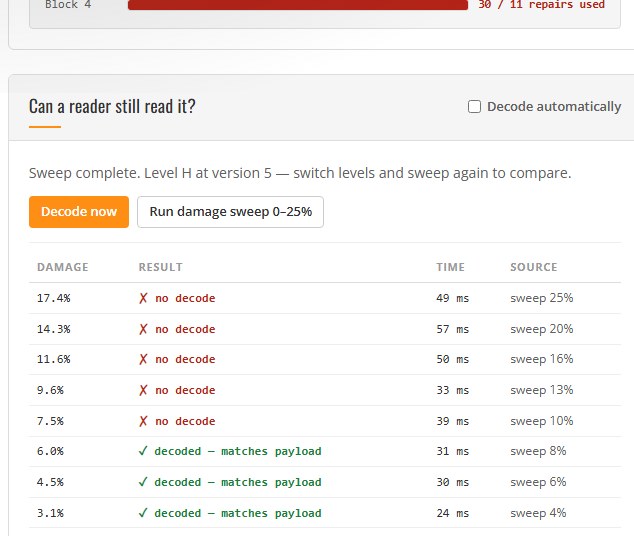
- In a seeded damage sweep on this demo, level M decoded up to 2.6% module damage and failed from 3.8%, while level H still decoded at 6.0% and failed from 7.5% — more than twice the survivable damage, measured with the same decoder on the same payload.
- Every claim above is reproducible in the browser: the visualizer counts real corrupted codewords per block from the encoder’s own placement map, not a pixel-level guess.
- A damaged symbol can be rebuilt, not just read: when the data survives, the demo writes the corrected codewords back into a symbol — same version, same level, same mask — and hands it back as PNG or SVG once its own reader confirms the payload. That is a redraw from codewords, not a restoration of the original pixels.
Common Developer Questions
What do the QR error correction levels L, M, Q, and H mean?
L, M, Q, and H are the four recovery levels defined by ISO/IEC 18004: a symbol at level L can repair roughly 7% of its data, M about 15%, Q about 25%, and H about 30%. The percentage is bought with Reed-Solomon parity codewords — level H spends about two thirds of a typical symbol on parity — so a higher level means a larger symbol for the same payload.
How much damage can a QR code take before it stops scanning?
It depends on where the damage lands relative to the codewords. A Reed-Solomon block of e parity codewords corrects up to ⌊e/2⌋ corrupted codewords per block; damage that hits more codewords than that in any one block is beyond repair. In the damage sweep shown below, a version-3 symbol at level M stopped decoding between 2.6% and 3.8% module damage, while a version-5 symbol at level H kept decoding up to 6.0% module damage — decoded by Dynamsoft Barcode Reader at default settings on the same payload.
Why does a small scratch on a QR corner break the whole code?
The three corner squares are finder patterns, and the lines between them are timing patterns — together with the format information and the dark module they form the scaffolding a scanner uses to locate, orient, and sample the symbol. These modules carry no parity codewords, so error correction cannot rebuild them; if the scaffolding is unreadable, the scanner never gets far enough to attempt Reed-Solomon repair.
Which error correction level should I use?
Use level H or Q when the symbol will face real-world abuse — laser engraving, outdoor signage, fabric printing, or packaging that gets handled — and pay for it with a larger symbol. Use M for general print-and-screen use, and L only when the payload is long and the surface is controlled, such as a URL on a clean screen. The demo’s level comparison shows the parity and repair counts for all four levels at the current version, so you can read the trade-off instead of guessing it.
Online Demo
https://www.dynamsoft.com/codepool/demos/qr-error-correction-visualizer/
Demo Video: Damaging and Decoding QR Codes Live
The video walks through the core loop: paint damage on the symbol until level M gives up, clear it, run a seeded damage sweep, then repeat at level H and watch the same payload survive far more abuse.
Prerequisites
- A modern browser. The QR encoder runs entirely client side; decoding needs a secure context (HTTPS or localhost) for license activation.
- A Dynamsoft Barcode Reader license for your own deployment. The hosted demo activates its Codepool license automatically.
Get a 30-day free trial license for Dynamsoft Barcode Reader.
QR Anatomy: the Parts of a Symbol
Every region of a QR symbol has a name, and the vocabulary matters because each part fails differently. The diagram below colors each region of a real version-3 symbol; the demo’s QR anatomy panel renders the same view for whatever symbol you have encoded, with every term hoverable on the live grid.
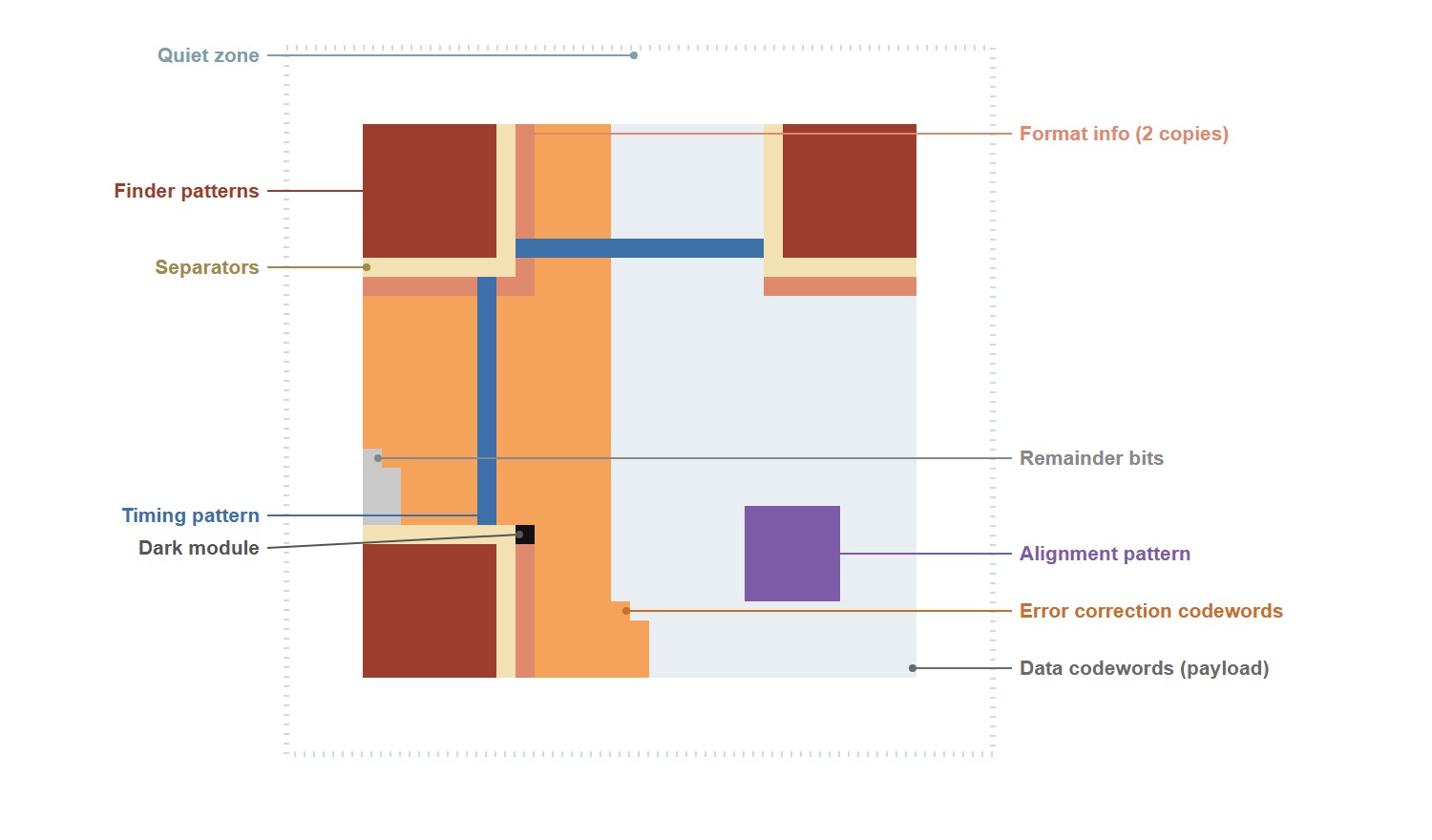
| Term | What it does | If it is damaged |
|---|---|---|
| Module | One black or white square; a version-3 symbol is 29×29 of them | One damaged module can corrupt a whole codeword |
| Codeword | 8 modules read as one byte — the unit error correction counts | Corrupted codewords consume the repair budget |
| Finder patterns | The three large squares the scanner uses to locate and orient the symbol | No parity protects them; often fatal |
| Separators | The one-module light ring around each finder pattern | Finder edges blur into the data region |
| Timing pattern | The alternating stripe in row 6 and column 6; sets the grid spacing | Sampling drifts, modules get misread |
| Alignment pattern | The small square lower right; corrects distortion on larger symbols | Skewed sampling on big symbols |
| Format information | 15 bits, stored twice: the error correction level and the mask | Both copies lost → nothing to decode |
| Version information | 18 bits, versions 7 and up only: the symbol size | Mis-sized grid on large symbols |
| Dark module | One always-dark module; a fixed orientation anchor | Minor, but the standard requires it |
| Data codewords | The payload — 44 of them in this symbol | Corruption consumes the repair budget |
| Error correction codewords | The Reed-Solomon parity — 26 of them here | Corruption consumes the same budget |
| Quiet zone | Four white modules on every side | Scanner may not separate symbol from background |
How a QR Code Spends Its Redundancy
A QR symbol does not store “text with a few spare pixels”. The payload is packed into 8-bit data codewords, each block of data codewords gets a run of Reed-Solomon parity codewords computed over it, and the combined sequence is interleaved across blocks and laid onto the module grid in a zigzag order. When a scanner samples the grid, every module contributes one bit; eight modules make one codeword; and the Reed-Solomon decoder can rebuild a corrupted codeword as long as each block stays within its repair capacity.
The structure view of the visualizer colors this machinery directly on the symbol: white cells carry data codewords, orange cells carry Reed-Solomon parity, and the blue-gray cells are function patterns — the collective name for the finder patterns, timing pattern, alignment pattern, format information and dark module in the anatomy table above. Click any module and the panel reports which codeword it belongs to, which block owns that codeword, and how many codewords the block carries.
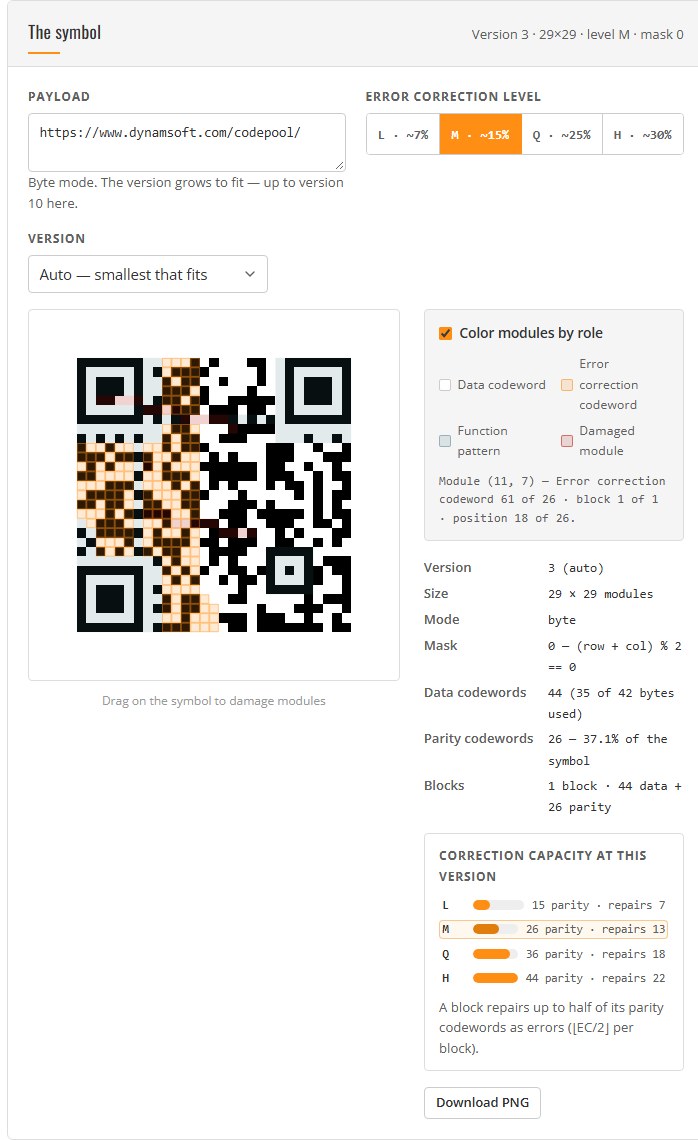
Two consequences follow directly from the picture:
- The repair budget is per block. A block with
eparity codewords corrects up to⌊e/2⌋corrupted codewords. Damage is not shared between blocks: if block 2 of 4 burns its budget, the symbol fails even when the other three blocks are pristine. - Function patterns sit outside the budget. They are the coordinates system of the symbol. Error correction repairs codewords, not scaffolding — cover a finder pattern and no amount of parity helps, because the scanner cannot establish where the data region even is.
Step 1: Encode with the Codeword Map Exposed
Most QR encoders hand you a bitmap and keep the internals. The demo uses a dependency-free encoder (ISO/IEC 18004 byte mode, versions 1–40, all four levels, standard mask search) that also returns the maps a structure view needs: the interleaved codeword index behind every module, the block split, and a per-module role map.
var QR = window.BarcodeQR;
var enc = QR.encode(text, { ecLevel: 'M' });            // or pin: { ecLevel: 'M', version: 3 }
var st  = QR.blockStructure(enc.version, enc.ecLevel);

// enc.size            -> 29 (a 29x29 module matrix for version 3)
// enc.dataCodewords   -> 44   enc.ecCodewords -> 26
// st                  -> { numBlocks: 1, ecPerBlock: 26, dataCodewords: 44, ... }
// enc.placement[r][c] -> the interleaved codeword index behind module (r, c),
//                        null for function patterns and remainder modules
For the demo’s 35-character default payload, auto version selection lands on version 3 at level L and M, version 4 at Q, and version 5 at H — the level costs size, which is the trade-off in action.
Step 2: Turn Painted Damage into a Repair Budget
When you drag across the symbol, each painted module flips to a stable random value — like a real scratch that repaints the surface. Because placement maps every module to its codeword, damage becomes bookkeeping: count the distinct codewords that own at least one damaged module, map each to its block, and compare the per-block tally against that block’s repair capacity.
// Interleaved index -> owning block. Data codewords round-robin across the
// blocks first (short blocks leading), then parity codewords round-robin again.
function codewordBlock(p, st) {
    if (p < st.dataCodewords) {
        if (p < st.shortLength * st.numBlocks) return p % st.numBlocks;
        return st.numShort + (p - st.shortLength * st.numBlocks);
    }
    return (p - st.dataCodewords) % st.numBlocks;
}

var corrupted = {};                       // codeword index -> true
for (var key in damaged) {
    var cell = parseKey(key);             // damaged module (r, c)
    var cw = enc.placement[cell.r][cell.c];
    if (cw !== null) corrupted[cw] = true;
}
var perBlock = new Array(st.numBlocks).fill(0);
for (var p in corrupted) perBlock[codewordBlock(Number(p), st)]++;

// Block b is beyond repair when perBlock[b] > Math.floor(st.ecPerBlock / 2)
The meter treats a codeword as corrupted as soon as one of its eight modules is damaged — a deliberate upper bound, since a scratch can repaint a module with the value it already had. It is still exact about which codewords and which blocks are at risk, which is what a pixel-damage percentage cannot tell you.
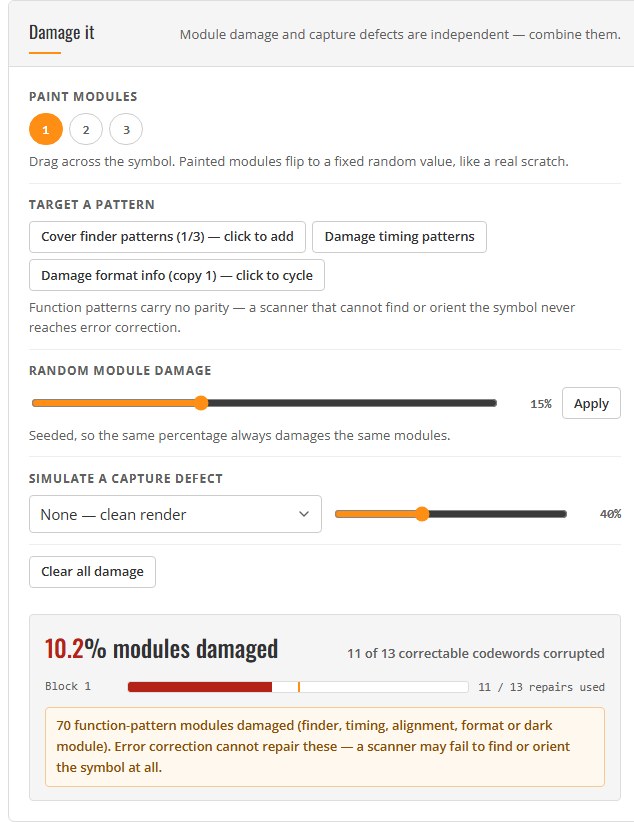
The same panel carries the lesson that hurts: cover a finder pattern — one of the three large corner squares from the anatomy table — or mangle the format information, the 15-bit field that tells the scanner which level and mask were used, and the meter flags function-pattern damage — 64 modules in this shot — with the note that error correction cannot repair them. The budget bars may still be half empty when the symbol becomes unscannable.
Step 3: Decode the Damaged Render with Dynamsoft Barcode Reader
The damaged render is decoded the way a camera would see it: the clean module grid plus the damage, rendered onto one canvas and passed to Dynamsoft Barcode Reader as a raw frame. Canvas ImageData stores pixels in RGBA byte order, which is exactly the byte order the SDK calls IPF_ABGR_8888 — so the buffer goes in directly:
const W = canvas.width;
const image = canvas.getContext('2d').getImageData(0, 0, W, W);
const result = await cvr.capture({
    bytes: new Uint8Array(image.data),    // fresh copy: capture may detach the input
    width: W, height: W, stride: W * 4,
    format: 10                            // IPF_ABGR_8888
}, 'ReadBarcodes_Default');

const barcodes = (result.items || []).filter(item => item.type === 2);
The decoder runs on your device; the first decode downloads the WebAssembly engine (about seven seconds on this connection), and every later decode of a symbol this size settles around 30–60 ms — fast enough to decode automatically after every change.
What the Sweep Shows: Where Each Level Stops
The damage sweep is the experiment that makes the levels comparable. It accumulates seeded random damage on the encoding region in ten steps from 0% to 25%, decodes after each step, and logs the module damage percentage against the outcome. Every run uses fixed seeds, so the table is reproducible.
At level M (version 3, one block, 26 parity codewords, 13 repairs), the payload decoded intact up to 2.6% module damage and failed from 3.8% onward:
At level H (version 5, four blocks, 22 parity codewords per block, 44 repairs in total), the same payload still decoded at 4.5% and 6.0% module damage and failed from 7.5%:
Read the two tables side by side and three things stand out (all levels and versions here are the ones auto-selected for the 35-character payload shown in the anatomy diagram):
- H survived more than twice the module damage of M in this sweep — 6.0% versus 2.6% at the last successful decode — because its repair budget is 44 codewords against 13, on a payload that stayed the same size.
- The failure boundary is a budget, not a percentage. Random damage lands on parity codewords as well as data codewords, and a corrupted parity codeword consumes the budget exactly like a corrupted data one. That is why the percentages look small: only about a third of the symbol carries data, and every hit counts.
- The boundary moves with the payload. Switch the error correction level and the auto-selected version grows; the parity count, the block count, and therefore the sweep outcome all change with it. The comparison bars under the symbol show the four levels’ parity and repair counts for the current version.
Step 4: Rebuild a Damaged Symbol You Did Not Generate
Everything above starts from a symbol this page encoded itself, so it knows every module. The last panel starts from a photograph instead: drop in a QR code someone sent you, and the page measures it — then, when the data is still there, hands back a symbol you can print.
Three things happen, in order.
1. The reader gets three escalating passes. The default settings run first. If they find nothing, the page
retries with the modes built for physical damage: BarcodeComplementModes (BCM_GENERAL) completes missing
positioning patterns and DeformationResistingModes (DRM_GENERAL) straightens a distorted symbol. If that fails
too, it builds prepared copies of the image — Otsu-binarized with a 3×3 closing pass over the pinholes, and the same
copy turned by ±45° — and runs the damaged template on each.
{ Section: 'ST_BARCODE_DECODING', ImageParameterName: 'IP_QR',
  StageArray: [
    { Stage: 'SST_RESIST_DEFORMATION', DeformationResistingModes: [{ Mode: 'DRM_GENERAL' }] },
    { Stage: 'SST_COMPLEMENT_BARCODE', BarcodeComplementModes: [{ Mode: 'BCM_GENERAL' }] }
  ] }
This is not a detail. On the sample photo used for this section — a printed symbol with one corner torn through
the bottom-left finder pattern — the default template returned zero results, and the second pass returned the
payload at 98% confidence. The third pass exists for the two failures neither template can reach: a postal label
whose ink is pinholed, and the same code wrapped 45° around a can. Both read only after the binarize-and-turn, and
when that is what happened the report says so — the damage percentage is omitted rather than faked, because the grid
was never locked on the original image. Two footnotes before you copy it: initSettings() replaces the whole template set, so
the moment you register a custom document the preset names (ReadBarcodes_Default) stop resolving and you have to
register your own default template alongside it; and the localization modes must be named explicitly
(connected blocks, lines, statistics, scan directly, neural) inside the damaged template, or that second pass finds
nothing on a symbol the first pass also missed.
2. The grid locks onto the symbol. The reader returns four corners in location.points, clockwise from the
top-left, and those corners drive a homography: each candidate version is sampled and scored against its finder and
timing patterns. A damaged symbol needs one concession here. A torn finder pattern scores about 0.80 where an intact
one scores near 1.0, and the demo’s threshold for a grid it found on its own is 0.82 — so when the corners came
from a successful decode, the threshold drops to 0.6. A decode is its own proof that the symbol exists; the pattern
score only has to confirm the grid is not wildly off.
3. The symbol is written back, not re-encoded. There are two sources of codewords, in order of preference.
First the page’s own Reed-Solomon decode of the sampled modules, which is the honest measurement path because it
knows exactly which codewords it repaired. When the damage sits on the data region and no block verifies, the
codewords come from details.codewords instead — a decode means the reader already recovered the whole stream, so
the symbol can be drawn from that. Two API details were measured rather than assumed: details.codewords is the
full raw sequence including parity, and details.errorCorrectionLevel is the SDK’s own enum, not the format
field’s two bits — against known symbols it reads 0=H, 1=L, 2=M, 3=Q.
Either way the output is a module matrix, and everything the standard fixes by version is redrawn from that version instead of copied from the blur: finder patterns, separators, timing, alignment, the dark module, version information, and both copies of the format field. The format field is the one that bites — a symbol whose format field is unreadable gets decoded by brute force, and the rebuilt symbol needs a valid format field or its own reader will reject it.
Then the page hands the rendered pixels back to the reader and compares the payload. The download stays disabled until the two agree: a rebuild its own reader will not accept is not a recovery, and the demo does not offer it.
Two limits worth stating plainly. The rebuilt image is a redraw from codewords, not a restoration of the original pixels — same version, same level, same mask, same payload, different paper. And if the finder patterns are damaged past the point where anything locates the symbol, no grid locks and there is nothing to rebuild; the page says so rather than guessing.
Common Issues & Edge Cases
- The percentage says fine but the scan fails: module damage and codeword corruption are different currencies. One damaged module can flip a whole codeword, and damage concentrated on a single block overloads that block while the others look healthy. Watch the per-block budget bars, not just the headline percentage.
- Covering a finder pattern breaks the symbol instantly: finder, timing, alignment, format, and version modules carry no parity. The demo flags function-pattern damage separately because no Reed-Solomon budget applies to it.
- The first decode takes seconds, later ones take milliseconds: the reader downloads its WebAssembly engine on first use. Preload it once on page load if your application decodes on a user action with no patience for a cold start.
- Painted damage can be a no-op: the brush repaints a module with a stable random value, which sometimes equals the value the module already had. The budget meter still counts the codeword as at risk — an upper bound by design.
- Capture-defect percentages are estimates: noise, blur, low contrast, occlusion, crop, shadow, and tilt are rendered onto the canvas, and the corruption estimate samples each module’s centre against its intended value. Module damage from the brush and sliders is exact; pixel-level damage is an estimate.
- A code a human can read but the reader calls unreadable: the default template is the fast path and it gives up on a torn finder pattern. Before concluding the image is dead, run the second pass with complement and deformation resisting — on the sample in Step 4 the defaults returned nothing and the second pass returned the payload.
- The recovered symbol’s download button is disabled: that is the re-read gate, not a bug. The rebuilt symbol did not come back with the same payload, which almost always means the damage was past the budget or the grid lock picked the wrong version.
Real-World Constraints
The sweep numbers in this article are measurements from this demo, this payload, and this reader: Dynamsoft Barcode Reader at default settings, decoding rendered images, with damage applied at the module level. Other readers use different localization and sampling strategies; printing, scanning, and photographing a symbol changes module geometry in ways the canvas render does not model; and Reed-Solomon erasure decoding — which a scanner can apply when it knows where the damage is — can recover more than the ⌊e/2⌋ error bound under some conditions. Treat the sweep as a way to understand the mechanism and compare the levels, not as a certified damage rating for your print layout: if you need a print-quality verdict, that is a job for an ISO 15415 verifier, not a browser tool. The recovered symbol belongs to the same caveat: it is a redraw from codewords, geometrically exact but a new print rather than a repair of the old one, and it is only produced when the data survived in the first place.
Conclusion
QR error correction is a concrete, countable resource: parity codewords, split into blocks, each repairing up to half its own count. Once you can see which codeword sits under which module, “how much damage can a QR code take” stops being folklore — you can paint the damage, watch the per-block budget drain, and read the failure boundary off a real decoder. The same mental model explains the practical rules: higher levels buy recovery with symbol size, function patterns are precious because nothing repairs them, and a scratch that lands on a parity codeword costs as much as one that lands on data. From here, the natural next step is the Barcode Structure Diagram, which annotates the rest of the symbol the same way, or the Barcode & QR Code Generator if you need degraded test datasets at scale.