




RedactionAnnotationOptions
Syntax
interface RedactionAnnotationOptions {
    redactionType?: "rectangle" | "text";
    rects?: RectXY[];
    background?: string;
    borderColor?: string;
    overlayBackground?: string;
    overlayText?: {
        text: string;
        color?: string;
        textAlign?: "left" | "center" | "right";
        fontSize?: number;
        fontFamily?: string;
        repeatText?: boolean;
        autoFontSize?: boolean;
    };
    flags?: Flags;
}
Attributes
redactionType
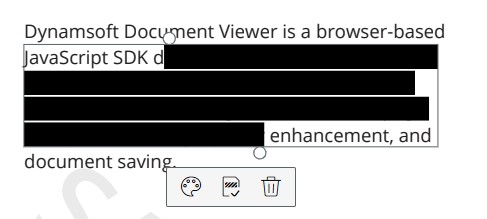
The type of the redaction. It can be text or rectangle. This affects the interaction behavior.
If the type is text, the annotation can be adjusted according to the text.
If the type is rectangle, the annotation can be adjusted as a rectangle.
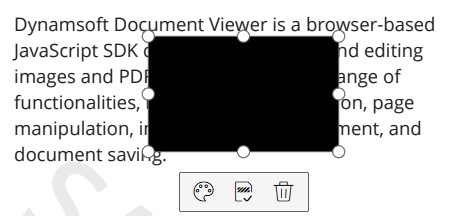
If the type is not specified when creation, it will be inferred based on the size of rects. If the size is 1, the type is rectangle. Otherwise, the type is text.
rects
An array of rectangles marking where to put the annotations.
Please refer to RectXY.
background
The background style of annotation.
Default value: '', it means no fill.
Example
background: "rgb(255,255,255)",
borderColor
The border color of annotation.
Default value: rgb(255,0,0)
Example
borderColor: "rgb(255,0,0)",
overlayBackground
The background of the annotation after being applied.
Default value: rgb(0,0,0)
overlayText
The text to display after being applied. It is an object for configuration. The following is the default options.
{
    text: "",                // text
    color: "rgb(255,0,0)", // text color
    textAlign: "left",       // text alignment: left, center, right
    fontSize: 16,            // font size
    fontFamily: "Helvetica", // font family name
    repeatText: false,       // repeat the text to fill the marked area
    autoFontSize: false,     // fit the text to the marked area
}
opacity
The opacity of the whole annotation. The value range is [0,1], value which is greater than 1 will default to 1.
Default value: 1
flags
The flags of annotation.
Please refer to Flags.
Related
getOptions()underRedactionclassupdateOptions()underRedactionclass
 Yes
Yes No
No