




How to enable and use debug mode in DBR-JS?
Enable debug mode
Starting from v11.0.3000, you can enable the demo’s debug mode by appending ?debug=true to the demo URL, for example:
https://demo.dynamsoft.com/barcode-reader-js/?debug=true
This version also adds:
- Custom template upload feature
- Video frame saving during debugging
- Improved UI with:
- Single/Multiple barcode toggle
- Scan Mode selection (Speed, Balance, Coverage)
- Barcode Color Options (Inverted, Normal, Both)
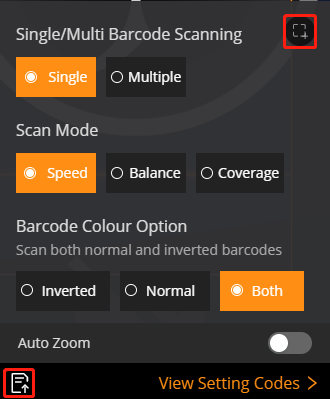
Upload a custom template
- Enable debug mode with
?debug=true - Use the custom template upload button (bottom-left of the UI)
- Upload a compatible
.jsontemplate for v11.0.3000
Note: Once a template is uploaded, changing other settings will have no effect until the template is cleared.
Save video frames
In debug mode, you can save video frames for testing and analysis using the button in the top-right of the UI.
 Yes
Yes No
No