




Configure MRZ Scanner
When developing with MRZScannerViewController, you can add configurations via the MRZScannerConfig class. This page will guide you on how to configure the settings.
Scan Document Type
Set the document type via APIs
Specifies the type of document to scan, such as ID cards or passports. It also improves the processing speed and the accuracy.
- Objective-C
- Swift
DSMRZScannerConfig *config = [[DSMRZScannerConfig alloc] init];
config.documentType = DSDocumentTypePassport;
let config = MRZScannerConfig() config.documentType = [.passport]
Setup a customized template file
A template file is a JSON file that includes a series of algorithm parameter settings. It is always used to customize the performance for different usage scenarios. Contact us to get a customized template for your scanner.
-
Create a
DynamsoftResourcesfolder in the finder. Under theDynamsoftResourcesfolder create a new folder,Templates. -
Put your customized template json file under the
Templatesfolder. -
Rename the
DynamsoftResourcesfolder’s extension name to .bundle and drag theDynamsoftResources.bundleinto your project on Xcode. Select Create groups for the Added folders option. -
Specify the template file via
templateFileproperty- Objective-C
- Swift
-
DSMRZScannerConfig *config = [[DSMRZScannerConfig alloc] init]; config.templateFile = @"CustomizedTemplate.json"; -
let config = MRZScannerConfig()
config.templateFile = "CustomizedTemplate.json"
You can also use a JSON string as the template file.
Related APIs
Configure the UI Elements
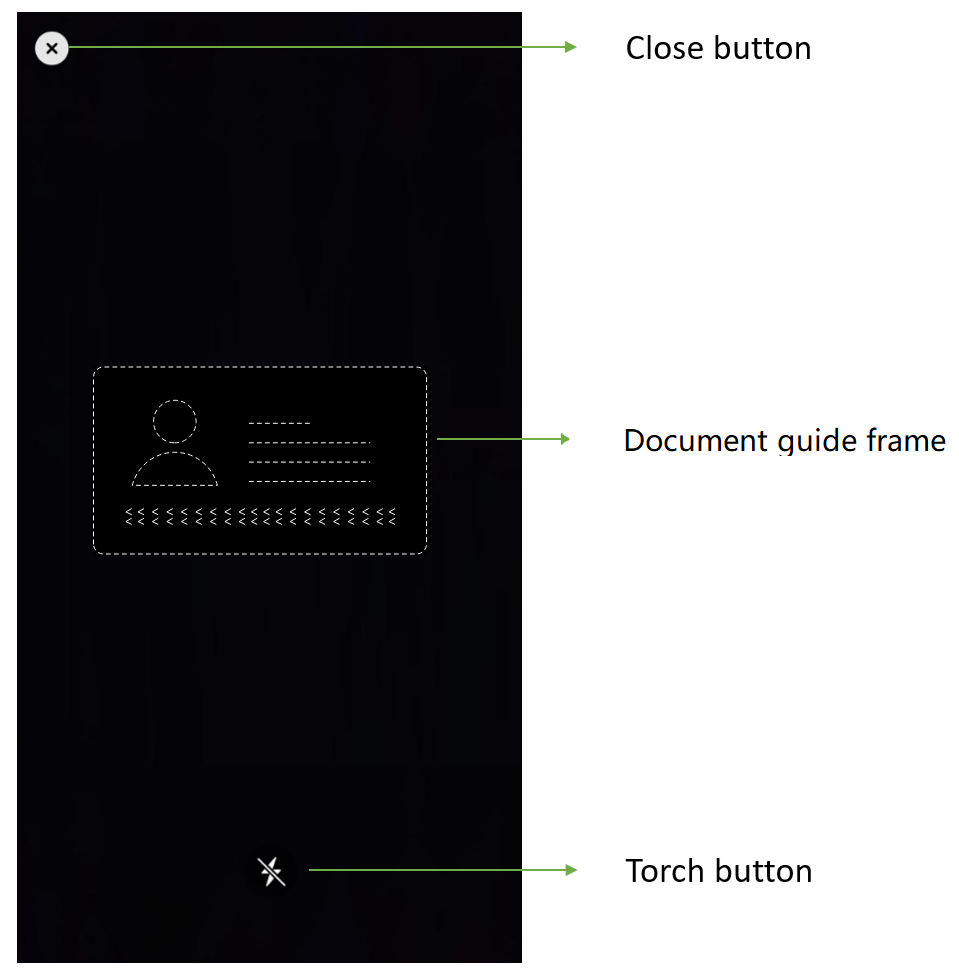
MRZ Scanner UI Components
- Close button: Stop MRZ scanning and go back to the previous activity.
- Torch button: A clickable button that can turn on/off the torch.
- Objective-C
- Swift
DSMRZScannerConfig *config = [[DSMRZScannerConfig alloc] init];
config.isCloseButtonVisible = false;
config.isGuideFrameVisible = false;
config.isTorchButtonVisible = false;
let config = MRZScannerConfig() config.isCloseButtonVisible = false config.isGuideFrameVisible = false config.isTorchButtonVisible = false
Related APIs
Beep
Let the app to trigger a beep sound when a MRZ is scanned successfully.
- Objective-C
- Swift
DSMRZScannerConfig *config = [[DSMRZScannerConfig alloc] init];
config.isBeepEnabled = true;
let config = MRZScannerConfig() config.isBeepEnabled = true
Related API
Further Customization
If you have other customization requirements on the MRZScanner component, you can modify it with the open source code on GitHub.
 Yes
Yes No
No