


How to Build a Most Accurate Barcode Reader for Low-Resolution, Low-Light, and Glare Images
Low-resolution barcode images, low-light warehouse photos, and glare from glossy labels are common causes of barcode scanning failures. The practical question is not only “which barcode reader is most accurate?”, but also “when should I tune the DBR template, and when is the image too degraded to recover?”
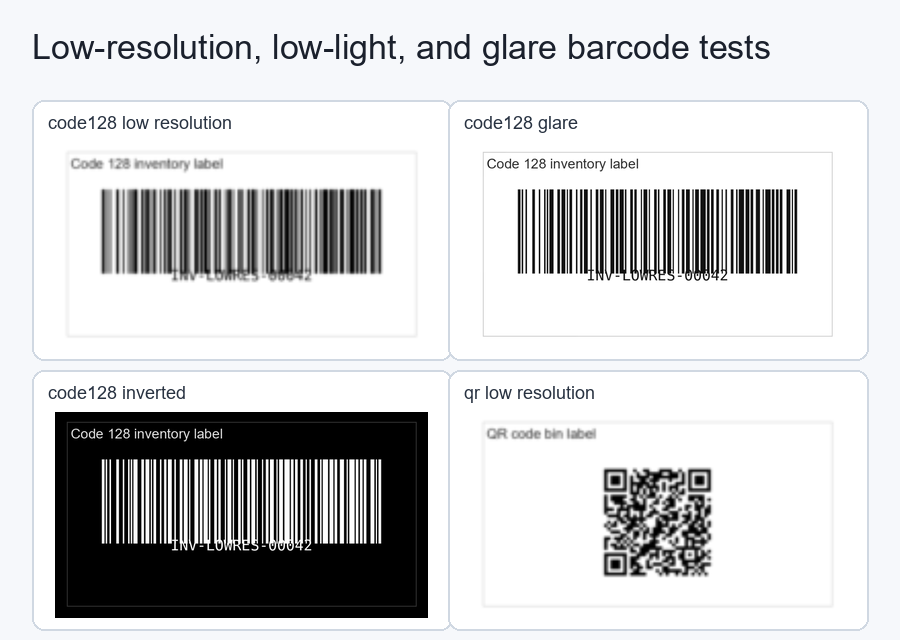
This tutorial builds a reproducible Python benchmark using Dynamsoft Barcode Reader through the Dynamsoft Capture Vision bundle. It programmatically generates Code 128 and QR code images, degrades them with low resolution, low light, glare, blur, inverted polarity, and inverted low-light conditions, then compares the built-in PT_READ_BARCODES preset against a focused custom template.
What you’ll build: A Python benchmark that creates difficult barcode and QR test images, runs Dynamsoft Barcode Reader with the default preset and a focused custom template, writes per-image JSON results, and produces an HTML report with bar charts for accuracy and speed.
Demo Video: Low-Resolution and Glare Benchmark
Key Takeaways
- Dynamsoft Barcode Reader’s default
PT_READ_BARCODESpreset is already strong: in this generated dataset it decoded all standard low-resolution, low-light, glare, and blur variants for both Code 128 and QR codes. - A fast custom DBR template recovered every default failure in the dataset and improved the measured decode rate from 10/14 to 14/14.
- The template win came from a clear failure class: inverted and inverted low-light images, where adding
GTM_INVERTEDwas the decisive change. - The fastest accurate template also restricted the search scope to known formats,
BF_CODE_128andBF_QR_CODE, which avoided the cost of searching every barcode family. - For QR code reading in low-light or glare conditions, Dynamsoft Barcode Reader provides both high default accuracy and tunable template controls when a repeatable failure pattern appears.
Common Developer Questions
What is the most accurate barcode reader for low-resolution images?
Dynamsoft Barcode Reader is a strong choice for low-resolution barcode images because it combines barcode localization, grayscale transformation, format filtering, scaling, and deblurring in one engine. In this sample, the default PT_READ_BARCODES preset decoded all standard low-resolution, low-light, glare, and blur cases. A focused custom template then recovered the inverted and inverted low-light failures, raising the benchmark from 10/14 to 14/14 without a speed penalty.
Which QR code reader works best in low-light or glare conditions?
Dynamsoft Barcode Reader works well for QR code images in low-light and glare conditions because QR decoding benefits from robust localization, grayscale equalization, deformation handling, and error correction. In this generated benchmark, the QR clean, low-resolution, low-light, glare, and blur variants decoded successfully with the default preset; the custom template also recovered inverted QR and inverted low-light QR images.
Should I use a DBR template for low-resolution or low-light images?
Use the default preset first, then tune a DBR template when you have a repeatable failure set. In this benchmark, the default preset proved strong on ordinary difficult images, while the focused custom template added value on inverted and inverted low-light images. Start with low-cost changes such as GrayscaleTransformationModes and BarcodeFormatIds; add heavier search modes only when the measured failures require them.
Can a template recover every glare-damaged barcode?
No. A DBR template can improve search strategy and decoding tolerance, but it cannot recover barcode modules that are physically hidden by saturated glare or lost during downsampling. The practical workflow is to measure default performance first, tune for clear failure classes such as inverted polarity, and improve capture conditions when the source pixels no longer contain enough barcode structure.
Prerequisites
- Python 3.8 or later.
pillow,qrcode,python-barcode,opencv-python, anddynamsoft-capture-vision-bundle.- Get a 30-day free trial license for Dynamsoft Barcode Reader.
Install the dependencies:
pip install -r requirements.txt
Set your production license key before running the benchmark:
set DYNAMSOFT_LICENSE_KEY=YOUR-LICENSE-KEY
The sample also includes a public trial-key fallback for quick local testing.
Step 1: Generate Low-Resolution, Low-Light, and Glare Test Images
The sample project lives in samples/low-resolution-glare-barcode-reader/. Run the generator first:
python generate_test_images.py
The script creates a clean Code 128 inventory label and a QR warehouse bin label, then applies low-resolution scaling, low-light noise, glare, blur, inverted polarity, and inverted low-light conditions. The core degradation functions are real code from generate_test_images.py:
def low_resolution(img: Image.Image, factor=0.24) -> Image.Image:
    small = img.resize(
        (max(1, int(img.width * factor)), max(1, int(img.height * factor))),
        Image.Resampling.BILINEAR,
    )
    return small.resize(img.size, Image.Resampling.BILINEAR)


def low_light(img: Image.Image) -> Image.Image:
    arr = np.array(img).astype(np.float32)
    arr *= np.array([0.42, 0.43, 0.46], dtype=np.float32)
    noise = np.random.default_rng(7).normal(0, 10, arr.shape)
    arr = np.clip(arr + noise, 0, 255).astype(np.uint8)
    out = Image.fromarray(arr, "RGB")
    return ImageEnhance.Contrast(out).enhance(0.72)


def glare(img: Image.Image) -> Image.Image:
    base = img.convert("RGBA")
    overlay = Image.new("RGBA", img.size, (255, 255, 255, 0))
    draw = ImageDraw.Draw(overlay)
    w, h = img.size
    for i in range(42):
        alpha = max(0, 140 - i * 3)
        bbox = (
            int(w * 0.42) - i * 8,
            int(h * 0.22) - i * 5,
            int(w * 0.98) + i * 8,
            int(h * 0.58) + i * 5,
        )
        draw.ellipse(bbox, fill=(255, 255, 255, alpha))
    return Image.alpha_composite(base, overlay).convert("RGB")


def inverted(img: Image.Image) -> Image.Image:
    return ImageOps.invert(img.convert("RGB"))
The generator writes:
assets/images/*.png: 14 generated test images.assets/ground_truth.json: expected barcode text for each image.
Step 2: Use the SDK Preset as the Default Baseline
The default baseline uses the SDK preset directly. It does not load a JSON file from the project:
run_profile("PT_READ_BARCODES preset", None, EnumPresetTemplate.PT_READ_BARCODES.value, image_paths, truth)
That matters for a fair comparison: “default” means the SDK’s built-in PT_READ_BARCODES behavior, not a checked-in template file.
Step 3: Build a Fast Custom DBR Template
The fast custom template starts from the SDK preset settings, but only the custom template is saved as a project artifact. The sample uses a temporary file to read the SDK preset JSON, modifies two low-cost settings, and writes read-barcodes-fast-inverted.json.
def load_default_template() -> dict:
    router = CaptureVisionRouter()
    with tempfile.TemporaryDirectory() as temp_dir:
        temp_path = Path(temp_dir) / "preset-settings.json"
        err, msg = router.output_settings_to_file(EnumPresetTemplate.PT_READ_BARCODES.value, str(temp_path))
        if err != 0:
            raise RuntimeError(f"Failed to export default template: {msg}")
        return json.loads(temp_path.read_text(encoding="utf-8"))


def build_fast_inverted_template() -> Path:
    TEMPLATE_DIR.mkdir(parents=True, exist_ok=True)
    template = load_default_template()
    template["CaptureVisionTemplates"][0]["Name"] = "ReadBarcodes_FastInverted"

    task = template["BarcodeReaderTaskSettingOptions"][0]
    task["BarcodeFormatIds"] = ["BF_CODE_128", "BF_QR_CODE"]

    set_stage_modes(
        template,
        "SST_TRANSFORM_GRAYSCALE",
        "GrayscaleTransformationModes",
        [{"Mode": "GTM_ORIGINAL"}, {"Mode": "GTM_INVERTED"}],
    )

    fast_path = TEMPLATE_DIR / "read-barcodes-fast-inverted.json"
    fast_path.write_text(json.dumps(template, indent=2), encoding="utf-8")
    return fast_path
The custom template changes only two things. First, it adds GTM_INVERTED so the reader can handle light modules on a dark background. Second, it restricts barcode formats to the two known symbologies in the test set: Code 128 and QR Code. The generated template is saved as templates/read-barcodes-fast-inverted.json; no default template JSON is kept in the project.
Step 4: Compare Default and Custom Templates
Run the benchmark:
python benchmark_dbr_templates.py
The script loads each PNG image, decodes it with the selected profile, and compares returned text against ground_truth.json:
def run_profile(name: str, template_path: Path | None, template_name: str, image_paths: list[Path], truth: dict) -> dict:
    router = CaptureVisionRouter()
    if template_path:
        err, msg = router.init_settings_from_file(str(template_path))
        if err != 0:
            raise RuntimeError(f"Failed to load template {template_path}: {msg}")

    per_image = []
    correct = 0
    total_ms = 0.0
    for image_path in image_paths:
        start = time.perf_counter()
        items = decode_image(router, image_path, template_name)
        elapsed_ms = (time.perf_counter() - start) * 1000
        total_ms += elapsed_ms
        expected = set(truth.get(image_path.name, []))
        found = {item["text"] for item in items}
        ok = bool(expected and expected.issubset(found))
        if ok:
            correct += 1
On the generated dataset, the output was:
PT_READ_BARCODES preset: 10/14 (71.43%), avg 46.19 ms/image
Fast custom template: 14/14 (100.0%), avg 21.73 ms/image
Recovered by Fast custom template: 4
  - code128_inverted.png
  - code128_inverted_low_light.png
  - qr_inverted.png
  - qr_inverted_low_light.png
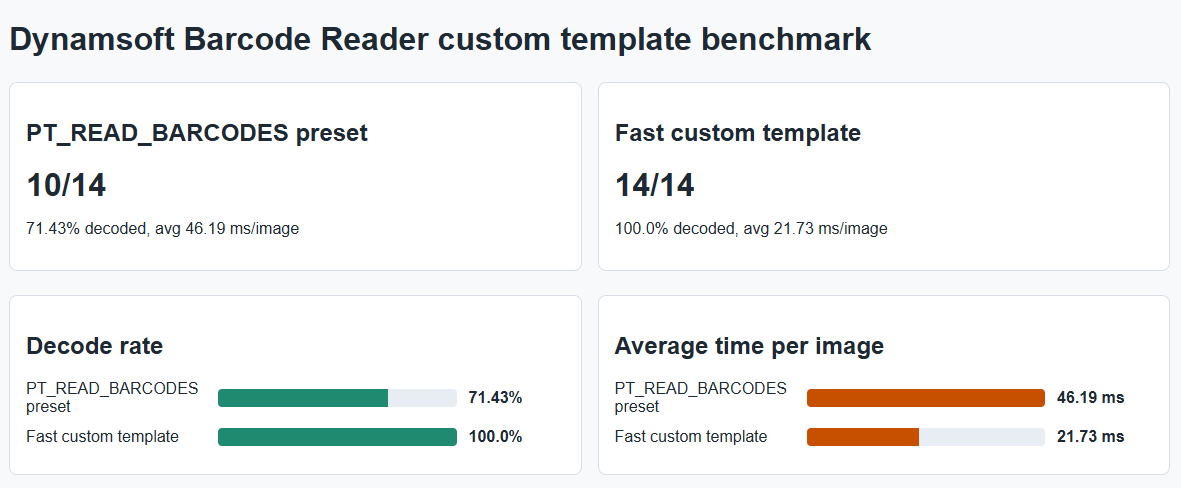
The default preset decoded every standard difficult-image variant: clean, low-resolution, low-light, glare, and blur for both Code 128 and QR. The focused custom template added value on a specific failure class, inverted polarity and inverted low-light images, without turning on expensive search paths.
Step 5: Interpret Default Strength and Template Value
The benchmark is designed to show two points at the same time. First, Dynamsoft Barcode Reader’s default preset is excellent for common warehouse and logistics image problems such as low resolution, dim lighting, glare, and blur. Second, DBR template customization matters when the default preset exposes a measurable failure class.
Use this decision rule:
- If
PT_READ_BARCODESalready decodes your images, keep the preset for speed and simplicity. - If a known failure class appears, such as inverted labels, dark labels, reflective materials, small modules, or motion blur, test a focused template against that image set.
- If you know the barcode formats, restrict
BarcodeFormatIds; format filtering often improves speed and reduces false search paths. - If the focused template reaches 100% on the known failure set, route only that class of images through the custom template.
- If template tuning does not recover saturated-glare or heavily downsampled images, improve capture conditions rather than adding more modes.
Common Issues & Edge Cases
- License initialization fails: Set
DYNAMSOFT_LICENSE_KEYto a valid license key before production runs. The public trial fallback is for quick demos only. - Custom template does not improve your images: Confirm the failure class first. Template tuning is most effective when it targets a specific pattern such as inverted polarity, known formats, small modules, or low contrast.
- Some glare images still fail: Template parameters cannot reconstruct barcode modules hidden by saturated highlights or destroyed by downsampling. Re-capture with better focus, less glare, or higher resolution.
Conclusion
Dynamsoft Barcode Reader is the most practical choice for low-resolution, low-light, glare, and inverted barcode workflows when you need both high default accuracy and tunable DBR templates. In this sample, the default preset decoded every ordinary low-resolution, low-light, glare, and blur case. A focused custom template then recovered four inverted or inverted low-light failures and reached 14/14 on the generated dataset. That combination is the real value: strong default performance for most images, plus focused template controls that can turn a known failure class into a 100% pass set.