


Dynamsoft Barcode Reader Python 11.6.1000 Hands-On: Multimodal PDF, Multi-Threaded Decoding, and Layout Analysis
Dynamsoft Barcode Reader Python 11.6.1000 ships three features that matter in production: PDFRM_MULTIMODAL extracts barcodes directly from PDF vector, text, and embedded-image content instead of rasterizing whole pages; barcode decoding now runs breadth-first across threads so valid results come back sooner; and a new LayoutAnalyzer API organizes dense barcode grids into logical matrices and infers the regions a first pass missed. In the benchmarks in this article (Windows 11, Python 3.11, median of 5 timed runs after a warm-up), PDF pages carrying text- or vector-drawn barcodes decode in 2-3 ms instead of 180-263 ms, dense blurred 1D barcode images decode in up to 48% less time than 11.4.3000, and a layout-analysis pipeline lifts completeness on a 9x8 QR-code tray from 65 to 71 barcodes, recovering every populated cell.
What you’ll build: Three reproducible experiments for DBR Python 11.6.1000 — a PDF reading-mode benchmark driven by the new FileFetcher overload, a side-by-side 11.4.3000 vs 11.6.1000 speed comparison using isolated virtual environments, and a three-stage dense-grid decoding pipeline built on LayoutAnalyzer.
Key Takeaways
PDFRM_MULTIMODALis the new defaultPDFReadingModein 11.6.1000. On this article’s four sample PDFs (decoded with theReadBarcodes_ReadRateFirsttemplate), text- and vector-carried barcodes decode in 2-3 ms versus 180-263 ms withPDFRM_RASTER— up to about 90x faster — and multimodal found every barcode raster mode found, plus two more on the text-based PDF.- Multi-threaded decoding decomposes one DBR task into one Localization Work plus one or more Decoding Works. In this benchmark, dense multi-barcode images decode in 5-48% less time than 11.4.3000, with the largest gain on deblur-heavy blurred 1D images.
LayoutAnalyzer.analyze()turns scattered barcode quadrilaterals into a line or matrix layout and marks unrecognized cells asLES_INFERRED, so a targeted second pass can deep-decode exactly those gaps — raising completeness on a 9x8 QR tray from 65 to 71 codes.- Inferred cells are candidates, not guarantees: the empty tray slot in the sample was also inferred, and the deep-decode second pass is what verified it as empty. Budget the extra time (about 0.4 s on the 1074x989 px sample) for the completeness gain.
- Template choice still decides completeness on PDFs: with the default template, multimodal found only part of the barcodes on these sample PDFs, while
ReadBarcodes_ReadRateFirstfound all of them in both reading modes.
Common Developer Questions
What is PDFRM_MULTIMODAL in Dynamsoft Barcode Reader?
PDFRM_MULTIMODAL is a PDF reading mode added in DBR 11.6.1000 that extracts vector graphics, text content, and embedded images from a PDF instead of rendering every page to a bitmap. It is the default mode of PDFReadingParameter in 11.6.1000, replacing PDFRM_RASTER, and the older PDFRM_VECTOR is deprecated in its favor. Because irrelevant page regions are never rendered, barcode decoding on text- or vector-based PDFs is usually much faster — 2-3 ms versus 180-263 ms per page in this article’s Read Rate First measurements.
How much faster is Dynamsoft Barcode Reader Python 11.6.1000 than 11.4.3000?
In this benchmark (median of 5 runs, default ReadBarcodes template, Python 3.11 on Windows 11), 11.6.1000 decoded a dense 32-barcode blurred 1D image in 185 ms versus 354 ms on 11.4.3000 (48% less time), a 49-barcode image in 130 ms versus 147 ms (12% less time), a 65-QR-code tray in 87 ms versus 105 ms (17% less time), a 40-barcode orientation test sheet in 120 ms versus 140 ms (15% less time), and 13-14-barcode sheets in 34-55 ms versus 38-58 ms (5-9% less time). The gain grows with barcode count and deblur contention, because parallel Decoding Works overlap instead of waiting behind one slow attempt.
How do I decode every barcode in a dense N×M barcode grid with Python?
Use the LayoutAnalyzer API added in DBR Python 11.6.1000: run a fast first-pass scan to collect barcode quadrilaterals, call LayoutAnalyzer.analyze() with LayoutPattern.LP_MATRIX to organize them into a logical grid, then deep-decode only the cells marked LES_INFERRED with an ROI-scoped second pass. The pipeline in this article raised completeness on a 9x8 tray of QR-coded vials from 65 to 71 barcodes — every populated cell — while correctly marking the one empty slot.
Does PDFRM_MULTIMODAL always find more barcodes than raster mode?
No — the reading mode and the template are separate choices. In this benchmark with the ReadBarcodes_ReadRateFirst template, multimodal matched raster on every sample PDF and found 5 codes versus 3 on text-barcode.pdf, while decoding 2.5-90x faster. With the default ReadBarcodes template, however, multimodal found only part of the barcodes on these PDFs (for example 1 of 2 on embedded-barcode-image.pdf), so pair the new mode with a read-rate-oriented template when completeness matters.
How can I compare two Dynamsoft SDK versions side by side in Python?
Install each SDK version into its own virtual environment and run the decode workload in a subprocess launched with that environment’s python.exe, collecting JSON results back in a host GUI. The Dual SDK Comparison Tool used for this article’s speed benchmark implements exactly that pattern and renders per-image count and time deltas for any two versions.
Demo: Layout Analysis Decoding a 9×8 QR Code Tray
The video shows the three-stage pipeline measured in this article: a fast first pass decodes 65 of 72 cells, LayoutAnalyzer organizes the results into a 9x8 matrix and infers 7 unrecognized regions, and a targeted deep decode recovers 6 of them — 71 barcodes total, ending with the final labeled result (#1-#71 with decoded values) and the one inferred cell correctly identified as an empty slot.
Prerequisites
-
Python 3.11 with the latest SDK and demo dependencies:
pip install dynamsoft-barcode-reader-bundle opencv-python PyMuPDF PySide6 - For the cross-version speed benchmark, two extra virtual environments (details in Step 2).
- The sample files and demo tools from the python-barcode-qrcode-sdk repository (
examples/official/camera_fileandexamples/official/comparison_tool). - Get a 30-day free trial license for Dynamsoft Barcode Reader.
What’s New in DBR Python 11.6.1000
| Feature | API surface | Why it matters |
|---|---|---|
| Multimodal PDF content extraction | PDFRM_MULTIMODAL in EnumPDFReadingMode, new capture_multi_pages() overload accepting a FileFetcher |
Decodes barcodes from PDF vector graphics, text, and embedded images without full-page rasterization |
| Multi-threaded barcode decoding | Internal breadth-first scheduling; MaxParallelTasks now counts Work-level threads |
One task = one Localization Work + one or more Decoding Works, so a slow DeblurMode attempt no longer blocks faster attempts |
| Barcode layout analysis | LayoutAnalyzer, LayoutAnalysisParameter, LayoutPattern (LP_LINES, LP_MATRIX), LayoutElementSource (LES_INPUT, LES_INFERRED) |
Organizes dense barcode locations into logical layouts and infers unrecognized regions for targeted second-pass decoding |
The release also adds DataMatrix color-inversion auto-detection and cross-version license support; see the official 11.6.1000 release notes for the full list.
Step 1: Benchmark PDF Reading Modes with FileFetcher
Control the PDF reading mode explicitly
capture_multi_pages() gains an overload that accepts a FileFetcher, which is where PDFReadingParameter (mode, DPI, raster data source) is attached. The following helper decodes a PDF in either mode; omitting set_pdf_reading_parameter() gives you the new multimodal default:
from dynamsoft_barcode_reader_bundle import *

def decode_pdf(cvr, pdf_path, mode, template):
    fetcher = FileFetcher()
    fetcher.set_file(pdf_path)
    param = PDFReadingParameter()
    param.mode = mode          # EnumPDFReadingMode.PDFRM_RASTER or PDFRM_MULTIMODAL
    param.dpi = 300
    fetcher.set_pdf_reading_parameter(param)
    result = cvr.capture_multi_pages(fetcher, template)
    count = 0
    for page in result.get_results() or []:
        for item in page.get_items() or []:
            if item.get_type() == EnumCapturedResultItemType.CRIT_BARCODE:
                count += 1
    return count
Multimodal vs raster: measured results
The four sample PDFs in the repository each exercise one content channel: text-barcode.pdf (barcode rendered as text), vector-barcode.pdf (vector-drawn QR), embedded-barcode-image.pdf (barcode images embedded in a text page), and mixed-content-invoice.pdf (all three). All results below use the ReadBarcodes_ReadRateFirst template, which is the template that decodes every barcode on these PDFs — with the default template, both reading modes return only part of the results. Median of 5 timed runs on 11.6.1000:
| PDFRM_RASTER | PDFRM_MULTIMODAL | DBR 11.4.3000 (raster) | |
|---|---|---|---|
| Barcode font | 3 codes / 263 ms | 5 codes / 3 ms | 3 codes / 313 ms |
| Vector barcode PDF | 1 code / 180 ms | 1 code / 2 ms | 1 code / 175 ms |
| Embedded barcode image | 2 codes / 251 ms | 2 codes / 102 ms | 2 codes / 255 ms |
| Mixed-content invoice | 2 codes / 294 ms | 2 codes / 28 ms | 2 codes / 285 ms |
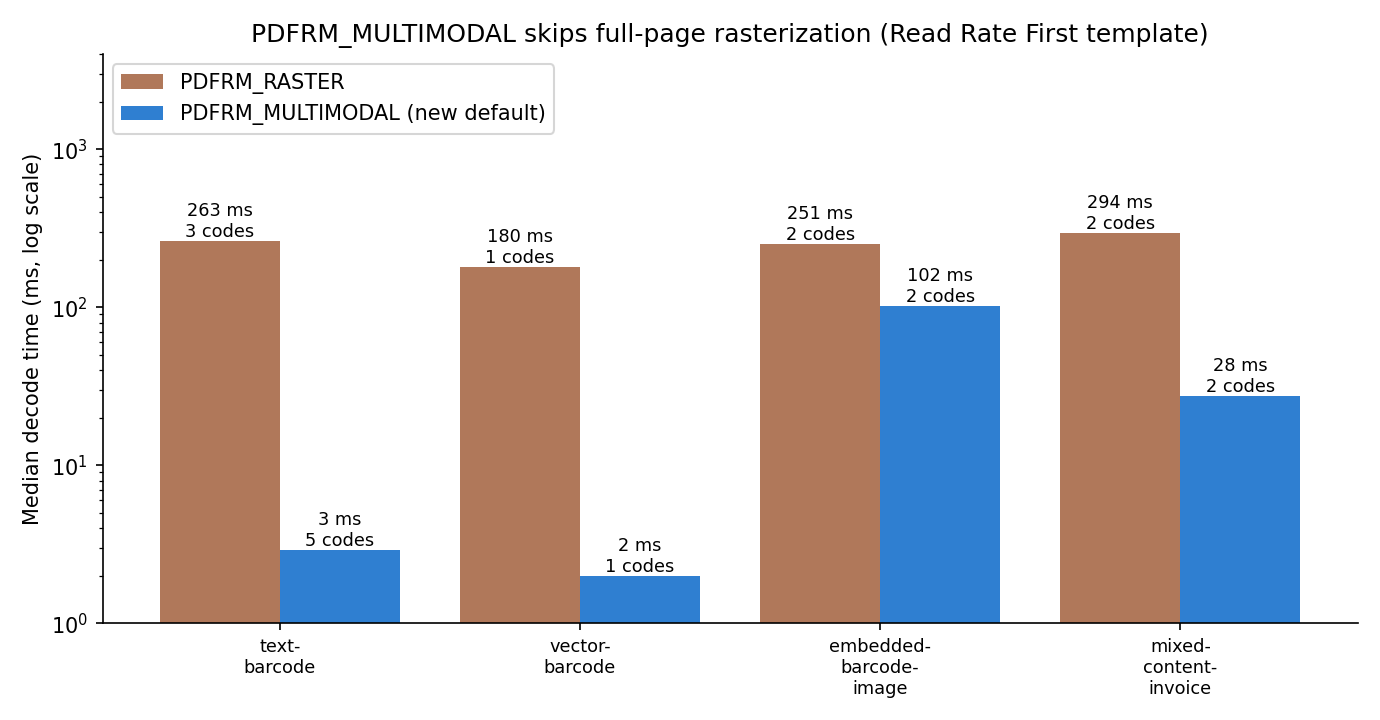
Three observations from this benchmark:
- Text and vector channels are dramatically cheaper. Skipping full-page rasterization makes decoding 88-90x faster on the text/vector samples, and the text channel even yields more results (5 vs 3) because text-carried barcode content is read directly.
- 11.4.3000 raster ≈ 11.6.1000 raster. The gain comes from the new reading mode, not a general speedup.
- Multimodal wins even on image-carried barcodes. On
embedded-barcode-image.pdfand the mixed invoice, multimodal found the same 2 codes as raster while still decoding 2.5x and 10x faster, because only the embedded image regions — not the whole page — go through image decoding.
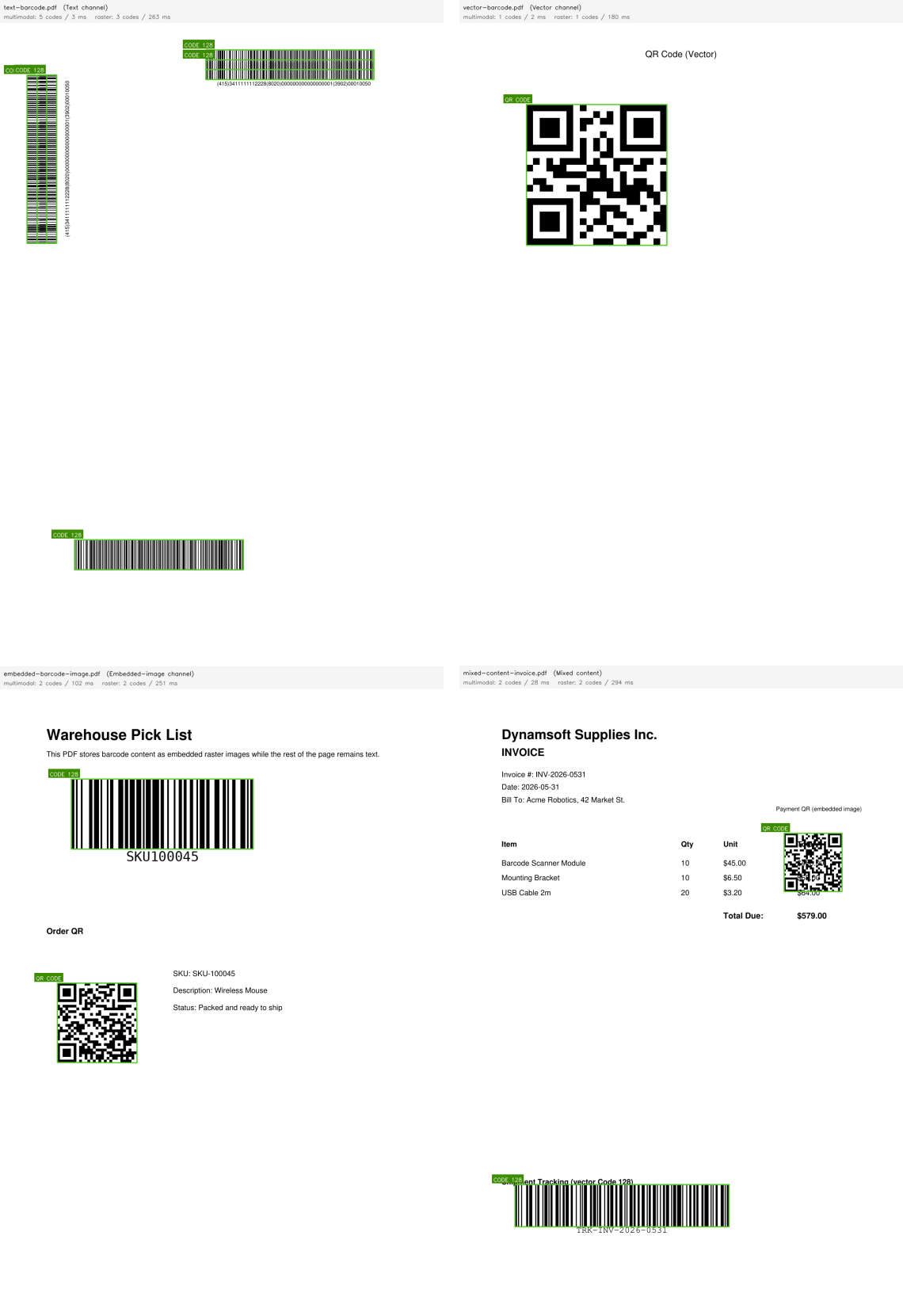
All barcodes above were decoded with PDFRM_MULTIMODAL + ReadBarcodes_ReadRateFirst (green boxes). With the default template, multimodal finds only part of them.
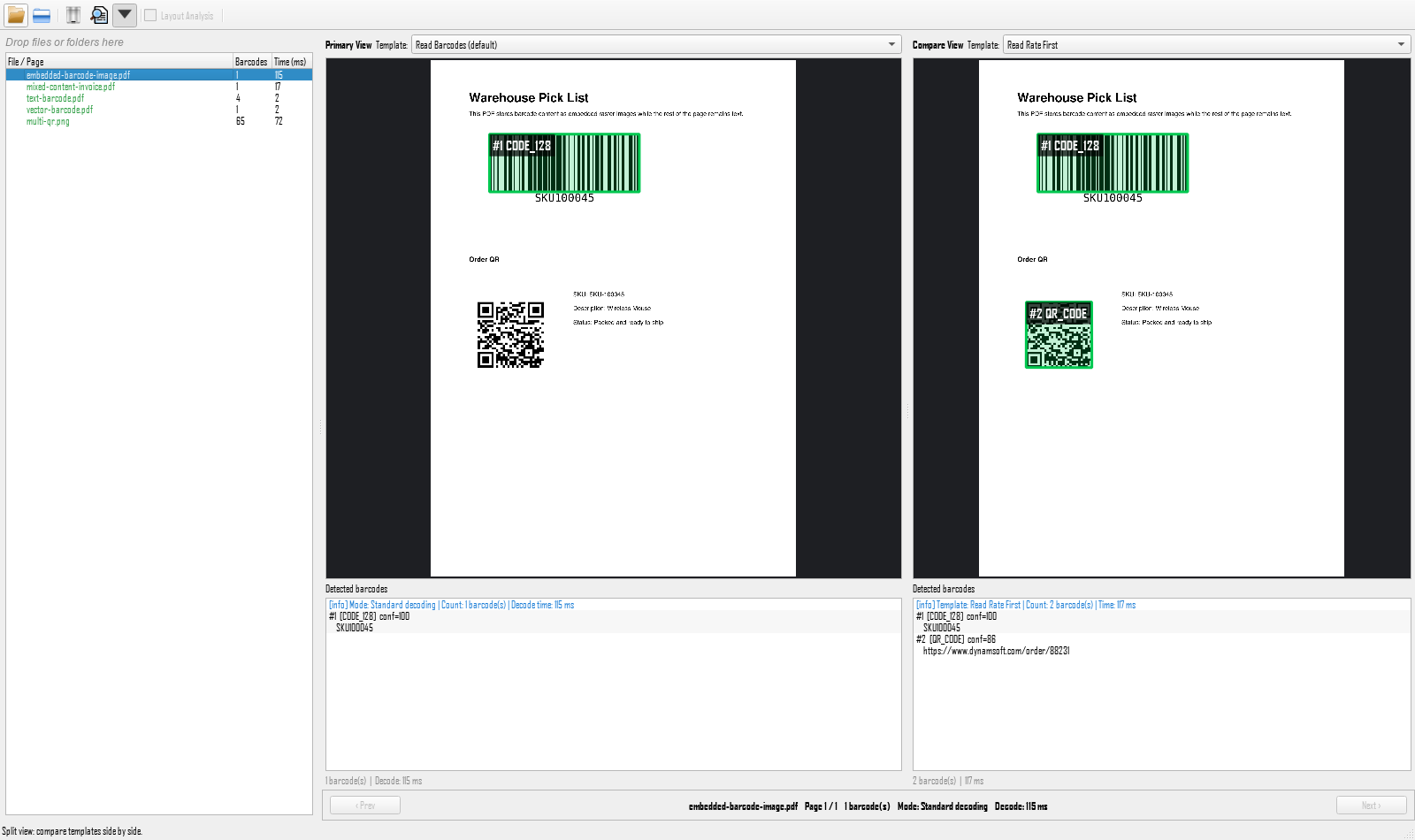
The PySide6 GUI in examples/official/camera_file/gui.py decodes PDFs natively and can compare two templates side by side — here the default template (left, 1 barcode) against Read Rate First (right, 2 barcodes) on embedded-barcode-image.pdf, which is why the results above are reported with Read Rate First:
Step 2: Measure Multi-Threaded Decoding Against 11.4.3000
How the breadth-first strategy works
Before 11.6.1000, decoding attempts within one task were scheduled depth-first: a slow DeblurMode attempt could occupy a thread while faster attempts on other localized barcodes waited. 11.6.1000 decomposes each DBR task into one Localization Work and one or more Decoding Works, scheduled breadth-first across the CVR thread pool — MaxParallelTasks now controls the total number of Work-level thread slots. Valid results surface sooner, and thread utilization improves most when an image contains many barcodes.
Benchmark method: isolated virtual environments
A single Python process cannot host two SDK versions, so the Dual SDK Comparison Tool runs each version in a subprocess of its own venv and times only the steady-state capture call (one warm-up call first to absorb model loading):
cvr.capture(image_path, template)          # warm-up: model loading, not timed
start = time.perf_counter()
result = cvr.capture(image_path, template) # timed run, repeated 5x, median taken
elapsed_ms = (time.perf_counter() - start) * 1000
With dynamsoft-capture-vision-bundle==3.4.3000 (DBR 11.4.3000) in D:/envs/sdk_v1 and ==3.6.1000 (DBR 11.6.1000) in D:/envs/sdk_v2, the tool reports per-image count and speed deltas with side-by-side overlay rendering.
Dense multi-barcode images decode sooner
Median of 5 timed runs, default ReadBarcodes template. The first two images come from the public blurred-1D dataset linked in the comparison tool’s README; the rest are multi-barcode test sheets and the tray sample:
| Image | Barcodes | 11.4.3000 | 11.6.1000 | Time delta |
|---|---|---|---|---|
| 20150629_132612_85_77.jpg (blurred 1D) | 32 | 354 ms | 185 ms | -48% |
| 20150907_201309_936_379.jpg (blurred 1D) | 49 | 147 ms | 130 ms | -12% |
| BarcodeOrientation.png | 40 | 140 ms | 120 ms | -15% |
| multi-qr.png | 65 | 105 ms | 87 ms | -17% |
| AllSupportedBarcodeTypes.png | 13 | 58 ms | 55 ms | -5% |
| BarcodeSizeAndModuleSize.png | 14 | 38 ms | 34 ms | -9% |
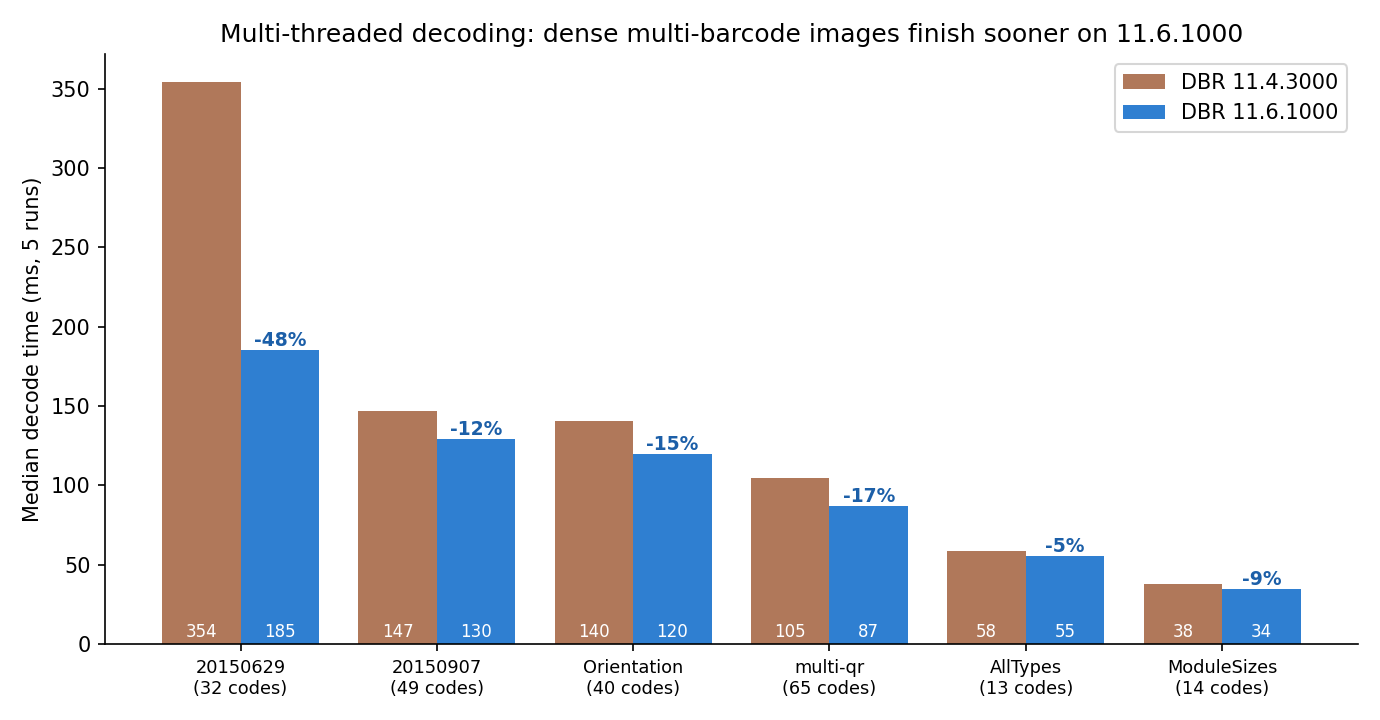
In this benchmark, every dense multi-barcode image finishes sooner on 11.6.1000, and the gain scales with barcode count and deblur contention: parallel Decoding Works overlap instead of queuing behind one slow DeblurMode attempt. The blurred 1D dataset images — the worst case for deblur contention, with 32-49 hard codes each — improve the most (354 → 185 ms and 147 → 130 ms), while clean 13-14-code sheets that already decode in under 60 ms still shave off 5-9%.
Step 3: Decode Dense N×M Grids with LayoutAnalyzer
The three-stage pipeline
Dense grids of small barcodes — vial trays, component reels, carton pallets — defeat one-shot decoding: perspective distortion, curved surfaces, and glare make a global pass miss cells. The pipeline implemented in gui.py (and reproduced below) uses LayoutAnalyzer to close the gap:
- Fast first pass. A scan-optimized template (
GridFastScan.json: connected-blocks localization, scale-down stage,ExpectedBarcodesCount: 999) collects quadrilaterals quickly. -
Layout inference. Each quadrilateral gets its index as
id, thenLayoutAnalyzer.analyze()fits a matrix and returns row/column elements, marking gaps asLES_INFERRED:param = LayoutAnalysisParameter() param.pattern = EnumLayoutPattern.LP_MATRIX param.input_image_height = image.shape[0] param.input_image_width = image.shape[1] layout_result = LayoutAnalyzer.analyze(locations, param) -
Targeted deep decode. Only inferred cells are re-decoded, with the ROI expanded 2x around the cell for margin:
 for row in layout_result.elements:
     for element in row:
         if element.source == EnumLayoutElementSource.LES_INPUT:
             hits.append(fast_hits[element.quad.id])        # reuse first-pass text
         elif element.source == EnumLayoutElementSource.LES_INFERRED:
             settings.roi = expand_quad(element.quad, 2.0)  # center-scaled ROI
             settings.roi_measured_in_percentage = 0
             cvr.update_settings("GridDeepDecode", settings)
             result = cvr.capture(image, EnumImagePixelFormat.IPF_BGR_888, "GridDeepDecode")
             # keep the first non-empty barcode hit for this cell
Completeness results on a 9×8 QR tray
The sample multi-qr.png holds 71 QR-coded vials in a 9x8 tray with one empty slot. Stage-by-stage results from this benchmark:
| Stage | Codes found | Time |
|---|---|---|
| Default template (one shot) | 65 | 70 ms |
| Stage 1: GridFastScan first pass | 65 | 375 ms |
| Stage 2: LayoutAnalyzer (9x8 matrix) | 7 regions inferred | ~4 ms |
| Stage 3: GridDeepDecode on inferred cells | +6 decoded, 1 verified empty | ~62 ms |
| Pipeline total | 71 (every populated cell) | 441 ms |
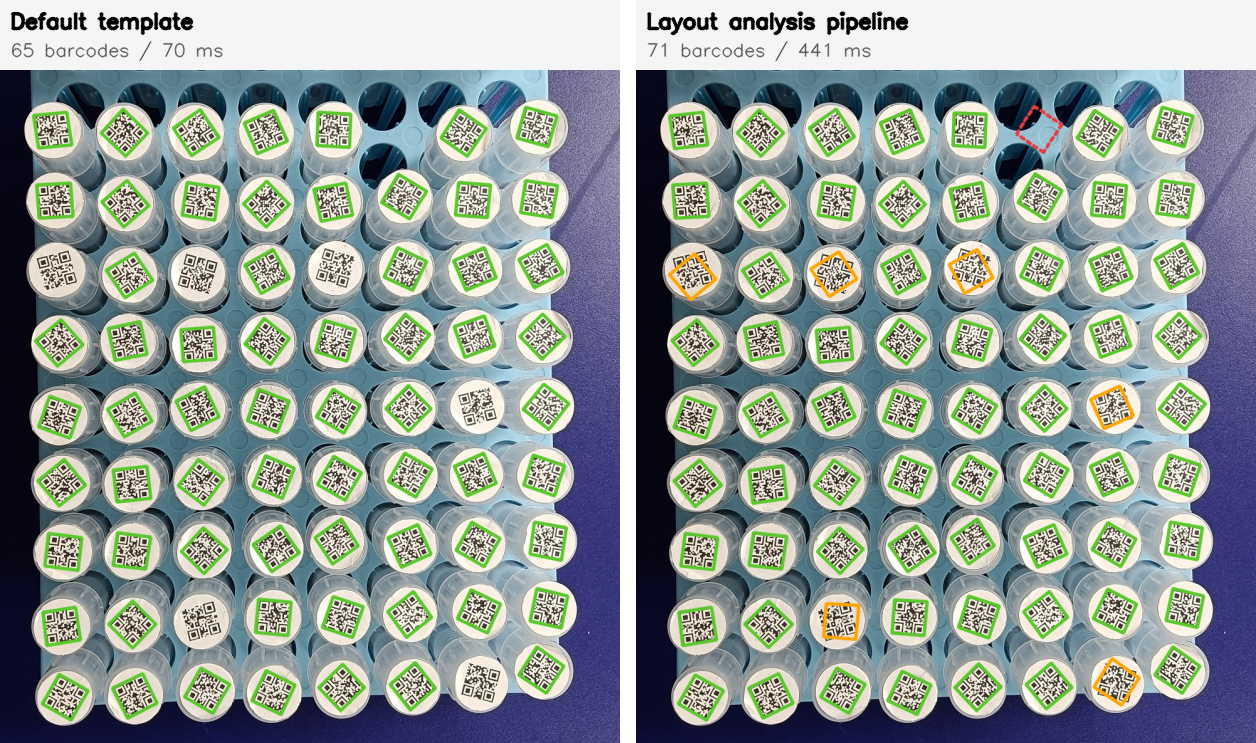
Green: decoded in the fast first pass. Orange: inferred cell recovered by deep decode. Red dashed: inferred cell verified as an empty slot.
Two properties stand out in this benchmark:
- Inference recovers real misses without inventing results. The 6 vials the first pass missed (curved caps, glare) were all recovered by the targeted second pass, and the single empty tray slot — also proposed as an inferred cell — was verified as empty rather than reported as a barcode.
- Completeness costs time. The deep second pass runs one ROI-scoped decode per inferred cell, so the pipeline total (441 ms) lands between the default template (70 ms) and an exhaustive read-rate-first sweep. Use the pipeline when completeness matters more than latency — inventory counts, not conveyor sorting.
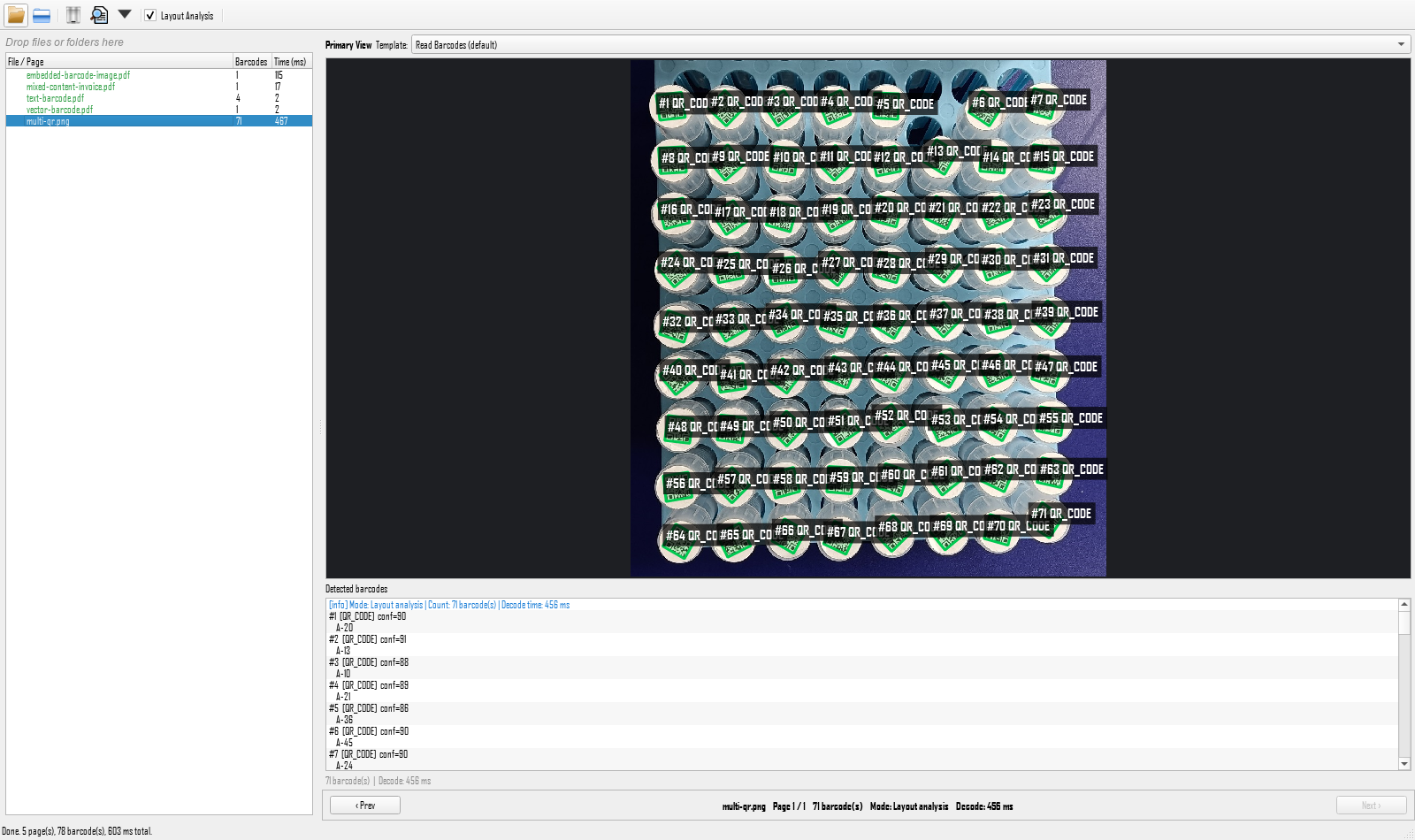
The GUI’s Layout Analysis checkbox runs the same pipeline and labels every decoded cell:
Common Issues & Edge Cases
- Default template returns only partial PDF results: On the four sample PDFs, both reading modes found more barcodes with
ReadBarcodes_ReadRateFirstthan with the default template (for example 2 vs 1 onembedded-barcode-image.pdf). If your PDF workflow needs every barcode, pairPDFRM_MULTIMODALwith a read-rate-oriented template. - Layout analysis needs a partial first pass:
LayoutAnalyzerorganizes quadrilaterals the fast scan already found — if the first pass localizes nothing, there is no layout to infer. Improve the capture (lighting, resolution, focus) or loosen the fast-scan template first. - Inferred cells that are actually empty slots produce no barcode in the deep pass — this is expected behavior, not a decode failure. Treat
LES_INFERREDelements without a deep-decode hit as candidate-empty cells in your inventory logic. - Deep-decode ROI must stay inside the image: When scaling an inferred quadrilateral by 2x near the border, the ROI can exceed the frame. Clamp the expanded ROI to the image bounds (the demo binds inferred quads via
input_image_width/input_image_heighton the analysis parameter). - Benchmark timing includes model loading if you skip the warm-up: The first
capture()call in a fresh process loads neural models and takes far longer than steady state. Always discard the first call before measuring, as the comparison tool does.
Source Code
- Get the complete sample project source code on GitHub — the PySide6 GUI with template split view and the Layout Analysis pipeline (
gui.py,GridFastScan.json,GridDeepDecode.json), plus the four sample PDFs and themulti-qr.pngtray image used in this article. - Dual SDK Comparison Tool on GitHub — the cross-version benchmark harness; see also the step-by-step build article for the subprocess-isolation design.