


How to Generate GS1 Barcodes in JavaScript for Scanner Testing
You have written a GS1 parser, and now you need something to test it with. A real product label is the wrong answer twice over: you probably do not have the stock, and somebody else’s batch and serial numbers are not yours to put in a test fixture anyway. So you go looking for a generator, and find plenty of them — except they encode text. Type a GTIN, get a DataBar. Type (01)09506000135000(17)270430(10)LOT-42, the way GS1 actually writes it, and they either print those characters literally into the symbol or refuse outright. A reader can decode that image perfectly and still return nothing useful, because the image was never a GS1 element string to begin with.
A GS1 generator has to work the other way round. The list of application identifiers is the source of truth; the element string, the FNC1 positions, the check digits and the symbology choice are all derived from it. Once that is the design, a second thing becomes possible: the generator can print the exact parse a conformant scanner should return, so a failing test tells you which side is wrong — the symbol or the parser.
What you’ll build: a browser-side GS1 generator that composes a validated element string from application identifiers, calculates GTIN/SSCC check digits, recommends the symbology a real supply chain would use, renders a test label on an HTML5 canvas, and exports the PNG together with the table of values a scanner should report.
Key Takeaways
- Encoding for GS1 is a payload problem, not a symbology problem: get the element string right and the encoder handles the FNC1 placement for you.
- The AI table does three jobs — validation, sample generation and the length rules — so it belongs in one place.
- Check digits are calculated, never typed. A GTIN whose check digit is wrong is a fine test of the failure path and a useless test of everything else.
- Not every symbology can carry every payload: DataBar, ITF-14 and EAN-13 encode the GTIN and nothing else, and GS1 constrains which AIs may travel together.
- A long payload must be re-encoded at a smaller module size, never scaled down. A blurred linear symbol tests your camera, not your parser.
- Generating the expected parse alongside the image turns each PNG into a test case instead of a picture.
Common Developer Questions
How do I generate a GS1 barcode in JavaScript?
Compose the element string by concatenating each AI with its data, then hand that string to an encoder that understands GS1 syntax. The bwip-js library (a JavaScript port of BWIPP) accepts the human-readable (01)…(10)… form for its GS1 symbologies — gs1datamatrix, gs1qrcode, gs1_128, databarexpanded, databaromni — and inserts the FNC1 bytes itself.
Which barcode symbology should a GS1 payload use?
It is decided by the payload, not by preference. A GTIN alone belongs in GS1 DataBar Omnidirectional (or EAN-13 for a GTIN-13). A GTIN plus batch, date or serial needs a symbology that can carry more than the GTIN: DataBar Expanded, GS1 DataMatrix, GS1 QR Code or GS1-128. An SSCC has no GTIN at all, so GS1-128 is the usual carrier.
How do I calculate a GTIN check digit in JavaScript?
Weight the digits alternately by 3 and 1 starting from the rightmost data digit, sum them, and take (10 - sum % 10) % 10. The same mod-10 routine covers GTIN-8/12/13/14, SSCC, GLN and GSRN.
Step 1: Make the AI Table the Model
Everything else is derived from this table, so it is worth getting right first. Each entry needs four things: the code, a name, a length rule, and a way to produce a valid sample.
const AI_LIST = [
  { ai: '01', title: 'GTIN', kind: 'gtin', fixed: 14, group: 'Retail',
    sample: () => withCheckDigit('0' + DEMO_PREFIX + digits(5)) },

  { ai: '10', title: 'BATCH/LOT', kind: 'text', max: 20, group: 'Traceability',
    sample: () => 'LOT-' + digits(5) },

  { ai: '17', title: 'EXPIRATION DATE', kind: 'date', fixed: 6, group: 'Dates',
    sample: () => sampleDate(90, 700) }
];
The fixed/max distinction is not metadata — it is what tells the encoder whether a separator is needed after this element, and it is what lets a parser recover a payload whose separators were stripped.
The sample() function earns its place too. Every AI in the table can produce a value that passes its own validation, so “Randomize data” is always available and a half-built payload is never blocked on typing a plausible SSCC by hand.
One detail that matters more than it sounds: when Randomize data replaces the values, the fields that changed are marked for a moment.
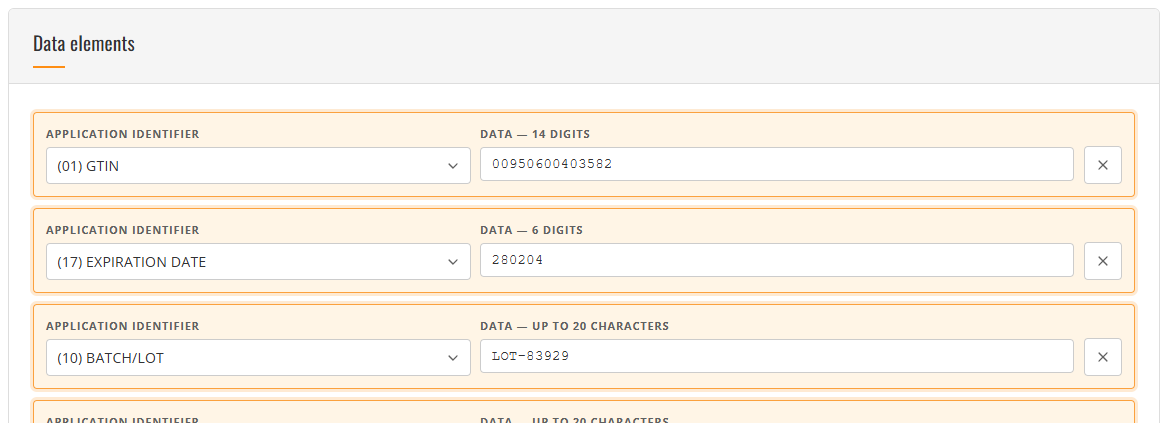
Random sample values are all digit soup — 00950600403582 and 00950600786614 look equally arbitrary — so without the marker a click reads as “nothing happened”, which is exactly the bug report this page got. The marker is a CSS animation on the row that fades out on its own and is removed from the DOM after 1.4 s, and it respects prefers-reduced-motion by dropping the animation while keeping the colour change, because the colour is the information.
Step 2: Calculate Check Digits, Don’t Ask for Them
function checkDigit(data) {
  let sum = 0, weight = 3;
  for (let i = data.length - 1; i >= 0; i--) {
    sum += Number(data.charAt(i)) * weight;
    weight = weight === 3 ? 1 : 3;
  }
  return String((10 - (sum % 10)) % 10);
}

function withCheckDigit(dataWithoutCheck) {
  return dataWithoutCheck + checkDigit(dataWithoutCheck);
}
One routine covers GTIN, SSCC, GLN and GSRN, because they all use the same mod-10 scheme. Completing the digit automatically is what makes a generated image a fair test: a scanner that verifies check digits would correctly reject a hand-typed GTIN, and you would spend the afternoon debugging the scanner.
Step 3: Let the Payload Pick the Symbology
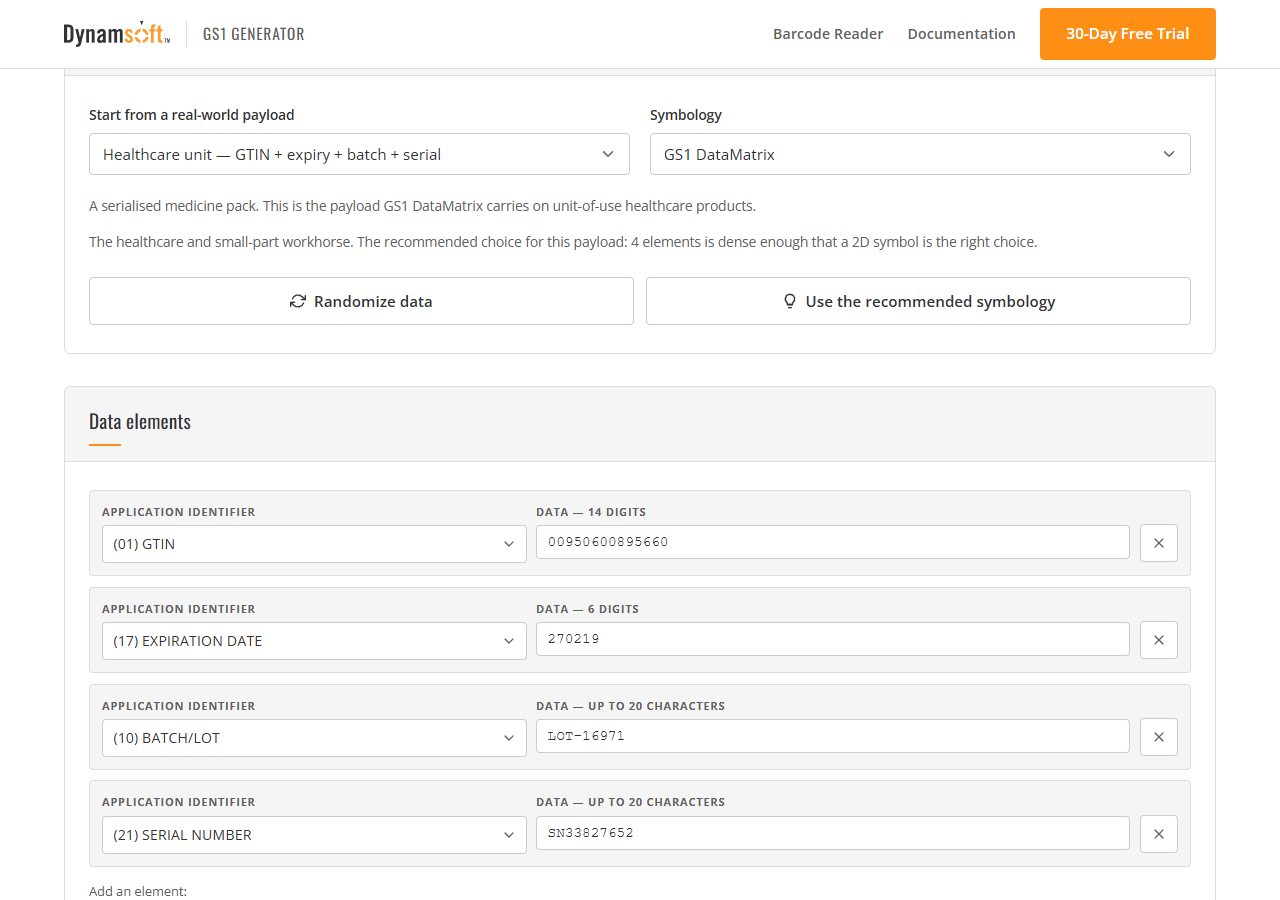
Twelve symbologies can carry GS1 data, and they are not interchangeable:
| Symbology | Kind | What it can carry |
|---|---|---|
| GS1 DataBar Omnidirectional | 1D | GTIN, full-height retail symbol |
| GS1 DataBar Truncated | 1D | GTIN, shorter bars for small packaging |
| GS1 DataBar Stacked / Stacked Omnidirectional | 1D | GTIN, split across two rows |
| GS1 DataBar Limited | 1D | GTIN starting with 0 or 1, smallest DataBar |
| GS1 DataBar Expanded / Expanded Stacked | 1D | GTIN plus up to 74 more characters |
| GS1 DataMatrix | 2D | Any element string |
| GS1 QR Code | 2D | Any element string, consumer readable |
| GS1-128 | 1D | Any element string, logistics default |
| ITF-14 | 1D | GTIN-14 only |
| EAN-13 | 1D | GTIN-13 only |
The recommendation is a small decision function over the payload’s AIs, and it is worth having because it encodes the field’s own habits:
function decide(rows) {
  const ais = rows.map((row) => row.ai);
  const extra = ais.filter((ai) => ai !== '01');

  if (ais[0] === '00') {
    return { symbology: 'gs1_128',
      reason: 'An SSCC is 18 digits with no GTIN, so a linear GS1-128 is the carrier.' };
  }
  if (!extra.length) {
    return { symbology: /^\d{13}$/.test(rows[0].value) ? 'ean13' : 'databaromni',
      reason: 'A GTIN plus nothing else is exactly what DataBar Omnidirectional encodes.' };
  }
  if (ais.includes('3103') || ais.includes('3922') || ais.includes('30')) {
    return { symbology: 'databarexpandedstacked',
      reason: 'Weight and price make the element string too long for one row, so it stacks.' };
  }
  return { symbology: 'gs1datamatrix',
    reason: ais.length + ' elements is dense enough that a 2D symbol is the right choice.' };
}
Validation is then relative to the chosen symbol, which is the only way it can be meaningful: a GTIN plus a batch is perfectly encodable in DataBar Expanded and completely unencodable in DataBar Omnidirectional.
And every message that diagnoses a problem carries the change that resolves it. “A DataBar, ITF-14 or EAN-13 symbol carries the GTIN and nothing else” is followed by a Switch to GS1 DataMatrix button; a wrong check digit offers the corrected digit; a serial number with no trade item offers Add AI 01; a price in a currency with no quantity offers Add AI 30.
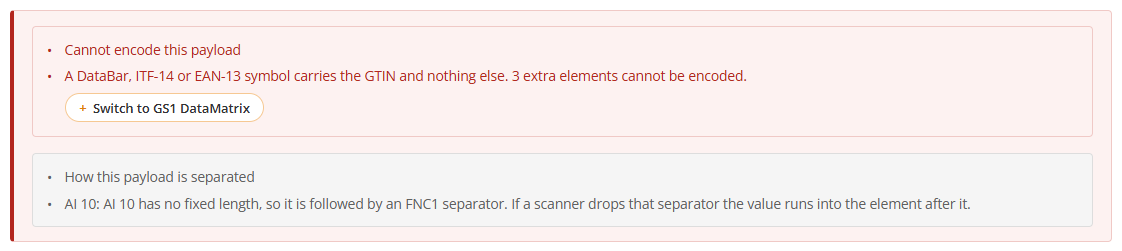
That is not politeness, it is the difference between a working tool and a puzzle. The GS1 length rules, the mod-10 check digit and the AI pairing constraints are specialist knowledge, and the people most likely to hit these errors are exactly the ones who do not have it yet. A message that only diagnoses leaves them to guess; a message with the remedy beside it teaches the rule and unblocks the payload at the same time.
The payload model carries the remedies as data, so the UI never has to guess:
// A value longer than its AI allows, a bad check digit, a symbology that cannot
// carry the payload, a missing partner AI — each one ships the fix with the message.
{ level: 'error', ai: '01', message: 'Check digit should be 2.',
  fix: { kind: 'set-value', ai: '01', value: '09506000134352', label: 'Correct the check digit' } }

{ level: 'error', ai: null,
  message: 'A DataBar, ITF-14 or EAN-13 symbol carries the GTIN and nothing else. 3 extra elements cannot be encoded.',
  fix: { kind: 'set-symbology', symbology: 'gs1datamatrix', label: 'Switch to GS1 DataMatrix' } }
The pairing rules are worth stating outright, because the encoder’s own message (“One of more requisite AIs for AI (21) are missing: 01 OR 03 OR 8006”) arrives too late to be actionable:
| AI | needs | why |
|---|---|---|
21 serial number |
01, 03 or 8006 |
a serial identifies a unit, so it needs the item it belongs to |
393x price in a currency |
30, or a 31nn/32nn/35nn/36nn measure |
a unit price needs the quantity it is a price of |
Step 4: Feed the Encoder the AI Syntax
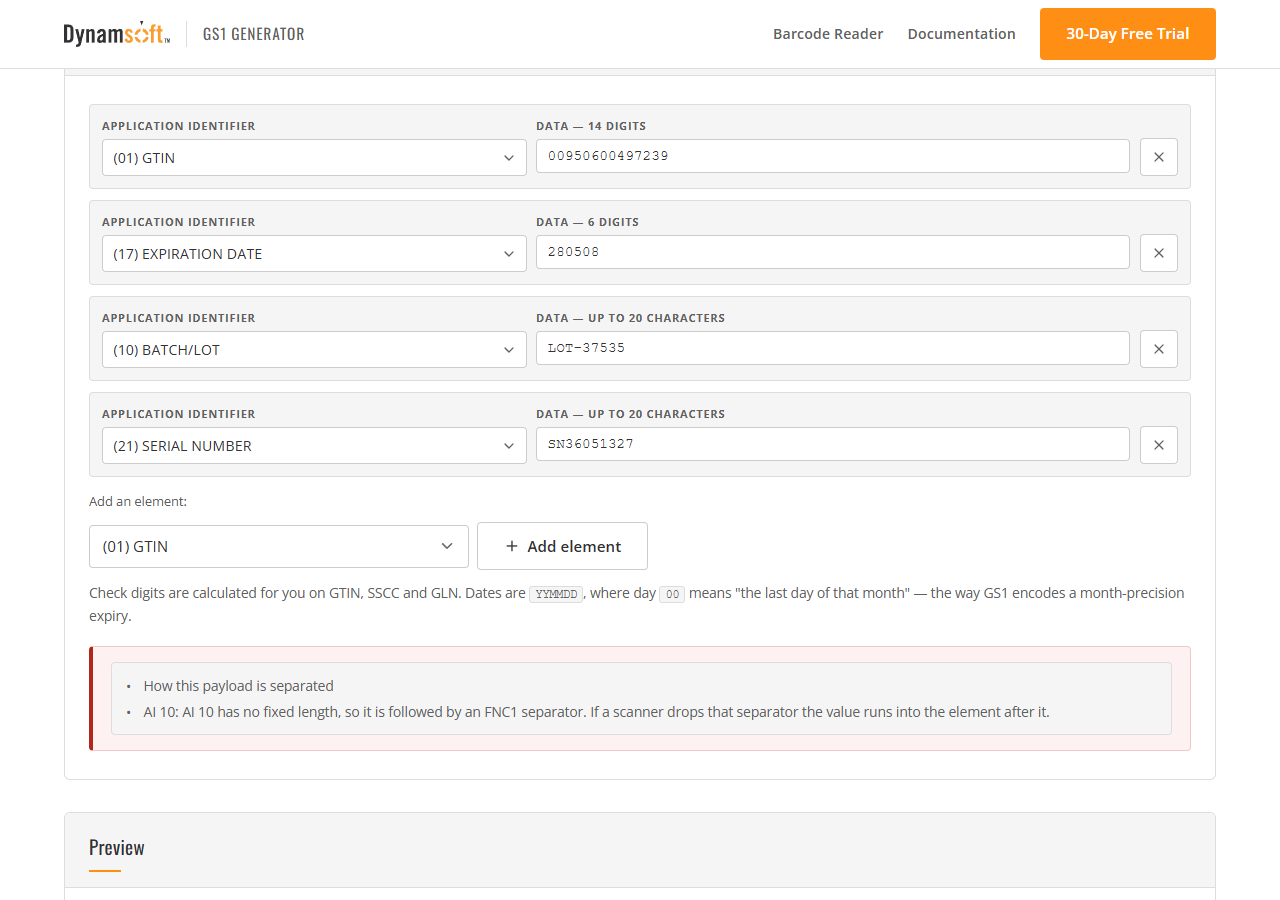
bwip-js is the encoder, and its GS1 symbologies accept the bracketed notation directly — the same string GS1 prints under a symbol as the human readable interpretation:
await bwipjs.toCanvas(canvas, {
  bcid: 'gs1datamatrix',
  text: '(01)00950600037152(17)270207(10)LOT-45727(21)SN96136133',
  scale: 6,
  includetext: false
});
BWIPP works out where the FNC1 bytes belong from the AI table: after 10, which has no fixed length, and not after 17, which does. That is a great deal of correctness to get for free, and it is the reason the payload model submits to the encoder as an AI list rather than as a hand-built byte string.
Two symbologies do not take AI syntax, and getting them wrong produces a silently different product:
function toEncoderInput(rows, symbologyId) {
  const gtin = (rows.find((row) => row.ai === '01') || {}).value || '';

  if (symbologyId === 'ean13') {
    // A GTIN-14 with packaging indicator 0 is a GTIN-13 with a leading zero.
    // Any other indicator has no GTIN-13 equivalent, and printing one anyway
    // would produce a symbol that decodes to a different product.
    if (gtin.length === 14 && gtin.charAt(0) !== '0') {
      return { error: 'EAN-13 carries a GTIN-13 only.' };
    }
    return { bcid: 'ean13', text: (gtin.length === 14 ? gtin.slice(1) : gtin).slice(0, 12) };
  }

  if (symbologyId === 'itf14') {
    // Hand over the GTIN as it stands. Trimming it to 13 digits would make the
    // encoder compute a *second* check digit over data that already contained
    // one, and the symbol would decode to a different number.
    return { bcid: 'itf14', text: gtin };
  }

  return { bcid: symbologyId, text: toHRI(rows) };   // the AI syntax form
}
That ITF-14 comment is a bug I shipped and then found. Passing 13 digits to an ITF-14 encoder looks reasonable and is wrong: the encoder appends a check digit, so a GTIN that already ended in one gets a second one computed over it. The generated label decoded cleanly to the wrong number, which is the worst kind of test fixture — it fails a scanner that is working perfectly.
Step 5: Render a Label a Camera Can Actually Read
A symbol floating on a white rectangle is not what a camera sees. Draw the thing that gets scanned: brand, product name, the identifiers in human-readable form, the symbol, and the HRI beneath it.
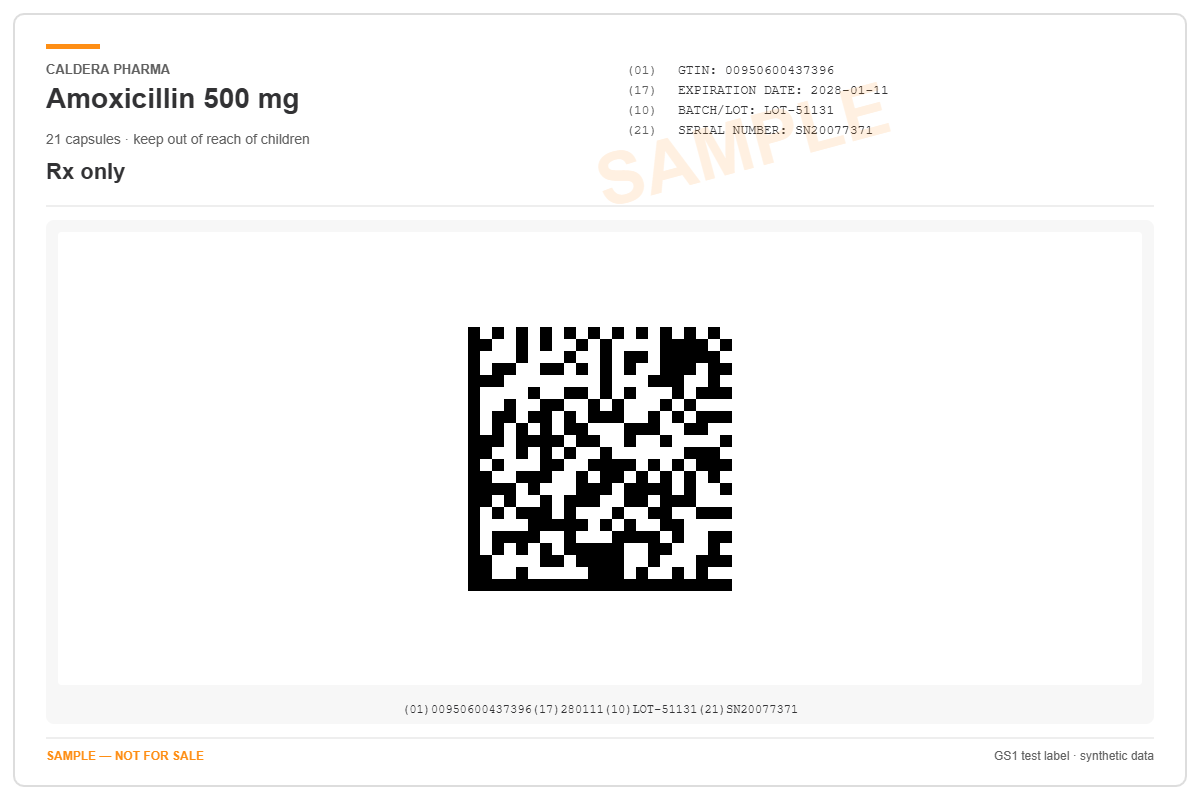
The layout detail that matters is the symbol band: it spans the full label width, because a logistic GS1-128 with five data elements is a lot of bars and squeezing it into a narrow column is how a test label ends up undecodable.
The size detail matters more. When a symbol is too wide for its frame, re-encode it at a smaller whole-number module size; do not scale the finished image:
function step(passesLeft) {
  return attempt().then((canvas) => {
    if (fits(canvas) || scale <= 1 || passesLeft <= 0) return canvas;
    const budget = Math.min(maxWidth / canvas.width, maxHeight / canvas.height);
    const next = Math.max(1, Math.floor(scale * budget));
    if (next >= scale) return canvas;
    scale = next;
    return step(passesLeft - 1);
  });
}
Scaling a linear symbol by a fraction blurs the module edges, and a symbol whose modules are no longer resolvable cannot be decoded however good the scanner is. Keeping the module size an integer number of pixels keeps every bar edge crisp. When even one pixel per module overflows the frame, the honest thing is to say so rather than hand out a weak image:
Rendered GS1-128 · symbol 1010 × 142 px · export 1200 × 800 px
· module size reduced to 2 px to fit the label
For a decoder test, the same page exports the bare symbol with its quiet zone and no label furniture at all.
Step 6: Print the Expected Result
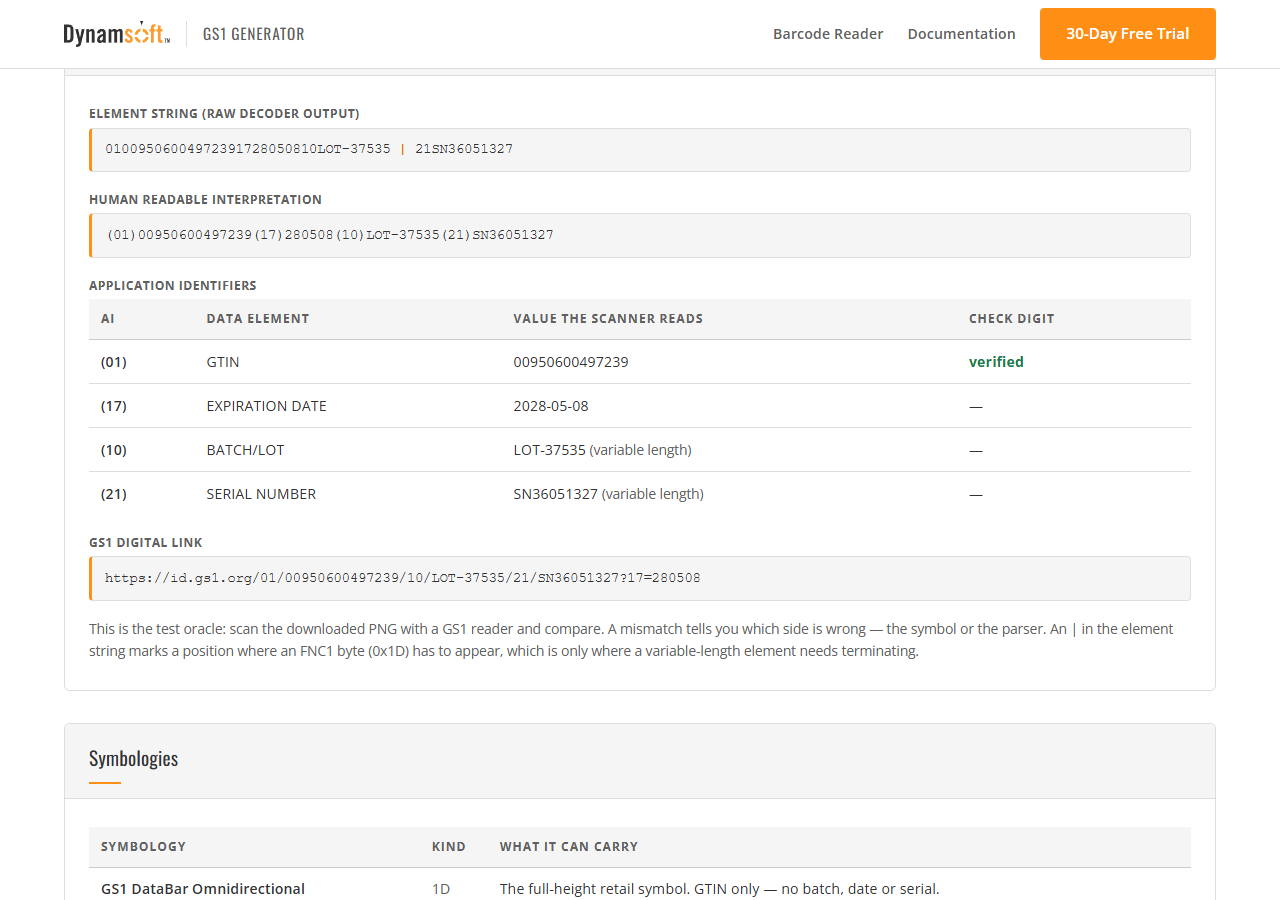
This is the part that turns a picture into a test. For the payload that is on screen, the page states:
- the element string a decoder should return, with
|marking each position where an FNC1 byte has to appear; - the human readable interpretation;
- every application identifier with the value the scanner should report, including the check-digit verdict;
- and the GS1 Digital Link.
A | only appears where a variable-length element needs terminating. Drawing one after every element would be easier to read and wrong: a fixed-length element needs no terminator, and showing one invites the reader to think it does.
The preview is only as current as the last successful generation
There is a failure mode here that is easy to ship and hard to notice: the preview and the expected-result table are produced after validation passes, so a payload with errors simply never reaches them — and whatever was drawn last stays on screen, looking current. That is worse than a blank canvas, because it invites someone to download or copy values that do not describe the payload in front of them.
So when the payload has errors, everything downstream of generation is explicitly marked out of date in one place:
if (blocked) {
  lastRun = null;              // nothing stale can be downloaded or copied
  showStalePreview();          // a dashed frame that says "no preview"
  markExpectedStale(true);     // the oracle is dimmed and badged
  setPreviewTabsEnabled(false); // disabled, not silently inert
  els.downloadBtn.disabled = true;
  els.copyBtn.disabled = true;
  return Promise.resolve(false);
}
The tabs deserve their own note. They used to look broken: the pressed state moved, but the early return above skipped both redraws, so clicking Symbol only changed nothing visible. A control that appears to respond and does not is worse than one that says it is unavailable, so they are disabled with a reason attached — and one click on the fix re-enables them, redraws the preview and restores the oracle together.
Step 7: Close the Loop
The generator is only worth having if the images actually round-trip. The verification harness drives both pages the way a person would: it renders the label in the generator, reads the PNG out of the canvas, uploads it to the GS1 scanner through the scanner’s own file input, and diffs every application identifier.
const dataUrl = await genPage.evaluate(() =>
  document.getElementById('previewCanvas').toDataURL('image/png'));
fs.writeFileSync(label, Buffer.from(dataUrl.split(',')[1], 'base64'));

await scannerPage.locator('#upload-input').setInputFiles(label, { force: true });
Eleven scenarios, eleven matches, twice in a row with freshly randomised payloads — including the cases that only a real decoder can teach you: an ITF-14 that had been given a second check digit, a DataBar whose GTIN arrives with no AI, and a DataBar Expanded whose FNC1 separators the decoder dropped, letting the batch number swallow the serial that followed it.
Scope and Limitations
- GS1 Composite is not offered. bwip-js has no composite encoder, and a composite is anyway two symbols a reader has to associate.
- DataBar Limited, ITF-14 and EAN-13 encode the GTIN and nothing else. The page reports the extra elements as an error rather than dropping them, and offers the symbology that can carry them.
- A generated image is a fair test of decoding and parsing, and no test of authenticity. The payload is plaintext, so a parseable symbol proves only that it is well formed. Digitally signed carriers — an mDL, or the encrypted PDF417 on a South African driving licence — are the formats where a successful read says something about origin, and those cannot be generated from a web page at all.
- Sample data only. Every value is synthetic and the preview is stamped
SAMPLE. A GS1 barcode is not a secret and not an authority.
Source Code
Get the complete sample project source code on GitHub
To read the labels back, open the GS1 barcode scanner demo — no install required — or build the same reader yourself with the GS1 barcode scanner tutorial, which splits the element string with the AI table this generator writes into every label.