


How to Build a Desktop Barcode Scanner with Tauri and Rust
Tauri’s official barcode-scanner plugin only runs on Android and iOS — it has no desktop implementation at all. If you are building a Tauri app for Windows, macOS, or Linux and need to read barcodes, the official plugin cannot help you. This tutorial builds the desktop scanner that fills that gap: a Tauri 2 app whose Rust backend decodes image files, PDFs, and a live webcam feed through FFI bindings to the Dynamsoft Barcode Reader SDK, while the UI is plain HTML/CSS/JS rendered in the system webview. The result decodes every barcode type the SDK supports, draws a quadrilateral over each one, and lists its format, text, and corner coordinates. Multi-page PDFs and TIFFs are previewed page by page, with on-screen arrows and left/right keys to switch pages.
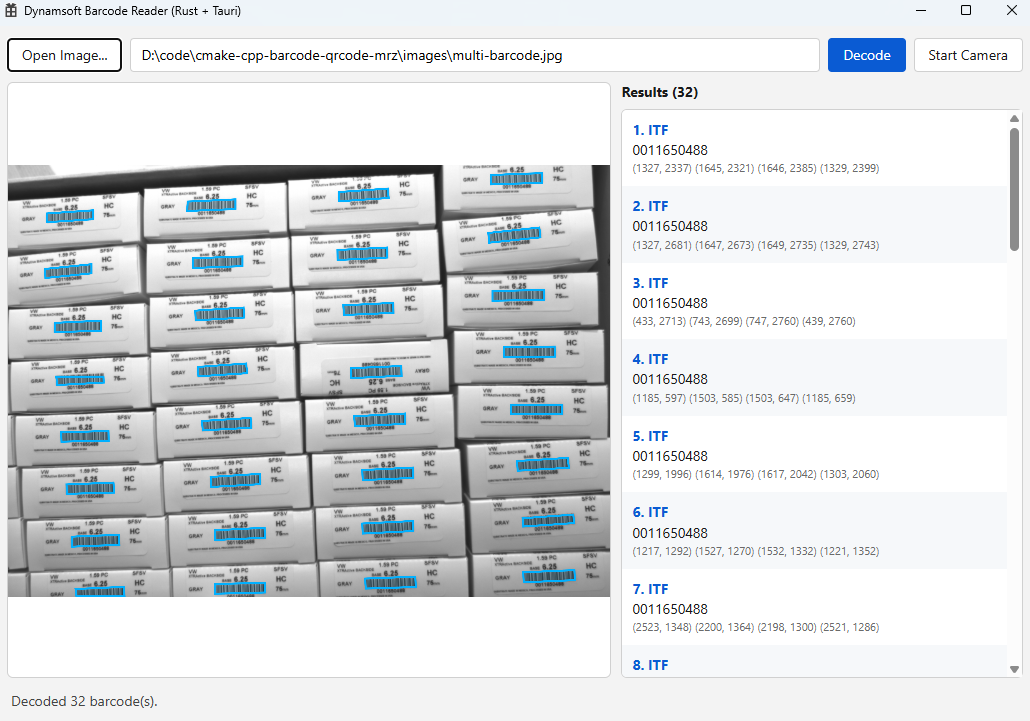
The finished app decoding 32 ITF barcodes from a single photo:
See it running — opening an image, decoding, and switching to the live camera:
What you’ll build: A cross-platform Tauri 2 desktop barcode scanner with a Rust backend and a no-bundler web frontend. It opens images/PDFs through a native file dialog or a typed path, previews each document page with a cyan overlay on every decoded barcode, lists each barcode’s format/text/coordinates, pages through multi-page PDFs and TIFFs, and streams a live webcam feed (Windows) — all powered by the same Dynamsoft Barcode Reader C++ core used by the Slint version of this sample.
Key Takeaways
- Tauri’s official
barcode-scannerplugin is mobile-only (Android and iOS); its install command targetscfg(any(target_os = "android", target_os = "ios"))and it initializes under#[cfg(mobile)]. This sample provides the missing desktop path for Windows, macOS, and Linux. - The official plugin scans live camera frames only. This sample also decodes image files and PDFs, returns multiple barcodes per image, and exposes four corner coordinates for each — capabilities a camera-only mobile plugin does not offer.
- A Tauri app has three communication channels, and this sample uses each for the job it is best at: commands (
invoke) for request/response, events (emit/listen) for push notifications, and a custommedia:URI scheme for bulk pixel data. - The Rust backend and the Slint GUI share one native core —
scanner.rs,camera.rs, andbridge.cppare compiled into both apps unchanged via#[path = "..."], so decoding, licensing, and camera capture behave identically. - Multi-page PDFs and TIFFs are previewed page by page. The SDK’s
CFileFetchersplits a document into oneCImageDataper page; each page is decoded and its pixels are kept for the preview, so a pager (and the left/right arrow keys) can switch pages without re-decoding the file. - The decoder runs on the exact RGB bitmap that is displayed — camera frames through
decode_buffer, file pages through the SDK’s per-page raster — so overlay coordinates stay aligned even for EXIF-rotated photos. The canvas is sized to the image’s own pixels, so barcode points need no conversion. - The camera is native (Media Foundation through the bundled
litecamlibrary), not the webview’sgetUserMedia. A worker thread owns its own reader handle and pushes JPEG frames over themedia:protocol at ~30 fps. - No Node.js, bundler, or
npm installis required to build or run:"withGlobalTauri": trueinjectswindow.__TAURI__, and"frontendDist": "../ui"embeds three static files into the binary.
Common Developer Questions
Does Tauri’s official barcode-scanner plugin work on Windows, macOS, or Linux?
No. The official plugin supports only Android and iOS. Its manual install command is cargo add tauri-plugin-barcode-scanner --target 'cfg(any(target_os = "android", target_os = "ios"))', it is initialized under #[cfg(mobile)], and its capability file lists "platforms": ["iOS", "android"]. The supported-platforms table leaves Windows, Linux, and macOS without a support level. For desktop barcode scanning you need your own backend, which is exactly what this sample builds with Rust and the Dynamsoft Barcode Reader SDK.
How do I decode barcodes in a Tauri desktop app?
Expose a Rust function marked #[tauri::command] that calls the Dynamsoft Capture Vision Router through a thin C ABI bridge, then call it from JavaScript with invoke("decode_path", { path }). The command returns a serde-serialized result containing the status, an optional preview, and a list of barcodes with format, text, and four corner points. The native SDK does the decoding; Tauri only shuttles JSON across the webview boundary.
How do I show a live camera preview in a Tauri webview?
Capture frames natively (this sample uses Media Foundation via the litecam library on Windows), encode each frame to JPEG in Rust, and serve the bytes over a registered custom URI scheme (media:). The frontend points an <img> at convertFileSrc("camera.jpg", "media") and listens for a camera-frame event that carries the frame’s sequence number and decoded barcodes. This avoids pushing megabytes of base64 through the IPC channel on every tick and does not rely on the webview’s getUserMedia.
How do I draw barcode bounding boxes over an image in a webview?
Give a <canvas> the image’s intrinsic pixel size and stretch it over the letterboxed <img>, then draw each barcode’s four points directly in image coordinates with moveTo/lineTo. Because the canvas coordinate space equals the image coordinate space, no scaling math is needed for the points themselves; only the stroke width is divided by the display scale so the outline stays about two screen pixels.
Can this scanner read barcodes from image files and PDFs, not just the camera?
Yes. decode_path rasterizes the file page by page with the SDK’s CFileFetcher, so JPEG, PNG, TIFF, BMP, GIF, and multi-page PDF/TIFF inputs all return previewable pages. Each page is decoded independently, the UI shows a pager, and the preview is re-encoded on demand. Formats the SDK cannot rasterize (WebP, for example) fall back to the image crate. This file-decoding path is a key difference from the camera-only official mobile plugin.
Do I need Node.js or a frontend bundler to build this Tauri app?
No. The frontend is three static files (index.html, style.css, app.js) and tauri.conf.json sets "withGlobalTauri": true plus "frontendDist": "../ui". Tauri injects its API as window.__TAURI__ and embeds the files into the binary, so cargo run --release builds and runs the whole app. The Tauri CLI (npm run dev / npm run build) is optional and only adds dev-server orchestration and installers.
The Desktop Gap in Tauri’s Barcode Plugin
This is the central reason this sample exists. Tauri ships an official barcode-scanner plugin, and its name suggests it is the obvious choice for any Tauri barcode app. It is not — at least not on desktop.
The plugin’s documentation describes it as a way to “allow your mobile application to use the camera to scan QR codes, EAN-13 and other kinds of barcodes.” Three details in the official setup confirm the desktop gap:
- The dependency is added only for mobile targets:
cargo add tauri-plugin-barcode-scanner --target 'cfg(any(target_os = "android", target_os = "ios"))'. - The plugin is registered only on mobile:
#[cfg(mobile)] app.handle().plugin(tauri_plugin_barcode_scanner::init());. - The capability that grants its permissions is scoped to mobile platforms:
"platforms": ["iOS", "android"].
On Windows, macOS, and Linux there is simply no implementation to call. Beyond the platform gap, the plugin is also camera-only: it opens a native scan view (its windowed: true mode makes the webview transparent so the camera shows through) and returns what the camera sees. It does not decode a photo you already have on disk, does not read PDFs, and is not designed to return a batch of barcodes with precise corner coordinates from a still image.
This sample complements the official plugin rather than competing with it on mobile. It covers the desktop platforms the plugin leaves out, and adds the file/PDF decoding and multi-barcode coordinate output that a live mobile scan view does not provide:
| Capability | Official barcode-scanner plugin |
This Tauri + Rust sample |
|---|---|---|
| Windows / macOS / Linux | Not supported | Supported (decoding on all three) |
| Android / iOS | Supported | Not the target (use the official plugin) |
| Live camera scanning | Yes (native mobile scan view) | Yes on Windows (native Media Foundation) |
| Decode image files (JPEG/PNG/TIFF/BMP/GIF/WebP) | No | Yes |
| Decode PDF | No | Yes (every page previewed and navigable) |
| Multiple barcodes per image with corner coordinates | Camera scan result | Yes, four points per barcode |
| Frontend toolchain | Plugin JS bindings | Plain HTML/CSS/JS, no bundler |
The practical takeaway: if your Tauri app targets desktop, or needs to read barcodes from files rather than only from a live mobile camera, you need a native decoding backend. The rest of this article builds one with Rust and the Dynamsoft Barcode Reader SDK, and shows how to wire it into a Tauri webview UI.
Prerequisites
- Rust toolchain (MSVC toolchain on Windows) for the Tauri backend.
- The WebView2 runtime on Windows (preinstalled on Windows 11); Tauri uses the system webview on macOS and Linux.
- The Dynamsoft Barcode Reader SDK and the
litecamcamera library, both already vendored in the sample repository underdcv/andlitecam/dist/. - Get a 30-day free trial license for the Dynamsoft Barcode Reader SDK. The sample ships a shared demo key in
examples/rust/src/scanner.rs; replaceDEFAULT_LICENSEwith your own for production. - Optional: Node.js only if you want the Tauri CLI (
npm run dev/npm run build) for dev-server orchestration and installers. It is not needed to build or run the app.
Architecture: One Native Core, Two GUIs
The sample repository already contains a Rust CLI and a Slint desktop GUI that share a native decoding core. The Tauri app is a third frontend on that same core. Nothing about the decoding, licensing, or camera capture is rewritten — the Tauri crate literally compiles the same source files:
// src-tauri/src/main.rs
#[path = "../../../src/scanner.rs"]
mod scanner;
#[cfg(windows)]
#[path = "../../../src/camera.rs"]
mod litecam;
Only the presentation layer differs. The webview and the Rust backend talk over three channels, each suited to a different kind of traffic:
webview (ui/app.js)                         Rust (src-tauri/src)
───────────────────                         ────────────────────
invoke("decode_path", { path })   ───────►  #[tauri::command] fn decode_path
        ◄─────── DecodeReply (JSON) ────────┘
listen("camera-frame")            ◄───────  app.emit("camera-frame", CameraFrame)
<img src="media:…/preview.jpg">   ───────►  register_uri_scheme_protocol("media")
        ◄─────── image/png bytes ──────────┘
- Commands carry request/response calls: open a file, decode a path, switch pages, start/stop the camera.
- Events carry push notifications: each camera frame and any camera error.
- A custom URI scheme carries bulk pixels: the current page’s JPEG and the live camera JPEG, served as ordinary HTTP responses instead of base64 JSON.
The project layout is small enough to read in one sitting:
tauri/
├── ui/                     # the frontend, loaded into the system webview
│   ├── index.html          # toolbar, preview pane, results list, status bar
│   ├── style.css           # the Slint look, in CSS
│   └── app.js              # invoke() calls, event listeners, canvas overlay
└── src-tauri/
    ├── Cargo.toml
    ├── build.rs            # tauri_build + cc: links Dynamsoft/litecam, copies DLLs
    ├── tauri.conf.json     # window, frontendDist, CSP, bundle icons
    ├── capabilities/       # what the webview is allowed to call
    ├── icons/
    └── src/
        ├── main.rs         # Builder: state, plugin, protocol, invoke_handler
        ├── commands.rs     # #[tauri::command] handlers + camera worker thread
        └── media.rs        # custom media: URI scheme serving page/camera JPEG bytes
Step 1: Scaffold the Tauri Project and Configure the Window
The crate depends on Tauri 2, the dialog plugin, serde for JSON, and the image crate for reading and re-encoding pictures. There is no frontend framework dependency:
# src-tauri/Cargo.toml
[package]
name = "barcode-reader-tauri"
version = "0.1.0"
edition = "2021"

[build-dependencies]
tauri-build = "2"
cc = "1.0"
walkdir = "2.5"

[dependencies]
tauri = { version = "2", features = [] }
tauri-plugin-dialog = "2"
serde = { version = "1", features = ["derive"] }
serde_json = "1"
image = { version = "0.24", default-features = false, features = [
    "png", "jpeg", "tiff", "bmp", "gif", "webp",
] }
tauri.conf.json points the webview at the static frontend, enables the global Tauri API, defines the window, and sets a Content Security Policy:
{
  "$schema": "https://schema.tauri.app/config/2",
  "productName": "barcode-reader-tauri",
  "version": "0.1.0",
  "identifier": "com.dynamsoft.barcode-reader-tauri",
  "build": {
    "frontendDist": "../ui"
  },
  "app": {
    "withGlobalTauri": true,
    "windows": [
      {
        "label": "main",
        "title": "Dynamsoft Barcode Reader (Rust + Tauri)",
        "width": 1040,
        "height": 700,
        "minWidth": 760,
        "minHeight": 500,
        "center": true
      }
    ],
    "security": {
      "csp": "default-src 'self'; img-src 'self' data: blob: media: http://media.localhost; connect-src 'self' ipc: http://ipc.localhost; style-src 'self' 'unsafe-inline'; script-src 'self'"
    }
  },
  "bundle": {
    "active": true,
    "targets": "all",
    "icon": ["icons/32x32.png", "icons/128x128.png", "icons/128x128@2x.png", "icons/icon.icns", "icons/icon.ico"]
  }
}
Two settings do the heavy lifting for the “no bundler” design:
"frontendDist": "../ui"tells Tauri to embed the static files inui/into the binary. There is nodevUrl, so the same files are used in debug and release."withGlobalTauri": trueinjects Tauri’s JavaScript API aswindow.__TAURI__, soapp.jscan callinvokeandlistenwithout importing npm packages.
The CSP allows the media: scheme (and its Windows form http://media.localhost) for images, and ipc: (plus http://ipc.localhost) for Tauri’s own command channel. Keep these in sync with the protocol you register in Step 5, or the webview will silently block the pixels.
Step 2: Build the Native Core with build.rs
build.rs has two jobs: generate the Tauri context, and compile/link the native Dynamsoft core. The Tauri part is a single call at the end; the rest is ordinary cc + linker configuration that mirrors the Slint example’s build.
On Windows the SDK ships as static import libraries plus runtime DLLs. The script links the five Dynamsoft libraries statically, links litecam dynamically, and copies every DLL next to the executable:
// src-tauri/build.rs (Windows branch)
"windows" => {
    let lib_dir = dcv.join("lib").join("win");
    println!("cargo:rustc-link-search=native={}", lib_dir.display());
    for lib in [
        "DynamsoftCaptureVisionRouterx64",
        "DynamsoftBarcodeReaderx64",
        "DynamsoftCorex64",
        "DynamsoftLicensex64",
        "DynamsoftUtilityx64",
    ] {
        println!("cargo:rustc-link-lib=static={lib}");
    }
    copy_extension(&lib_dir, &bin_dir, "dll");

    let cam_dir = litecam.join("lib").join("windows").join("release");
    println!("cargo:rustc-link-search=native={}", cam_dir.display());
    println!("cargo:rustc-link-lib=dylib=litecam");
    copy_file(&cam_dir.join("litecam.dll"), &bin_dir.join("litecam.dll"));

    copy_resources(&dcv, &bin_dir);
}
Linux and macOS link DynamsoftBarcodeReader as a dynamic library and set an rpath so the binary finds the .so/.dylib at runtime. copy_resources copies the SDK’s Templates/ and Models/ folders beside the executable, because the SDK resolves them at runtime from the module directory.
The C ABI bridge is compiled with cc and shared with the Slint example — this is the “one native core” promise made concrete:
// src-tauri/build.rs
let bridge = rust_example.join("lib").join("bridge.cpp");
let camera_bridge = rust_example.join("lib").join("camera_bridge.cpp");
let mut cpp = Build::new();
cpp.cpp(true)
    .include(dcv.join("include"))
    .file(&bridge);
if target_os == "windows" {
    cpp.include(litecam.join("include")).file(&camera_bridge);
}
cpp.compile("bridge");
println!("cargo:rustc-link-lib=static=bridge");
println!("cargo:rustc-link-search=native={}", env::var("OUT_DIR").unwrap());

// ... rerun-if-changed for bridge, scanner.rs, camera.rs, ../ui ...

tauri_build::build();
Two helpers are worth copying into your own Tauri + native projects:
// src-tauri/build.rs
/// `target/debug` or `target/release`, where the executable and its DLLs live.
/// OUT_DIR is `<target>/<profile>/build/<pkg>-<hash>/out`.
fn profile_dir() -> PathBuf {
    let out_dir = PathBuf::from(env::var("OUT_DIR").unwrap());
    out_dir.ancestors().nth(3).expect("unexpected OUT_DIR layout").to_path_buf()
}

/// Canonicalize without the `\\?\` prefix, which MSVC's linker does not accept.
fn absolute(path: PathBuf) -> PathBuf {
    let resolved = path.canonicalize().unwrap_or(path);
    let text = resolved.to_string_lossy();
    PathBuf::from(text.strip_prefix(r"\\?\").unwrap_or(&text).to_string())
}
profile_dir() is how the script knows where to drop the DLLs so they sit beside the final executable. absolute() strips the Windows \\?\ verbatim prefix that canonicalize() adds, because the MSVC linker rejects it. copy_file deliberately skips a destination that already exists — a running instance keeps its DLLs locked, and the files are identical anyway.
Step 3: Reuse the FFI Decoding Wrapper
The decoding core is a flat C API over the Dynamsoft Capture Vision Router. The C++ side (lib/bridge.cpp) wraps CCaptureVisionRouter and returns malloc’d structs; the Rust side (src/scanner.rs) declares them with #[repr(C)] and frees them after copying.
The C ABI is deliberately small:
// lib/bridge.h
typedef struct {
    const char *barcode_type;
    const char *barcode_value;
    int x1, y1, x2, y2, x3, y3, x4, y4;
} Barcode;

typedef struct {
    Barcode *barcodes;
    int count;
} BarcodeResults;

typedef struct {
    int width;
    int height;
    unsigned char *rgb;   // width * height * 3, RGB888
    int rgb_length;
    Barcode *barcodes;    // barcodes on this page; NULL when count is 0
    int count;
} PageResult;

typedef struct {
    PageResult *pages;
    int count;
} PageResults;

BarcodeResults *decode_barcode_file(void *instance, const char *filename);
PageResults *decode_barcode_file_pages(void *instance, const char *filename);
BarcodeResults *decode_barcode_buffer(void *instance, const unsigned char *bytes,
                                      int width, int height, int stride);
void free_barcode(BarcodeResults *results);
void free_page_results(PageResults *results);
int init_license(const char *license);
void *CVR_CreateInstance();
void CVR_DestroyInstance(void *instance);
The buffer entry point is the one that matters for coordinate alignment. It wraps the raw bytes in a CImageData tagged IPF_RGB_888 and captures with the read-barcodes preset:
// lib/bridge.cpp
BarcodeResults *decode_barcode_buffer(void *instance, const unsigned char *bytes,
                                      int width, int height, int stride)
{
    CCaptureVisionRouter *cvr = (CCaptureVisionRouter *)instance;
    CImageData image((unsigned long long)stride * height, bytes, width, height, stride, IPF_RGB_888);
    CCapturedResult *result = cvr->Capture(&image, CPresetTemplate::PT_READ_BARCODES);
    return extract_barcodes(result);
}
Two file entry points sit on the bridge. decode_barcode_file is the flat API used by the CLI and Slint UI: it calls CaptureMultiPages and concatenates every page’s barcodes into one list. The Tauri GUI uses decode_barcode_file_pages because it also needs the pixels of each page for the preview.
The router does not keep page pixels around by default — GetOriginalImage returns NULL unless the original image was cached — and CaptureMultiPages only hands back decoded items. The SDK’s CFileFetcher is the documented tool for this job: it partitions a multi-page PDF or TIFF into one CImageData per page. The bridge loops over those page bitmaps, copies each into RGB888, and decodes that exact bitmap with Capture():
// lib/bridge.cpp
PageResults *decode_barcode_file_pages(void *instance, const char *filename)
{
    CCaptureVisionRouter *cvr = (CCaptureVisionRouter *)instance;
    // CFileFetcher splits a multi-page PDF or TIFF into one CImageData per page.
    CFileFetcher fetcher;
    if (fetcher.SetFile(filename) != EC_OK)
    {
        return NULL;
    }

    std::vector<PageResult> pages;
    while (fetcher.HasNextImageToFetch())
    {
        CImageData *image = fetcher.GetImage();
        if (!image)
        {
            break;
        }

        PageResult page;
        page.rgb = image_to_rgb(image, &page.rgb_length); // stride-aware RGB888 copy
        page.width = page.rgb ? image->GetWidth() : 0;
        page.height = page.rgb ? image->GetHeight() : 0;
        page.barcodes = NULL;
        page.count = 0;

        // Decode the very bitmap the GUI will preview.
        CCapturedResult *result = cvr->Capture(image, CPresetTemplate::PT_READ_BARCODES);
        if (result)
        {
            if (result->GetErrorCode() == 0)
            {
                CDecodedBarcodesResult *barcodeResult = result->GetDecodedBarcodesResult();
                std::vector<Barcode> items;
                append_barcode_items(barcodeResult, items);
                if (barcodeResult)
                {
                    barcodeResult->Release();
                }
                if (!items.empty())
                {
                    page.count = (int)items.size();
                    page.barcodes = (Barcode *)std::malloc(sizeof(Barcode) * items.size());
                    for (size_t i = 0; i < items.size(); i++)
                    {
                        page.barcodes[i] = items[i];
                    }
                }
            }
            result->Release();
        }

        // Keep pages that have pixels even when they contain no barcode.
        if (page.rgb || page.count > 0)
        {
            pages.push_back(page);
        }
        else if (page.barcodes)
        {
            std::free(page.barcodes);
        }
    }

    if (pages.empty())
    {
        return NULL;
    }

    PageResults *results = (PageResults *)std::malloc(sizeof(PageResults));
    results->count = (int)pages.size();
    results->pages = (PageResult *)std::malloc(sizeof(PageResult) * pages.size());
    for (size_t i = 0; i < pages.size(); i++)
    {
        results->pages[i] = pages[i];
    }
    return results;
}
image_to_rgb copies a CImageData into a tightly packed RGB buffer, honoring GetStride() and converting the formats the rasterizer produces — RGB/BGR 888, grayscale, 8-bit binary, and ARGB/ABGR 8888. One gotcha: on this SDK build CFileFetcher hands back BGR bytes even though GetImagePixelFormat() reports IPF_RGB_888, so the 3-byte converter always swaps red and blue. A red/green/blue test image is the quickest way to catch a channel-order mistake. Because every page keeps its own pixels, the pager can switch pages later without touching the file again.
append_barcode_items reads each item’s CQuadrilateral into four corner points and copies the format and text strings; the packing loop hands ownership of those strings to the returned PageResults. An EXIF-rotated photo simply becomes a one-page document, so the same code path covers images, PDFs, and TIFFs. In this sample, images/MultiPage.pdf becomes 4 pages with one QR code each.
For the buffer path, extract_barcodes reads each item’s CQuadrilateral location into the four corner points, copies the format and text strings, and releases the SDK result. On the Rust side, the safe wrapper initializes the license once, creates the instance, and frees it on Drop:
// src/scanner.rs (shared with the CLI and Slint GUI)
/// One rasterized page from a file plus the barcodes found on it.
#[derive(Clone, Debug)]
pub struct PageDecode {
    pub rgb: Vec<u8>,
    pub width: i32,
    pub height: i32,
    pub barcodes: Vec<BarcodeResult>,
}

pub struct BarcodeReader {
    instance: *mut c_void,
}

impl BarcodeReader {
    pub fn new(license: &str) -> Result<Self, String> {
        let license_cstr = CString::new(license).map_err(|e| e.to_string())?;
        let ret = unsafe { init_license(license_cstr.as_ptr()) };
        if ret != 0 {
            return Err(format!("License initialization failed with code: {ret}"));
        }
        let instance = unsafe { CVR_CreateInstance() };
        if instance.is_null() {
            return Err("Failed to create barcode reader instance".to_string());
        }
        Ok(Self { instance })
    }

    /// Decode barcodes from a raw RGB888 frame (e.g. a camera frame).
    pub fn decode_buffer(&self, rgb: &[u8], width: i32, height: i32)
        -> Result<Vec<BarcodeResult>, String>
    {
        let stride = width * 3;
        let results_ptr =
            unsafe { decode_barcode_buffer(self.instance, rgb.as_ptr(), width, height, stride) };
        Ok(unsafe { collect_results(results_ptr) })
    }

    /// Decode a file page by page. Each page carries the rasterized RGB888
    /// pixels the SDK decoded, so a PDF or multi-page TIFF can be previewed
    /// and navigated. An empty vector means the file could not be rasterized.
    pub fn decode_pages(&self, file_path: &str) -> Result<Vec<PageDecode>, String> {
        let path_cstr = CString::new(file_path).map_err(|e| format!("Invalid file path: {e}"))?;
        let results_ptr =
            unsafe { decode_barcode_file_pages(self.instance, path_cstr.as_ptr()) };
        Ok(unsafe { collect_pages(results_ptr) })
    }
}

impl Drop for BarcodeReader {
    fn drop(&mut self) {
        unsafe { CVR_DestroyInstance(self.instance) };
    }
}
collect_results and collect_pages copy every native struct into owned Rust values and then call free_barcode / free_page_results, so no native memory outlives the call. Because the Tauri crate includes this exact file with #[path], the desktop app and the Slint app decode byte-for-byte identically.
Step 4: Wire the Rust Backend and Managed State
main.rs builds the Tauri app: it creates the reader, registers the dialog plugin, manages shared state, registers the media: protocol, and lists the commands the webview may call.
// src-tauri/src/main.rs
/// `BarcodeReader` owns a raw C++ handle, which is neither Send nor Sync. Tauri
/// state must be, and the mutex around it keeps every access serialized.
pub struct Reader(BarcodeReader);
unsafe impl Send for Reader {}

pub struct AppState {
    pub reader: Mutex<Result<Reader, String>>,
    pub media: Mutex<media::MediaStore>,
    pub camera_stop: Mutex<Option<Arc<AtomicBool>>>,
}

fn main() {
    let reader = BarcodeReader::new(DEFAULT_LICENSE).map(Reader);

    tauri::Builder::default()
        .plugin(tauri_plugin_dialog::init())
        .manage(AppState {
            reader: Mutex::new(reader),
            media: Mutex::new(media::MediaStore::default()),
            camera_stop: Mutex::new(None),
        })
        .register_uri_scheme_protocol("media", media::handle)
        .invoke_handler(tauri::generate_handler![
            commands::startup_status,
            commands::open_image,
            commands::decode_path,
            commands::start_camera,
            commands::stop_camera,
        ])
        .run(tauri::generate_context!())
        .expect("error while running the Tauri application");
}
Three design points are worth understanding:
Readeris a newtype withunsafe impl Send. The raw C++ handle is notSend/Sync, but Tauri’s managed state must be. Wrapping it and assertingSendis safe here because every access goes through aMutex, so only one thread touches the handle at a time.- The reader is stored as
Result<Reader, String>. A bad license fails at construction; storing the error lets the UI report it at startup (Step 5) instead of crashing. camera_stopis anArc<AtomicBool>slot.Somemeans a camera worker is running; setting the flag tells it to exit.take()clears the slot so a new worker can start.
Tauri injects this state into any command that asks for State<AppState>, which is how the command layer reaches the reader and the media store without globals.
Step 5: Expose Commands to the Webview
Commands are Rust functions marked #[tauri::command] and listed in invoke_handler. Arguments and return values are serialized with serde. The result types use camelCase so the JSON is idiomatic on the JS side:
// src-tauri/src/commands.rs
#[derive(Clone, Serialize)]
#[serde(rename_all = "camelCase")]
pub struct BarcodeItem {
    pub format: String,
    pub text: String,
    pub location: String,
    pub points: [(i32, i32); 4],
}

#[derive(Clone, Serialize)]
#[serde(rename_all = "camelCase")]
pub struct Preview {
    pub seq: u64,
    pub width: u32,
    pub height: u32,
}

#[derive(Serialize)]
#[serde(tag = "kind", rename_all = "camelCase")]
pub enum DecodeReply {
    /// Nothing was decoded; keep the current preview and results.
    Message { status: String },
    /// `page`/`pages` describe the currently previewed page of the loaded file.
    /// `preview: None` means the input could not be rasterized at all.
    Decoded {
        status: String,
        preview: Option<Preview>,
        items: Vec<BarcodeItem>,
        page: u32,
        pages: u32,
    },
}
The tagged enum DecodeReply lets the frontend distinguish “show a message” from “here are results” by reading reply.kind.
startup_status reports a license problem once, before the first decode:
// src-tauri/src/commands.rs
#[tauri::command]
pub fn startup_status(state: State<AppState>) -> Option<String> {
    state.reader.lock().unwrap().as_ref().err()
        .map(|err| format!("{err}. {LICENSE_HINT}"))
}
open_image is async because a modal file dialog must not block the thread that pumps window messages. It uses the dialog plugin’s callback API plus a one-shot channel:
// src-tauri/src/commands.rs
#[tauri::command]
pub async fn open_image(app: AppHandle) -> Option<String> {
    let mut dialog = app.dialog().file()
        .set_title("Open image or PDF")
        .add_filter("Images & PDF",
            &["jpg", "jpeg", "png", "bmp", "tif", "tiff", "gif", "webp", "pdf"]);
    if let Some(dir) = samples_dir() {
        dialog = dialog.set_directory(dir);
    }

    let (tx, mut rx) = tauri::async_runtime::channel(1);
    dialog.pick_file(move |file| { let _ = tx.try_send(file); });

    rx.recv().await.flatten()
        .and_then(|path| path.into_path().ok())
        .map(|path| path.to_string_lossy().into_owned())
}
The other commands stay synchronous. Tauri runs sync commands on the main thread, which keeps the native Capture Vision handle on a single thread — the same thread-affinity contract the Slint UI relies on. The camera worker (Step 9) owns a second reader instance for its own thread, so the two never share a handle.
decode_path is the heart of the app. It stops the camera, validates the path, asks the bridge for one entry per page, and stores each page’s pixels together with its barcodes:
// src-tauri/src/commands.rs
#[tauri::command]
pub fn decode_path(state: State<AppState>, path: String) -> DecodeReply {
    stop_camera_inner(&state);

    let path = path.trim().to_string();
    if path.is_empty() {
        return DecodeReply::Message { status: "Enter an image path or click \"Open Image...\".".into() };
    }
    if !std::path::Path::new(&path).exists() {
        return DecodeReply::Message { status: format!("File not found: {path}") };
    }

    let guard = state.reader.lock().unwrap();
    let reader = match guard.as_ref() {
        Ok(reader) => &reader.0,
        Err(err) => return DecodeReply::Message { status: format!("{err}. {LICENSE_HINT}") },
    };

    // One PageImage per rasterized page; the preview uses the same bitmap that
    // was decoded, so barcode coordinates need no conversion.
    let mut pages: Vec<PageImage> = reader
        .decode_pages(&path)
        .unwrap_or_default()
        .into_iter()
        .filter(|page| !page.rgb.is_empty() && page.width > 0 && page.height > 0)
        .map(|page| PageImage {
            rgb: page.rgb,
            width: page.width as u32,
            height: page.height as u32,
            items: page.barcodes.into_iter().map(to_item).collect(),
            jpeg: None,
        })
        .collect();

    // The SDK cannot rasterize every format the dialog accepts (WebP, for one).
    // Fall back to the image crate for those so the preview still appears.
    if pages.is_empty() {
        if let Some(page) = decode_with_image_crate(&path, reader) {
            pages.push(page);
        }
    }

    let mut store = state.media.lock().unwrap();
    store.pages = pages;
    store.current = 0;
    store.preview_seq += 1;

    let page_count = store.pages.len() as u32;
    let total: usize = store.pages.iter().map(|page| page.items.len()).sum();
    let preview = store.pages.first().map(|page| Preview {
        seq: store.preview_seq,
        width: page.width,
        height: page.height,
    });
    let items = store.pages.first().map(|page| page.items.clone()).unwrap_or_default();
    drop(store);

    let status = if total == 0 {
        "No barcode found.".to_string()
    } else if page_count > 1 {
        format!("Decoded {total} barcode(s) across {page_count} pages.")
    } else {
        format!("Decoded {total} barcode(s).")
    };

    DecodeReply::Decoded { status, preview, items, page: 0, pages: page_count }
}
set_page switches the preview to another page without decoding the file again — every page is already in MediaStore:
// src-tauri/src/commands.rs
#[tauri::command]
pub fn set_page(state: State<AppState>, page: u32) -> DecodeReply {
    let mut store = state.media.lock().unwrap();
    if store.pages.is_empty() {
        return DecodeReply::Message { status: "No document loaded.".into() };
    }

    let index = (page as usize).min(store.pages.len() - 1);
    store.current = index;
    store.preview_seq += 1;

    let pages = store.pages.len() as u32;
    let current = &store.pages[index];
    let preview = Preview { seq: store.preview_seq, width: current.width, height: current.height };
    let items = current.items.clone();

    DecodeReply::Decoded {
        status: format!("Page {} of {pages}.", index + 1),
        preview: Some(preview),
        items,
        page: index as u32,
        pages,
    }
}
The coordinate-space decision is deliberate. The SDK rasterizes a page and the bridge decodes the same bitmap it returns for the preview, so overlay points and the displayed image always share one coordinate space — whether the source is an EXIF-rotated phone photo or page 3 of a PDF. Preview bytes are encoded lazily in the next step, so decoding a 4-page 2481×3509 document stays fast.
Step 6: Serve Pixels over a Custom media: Protocol
Sending a 1280×720 frame as base64 through the IPC channel on every camera tick would waste megabytes a second. Instead, Rust keeps the loaded pages and the latest camera JPEG in a MediaStore and serves them over a registered URI scheme. Pages are stored as raw RGB and JPEG-encoded on first view, then cached:
// src-tauri/src/media.rs
pub struct PageImage {
    pub rgb: Vec<u8>,          // raw RGB888 until the page is first viewed
    pub width: u32,
    pub height: u32,
    pub items: Vec<BarcodeItem>,
    pub jpeg: Option<Vec<u8>>, // encoded once, then cached
}

#[derive(Default)]
pub struct MediaStore {
    /// `/preview.jpg` serves `pages[current]`; a single image is just one page.
    pub pages: Vec<PageImage>,
    pub current: usize,
    pub preview_seq: u64,
    pub frame_jpeg: Vec<u8>,
    pub frame_seq: u64,
}

pub fn handle(ctx: UriSchemeContext<'_, Wry>, request: Request<Vec<u8>>) -> Response<Vec<u8>> {
    let state = ctx.app_handle().state::<AppState>();
    let mut store = state.media.lock().unwrap();
    let current = store.current;

    // The frontend appends ?seq=N so each new frame bypasses the image cache.
    let (body, content_type) = match request.uri().path() {
        "/preview.jpg" => match store.pages.get_mut(current) {
            Some(page) => {
                if page.jpeg.is_none() {
                    page.jpeg = encode_jpeg(&page.rgb, page.width, page.height);
                    // The cached JPEG replaces the raw buffer; switching back to
                    // this page later serves it without re-encoding.
                    page.rgb = Vec::new();
                }
                (page.jpeg.clone().unwrap_or_default(), "image/jpeg")
            }
            None => (Vec::new(), "image/jpeg"),
        },
        "/camera.jpg" => (store.frame_jpeg.clone(), "image/jpeg"),
        _ => return Response::builder()
                .status(StatusCode::NOT_FOUND).body(Vec::new()).unwrap(),
    };

    Response::builder()
        .status(StatusCode::OK)
        .header(header::CONTENT_TYPE, content_type)
        .header(header::CACHE_CONTROL, "no-store")
        .body(body)
        .unwrap()
}
Lazy encoding matters for multi-page documents. A 2481×3509 PDF page is about 26 MB of raw RGB, and eagerly PNG-encoding four of them in a debug build blocked the UI for seconds. JPEG-encoding one page on demand takes a fraction of that time, and dropping the raw buffer afterward keeps memory bounded. When the pager moves to a new page, the <img> requests the same path with a new seq, so the handler encodes that page once and caches it. The camera path stays separate and keeps pushing one JPEG per frame.
The handler is registered in main.rs with .register_uri_scheme_protocol("media", media::handle). The frontend builds a platform-correct URL with convertFileSrc:
// ui/app.js
const { invoke, convertFileSrc } = window.__TAURI__.core;

function mediaUrl(name, seq) {
  return `${convertFileSrc(name, "media")}?seq=${seq}`;
}
convertFileSrc("camera.jpg", "media") produces http://media.localhost/camera.jpg on Windows and media://localhost/camera.jpg elsewhere. The seq counter is a cache-buster: each new page or frame increments it, so the <img> always fetches fresh bytes. The payload travels as a normal HTTP response with Cache-Control: no-store, not as JSON — which is exactly why this channel exists separately from commands and events.
Step 7: Build the Webview Frontend
The frontend is three static files. index.html is the toolbar, preview pane, results list, and status bar:
<!-- ui/index.html -->
<div class="app">
<div class="toolbar">
<button id="open" type="button">Open Image...</button>
<input id="path" type="text" spellcheck="false" autocomplete="off"
placeholder="Full path to an image or PDF..." />
<button id="decode" type="button" class="primary" disabled>Decode</button>
<button id="camera" type="button">Start Camera</button>
</div>
<div class="content">
<div class="preview" id="preview">
<div class="stage" id="stage" hidden>
<img id="image" alt="Barcode preview" />
<canvas id="overlay"></canvas>
</div>
<span class="placeholder" id="placeholder">Image preview</span>
<div class="pager" id="pager" hidden>
<button id="prev" type="button" aria-label="Previous page">◀</button>
<span id="pageLabel">Page 1 / 1</span>
<button id="next" type="button" aria-label="Next page">▶</button>
</div>
</div>
<div class="results-pane">
<div class="results-title">Results (<span id="count">0</span>)</div>
<div class="results" id="results"></div>
</div>
</div>
<div class="status" id="status">Open an image to start.</div>
</div>
<script type="module" src="app.js"></script>
The script is type="module" because app.js uses top-level await for listen and startup_status. app.js grabs the Tauri API from the injected global and wires the buttons to commands:
// ui/app.js
const { invoke, convertFileSrc } = window.__TAURI__.core;
const { listen } = window.__TAURI__.event;

// Shared by a fresh decode and by page switches: both replies carry the preview
// and the results of whichever page is current.
function applyDecoded(reply) {
  setStatus(reply.status);
  view.page = reply.page ?? 0;
  view.pages = reply.pages ?? 0;
  if (reply.preview) {
    // waitForLoad: show the new page first, draw its overlay afterwards.
    showPreview(mediaUrl("preview.jpg", reply.preview.seq),
                reply.preview.width, reply.preview.height, true);
  } else {
    clearPreview();
  }
  renderResults(reply.items);
  updatePager();
}

async function decode(path) {
  setCameraOn(false); // the backend stops the camera before decoding a file
  const reply = await invoke("decode_path", { path });
  if (reply.kind === "message") {
    setStatus(reply.status);
    return;
  }
  applyDecoded(reply);
}

async function gotoPage(delta) {
  if (view.pages <= 1) return;
  const target = view.page + delta;
  if (target < 0 || target >= view.pages) return;
  const reply = await invoke("set_page", { page: target });
  if (reply.kind === "message") {
    setStatus(reply.status);
    return;
  }
  applyDecoded(reply);
}

el.decode.addEventListener("click", () => decode(el.path.value));
el.path.addEventListener("keydown", (event) => {
  if (event.key === "Enter") decode(el.path.value);
});

el.prev.addEventListener("click", () => gotoPage(-1));
el.next.addEventListener("click", () => gotoPage(1));
document.addEventListener("keydown", (event) => {
  if (view.pages <= 1 || event.target === el.path) return;
  if (event.key === "ArrowLeft") {
    gotoPage(-1);
    event.preventDefault();
  } else if (event.key === "ArrowRight") {
    gotoPage(1);
    event.preventDefault();
  }
});
The pager stays out of the way for single-page images and the camera, and only appears when the reply reports more than one page:
// ui/app.js
function updatePager() {
  const show = view.hasPreview && view.pages > 1;
  el.pager.hidden = !show;
  if (!show) return;
  el.pageLabel.textContent = `Page ${view.page + 1} / ${view.pages}`;
  el.prev.disabled = view.page <= 0;
  el.next.disabled = view.page >= view.pages - 1;
}
Because set_page only swaps the current index in MediaStore, switching pages is instant after the first view of that page. The arrow keys call the same gotoPage path; the handler ignores them while the path input has focus so the caret still moves normally.
The results list is built with textContent, never innerHTML, because barcode text is untrusted input that could contain markup:
// ui/app.js
function renderResults(items) {
  view.items = items;
  el.count.textContent = items.length;
  el.results.replaceChildren();

  items.forEach((item, index) => {
    const row = document.createElement("div");
    row.className = index % 2 ? "row alt" : "row";
    for (const [className, text] of [
      ["row-format", `${index + 1}. ${item.format}`],
      ["row-text", item.text],
      ["row-location", item.location],
    ]) {
      const line = document.createElement("div");
      line.className = className;
      line.textContent = text; // safe: no HTML parsing
      row.append(line);
    }
    el.results.append(row);
  });

  layout();
}
One CSS detail matters for the preview. The placeholder uses display: flex, which would override the browser’s default [hidden] { display: none } rule, so the stylesheet forces it:
/* ui/style.css */
/* .placeholder sets display:flex, which would override the UA [hidden] rule. */
[hidden] {
  display: none !important;
}
Without this, hiding the placeholder or the stage with the hidden attribute would not actually hide it.
Step 8: Draw Pixel-Aligned Barcode Overlays
The overlay is a <canvas> stacked on the <img>. The trick that keeps coordinates simple: give the canvas the image’s own pixel size, then stretch both to the same letterboxed rectangle. The canvas coordinate space then equals the image coordinate space, so barcode points are drawn without conversion.
// ui/app.js
// Letterbox the image inside the preview pane, then give the overlay canvas the
// image's own pixel size so barcode coordinates need no conversion.
function layout() {
  if (!view.hasPreview || !view.width || !view.height) return;
  const box = el.preview.getBoundingClientRect();
  const scale = Math.min(box.width / view.width, box.height / view.height);
  const width = view.width * scale;
  const height = view.height * scale;
  el.stage.style.width = `${width}px`;
  el.stage.style.height = `${height}px`;
  el.stage.style.left = `${(box.width - width) / 2}px`;
  el.stage.style.top = `${(box.height - height) / 2}px`;

  if (el.overlay.width !== view.width) el.overlay.width = view.width;
  if (el.overlay.height !== view.height) el.overlay.height = view.height;
  drawOverlay(scale);
}

function drawOverlay(scale) {
  const ctx = el.overlay.getContext("2d");
  ctx.clearRect(0, 0, el.overlay.width, el.overlay.height);
  // Wait until the new page/frame is actually visible; drawing boxes over the
  // previous image while the next one decodes looks broken.
  if (!view.imageReady || !view.items.length) return;
  ctx.lineWidth = Math.max(1, 2 / scale);
  ctx.strokeStyle = "#00b0ff";
  // Stroke only: a translucent fill tints the barcode and makes a small QR look
  // colour-shifted once the preview is scaled down.
  for (const item of view.items) {
    ctx.beginPath();
    item.points.forEach(([x, y], i) => (i ? ctx.lineTo(x, y) : ctx.moveTo(x, y)));
    ctx.closePath();
    ctx.stroke();
  }
}

// The <img> tells us when the new pixels are actually on screen.
el.image.addEventListener("load", () => {
  view.imageReady = true;
  layout();
});
showPreview sets view.imageReady = false before it swaps the <img> source (file pages pass waitForLoad = true). layout() still sizes the stage and clears the canvas immediately, but drawOverlay returns until the load event fires. At that point the new page is visible and the boxes are drawn. Camera frames skip the wait, because the previous frame is already on screen and the stream replaces it every ~33 ms.
layout() computes a contain-fit rectangle (the smaller of the width/height ratios) and centers it. The canvas backing store is set to view.width × view.height — the image’s intrinsic pixels — while CSS stretches it to the letterboxed size. The only scale-dependent value is lineWidth = 2 / scale, which keeps the outline about two screen pixels regardless of zoom, matching the Slint version. A ResizeObserver re-runs layout() whenever the pane resizes:
// ui/app.js
new ResizeObserver(layout).observe(el.preview);
The CSS that stacks the image and canvas in the same box:
/* ui/style.css */
.stage { position: absolute; }
.stage img,
.stage canvas {
  position: absolute;
  inset: 0;
  width: 100%;
  height: 100%;
}
Because the decoder ran on the same per-page bitmap that became the preview (Step 3 and Step 5), the points line up with the displayed pixels even for EXIF-rotated photos — no rotation or offset math is needed here. The overlay draws only the outline; a translucent fill over a dense QR code reads as a colour shift when the preview is scaled down.
Step 9: Stream the Native Camera
The camera is native, not the webview’s getUserMedia. On Windows the bundled litecam library captures from Media Foundation and delivers RGB frames through a C ABI. The Rust wrapper copies each frame out and releases the native buffer:
// src/camera.rs (shared with the Slint GUI)
extern "C" {
    fn litecam_create() -> *mut c_void;
    fn litecam_open(handle: *mut c_void, index: c_int) -> c_int;
    fn litecam_grab(handle: *mut c_void, width: *mut c_int,
                    height: *mut c_int, size: *mut c_int) -> *mut u8;
    fn litecam_release(handle: *mut c_void);
    fn litecam_destroy(handle: *mut c_void);
}

impl Camera {
    /// Grab one frame, copying the RGB bytes out and releasing the native buffer.
    pub fn grab(&mut self) -> Option<Frame> {
        let mut width = 0;
        let mut height = 0;
        let mut size = 0;
        let ptr = unsafe { litecam_grab(self.handle, &mut width, &mut height, &mut size) };
        if ptr.is_null() || width <= 0 || height <= 0 || size <= 0 {
            unsafe { litecam_release(self.handle) };
            return None;
        }
        let rgb = unsafe { std::slice::from_raw_parts(ptr, size as usize) }.to_vec();
        unsafe { litecam_release(self.handle) };
        Some(Frame { rgb, width, height })
    }
}
start_camera spawns a worker thread that owns its own reader instance, so the native handle stays on that thread. The loop grabs a frame, caps itself near 30 fps, decodes, encodes JPEG, stores it, and emits an event:
// src-tauri/src/commands.rs
#[cfg(windows)]
fn spawn_camera(app: AppHandle, stop: Arc<AtomicBool>) {
    thread::spawn(move || {
        let mut camera = match crate::litecam::Camera::open(0) {
            Ok(camera) => camera,
            Err(err) => return camera_failed(&app, err),
        };
        // The camera owns its reader: the native handle stays on this thread.
        let reader = match scanner::BarcodeReader::new(scanner::DEFAULT_LICENSE) {
            Ok(reader) => reader,
            Err(err) => return camera_failed(&app, err),
        };

        let mut last_frame = Instant::now();
        let mut first_frame = true;
        while !stop.load(Ordering::Relaxed) {
            let Some(frame) = camera.grab() else {
                // The device can open while another app keeps it busy; ReadSample
                // then fails forever. Fail loudly instead of hanging the UI.
                if first_frame && last_frame.elapsed() > Duration::from_secs(3) {
                    return camera_failed(&app,
                        "Camera opened but delivered no frames. Close other apps using the \
                         camera (browser tabs, video calls) and try again.".into());
                }
                thread::sleep(Duration::from_millis(10));
                continue;
            };
            first_frame = false;

            // Cap near 30 fps so decoding and JPEG encoding do not flood the
            // event channel with frames the webview never shows.
            let pause = Duration::from_millis(33).saturating_sub(last_frame.elapsed());
            if !pause.is_zero() { thread::sleep(pause); }
            if stop.load(Ordering::Relaxed) { break; }

            let items = reader.decode_buffer(&frame.rgb, frame.width, frame.height)
                .unwrap_or_default().into_iter().map(to_item).collect();
            let Some(jpeg) = encode_jpeg(&frame.rgb, frame.width as u32, frame.height as u32) else {
                continue;
            };

            let seq = {
                let state = app.state::<AppState>();
                let mut store = state.media.lock().unwrap();
                store.frame_jpeg = jpeg;
                store.frame_seq += 1;
                store.frame_seq
            };
            let _ = app.emit("camera-frame", CameraFrame {
                seq, width: frame.width as u32, height: frame.height as u32, items,
            });
            last_frame = Instant::now();
        }
    });
}
The frontend listens for the event and repaints the same preview/overlay/results path used for still images:
// ui/app.js
await listen("camera-frame", (event) => {
  const frame = event.payload;
  view.page = 0;
  view.pages = 0;
  showPreview(mediaUrl("camera.jpg", frame.seq), frame.width, frame.height);
  renderResults(frame.items);
  updatePager();
  setStatus(`Camera: ${frame.items.length} barcode(s)`);
});

await listen("camera-error", (event) => {
  setCameraOn(false);
  setStatus(event.payload);
});
Camera frames hide the pager (view.pages = 0) because the live stream is a single surface. If no frame arrives within three seconds, the worker emits camera-error instead of leaving the status on “Starting camera…” — almost always because another app (a browser tab using getUserMedia, a video call, or a second scanner instance) holds the device.
This is the event channel doing what events are for: pushing data the webview did not explicitly request. The seq in each payload tells the <img> which JPEG to fetch from the media: protocol. On non-Windows platforms start_camera returns a clear error (“Camera capture is only wired for Windows in this example.”), while image and PDF decoding still work everywhere.
Step 10: Lock Down Security with Capabilities and CSP
Tauri blocks every potentially dangerous command by default; you grant access explicitly in a capability file. This app grants the main window only core:default (invoke + events):
// src-tauri/capabilities/default.json
{
  "$schema": "../gen/schemas/desktop-schema.json",
  "identifier": "default",
  "description": "The main window may call the app commands and listen to events. The file dialog is opened from Rust, so no dialog permission is needed here.",
  "windows": ["main"],
  "permissions": ["core:default"]
}
Notice what is not granted: no dialog permission. The file picker is opened from Rust (open_image calls app.dialog()), so the webview never needs the ability to open dialogs itself. This is the principle of least privilege applied to the IPC surface — the webview can call your five commands and listen to events, and nothing else.
The CSP in tauri.conf.json (Step 1) restricts where images and connections may come from, and the results list uses textContent (Step 7) so untrusted barcode text cannot inject markup. Together these keep the webview side safe even though it renders data decoded from arbitrary files.
Step 11: Build and Run
With the SDK and litecam vendored in the repo, building is a single Cargo command — no Node.js, no bundler, no npm install:
cd examples/rust/tauri/src-tauri
cargo run --release
On Windows you can double-click tauri/run.bat. The first build compiles the Dynamsoft bridge and links the SDK, so it takes longer than later builds.
If you want the Tauri CLI for dev-server orchestration and installers, it is optional:
cd examples/rust/tauri
npm install
npm run dev      # tauri dev
npm run build    # tauri build → src-tauri/target/release/bundle/
Because there is no devUrl, Tauri embeds the frontend assets into the binary in both debug and release. If you edit ui/*.js or ui/*.css, rebuild (or restart cargo run) to see the change — a webview reload alone will not pick up disk edits.
Common Issues & Edge Cases
- License error in the status bar at startup.
startup_statussurfaces a failedInitLicensebefore the first decode. Set a valid key inDEFAULT_LICENSE(examples/rust/src/scanner.rs); the shipped key is a shared demo trial. - Colors look swapped (red/blue inverted) in the camera preview. The
litecamWindows YUY2 converter once wrote BGR to satisfy GDI’sStretchDIBits, breaking the RGB contract for every consumer. The fix converts to RGB uniformly and lets the GDI preview swap to BGR itself. If you see inverted colors, rebuildlitecamand copy the freshlitecam.dllbeside the executable. - DLLs fail to copy during a rebuild. A running instance locks its DLLs.
build.rsskips an existing destination on purpose; close the running app before rebuilding if you need to replace a DLL. - Overlay boxes misaligned on a phone photo. Decode the same RGB buffer you display (Step 5). If you let the SDK read the file directly while previewing raw pixels, EXIF orientation can desync the coordinates.
- PDF or multi-page TIFF shows only the first page. The
imagecrate decoders return just the first frame, and the router’s single-imageCapture()does not rasterize a document. Rasterize the file withCFileFetcherand decode eachCImageData(Step 3) so every page is previewed and decoded. - PDF returns “No barcode found” even though the SDK supports PDF. The single-image
Capture()does not rasterize multi-page documents. UseCFileFetcherper page (the GUI path) orCaptureMultiPages(the flat Slint path, also in Step 3); this sample’sMultiPage.pdfyields 4 QR codes, one per page. If you wire your own bridge, this is the first thing to check when PDFs come back empty. - All file previews look colour-swapped (orange becomes blue). On this SDK build
CFileFetcherreturns BGR bytes even thoughGetImagePixelFormat()reportsIPF_RGB_888. The bridge swaps red and blue while copying each page (Step 3); a red/green/blue test image is the fastest way to verify. The camera path is separate and stays RGB. - Camera stays on “Starting camera…” and no preview appears. The device can open while another app keeps it busy — a browser tab with
getUserMedia, Teams, or a second scanner instance. Close the other app and retry; this sample now reports a clear error after three seconds without a frame instead of hanging forever. - Camera button reports “only wired for Windows.” Live capture uses Media Foundation through
litecamand is Windows-only in this sample. Image and PDF decoding still work on macOS and Linux. - Frontend edits do not appear after a reload. Assets are embedded at compile time in both profiles (no
devUrl). Rebuild after changingui/files. - Stale camera frame after a new decode. The
?seq=Ncache-buster andCache-Control: no-storeprevent the webview from reusing an old JPEG; keep both if you extend the media protocol.
Source Code
Get the complete sample project source code on GitHub. The tauri/ folder contains the full app described above; its parent examples/rust/ holds the shared native core (src/scanner.rs, src/camera.rs, lib/bridge.cpp) and the Slint GUI that uses the same decoding backend.