




RectAnnotationOptions
Syntax
interface RectAnnotationOptions {
    x?: number;
    y?: number;
    width?: number;
    height?: number;
    borderWidth?: number;
    borderColor?: string;
    background?: string;
    opacity?: number;
    lineDash?: number[];
    flags?: Flags;
    rotation?: number;
}
Attributes
x
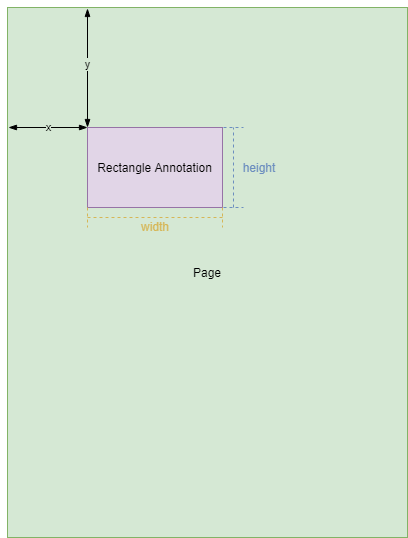
The x-coordinate of the upper-left corner of the rectangle annotation to draw. The unit is point.
Default value: 10
y
The y-coordinate of the upper-left corner of the rectangle annotation to draw. The unit is point.
Default value: 10
width
The width of the rectangle annotation to draw. The unit is point.
Default value: 100
height
The height of the rectangle annotation to draw. The unit is point.
Default value: 100
borderWidth
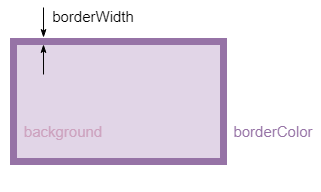
The border width of annotation. The unit is point.
Default value: 1
borderColor
The border color of annotation.
Default value: rgb(0,0,0)
Remark
Supported string value of borderColor and background:
- Named color, for example,
red,green, etc. - HEX(
#RRGGBB), for example,#ff0000,#008000, etc. - RGB(
rgb(red, green, blue)), for example,rgb(255, 0, 0),rgb(0, 128, 0), etc. - HSL(
hsl(Hue, Saturation, Lightness)), for example,hsl(0, 100%, 50%),hsl(120, 100%, 25%),etc.
background
The backgroud style of annotation.
Default value: '', it means no fill.
Example
background: "rgb(255,255,255)",
Remark
Supported string value of borderColor and background:
- Named color, for example,
red,green, etc. - HEX(
#RRGGBB), for example,#ff0000,#008000, etc. - RGB(
rgb(red, green, blue)), for example,rgb(255, 0, 0),rgb(0, 128, 0), etc. - HSL(
hsl(Hue, Saturation, Lightness)), for example,hsl(0, 100%, 50%),hsl(120, 100%, 25%),etc.
If set to '', it means no fill.
opacity
The opacity of the whole annotation. The value range is [0,1], value which is greater than 1 will default to 1.
Default value: 1
lineDash
The style of rectangle annotation border. The unit is point.
Default value: [0, 0]
Example
lineDash: [10, 10],
flags
The flags of annotation.
Please refer to Flags.
rotation
The rotation angle of annotation.
Default value: 0
Remark
- Positive value means clockwise rotation, negative value means counterclockwise rotation.
Related
Rectangle()getOptions()underRectangleclassupdateOptions()underRectangleclass
 Yes
Yes No
No