


Document Scanner
The scanner extension integrates a scan icon into web apps such as Gmail, Outlook, and Salesforce. By clicking this icon, users are presented with a scanning dialog, allowing them to instantly scan and attach documents either as attachments or images.
Request Trial License
Getting Started
The Document Scanner extension utilizes the Dynamic Web TWAIN SDK. Once you've added the extension to Chrome, the subsequent step is to install the Dynamic Web TWAIN service.
After completing the installation, you can seamlessly interact with your scanners through the following web apps:
FAQ
1. How can you activate the Document Scanner extension?
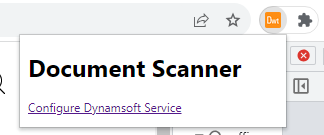
In Chrome, click on the extension icon and then select “Configure Dynamsoft Service”. This will take you to a page where you can enter the activation key.
2. Is the Document Scanner available for free?
The Document Scanner can be tried for free for up to 30 days. For extended access with a full license, please have your system administrator reach out to sales@dynamsoft.com.
3. On which platforms and browsers does the Document Scanner Extension operate?
Supported Platforms: Windows, macOS, and Linux.
Supported Browsers: Chrome and Edge.
Supported Web Apps: Gmail, Outlook, and Salesforce.
4. Which file formats are supported by the extension for saving as attachments?
The extension supports saving attachments in multiple-page PDF and JPG formats.
You have reached the maximum number of trial license requests. Please get in touch with our sales team at sales@dynamsoft.com for further assistance.