



SourceAnywhere Demo

The Best Visual SourceSafe Replacement and the Best Expert Service
We encourage you to evaluate SourceAnywhere before making your purchase. To make the evaluation easier, we have set up a SourceAnywhere demo server for your use. By connecting the SourceAnywhere Client to the demonstration server, you can experience SourceAnywhere version control without the hassle of having to configure your own server.
please download this demo server in your desktop Web browsers.Thanks !
Simply follow these steps
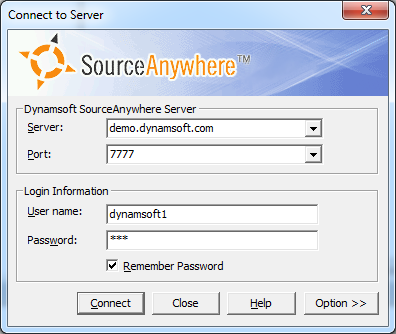
To connect to the online demo server, please follow these steps:
1. Download and install the SourceAnywhere Client.
2. Connect to the demo server from the SourceAnywhere Client.
server = demo.dynamsoft.com port = 7777
3. Input the following username and password to login:
- User Name = dynamsoft1 Password = saw
- User Name = dynamsoft2 Password = saw
- User Name = dynamsoft3 Password = saw
Blowfish port 7778 and SSL port 7779 are also available for your evaluation.
To use the Blowfish port, you'll need to download a user certificate (dynamsoft1, dynamsoft2, dynamsoft3) and import it using the SourceAnywhere Client.
This server is open to all for evaluation purposes. Please do not add or check in any objectionable files. Thanks!
Contact us
Any comments, bug reports or feature suggestions for SourceAnywhere are greatly appreciated.Please feel free to get in touch with us at support@dynamsoft.com with any questions.