




Need better scanning performance?
BarcodeFormatSpecification Parameters
The BarcodeFormatSpecification object defines format-specific decoding rules and constraints used by barcode reading tasks.
Example JSON
{
    "BarcodeFormatSpecificationOptions": [
        {
            "Name": "BFS_0",
            "BarcodeFormatIds": ["BF_QR_CODE"],
            "ExpectedBarcodesCount": 512,
            "MirrorMode": "MM_NORMAL",
            "MinResultConfidence": 30
        }
    ]
}
Hierarchical Structure
This tree shows one BarcodeFormatSpecification object inside BarcodeFormatSpecificationOptions.
BarcodeFormatSpecification
├── Name
├── BarcodeFormatIds
└── Format-specific parameters like ExpectedBarcodesCount
Top-Level Parameters
| Parameter Name | Description |
|---|---|
Name |
The unique name of the BarcodeFormatSpecification object. |
BarcodeFormatIds |
Specifies which barcode format(s) this specification applies to. |
ExpectedBarcodesCount |
Expected number of barcodes to decode. |
MirrorMode |
Controls barcode mirroring handling. |
MinResultConfidence |
Minimum confidence threshold for accepted results. |
StandardFormat |
Indicates whether standard format constraints are applied. |
PartitionModes |
Defines partitioning strategies during decoding. |
VerifyCheckDigit |
Defines whether to verify check digits. |
IncludeTrailingCheckDigit |
Defines whether to include trailing check digits in text results. |
IncludeImpliedAI01 |
Defines whether to include implied AI(01) for GS1 parsing. |
Code128Subset |
Specifies the subset strategy for Code 128 decoding. |
MsiCodeCheckDigitCalculation |
Specifies MSI check digit calculation rules. |
RequireStartStopChars |
Defines whether start/stop characters are required. |
EnableAddOnCode |
Defines whether add-on codes are decoded with primary barcodes. |
EnableDataMatrixECC000140 |
Defines whether DataMatrix ECC000-140 variants are enabled. |
DataMatrixModuleIsotropic |
Controls isotropic module assumption for DataMatrix. |
DataMatrixSizeOptions |
Specifies acceptable DataMatrix symbol size options. |
EnableQRCodeModel1 |
Defines whether QR Code Model 1 decoding is enabled. |
AustralianPostEncodingTable |
Specifies encoding table selection for Australian Post barcodes. |
ReturnPartialBarcodeValue |
Defines whether partial barcode values can be returned. |
FindUnevenModuleBarcode |
Defines whether to detect barcodes with uneven modules. |
AutoDetectColorInversion |
Defines whether to auto-detect foreground/background inversion. |
HasVerticalQuietZone |
Defines whether vertical quiet zone is required/assumed. |
HeadModuleRatio |
Defines ratio constraints for leading modules. |
TailModuleRatio |
Defines ratio constraints for trailing modules. |
MinQuietZoneWidth |
Minimum quiet-zone width requirement. |
MinRatioOfBarcodeZoneWidthToHeight |
Minimum width-to-height ratio for barcode zones. |
BarcodeZoneMinDistanceToImageBorders |
Minimum distance from barcode zone to image borders. |
BarcodeZoneWidthToHeightRatioRangeArray |
Acceptable barcode-zone width/height ratio range(s). |
BarcodeZoneBarCountRangeArray |
Acceptable barcode bar-count range(s). |
BarcodeWidthRangeArray |
Acceptable barcode width range(s). |
BarcodeHeightRangeArray |
Acceptable barcode height range(s). |
BarcodeAngleRangeArray |
Acceptable barcode angle range(s). |
BarcodeTextLengthRangeArray |
Acceptable decoded-text length range(s). |
BarcodeBytesLengthRangeArray |
Acceptable decoded-byte length range(s). |
BarcodeTextRegexPattern |
Regex pattern to validate decoded barcode text. |
ModuleSizeRangeArray |
Acceptable module-size range(s). |
PatchCodeSearchingMargins |
Search margins for Patch Code localization. |
AllModuleDeviation |
Allowed deviation threshold for module consistency checks. |
Usage Instructions
Format-Specific Behavior Design
The design purpose of BarcodeFormatSpecification is to customize decoding behavior for specific barcode format(s) without affecting other formats.
BarcodeFormatIds defines which format(s) the current configuration applies to, and the other parameters in the same object define how those matched format(s) should be processed.
When a setting in BarcodeFormatSpecification conflicts with a broader/global setting, the format-specific setting takes priority for the matched formats. For example:
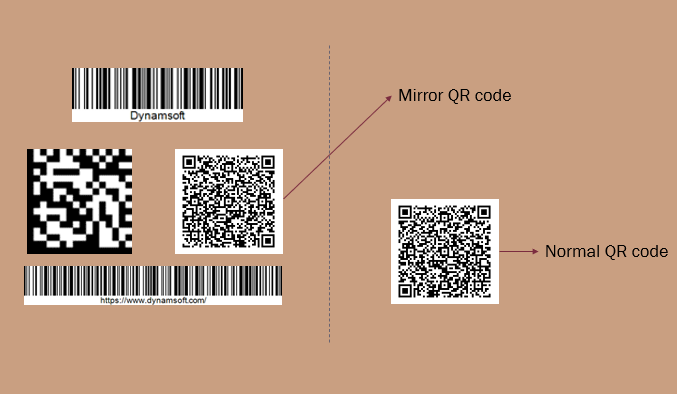
Sometimes the captured image is mirrored relative to the real scene. For 2D barcodes, this can cause decoding failures. If only QR Codes are affected, you can set MirrorMode specifically for QR Codes:
{
        "Name": "BFS_mirror",
        "BarcodeFormatIds": ["BF_QR_CODE"],
        "MirrorMode":"MM_MIRROR"
}
Quick Settings
Based on an existing BarcodeFormatSpecification object, you can set BaseBarcodeFormatSpecificationName and override only the fields you want to change. For example:
{
    "BarcodeFormatSpecificationOptions": [
        {
            "Name": "BFS_0",
            "BarcodeFormatIds": ["BF_DATAMATRIX"],
            "BinarizationModes": [
                {
                    "Mode": "BM_LOCAL_BLOCK",
                    "BlockSizeX": 5,
                    "BlockSizeY": 5
                }
            ]
        },
        {
            "Name": "BFS_1",
            "BaseBarcodeFormatSpecificationName": "BFS_0",
            "MinResultConfidence": 20
        }
    ]
}
In this example, BFS_1 inherits settings from BFS_0 and only overrides MinResultConfidence.
Additional Annotations
BarcodeReaderTaskSetting defines how a barcode-reading task runs from initialization to finalization. Within it, BarcodeFormatSpecification controls format-level decoding behaviors after barcodes are detected.
Default settings are provided for BarcodeFormatSpecification, so BarcodeReaderTaskSetting can still work even if you do not explicitly configure BarcodeFormatSpecification parameters.
 Yes
Yes No
No