




Need better scanning performance?
TargetROIDef Parameters
The TargetROIDef object specifies one or more recognition tasks to be performed on regions of interest (ROIs) within an image.
Example JSON
{
    "TargetROIDefOptions": [
        {
            "Name": "roi_a",
            "BaseTargetROIDefName": "",
            "TaskSettingNameArray": ["dbr_task"],
            "PauseFlag": 0,
            "EnableResultsDeduplication": 1,
            "Location": {
                "ReferenceObjectFilter": {
                    "ReferenceTargetROIDefNameArray": ["roi_root"],
                    "ReferenceTaskSettingNameArray": ["dbr_root"],
                    "ReferenceResultType": "RRT_ORIGINAL_IMAGE"
                },
                "Offset": {
                    "MeasuredByPercentage": 1,
                    "FirstPoint": [0, 0],
                    "SecondPoint": [100, 100]
                }
            }
        }
    ]
}
Hierarchical Structure
This tree shows one TargetROIDef object inside TargetROIDefOptions.
TargetROIDef
├── Name
├── BaseTargetROIDefName
├── TaskSettingNameArray
├── PauseFlag
├── EnableResultsDeduplication
└── Location
  ├── ReferenceObjectFilter
  └── Offset
Top-Level Parameters
| Parameter Name | Description |
|---|---|
Name |
The unique name of the TargetROIDef object. |
BaseTargetROIDefName |
The name of another TargetROIDef to inherit from. |
TaskSettingNameArray |
The names of task setting objects to apply. |
PauseFlag |
Whether to pause processing at this ROI. |
EnableResultsDeduplication |
Whether to enable deduplication of results. |
Location |
The location definition of the target ROI. |
How TargetROIDef Works
TargetROIDef combines two parts:
TargetROIDef = Task Binding + Location Definition
Location-Related Quick Links
| Parameter Name | Description |
|---|---|
Location |
Container object that combines reference filtering and offset definition. |
ReferenceObjectFilter |
Filters which reference objects are used when computing the ROI location. |
Offset |
Defines the offset from the reference object to the target ROI. |
Task Binding
TaskSettingNameArray binds one or more task settings to the ROI defined by this TargetROIDef object. Typical tasks include barcode reading, text-line recognition, and document processing.
Each task produces atomic result items (for example, barcode, text line, or quadrilateral). CapturedResult represents the full set of captured atomic results for an image.
| Task Type | Performed By | Atomic Result Type |
|---|---|---|
| Read Barcodes | Dynamsoft Barcode Reader SDK | BarcodeResultItem |
| Recognize Text Lines | Dynamsoft Label Recognizer SDK | TextResultItem |
| Detect Document Borders | Dynamsoft Document Normalizer SDK | DetectedQuadResultItem |
| Deskew a Document | Dynamsoft Document Normalizer SDK | DeskewedImageResultItem |
| Enhance an Image | Dynamsoft Document Normalizer SDK | EnhancedImageResultItem |
For more details:
Location Model
Location defines where recognition tasks are performed. It includes:
ReferenceObjectFilter: selects reference regions.Offset: maps those reference regions to final target regions.
This design enables either fixed ROIs (relative to the original image) or dynamic ROIs (relative to detected results).
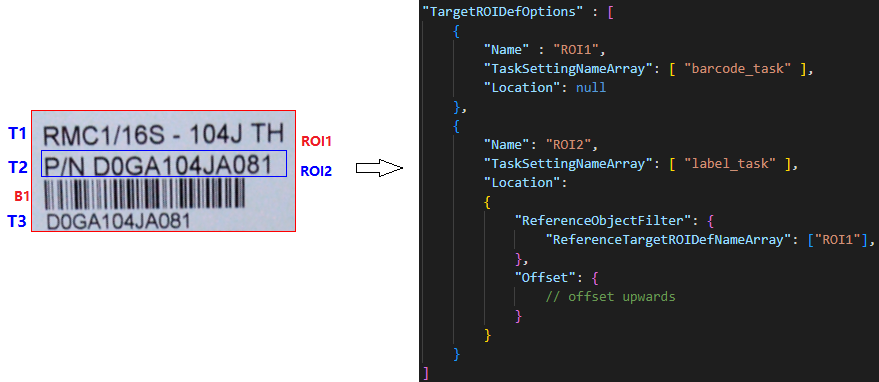
| Concept | Description | Example Explanation |
|---|---|---|
| Atomic Result | The smallest output item from a task (for example, barcode, text line, table cell, or detected quadrilateral). | T1, T2, T3 are three TextLineResultItem objects, and B1 is one BarcodeResultItem object. |
| Reference Region | A physical quadrilateral region used as the positioning base. It can come from the entire image or from atomic results. | ROI1 has one reference region (entire image). ROI2 has three reference regions generated from T1, T2, T3. |
| Target Region | A physical quadrilateral region calculated from a reference region plus offset rules. | ROI1 has one target region equal to the reference region. ROI2 has three target regions calculated by offsets from T1, T2, T3 quadrilateral regions. |
ReferenceObjectFilter
Defines filter conditions for reference objects. You can filter reference objects by TargetROIDefName, atomic result type, and specific atomic result details. Multiple objects may fit the filter conditions. More precise filter conditions yield more accurate reference regions.
| Parameter Name | Type | Required/Optional | Description |
|---|---|---|---|
ReferenceTargetROIDefNameArray |
String Array | Optional | References atomic objects generated by other TargetROIDef objects by name. Intersects with AtomicResultTypeArray to determine final referenced objects. |
AtomicResultTypeArray |
String Array | Optional | Atomic result types that can be used as reference objects. Intersects with ReferenceTargetROIDefNameArray to determine final referenced objects. |
BarcodeFilteringCondition |
Object | Optional | Barcode conditions that can be used as reference objects. |
FrameFilteringCondition |
Object | Optional | Frame conditions that can be used as reference objects. |
TextLineFilteringCondition |
Object | Optional | Text line conditions that can be used as reference objects. |
RegionFilteringCondition |
Object | Optional | Colour region conditions that can be used as reference objects. |
Offset
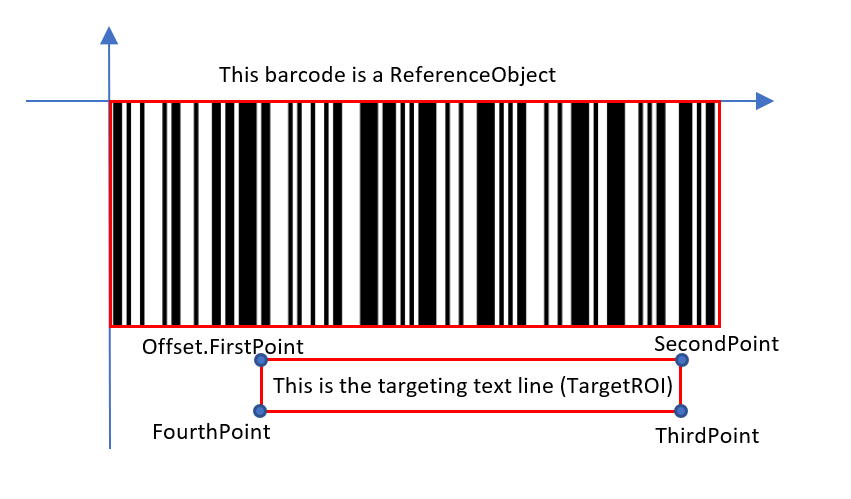
Defines the offset of the target region from the reference object. If no reference object is defined, the origin is set to the top-left vertex of the original image.
| Parameter Name | Type | Required/Optional | Description |
|---|---|---|---|
ReferenceObjectOriginIndex |
Integer | Optional | Which point of the reference object will be set as the origin of the coordinate system. |
ReferenceObjectType |
String | Optional | Which coordinate system to use when configuring offset parameters based on the reference objects. |
ReferenceXAxis |
Object | Optional | The x-axis of the coordinate system to use when configuring offset parameters based on the reference objects. |
ReferenceYAxis |
Object | Optional | The y-axis of the coordinate system to use when configuring offset parameters based on the reference objects. |
MeasuredByPercentage |
Integer | Optional | Whether to use percentage to measure the points’ coordinates (0 or 1). |
FirstPoint |
Integer Array | Required | The first point of the target region, defining the offset from the origin. |
SecondPoint |
Integer Array | Required | The second point of the target region, defining the offset from the origin. |
ThirdPoint |
Integer Array | Required | The third point of the target region, defining the offset from the origin. |
FourthPoint |
Integer Array | Required | The fourth point of the target region, defining the offset from the origin. |
Usage Examples
Reference the Original Image
You can set an offset based on the original image to localize the ROI without any reference object.
Example: Define ROI from the original image and perform barcode recognition on the upper 50% of the image.
{
    "TargetROIDefOptions": [
        {
            "Name": "ROI_0",
            "TaskSettingNameArray": ["barcode_task"],
            "Location": {
                "ReferenceObjectFilter": null,
                "Offset": {
                    "MeasuredByPercentage": 1,
                    "FirstPoint": [0, 0],
                    "SecondPoint": [100, 0],
                    "ThirdPoint": [100, 50],
                    "FourthPoint": [0, 50]
                }
            }
        }
    ]
}
Reference Another TargetROIDef
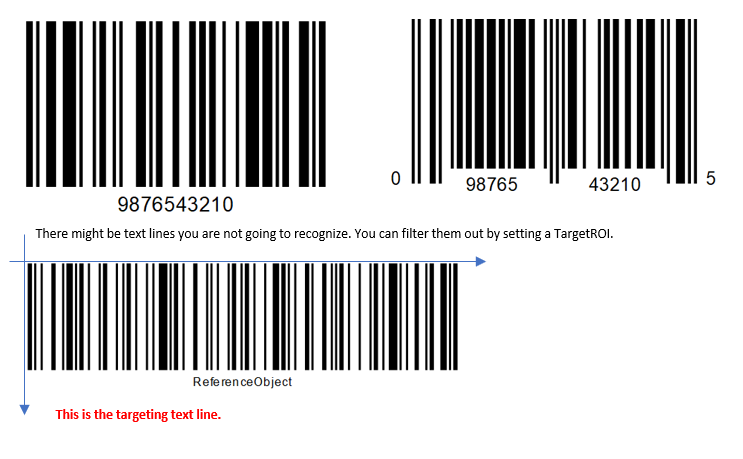
If significant objects can help localize the targeting content, define filter conditions to localize reference objects first, then capture the targeting content.
Example: Use barcode location to extract text line information.
{
    "TargetROIDefOptions": [
        {
            "Name": "ROI_0",
            "TaskSettingNameArray": ["barcode_task"],
            "Location": null
        },
        {
            "Name": "ROI_1",
            "TaskSettingNameArray": ["text_task"],
            "Location": {
                "ReferenceObjectFilter": {
                    "ReferenceTargetROIDefNameArray": ["ROI_0"],
                    "AtomicResultTypeArray": ["ART_BARCODE"],
                    "BarcodeFilteringCondition": {
                        "BarcodeFormatIds": ["BF_CODE_128"],
                        "BarcodeTextRegExPattern": "ReferenceObject"
                    }
                },
                "Offset": {
                    "MeasuredByPercentage": 1,
                    "FirstPoint": [20, 140],
                    "SecondPoint": [60, 140],
                    "ThirdPoint": [60, 170],
                    "FourthPoint": [20, 170]
                }
            }
        }
    ]
}
 Yes
Yes No
No