




Need better scanning performance?
TextLineSpecification Parameters
The TextLineSpecification object defines configurations for specified text lines, including character models, recognition patterns, and output settings.
Example JSON
{
    "TextLineSpecificationOptions": [
        {
            "Name": "tls_default",
            "BaseTextLineSpecificationName": "",
            "ApplicableTextLineNumbers": [0],
            "CharacterModelName": "",
            "TextLineRecModelName": "",
            "CharHeightRange": [5, 1000],
            "CharacterNormalizationModes": [],
            "BinarizationModes": [],
            "GrayscaleEnhancementModes": [],
            "StringLengthRange": [3, 200],
            "StringRegexPattern": "",
            "OutputResults": 1,
            "ConcatResults": 0,
            "ConcatSeparator": "",
            "ConcatStringLengthRange": [0, 0],
            "ConcatStringRegexPattern": "",
            "ExpectedGroupsCount": 1,
            "SubGroups": [],
            "ReferenceGroupName": "",
            "TextLinesCount": 1,
            "Position": { "Left": -1, "Top": -1, "Right": -1, "Bottom": -1 },
            "ConfusableCharactersCorrection": {
                "ConfusionSet": "",
                "FontName": "",
                "Height": 0,
                "Width": 0
            }
        }
    ]
}
Hierarchical Structure
This tree shows one TextLineSpecification object inside TextLineSpecificationOptions.
TextLineSpecification
├── Name
├── BaseTextLineSpecificationName
├── ApplicableTextLineNumbers
├── CharacterModelName
├── TextLineRecModelName
├── CharHeightRange
├── CharacterNormalizationModes
├── BinarizationModes
├── GrayscaleEnhancementModes
├── StringLengthRange
├── StringRegexPattern
├── OutputResults
├── ConcatResults
├── ConcatSeparator
├── ConcatStringLengthRange
├── ConcatStringRegexPattern
├── ExpectedGroupsCount
├── SubGroups
├── ReferenceGroupName
├── TextLinesCount
├── Position
└── ConfusableCharactersCorrection
Top-Level Parameters
| Parameter Name | Description |
|---|---|
Name |
The unique name of the TextLineSpecification object. |
BaseTextLineSpecificationName |
The name of another TextLineSpecification to inherit from. |
ApplicableTextLineNumbers |
The text line numbers this specification applies to. |
CharacterModelName |
The name of the character recognition model. |
TextLineRecModelName |
The name of the text line recognition model. |
CharHeightRange |
The expected character height range. |
CharacterNormalizationModes |
The modes for character normalization. |
BinarizationModes |
The modes for binarization. |
GrayscaleEnhancementModes |
The modes for grayscale enhancement. |
StringLengthRange |
The expected string length range. |
StringRegexPattern |
The regex pattern for validating recognized strings. |
OutputResults |
Whether to output results for this specification. |
ConcatResults |
Whether to concatenate results. |
ConcatSeparator |
The separator for concatenated results. |
ConcatStringLengthRange |
The length range for concatenated strings. |
ConcatStringRegexPattern |
The regex pattern for concatenated strings. |
ExpectedGroupsCount |
The expected number of text line groups. |
SubGroups |
The sub-group definitions. |
ReferenceGroupName |
The name of the reference group. |
TextLinesCount |
The expected number of text lines. |
Position |
The position of the text line. |
ConfusableCharactersCorrection |
The settings for confusable characters correction. |
Usage Instructions
Design and Configuration Strategy
TextLineSpecification is used to apply specialized recognition settings to selected text lines.
ApplicableTextLineNumberscontrols which text lines are targeted.CharacterModelNameandTextLineRecModelNameselect the CNN models used for recognition.- Other parameters define preprocessing, validation, grouping, and output behavior for the targeted lines.
When multiple TextLineSpecification objects exist, each object affects only the lines it targets.
Select Models
Use CharacterModelName and TextLineRecModelName to bind the corresponding models to the target text lines.
For model configuration details, see CaptureVisionModel.
Select Target Text Lines and Area
ApplicableTextLineNumbers defines which text lines use the current TextLineSpecification settings.
- If
ApplicableTextLineNumbersis null, all text lines use default settings. - If only some line numbers are specified, unspecified lines still use default settings.
You can further constrain target lines by area using FirstPoint, SecondPoint, ThirdPoint, and FourthPoint.
The final targeting result is determined by both line-number selection and area selection.
For example:
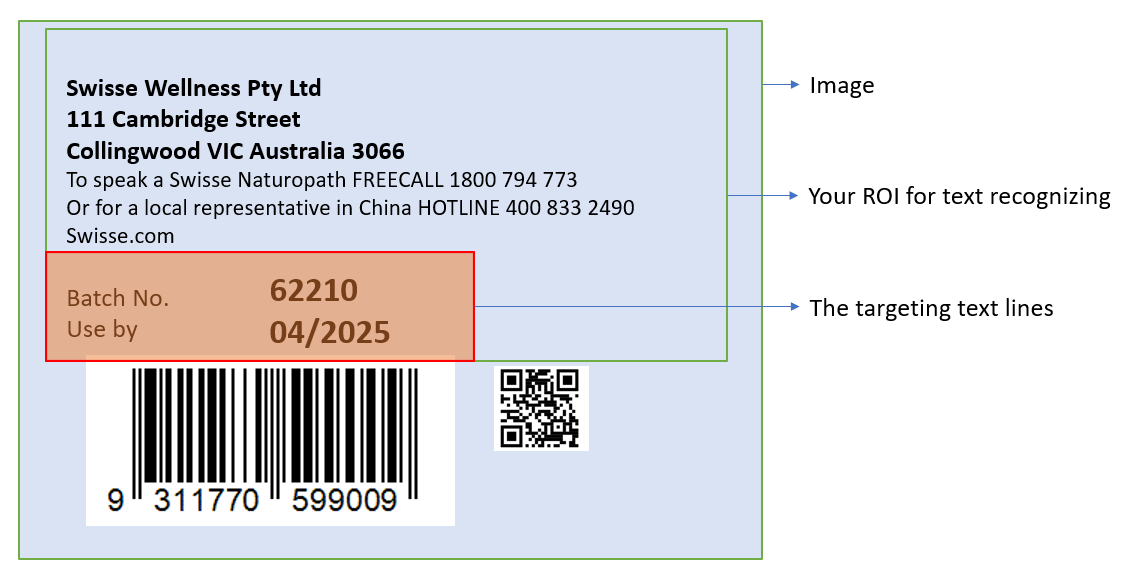
You can use the following parameters to process the above image:
{
    "ApplicableTextLineNumbers": [7, 8],
    "FirstPoint": [0, 60],
    "SecondPoint": [70, 60],
    "ThirdPoint": [70, 100],
    "FourthPoint": [0, 100]
}
If ApplicableTextLineNumbers is set to cover lines 1 to 8, but only lines 7 and 8 are inside the configured area, lines 1 to 6 are excluded by area filtering.
Configure Image Processing Modes
GrayscaleEnhancementModes improve grayscale quality before recognition.
BinarizationModes determine binary-image quality and directly affect character visibility in text areas before recognition.
CharacterNormalizationModes are additional improvements, commonly based on morphological transformations.
You can learn more from Image-Processing in OpenCV - Morphological Transformations.
Quick Settings
Based on an existing TextLineSpecification object, you can set BaseTextLineSpecificationName and override only the required fields. For example:
{
    "TextLineSpecificationOptions": [
        {
            "Name": "LS_0",
            "CharacterModelName": "NumberLetterCharRecognition",
            "ApplicableTextLineNumbers": [1, 2, 3],
            "BinarizationModes": [
                {
                    "Mode": "BM_LOCAL_BLOCK",
                    "BlockSizeX": 5,
                    "BlockSizeY": 5
                }
            ],
            "CharacterNormalizationModes": [
                {
                    "Mode": "CNM_MORPH",
                    "MorphOperation": "Close",
                    "MorphArgument": "3"
                }
            ],
            "StringLengthRange": [44, 44],
            "StringRegexPattern": "Dynamsoft",
            "CharHeightRange": [800, 1000]
        },
        {
            "Name": "LS_1",
            "BaseTextLineSpecificationName": "LS_0",
            "ApplicableTextLineNumbers": [4, 5, 6, 7],
            "CharHeightRange": [600, 800]
        }
    ]
}
In this example, LS_1 reuses the core settings from LS_0 and overrides only line targeting and character-height range.
Result Composition and Output
Result Concatenation
When multiple text lines need to be combined into a single result, use the following parameters:
ConcatResults: Set to 1 to enable concatenation of multiple text line results into a single output.ConcatSeparator: Defines the separator string used between concatenated text lines (e.g., “\n” for newline).ConcatStringLengthRange: Specifies the valid length range [min, max] for the concatenated result.ConcatStringRegexPattern: Regular expression pattern that the concatenated result must match.
Grouping and Filtering
ExpectedGroupsCount: Specifies the expected number of text line groups to be recognized.ReferenceGroupName: References another group for relative positioning or filtering.SubGroups: Defines sub-groups within the text line specification for hierarchical organization.TextLinesCount: Specifies the expected number of text lines to be processed.
Output Control
OutputResults: Set to 1 to include this text line’s results in the final output, or 0 to process internally without outputting.
Character Correction
ConfusableCharactersCorrection: Configuration for correcting commonly confused characters (e.g., 0 vs O, 1 vs I).
 Yes
Yes No
No