


How to Build an AI-Powered MRZ Scanner and Barcode Reader with Dynamsoft Capture Vision
On October 14, 2025, Dynamsoft unveiled its most significant leap in computer vision yet — the AI-powered Dynamsoft Capture Vision (DCV) 3.2.1000. This release introduces groundbreaking deep learning models that transform how 1D barcodes and MRZs are detected and decoded, pushing the boundaries of accuracy, performance, and real-world reliability. You can evaluate these new capabilities by building a Python benchmark comparison tool that runs DCV 3.2.1000 against publicly available datasets for 1D barcode and MRZ recognition.
What you’ll build: A Python-based benchmark comparison tool that evaluates Dynamsoft Capture Vision 3.2.1000’s AI deep learning models for 1D barcode recognition and MRZ passport scanning — tested against real-world public datasets.
Key Takeaways
- Dynamsoft Capture Vision 3.2.1000 ships neural network–based localization and decoding models that successfully read blurred, low-resolution, and partially damaged 1D barcodes.
- The MRZ deep learning model delivers 42.7% faster processing than the previous rule-based approach while improving region detection accuracy for passports and ID cards.
- Benchmarking is performed by running each SDK version in a subprocess and comparing per-image results — the first
cvr.capture()call warms up the AI model; only the second call’s timing is measured. - This workflow applies to any use case requiring reliable automated document scanning: border control, KYC onboarding, and logistics identity verification.
Common Developer Questions
How do I build an AI MRZ scanner in Python using Dynamsoft Capture Vision?
Initialize a CaptureVisionRouter, switch the processing template to the MRZ preset such as ReadPassportAndId, and run the capture flow from Python against passport or ID images. In this article, the MRZ mode is added to an existing benchmark tool so the same app can compare barcode and MRZ recognition on real datasets.
How much faster is the new deep learning MRZ model compared to the previous version?
The measurements reported here show the new MRZ deep learning model running about 42.7% faster than the earlier rule-based approach while also improving region detection quality. The benchmark is designed to compare versions against the same image set so that speed and accuracy changes are visible together.
Why does my first cvr.capture() call return a slow result when using the AI barcode model?
The first cvr.capture() call is slow because the AI model loads into memory during that call. The sample script warms up the model with an initial capture and then measures only the second cvr.capture() call, so the benchmark reflects true per-image processing time rather than model-load overhead.
See the AI Models in Action
-
Blurred 1D Barcode Recognition
-
MRZ Recognition
Prerequisites
What the AI Models Detect: 1D Barcodes and MRZ
The core highlights of this release include:
- Barcode: Deep neural network–based localization and decoding models designed to handle blurred, low-resolution, or partially damaged barcodes.
- MRZ: A specialized deep learning model that delivers 42.7% faster processing with improved region detection accuracy for passport and ID recognition workflows.
Step 1: Extend the Comparison Tool to Support MRZ Mode
We previously developed a comparison tool to benchmark barcode recognition performance.
To extend this tool for MRZ evaluation, we made the following updates.
Step 1: Add a Mode-Switching Dropdown for Barcode and MRZ
mode_label = QLabel("Detection Mode:")
toolbar_layout.addWidget(mode_label)

self.detection_mode_combo = QComboBox()
self.detection_mode_combo.addItems(["Barcode", "MRZ"])
self.detection_mode_combo.setCurrentText("Barcode")
self.detection_mode_combo.currentTextChanged.connect(self.on_detection_mode_changed)
toolbar_layout.addWidget(self.detection_mode_combo)

def on_detection_mode_changed(self, mode: str):
    self.current_detection_mode = mode
    self.status_bar.showMessage(f"Detection mode changed to: {mode}")

    if hasattr(self, 'processing_thread') and self.processing_thread and self.processing_thread.isRunning():
        self.processing_thread.terminate()
        self.processing_thread.wait(1000)
        self.processing_thread = None

    self.progress_bar.setVisible(False)

    self.results.clear()
    self.results_table.setRowCount(0)
    self.image_files.clear()
    self.file_list.clear()
    self.new_files = []
    self.image_comparison.sdk1_scene.clear()
    self.image_comparison.sdk2_scene.clear()
    self.image_comparison.summary_label.setText(f"Detection mode: {mode} - Add images to begin comparison")
    self.image_comparison.sdk1_results_text.clear()
    self.image_comparison.sdk2_results_text.clear()

    if mode == "Barcode":
        self.results_table.setHorizontalHeaderLabels(["Image", "SDK 1", "SDK 2", "Barcode Δ", "Speed Δ"])
    elif mode == "MRZ":
        self.results_table.setHorizontalHeaderLabels(["Image", "SDK 1", "SDK 2", "MRZ Δ", "Speed Δ"])
Step 2: Update the Detection Script to Handle MRZ Mode in the Subprocess
script_content = f'''#!/usr/bin/env python3
import sys
import json
import time
import os
from dynamsoft_capture_vision_bundle import *

LICENSE_KEY = "LICENSE-KEY"

def process_image(image_path, detection_mode):


    # Initialize license
    error_code, error_message = LicenseManager.init_license(LICENSE_KEY)
    if error_code not in [EnumErrorCode.EC_OK, EnumErrorCode.EC_LICENSE_CACHE_USED]:
        return {{"success": False, "error": f"License error: {{error_message}}", "detection_mode": detection_mode}}

    # Process image
    cvr = CaptureVisionRouter()

    # Select template based on detection mode
    if detection_mode == "Barcode":
        template = EnumPresetTemplate.PT_READ_BARCODES.value
    elif detection_mode == "Document":
        template = EnumPresetTemplate.PT_DETECT_AND_NORMALIZE_DOCUMENT.value
    elif detection_mode == "MRZ":
        template = "ReadPassportAndId"
    else:
        template = EnumPresetTemplate.PT_READ_BARCODES.value  # Default

    try:
        cvr.capture(image_path, template) # Trigger model loading the first time
    except Exception as e:
        pass  # Ignore first capture errors for model loading

    start_time = time.time()
    result = cvr.capture(image_path, template)
    processing_time = time.time() - start_time

    error_code = result.get_error_code()
    items = result.get_items()

    # Error -10005 often just means "no results found" for any detection mode
    # This is not necessarily a failure, just empty results
    if error_code != EnumErrorCode.EC_OK:
        if error_code == -10005:
            # No results found - return empty results but success
            pass  # Continue with empty items list
        else:
            return {{"success": False, "error": f"Capture error: {{error_code}}", "detection_mode": detection_mode}}

    # Initialize result containers
    barcodes = []
    mrz_results = []
    document_results = []

    # Process items based on detection mode
    for item in items:
        item_type = item.get_type()

        if detection_mode == "Barcode" and item_type == 2:  # Barcode item (CRIT_BARCODE = 2)
            barcode_data = {{
                "text": item.get_text(),
                "format": item.get_format_string(),
                "confidence": getattr(item, 'get_confidence', lambda: 0.0)()
            }}

            # Get location points
            try:
                location = item.get_location()
                if location and hasattr(location, 'points'):
                    barcode_data["points"] = [
                        [int(location.points[0].x), int(location.points[0].y)],
                        [int(location.points[1].x), int(location.points[1].y)],
                        [int(location.points[2].x), int(location.points[2].y)],
                        [int(location.points[3].x), int(location.points[3].y)]
                    ]
                else:
                    barcode_data["points"] = []
            except:
                barcode_data["points"] = []

            barcodes.append(barcode_data)

        elif detection_mode == "MRZ" and item_type == 4:  # Text line item (CRIT_TEXT_LINE = 4)
            text = item.get_text()
            mrz_data = {{
                "text": text,
                "parsed_info": {{}},  # Could be expanded to parse MRZ fields
                "points": []
            }}

            # Get location points
            try:
                location = item.get_location()
                if location and hasattr(location, 'points'):
                    mrz_data["points"] = [
                        [int(location.points[0].x), int(location.points[0].y)],
                        [int(location.points[1].x), int(location.points[1].y)],
                        [int(location.points[2].x), int(location.points[2].y)],
                        [int(location.points[3].x), int(location.points[3].y)]
                    ]
            except:
                mrz_data["points"] = []

            mrz_results.append(mrz_data)

    return {{
        "success": True,
        "detection_mode": detection_mode,
        "processing_time": processing_time,
        "barcodes": barcodes,
        "mrz_results": mrz_results,
    }}

if __name__ == "__main__":
    detection_mode = sys.argv[2] if len(sys.argv) > 2 else "Barcode"
    result = process_image(sys.argv[1], detection_mode)
    print(json.dumps(result))
'''
Note: The first call to cvr.capture() triggers AI model loading. To measure true image-processing time, the script calls cvr.capture() twice.
Step 2: Prepare Datasets and Run the Benchmark
To evaluate the new AI-powered models, we used two public datasets:
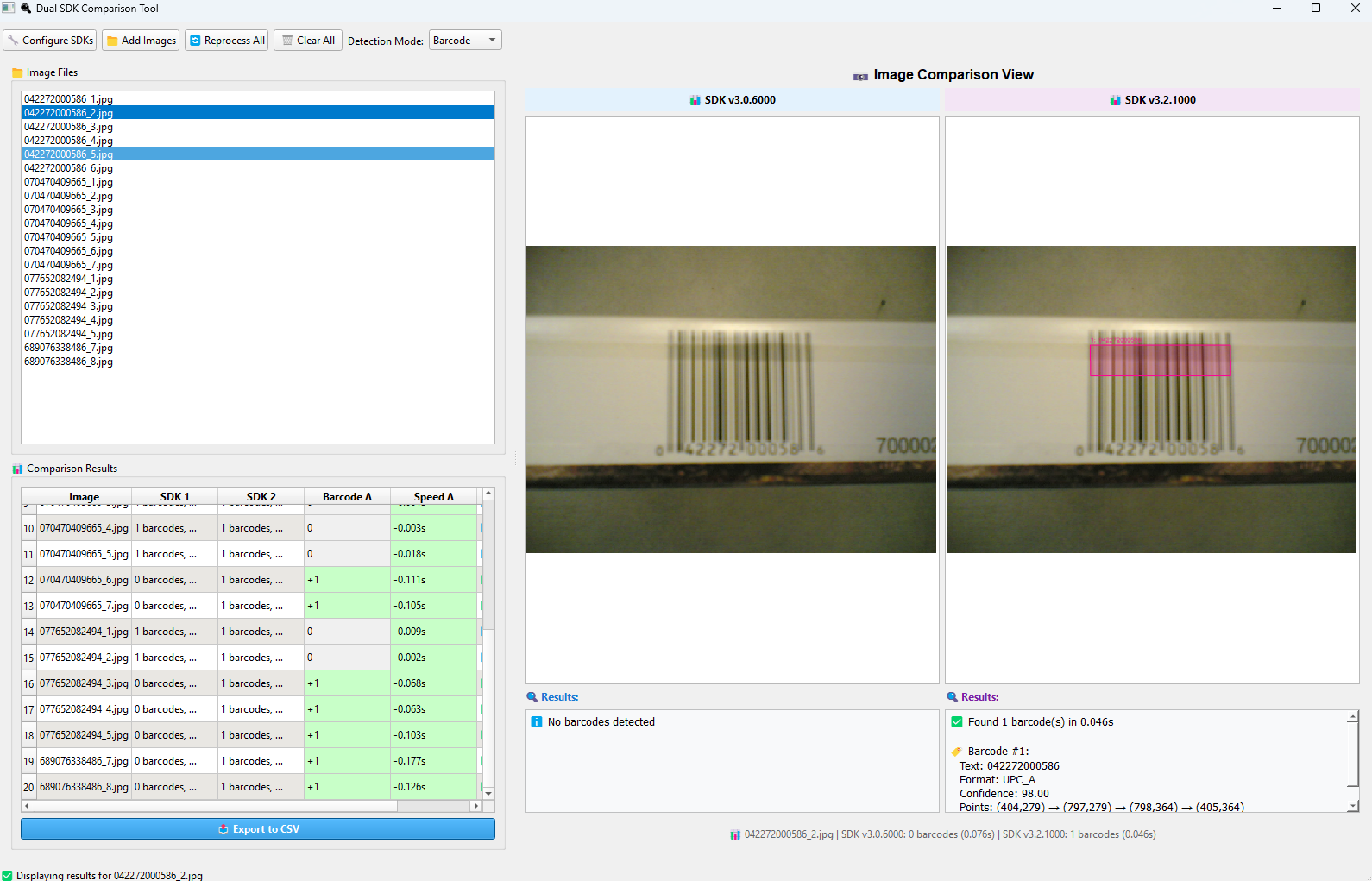
Benchmark 1D Barcode Recognition with Dataset3
We used the Dataset3 folder (images at 1152×864 resolution, taken with an older Nokia 7610 phone lacking autofocus) to benchmark 1D barcode recognition.
Benchmark MRZ Recognition with the L3i Passport Dataset
Reference
K.B. Bulatov, E.V. Emelianova, D.V. Tropin, N.S. Skoryukina, Y.S. Chernyshova, A.V. Sheshkus, S.A. Usilin, Z. Ming, J.-C. Burie, M. M. Luqman, V.V. Arlazarov: “MIDV-2020: A Comprehensive Benchmark Dataset for Identity Document Analysis”, Computer Optics (submitted), 2021.
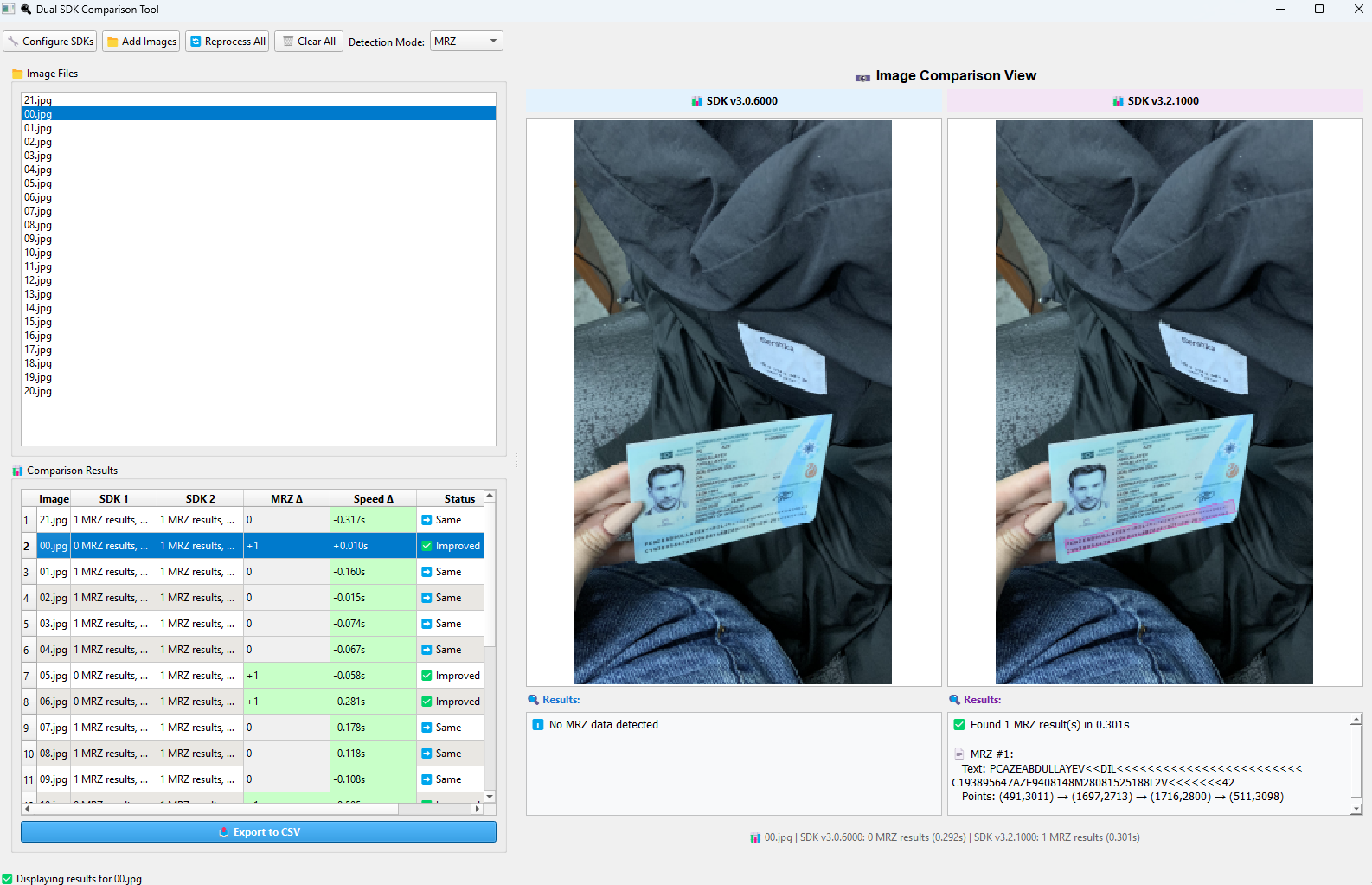
We used the aze_passport folder for MRZ recognition benchmarking.
Common Issues & Edge Cases
- First-capture timing inflation: The AI model loads on the first
cvr.capture()call. Always callcvr.capture()once to warm up the model before starting your benchmark timer — the script already does this. - MRZ not detected on low-resolution scans: The deep learning model expects sufficient image resolution. Scans below ~200 DPI may fail to locate the MRZ zone; pre-process images with contrast enhancement or upscaling if recognition returns empty results.
- Error code -10005 misread as failure: DCV returns
-10005when no results are found in an image — this is not a crash. Treat it as an empty result set and continue processing rather than halting the benchmark run.