


How to Benchmark MRZ Scanner SDKs on MIDV-500 in the Browser: Dynamsoft vs Scanbot
Choosing an MRZ (Machine Readable Zone) SDK for passport and ID scanning is hard to do from marketing pages alone — you need exact-match accuracy and latency numbers on a realistic dataset. This project is a browser-based benchmark app built with JavaScript, Dynamsoft Capture Vision 3.4.3000, and Scanbot Web SDK 9 that runs both SDKs against the same curated 3,315-image MIDV-500 MRZ subset and reports exact accuracy, character match rate, and P50/P95/P99 scan times side by side. On this dataset, Dynamsoft Capture Vision produced more fully correct MRZ reads — 46.49% exact-match accuracy versus 42.78% for Scanbot — at roughly half the average scan time (455.6 ms vs 828.7 ms). It is the JavaScript/web companion to our Python benchmark, How to Benchmark MRZ Recognition Accuracy on MIDV-500 with Python, using the same images, the same ground truth, and the same metrics.
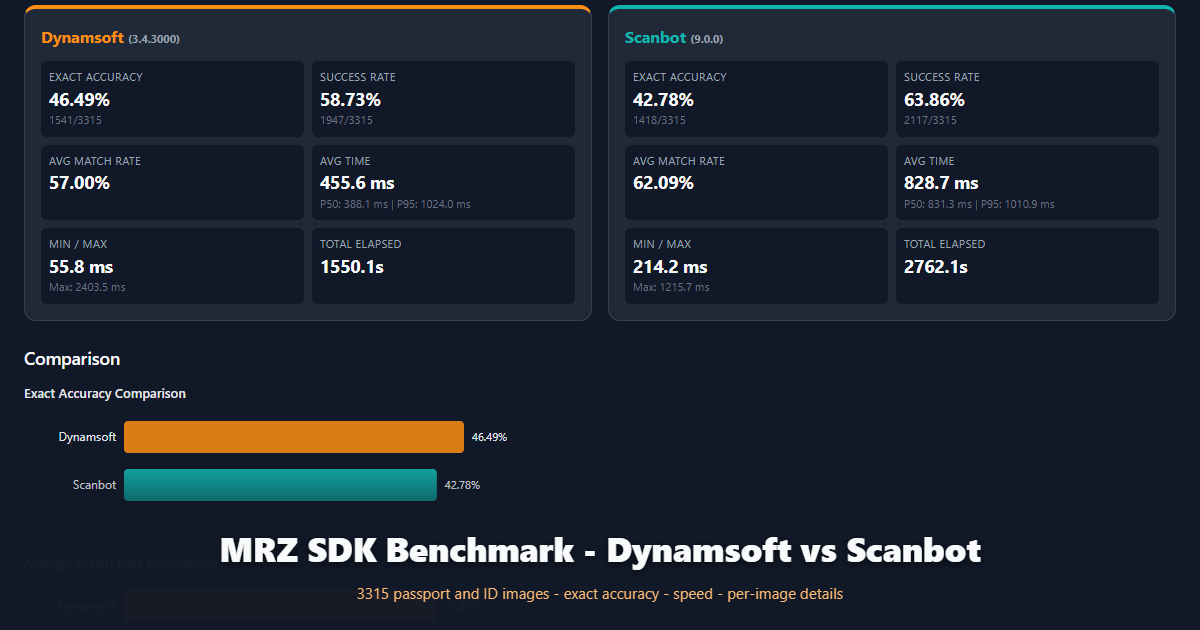
What you’ll build: A pure front-end web app that batch-loads MRZ images, optionally imports a ground-truth CSV, runs Dynamsoft Capture Vision and Scanbot Web SDK on every image, and exports a self-contained HTML comparison report.
This article is Part 2 in a 2-Part Series.
Demo Video: MRZ Benchmark App and Exported Report
The video walks through the benchmark UI, the vendor summary cards, comparison charts, and the per-image detail table from a real 3,315-image run.
Key Takeaways
- The benchmark runs on a curated 3,315-image MIDV-500 MRZ subset — frames extracted from mobile-phone video clips of passports and ID documents, not flatbed scans — with 285 cropped or incomplete frames audited out of the original 3,600 labels.
- In a 3,315-image browser benchmark with ground truth, Dynamsoft Capture Vision achieved 46.49% exact-match accuracy (1541/3315) versus 42.78% (1418/3315) for Scanbot Web SDK 9.0.0 — 123 more fully correct MRZ reads.
- Dynamsoft’s average scan time was 455.6 ms, about 45% faster than Scanbot’s 828.7 ms, and its median scan time was less than half of Scanbot’s (388.1 ms vs 831.3 ms); P95 latency was effectively tied (1024.0 ms vs 1010.9 ms).
- Scanbot returned a raw MRZ string more often (63.86% success rate, 62.09% average match rate vs Dynamsoft’s 58.73% and 57.00%), but more of those strings contained at least one incorrect character, so they failed exact matching.
- On the identical MIDV-500 subset, the Dynamsoft Python SDK scored 48.33% exact accuracy at 365.2 ms average on desktop — the in-browser WASM build gives up only ~1.8 percentage points of accuracy to run entirely client-side.
- The benchmark app measures scan time only around the recognition call, computes position-wise character match rate against ground truth, and exports a self-contained HTML report with comparison charts and per-image details.
- Dynamsoft Capture Vision parses recognized MRZ text into structured fields (document number, name, nationality, dates of birth and expiry) using its Code Parser module with MRTD_TD1/TD2/TD3 specifications, which is essential for automated identity verification workflows.
Common Developer Questions
Which MRZ SDK is more accurate, Dynamsoft or Scanbot?
In this browser benchmark on 3,315 curated MIDV-500 mobile-video frames with ground truth, Dynamsoft Capture Vision produced more fully correct reads: 46.49% exact-match accuracy (1541/3315) versus 42.78% (1418/3315) for Scanbot Web SDK 9.0.0, and Dynamsoft was also faster — 455.6 ms versus 828.7 ms average scan time. Scanbot had a higher raw success rate (63.86% vs 58.73%) and average character match rate (62.09% vs 57.00%), meaning it returned partial MRZ strings more often, but those strings more frequently contained at least one wrong character — which fails check-digit-level validation in real verification flows.
Why do the MIDV-500 benchmark scores look so low?
MIDV-500 images are frames from hand-held phone video clips, not flatbed scans, so the MRZ may be tilted, motion-blurred, reflected in glare, or printed small against a cluttered desk — and the exact-match metric counts a single wrong character as a miss. Every engine scores far lower on this dataset than on clean scans: in this browser benchmark the best exact accuracy was 46.49%, and in the companion Python benchmark on the same images the open-source PassportEye and FastMRZ libraries reached only 0.27% and 7.30%. MIDV-500’s specimen MRZ lines also contain fictional content (for example PCAZE... instead of P<AZE...) whose check digits do not always follow ICAO rules, which additionally penalizes engines that hard-reject checksum failures.
How do I scan MRZ from an image in JavaScript with Dynamsoft Capture Vision?
Initialize the license, preload the DLR/DDN WASM modules and the two MRZ deep-learning models, create a CaptureVisionRouter, load the MRZ template with initSettings, then call cvr.capture(dataUrl, "ReadMRZ"). The recognized text lines arrive as CRIT_TEXT_LINE result items, and CodeParser.parse() converts the raw MRZ string into structured fields such as document number, surname, nationality, and expiry date.
What ground truth format does the MRZ benchmark expect?
The app imports a CSV where each row is "imagepath","label" with MRZ lines joined by # (converted to newlines internally), for example "CA/CA05_01.JPG","PCAZEHUSEYNLI<<ORKHAN<...#X110003442AZE7503153M230801030LJV5Z<<<<<<<86#". Images are matched to entries by the last two path segments, lowercased, without extension, and images with no ground-truth match are automatically filtered out of the run. The bundled labels.csv contains the same 3,315 curated MIDV-500 entries used by the Python benchmark.
Is Dynamsoft slower than Scanbot at P95 latency?
No — in this benchmark the two SDKs are effectively tied at P95: 1024.0 ms for Dynamsoft Capture Vision versus 1010.9 ms for Scanbot Web SDK 9.0.0, while Dynamsoft is much faster everywhere else (388.1 ms vs 831.3 ms at P50, 455.6 ms vs 828.7 ms on average). Dynamsoft’s higher maximum scan time (2403.5 ms vs 1215.7 ms) comes from its deeper multi-stage pipeline — texture removal, text-line detection, deep-learning character recognition, and regex-based line validation — which spends extra time on the hardest images rather than returning a partial result quickly, consistent with its higher exact-match accuracy.
Benchmark Results: Dynamsoft vs Scanbot on 3,315 MIDV-500 Images
The numbers below come from a single-run export of the benchmark report — Dynamsoft Capture Vision 3.4.3000 versus Scanbot Web SDK 9.0.0 on the same 3,315 images with the same ground truth.
| Metric | Dynamsoft Capture Vision 3.4.3000 | Scanbot Web SDK 9.0.0 |
|---|---|---|
| Exact Accuracy | 46.49% (1541/3315) | 42.78% (1418/3315) |
| Success Rate | 58.73% (1947/3315) | 63.86% (2117/3315) |
| Avg Match Rate | 57.00% | 62.09% |
| Avg Scan Time | 455.6 ms | 828.7 ms |
| P50 Latency | 388.1 ms | 831.3 ms |
| P95 Latency | 1024.0 ms | 1010.9 ms |
| Min / Max Scan Time | 55.8 / 2403.5 ms | 214.2 / 1215.7 ms |
| Total Elapsed | 1550.1 s | 2762.1 s |
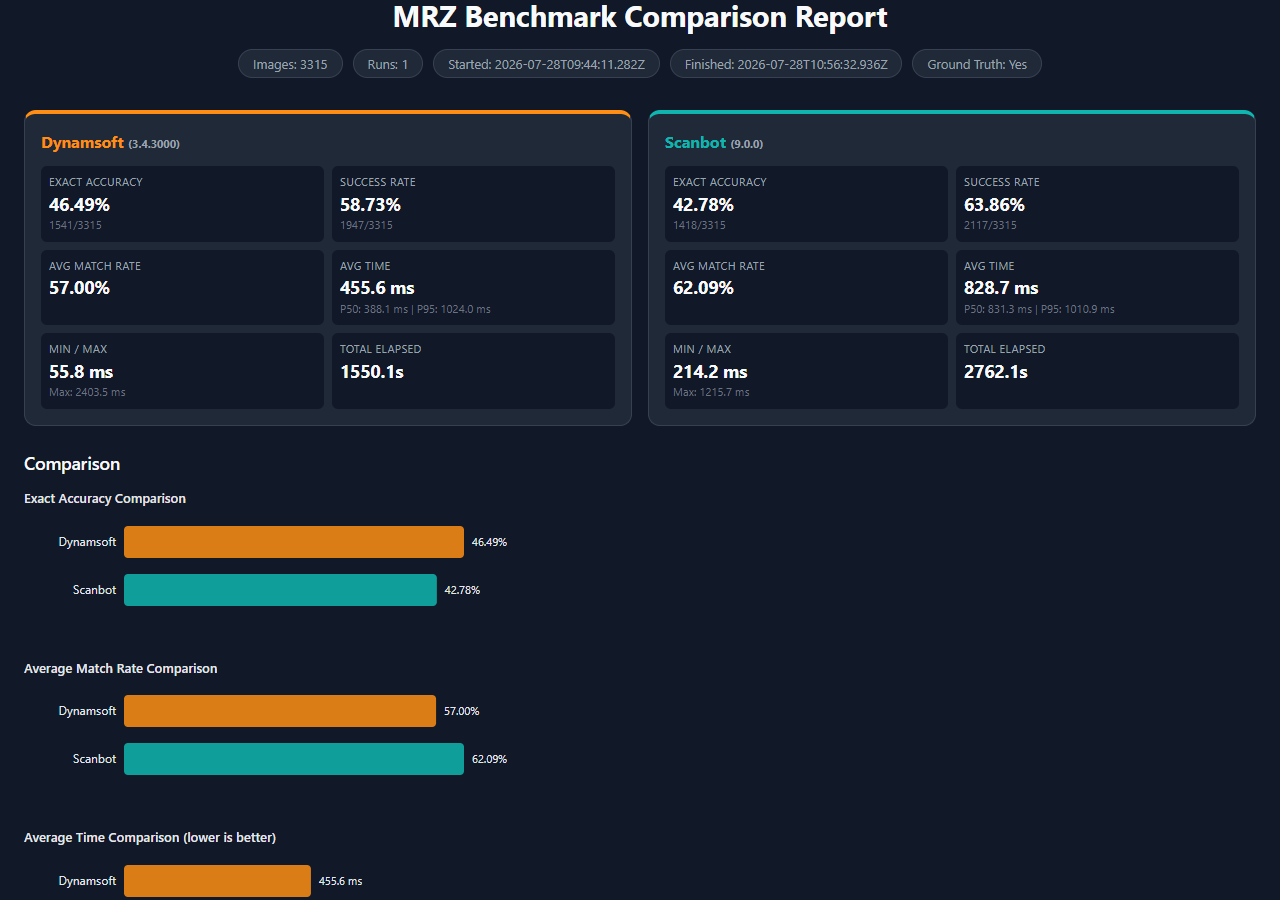
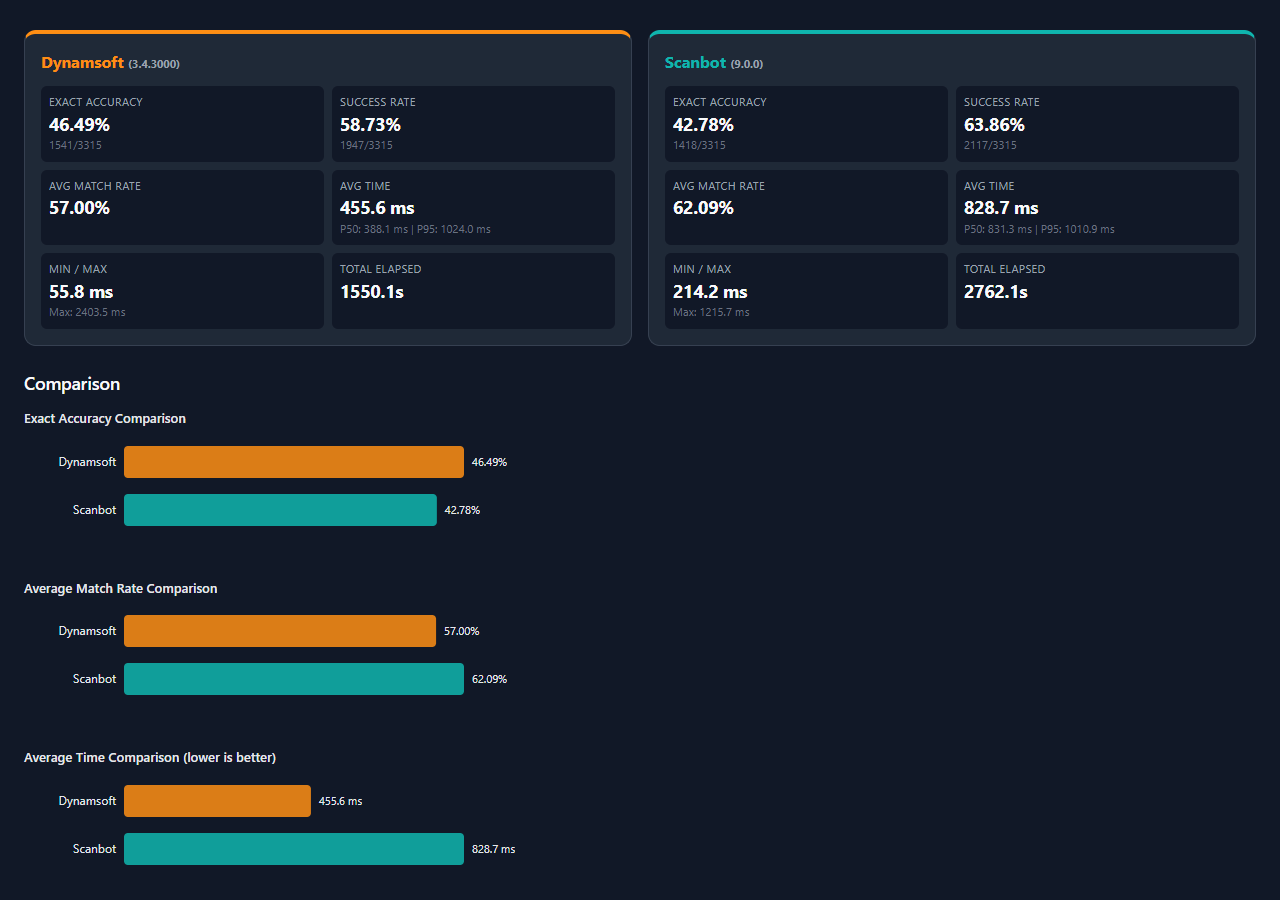
Two findings matter most for SDK selection. First, exact-match accuracy — the metric automated identity verification depends on, because a single wrong character fails check-digit validation — favors Dynamsoft by 3.71 percentage points, or 123 more fully correct MRZ reads. Second, higher accuracy does not cost throughput: Dynamsoft finished the full dataset in 1550.1 seconds versus 2762.1 seconds for Scanbot, and its median scan took 388.1 ms, less than half of Scanbot’s 831.3 ms. Scanbot’s higher success rate (63.86% vs 58.73%) means it returned a raw MRZ string more often, but more of those strings contained at least one incorrect character.
The MIDV-500 Benchmark Dataset: Mobile Video Frames, Not Clean Scans
The benchmark uses the same curated MIDV-500 MRZ subset as the Python companion article — the bundled labels.csv is the identical ground-truth file, so results are directly comparable across the two runtimes. MIDV-500 (Mobile Identity Document Video dataset) was published by Arlazarov et al. in Computer Optics (2019) and contains 500 video clips of 50 identity document types — 17 ID cards, 14 passports, 13 driving licences, and 6 other document types — captured with mobile phones and annotated with ground truth.
Three properties make MIDV-500 a genuinely hard MRZ benchmark:
- Frames, not scans. Every image is a frame from a hand-held phone video: 3D perspective tilt, motion blur, glare, uneven lighting, cluttered desk backgrounds, and MRZ text occupying only a small fraction of the frame.
- Documents entering the frame. Early and late frames of each clip show the document sliding into view, so the MRZ can be cropped or incomplete. The audit removes 285 such frames — mostly in the
PAandPSconditions — leaving 3,315 scoreable images out of 3,600 labeled frames. - Synthetic specimen data. All source documents are public-domain specimens from Wikimedia Commons. Their MRZ lines contain fictional, non-standard content —
PCAZE...instead of the ICAO-standardP<AZE..., letters such asLJV5Zwhere real passports place digits — so any recognizer that hard-rejects checksum failures or non-standard field values discards otherwise correct reads on this dataset.
The curated subset covers 12 document groups — 11 passport types (Azerbaijan 05, Brazil 06, Czech 11, German new 16, German old 17, Greek 25, Croatian 27, Hungarian 28, Latvian 32, Moldovan 34, Serbian 41) plus the Algerian document 18 with an ID-card style MRZ — across 10 capture conditions (CA, CS, HA, HS, KA, KS, PA, PS, TA, TS), 30 frames per document-condition pair. Every kept frame has a complete, visible MRZ, including the difficult ones. Because of this, exact-match percentages on MIDV-500 look low in absolute terms for every engine, and the numbers in this article should be read comparatively — SDK versus SDK on identical pixels.
To run the benchmark yourself, preprocess the MIDV-500 download into the CA/–TS/ folder layout expected by labels.csv (the Python article documents the preparation and exclusion audit), then drag the whole folder into the web app.
Prerequisites
- Dynamsoft Capture Vision Bundle 3.4.3000 (loaded from CDN) and Scanbot Web SDK 9 (loaded from CDN)
- A local static server to deploy the app, such as
python -m http.server - A valid Dynamsoft license key. Get a 30-day free trial license.
Step 1: Load Both SDKs from CDN
The page pulls in the Dynamsoft Capture Vision Bundle (CVR, DLR, DCP, DDN for MRZ) and the Scanbot Web SDK via script tags — no build step required.
<!-- Dynamsoft Capture Vision Bundle (includes CVR, DLR, DCP, DDN for MRZ) -->
<script src="https://cdn.jsdelivr.net/npm/dynamsoft-capture-vision-bundle@3.4.3000/dist/dcv.bundle.min.js" crossorigin="anonymous"></script>
<!-- Scanbot Web SDK -->
<script src="https://cdn.jsdelivr.net/npm/scanbot-web-sdk@9/bundle/ScanbotSDK.min.js" crossorigin="anonymous"></script>
Step 2: Initialize Dynamsoft Capture Vision for MRZ
Activation initializes the license, preloads the recognition WASM modules, creates the Code Parser, loads all MRTD specifications, appends the two MRZ deep-learning model buffers, and creates the CaptureVisionRouter with the MRZ template.
// Step 1: Initialize license
await Dynamsoft.License.LicenseManager.initLicense(license, true);

// Step 2: Preload WASM modules for label recognition and document normalization
Dynamsoft.Core.CoreModule.loadWasm(["DLR", "DDN"]);

// Step 3: Create CodeParser instance for parsing MRZ into structured data
const parser = await Dynamsoft.DCP.CodeParser.createInstance();

// Step 4: Load MRZ document specifications
await Dynamsoft.DCP.CodeParserModule.loadSpec("MRTD_TD1_ID");
await Dynamsoft.DCP.CodeParserModule.loadSpec("MRTD_TD2_FRENCH_ID");
await Dynamsoft.DCP.CodeParserModule.loadSpec("MRTD_TD2_ID");
await Dynamsoft.DCP.CodeParserModule.loadSpec("MRTD_TD2_VISA");
await Dynamsoft.DCP.CodeParserModule.loadSpec("MRTD_TD3_PASSPORT");
await Dynamsoft.DCP.CodeParserModule.loadSpec("MRTD_TD3_VISA");

// Step 5: Load deep-learning model buffers for MRZ recognition
await Dynamsoft.CVR.CaptureVisionRouter.appendDLModelBuffer("MRZCharRecognition");
await Dynamsoft.CVR.CaptureVisionRouter.appendDLModelBuffer("MRZTextLineRecognition");

// Step 6: Create CaptureVisionRouter instance
const cvr = await Dynamsoft.CVR.CaptureVisionRouter.createInstance();

// Step 7: Load MRZ template settings (embedded to avoid fetch dependency)
await cvr.initSettings(MRZ_TEMPLATE_JSON);
The template is embedded as a JSON string constant and passed directly to initSettings, so the app never fetches its recognition settings at runtime. It defines regex-validated text-line specifications for every MRZ format — TD3 passports (44 chars), TD3/TD2 visas, and TD1/TD2 IDs (30/36 chars) — plus confusable-character correction for OCR-B:
"CodeParserTaskSettingOptions": [
  { "CodeSpecifications": ["MRTD_TD3_PASSPORT","MRTD_TD2_VISA","MRTD_TD3_VISA","MRTD_TD1_ID","MRTD_TD2_ID"], "Name": "dcp-mrz" }
],
{ "BaseTextLineSpecificationName": "tls-base", "ConcatResults": 1, "ConcatSeparator": "\\n", "Name": "tls-mrz-passport", "StringLengthRange": [44,44], "SubGroups": [
  { "BaseTextLineSpecificationName": "tls-base", "StringLengthRange": [44,44], "StringRegExPattern": "(P[A-Z<][A-Z<]{3}[A-Z<]{39}){(44)}" },
  { "BaseTextLineSpecificationName": "tls-base", "StringLengthRange": [44,44], "StringRegExPattern": "([A-Z0-9<]{9}[0-9][A-Z<]{3}[0-9]{2}[(01-12)][(01-31)][0-9][MF<][0-9]{2}[(01-12)][(01-31)][0-9][A-Z0-9<]{14}[0-9<][0-9]){(44)}" }
]},
Step 3: Initialize Scanbot Web SDK
Scanbot initializes with an engine path and a license key; thread support is only enabled when the page is cross-origin isolated. The default trial license contains newlines that an <input> would strip, so the app falls back to the JS constant when the field is empty.
const isolated = typeof crossOriginIsolated !== 'undefined' ? crossOriginIsolated : false;

const sdk = await SDK.initialize({
  licenseKey: license || '',
  enginePath: SCANBOT_CDN_ENGINE,
  allowThreads: isolated,
});

const mrzEngine = await sdk.createMrzScannerEngine({
  enableDetection: true,
  incompleteResultHandling: 'ACCEPT',
});
Step 4: Batch-Load Images and Ground Truth
The upload zone accepts both files and folders. Directory drops are traversed recursively with webkitGetAsEntry, and each image gets a matching key built from its last two path segments so it can be joined with the ground-truth CSV.
// Build a matching key from a relative path: last two segments, lowercase, no extension
// e.g. "midv-500-passport/CA/ca01_01.jpg" → "ca/ca01_01"
function buildKey(relPath) {
  const normalized = relPath.toLowerCase().replace(/\\/g, '/');
  const parts = normalized.split('/');
  const keyParts = parts.length >= 2 ? parts.slice(-2) : parts;
  return keyParts.join('/').replace(/\.[^.]+$/, '');
}
The CSV parser converts # line separators into newlines and stores entries in a Map:
const match = trimmed.match(/^"([^"]+)","(.+)"$/);
if (match) {
  const path = match[1].toLowerCase().replace(/\\/g, '/');
  const mrz = match[2].replace(/#/g, '\n');
  const parts = path.split('/');
  const key = parts.length >= 2
    ? parts.slice(-2).join('/').replace(/\.[^.]+$/, '')
    : path.replace(/\.[^.]+$/, '');
  map.set(key, mrz);
}
Step 5: Run the Benchmark and Decode with Each SDK
The loop runs each vendor over the same image list, keeps the best of N runs per image by scan time, and computes the match rate when ground truth exists. The Dynamsoft decode path measures image-decode and scan time separately, captures with the ReadMRZ template, extracts the text-line item, and parses it into structured fields.
// Capture with ReadMRZ template
const scanStart = performance.now();
const result = await cvr.capture(dataUrl, "ReadMRZ");
const scanMs = performance.now() - scanStart;

// Extract MRZ text from result items (filter by TEXT_LINE type)
let mrzText = null;
let success = false;
let fields = emptyFields();

const items = result && result.items ? result.items : [];
const textLineType = Dynamsoft.Core.EnumCapturedResultItemType.CRIT_TEXT_LINE;

for (const item of items) {
  if (item.type === textLineType && item.text) {
    mrzText = item.text.replace(/\\n/g, '\n');
    success = true;
    break;
  }
}

// Parse MRZ text into structured fields using CodeParser
if (success && mrzText && parser) {
  try {
    const parseText = mrzText.replace(/\n/g, '');
    const parseResult = await parser.parse(parseText);
    if (parseResult) {
      fields = extractMrzFields(parseResult);
    }
  } catch (_) {
    // Parsing failed but recognition succeeded - keep raw text
  }
}
Step 6: Compute Metrics and Export the HTML Report
Match rate is position-wise character agreement after normalization; an exact match requires a rate of at least 0.99999. The summary aggregates exact accuracy, success rate, and latency percentiles, and ReportGenerator.generate() produces a self-contained dark-themed HTML report with comparison bar charts, timing histograms, and a per-image detail table.
function computeMatchRate(recognized, truth) {
  const norm = (s) => s.toUpperCase().replace(/[^A-Z0-9<\n]/g, '').replace(/\n/g, '');
  const a = norm(recognized);
  const b = norm(truth);
  if (!a.length && !b.length) return 1.0;
  const maxLen = Math.max(a.length, b.length);
  if (maxLen === 0) return 1.0;
  let matches = 0;
  for (let i = 0; i < maxLen; i++) {
    if (a[i] === b[i]) matches++;
  }
  return matches / maxLen;
}
function exportReport() {
  if (!state.benchmarkResults) return;
  const html = ReportGenerator.generate(state.benchmarkResults);
  const blob = new Blob([html], { type: 'text/html;charset=utf-8' });
  const url = URL.createObjectURL(blob);
  const a = document.createElement('a');
  a.href = url;
  const vendorNames = state.benchmarkResults.vendors.map(v => v.id).join('_vs_');
  a.download = `mrz_benchmark_${vendorNames}_${Date.now()}.html`;
  document.body.appendChild(a);
  a.click();
  document.body.removeChild(a);
  URL.revokeObjectURL(url);
}
Common Issues & Edge Cases
- MRZ template embedded as a constant: The Dynamsoft MRZ template is embedded as a string constant (
MRZ_TEMPLATE_JSON) and passed directly toinitSettings, so the recognition settings ship with the app instead of being fetched from a separate file at runtime.
Conclusion
You now have a fully client-side benchmark that compares MRZ SDKs on the curated 3,315-image MIDV-500 subset with exact-match accuracy, character match rate, and latency percentiles — and on this dataset, Dynamsoft Capture Vision delivered more fully correct reads at roughly half the average and median scan time of Scanbot Web SDK. Because the images, ground truth, and metrics are identical to the Python MIDV-500 benchmark, you can also compare runtimes directly: the browser WASM build reached 46.49% exact accuracy versus 48.33% on desktop Python, at roughly 1.25× the per-image scan time.