


How to Benchmark MRZ Recognition Accuracy on MIDV-500 with Python
Building an MRZ recognition pipeline is only half the battle. You also need to know how it performs across real-world capture conditions, and you need a dataset whose ground truth matches the pixels being scored. This tutorial walks through a Python benchmark that evaluates the Dynamsoft Capture Vision SDK on a curated 3,315-image MIDV-500 MRZ subset, measuring exact accuracy, wrong reads, no-reads, and per-image decode timing — and then runs the identical benchmark against the two most popular open-source Python MRZ libraries, PassportEye and FastMRZ, for a like-for-like comparison. Because MIDV-500 frames come from mobile-phone video clips rather than flatbed scans, the scores in this benchmark are far stricter than typical clean-document OCR tests.
What you’ll build: A Python command-line tool that benchmarks Dynamsoft Capture Vision MRZ recognition on MIDV-500 images, uses audited ground truth, and exports a JSON report plus an HTML dashboard with accuracy metrics and timing distribution charts. Companion scripts in the same project reproduce the benchmark with PassportEye and FastMRZ as open-source baselines.
This article is Part 1 in a 2-Part Series.
Demo Video: Python MRZ SDK Benchmark
Key Takeaways
- This benchmark uses the MIDV-500 public dataset — a stress-test dataset with challenging images containing motion blur, partial frames, and extreme angles.
- 52.76% exact accuracy on MIDV-500 is a strong result. The same benchmark run against the two leading open-source Python MRZ libraries scored 0.27% and 7.30% exact accuracy on identical images.
- The curated benchmark contains 3,315 scoreable MRZ images from an original 3,600 labeled MIDV-500 subset.
- The benchmark keeps all visible, scoreable MRZ pages, including passport MRZ images and the Algerian ID-card style MRZ images in document type
18. - The audit excludes 285 frames where the MRZ is cropped, incomplete, or not yet visible.
- MIDV-500 images are frames from mobile-phone video clips, not flatbed scans. Glare, motion blur, steep angles, cluttered backgrounds, and small MRZ text make exact-match scores on this dataset far lower than on clean-document MRZ tests.
- Of the 3,315 images, 1,749 matched exactly, 408 returned text that did not match, and 1,158 produced no MRZ at all — the split matters more than any single rate, because a wrong read fails check-digit validation just as hard as no read.
- 1,749 images matched the ground truth exactly, giving 52.76% exact accuracy.
- The average decode time was 312.1 ms, with a P50 of 228.8 ms, P95 of 736.3 ms, and P99 of 1,011.8 ms.
- On the same 3,315 images, PassportEye 2.2.2 matched only 9 images exactly (0.27% exact accuracy) and FastMRZ 2.1.2 matched 242 images (7.30%) — both Tesseract-based pipelines degrade sharply on slanted video-frame MRZ text.
- The benchmark uses the
ReadPassportAndIdtemplate, which handles passport and ID MRZ formats in one API call viarouter.capture_multi_pages(). - At the time of writing, Dynamsoft Capture Vision is the only commercial MRZ SDK distributed as a pip-installable Python package that performs recognition fully offline.
Common Developer Questions
How accurate is Dynamsoft Capture Vision for MRZ reading?
On the curated 3,315-image MIDV-500 MRZ benchmark, the SDK achieved 52.76% exact MRZ accuracy; the rest of the set splits into 408 wrong reads and 1,158 images with no MRZ returned. The exact-match number is strict: the normalized recognized MRZ must match the ground-truth MRZ character for character. The success-rate number is higher because it counts images where the SDK returned MRZ text, even if one line or some characters did not match exactly.
Why do the MIDV-500 benchmark scores look so low?
The scores are low because MIDV-500 is a mobile-video dataset, not a collection of flatbed scans. Each image is a frame from a phone video clip, so the MRZ may be slanted, blurred by motion, partially in shadow, reflected in glare, or printed small against a cluttered desk. The exact-match metric is also unforgiving: one wrong check digit or one misread filler character turns an otherwise correct read into a miss. For calibration, the same SDK pipeline produced 5 out of 5 exact matches on a clean subset (ca/ca05_01.jpg through ca/ca05_05.jpg), and reached 84.2% exact accuracy on the easiest capture condition (TA). The low full-dataset numbers reflect image difficulty, and every engine scores far lower on MIDV-500 than on clean scans — in this benchmark, the open-source PassportEye and FastMRZ libraries reached only 0.27% and 7.30% exact accuracy on the same images.
Why is the curated benchmark smaller than the original 3,600 labels?
The original label file includes frames from moving capture sequences. Some early PA and PS frames show only part of the document, or the MRZ has not entered the frame yet. These images have a label row, but the MRZ cannot be fairly scored from the pixels. The audit removes 285 such frames and records every removal in assets/midv500_mrz_exclusions.csv.
What document types are included?
The source subset covers 12 MIDV-500 document groups: Azerbaijan passport (05), Brazil passport (06), Czech passport (11), German new passport (16), German old passport (17), Algerian document with an ID-card style MRZ (18), Greek passport (25), Croatian passport (27), Hungarian passport (28), Latvian passport (32), Moldovan passport (34), and Serbian passport (41). The benchmark is not limited to passport MRZ pages when another scoreable MRZ page is present.
How fast is the Dynamsoft Capture Vision Python SDK for MRZ decoding?
The average decode time across the curated benchmark is 312.1 ms per image. The median is 228.8 ms, with P95 at 736.3 ms and P99 at 1,011.8 ms. Timing starts immediately before the SDK call and stops immediately after it returns, excluding JSON serialization and report generation.
How does Dynamsoft Capture Vision compare to PassportEye and FastMRZ on MIDV-500?
In this benchmark, all three engines ran on the same 3,315 curated images with the same ground truth, metrics, and machine. Dynamsoft Capture Vision reached 52.76% exact accuracy (1,749 images) at 312.1 ms average decode time, with 408 wrong reads (12.31%) and 1,158 images where it returned nothing. PassportEye 2.2.2 answered far more often — 2,688 images — but only 9 of those answers were correct (0.27%), so 2,679 were wrong (80.81%), at 798.5 ms. FastMRZ 2.1.2 stayed silent on 2,310 images (69.68%), returned 763 wrong reads (23.02%), and matched 242 exactly (7.30%) at 484.0 ms. Both open-source libraries are Tesseract-OCR pipelines, and Tesseract struggles with the slanted, blurred OCR-B text found in mobile video frames.
Is there a commercial Python MRZ SDK that works offline?
Yes — Dynamsoft Capture Vision is, at the time of writing, the only commercial MRZ SDK distributed as a pip-installable Python package (dynamsoft-capture-vision-bundle) whose recognition runs fully offline on Windows, Linux, and macOS. Other commercial MRZ products do not offer an equivalent offline Python package: Regula’s Python client requires a running Document Reader Web Service, Smart Engines ships C++ and Java SDKs, and Microblink focuses on mobile, web, and self-hosted server APIs. Doubango’s ultimateMRZ offers Python bindings, but they must be compiled from source rather than installed from PyPI.
The MIDV-500 Dataset: Mobile Video Frames, Not Clean Scans
MIDV-500 (Mobile Identity Document Video dataset) is a public benchmark for identity document analysis on mobile devices. It was published by Arlazarov et al. in Computer Optics (2019) — MIDV-500: a dataset for identity document analysis and recognition on mobile devices in video stream — and contains 500 video clips of 50 identity document types: 17 ID cards, 14 passports, 13 driving licences, and 6 other document types, all annotated with ground truth. The fcakyon/midv500 GitHub repository provides the canonical download links and annotation-conversion tooling.
Three properties of the dataset make MRZ recognition on it genuinely hard:
- Frames, not scans. Every image is a frame extracted from a hand-held phone video. The document may be tilted in 3D perspective, moving (motion blur), lit unevenly, reflected in glare, or sitting on a cluttered desk among cables, pens, and keyboards. The MRZ text often occupies only a small fraction of the frame.
- Documents entering the frame. Because the source is a video clip, early and late frames show the document sliding into view. This is why the audit excludes 285 frames whose MRZ is cropped or incomplete.
- Synthetic specimen data. To avoid exposing personal data, all source documents are public-domain specimen images from Wikimedia Commons. Their MRZ lines contain fictional, non-standard content — for example
PCAZE...instead of the ICAO-standardP<AZE..., and letters such asLJV5Zwhere real passports place digits. Any recognizer that hard-rejects checksum failures or non-standard field values will discard otherwise correct reads on this dataset.
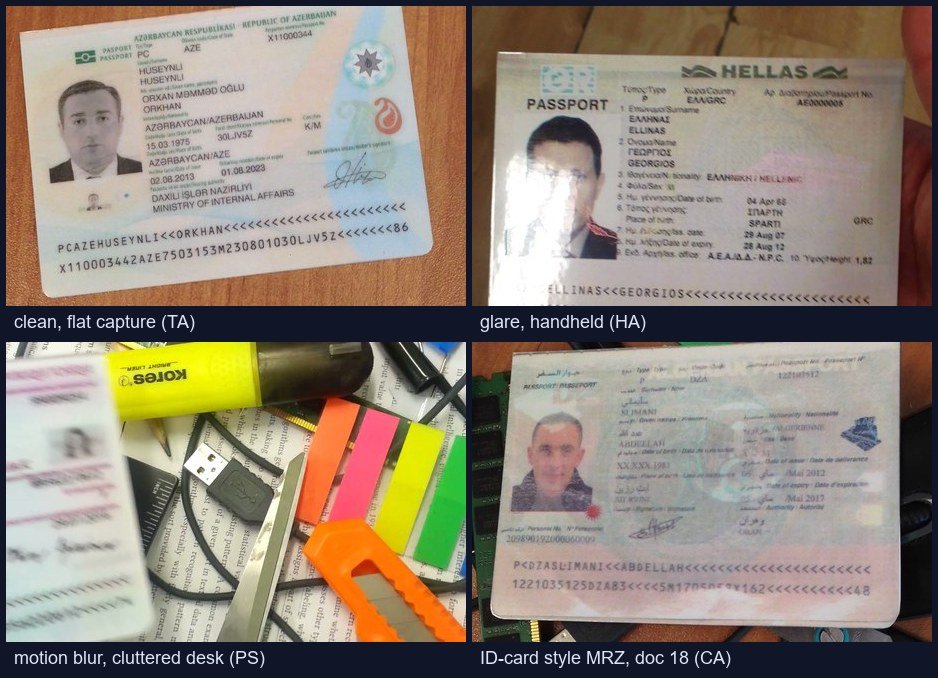
The curated benchmark subset covers 12 of the 50 document groups — 11 passport types plus the Algerian document (18) with an ID-card style MRZ — and keeps every frame in which a complete MRZ is visible, including the difficult ones. Keep this context in mind when reading the scores below: 52.76% exact accuracy on MIDV-500 is a strong result, not a weak one, as the open-source baseline comparison later in this article demonstrates.
Prerequisites
- Python 3.8 or later
dynamsoft-capture-vision-bundle3.6.5000 (pinned inrequirements.txt)Pillow, only needed when converting downloaded.tiffiles- A valid Dynamsoft license key. Get a 30-day free trial license.
- Optional, for the open-source baseline runs:
PassportEyeandfastmrz(seerequirements-compare.txtin the sample project), plus the Tesseract OCR engine on the system PATH and FastMRZ’s custommrz.traineddatalanguage file.
Install the Python dependencies:
pip install -r requirements.txt
Step 1: Initialize the Dynamsoft Capture Vision Router
The first step is to initialize the SDK license and create a CaptureVisionRouter instance. The router is the central object that handles image recognition tasks. The ReadPassportAndId template is a built-in preset for passport and ID MRZ recognition, including TD1, TD2, and TD3 document formats.
from dynamsoft_capture_vision_bundle import (
    CaptureVisionRouter,
    EnumErrorCode,
    LicenseManager,
)

DEFAULT_LICENSE = "LICENSE-KEY"
DEFAULT_TEMPLATE = "ReadPassportAndId"

def init_dynamsoft_router(license_key: str) -> CaptureVisionRouter:
    """Initialise the Dynamsoft license and create a CaptureVisionRouter."""
    code, message = LicenseManager.init_license(license_key)
    if code not in (EnumErrorCode.EC_OK, EnumErrorCode.EC_LICENSE_WARNING):
        raise RuntimeError(
            f"License initialization failed. code={code}, message={message}"
        )
    return CaptureVisionRouter()
Replace LICENSE-KEY with your own license before production use.
Step 2: Load Curated Ground-Truth MRZ Labels
The benchmark compares the SDK’s recognized MRZ text against ground-truth labels stored in a CSV file. The bundled labels.csv in this sample is curated: it contains 3,315 scoreable MRZ images and excludes 285 unscoreable frames.
By default, the script uses this bundled curated CSV:
BUNDLED_LABELS_CSV = Path(__file__).resolve().parent / "labels.csv"

if args.csv:
    csv_path = args.csv
elif BUNDLED_LABELS_CSV.exists():
    csv_path = BUNDLED_LABELS_CSV
else:
    csv_path = dataset_dir / "labels.csv"
The loader normalizes image paths by taking the last two path components, for example CA/CA05_01.jpg becomes ca/ca05_01.jpg. This keeps the CSV independent of the absolute dataset location.
def load_ground_truth(csv_path: Path) -> Dict[str, str]:
    """Load ground-truth MRZ labels from a CSV file."""
    mapping: Dict[str, str] = {}
    with csv_path.open("r", encoding="utf-8", newline="") as fp:
        reader = csv.reader(fp)
        for row in reader:
            if not row or len(row) < 2:
                continue
            image_path = row[0].strip()
            mrz_label = row[1].strip()
            if not image_path or not mrz_label:
                continue
            if image_path.lower().startswith("imagepath"):
                continue

            normalised = image_path.replace("\\", "/").strip("/").lower()
            parts = normalised.split("/")
            key = "/".join(parts[-2:]) if len(parts) >= 2 else normalised
            mapping[key] = mrz_label
    return mapping
Step 3: Decode a Single Image and Extract MRZ Text
The decode_once function calls router.capture_multi_pages() with an image file path and the ReadPassportAndId template name. The SDK returns one or more captured results. The benchmark extracts MRZ text from line1, line2, and line3 fields of the parsed result items.
def decode_once(
    router: CaptureVisionRouter,
    image_path: Path,
    template_name: str,
) -> Tuple[Optional[str], Optional[str], int, float]:
    """Decode a single image and return (mrz_text, error, page_number, elapsed_ms)."""
    start = time.perf_counter()
    result_array = router.capture_multi_pages(str(image_path), template_name)
    elapsed_ms = (time.perf_counter() - start) * 1000.0

    results = result_array.get_results() if result_array is not None else None
    if not results:
        return None, "No captured results.", 1, elapsed_ms

    for index, captured in enumerate(results, start=1):
        text = extract_mrz_from_captured_result(captured)
        if text:
            return text, None, _page_number(captured, index), elapsed_ms

    first = results[0]
    try:
        err_text = f"Capture error {first.get_error_code()}: {first.get_error_string()}"
    except Exception:
        err_text = "No parsable MRZ found in captured result."
    return None, err_text, _page_number(first, 1), elapsed_ms
The timing measurement uses time.perf_counter(), which provides high-resolution monotonic timestamps suitable for benchmarking. The elapsed time is calculated immediately after capture_multi_pages() returns, before any result extraction — this ensures the measurement reflects only the SDK’s recognition work, not the application’s result parsing overhead.
Step 4: Run the Benchmark Across All Images
The benchmark iterates over matched image records, decodes each image, computes a character-level match rate, and records whether the result is an exact match. When --runs is greater than 1, each image is decoded multiple times and the fastest successful timing is kept.
def benchmark(
    router: CaptureVisionRouter,
    records: Sequence[ImageRecord],
    runs: int,
    template_name: str,
    has_ground_truth: bool = True,
) -> List[ImageResult]:
    output: List[ImageResult] = []
    total = len(records)

    for idx, record in enumerate(records, start=1):
        best_text: Optional[str] = None
        best_err: Optional[str] = None
        best_page = 1
        best_ms: Optional[float] = None

        for _ in range(max(1, runs)):
            recognized, err, page_number, elapsed_ms = decode_once(
                router=router,
                image_path=record.path,
                template_name=template_name,
            )

            is_better = best_ms is None or elapsed_ms < best_ms
            prefer_success = recognized is not None and best_text is None
            if prefer_success or is_better:
                best_text = recognized
                best_err = err
                best_page = page_number
                best_ms = elapsed_ms

        score = match_rate(best_text, record.truth_mrz) if has_ground_truth else 0.0
        exact = score >= 0.99999 if has_ground_truth else False

        output.append(ImageResult(
            key=record.key,
            success=best_text is not None,
            error=best_err if best_text is None else None,
            recognized_mrz=best_text,
            truth_mrz=record.truth_mrz,
            match_rate=score,
            exact_match=exact,
            run_ms=best_ms,
            page_number=best_page,
        ))
Step 5: Generate JSON and HTML Reports
After all images are processed, the script computes aggregate metrics: exact accuracy, success rate, average match rate, and timing percentiles. It writes both a machine-readable JSON file and an HTML dashboard.
summary = build_summary(results, total_wall_ms)

report_obj = {
    "sdk": "Dynamsoft Capture Vision",
    "template": args.template,
    "dataset": str(dataset_dir.resolve()),
    "csv": str(csv_path.resolve()) if has_ground_truth else None,
    "image_count": summary.total_images,
    "summary": {
        "exact_accuracy": round(summary.exact_count / summary.total_images, 6),
        "success_rate": round(summary.success_count / summary.total_images, 6),
        "average_match_rate": round(summary.avg_match_rate, 6),
        "avg_ms": round(summary.avg_ms, 3),
        "p50_ms": round(summary.p50_ms, 3),
        "p95_ms": round(summary.p95_ms, 3),
        "p99_ms": round(summary.p99_ms, 3),
    },
    "results": [result_to_dict(r) for r in results],
}
Step 6: Run the Benchmark
Use a preprocessed MIDV-500 image folder with CA/, CS/, HA/, HS/, KA/, KS/, PA/, PS/, TA/, and TS/ subfolders:
python benchmark_dcv_mrz.py --dataset /path/to/midv-500-mrz --output benchmark_report_dcv_python_full
Run a quick smoke test:
python benchmark_dcv_mrz.py --dataset /path/to/midv-500-mrz --limit 5 --output benchmark_report_dcv_python
Use --csv only when you intentionally want to override the bundled curated labels:
python benchmark_dcv_mrz.py --dataset /path/to/midv-500-mrz --csv /path/to/labels.csv
Benchmark Results Analysis
Running the latest full benchmark on the curated 3,315-image MRZ subset with Dynamsoft Capture Vision Bundle 3.6.5000 produced the following results:
| Metric | Value |
|---|---|
| Total benchmark images | 3,315 |
| Exact MRZ matches | 1,749 (52.76%) |
| Wrong reads (text returned, not exact) | 408 (12.31%) |
| No read (no MRZ text returned) | 1,158 (34.93%) |
| Average decode time | 312.1 ms |
| P50 decode time | 228.8 ms |
| P95 decode time | 736.3 ms |
| P99 decode time | 1,011.8 ms |
| Fastest decode | 78.1 ms |
| Slowest decode | 1,548.1 ms |
The exact-match score is intentionally strict. A result that returns only the first MRZ line, omits one line, or returns a second line with a wrong checksum character counts as a miss even when most characters are correct. That is why 1,749 exact matches sit below the 2,157 images that returned any MRZ text: 408 reads were wrong and 1,158 produced nothing. The wrong reads are useful for debugging because the per-image report preserves the recognized MRZ, ground truth, match rate, and decode time.
The timing distribution shows that most successful and failed attempts still complete quickly. In this run, 1,370 images (41.3%) completed in under 200 ms, and another 1,419 images (42.8%) completed between 200 and 500 ms. That means 84.1% of the curated benchmark finished in under 500 ms. Only 37 images (1.1%) exceeded 1,000 ms, with the slowest image taking 1,548.1 ms.
Performance varies strongly by capture condition. TA was the best subset, returning MRZ text for 91.1% of its images and matching 84.2% exactly. TS followed with 86.7% returned and 75.3% exact. KA and CA also performed above the overall average. The hardest subsets were PA and PS, with 38.9% and 36.1% success rates, because they contain motion, angle, partial entry into frame, and blur. The audit removes frames where a complete MRZ is not visible, but it intentionally keeps difficult images when the MRZ is visible and scoreable.
The curated subset changes the benchmark denominator, not the benchmark rules. It excludes 285 frames where the label exists but the image does not contain a complete scoreable MRZ. It still keeps all normal visible MRZ images, including passport MRZ pages and the ID-card style MRZ in document type 18. On a small clean smoke test (ca/ca05_01.jpg through ca/ca05_05.jpg), the SDK produced 5 out of 5 exact matches at an average of 150.7 ms, which confirms that the lower full-dataset score is driven mainly by image quality and capture-condition difficulty rather than by the ground-truth format.
Open-Source Baseline: PassportEye and FastMRZ on the Same Benchmark
To put the numbers above in perspective, the sample project runs the identical benchmark against the two most widely used open-source Python MRZ libraries:
- PassportEye 2.2.2 (MIT license) — an MRZ region-detection and parsing pipeline built on Google Tesseract OCR.
- FastMRZ 2.1.2 (AGPL-3.0 license) — an ONNX segmentation model that localizes the MRZ region, followed by Tesseract OCR with a custom
mrzlanguage model.
The comparison scripts benchmark_passporteye_mrz.py and benchmark_fastmrz_mrz.py reuse the same curated labels.csv, the same image set, the same normalization and match-rate functions, and the same per-image wall-clock timing as the Dynamsoft run, on the same machine (Tesseract 5.5.0). Both libraries were measured through their raw MRZ text output (read_mrz(...).aux['raw_text'] for PassportEye, get_details(..., ignore_parse=True) for FastMRZ) so that their ICAO checksum validators could not reject MIDV-500’s synthetic specimen MRZ data — the most favorable configuration for the open-source tools.
| Metric | Dynamsoft Capture Vision | PassportEye | FastMRZ |
|---|---|---|---|
| Exact MRZ matches | 1,749 (52.76%) | 9 (0.27%) | 242 (7.30%) |
| Wrong reads | 408 (12.31%) | 2,679 (80.81%) | 763 (23.02%) |
| No read | 1,158 (34.93%) | 627 (18.91%) | 2,310 (69.68%) |
| Average decode time | 312.1 ms | 798.5 ms | 484.0 ms |
| P50 decode time | 228.8 ms | 748.3 ms | 479.6 ms |
| P95 decode time | 736.3 ms | 1,449.5 ms | 639.9 ms |
The table tells three distinct stories. PassportEye answers almost everything — 2,688 of 3,315 images — but its recognized text is riddled with OCR errors, so only 9 answers are right and 2,679 are wrong (80.81%). Tesseract systematically misreads the < filler as K and swaps look-alike characters on slanted OCR-B text. FastMRZ is the opposite: its output filter only accepts lines of 30/36/44 characters containing <, so it stays silent on 2,310 frames (69.68%), but when it does answer it is often right — 242 exact against 763 wrong, nearly all from the cleaner capture conditions. Dynamsoft Capture Vision leads on exact accuracy (52.76%, 7.2x the best open-source result) with the lowest wrong-read rate (12.31%), while also being the fastest on average (312.1 ms).
This gap is a dataset effect, not a verdict on the open-source tools in general. PassportEye’s documentation reports roughly 80% recognition on clearly visible, scanned MRZ, and FastMRZ works well on flat, high-resolution passport photos — both are reasonable choices for clean scans, prototypes, and zero-budget projects. MIDV-500’s mobile video frames are precisely the input that Tesseract-based pipelines handle worst, and that is exactly the input real-world capture produces. It is also worth noting the licensing trade-off: PassportEye is MIT-licensed, but FastMRZ is AGPL-3.0, which restricts use in closed-source commercial products.
Finally, a market observation that matters for Python developers evaluating these results: Dynamsoft Capture Vision is currently the only commercial MRZ SDK you can pip install and run entirely offline. Competing commercial MRZ products either have no Python SDK at all (Smart Engines ships C++/Java), require a self-hosted web service behind their Python client (Regula Document Reader), target mobile and cloud (Microblink), or require compiling Python bindings from source (Doubango ultimateMRZ). For a Python-based, offline, server-side MRZ workload — bank back-offices, border kiosks, air-gapped environments — that makes Dynamsoft Capture Vision effectively the only commercial option on PyPI today.
Common Issues & Edge Cases
- Motion blur and extreme angles: MIDV-500 intentionally includes challenging capture conditions. Images with significant blur, glare, or perspective distortion may return no MRZ or only a partial MRZ.
- Incomplete capture frames: Some
PAandPSframes contain a label but no complete MRZ in the image. These are excluded from the curated benchmark and listed inassets/midv500_mrz_exclusions.csv. - Passport and ID MRZ formats: Most document groups are passports, while document type
18contains a visible ID-card style MRZ. It remains in the benchmark because the goal is MRZ recognition, not passport-only recognition. - Downloaded data and labels.csv mismatch: Downloaded MIDV-500 archives use original folder names. The curated labels expect the preprocessed
CA/toTS/directory layout. Use--no-ground-truthfor speed-only runs unless your images match the curated label paths. - Exact match vs. success rate:
success_ratecounts any returned MRZ text.exact_accuracyrequires the normalized MRZ to match ground truth exactly. - Tesseract
<-vs-Kconfusion: When benchmarking PassportEye or FastMRZ yourself, expect Tesseract to misread runs of the<filler character asK(and to swapU/V,0/O) on slanted OCR-B text. This is the single largest contributor to their low exact-match scores on video frames. - Checksum validators vs. MIDV-500 specimen data: MIDV-500 MRZ lines contain synthetic content whose check digits do not always follow ICAO rules. FastMRZ’s parsed output and PassportEye’s
valid_scorewill flag these as invalid; benchmark against their raw MRZ text output instead, as the comparison scripts do. - FastMRZ setup: FastMRZ needs the custom
mrz.traineddatafile from its repository copied into Tesseract’stessdatafolder (or passed viatessdata_path), in addition to the Tesseract engine itself.
Conclusion
This benchmark demonstrates how to evaluate MRZ recognition with a reproducible Python workflow, audited ground truth, and per-image result records. The curated MIDV-500 MRZ subset keeps all visible, scoreable MRZ images — mobile-phone video frames with glare, motion blur, steep angles, and cluttered backgrounds — while excluding incomplete or cropped frames. On the latest 3,315-image run, Dynamsoft Capture Vision achieved 52.76% exact accuracy, only 12.31% wrong reads, and 312.1 ms average decode time. Measured against the same images, labels, and metrics, the open-source PassportEye and FastMRZ libraries reached 0.27% and 7.30% exact accuracy respectively, which shows both how unforgiving the MIDV-500 dataset is and how large the gap between a purpose-built commercial MRZ engine and Tesseract-based pipelines becomes on real-world video frames. For Python teams that also need offline deployment, Dynamsoft Capture Vision is currently the only pip-installable commercial MRZ SDK that runs entirely on-premises.