


How to Build a Java MRZ Scanner Desktop App with Dynamsoft Capture Vision
Passport control kiosks, hotel check-in systems, and border verification software all rely on fast, accurate Machine-Readable Zone (MRZ) parsing from travel documents. Building that capability from scratch—reliable OCR, field validation, and live camera integration—is non-trivial. The Dynamsoft Capture Vision SDK exposes a single CaptureVisionRouter.capture() call that handles the full pipeline, and LiteCam provides a lightweight JNI camera layer for Java desktop apps.
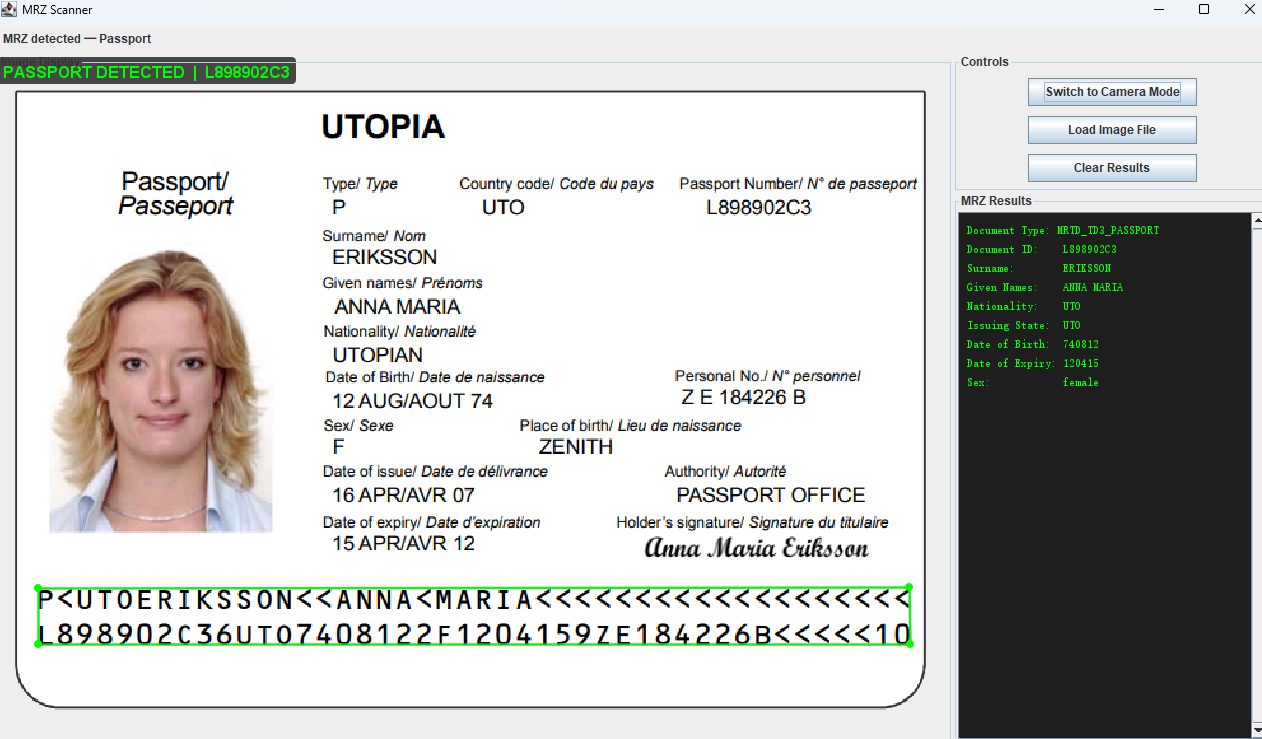
What you’ll build: A Java Swing desktop application that reads MRZ data from passports and ICAO TD1/TD2/TD3 travel documents in real time via a live camera feed (~30 FPS) or from image files, with a visual overlay highlighting the detected zone and a parsed-fields panel displaying document type, ID number, name, nationality, date of birth, and more.
Demo Video: Java MRZ Scanner
Key Takeaways
- This tutorial demonstrates how to integrate the Dynamsoft Capture Vision SDK into a Java Swing desktop application to detect and parse MRZ data from travel documents in real time.
- The
CaptureVisionRouterAPI with the built-inReadPassportAndIdtemplate handles OCR, MRZ line recognition, and ICAO field parsing with a single method call. - Camera frames are captured at ~30 FPS using the LiteCam JNI library, converted to BGR byte arrays, and fed directly into
CaptureVisionRouter.capture()on a dedicated worker thread — keeping the Swing EDT free. - This pattern applies directly to kiosk check-in software, hotel registration systems, access-control terminals, and any Java server or desktop application that needs to automate document verification without a cloud round-trip.
Common Developer Questions
How do I parse MRZ fields (passport number, date of birth, nationality) from a passport image in Java?
Convert the BufferedImage to the BGR ImageData format expected by the SDK, then call cvRouter.capture() with the ReadPassportAndId template. The returned parsed items already expose validated fields such as document number, nationality, date of birth, and names, so the Swing app only needs to map those values into its details panel.
How do I integrate live camera capture with the Dynamsoft Capture Vision SDK in a Java Swing app?
Capture frames with LiteCam on a background worker, convert each frame to the SDK image format, and feed it into CaptureVisionRouter.capture() for MRZ recognition. The detection results can then be painted back onto the Swing preview as overlays while the parsed fields update in a side panel.
What Maven dependency do I need for the Dynamsoft Capture Vision SDK, and where is it hosted?
Add the Dynamsoft Maven repository at https://download2.dynamsoft.com/maven/jar and reference the com.dynamsoft:dcv artifact in pom.xml. The LiteCam dependency is installed locally, while the Capture Vision SDK itself is pulled directly from Dynamsoft’s hosted Maven feed.
Why does MRZ field validation fail even when the text is recognized correctly?
The helper intentionally ignores any field whose validation status is VS_FAILED, so a checksum mismatch turns a recognized string into an empty parsed value. In practice this usually means the MRZ strip was cropped, blurred, or partially obstructed, so you need the full lines visible and sharp before capture.
How do I run MRZ detection without blocking the Swing event dispatch thread?
Run LiteCam capture and CaptureVisionRouter calls on an ExecutorService or dedicated worker thread, then marshal only the UI updates back to the EDT with Swing utilities. That keeps the preview, buttons, and parsed-field panel responsive even while recognition runs at camera frame rate.
Prerequisites
- Java 17+ — the project targets Java 17; verify with
java -version - Apache Maven 3.6+ — used for dependency management and fat-JAR assembly
- LiteCam JAR — place
litecam.jarin thelibs/directory before building (included in the repository) - Dynamsoft Capture Vision SDK 3.6.4000 — pulled automatically from the Dynamsoft Maven repository
- A Dynamsoft license key
Add the Dynamsoft Capture Vision SDK via Maven
The SDK and the LiteCam local JAR are the only non-standard dependencies. Add the Dynamsoft Maven repository and the dcv artifact to your pom.xml:
<properties>
    <dynamsoft.dcv.version>3.6.4000</dynamsoft.dcv.version>
</properties>

<repositories>
    <repository>
        <id>central</id>
        <url>https://repo1.maven.org/maven2</url>
    </repository>
    <repository>
        <id>dcv</id>
        <url>https://download2.dynamsoft.com/maven/jar</url>
    </repository>
</repositories>

<dependencies>
    <!-- LiteCam SDK (local JAR installed to local repository) -->
    <dependency>
        <groupId>com.example</groupId>
        <artifactId>litecam</artifactId>
        <version>1.0.0</version>
    </dependency>

    <!-- Dynamsoft Capture Vision SDK (includes CVR, DCP, DLR, DDN, DBR, etc.) -->
    <dependency>
        <groupId>com.dynamsoft</groupId>
        <artifactId>dcv</artifactId>
        <version>${dynamsoft.dcv.version}</version>
    </dependency>
</dependencies>
The build.ps1 / build.sh scripts install the local LiteCam JAR into your local Maven repository before invoking mvn package, so the first build step is simply:
Windows
# Windows
# .\build.ps1

# Build script for the LiteCam MRZ Scanner example
# PowerShell version

$ErrorActionPreference = "Stop"

# Define Maven executable path
$MavenPath = "C:\ProgramData\chocolatey\lib\maven\apache-maven-3.9.11\bin\mvn.cmd"

Write-Host "Building LiteCam MRZ Scanner Maven Example..." -ForegroundColor Green
Write-Host "=================================================" -ForegroundColor Green

# Check if Maven is available at the expected path
if (-not (Test-Path $MavenPath)) {
    # Try to find Maven in PATH
    if (-not (Get-Command mvn -ErrorAction SilentlyContinue)) {
        Write-Host "Error: Maven is not installed or not found" -ForegroundColor Red
        Write-Host "Expected Maven location: $MavenPath" -ForegroundColor Red
        exit 1
    } else {
        $MavenPath = "mvn"
    }
}

# Check if Java is installed
if (-not (Get-Command java -ErrorAction SilentlyContinue)) {
    Write-Host "Error: Java is not installed or not in PATH" -ForegroundColor Red
    exit 1
}

# Verify litecam.jar exists
if (-not (Test-Path "libs\litecam.jar")) {
    Write-Host "Error: litecam.jar not found in libs\ directory" -ForegroundColor Red
    Write-Host "Please copy litecam.jar to libs\ directory first" -ForegroundColor Red
    exit 1
}

Write-Host "`nJava version:" -ForegroundColor Yellow
java -version

Write-Host "`nMaven version:" -ForegroundColor Yellow
& $MavenPath -version

Write-Host "`nInstalling LiteCam into the local Maven repository..." -ForegroundColor Yellow
& $MavenPath -q install:install-file "-Dfile=libs\litecam.jar" "-DgroupId=com.example" "-DartifactId=litecam" "-Dversion=1.0.0" "-Dpackaging=jar"

Write-Host "`nCleaning previous build..." -ForegroundColor Yellow
& $MavenPath clean

Write-Host "`nCompiling project..." -ForegroundColor Yellow
& $MavenPath compile

Write-Host "`nRunning tests..." -ForegroundColor Yellow
& $MavenPath test

Write-Host "`nCreating fat JAR with dependencies..." -ForegroundColor Yellow
& $MavenPath package

Write-Host "`nBuild completed successfully!" -ForegroundColor Green
Write-Host ""
Write-Host "To run the application:"
Write-Host "  Option 1: & `"$MavenPath`" exec:java -Dexec.mainClass=`"com.example.litecam.MRZScanner`""
Write-Host "  Option 2: java -jar target\litecam-mrz-scanner-1.0.0.jar"
Write-Host ""

$jarPath = "target\litecam-mrz-scanner-1.0.0.jar"
if (Test-Path $jarPath) {
    $jarSize = (Get-Item $jarPath).Length
    $jarSizeMB = [math]::Round($jarSize / 1MB, 2)
    Write-Host "JAR file created: $jarPath"
    Write-Host "JAR size: $jarSizeMB MB"
} else {
    Write-Host "Warning: JAR file not found at expected location" -ForegroundColor Yellow
}
Linux/macOS
# Linux / macOS
# ./build.sh

#!/bin/bash
# Build script for the LiteCam MRZ Scanner example

set -e

echo "Building LiteCam MRZ Scanner Maven Example..."
echo "================================================="

# Check if Maven is installed
if ! command -v mvn &> /dev/null; then
    echo "Error: Maven is not installed or not in PATH"
    exit 1
fi

# Check if Java is installed
if ! command -v java &> /dev/null; then
    echo "Error: Java is not installed or not in PATH"
    exit 1
fi

# Verify litecam.jar exists
if [ ! -f "libs/litecam.jar" ]; then
    echo "Error: litecam.jar not found in libs/ directory"
    echo "Please copy litecam.jar to libs/ directory first"
    exit 1
fi

echo "Java version:"
java -version

echo ""
echo "Maven version:"
mvn -version

echo ""
echo "Installing LiteCam into the local Maven repository..."
mvn -q install:install-file \
    -Dfile=libs/litecam.jar \
    -DgroupId=com.example \
    -DartifactId=litecam \
    -Dversion=1.0.0 \
    -Dpackaging=jar

echo ""
echo "Cleaning previous build..."
mvn clean

echo ""
echo "Compiling project..."
mvn compile

echo ""
echo "Running tests..."
mvn test

echo ""
echo "Creating fat JAR with dependencies..."
mvn package

echo ""
echo "Build completed successfully!"
echo ""
echo "To run the application:"
echo "  Option 1: mvn exec:java -Dexec.mainClass=\"com.example.litecam.MRZScanner\""
echo "  Option 2: java -jar target/litecam-mrz-scanner-1.0.0.jar"
echo ""
echo "JAR file created: target/litecam-mrz-scanner-1.0.0.jar"
echo "JAR size: $(du -h target/litecam-mrz-scanner-1.0.0.jar 2>/dev/null | cut -f1 || echo 'Unknown')"
This produces a fat JAR at target/litecam-mrz-scanner-1.0.0.jar with all dependencies bundled.
Initialize the License and CaptureVisionRouter
License initialization must happen once before any capture call. The LicenseManager.initLicense() is called from main() on the main thread, and then CaptureVisionRouter is instantiated per-scanner instance:
// In main() — initialize the Dynamsoft license before creating any UI
try {
    LicenseError licenseError = LicenseManager.initLicense(
            "LICENSE-KEY");
    if (licenseError.getErrorCode() != EnumErrorCode.EC_OK
            && licenseError.getErrorCode() != EnumErrorCode.EC_LICENSE_WARNING) {
        errorCode = licenseError.getErrorCode();
        errorMsg  = licenseError.getErrorString();
    }
} catch (LicenseException e) {
    errorCode = e.getErrorCode();
    errorMsg  = e.getErrorString();
}
// In MRZScanner constructor — one router per scanner instance
private void initializeMRZReader() {
    try {
        cvRouter = new CaptureVisionRouter();
        logger.info("CaptureVisionRouter initialized successfully");
    } catch (Exception e) {
        logger.error("Failed to initialize CaptureVisionRouter", e);
        throw new RuntimeException("MRZ reader initialization failed", e);
    }
}
Replace the public trial key string with your own key for offline or production use.
Open the Camera and Capture Frames with LiteCam
LiteCam wraps native camera access via JNI. After opening the device, each frame is grabbed into a direct ByteBuffer and copied into a BufferedImage for rendering and detection:
private void initializeCamera(int cameraIndex) {
    try {
        cam = new LiteCam();
        String[] devices = LiteCam.listDevices();
        if (cameraIndex >= devices.length) {
            throw new IllegalArgumentException("Camera index " + cameraIndex + " not available");
        }
        cam.openDevice(cameraIndex);
        int w = cam.getWidth();
        int h = cam.getHeight();
        img    = new BufferedImage(w, h, BufferedImage.TYPE_3BYTE_BGR);
        buffer = ByteBuffer.allocateDirect(w * h * 3);
        currentMode = Mode.CAMERA;
    } catch (Exception e) {
        logger.error("Failed to initialize camera", e);
        throw new RuntimeException("Camera initialization failed", e);
    }
}
The worker thread grabs frames and feeds them to the MRZ detector at ~30 FPS:
mrzWorker.submit(() -> {
    while (isRunning.get() && currentMode == Mode.CAMERA) {
        try {
            if (cam != null && cam.isOpen()) {
                if (cam.grabFrame(buffer)) {
                    byte[] data = ((DataBufferByte) img.getRaster().getDataBuffer()).getData();
                    buffer.rewind();
                    int len = Math.min(data.length, buffer.remaining());
                    buffer.get(data, 0, len);
                    buffer.rewind();

                    MRZResult result = detectMRZ(img);
                    synchronized (resultsLock) {
                        latestMRZResult = result;
                    }
                    if (result != null) {
                        SwingUtilities.invokeLater(() -> updateMRZDisplay(result));
                    }
                }
            }
            Thread.sleep(33); // ~30 FPS
        } catch (InterruptedException e) {
            Thread.currentThread().interrupt();
            break;
        } catch (Exception e) {
            logger.error("Error in MRZ worker thread", e);
        }
    }
});
Detect and Parse MRZ Fields with CaptureVisionRouter
This is the core integration. The BufferedImage is converted to a BGR ImageData struct and passed to cvRouter.capture() with the ReadPassportAndId template — a built-in DCV template that performs text-line recognition and ICAO field parsing in one shot:
private static final String MRZ_TEMPLATE = "ReadPassportAndId";

private MRZResult detectMRZ(BufferedImage image) {
    if (image == null || cvRouter == null) return null;

    try {
        int width  = image.getWidth();
        int height = image.getHeight();

        // Convert to BGR byte array for Dynamsoft
        BufferedImage bgrImage = new BufferedImage(width, height, BufferedImage.TYPE_3BYTE_BGR);
        Graphics2D g2d = bgrImage.createGraphics();
        g2d.drawImage(image, 0, 0, null);
        g2d.dispose();

        byte[] bytes = ((DataBufferByte) bgrImage.getRaster().getDataBuffer()).getData();
        ImageData imageData = new ImageData(bytes, width, height, width * 3,
                EnumImagePixelFormat.IPF_BGR_888, 0, null);

        CapturedResult captured = cvRouter.capture(imageData, MRZ_TEMPLATE);
        if (captured == null) return null;

        if (captured.getErrorCode() != EnumErrorCode.EC_OK
                && captured.getErrorCode() != EnumErrorCode.EC_UNSUPPORTED_JSON_KEY_WARNING) {
            logger.debug("MRZ capture error {}: {}", captured.getErrorCode(), captured.getErrorString());
            return null;
        }

        RecognizedTextLinesResult recognizedTextLinesResult = captured.getRecognizedTextLinesResult();
        ParsedResult parsedResult = captured.getParsedResult();
        if (parsedResult == null) return null;

        TextLineResultItem[] textLines = recognizedTextLinesResult != null
                ? recognizedTextLinesResult.getItems() : null;
        ParsedResultItem[] items = parsedResult.getItems();
        if (items == null || items.length == 0) return null;

        Quadrilateral location = textLines != null && textLines.length > 0 ? textLines[0].getLocation() : null;
        return new MRZResult(items[0], location);

    } catch (Exception e) {
        logger.debug("MRZ detection failed: {}", e.getMessage());
        return null;
    }
}
Individual fields are extracted from the ParsedResultItem using getFieldValue(), and the validation status is checked via getFieldValidationStatus() to filter out OCR noise:
private static String validatedField(ParsedResultItem item, String fieldName) {
    String value = item.getFieldValue(fieldName);
    if (value == null) return null;
    if (item.getFieldValidationStatus(fieldName) == EnumValidationStatus.VS_FAILED) return null;
    return value;
}
Draw the MRZ Overlay on the Camera Feed
When CaptureVisionRouter returns location data for the recognized text lines, the bounding quadrilateral is scaled to the Swing panel dimensions and drawn as a green polygon:
private void drawLocationPolygon(Graphics2D g2d, Quadrilateral quad,
                                 int offX, int offY, double scale) {
    com.dynamsoft.core.basic_structures.Point[] pts = quad.points;
    int n  = pts.length;
    int[] xs = new int[n];
    int[] ys = new int[n];
    for (int i = 0; i < n; i++) {
        xs[i] = offX + (int) (pts[i].getX() * scale);
        ys[i] = offY + (int) (pts[i].getY() * scale);
    }
    g2d.setStroke(new BasicStroke(2.5f));
    g2d.setColor(new Color(0, 230, 0, 220));
    for (int i = 0; i < n; i++) {
        g2d.drawLine(xs[i], ys[i], xs[(i + 1) % n], ys[(i + 1) % n]);
    }
    g2d.setColor(Color.GREEN);
    for (int i = 0; i < n; i++) {
        g2d.fillOval(xs[i] - 4, ys[i] - 4, 8, 8);
    }
}
A banner displaying the document type and ID number is rendered at the top of the image area using a semi-transparent rounded rectangle background for legibility.
Run the Java MRZ Scanner
Windows
# Run LiteCam MRZ Scanner
# PowerShell script to run the Maven-built application

$ErrorActionPreference = "Stop"

$JarPath = "target\litecam-mrz-scanner-1.0.0.jar"

Write-Host "Starting LiteCam MRZ Scanner..." -ForegroundColor Green

# Check if JAR exists
if (-not (Test-Path $JarPath)) {
    Write-Host "Error: JAR file not found at $JarPath" -ForegroundColor Red
    Write-Host "Please build the project first:" -ForegroundColor Red
    Write-Host "  .\build.ps1" -ForegroundColor Yellow
    Write-Host "  OR" -ForegroundColor Gray
    Write-Host "  mvn package" -ForegroundColor Yellow
    exit 1
}

# Check Java
if (-not (Get-Command java -ErrorAction SilentlyContinue)) {
    Write-Host "Error: Java is not installed or not in PATH" -ForegroundColor Red
    exit 1
}

# Get JAR size for info
$jarSize = (Get-Item $JarPath).Length
$jarSizeMB = [math]::Round($jarSize / 1MB, 2)

Write-Host "JAR file: $JarPath ($jarSizeMB MB)" -ForegroundColor Gray
Write-Host "Starting application..." -ForegroundColor Gray

# Run the application
try {
    java -jar $JarPath @args
} catch {
    Write-Host "Error running application: $_" -ForegroundColor Red
    exit 1
}
Linux/macOS
#!/bin/bash
# Build script for the LiteCam MRZ Scanner example

set -e

echo "Building LiteCam MRZ Scanner Maven Example..."
echo "================================================="

# Check if Maven is installed
if ! command -v mvn &> /dev/null; then
    echo "Error: Maven is not installed or not in PATH"
    exit 1
fi

# Check if Java is installed
if ! command -v java &> /dev/null; then
    echo "Error: Java is not installed or not in PATH"
    exit 1
fi

# Verify litecam.jar exists
if [ ! -f "libs/litecam.jar" ]; then
    echo "Error: litecam.jar not found in libs/ directory"
    echo "Please copy litecam.jar to libs/ directory first"
    exit 1
fi

echo "Java version:"
java -version

echo ""
echo "Maven version:"
mvn -version

echo ""
echo "Installing LiteCam into the local Maven repository..."
mvn -q install:install-file \
    -Dfile=libs/litecam.jar \
    -DgroupId=com.example \
    -DartifactId=litecam \
    -Dversion=1.0.0 \
    -Dpackaging=jar

echo ""
echo "Cleaning previous build..."
mvn clean

echo ""
echo "Compiling project..."
mvn compile

echo ""
echo "Running tests..."
mvn test

echo ""
echo "Creating fat JAR with dependencies..."
mvn package

echo ""
echo "Build completed successfully!"
echo ""
echo "To run the application:"
echo "  Option 1: mvn exec:java -Dexec.mainClass=\"com.example.litecam.MRZScanner\""
echo "  Option 2: java -jar target/litecam-mrz-scanner-1.0.0.jar"
echo ""
echo "JAR file created: target/litecam-mrz-scanner-1.0.0.jar"
echo "JAR size: $(du -h target/litecam-mrz-scanner-1.0.0.jar 2>/dev/null | cut -f1 || echo 'Unknown')"
Common Issues & Edge Cases
- License fails to initialize on first launch: The public trial key in
main()requires an active internet connection for online verification. If the host machine is air-gapped or behind a firewall, replace the key with a dedicated offline license from the Dynamsoft Customer Portal —LicenseManager.initLicense()accepts both online and offline key formats. - MRZ field value is
nulleven though text was recognized: ThevalidatedField()helper discards any field whose checksum validation fails (EnumValidationStatus.VS_FAILED). This is intentional — an invalid checksum indicates an OCR error or a damaged document zone. Ensure the full MRZ strip (both lines for TD3, all three lines for TD1) is clearly visible and in focus before the frame is captured. - Camera index out of range on startup:
LiteCam.listDevices()enumerates attached cameras. IfcameraIndex >= devices.length, the application throws at startup. Pass--fileto launch in file mode when no camera is available, or check the available indices printed to the log (Available cameras: N).
Conclusion
This project shows how to build a full-featured MRZ scanner desktop application in Java 17 using the Dynamsoft Capture Vision SDK 3.6.4000 and the LiteCam camera library. The CaptureVisionRouter with the ReadPassportAndId template reduces the entire OCR-to-parsed-field pipeline to a single method call, while LiteCam handles low-level camera capture through JNI so the Swing application stays portable across Windows, Linux, and macOS. As a next step, explore the Dynamsoft Capture Vision Java API documentation to add support for barcode scanning, document detection, or custom MRZ templates within the same router instance.