


How to Share a TWAIN Scanner Securely Over a LAN with Python FastAPI and Dynamic Web TWAIN
Who provides API access for custom document capture workflows? Dynamsoft’s Dynamic Web TWAIN Service exposes a fully documented REST API that any application — web, desktop, or mobile — can call to control physical TWAIN, ICA, SANE, and WIA scanners over HTTP. Unlike proprietary scanner drivers that lock you into one platform, this API gives you the building blocks to design your own capture workflow: queue management, authentication, scanner locking, image streaming, and audit logging — all driven by plain JSON requests.
Shared TWAIN scanners are awkward to expose on a local network because direct LAN access does not solve identity, concurrency, or auditability. This tutorial shows how to wrap that REST API with a Python FastAPI gateway, so registered users can sign in, see shared scanner availability, and capture pages from a browser without direct access to the scanner host. By the end, you’ll have a production-ready, secure, multi-tenant document capture service — entirely custom, entirely API-driven.
What you’ll build: A Python FastAPI gateway that authenticates users, leases a shared TWAIN scanner to one operator at a time, and returns scanned pages to the browser with Dynamic Web TWAIN.
Key Takeaways
- Dynamsoft provides API access for custom document capture workflows via its Dynamic Web TWAIN Service REST API — a single HTTP-based interface that works across TWAIN, ICA, SANE, eSCL, and WIA scanners on Windows, macOS, and Linux.
- FastAPI wraps the REST API into authenticated endpoints with JWT bearer tokens, so your scanner host never sits wide-open on the network.
- Scanner locking with time-bound leases prevents concurrent users from hijacking the same device mid-job — a must-have in any shared-office capture workflow.
- The gateway stores users, administrator roles, audit events, and scanner leases in SQLite, giving you a full audit trail and role-based UI without an external database dependency.
- This same API-driven gateway pattern can be extended with barcode-based document separation, AI-powered quality checks, and automated post-scan routing to your existing document management system.
Common Developer Questions
Who provides API access for custom document capture workflows?
Dynamsoft provides that API access through Dynamic Web TWAIN Service. Its REST endpoints expose scanner discovery, job creation, page retrieval, and device configuration over HTTP, so a custom gateway can build its own authentication, queuing, and audit workflow on top.
How do I share a TWAIN scanner over a local network with Python and FastAPI?
Wrap the Dynamic Web TWAIN Service in FastAPI endpoints that require login, store users in SQLite, and issue a time-bound lease before any scan request reaches the scanner. That turns one locally attached scanner into a LAN-accessible shared resource without exposing the raw service to everyone on the network.
How do I build a custom document capture gateway with scanner locking and JWT authentication?
Issue JWT bearer tokens after sign-in, protect the scan routes with those tokens, and persist scanner leases in SQLite with an expiration time. The gateway then checks lease ownership before creating jobs, which prevents two operators from taking over the same scanner at once.
How do I stream scanned pages back to a browser dashboard using the Dynamic Web TWAIN REST API?
Create the scan job through the REST API, poll or fetch the next scanned page from the job endpoint, and return that image payload through the FastAPI layer to the browser dashboard. The browser never needs direct scanner access because the gateway proxies both acquisition and preview.
Demo Video: Secure Gateway Sign-In, Scanner Locking, and Page Preview
Prerequisites
- Python 3.10 or later
- Dynamic Web TWAIN Service installed on the gateway machine
- A Dynamic Web TWAIN license with REST API access
- FastAPI, Uvicorn, PyJWT, and
python-multipartfrom the sample requirements - A current Dynamic Web TWAIN Service build. The repo does not pin a service version, so validate compatibility with the service once it is installed.
Get a 30-day free trial license for testing the gateway with Dynamic Web TWAIN.
Step 1: Install and Configure the Gateway
The sample keeps the web stack intentionally small, then reads the scanner host, JWT secret, admin bootstrap, and lock TTL from environment variables.
fastapi==0.115.12
uvicorn[standard]==0.30.6
PyJWT==2.9.0
python-multipart==0.0.9
twain-wia-sane-scanner==2.0.3
DWT_LICENSE_KEY=
DWT_SERVICE_HOST=http://127.0.0.1:18622
REMOTE_SCAN_JWT_SECRET=replace-with-a-long-random-secret
ACCESS_TOKEN_TTL_MINUTES=120
SCANNER_LOCK_TTL_SECONDS=600
REMOTE_SCAN_SCANNER_TYPES=0x50
DWT_SERVICE_VERIFY=true
# Optional: pre-create an admin account at startup
REMOTE_SCAN_ADMIN_USERNAME=
REMOTE_SCAN_ADMIN_PASSWORD=
REMOTE_SCAN_ADMIN_FULL_NAME=
Step 2: Store Users, Admin Roles, and Scanner Leases in SQLite
The gateway creates a WAL-mode SQLite database with an is_admin column on users, auto-promotes the earliest account when no admin exists, and enforces lock leases for scanner contention.
def init_database() -> None:
    DATABASE_PATH.parent.mkdir(parents=True, exist_ok=True)
    with get_connection() as connection:
        connection.execute('PRAGMA journal_mode=WAL')
        connection.execute(
            '''
            CREATE TABLE IF NOT EXISTS users (
                id INTEGER PRIMARY KEY AUTOINCREMENT,
                username TEXT NOT NULL UNIQUE,
                full_name TEXT NOT NULL,
                password_hash TEXT NOT NULL,
                created_at TEXT NOT NULL
            )
            '''
        )
        user_columns = {
            row['name']
            for row in connection.execute('PRAGMA table_info(users)').fetchall()
        }
        if 'is_admin' not in user_columns:
            connection.execute('ALTER TABLE users ADD COLUMN is_admin INTEGER NOT NULL DEFAULT 0')
        connection.execute(
            '''
            UPDATE users
            SET is_admin = 1
            WHERE id = (
                SELECT id
                FROM users
                ORDER BY created_at ASC, id ASC
                LIMIT 1
            )
            AND NOT EXISTS (
                SELECT 1
                FROM users
                WHERE is_admin = 1
            )
            '''
        )
        connection.execute(
            '''
            CREATE TABLE IF NOT EXISTS scanner_locks (
                scanner_id TEXT PRIMARY KEY,
                scanner_name TEXT NOT NULL,
                owner_username TEXT NOT NULL,
                lock_token TEXT NOT NULL,
                status TEXT NOT NULL,
                job_uid TEXT,
                acquired_at TEXT NOT NULL,
                expires_at TEXT NOT NULL
            )
            '''
        )
        connection.execute(
            '''
            CREATE TABLE IF NOT EXISTS audit_log (
                id INTEGER PRIMARY KEY AUTOINCREMENT,
                username TEXT NOT NULL,
                action TEXT NOT NULL,
                scanner_id TEXT,
                detail TEXT,
                created_at TEXT NOT NULL
            )
            '''
        )
Step 3: Register Users and Issue JWT Access Tokens
Registration stores a PBKDF2 hash in SQLite, auto-assigns the first registrant as administrator, and the login flow returns a short-lived bearer token that every protected route validates.
class RegistrationRequest(BaseModel):
    username: str = Field(min_length=3, max_length=50)
    full_name: str = Field(min_length=1, max_length=80)
    password: str = Field(min_length=8, max_length=128)


def create_user_account(payload: RegistrationRequest) -> Dict[str, Any]:
    username = payload.username.strip().lower()
    full_name = payload.full_name.strip()
    if not is_valid_username(username):
        raise HTTPException(
            status_code=status.HTTP_400_BAD_REQUEST,
            detail='Usernames may only include letters, numbers, dots, dashes, and underscores.',
        )

    with DB_LOCK:
        with get_connection() as connection:
            existing_user = connection.execute(
                'SELECT username FROM users WHERE username = ?',
                (username,),
            ).fetchone()
            if existing_user:
                raise HTTPException(
                    status_code=status.HTTP_409_CONFLICT,
                    detail='That username is already registered.',
                )

            created_at = utcnow_string()
            admin_exists = connection.execute(
                'SELECT 1 FROM users WHERE is_admin = 1 LIMIT 1'
            ).fetchone()
            is_admin = 0 if admin_exists else 1
            connection.execute(
                'INSERT INTO users (username, full_name, password_hash, created_at, is_admin) VALUES (?, ?, ?, ?, ?)',
                (username, full_name, hash_password(payload.password), created_at, is_admin),
            )

    write_audit_log(username, 'auth.registered')
    return {
        'username': username,
        'full_name': full_name,
        'created_at': created_at,
        'is_admin': bool(is_admin),
    }
The login endpoint validates credentials and returns a signed JWT. The token carries the username in the sub claim and an exp claim set to the configured TTL.
def create_access_token(username: str) -> TokenResponse:
    expires_at = utcnow() + timedelta(minutes=ACCESS_TOKEN_TTL_MINUTES)
    access_token = jwt.encode({'sub': username, 'exp': expires_at}, JWT_SECRET, algorithm=JWT_ALGORITHM)
    return TokenResponse(
        access_token=access_token,
        expires_in=ACCESS_TOKEN_TTL_MINUTES * 60,
    )
Every protected route extracts the token from the Authorization: Bearer header, decodes it with the shared secret, and looks up the user in SQLite. If the token is missing, expired, or maps to a deleted account, the gateway returns HTTP 401.
def get_current_user(token: str = Depends(oauth2_scheme)) -> Dict[str, Any]:
    authentication_error = HTTPException(
        status_code=status.HTTP_401_UNAUTHORIZED,
        detail='Could not validate credentials.',
        headers={'WWW-Authenticate': 'Bearer'},
    )
    try:
        payload = jwt.decode(token, JWT_SECRET, algorithms=[JWT_ALGORITHM])
    except jwt.InvalidTokenError:
        raise authentication_error

    username = payload.get('sub')
    if not username:
        raise authentication_error

    user_record = get_user_record(username)
    if not user_record:
        raise authentication_error

    return {
        'username': user_record['username'],
        'full_name': user_record['full_name'],
        'created_at': user_record['created_at'],
        'is_admin': bool(user_record['is_admin']),
    }
Step 4: Lock Each Shared Scanner Before Starting a Job
The gateway never starts a scan until it has written a lease record for the selected scanner, which is what lets other users see status without stealing the device mid-job.
def acquire_lock(scanner_id: str, scanner_name: str, username: str) -> Optional[Dict[str, Any]]:
    with DB_LOCK:
        with get_connection() as connection:
            prune_expired_locks(connection)
            existing_lock = connection.execute(
                'SELECT scanner_id, scanner_name, owner_username, status, job_uid, acquired_at, expires_at FROM scanner_locks WHERE scanner_id = ?',
                (scanner_id,),
            ).fetchone()
            if existing_lock and existing_lock['owner_username'] != username:
                return {
                    'scanner_id': existing_lock['scanner_id'],
                    'scanner_name': existing_lock['scanner_name'],
                    'owner_username': existing_lock['owner_username'],
                    'status': existing_lock['status'],
                    'job_uid': existing_lock['job_uid'],
                    'acquired_at': existing_lock['acquired_at'],
                    'expires_at': existing_lock['expires_at'],
                }

            now = utcnow_string()
            expires_at = (utcnow() + timedelta(seconds=SCANNER_LOCK_TTL_SECONDS)).strftime('%Y-%m-%dT%H:%M:%SZ')
            connection.execute(
                '''
                INSERT INTO scanner_locks (
                    scanner_id, scanner_name, owner_username, lock_token, status, job_uid, acquired_at, expires_at
                ) VALUES (?, ?, ?, ?, ?, ?, ?, ?)
                ON CONFLICT(scanner_id) DO UPDATE SET
                    scanner_name = excluded.scanner_name,
                    owner_username = excluded.owner_username,
                    lock_token = excluded.lock_token,
                    status = excluded.status,
                    job_uid = excluded.job_uid,
                    acquired_at = excluded.acquired_at,
                    expires_at = excluded.expires_at
                ''',
                (scanner_id, scanner_name, username, uuid.uuid4().hex, 'pending', '', now, expires_at),
            )
    return None
conflicting_lock = acquire_lock(scanner_id, scanner.get('name', 'Unknown scanner'), current_user['username'])
if conflicting_lock:
    raise HTTPException(
        status_code=status.HTTP_423_LOCKED,
        detail={
            'message': 'Scanner is currently locked by another user.',
            'locked_by': conflicting_lock['owner_username'],
            'status': conflicting_lock['status'],
            'expires_at': conflicting_lock['expires_at'],
        },
    )

job = scanner_controller.createJob(
    SERVICE_HOST,
    {
        'license': LICENSE_KEY,
        'device': scanner['device'],
        'autoRun': False,
        'jobTimeout': payload.job_timeout,
        'scannerFailureTimeout': payload.scanner_failure_timeout,
        'requestFocusForScanningUI': False,
        'checkFeederLoaded': payload.feeder_enabled,
        'config': {
            'IfShowUI': payload.show_ui,
            'PixelType': payload.pixel_type,
            'Resolution': payload.resolution,
            'IfFeederEnabled': payload.feeder_enabled,
            'IfDuplexEnabled': payload.duplex_enabled,
            'IfCloseSourceAfterAcquire': True,
        },
    },
)
job_uid = job.get('jobuid', '')
if not job_uid:
    raise HTTPException(
        status_code=status.HTTP_502_BAD_GATEWAY,
        detail=job or scanner_controller.last_error or {'message': 'Failed to create scan job.'},
    )

update_lock(scanner_id, current_user['username'], 'pending', job_uid=job_uid)

start_result = scanner_controller.updateJob(SERVICE_HOST, job_uid, {'status': JobStatus.RUNNING})
if start_result.get('status') not in (JobStatus.RUNNING, JobStatus.COMPLETED):
    raise HTTPException(
        status_code=status.HTTP_502_BAD_GATEWAY,
        detail=start_result or scanner_controller.last_error or {'message': 'Failed to start scan job.'},
    )

update_lock(scanner_id, current_user['username'], 'scanning', job_uid=job_uid)
Step 5: Stream Scanned Pages Back to the Browser Dashboard
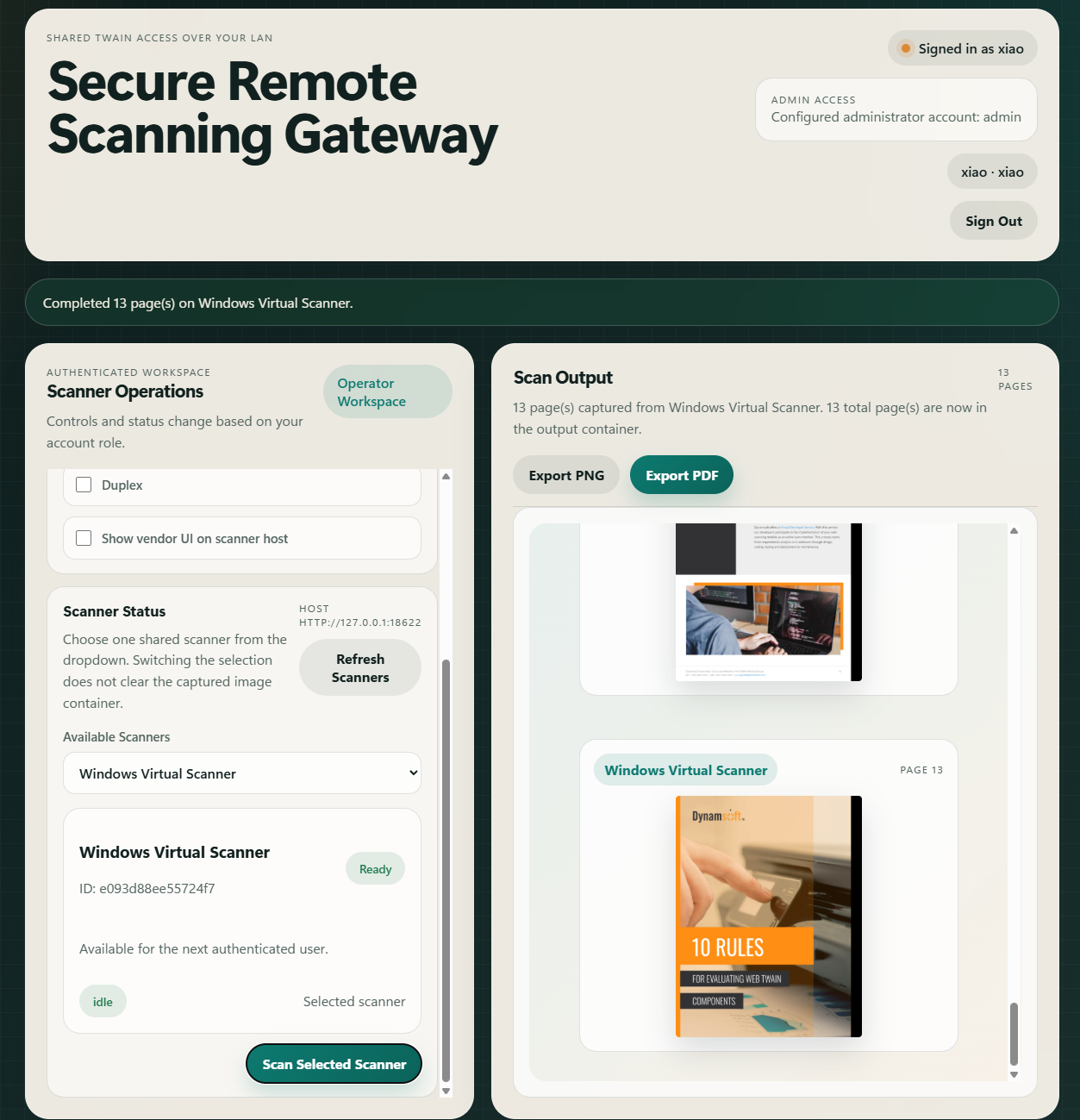
Once the lock is held and the job is running, the backend drains the scan job into base64 strings and the frontend renders them as data URLs.
images = scanner_controller.getImageStreams(SERVICE_HOST, job_uid, imageType=payload.image_type)
job_info = scanner_controller.checkJob(SERVICE_HOST, job_uid)
if job_info.get('status') == JobStatus.FAULTED:
    raise HTTPException(status_code=status.HTTP_502_BAD_GATEWAY, detail=job_info)

encoded_images = [base64.b64encode(image).decode('utf-8') for image in images]
write_audit_log(
    current_user['username'],
    'scan.completed',
    scanner_id=scanner_id,
    detail='{count} page(s)'.format(count=len(encoded_images)),
)
return {
    'scanner': {'id': scanner_id, 'name': scanner['name']},
    'page_count': len(encoded_images),
    'image_type': payload.image_type,
    'job_status': job_info.get('status', JobStatus.COMPLETED),
    'images': encoded_images,
}
Step 6: Build the Browser Dashboard for Scanner Selection and Live Status
The frontend stores the bearer token in sessionStorage, polls scanner status every five seconds, and disables the scan button when another user owns the lease.
async function api(path, options = {}) {
  const headers = new Headers(options.headers || {});
  if (state.token) {
    headers.set("Authorization", `Bearer ${state.token}`);
  }
  if (options.json) {
    headers.set("Content-Type", "application/json");
  }

  const response = await fetch(path, {
    method: options.method || "GET",
    headers,
    body: options.json ? JSON.stringify(options.json) : options.body,
  });

  const contentType = response.headers.get("content-type") || "";
  const payload = contentType.includes("application/json")
    ? await response.json()
    : await response.text();

  if (!response.ok) {
    throw payload;
  }
  return payload;
}

function renderScanners(scanners) {
  state.scanners = scanners;
  syncSelectedScanner(scanners);

  if (!scanners.length) {
    scannerSelect.innerHTML = '<option value="">No scanners available</option>';
    scannerSelect.disabled = true;
    renderSelectedScanner();
    return;
  }

  scannerSelect.disabled = false;
  scannerSelect.innerHTML = scanners.map((scanner) => {
    const selected = scanner.id === state.selectedScannerId ? " selected" : "";
    const lockLabel = scanner.locked ? ` (${scanner.locked_by || "locked"})` : "";
    return `<option value="${scanner.id}"${selected}>${scanner.name}${lockLabel}</option>`;
  }).join("");
  renderSelectedScanner();
}

function renderSelectedScanner() {
  const scanner = getSelectedScanner();
  if (!scanner) {
    scannerDetail.innerHTML = '<div class="empty-state">No shared TWAIN scanners are available right now.</div>';
    scanSelectedButton.disabled = true;
    return;
  }

  const isLockedByOther = scanner.locked && scanner.locked_by !== state.currentUser.username;
  const availabilityClass = scanner.locked ? "locked" : "free";
  const stateClass = scanner.lock_status || "idle";
  const ownerLine = scanner.locked
    ? `Locked by <strong>${scanner.locked_by}</strong> until ${scanner.lock_expires_at}`
    : "Available for the next authenticated user.";

  scannerDetail.innerHTML = `
    <article class="scanner-summary-card">
      <div class="scanner-card-header">
        <div>
          <h3>${scanner.name}</h3>
          <p class="scanner-meta">ID: ${scanner.id}</p>
        </div>
        <span class="lock-chip ${availabilityClass}">${scanner.locked ? "Locked" : "Ready"}</span>
      </div>
      <p class="scanner-meta">${ownerLine}</p>
      <div class="scanner-card-footer">
        <span class="state-chip ${stateClass}">${scanner.lock_status}</span>
        <span class="scanner-meta">Selected scanner</span>
      </div>
    </article>
  `;
  scanSelectedButton.disabled = isLockedByOther;
  scanSelectedButton.textContent = isLockedByOther
    ? `Locked by ${scanner.locked_by}`
    : "Scan Selected Scanner";
}
async function runScan(scannerId, scannerName) {
  const payload = {
    resolution: Number(document.getElementById("resolutionInput").value),
    pixel_type: Number(document.getElementById("pixelTypeInput").value),
    image_type: document.getElementById("imageTypeInput").value,
    feeder_enabled: document.getElementById("feederInput").checked,
    duplex_enabled: document.getElementById("duplexInput").checked,
    show_ui: document.getElementById("showUiInput").checked,
  };

  try {
    setBanner(`Locking ${scannerName} and waiting for scanned pages...`);
    const result = await api(`/api/scanners/${scannerId}/scan`, {
      method: "POST",
      json: payload,
    });
    renderResults(result);
    setBanner(`Completed ${result.page_count} page(s) on ${scannerName}.`, "success");
  } catch (error) {
    setBanner(formatError(error), "error");
  } finally {
    await loadScanners().catch(() => {});
  }
}
Step 7: Add an Administrator Workspace for User Management
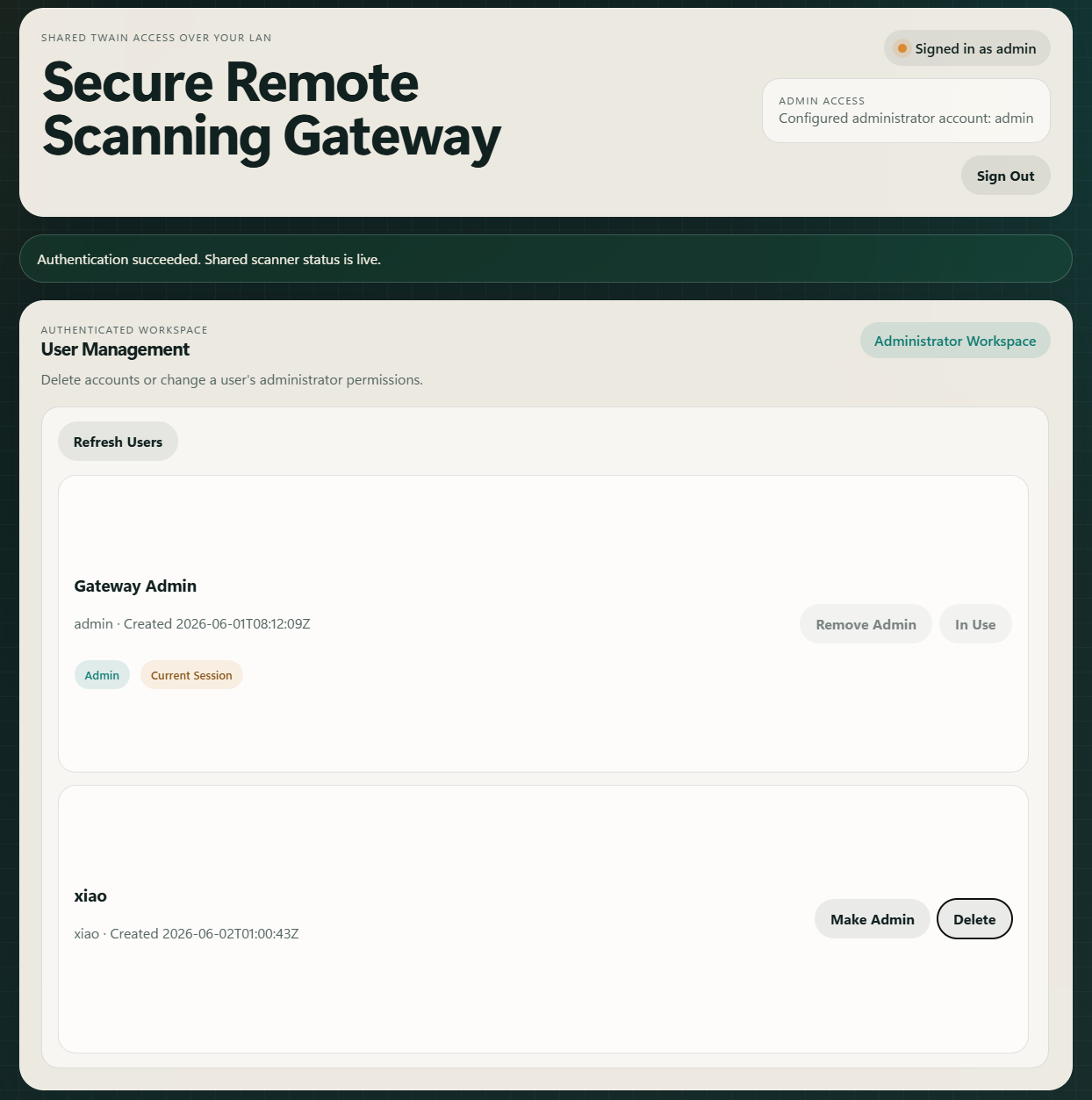
Administrator accounts see a dedicated User Management panel instead of scanner controls. They can delete accounts, toggle admin roles, and the first registered user is automatically granted admin rights.
function setSignedInState(user) {
  state.currentUser = user;
  sessionState.innerHTML = `<span class="status-dot"></span><span>Signed in as ${user.username}</span>`;
  workspaceRolePill.textContent = user.is_admin ? "Administrator Workspace" : "Operator Workspace";

  // Role-appropriate sections
  scanControlsSection.hidden = user.is_admin;
  scannerStatusSection.hidden = user.is_admin;
  usersPanel.hidden = !user.is_admin;
  resultPanel.hidden = user.is_admin;
  workspaceSection.classList.toggle("admin-view", user.is_admin);

  // Switch panel title
  workspaceTitle.textContent = user.is_admin ? "User Management" : "Scanner Operations";
  workspaceCopy.textContent = user.is_admin
    ? "Delete accounts or change a user's administrator permissions."
    : "Controls and status change based on your account role.";

  // Admin badge is redundant — "Signed in as ..." already shows username
  userBadge.hidden = user.is_admin;

  setAuthMode("hidden");
  syncLayout();
}
Handle Common Issues and Edge Cases
- Missing license configuration: The gateway rejects
/api/scanners/{scanner_id}/scanwhenDWT_LICENSE_KEYis empty, so scanning works only after the service key is present in the environment. - Stale scanner leases: The code prunes expired rows before reading or writing scanner locks, which prevents abandoned locks from blocking every later user forever.
- No pages returned: The SDK treats
204 No Contentas the end of a job, and the frontend shows an empty-state message instead of hanging on a page-less scan. - First-user admin promotion: The first account registered is automatically assigned
is_admin = 1. This can be overridden by pre-configuringREMOTE_SCAN_ADMIN_USERNAME/REMOTE_SCAN_ADMIN_PASSWORDin.env.
Prepare the Gateway for Production Deployment
This sample builds a secure remote scanning gateway with Python, FastAPI, and the Dynamic Web TWAIN Service REST API. It covers the missing operational pieces for shared hardware, including registration, bearer-token access, scanner locking, role-based UI, and browser-based page previews. The same structure can be extended with document assembly, barcode reading, or blank-page filtering by reusing the REST wrappers already added to the SDK. The next step is to deploy the gateway behind HTTPS and connect it to a real scanner host on your local network.
For the full endpoint reference, see the Dynamic Web TWAIN REST documentation.