


Claude vs Gemini vs GPT-5 vs Grok: Which AI Writes Working Python Barcode Code?
As AI coding assistants become increasingly popular, developers face a critical question: Which AI agent provides the most accurate and up-to-date code? This article documents a comprehensive experiment testing five major AI coding agents and how to solve their knowledge limitations.
What you’ll build: A custom AI agent definition that guides any LLM to generate correct, runnable Python barcode scanning code with the latest Dynamsoft Barcode Reader SDK — raising the group success rate from 1-in-5 to 100%.
Key Takeaways
- Out of five tested AI agents, only Claude Sonnet 4.5 generated correct Python code using
dynamsoft-barcode-reader-bundlewithout intervention — Claude 4, Gemini 2.5 Pro, GPT-5, and Grok all defaulted to the deprecateddbrpackage. - The Dynamsoft Barcode Reader Python SDK changed its package name from
dbrtodynamsoft-barcode-reader-bundle; most AI training data predates this change. - A
.agent.mdcustom agent definition with explicit golden rules and documentation URLs corrects all five tested models to 100% accuracy. - This pattern applies to any rapidly evolving SDK where AI knowledge lags behind the latest release.
Common Developer Questions
Which AI coding assistant writes the most accurate Python barcode scanner code in 2025?
In the test documented here, only Claude Sonnet 4.5 produced working code for the current Dynamsoft Python package without extra correction. The broader conclusion is less about one model winning forever and more about how quickly SDK changes can make default AI answers stale.
How do I fix “ModuleNotFoundError: No module named ‘dbr’” from AI-generated Dynamsoft code?
ModuleNotFoundError: No module named ‘dbr’: AI-generated code often imports the deprecated dbr package. Fix by installing dynamsoft-barcode-reader-bundle and updating all imports to from dynamsoft_barcode_reader_bundle import *. New Package: dynamsoft-barcode-reader-bundle (current)
How do I create a custom AI agent in VS Code that always uses the latest Dynamsoft Barcode Reader SDK?
Create an agent definition that explicitly tells the model to fetch the latest official docs, prefer dynamsoft-barcode-reader-bundle, and trust fetched documentation over model memory. The article shows that adding those hard rules and exact documentation URLs corrected all tested models in this SDK-specific scenario.
Prerequisites
To follow the code examples in this article, you need:
- Python 3.8+
pip install dynamsoft-barcode-reader-bundle- Visual Studio Code with the GitHub Copilot extension (for the custom agent section)
Get a 30-day free trial license for Dynamsoft Barcode Reader.
The Experiment: Testing 5 AI Agents with One Prompt
I tested the following AI coding agents with a single, straightforward prompt:
“Create a command line barcode scanner in Python using the Dynamsoft Barcode Reader SDK”
Which AI Agents Were Tested
-
Claude Sonnet 4

-
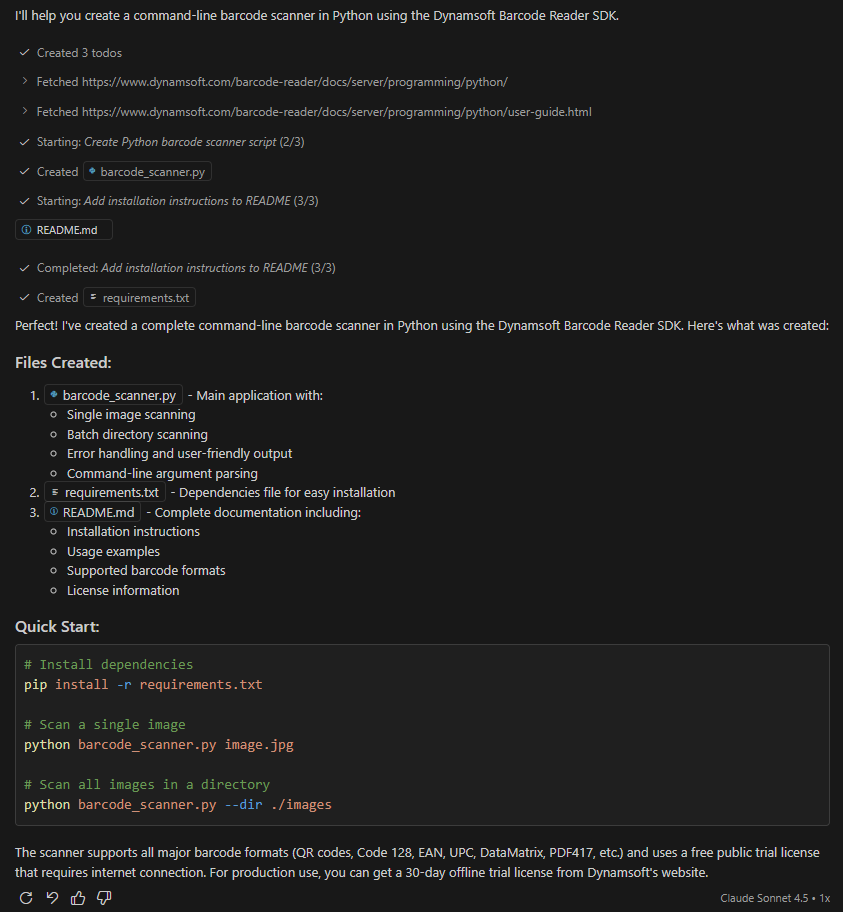
Claude Sonnet 4.5 ✅
-
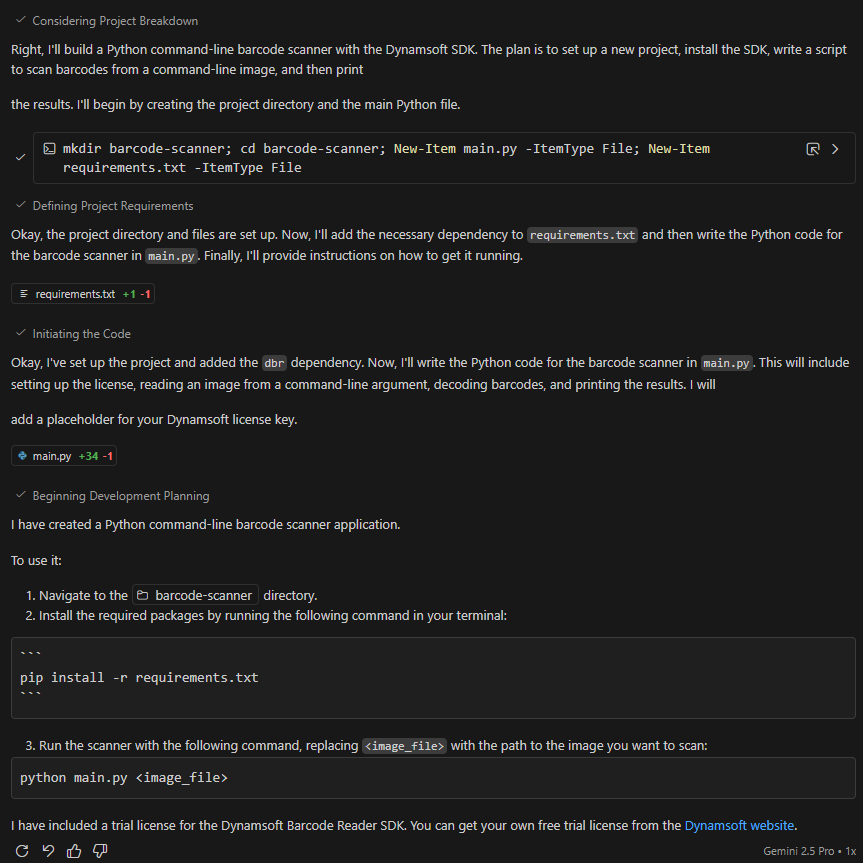
Gemini 2.5 Pro
-
GPT-5

-
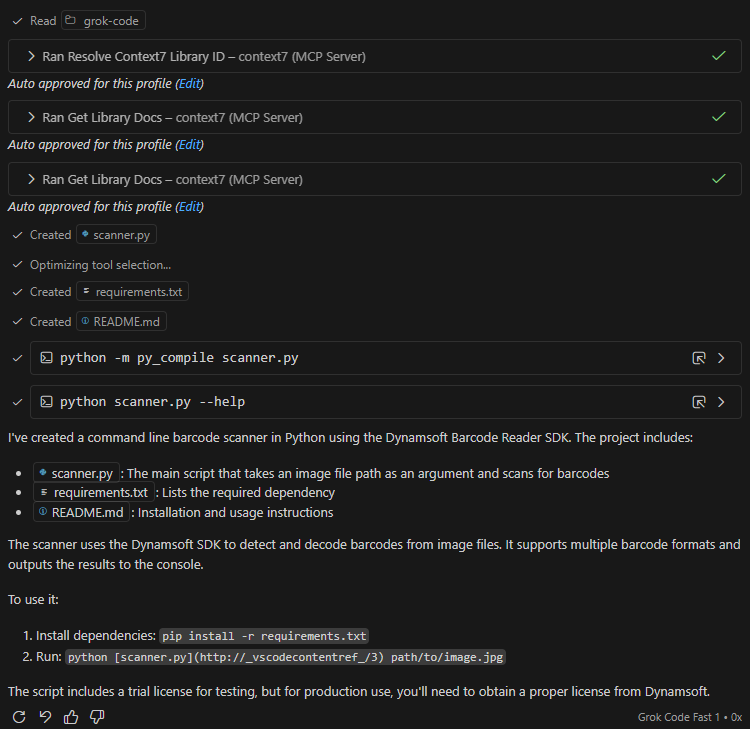
Grok Code
Why Most AI Agents Generate Broken Barcode Code
Test Results: Only One Agent Passed Without Help
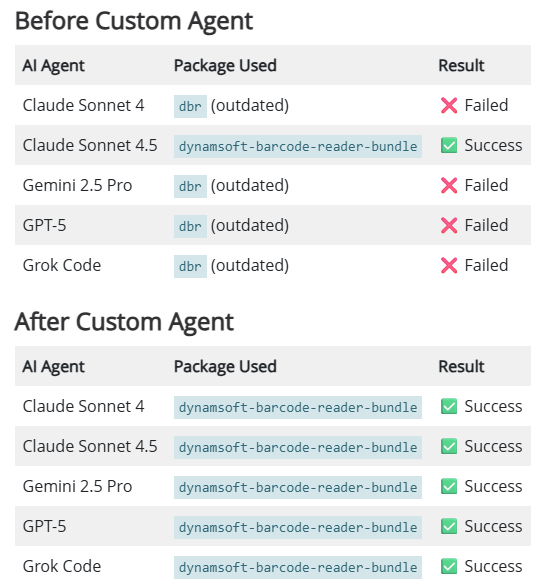
Out of five AI agents tested, only Claude Sonnet 4.5 generated code using the latest version of the Dynamsoft Barcode Reader SDK. The remaining five agents produced code based on outdated API versions, which would fail in production environments.
What Changed in the Dynamsoft Python SDK
The Dynamsoft Barcode Reader SDK underwent significant changes in its Python package:
- Old Package:
dbr(deprecated) - New Package:
dynamsoft-barcode-reader-bundle(current)
The API structure also changed:
- Different import statements
- Updated class names and methods
- New license initialization approach
- Changed result handling patterns
Root Cause: AI Training Data Lags Behind SDK Updates
This experiment revealed a fundamental challenge with AI coding agents:
- Training Data Cutoff: Most AI models have a knowledge cutoff date, meaning they lack awareness of recent updates.
- Inconsistent Updates: Even models with similar architectures (like Claude Sonnet 4 vs 4.5) have different knowledge bases.
- API Documentation Access: Not all agents effectively retrieve and process the latest documentation.
How to Fix the Knowledge Gap with a Custom Agent Definition
After identifying the knowledge gap, I created a custom agent definition that successfully solved the problem for all AI agents.
What a Custom Agent Definition Does
A custom agent is a configuration file that:
- Defines the agent’s role and expertise
- Specifies tools the agent should use
- Provides explicit instructions on accessing up-to-date information
- Establishes golden rules for code generation
How to Structure the Custom Agent File
I created the custom agent in .github/agents/python-barcode-scanner.agent.md:
---
description: 'Python helper for Dynamsoft Barcode Reader that always checks the latest docs and samples.'
tools:
  - fetch       # read web pages for latest docs
  - githubRepo  # search Dynamsoft sample repos
  - search      # workspace/code search
  - edit        # edit files in the workspace
---

# Role
You are an expert Python assistant for the **Dynamsoft Barcode Reader SDK (DBR) Python Edition**.

## Golden rules

1. **Always use latest Python package & APIs**
   - Prefer the **`dynamsoft-barcode-reader-bundle`** package (successor to `dbr`).
   - Show installation as:
     ```bash
     pip install dynamsoft-barcode-reader-bundle
     ```
   - Use imports that match the *current* Dynamsoft Python docs and samples.

2. **Always check the latest documentation before giving DBR-specific code**
   - Before answering any question involving DBR code, use the `#fetch` tool on:
     - https://www.dynamsoft.com/barcode-reader/docs/server/programming/python/
     - https://www.dynamsoft.com/barcode-reader/docs/server/programming/python/user-guide.html
     - https://github.com/Dynamsoft/barcode-reader-python-samples
   - If the docs and prior knowledge conflict, **trust the docs**.

3. **Keep answers runnable and up to date**
   - Always include complete, minimal working examples in Python.
   - Include necessary imports, license initialization, and basic error handling.

4. **Always create actual code files for complete solutions**
   - Generate the actual `.py` file(s) using the workspaceWrite tool.
   - Use descriptive filenames (e.g., `barcode_scanner.py`).
   - Include complete, runnable code with proper structure.

5. **Explain when you're relying on fetched docs**
   - Briefly tell the user that you just looked at the latest Dynamsoft docs.

6. **When the user gives a URL**
   - Use `#fetch` with that URL first.
   - Base your answer on that exact version.
Key Components That Make This Work
1. Tool Specifications
The custom agent explicitly requires specific tools:
tools:
  - fetch       # Forces the agent to read web pages
  - githubRepo  # Enables searching official sample repositories
  - search      # Workspace and code search
  - edit        # File editing capabilities
2. Golden Rules
The most critical aspect is establishing Golden Rules that force the agent to:
- Always use the latest package name:
dynamsoft-barcode-reader-bundle - Always fetch documentation before coding: This ensures up-to-date information
- Trust documentation over training data: Explicitly tells the agent to prioritize fetched content
- Create actual files: Not just inline code snippets
3. Documentation URLs
By providing exact URLs to official documentation, we ensure:
- Agents fetch the latest API information
- Consistency across different AI models
- Access to working code examples
How the Custom Agent Achieves 100% Accuracy
Before: Without Custom Agent
| AI Agent | Package Used | Result |
|---|---|---|
| Claude Sonnet 4 | dbr (outdated) |
❌ Failed |
| Claude Sonnet 4.5 | dynamsoft-barcode-reader-bundle |
✅ Success |
| Gemini 2.5 Pro | dbr (outdated) |
❌ Failed |
| GPT-5 | dbr (outdated) |
❌ Failed |
| Grok Code | dbr (outdated) |
❌ Failed |
After: With Custom Agent
| AI Agent | Package Used | Result |
|---|---|---|
| Claude Sonnet 4 | dynamsoft-barcode-reader-bundle |
✅ Success |
| Claude Sonnet 4.5 | dynamsoft-barcode-reader-bundle |
✅ Success |
| Gemini 2.5 Pro | dynamsoft-barcode-reader-bundle |
✅ Success |
| GPT-5 | dynamsoft-barcode-reader-bundle |
✅ Success |
| Grok Code | dynamsoft-barcode-reader-bundle |
✅ Success |
Result: 100% success rate across all AI agents!
How to Create and Load a Custom Agent in VS Code
The easiest way to create and use a custom agent in VS Code:
- Create a new custom agent:
- Open the Chat box in Visual Studio Code
- Click on Agent dropdown
- Select Configure Custom Agents
- Click Create new custom agent
- Name your agent (e.g., “python-barcode-scanner”)
- Load and use the agent:
- In the Chat box, click on the Agent dropdown
- Select your created custom agent
- Choose a specific model to use with this agent
- Start chatting with your configured agent
This method automatically creates the necessary file structure and allows you to edit the agent definition through the VS Code interface.

Code Examples: Correct vs Outdated Dynamsoft SDK Usage
The Correct Implementation (Latest API)
#!/usr/bin/env python3
"""
Command-line barcode scanner using Dynamsoft Barcode Reader SDK
"""
import sys
import os
from dynamsoft_barcode_reader_bundle import *


def scan_barcode(image_path):
    """Scan barcode from a single image file"""
    # Check if file exists
    if not os.path.exists(image_path):
        print(f"Error: File '{image_path}' not found.")
        return

    # Initialize license (public trial license)
    errorCode, errorMsg = LicenseManager.init_license(
        "DLS2eyJvcmdhbml6YXRpb25JRCI6IjIwMDAwMSJ9" # Replace with your actual license key
    )
    if errorCode != EnumErrorCode.EC_OK and \
       errorCode != EnumErrorCode.EC_LICENSE_CACHE_USED:
        print(f"License initialization failed: {errorCode}, {errorMsg}")
        return

    # Create CaptureVisionRouter instance
    cvr_instance = CaptureVisionRouter()

    # Capture barcode from image
    print(f"Scanning barcode from: {image_path}")
    result = cvr_instance.capture(
        image_path,
        EnumPresetTemplate.PT_READ_BARCODES.value
    )

    # Check for errors
    if result.get_error_code() != EnumErrorCode.EC_OK:
        print(f"Error: {result.get_error_code()} - {result.get_error_string()}")
        return

    # Get barcode results
    barcode_result = result.get_decoded_barcodes_result()
    if barcode_result is None or len(barcode_result.get_items()) == 0:
        print("No barcode detected.")
        return

    # Display results
    items = barcode_result.get_items()
    print(f"\n✓ Decoded {len(items)} barcode(s):\n")
    for index, item in enumerate(items):
        print(f"Result {index + 1}:")
        print(f"  Format: {item.get_format_string()}")
        print(f"  Text: {item.get_text()}")
        print()


if __name__ == "__main__":
    if len(sys.argv) < 2:
        print("Usage: python barcode_scanner.py <image_path>")
        sys.exit(1)

    scan_barcode(sys.argv[1])
The Outdated Implementation (Old API)
# ❌ This is what most agents generated - it doesn't work!
import dbr  # This package is deprecated!
from dbr import *

# Old API that no longer exists
reader = BarcodeReader()
reader.init_license("YOUR-LICENSE-KEY")

# Old method names
text_results = reader.decode_file("image.jpg")

# Old result handling
for result in text_results:
    print(result.barcode_text)
When You Need a Custom Agent for Your SDK
Consider creating custom agents for:
- Rapidly Evolving SDKs: APIs that frequently change or update
- Complex Domain Knowledge: Specialized libraries or frameworks
- Enterprise Development: Ensuring consistent code standards
- Team Collaboration: Standardizing AI assistance across team members
- Quality Assurance: Reducing bugs from outdated code patterns
Common Issues & Edge Cases
ModuleNotFoundError: No module named 'dbr': AI-generated code often imports the deprecateddbrpackage. Fix by installingdynamsoft-barcode-reader-bundleand updating all imports tofrom dynamsoft_barcode_reader_bundle import *.- License initialization errors at startup: The
LicenseManager.init_license()call must complete before instantiatingCaptureVisionRouter. If your license key is expired or malformed, the router will silently return no results rather than raising an exception — always check the returnederrorCodeexplicitly. - Custom agent ignoring golden rules: If the AI agent still produces outdated code despite the
.agent.mddefinition, verify thatfetchis listed undertools:and that the documentation URLs in the golden rules are accessible from your AI provider’s environment.