


Compare AI CLI Responses Side by Side with a Python PySide6 Desktop App
Choosing between AI coding assistants is hard when you can only test one at a time. Developers who have Qwen Code, GitHub Copilot CLI, OpenCode, and Gemini CLI installed need a fast way to send the same prompt to all of them and read the results in parallel. This project builds a Python desktop app with PySide6 that does exactly that — one prompt in, four streaming response panels out.
What you’ll build: A PySide6 desktop GUI that dynamically detects installed AI CLI tools, sends a single prompt to all of them concurrently, and streams each response into its own panel with a Markdown/rendered-HTML toggle for easy reading.
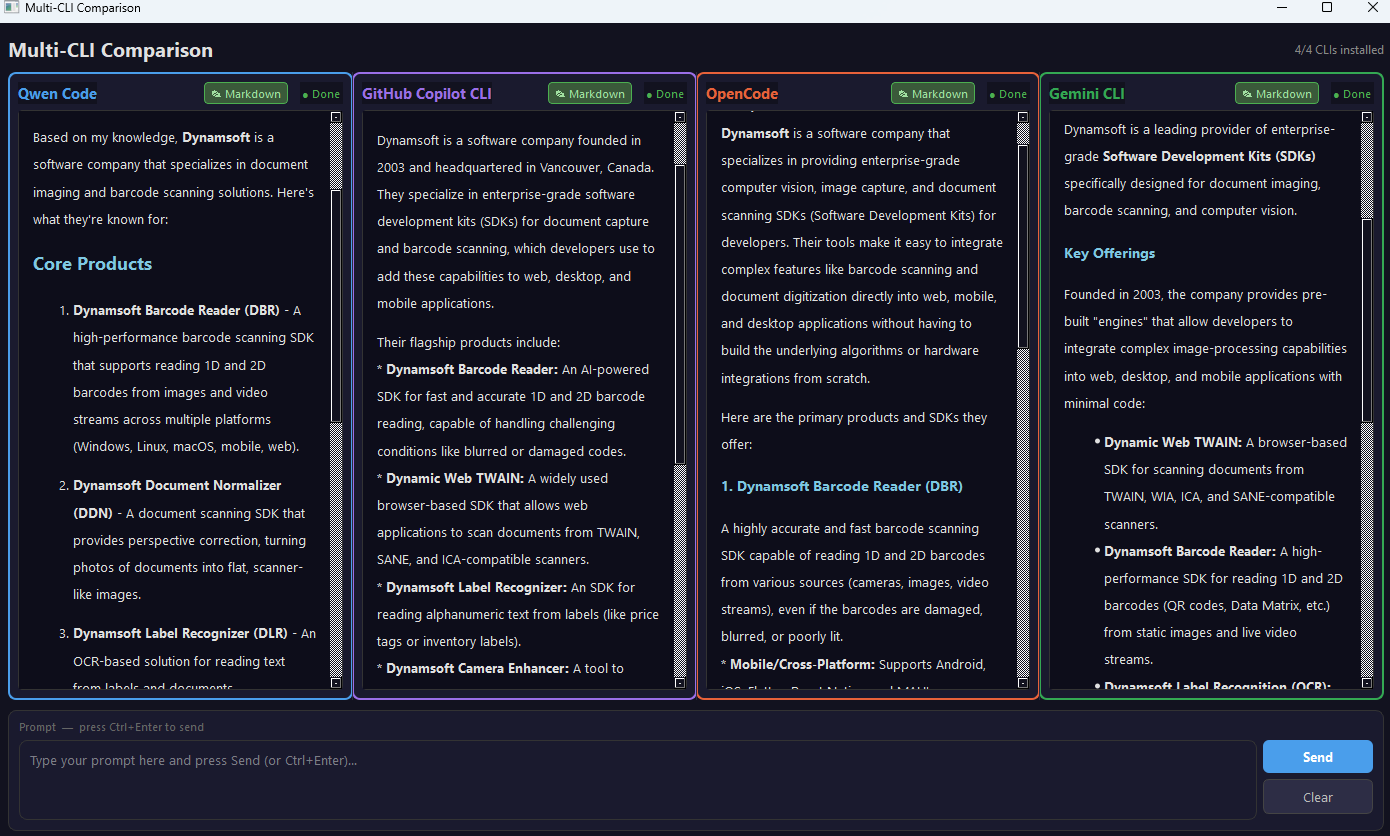
Key Takeaways
- A PySide6 desktop app can launch multiple AI CLI tools concurrently and stream their responses side by side without blocking the UI.
- Each CLI needs its own command adapter because non-interactive invocation syntax differs between Qwen, Copilot, OpenCode, and Gemini.
- Windows support is more reliable when npm-installed CLI wrappers are executed through
cmd /cand PowerShell wrappers are bypassed where necessary. - A per-panel Markdown/rendered-HTML toggle makes long AI responses easier to compare than raw terminal output alone.
Common Developer Questions
How do I send one prompt to multiple AI CLI tools at the same time from a Python desktop app?
Create one worker thread per CLI, build the command line for each tool, and start them concurrently so their stdout streams can update separate UI panels in parallel. That is the core design used here to compare answers without waiting for one tool to finish before starting the next.
Why do npm-installed AI CLIs fail to launch correctly on Windows with Python subprocess?
Many Windows CLI installs expose .cmd or PowerShell wrapper scripts instead of a direct .exe, and those wrappers often do not behave well when spawned naively from subprocess.Popen. This article solves that by wrapping script launches with cmd /c and by resolving the real Copilot executable to avoid an interactive PowerShell wrapper.
How do I stream AI CLI output into a PySide6 GUI without freezing the interface?
Run each CLI inside a background QThread, read stdout incrementally, strip ANSI escape sequences, and emit each chunk back into the main window as Qt signals. That keeps the event loop responsive while the response panels update in real time.
Prerequisites
- Python 3.10+
- PySide6 (
pip install PySide6) - markdown (
pip install markdown) - At least one of the following AI CLI tools installed and authenticated:
| CLI | Install command | Documentation |
|---|---|---|
| Qwen Code | npm install -g @qwen-code/qwen-code |
github.com/QwenLM/qwen-code |
| GitHub Copilot CLI | npm install -g @github/copilot |
docs.github.com |
| OpenCode | npm install -g opencode-ai |
opencode.ai |
| Gemini CLI | npm install -g @google/gemini-cli |
github.com/google-gemini/gemini-cli |
Install Dependencies
Create a requirements.txt with the two Python dependencies and install them:
PySide6>=6.6.0
markdown>=3.5
pip install -r requirements.txt
Define the CLI Tool Registry
Each AI CLI has its own binary name, non-interactive invocation flags, and brand color. The app stores these as a list of dictionaries so panels can be generated dynamically at startup.
CLI_DEFS = [
    {
        "id": "qwen",
        "name": "Qwen Code",
        "cmd": lambda p: ["qwen", p],
        "color": "#4A9EEB",
        "download_url": "https://github.com/QwenLM/qwen-code",
        "install_hint": "npm install -g @qwen-code/qwen-code",
    },
    {
        "id": "copilot",
        "name": "GitHub Copilot CLI",
        "cmd": lambda p: [_REAL_COPILOT, "-p", p] if _REAL_COPILOT else ["copilot", "-p", p],
        "color": "#9B6FE8",
        "download_url": "https://docs.github.com/en/copilot/github-copilot-in-the-cli",
        "install_hint": "gh extension install github/gh-copilot",
    },
    {
        "id": "opencode",
        "name": "OpenCode",
        "cmd": lambda p: ["opencode", "run", p],
        "color": "#E8623A",
        "download_url": "https://opencode.ai",
        "install_hint": "npm install -g opencode-ai",
    },
    {
        "id": "gemini",
        "name": "Gemini CLI",
        "cmd": lambda p: ["gemini", "-p", p],
        "color": "#34A853",
        "download_url": "https://github.com/google-gemini/gemini-cli",
        "install_hint": "npm install -g @google/gemini-cli",
    },
]
Each CLI’s non-interactive invocation syntax differs:
| CLI | Command pattern |
|---|---|
| Qwen Code | qwen "<prompt>" |
| GitHub Copilot CLI | copilot -p "<prompt>" |
| OpenCode | opencode run "<prompt>" |
| Gemini CLI | gemini -p "<prompt>" |
Handle Windows Subprocess
On Windows, npm-installed CLI tools are .CMD wrapper scripts that subprocess.Popen cannot spawn directly — they need to be executed through cmd /c. The build_cmd helper handles this transparently, while skipping the wrapper for real .exe binaries:
_IS_WINDOWS = platform.system() == "Windows"

def build_cmd(args: list[str]) -> list[str]:
    """On Windows .CMD/.BAT scripts cannot be spawned directly; wrap with cmd /c.
    If the binary is already a .exe, no wrapping is needed."""
    if _IS_WINDOWS and not args[0].lower().endswith(".exe"):
        return ["cmd", "/c"] + args
    return args
GitHub Copilot CLI has an additional complication: the VS Code extension installs a PowerShell wrapper (copilot.ps1) that performs an interactive version check using Read-Host. When stdin is /dev/null, this causes the process to exit immediately without running the query. The _find_real_copilot function resolves the actual copilot.exe binary by temporarily removing the wrapper’s directory from PATH:
def _find_real_copilot() -> str | None:
    """Find the real copilot binary, skipping the VS Code PS1/BAT wrapper."""
    wrapper_path = shutil.which("copilot")
    if not wrapper_path:
        return None

    if wrapper_path.lower().endswith(".exe"):
        return wrapper_path

    wrapper_dir = os.path.dirname(os.path.abspath(wrapper_path))
    filtered = [p for p in os.environ.get("PATH", "").split(os.pathsep)
                if os.path.normcase(os.path.abspath(p)) != os.path.normcase(wrapper_dir)]
    old_path = os.environ["PATH"]
    os.environ["PATH"] = os.pathsep.join(filtered)
    try:
        real = shutil.which("copilot")
    finally:
        os.environ["PATH"] = old_path
    return real
Stream CLI Output with a Background QThread Worker
Each CLI runs in its own QThread to keep the UI responsive. The CLIWorker class spawns a subprocess, reads stdout line by line, strips ANSI escape codes, and emits each chunk as a Qt signal:
_ANSI_RE = re.compile(r"\x1B(?:[@-Z\\-_]|\[[0-?]*[ -/]*[@-~])")

def strip_ansi(text: str) -> str:
    return _ANSI_RE.sub("", text)

class CLIWorker(QThread):
    output_chunk = Signal(str)
    finished = Signal(bool, str)

    def __init__(self, cmd: list[str]):
        super().__init__()
        self._cmd = cmd
        self._cancelled = False
        self._process: subprocess.Popen | None = None

    def cancel(self):
        self._cancelled = True
        if self._process and self._process.poll() is None:
            self._process.kill()

    def run(self):
        try:
            self._process = subprocess.Popen(
                self._cmd,
                stdout=subprocess.PIPE,
                stderr=subprocess.STDOUT,
                stdin=subprocess.DEVNULL,
                text=True,
                encoding="utf-8",
                errors="replace",
            )
            for line in iter(self._process.stdout.readline, ""):
                if self._cancelled:
                    self._process.kill()
                    self.finished.emit(False, "Cancelled")
                    return
                self.output_chunk.emit(strip_ansi(line))
            self._process.stdout.close()
            self._process.wait()
            rc = self._process.returncode
            if rc == 0:
                self.finished.emit(True, "")
            else:
                self.finished.emit(False, f"Process exited with code {rc}")
        except FileNotFoundError:
            self.finished.emit(False, f"Command not found: {self._cmd[0]}")
        except Exception as exc:
            self.finished.emit(False, str(exc))
Key design decisions:
stdin=subprocess.DEVNULLprevents CLI tools from blocking on interactive prompts.stderr=subprocess.STDOUTmerges error output into the panel so nothing is silently lost.- Line-by-line iteration (
readline) enables real-time streaming rather than waiting for the process to finish.
Build per-CLI Response Panels with Markdown Rendering
Each CLIPanel is a QFrame containing a header (CLI name, toggle button, status indicator) and two stacked content areas — a monospace raw-text view and a rendered HTML view. The toggle button switches between them:
def _on_toggle(self, checked: bool):
    self._rendered_mode = checked
    if checked:
        self._toggle_btn.setText("✎ Markdown")
        self.render_area.setHtml(markdown_to_html(self._raw_text))
        self.text_area.setVisible(False)
        self.render_area.setVisible(True)
    else:
        self._toggle_btn.setText("⟳ Render")
        self.render_area.setVisible(False)
        self.text_area.setVisible(True)
The Markdown-to-HTML conversion uses the Python markdown library with extensions for fenced code blocks, tables, and line breaks, wrapped in a dark-theme CSS stylesheet:
_MD_EXTENSIONS = ["fenced_code", "tables", "nl2br", "sane_lists"]

def markdown_to_html(text: str) -> str:
    body = md_lib.markdown(text, extensions=_MD_EXTENSIONS)
    return f"""<!DOCTYPE html><html><head><meta charset='utf-8'>{_MD_CSS}</head>
<body>{body}</body></html>"""
When a CLI is not installed, the panel displays a styled info card with a clickable download URL and suggested install command instead of an empty text area:
def _show_download_info(self):
self._set_status("● Not installed", "#f44336")
url = self.cli_def["download_url"]
hint = self.cli_def["install_hint"]
name = self.cli_def["name"]
color = self.cli_def["color"]
html = f"""
<div style="color:#e0e0e0; font-family:'Segoe UI',sans-serif; padding:16px;">
<p style="font-size:16px; font-weight:bold; color:{color};">{name}</p>
<p style="color:#f44336; font-size:13px;">⚠ Not installed on this system</p>
<p style="font-size:12px; color:#aaa; margin-top:16px;">Download / Documentation:</p>
<p style="margin-top:4px;">
<a href="{url}" style="color:#4A9EEB; font-size:13px;">{url}</a>
</p>
</div>
"""
self.text_area.setHtml(html)
Assemble the Main Window and Prompt Bar
The MainWindow dynamically checks for installed CLIs using shutil.which, creates a CLIPanel for each one, and arranges them in a horizontal QSplitter. The prompt input area at the bottom supports both a Send button and a Ctrl+Enter keyboard shortcut:
# ── CLI panels ───────────────────────────────────────────────────────
splitter = QSplitter(Qt.Orientation.Horizontal)

available_count = 0
for cli_def in CLI_DEFS:
    avail = shutil.which(cli_def["id"]) is not None
    panel = CLIPanel(cli_def, avail)
    splitter.addWidget(panel)
    self._panels.append(panel)
    if avail:
        available_count += 1
When the user clicks Send, the prompt text is dispatched to every installed panel concurrently:
def _send_prompt(self):
    prompt = self._prompt_input.toPlainText().strip()
    if not prompt:
        return
    self._prompt_input.clear()
    for panel in self._panels:
        panel.start_query(prompt)
The Ctrl+Enter shortcut is implemented via a QEvent filter on the prompt input:
def eventFilter(self, obj, event):
    if obj is self._prompt_input and event.type() == QEvent.Type.KeyPress:
        key_ev: QKeyEvent = event
        ctrl = Qt.KeyboardModifier.ControlModifier
        if (
            key_ev.key() == Qt.Key.Key_Return
            and key_ev.modifiers() & ctrl
        ):
            self._send_prompt()
            return True
    return super().eventFilter(obj, event)