


How to Build a Compose Multiplatform QR Code Scanner
A cross-platform QR code scanner needs a camera pipeline on each platform and a shared decoding engine. Compose Multiplatform (built on Kotlin Multiplatform) lets you share the UI and scanner logic across Android and iOS, and Dynamsoft Barcode Reader v11 provides the decoding engine through CaptureVisionRouter, the entry point of the Dynamsoft Capture Vision core API that hosts the barcode decoding engine.
What you’ll build: A QR code scanner app that shares its Compose UI between Android and iOS, decodes barcodes with Dynamsoft Barcode Reader v11 (CaptureVisionRouter), draws a bounding-box overlay on Android, and handles camera permissions and device orientation on both platforms.
Key Takeaways
- Compose Multiplatform shares the UI and a scanner component between Android and iOS; only the camera capture and decoding layer are implemented per platform.
- On Android, CameraX
ImageAnalysisfeeds NV21 frames toCaptureVisionRouter.capture()with the built-inReadBarcodespreset template, and decoded corners are drawn back on the preview with rotation-aware normalization. - On iOS, Dynamsoft Barcode Reader v11 is pulled in as the
DynamsoftBarcodeReaderBundleCocoaPods pod (which depends on the Dynamsoft Capture Vision bundle), its XCFrameworks are exposed to Kotlin/Native through a cinterop declared iniosApp/SDK/DynamsoftBarcodeReaderBundle.def, and AVFoundation delivers frames that are decoded withDSCaptureVisionRouterusing theReadBarcodes_Defaulttemplate. - Decoding is throttled to one frame per second on iOS and runs on a dedicated queue, keeping the UI responsive on both platforms; the license also requires one-time online verification on first launch, so
INTERNETpermission (Android) and a camera usage description key (iOSInfo.plist) are mandatory.
Common Developer Questions
How do I share barcode scanning code between Android and iOS with Kotlin Multiplatform?
Declare one Scanner component in common code with Kotlin expect/actual declarations, then implement the camera and decoding layer separately per platform. In this project, Android uses CameraX with Dynamsoft’s CaptureVisionRouter, while iOS uses AVFoundation with DSCaptureVisionRouter exposed through Kotlin/Native cinterop.
Does Dynamsoft Barcode Reader v11 have a CocoaPods pod for iOS?
Yes. Dynamsoft Barcode Reader v11 for iOS ships as the DynamsoftBarcodeReaderBundle CocoaPods pod, which depends on the Dynamsoft Capture Vision bundle. The tutorial installs it through the Podfile, declares a .def cinterop file in iosApp/SDK, and consumes its XCFrameworks via Kotlin/Native cinterop.
Why do barcode bounding boxes appear at the wrong position after rotating an Android device?
Barcode locations are reported in the unrotated camera buffer, while the preview displays the rotated image. Convert each corner with the frame’s rotationDegrees (90/180/270) before drawing, as the normalizedCorners mapping in this article does — otherwise the overlay only lines up in one orientation.
Demo video:
Prerequisites
- Kotlin Multiplatform Wizard account-free project generator, or a JDK and Android Studio for Android; macOS with Xcode for iOS builds.
- A Dynamsoft trial key — the sample code calls
LicenseManager.initLicense()at startup: Get a 30-day free trial license for Dynamsoft Barcode Reader.
Step 1: Create a New Compose Multiplatform Project
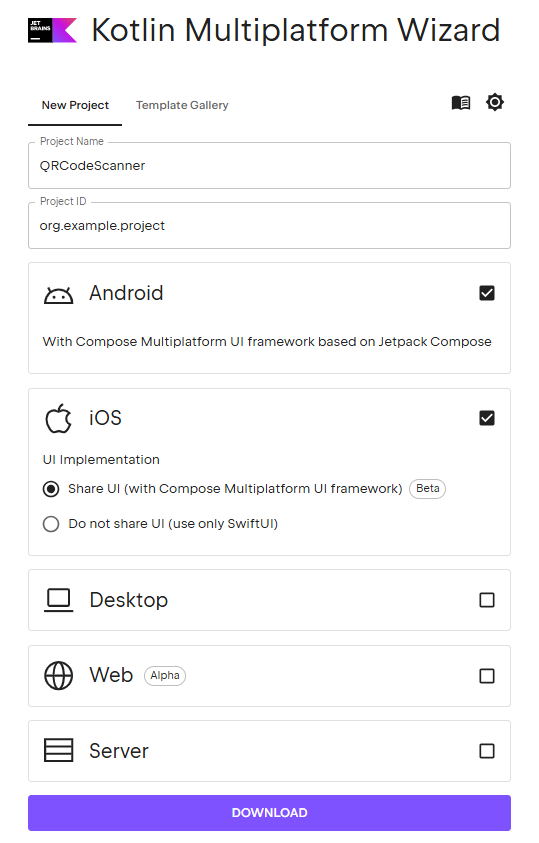
Go to Kotlin Multiplatform Wizard to create a new Compose Multiplatform project for Android and iOS.
Step 2: Declare Camera Permission
-
For Android, add the following to
AndroidManifest.xml.INTERNETis required because the license needs online verification on first launch:<uses-feature android:name="android.hardware.camera"/> <uses-feature android:name="android.hardware.camera.autofocus"/> <uses-permission android:name="android.permission.CAMERA" /> <uses-permission android:name="android.permission.INTERNET"/> -
For iOS, add the following to
Info.plist<key>NSCameraUsageDescription</key> <string>For camera usage</string>
Step 3: Add the Barcode and Camera Dependencies
Next, let’s add dependencies related to QR code scanning.
Android
We need to add CameraX, Accompanist and Dynamsoft Barcode Reader.
-
Add the Dynamsoft Maven repository to
settings.gradle.kts:dependencyResolutionManagement { repositories { google { mavenContent { includeGroupAndSubgroups("androidx") includeGroupAndSubgroups("com.android") includeGroupAndSubgroups("com.google") } } mavenCentral() maven (url="https://download2.dynamsoft.com/maven/aar") } } -
Add the following to
libs.versions.toml:[versions] accompanist = "0.34.0" androidxCamera = "1.3.4" dynamsoft-barcode-reader = "11.6.2000" [libraries] accompanist-permissions = { module = "com.google.accompanist:accompanist-permissions", version.ref = "accompanist" } androidx-camera-camera2 = { module = "androidx.camera:camera-camera2", version.ref = "androidxCamera" } androidx-camera-lifecycle = { module = "androidx.camera:camera-lifecycle", version.ref = "androidxCamera" } androidx-camera-view = { module = "androidx.camera:camera-view", version.ref = "androidxCamera" } androidx-material3-android = { group = "androidx.compose.material3", name = "material3-android", version.ref = "material3Android" } dynamsoft-barcode-reader = { module = "com.dynamsoft:barcodereaderbundle", version.ref = "dynamsoft-barcode-reader" } -
Add the following to
composeApp/build.gradle.kts:kotlin { sourceSets { androidMain.dependencies { implementation(libs.accompanist.permissions) implementation(libs.androidx.camera.camera2) implementation(libs.androidx.camera.lifecycle) implementation(libs.androidx.camera.view) implementation(libs.dynamsoft.barcode.reader) } } }
iOS
Dynamsoft Barcode Reader v11 for iOS is distributed as the DynamsoftBarcodeReaderBundle CocoaPods pod, which depends on the Dynamsoft Capture Vision bundle. We install it through the Podfile, expose its Objective-C API to Kotlin with Kotlin/Native cinterop, and let CocoaPods embed the frameworks into the app.
-
Add the Kotlin CocoaPods Gradle plugin. It is still needed to ship the shared Compose framework to the iOS app.
-
Add the following to
libs.versions.toml(in the[plugins]section, so thatlibs.plugins.kotlinCocoapodsresolves):[plugins] kotlinCocoapods = { id = "org.jetbrains.kotlin.native.cocoapods", version.ref = "kotlin" } -
Add the following alias to your root folder’s
build.gradle.ktsfile:plugins { alias(libs.plugins.kotlinCocoapods) apply false } -
Also add the following to the app’s
build.gradle.ktsfile:plugins { alias(libs.plugins.kotlinCocoapods) }
-
-
Add the following to the app’s
build.gradle.kts:cocoapods { // Required fields version = "1.0" summary = "CocoaPods test library" homepage = "https://github.com/JetBrains/kotlin" ios.deploymentTarget = "15.0" // Specify path to Podfile podfile = project.file("../iosApp/Podfile") framework { baseName = "ComposeApp" isStatic = true } xcodeConfigurationToNativeBuildType["CUSTOM_DEBUG"] = NativeBuildType.DEBUG xcodeConfigurationToNativeBuildType["CUSTOM_RELEASE"] = NativeBuildType.RELEASE } -
In
iosApp/Podfile, add the Dynamsoft Barcode Reader pod. It is version11.6.2000and is fetched from the CocoaPods trunk:platform :ios, '15.0' target 'iosApp' do use_frameworks! # Local podspec from path pod 'composeApp', :path => '../composeApp/composeApp.podspec' # Dynamsoft Barcode Reader Bundle (v11) - fetched from the CocoaPods trunk pod 'DynamsoftBarcodeReaderBundle', '11.6.2000' endRun
pod installiniosApp. This pulls bothDynamsoftBarcodeReaderBundle.xcframeworkand theDynamsoftCaptureVisionBundle.xcframeworkit depends on intoiosApp/Pods, so there is no need to vendor the frameworks yourself. -
Create the cinterop definition file
iosApp/SDK/DynamsoftBarcodeReaderBundle.def. TheDynamsoftBarcodeReaderBundleheader re-exports the Capture Vision Bundle headers, so both modules are listed:language = Objective-C modules = DynamsoftBarcodeReaderBundle DynamsoftCaptureVisionBundle package = dynamsoft -
Add the following cinterop configuration to the app’s
build.gradle.kts. It resolves the XCFramework slices fromiosApp/Podsfor each iOS target and passes both frameworks to the cinterop compiler and the linker. The Dynamsoft headers use clang modules (@import), so-fmodulesis required:kotlin { // ...existing config... // Dynamsoft Barcode Reader v11 is installed via CocoaPods (see the Podfile) and its // XCFrameworks are consumed through Kotlin/Native cinterop. // DynamsoftBarcodeReaderBundle.h re-exports the Capture Vision Bundle headers, // so both frameworks must be on the compiler/linker search paths. val dynamsoftPodRoot = rootProject.projectDir.resolve( "iosApp/Pods/DynamsoftBarcodeReaderBundle/DynamsoftBarcodeReaderBundle.xcframework" ) val dynamsoftCaptureVisionPodRoot = rootProject.projectDir.resolve( "iosApp/Pods/DynamsoftCaptureVisionBundle/DynamsoftCaptureVisionBundle.xcframework" ) listOf( iosX64(), iosArm64(), iosSimulatorArm64() ).forEach { iosTarget -> iosTarget.binaries.framework { baseName = "ComposeApp" isStatic = true } // Pick the XCFramework slice matching this target. val xcframeworkSlice = when (iosTarget.name) { "iosArm64" -> "ios-arm64" else -> "ios-arm64_x86_64-simulator" } val frameworkDir = dynamsoftPodRoot.resolve(xcframeworkSlice) val captureVisionDir = dynamsoftCaptureVisionPodRoot.resolve(xcframeworkSlice) iosTarget.compilations.getByName("main") { cinterops { val dynamsoftBarcodeReader by creating { defFile(rootProject.projectDir.resolve("iosApp/SDK/DynamsoftBarcodeReaderBundle.def")) // The Dynamsoft framework headers use clang modules (@import), so -fmodules is required. compilerOpts( "-fmodules", "-framework", "DynamsoftBarcodeReaderBundle", "-framework", "DynamsoftCaptureVisionBundle", "-F", frameworkDir.absolutePath, "-F", captureVisionDir.absolutePath ) } } } iosTarget.binaries.all { linkerOpts( "-framework", "DynamsoftBarcodeReaderBundle", "-framework", "DynamsoftCaptureVisionBundle", "-F", frameworkDir.absolutePath, "-F", captureVisionDir.absolutePath ) } } } -
Because the
composeApppod and theDynamsoftBarcodeReaderBundlepod are installed together by CocoaPods, there is no need to drag XCFrameworks into the Xcode target or set Framework Search Paths manually. The generatedcomposeApp.podspecdeclaresspec.dependency 'DynamsoftBarcodeReaderBundle', '11.6.2000', so Xcode links the Dynamsoft frameworks automatically through CocoaPods.
Sync your project to create the required composeApp.podspec file.
You may also meet the following error when compiling:
'embedAndSign' task can't be used in a project with dependencies to pods.
In this case, add the following to gradle.properties:
kotlin.apple.deprecated.allowUsingEmbedAndSignWithCocoaPodsDependencies=true
Step 4: Create a Shared Scanner Component with Platform Implementations
Let’s first define the component in the common code and then implement it in the native code.
Define the Expect/Actual Component Contract in Common Code
-
Add
CameraPermissionState.ktfor camera permission states.interface CameraPermissionState { val status: CameraPermissionStatus fun requestCameraPermission() fun goToSettings() } @Composable expect fun rememberCameraPermissionState(): CameraPermissionState enum class CameraPermissionStatus { Denied, Granted } -
Define the scanner component which has a callback to return the scanned QR code.
@Composable expect fun Scanner( modifier: Modifier = Modifier, onScanned: (String) -> Unit, ) -
Define the
ScannerWithPermissionscomponent to deal with permission.@Composable fun ScannerWithPermissions( modifier: Modifier = Modifier, onScanned: (String) -> Unit, permissionText: String = "Camera is required for QR Code scanning", openSettingsLabel: String = "Open Settings", ) { ScannerWithPermissions( modifier = modifier.clipToBounds(), onScanned = onScanned, permissionDeniedContent = { permissionState -> Column(modifier, horizontalAlignment = Alignment.CenterHorizontally) { Text( modifier = Modifier.padding(6.dp), text = permissionText ) Button(onClick = { permissionState.goToSettings() }) { Text(openSettingsLabel) } } } ) } @Composable fun ScannerWithPermissions( modifier: Modifier = Modifier, onScanned: (String) -> Unit, permissionDeniedContent: @Composable (CameraPermissionState) -> Unit, ) { val permissionState = rememberCameraPermissionState() LaunchedEffect(Unit) { if (permissionState.status == CameraPermissionStatus.Denied) { permissionState.requestCameraPermission() } } if (permissionState.status == CameraPermissionStatus.Granted) { Scanner(modifier, onScanned = onScanned) } else { permissionDeniedContent(permissionState) } }
Implement the Android Scanner with CameraX and a Bounding-Box Overlay
-
Initialize the license in
MainActivity.kt:class MainActivity : ComponentActivity() { override fun onCreate(savedInstanceState: Bundle?) { super.onCreate(savedInstanceState) if (savedInstanceState == null) { // Public trial license. A network connection is required for the first online verification. // Request a longer trial key at https://www.dynamsoft.com/customer/license/trialLicense/?product=dbr LicenseManager.initLicense("DLS2eyJoYW5kc2hha2VDb2RlIjoiMjAwMDAxLTE2NDk4Mjk3OTI2MzUiLCJvcmdhbml6YXRpb25JRCI6IjIwMDAwMSIsInNlc3Npb25QYXNzd29yZCI6IndTcGR6Vm05WDJrcEQ5YUoifQ==") { isSuccess: Boolean, error: Exception? -> Log.d("DBR", isSuccess.toString()) if (!isSuccess) { error?.printStackTrace() } } } setContent { App() } } } -
Add a
BarcodeAnalyzer.ktfile which implements CameraX’s image analyzer. It gets the camera frames and usesCaptureVisionRouterto read barcodes from them with the built-inReadBarcodespreset template. Besides the first scanned text, it also reports every decoded barcode of the frame — with corners normalized to the rotated display coordinate space — so an overlay can draw a bounding quadrilateral around each one./** * A decoded barcode together with its bounding quadrilateral. * The corners are normalized to 0..1 in the rotated (display) coordinate space, * so they can be mapped directly onto the camera preview. [aspectRatio] is the * width/height ratio of the rotated camera frame and is required to undo the * normalization when drawing on the preview. */ data class BarcodeAnnotation( val text: String, val corners: List<Offset>, val aspectRatio: Float, ) class BarcodeAnalyzer( private val onScanned: (String) -> Unit, private val onBarcodesUpdated: (List<BarcodeAnnotation>) -> Unit, private val context: Context, ) : ImageAnalysis.Analyzer { // CaptureVisionRouter is the entry point of the Dynamsoft Capture Vision core API. // It hosts the barcode engine of Dynamsoft Barcode Reader. private val router = CaptureVisionRouter(context) @SuppressLint("UnsafeOptInUsageError") override fun analyze(imageProxy: ImageProxy) { imageProxy.image?.let { image -> val buffer = image.planes[0].buffer val nRowStride = image.planes[0].rowStride val nPixelStride = image.planes[0].pixelStride val length = buffer.remaining() val bytes = ByteArray(length) buffer[bytes] val imageData = ImageData() imageData.bytes = bytes imageData.width = image.width imageData.height = image.height imageData.stride = nRowStride * nPixelStride imageData.format = EnumImagePixelFormat.IPF_NV21 // Read barcodes with the built-in "ReadBarcodes" preset template. val capturedResult = router.capture(imageData, EnumPresetTemplate.PT_READ_BARCODES) if (capturedResult.errorCode != 0) { Log.e("DBR", capturedResult.errorMessage) } else { val items = capturedResult.decodedBarcodesResult?.items.orEmpty() items.firstOrNull()?.let { onScanned(it.text) } // Report every barcode of the current frame, so the overlay can // draw a bounding quadrilateral for each of them. val rotatedWidth = if (imageProxy.imageInfo.rotationDegrees % 180 == 0) image.width else image.height val rotatedHeight = if (imageProxy.imageInfo.rotationDegrees % 180 == 0) image.height else image.width onBarcodesUpdated( items.mapNotNull { item -> normalizedCorners( item, rotatedWidth, rotatedHeight, imageProxy.imageInfo.rotationDegrees )?.let { corners -> BarcodeAnnotation( item.text, corners, rotatedWidth.toFloat() / rotatedHeight ) } } ) } } imageProxy.close() } /** * Converts the location of a barcode (reported in the unrotated buffer space) * into normalized corners in the display coordinate space. */ private fun normalizedCorners( item: BarcodeResultItem, rotatedWidth: Int, rotatedHeight: Int, rotationDegrees: Int, ): List<Offset>? { val points = item.location?.points ?: return null val bufferWidth = if (rotationDegrees % 180 == 0) rotatedWidth else rotatedHeight val bufferHeight = if (rotationDegrees % 180 == 0) rotatedHeight else rotatedWidth return points.map { point -> // Normalize in the unrotated buffer space first, then apply the // rotation so the corner lands in the display coordinate space. val u = point.x.toFloat() / bufferWidth val v = point.y.toFloat() / bufferHeight when (rotationDegrees) { 90 -> Offset(1f - v, u) 180 -> Offset(1f - u, 1f - v) 270 -> Offset(v, 1f - u) else -> Offset(u, v) } } } } -
Add a
ScannerView.ktfile to hold the camera preview.@Composable fun CameraView( modifier: Modifier = Modifier, analyzer: BarcodeAnalyzer ) { val localContext = LocalContext.current val lifecycleOwner = LocalLifecycleOwner.current val cameraProviderFuture = remember { ProcessCameraProvider.getInstance(localContext) } AndroidView( modifier = modifier.fillMaxSize(), factory = { context -> val previewView = PreviewView(context) val preview = Preview.Builder().build() val selector = CameraSelector.Builder() .requireLensFacing(CameraSelector.LENS_FACING_BACK) .build() preview.setSurfaceProvider(previewView.surfaceProvider) val imageAnalysis = ImageAnalysis.Builder().build() imageAnalysis.setAnalyzer( ContextCompat.getMainExecutor(context), analyzer ) runCatching { cameraProviderFuture.get().unbindAll() cameraProviderFuture.get().bindToLifecycle( lifecycleOwner, selector, preview, imageAnalysis ) }.onFailure { Log.e("CAMERA", "Camera bind error ${it.localizedMessage}", it) } previewView } ) } -
Add a
BarcodeOverlay.ktfile that draws a bounding quadrilateral and the decoded text of each detected barcode on top of the camera preview. The normalized corners are mapped onto the preview with the same center-crop scaling thatPreviewViewapplies with its defaultFILL_CENTERscale type./** * Draws a bounding quadrilateral and the decoded text of each detected barcode * on top of the camera preview. * * The corners are normalized (0..1) in the display coordinate space and mapped * onto the preview with the same center-crop scaling that PreviewView applies * with its default FILL_CENTER scale type. */ @Composable fun BarcodeOverlay( annotations: List<BarcodeAnnotation>, modifier: Modifier = Modifier, ) { val textMeasurer = rememberTextMeasurer() val labelStyle = remember { TextStyle(color = Color.Green, fontSize = 14.sp) } Canvas(modifier = modifier.fillMaxSize()) { annotations.forEach { annotation -> // PreviewView (FILL_CENTER) center-crops the camera image to fill the view. // The normalized corners span an image with the given aspect ratio, so // width and height must be scaled separately to avoid distortion. val aspectRatio = annotation.aspectRatio val scale = maxOf(size.width / aspectRatio, size.height) val imageWidth = aspectRatio * scale val offsetX = (size.width - imageWidth) / 2f val offsetY = (size.height - scale) / 2f val corners = annotation.corners.map { Offset(offsetX + it.x * imageWidth, offsetY + it.y * scale) } if (corners.size < 3) return@forEach val contour = Path().apply { moveTo(corners.first().x, corners.first().y) corners.drop(1).forEach { lineTo(it.x, it.y) } close() } drawPath(contour, color = Color.Green.copy(alpha = 0.2f)) drawPath(contour, color = Color.Green, style = Stroke(width = 4f)) // Show the decoded text above the top-left corner of the quadrilateral. val label = textMeasurer.measure(annotation.text, labelStyle) val topLeft = corners.first() drawText( textLayoutResult = label, topLeft = Offset( topLeft.x.coerceIn(0f, size.width - label.size.width), (topLeft.y - label.size.height).coerceAtLeast(0f) ) ) } } } -
Add a
Scanner.android.ktfile to contain the implementation of the scanner component. It holds the overlay annotations in Compose state and layers the camera preview and the overlay in aBox.@Composable actual fun Scanner( modifier: Modifier, onScanned: (String) -> Unit, ) { val context = LocalContext.current var annotations by remember { mutableStateOf(emptyList<BarcodeAnnotation>()) } val analyzer = remember() { BarcodeAnalyzer( onScanned = onScanned, onBarcodesUpdated = { annotations = it }, context = context, ) } Box(modifier) { CameraView(Modifier.fillMaxSize(), analyzer) BarcodeOverlay(annotations, Modifier.fillMaxSize()) } } @OptIn(ExperimentalPermissionsApi::class) @Composable actual fun rememberCameraPermissionState(): CameraPermissionState { val accPermissionState = rememberPermissionState(android.Manifest.permission.CAMERA) val context = LocalContext.current val wrapper = remember(accPermissionState) { AccompanistPermissionWrapper(accPermissionState, context) } return wrapper } @OptIn(ExperimentalPermissionsApi::class) class AccompanistPermissionWrapper (val accPermissionState: PermissionState, private val context: Context): CameraPermissionState { override val status: CameraPermissionStatus get() = accPermissionState.status.toCameraPermissionStatus() override fun requestCameraPermission() { accPermissionState.launchPermissionRequest() } override fun goToSettings() { val intent = Intent(Settings.ACTION_APPLICATION_DETAILS_SETTINGS) intent.data = Uri.parse("package:" + context.packageName) ContextCompat.startActivity(context, intent, null) } } @OptIn(ExperimentalPermissionsApi::class) private fun PermissionStatus.toCameraPermissionStatus(): CameraPermissionStatus { return when (this) { is PermissionStatus.Denied -> CameraPermissionStatus.Denied PermissionStatus.Granted -> CameraPermissionStatus.Granted } }
Implement the iOS Scanner with AVFoundation and cinterop
-
Create a
OrientationListener.ktfile to listen to the orientation changes.@OptIn(ExperimentalForeignApi::class) class OrientationListener( val orientationChanged: (UIDeviceOrientation) -> Unit ) : NSObject() { val notificationName = platform.UIKit.UIDeviceOrientationDidChangeNotification @Suppress("UNUSED_PARAMETER") @ObjCAction fun orientationDidChange(arg: NSNotification) { orientationChanged(UIDevice.currentDevice.orientation) } fun register() { NSNotificationCenter.defaultCenter.addObserver( observer = this, selector = NSSelectorFromString( OrientationListener::orientationDidChange.name + ":" ), name = notificationName, `object` = null ) } fun unregister() { NSNotificationCenter.defaultCenter.removeObserver( observer = this, name = notificationName, `object` = null ) } } -
Create a new
ScannerView.ktfile to hold several classes for the scanner.-
A
ScannerPreviewViewclass to as the container of the camera preview.@OptIn(ExperimentalForeignApi::class) class ScannerPreviewView(private val coordinator: ScannerCameraCoordinator): UIView(frame = cValue { CGRectZero }) { @OptIn(ExperimentalForeignApi::class) override fun layoutSubviews() { super.layoutSubviews() CATransaction.begin() CATransaction.setValue(true, kCATransactionDisableActions) layer.setFrame(frame) coordinator.setFrame(frame) CATransaction.commit() } } -
A
ScannerCameraCoordinatorclass to open the camera using AVFoundation and read barcodes usingDSCaptureVisionRouter, the Objective-C counterpart ofCaptureVisionRouterexposed by the cinterop:@OptIn(ExperimentalForeignApi::class) class ScannerCameraCoordinator( val onScanned: (String) -> Unit ): AVCaptureVideoDataOutputSampleBufferDelegateProtocol, DSLicenseVerificationListenerProtocol, NSObject() { private var previewLayer: AVCaptureVideoPreviewLayer? = null lateinit var captureSession: AVCaptureSession // CaptureVisionRouter is the entry point of the Dynamsoft Capture Vision core API. // It hosts the barcode engine of Dynamsoft Barcode Reader. lateinit var router: DSCaptureVisionRouter var lastTime: Long = 0 // Decode frames on a dedicated serial queue to keep the main thread responsive. private val decodeQueue = dispatch_queue_create("org.example.project.barcodeDecode", null) @OptIn(ExperimentalForeignApi::class, BetaInteropApi::class) fun prepare(layer: CALayer) { // Public trial license. A network connection is required for the first online verification. // Request a longer trial key at https://www.dynamsoft.com/customer/license/trialLicense/?product=dbr DSLicenseManager.initLicense( "DLS2eyJoYW5kc2hha2VDb2RlIjoiMjAwMDAxLTE2NDk4Mjk3OTI2MzUiLCJvcmdhbml6YXRpb25JRCI6IjIwMDAwMSIsInNlc3Npb25QYXNzd29yZCI6IndTcGR6Vm05WDJrcEQ5YUoifQ==", this ) router = DSCaptureVisionRouter() captureSession = AVCaptureSession() val device = AVCaptureDevice.defaultDeviceWithMediaType(AVMediaTypeVideo) if (device == null) { println("Device has no camera") return } val videoInput = memScoped { val error: ObjCObjectVar<NSError?> = alloc<ObjCObjectVar<NSError?>>() val videoInput = AVCaptureDeviceInput(device = device, error = error.ptr) if (error.value != null) { println(error.value) null } else { videoInput } } if (videoInput != null && captureSession.canAddInput(videoInput)) { captureSession.addInput(videoInput) } else { println("Could not add input") return } val videoDataOutput = AVCaptureVideoDataOutput() if (captureSession.canAddOutput(videoDataOutput)) { captureSession.addOutput(videoDataOutput) videoDataOutput.alwaysDiscardsLateVideoFrames = true val map = HashMap<Any?, Any>() map.put( platform.CoreVideo.kCVPixelBufferPixelFormatTypeKey, platform.CoreVideo.kCVPixelFormatType_32BGRA ) videoDataOutput.videoSettings = map videoDataOutput.setSampleBufferDelegate(this, queue = decodeQueue) // Deliver portrait frames so that results match the portrait preview. videoDataOutput.connectionWithMediaType(AVMediaTypeVideo)?.videoOrientation = AVCaptureVideoOrientationPortrait } else { println("Could not add output") return } previewLayer = AVCaptureVideoPreviewLayer(session = captureSession).also { it.frame = layer.bounds it.videoGravity = AVLayerVideoGravityResizeAspectFill setCurrentOrientation(newOrientation = UIDevice.currentDevice.orientation) layer.addSublayer(it) } GlobalScope.launch(Dispatchers.Default) { captureSession.startRunning() } } fun stop() { if (::captureSession.isInitialized && captureSession.isRunning()) { GlobalScope.launch(Dispatchers.Default) { captureSession.stopRunning() } } } fun setCurrentOrientation(newOrientation: UIDeviceOrientation) { when (newOrientation) { UIDeviceOrientation.UIDeviceOrientationLandscapeLeft -> previewLayer?.connection?.videoOrientation = AVCaptureVideoOrientationLandscapeRight UIDeviceOrientation.UIDeviceOrientationLandscapeRight -> previewLayer?.connection?.videoOrientation = AVCaptureVideoOrientationLandscapeLeft UIDeviceOrientation.UIDeviceOrientationPortrait -> previewLayer?.connection?.videoOrientation = AVCaptureVideoOrientationPortrait UIDeviceOrientation.UIDeviceOrientationPortraitUpsideDown -> previewLayer?.connection?.videoOrientation = AVCaptureVideoOrientationPortraitUpsideDown else -> previewLayer?.connection?.videoOrientation = AVCaptureVideoOrientationPortrait } } override fun captureOutput( output: AVCaptureOutput, didOutputSampleBuffer: CMSampleBufferRef?, fromConnection: AVCaptureConnection ) { // Decode at most one frame per second. val now = (NSDate().timeIntervalSince1970 * 1000).toLong() if (now - lastTime < 1000) return lastTime = now val imageBuffer: CVImageBufferRef = CMSampleBufferGetImageBuffer(didOutputSampleBuffer) ?: return val ciImage = CIImage(cVPixelBuffer = imageBuffer) val cgImage = CIContext().createCGImage(ciImage, ciImage.extent) ?: return val image = UIImage(cgImage) // Read barcodes with the built-in "ReadBarcodes_Default" template. val capturedResult = router.captureFromImage(image, "ReadBarcodes_Default") ?: return if (capturedResult.errorCode != 0L) { println("Decode failed: ${capturedResult.errorMessage}") return } val text = (capturedResult.decodedBarcodesResult?.items?.firstOrNull() as? DSBarcodeResultItem)?.text if (text != null) { // Report results on the main thread because they update Compose state. dispatch_async(dispatch_get_main_queue()) { onScanned(text) } } } fun setFrame(rect: CValue<CGRect>) { previewLayer?.setFrame(rect) } override fun onLicenseVerified(isSuccess: Boolean, error: NSError?) { println("License verified: $isSuccess") } } -
A
UiScannerViewclass using the above classes together.@Composable fun UiScannerView( modifier: Modifier = Modifier, onScanned: (String) -> Unit ) { val coordinator = remember { ScannerCameraCoordinator( onScanned = onScanned ) } DisposableEffect(Unit) { val listener = OrientationListener { orientation -> coordinator.setCurrentOrientation(orientation) } listener.register() onDispose { listener.unregister() coordinator.stop() } } UIKitView<UIView>( modifier = modifier.fillMaxSize(), factory = { val previewContainer = ScannerPreviewView(coordinator) coordinator.prepare(previewContainer.layer) previewContainer }, properties = UIKitInteropProperties( isInteractive = true, isNativeAccessibilityEnabled = true, ) ) }
-
-
Create a
Scanner.ios.ktfile to contain the implementation of the scanner component.@Composable actual fun Scanner( modifier: Modifier, onScanned: (String) -> Unit, ) { UiScannerView( modifier = modifier, onScanned = { onScanned(it) }, ) } @Composable actual fun rememberCameraPermissionState(): CameraPermissionState { return remember { IosMutableCameraPermissionState() } } abstract class MutableCameraPermissionState: CameraPermissionState { override var status: CameraPermissionStatus by mutableStateOf(getCameraPermissionStatus()) } class IosMutableCameraPermissionState: MutableCameraPermissionState() { override fun requestCameraPermission() { AVCaptureDevice.requestAccessForMediaType(AVMediaTypeVideo) { this.status = getCameraPermissionStatus() } } override fun goToSettings() { val appSettingsUrl = NSURL(string = UIApplicationOpenSettingsURLString) if (UIApplication.sharedApplication.canOpenURL(appSettingsUrl)) { UIApplication.sharedApplication.openURL(appSettingsUrl) } } } fun getCameraPermissionStatus(): CameraPermissionStatus { val authorizationStatus = AVCaptureDevice.authorizationStatusForMediaType(AVMediaTypeVideo) return if (authorizationStatus == AVAuthorizationStatusAuthorized) CameraPermissionStatus.Granted else CameraPermissionStatus.Denied }
Step 5: Show the Scanned Barcode Text in the App
In App.kt, use the component and display the barcode text.
@Composable
@Preview
fun App() {
    MaterialTheme {
        var showContent by remember { mutableStateOf(false) }
        var barcodeResult by remember {mutableStateOf("")}
        Column(Modifier.fillMaxWidth(), horizontalAlignment = Alignment.CenterHorizontally) {
            Button(onClick = {
                showContent = !showContent
                if (showContent) {
                    barcodeResult = ""
                }
            }) {
                Text("Toggle Scanner")
            }
            Text(barcodeResult)
            if (showContent) {
                val scope = rememberCoroutineScope()
                ScannerWithPermissions(
                    modifier = Modifier.padding(16.dp),
                    onScanned = {
                        scope.launch {
                            println(it)
                            barcodeResult = it
                        }
                    },
                )
            }
        }
    }
}
All right, we’ve completed the demo. The same Compose UI now scans QR codes on Android and iOS, and on Android each decode draws a green quadrilateral plus the decoded text over the preview.
Common Issues & Edge Cases
- License verification fails on first launch: Dynamsoft licenses require a one-time online handshake, so verify the
INTERNETpermission is declared (Android) and the device is online. In the sample,onLicenseVerified(isSuccess, error)on iOS and theinitLicensecallback on Android log the outcome — use these when debugging. 'embedAndSign' task can't be used in a project with dependencies to podson iOS builds: This Gradle/CocoaPods interaction is expected for this project shape; addkotlin.apple.deprecated.allowUsingEmbedAndSignWithCocoaPodsDependencies=truetogradle.properties, as shown in Step 3.- iOS crashes with a symbol/dyld error involving the Dynamsoft framework: The Dynamsoft frameworks are now linked through CocoaPods, so make sure you ran
pod installiniosAppafter adding theDynamsoftBarcodeReaderBundlepod, and always openiosApp.xcworkspace(not the.xcodeproj) so the pod targets are embedded. CocoaPods embeds them automatically withuse_frameworks!.
Source Code
Get the complete sample project source code on GitHub and build it with the commands in its README (Gradle for Android, pod install + Xcode for iOS):
https://github.com/tony-xlh/Compose-Multiplatform-QR-Code-Scanner