


How to Improve C++ MRZ Scanner Accuracy with Deep Learning Models
The font used in the Machine Readable Zone (MRZ) is called OCR-B, which is standardized and globally unified. In the latest version of the Capture Vision SDK, Dynamsoft has released a new deep learning model for MRZ recognition. The model has been trained on a large dataset of MRZ samples and offers significantly higher accuracy in MRZ text recognition. Build a desktop MRZ scanner in C++ using Dynamsoft’s fine-tuned deep learning models to recognize OCR-B text in passport and ID card Machine Readable Zones.
What you’ll build: A real-time C++ desktop MRZ scanner that reads passport and ID card Machine Readable Zones using Dynamsoft’s new deep learning model, achieving up to 95% recognition accuracy on the OCR-B character set.
Key Takeaways
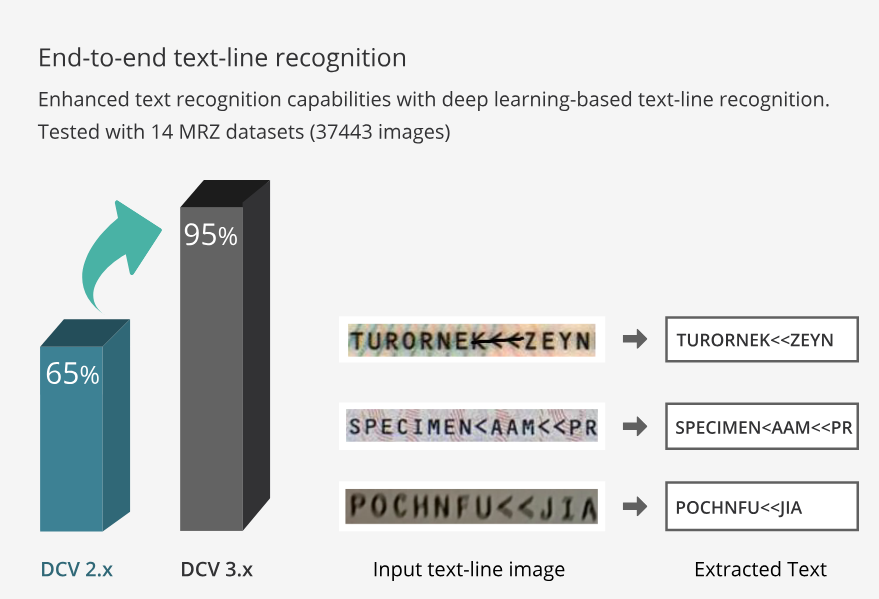
- Dynamsoft’s new deep learning MRZ model improves recognition accuracy from 65% to 95% over the previous rule-based approach on a standardized OCR-B dataset.
- The
CCaptureVisionRouterAPI manages the full MRZ detection pipeline — from live camera input through text line recognition to structured field parsing. - Model files are under 2 MB and deploy on Windows, macOS, and Linux with no runtime dependency changes.
- This approach suits passport scanning kiosks, border control systems, and any real-time identity verification workflow where high MRZ accuracy is required.
Common Developer Questions
How do I improve MRZ reading accuracy in C++ using deep learning?
Upgrade to the newer Dynamsoft MRZ model files and make sure those resources are copied beside the executable during the CMake post-build step. The improved model dramatically raises OCR-B recognition accuracy without changing the rest of the capture pipeline.
How do I parse passport and ID card MRZ fields (name, date of birth, document number) in C++?
Run CCaptureVisionRouter with the ReadPassportAndId template, then read each parsed field with GetFieldValue only after checking that its validation status is not VS_FAILED. That gives you structured values such as name, document number, nationality, and dates instead of handling raw OCR lines manually.
How do I integrate the Dynamsoft Capture Vision SDK with a live camera stream in C++?
Capture frames with a lightweight camera layer such as LiteCam, convert the frame buffer into the SDK image structure, and submit it to CCaptureVisionRouter inside your live scan loop. The same C++ app can then show preview frames and parsed MRZ results in real time.
C++ MRZ Scanner Demo Video
Prerequisites
- C++ compiler
- CMake
- Get a 30-day free trial license for Dynamsoft Capture Vision
- Dynamsoft Capture Vision C++ SDK
How the New Deep Learning Models Improve MRZ Recognition Accuracy
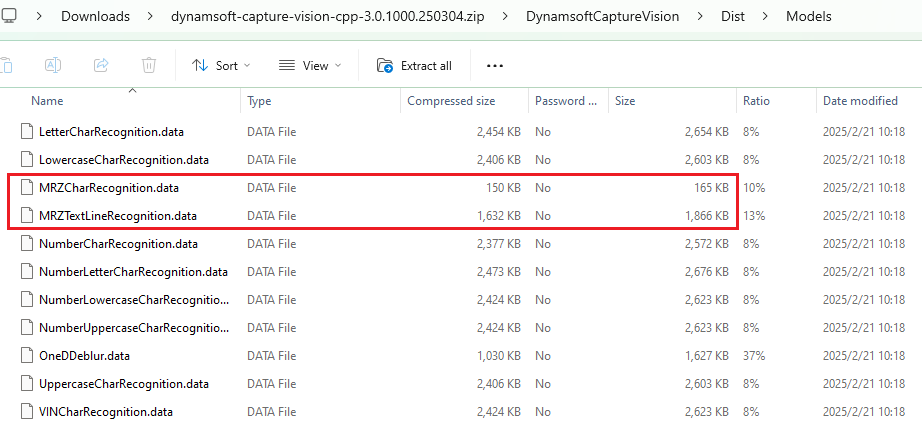
After extracting the SDK zip package, you can find the model files in the DynamsoftCaptureVision\Dist\Models folder. The model files are less than 2MB in size.
Compared to the previous version, the new model improves the recognition accuracy of Dynamsoft’s MRZ dataset from 65% to 95%, marking a significant leap in performance.
How to Configure the CMakeLists.txt File
The MRZ scanner application requires camera access. We use litecam to capture video frames.
In the CMakeLists.txt file:
-
Compile the source code file and link the litecam and Dynamsoft Capture Vision libraries. Use
CMAKE_BUILD_TYPEto determine the runtime library and link directories for Windows.cmake_minimum_required(VERSION 3.15) project(MRZScanner) if(WIN32) if (CMAKE_BUILD_TYPE STREQUAL "Debug") set(CMAKE_MSVC_RUNTIME_LIBRARY "MultiThreadedDebug") else() set(CMAKE_MSVC_RUNTIME_LIBRARY "MultiThreaded") endif() if(CMAKE_BUILD_TYPE STREQUAL "Release") link_directories(${CMAKE_CURRENT_SOURCE_DIR}/../../dist/lib/windows/release ${CMAKE_CURRENT_SOURCE_DIR}/../../../examples/10.x/sdk/platforms/win/lib) else() link_directories(${CMAKE_CURRENT_SOURCE_DIR}/../../dist/lib/windows/debug ${CMAKE_CURRENT_SOURCE_DIR}/../../../examples/10.x/sdk/platforms/win/lib) endif() set(DBR_LIBS "DynamsoftCorex64" "DynamsoftLicensex64" "DynamsoftCaptureVisionRouterx64" "DynamsoftUtilityx64") elseif(APPLE) set(CMAKE_CXX_FLAGS "-std=c++11 -O3 -Wl,-rpath,@executable_path") set(CMAKE_INSTALL_RPATH "@executable_path") link_directories( ${CMAKE_CURRENT_SOURCE_DIR}/../../dist/lib/macos ${CMAKE_CURRENT_SOURCE_DIR}/../../../examples/10.x/sdk/platforms/macos ) set(DBR_LIBS "DynamsoftCore" "DynamsoftLicense" "DynamsoftCaptureVisionRouter" "DynamsoftUtility" "pthread" ) elseif(UNIX) SET(CMAKE_CXX_FLAGS "-std=c++11 -O3 -Wl,-rpath=$ORIGIN") SET(CMAKE_INSTALL_RPATH "$ORIGIN") link_directories(${CMAKE_CURRENT_SOURCE_DIR}/../../dist/lib/linux ${CMAKE_CURRENT_SOURCE_DIR}/../../../examples/10.x/sdk/platforms/linux) set(DBR_LIBS "DynamsoftCore" "DynamsoftLicense" "DynamsoftCaptureVisionRouter" "DynamsoftUtility" pthread) endif() add_executable(${PROJECT_NAME} main.cpp) target_include_directories(${PROJECT_NAME} PUBLIC ${CMAKE_CURRENT_SOURCE_DIR}/../../dist/include ${CMAKE_CURRENT_SOURCE_DIR}/../../../examples/10.x/sdk/include) target_link_libraries(${PROJECT_NAME} litecam ${DBR_LIBS}) -
Copy resources, including templates, models, and shared libraries, to the output directory. Ensure that resource names and structures remain consistent with the Dynamsoft Capture Vision SDK.
 if(WIN32)
     if(CMAKE_BUILD_TYPE STREQUAL "Release")
         add_custom_command(TARGET ${PROJECT_NAME} POST_BUILD
         COMMAND ${CMAKE_COMMAND} -E copy_directory
         ${CMAKE_CURRENT_SOURCE_DIR}/../../dist/lib/windows/release
         $<TARGET_FILE_DIR:${PROJECT_NAME}>)
     else()
         add_custom_command(TARGET ${PROJECT_NAME} POST_BUILD
         COMMAND ${CMAKE_COMMAND} -E copy_directory
         ${CMAKE_CURRENT_SOURCE_DIR}/../../dist/lib/windows/debug
         $<TARGET_FILE_DIR:${PROJECT_NAME}>)
     endif()

     add_custom_command(TARGET ${PROJECT_NAME} POST_BUILD
     COMMAND ${CMAKE_COMMAND} -E copy_directory
     ${CMAKE_CURRENT_SOURCE_DIR}/../../../examples/10.x/sdk/platforms/win/bin/
     $<TARGET_FILE_DIR:${PROJECT_NAME}>)
 elseif(APPLE)
     add_custom_command(TARGET ${PROJECT_NAME} POST_BUILD
         COMMAND ${CMAKE_COMMAND} -E copy_directory
         ${CMAKE_CURRENT_SOURCE_DIR}/../../../examples/10.x/sdk/platforms/macos
         $<TARGET_FILE_DIR:${PROJECT_NAME}>
     )
 elseif(UNIX)
     add_custom_command(TARGET ${PROJECT_NAME} POST_BUILD
     COMMAND ${CMAKE_COMMAND} -E copy_directory
     ${CMAKE_CURRENT_SOURCE_DIR}/../../../examples/10.x/sdk/platforms/linux/
     $<TARGET_FILE_DIR:${PROJECT_NAME}>)
 endif()


 add_custom_command(TARGET ${PROJECT_NAME} POST_BUILD
 COMMAND ${CMAKE_COMMAND} -E make_directory $<TARGET_FILE_DIR:${PROJECT_NAME}>/Templates
 COMMAND ${CMAKE_COMMAND} -E copy_directory
 ${CMAKE_CURRENT_SOURCE_DIR}/../../../examples/10.x/sdk/Templates
 $<TARGET_FILE_DIR:${PROJECT_NAME}>/Templates)

 add_custom_command(TARGET ${PROJECT_NAME} POST_BUILD
 COMMAND ${CMAKE_COMMAND} -E make_directory $<TARGET_FILE_DIR:${PROJECT_NAME}>/Models
 COMMAND ${CMAKE_COMMAND} -E copy_directory
 ${CMAKE_CURRENT_SOURCE_DIR}/../../../examples/10.x/sdk/Models
 $<TARGET_FILE_DIR:${PROJECT_NAME}>/Models)

 add_custom_command(TARGET ${PROJECT_NAME} POST_BUILD
 COMMAND ${CMAKE_COMMAND} -E make_directory $<TARGET_FILE_DIR:${PROJECT_NAME}>/ParserResources
 COMMAND ${CMAKE_COMMAND} -E copy_directory
 ${CMAKE_CURRENT_SOURCE_DIR}/../../../examples/10.x/sdk/ParserResources
 $<TARGET_FILE_DIR:${PROJECT_NAME}>/ParserResources)

 add_custom_command(TARGET ${PROJECT_NAME} POST_BUILD
 COMMAND ${CMAKE_COMMAND} -E copy
 ${CMAKE_CURRENT_SOURCE_DIR}/../../../examples/10.x/sdk/ConfusableChars.data
 $<TARGET_FILE_DIR:${PROJECT_NAME}>/ConfusableChars.data)

 add_custom_command(TARGET ${PROJECT_NAME} POST_BUILD
 COMMAND ${CMAKE_COMMAND} -E copy
 ${CMAKE_CURRENT_SOURCE_DIR}/../../../examples/10.x/sdk/OverlappingChars.data
 $<TARGET_FILE_DIR:${PROJECT_NAME}>/OverlappingChars.data)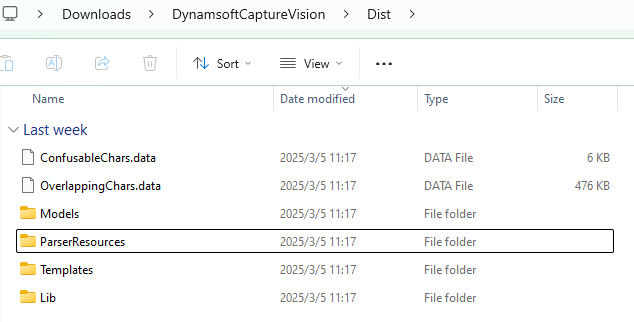
Steps to Implement the MRZ Scanner in C++
In the following steps, we will gradually complete the main.cpp file to implement the MRZ scanner.
Step 1: Include Header Files
#include <iostream>
#include <deque>
#include <vector>
#include <mutex>
#include <string>
#include "DynamsoftCaptureVisionRouter.h"
#include "DynamsoftUtility.h"
#include "Camera.h"
#include "CameraPreview.h"

using namespace std;
using namespace dynamsoft::license;
using namespace dynamsoft::dlr;
using namespace dynamsoft::cvr;
using namespace dynamsoft::utility;
using namespace dynamsoft::basic_structures;
using namespace dynamsoft::dcp;
Step 2: Initialize the Image Processing Engine
-
Set the license key with your own.
int iRet = -1; char szErrorMsg[256]; iRet = CLicenseManager::InitLicense("LICENSE-KEY", szErrorMsg, 256); if (iRet != EC_OK) { std::cout << szErrorMsg << std::endl; } -
Instantiate
CCaptureVisionRouter,MyVideoFetcher, andCCapturedResultReceiver.CCaptureVisionRoutermanages the workflow of image processing.MyVideoFetcheris a subclass ofCImageSourceAdapterand is used to fetch video frames.CCapturedResultReceiveris a subclass ofCCapturedResultReceiverand is used to receive MRZ recognition results.class MyCapturedResultReceiver : public CCapturedResultReceiver { public: virtual void OnCapturedResultReceived(CCapturedResult *capturedResult) override { // TODO: process the MRZ text } }; class MyVideoFetcher : public CImageSourceAdapter { public: MyVideoFetcher() {} ~MyVideoFetcher() {} bool HasNextImageToFetch() const override { return true; } void MyAddImageToBuffer(const CImageData *img, bool bClone = true) { AddImageToBuffer(img, bClone); } }; int main() { int errorCode = 0; char errorMsg[512] = {0}; CCaptureVisionRouter *cvr = new CCaptureVisionRouter; MyVideoFetcher *fetcher = new MyVideoFetcher(); fetcher->SetMaxImageCount(4); fetcher->SetBufferOverflowProtectionMode(BOPM_UPDATE); fetcher->SetColourChannelUsageType(CCUT_AUTO); cvr->SetInput(fetcher); CCapturedResultReceiver *capturedReceiver = new MyCapturedResultReceiver; cvr->AddResultReceiver(capturedReceiver); errorCode = cvr->StartCapturing("ReadPassportAndId", false, errorMsg, 512); if (errorCode != EC_OK) { std::cout << "error:" << errorMsg << std::endl; return -1; } }
Step 3: Set Up the Camera Stream and Capture Frames
-
Create a
Cameraobject and capture video frames in a loop.Camera camera; if (camera.Open(0)) { CameraWindow window(camera.frameWidth, camera.frameHeight, "Camera Stream"); if (!window.Create()) { std::cerr << "Failed to create window." << std::endl; return -1; } window.Show(); CameraWindow::Color textColor = {255, 0, 0}; while (window.WaitKey('q')) { FrameData frame = camera.CaptureFrame(); if (frame.rgbData) { window.ShowFrame(frame.rgbData, frame.width, frame.height); // Process the frame ReleaseFrame(frame); } } camera.Release(); } -
Append the frames to the
MyVideoFetcherobject for MRZ recognition.if (frame.rgbData) { window.ShowFrame(frame.rgbData, frame.width, frame.height); CImageData data(frame.size, frame.rgbData, frame.width, frame.height, frame.width * 3, IPF_RGB_888, 0, 0); fetcher->MyAddImageToBuffer(&data); }
Step 4: Process MRZ Recognition Results in the Callback
-
The
OnCapturedResultReceivedcallback function is triggered when the MRZ recognition process is completed. The MRZ text is stored in theCCapturedResultobject.class Point { public: int x; int y; Point(int x, int y) : x(x), y(y) {} }; struct TextResult { int id; MRZResult info; std::vector<Point> textLinePoints; }; std::vector<TextResult> textResults; std::mutex textResultsMutex; class MyCapturedResultReceiver : public CCapturedResultReceiver { public: virtual void OnCapturedResultReceived(CCapturedResult *capturedResult) override { std::lock_guard<std::mutex> lock(textResultsMutex); textResults.clear(); CRecognizedTextLinesResult *textLineResult = capturedResult->GetRecognizedTextLinesResult(); if (textLineResult == nullptr) { return; } int lCount = textLineResult->GetItemsCount(); for (int li = 0; li < lCount; ++li) { TextResult textResult; const CTextLineResultItem *textLine = textLineResult->GetItem(li); CPoint *points = textLine->GetLocation().points; textResult.textLinePoints.push_back(Point(points[0][0], points[0][1])); textResult.textLinePoints.push_back(Point(points[1][0], points[1][1])); textResult.textLinePoints.push_back(Point(points[2][0], points[2][1])); textResult.textLinePoints.push_back(Point(points[3][0], points[3][1])); const CParsedResultItem *item = capturedResult->GetParsedResult()->GetItem(li); MRZResult mrzResult; mrzResult.FromParsedResultItem(item); textResult.info = mrzResult; textResults.push_back(textResult); } } }; -
The
FromParsedResultItem()function extracts standardized information such as document type, issuing country, document number, name, nationality, date of birth, gender, and expiry date from the MRZ text.class MRZResult { public: string docId; string docType; string nationality; string issuer; string dateOfBirth; string dateOfExpiry; string gender; string surname; string givenname; vector<string> rawText; MRZResult FromParsedResultItem(const CParsedResultItem *item) { docType = item->GetCodeType(); if (docType == "MRTD_TD3_PASSPORT") { if (item->GetFieldValidationStatus("passportNumber") != VS_FAILED && item->GetFieldValue("passportNumber") != NULL) { docId = item->GetFieldValue("passportNumber"); } } else if (item->GetFieldValidationStatus("documentNumber") != VS_FAILED && item->GetFieldValue("documentNumber") != NULL) { docId = item->GetFieldValue("documentNumber"); } string line; if (docType == "MRTD_TD1_ID") { if (item->GetFieldValue("line1") != NULL) { line = item->GetFieldValue("line1"); if (item->GetFieldValidationStatus("line1") == VS_FAILED) { line += ", Validation Failed"; } rawText.push_back(line); } if (item->GetFieldValue("line2") != NULL) { line = item->GetFieldValue("line2"); if (item->GetFieldValidationStatus("line2") == VS_FAILED) { line += ", Validation Failed"; } rawText.push_back(line); } if (item->GetFieldValue("line3") != NULL) { line = item->GetFieldValue("line3"); if (item->GetFieldValidationStatus("line3") == VS_FAILED) { line += ", Validation Failed"; } rawText.push_back(line); } } else { if (item->GetFieldValue("line1") != NULL) { line = item->GetFieldValue("line1"); if (item->GetFieldValidationStatus("line1") == VS_FAILED) { line += ", Validation Failed"; } rawText.push_back(line); } if (item->GetFieldValue("line2") != NULL) { line = item->GetFieldValue("line2"); if (item->GetFieldValidationStatus("line2") == VS_FAILED) { line += ", Validation Failed"; } rawText.push_back(line); } } if (item->GetFieldValidationStatus("nationality") != VS_FAILED && item->GetFieldValue("nationality") != NULL) { nationality = item->GetFieldValue("nationality"); } if (item->GetFieldValidationStatus("issuingState") != VS_FAILED && item->GetFieldValue("issuingState") != NULL) { issuer = item->GetFieldValue("issuingState"); } if (item->GetFieldValidationStatus("dateOfBirth") != VS_FAILED && item->GetFieldValue("dateOfBirth") != NULL) { dateOfBirth = item->GetFieldValue("dateOfBirth"); } if (item->GetFieldValidationStatus("dateOfExpiry") != VS_FAILED && item->GetFieldValue("dateOfExpiry") != NULL) { dateOfExpiry = item->GetFieldValue("dateOfExpiry"); } if (item->GetFieldValidationStatus("sex") != VS_FAILED && item->GetFieldValue("sex") != NULL) { gender = item->GetFieldValue("sex"); } if (item->GetFieldValidationStatus("primaryIdentifier") != VS_FAILED && item->GetFieldValue("primaryIdentifier") != NULL) { surname = item->GetFieldValue("primaryIdentifier"); } if (item->GetFieldValidationStatus("secondaryIdentifier") != VS_FAILED && item->GetFieldValue("secondaryIdentifier") != NULL) { givenname = item->GetFieldValue("secondaryIdentifier"); } return *this; } string ToString() { string msg = "Raw Text:\n"; for (size_t idx = 0; idx < rawText.size(); ++idx) { msg += "\tLine " + to_string(idx + 1) + ": " + rawText[idx] + "\n"; } msg += "Parsed Information:\n"; msg += "\tDocument Type: " + docType + "\n"; msg += "\tDocument ID: " + docId + "\n"; msg += "\tSurname: " + surname + "\n"; msg += "\tGiven Name: " + givenname + "\n"; msg += "\tNationality: " + nationality + "\n"; msg += "\tIssuing Country or Organization: " + issuer + "\n"; msg += "\tGender: " + gender + "\n"; msg += "\tDate of Birth(YYMMDD): " + dateOfBirth + "\n"; msg += "\tExpiration Date(YYMMDD): " + dateOfExpiry + "\n"; return msg; } };
Step 5: Overlay MRZ Detection Results on the Camera Preview
{
    std::lock_guard<std::mutex> lock(textResultsMutex);
    for (const auto &result : textResults)
    {
        if (!result.textLinePoints.empty())
        {
            std::vector<std::pair<int, int>> corners = {{result.textLinePoints[0].x, result.textLinePoints[0].y},
                                                        {result.textLinePoints[1].x, result.textLinePoints[1].y},
                                                        {result.textLinePoints[2].x, result.textLinePoints[2].y},
                                                        {result.textLinePoints[3].x, result.textLinePoints[3].y}};
            window.DrawContour(corners);

            int x = 20;
            int y = 40;

            MRZResult mrzResult = result.info;
            string msg = "Document Type: " + mrzResult.docType;
            window.DrawText(msg, x, y, 24, textColor);
            y += 20;
            msg = "Document ID: " + mrzResult.docId;
            window.DrawText(msg, x, y, 24, textColor);
            y += 20;
            msg = "Surname: " + mrzResult.surname;
            window.DrawText(msg, x, y, 24, textColor);
            y += 20;
            msg = "Given Name: " + mrzResult.givenname;
            window.DrawText(msg, x, y, 24, textColor);
            y += 20;
            msg = "Nationality: " + mrzResult.nationality;
            window.DrawText(msg, x, y, 24, textColor);
            y += 20;
            msg = "Issuing Country or Organization: " + mrzResult.issuer;
            window.DrawText(msg, x, y, 24, textColor);
            y += 20;
            msg = "Gender: " + mrzResult.gender;
            window.DrawText(msg, x, y, 24, textColor);
            y += 20;
            msg = "Date of Birth(YYMMDD): " + mrzResult.dateOfBirth;
            window.DrawText(msg, x, y, 24, textColor);
            y += 20;
            msg = "Expiration Date(YYMMDD): " + mrzResult.dateOfExpiry;
        }
    }
}
Step 6: Build and Run the MRZ Scanner
-
Create a build directory:
mkdir build cd build -
Configure with CMake and build:
 cmake ..
 cmake --build .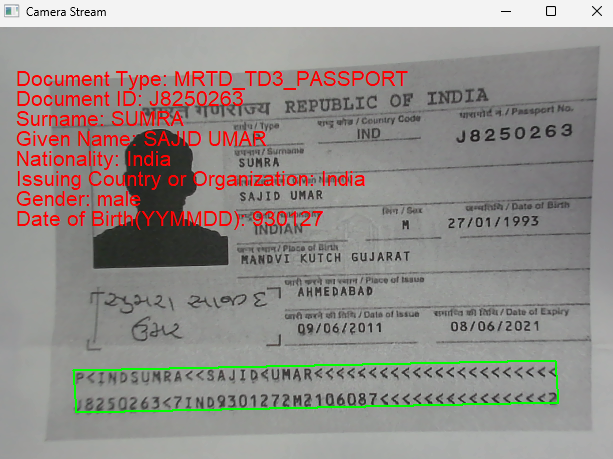
Common Issues & Edge Cases
- License initialization fails at startup: Ensure
CLicenseManager::InitLicenseis called before anyCCaptureVisionRoutermethod. On Linux, verify that the shared libraries in theplatforms/linuxdirectory are on the loader path (setLD_LIBRARY_PATHor use the$ORIGINrpath configured in the CMakeLists). - MRZ not detected on worn or laminated documents: The deep learning model handles OCR-B degradation well, but extreme physical damage may still cause missed detections. Increase frame rate or add a retry prompt asking the user to reposition the document.
- Parsed fields return empty strings: Field extraction via
GetFieldValueonly succeeds whenGetFieldValidationStatusdoes not returnVS_FAILED. If a field is consistently empty, check that the correct template (ReadPassportAndId) is active and that theParserResourcesdirectory was copied to the output folder as part of the CMake post-build step.