


Dynamsoft Barcode Reader JS v11.4: The Foundational API Is Now the Primary API
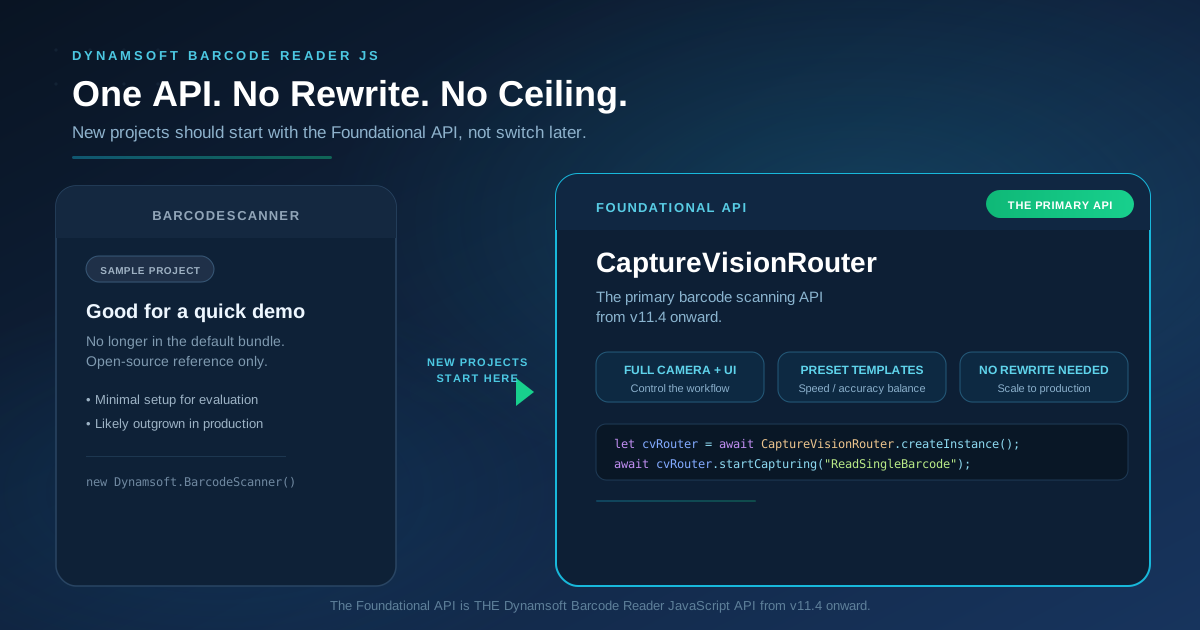
Starting with Dynamsoft Barcode Reader JavaScript Edition v11.4, the Foundational API built on CaptureVisionRouter is the primary and recommended barcode scanning API. BarcodeScanner remains available in v11.x for backward compatibility but is no longer part of the default bundle and will not receive new features.
This post explains what changed, why it matters, and how to get started. Try the Foundational API in your browser right now — no install required.
Key Takeaways
- The Foundational API (CaptureVisionRouter) is now the primary and recommended barcode scanning API in the Dynamsoft Barcode Reader JavaScript SDK — one API from first experiment to production, with no ceiling and no rewrite
- BarcodeScanner is no longer part of the default bundle — it remains available in v11.x for backward compatibility and will be maintained as an open-source sample project on GitHub, but it will not receive new features
- The Foundational API gives you access to the full Dynamsoft Capture Vision architecture, including label recognition (DLR), document normalization, zonal OCR, code parsing, camera controls, and more
Common Developer Questions
Why did Dynamsoft consolidate to a single API?
The Foundational API and BarcodeScanner always shared the same underlying engine. Having two entry points forced developers to choose between simplicity and capability — and those who started with BarcodeScanner often had to rebuild when requirements grew. A single API eliminates that fork and ensures every project starts on the path that scales to production.
What happens to BarcodeScanner?
BarcodeScanner is no longer included in the default dynamsoft-barcode-reader-bundle package. It remains available in v11.x for backward compatibility and will be maintained as an open-source sample project on GitHub. Existing BarcodeScanner code continues to work, but new development should use the Foundational API exclusively — it will not receive new features going forward.
Is the Foundational API harder to use?
The setup is straightforward — about 20 lines to a working scanner. The guide below walks through every line. Most developers are scanning within minutes, and everything you write carries directly into production — nothing to throw away later.
Can I still use BarcodeScanner for new projects?
We strongly recommend starting with the Foundational API. BarcodeScanner is no longer part of the default bundle and will not receive new features. The Foundational API is the only actively developed API for Dynamsoft Barcode Reader JavaScript Edition going forward — it scales with your requirements instead of against them.
What Changed and Why
Previously, Dynamsoft Barcode Reader JS shipped two parallel API surfaces:
| Foundational API (CaptureVisionRouter) | BarcodeScanner (RTU Wrapper) | |
|---|---|---|
| Goal | Full control over the scanning pipeline | Minimal code to scan a barcode |
| Lines of code to “Hello World” | ~20 | ~3 |
| Customize UI, camera, result flow | Full | Limited |
| Use other DCV modules (DLR, DDN) | Yes | No |
| Production-grade flexibility | Unlimited | Constrained |
The BarcodeScanner wrapper was originally designed to give evaluators the fastest possible start — scan a barcode in a single line of JavaScript. In practice, however, most projects outgrew it:
- Custom UI requirements — production apps need branded viewfinders, non-default scan regions, or framework-specific component integration.
- Advanced scan logic — multi-barcode deduplication, cross-frame verification, conditional scanning based on barcode type or content.
- Multi-capability workflows — combining barcode reading with label recognition (DLR) or document normalization (DDN) under one pipeline.
By consolidating on the Foundational API from v11.4 onward, every project starts on the path that already supports these advanced scenarios — from first experiment to production without hitting a wall.
Side-by-Side: BarcodeScanner vs. Foundational API
To illustrate why the consolidation makes sense, here is how the two APIs compare. BarcodeScanner code below is shown for reference only — it is no longer part of the default bundle.
BarcodeScanner — Scan a barcode in three lines (reference only)
<!DOCTYPE html>
<html>
<head>
    <title>Barcode Scanner</title>
    <script src="https://cdn.jsdelivr.net/npm/dynamsoft-barcode-reader-bundle@11.4.xxxx/dist/dbr.bundle.js"></script>
</head>
<body>
    <script>
        new Dynamsoft.BarcodeScanner({
            license: "YOUR_LICENSE_KEY_HERE"
        }).launch().then(result => alert(result.barcodeResults[0].text));
    </script>
</body>
</html>
This was compact and useful for a quick proof-of-concept, but it offered no path to production-grade customization without a full rewrite.
Foundational API — The only API you need
<!DOCTYPE html>
<html>
<body>
<div id="camera-view-container" style="width: 100%; height: 60vh"></div>
<textarea id="results" style="width: 100%; min-height: 10vh; font-size: 3vmin; overflow: auto" disabled></textarea>
<script src="https://cdn.jsdelivr.net/npm/dynamsoft-barcode-reader-bundle@11.4.xxxx/dist/dbr.bundle.js"></script>
<script>
  Dynamsoft.License.LicenseManager.initLicense("YOUR_LICENSE_KEY_HERE");
  Dynamsoft.Core.CoreModule.loadWasm();
  (async () => {
    let cvRouter = await Dynamsoft.CVR.CaptureVisionRouter.createInstance();

    let cameraView = await Dynamsoft.DCE.CameraView.createInstance();
    let cameraEnhancer = await Dynamsoft.DCE.CameraEnhancer.createInstance(cameraView);
    document.querySelector("#camera-view-container").append(cameraView.getUIElement());
    cvRouter.setInput(cameraEnhancer);

    const resultsContainer = document.querySelector("#results");
    cvRouter.addResultReceiver({ onDecodedBarcodesReceived: (result) => {
      if (result.barcodeResultItems?.length) {
        resultsContainer.textContent = '';
        for (let item of result.barcodeResultItems) {
          resultsContainer.textContent += `${item.formatString}: ${item.text}\n\n`;
        }
      }
    }});

    let filter = new Dynamsoft.Utility.MultiFrameResultCrossFilter();
    filter.enableResultCrossVerification("barcode", true);
    filter.enableResultDeduplication("barcode", true);
    await cvRouter.addResultFilter(filter);

    await cameraEnhancer.open();
    await cvRouter.startCapturing("ReadSingleBarcode");
  })();
</script>
</body>
</html>
A few more lines of setup, but this is the complete, production-grade API:
- Full camera control via CameraEnhancer — switch cameras, set resolution, define scan regions
- Built-in result deduplication and cross-frame verification — production-ready from day one
- Preset templates — swap
"ReadSingleBarcode"for"ReadBarcodes_SpeedFirst","ReadBarcodes_ReadRateFirst", or other presets without rewriting any logic - Extensible pipeline — add label recognition or document normalization to the same
cvRouterlater, with zero refactoring
What the Foundational API Unlocks
Preset templates for common scenarios
Instead of configuring every parameter, choose a template that matches your use case:
| Template Name | Description |
|---|---|
ReadSingleBarcode |
Optimized for scanning one barcode quickly |
ReadBarcodes_SpeedFirst |
Prioritizes decoding speed for multiple barcodes |
ReadBarcodes_ReadRateFirst |
Maximizes the number of barcodes detected per frame |
ReadBarcodes_Balance |
Balances speed and read rate |
ReadDenseBarcodes |
Tuned for high-density barcode images |
ReadDistantBarcodes |
Optimized for barcodes far from the camera |
Switching templates is a single-line change:
await cvRouter.startCapturing("ReadBarcodes_ReadRateFirst");
Fine-grained settings
Need to restrict scanning to QR codes only? Three lines:
let settings = await cvRouter.getSimplifiedSettings("ReadSingleBarcode");
settings.barcodeSettings.barcodeFormatIds = Dynamsoft.DBR.EnumBarcodeFormat.BF_QR_CODE;
await cvRouter.updateSettings("ReadSingleBarcode", settings);
Scan region control
Limit decoding to the center of the frame to improve speed:
cameraEnhancer.setScanRegion({
  x: 25, y: 25,
  width: 50, height: 50,
  isMeasuredInPercentage: true,
});
Audio and haptic feedback
cvRouter.addResultReceiver({
  onDecodedBarcodesReceived: (result) => {
    if (result.barcodeResultItems.length > 0) {
      Dynamsoft.DCE.Feedback.beep();
    }
  }
});
Multi-capability pipelines
Because CaptureVisionRouter is the shared backbone of all Dynamsoft Capture Vision products, the same cvRouter instance can run barcode reading, label recognition, and document normalization — independently or together. You invest in one architecture.
What Existing BarcodeScanner Users Should Know
- Your existing code still works. BarcodeScanner code continues to function through the v11.x release line.
- BarcodeScanner is no longer in the default bundle. It will be repositioned as an open-source wrapper built on top of the core SDK in version 12, coming later this year, rather than remaining part of the core product itself.
- Plan your migration. When you upgrade to v12.x and beyond, the Foundational API will be the only supported path. We recommend migrating at your own pace during the v11.x cycle so the transition is smooth.
Get Started
- Try the live demo — the online barcode scanner, built with CaptureVisionRouter, runs in your browser with no setup.
- Read the guide — The Foundational API user guide walks through every step from including the SDK to customizing the UI.
- Grab a free trial license — Start a 30-day trial to test with your own data and your own use case.
The Foundational API is the Dynamsoft Barcode Reader JavaScript API — one API from first experiment to production, with no ceiling and no rewrite.