


How to Build a Windows Desktop App for Barcode, Document, and MRZ Detection with C# and .NET WinForms
The Dynamsoft Capture Vision Bundle is a single NuGet package that bundles three powerful vision capabilities: Dynamsoft Barcode Reader (DBR), Dynamsoft Document Normalizer (DDN), and Dynamsoft Label Recognizer (DLR) with MRZ parsing support. All capabilities are exposed through a single unified CaptureVisionRouter API. In this tutorial, we will build a .NET Windows Forms desktop application that lets users scan barcodes and QR codes, detect and normalize document pages, and extract MRZ data from passports, visas, and ID cards — all in real time from a webcam or from local image files.
What you’ll build: A .NET WinForms desktop app that scans barcodes, detects and normalizes documents, and extracts MRZ data from local files or a webcam using one CaptureVisionRouter workflow.
Key Takeaways
- One Dynamsoft Capture Vision bundle can cover barcode reading, document normalization, and MRZ parsing from a single WinForms application.
- OpenCvSharp provides the desktop camera and image plumbing, while
CaptureVisionRouterhandles the actual vision tasks. - Switching between DBR, MRZ, and DDN modes is mainly a matter of selecting the correct preset template.
- The same UI can support both file-based processing and live webcam scanning with only small changes in the processing path.
Common Developer Questions
How do I build one WinForms app that supports barcode, document, and MRZ detection?
Install the unified Dynamsoft Capture Vision NuGet bundle, initialize the license once, and keep one CaptureVisionRouter instance that is reused across the different detection modes. This tutorial then maps the active WinForms radio button to the matching capture template.
How do I switch between barcode, MRZ, and document workflows in a C# desktop scanner?
Track the current mode with an enum and choose the matching template when the user loads a file or starts the webcam. The article uses that pattern so the same window can rerun detection against the current image whenever the mode changes.
How do I connect a webcam feed to Dynamsoft Capture Vision in WinForms?
Open the camera with OpenCvSharp, pull frames from the VideoCapture, and pass those frames into the router while drawing the returned overlays and results back into the form controls. That gives a live desktop scanning loop without changing the underlying detection APIs.
Development Environment
- Windows 10 / 11
- Visual Studio 2022 or the .NET SDK with any editor
NuGet Packages
Add the following packages to your .csproj file:
OpenCV (camera access and image rendering)
- OpenCvSharp4 — managed OpenCV bindings
- OpenCvSharp4.Extensions —
BitmapConverterhelper - OpenCvSharp4.runtime.win — native Windows binaries
Dynamsoft Capture Vision Bundle
- Dynamsoft.DotNet.CaptureVision.Bundle — barcode reading (DBR), document detection and normalization (DDN), and MRZ recognition with parsing (DLR + DCP), all in one package.
A 30-day free trial license is available at the Dynamsoft Customer Portal. A single license key covers all three capabilities.
Create a Windows Forms Project
In Visual Studio 2022 create a new Windows Forms App project targeting .NET (not .NET Framework). Then update the .csproj to add the required packages:
<Project Sdk="Microsoft.NET.Sdk">
  <PropertyGroup>
    <OutputType>WinExe</OutputType>
    <TargetFramework>net8.0-windows</TargetFramework>
    <Nullable>enable</Nullable>
    <UseWindowsForms>true</UseWindowsForms>
    <ImplicitUsings>enable</ImplicitUsings>
  </PropertyGroup>
  <ItemGroup>
    <PackageReference Include="Dynamsoft.DotNet.CaptureVision.Bundle" Version="3.4.1000" />
    <PackageReference Include="OpenCvSharp4" Version="4.6.0.20220608" />
  </ItemGroup>
  <ItemGroup>
    <PackageReference Include="OpenCvSharp4.Extensions" Version="4.5.5.20211231" />
    <PackageReference Include="OpenCvSharp4.runtime.win" Version="4.6.0.20220608" />
  </ItemGroup>
</Project>
Windows Forms UI Design
The UI contains the following key controls:
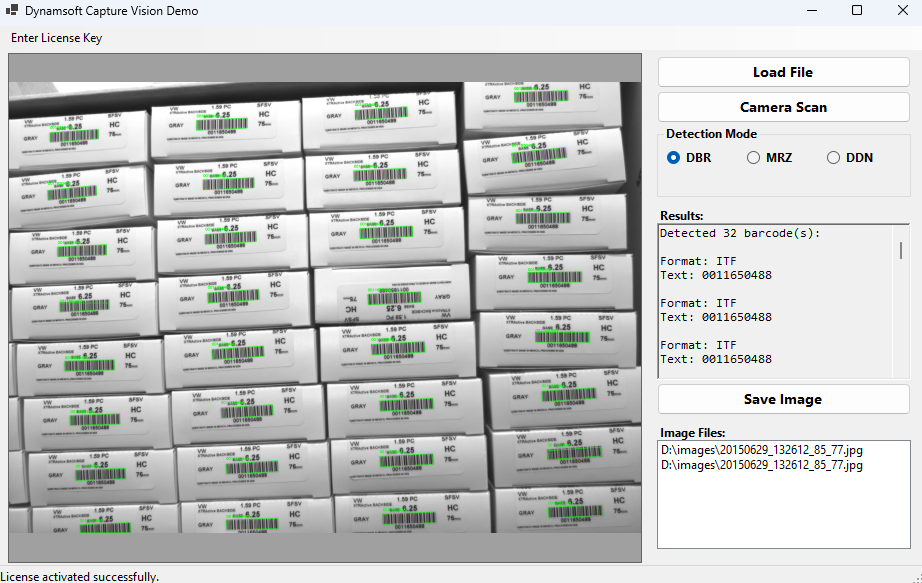
PictureBox— occupies the left side of the window; displays the live camera feed or the loaded image with detection overlays drawn on top.GroupBoxwith radio buttons — selects the active detection mode: DBR (barcode), MRZ, or DDN (document).Buttoncontrols — Load File opens an image, Camera Scan toggles the webcam, and Save Image exports the annotated frame.ListBox— stores recently loaded files; supports drag-and-drop for batch loading.RichTextBox— displays decoded barcode text, parsed MRZ fields, or document detection output.ToolStripStatusLabel— shows license activation status at the bottom of the window.ToolStripMenuItem— opens an input dialog for entering a new license key at runtime.
Initialize the Dynamsoft Capture Vision SDK
Add the required using directives at the top of Form1.cs:
using Dynamsoft.CVR;
using Dynamsoft.Core;
using Dynamsoft.DBR;
using Dynamsoft.DDN;
using Dynamsoft.DCP;
using Dynamsoft.DLR;
using Dynamsoft.License;
using Dynamsoft.Utility;
In the Form1 constructor, activate the license and create a CaptureVisionRouter instance. LicenseManager.InitLicense unlocks all capabilities at once:
public Form1()
{
    InitializeComponent();
    FormClosing += new FormClosingEventHandler(Form1_Closing);

    // Activate license — one key covers DBR, DDN, and DLR/MRZ
    string license = "YOUR-LICENSE-KEY";
    int errorCode = LicenseManager.InitLicense(license, out string errorMsg);
    if (errorCode != (int)EnumErrorCode.EC_OK && errorCode != (int)EnumErrorCode.EC_LICENSE_WARNING)
    {
        toolStripStatusLabel1.Text = $"License error: {errorMsg}";
    }
    else
    {
        toolStripStatusLabel1.Text = "License activated successfully.";
    }

    // Single router handles barcode, document, and MRZ processing
    cvRouter = new CaptureVisionRouter();

    // Open the default webcam (index 0)
    capture = new VideoCapture(0);
    isCapturing = false;
}

protected override void OnFormClosing(FormClosingEventArgs e)
{
    base.OnFormClosing(e);
    cvRouter?.Dispose();
}
Detection Mode Selection
A simple enum tracks which detection mode is active. Radio-button CheckedChanged events update it:
private enum DetectionMode { DBR, MRZ, DDN }
private DetectionMode currentMode = DetectionMode.DBR;

private void radioButton_CheckedChanged(object sender, EventArgs e)
{
    RadioButton? rb = sender as RadioButton;
    if (rb != null && rb.Checked)
    {
        if (rb == radioButtonDbr)      currentMode = DetectionMode.DBR;
        else if (rb == radioButtonMrz) currentMode = DetectionMode.MRZ;
        else if (rb == radioButtonDdn) currentMode = DetectionMode.DDN;

        // Re-run detection on the current file when mode changes
        if (!isCapturing && !string.IsNullOrEmpty(_currentFilename))
            DetectFile(_currentFilename);
    }
}
GetTemplate() maps each mode to a built-in Capture Vision preset template:
private string GetTemplate() => currentMode switch
{
    DetectionMode.DBR => PresetTemplate.PT_READ_BARCODES,
    DetectionMode.MRZ => "ReadPassportAndId",
    DetectionMode.DDN => PresetTemplate.PT_DETECT_AND_NORMALIZE_DOCUMENT,
    _                 => PresetTemplate.PT_READ_BARCODES
};
Load Image Files from Disk
Use OpenFileDialog to let the user pick a file; a ListBox holds file history. Drag-and-drop is also supported:
private void buttonFile_Click(object sender, EventArgs e)
{
    StopScan();
    using OpenFileDialog dlg = new OpenFileDialog
    {
        Title = "Open Image",
        Filter = "Image files (*.bmp, *.jpg, *.png) | *.bmp; *.jpg; *.png"
    };
    if (dlg.ShowDialog() == DialogResult.OK)
    {
        listBox1.Items.Add(dlg.FileName);
        _currentFilename = dlg.FileName;
        DetectFile(dlg.FileName);
    }
}

private void listBox1_DragEnter(object sender, DragEventArgs e)
{
    if (e.Data != null && e.Data.GetDataPresent(DataFormats.FileDrop))
        e.Effect = DragDropEffects.Copy;
}

private void listBox1_DragDrop(object sender, DragEventArgs e)
{
    if (e.Data != null && e.Data.GetDataPresent(DataFormats.FileDrop))
    {
        string[]? files = (string[]?)e.Data.GetData(DataFormats.FileDrop);
        if (files != null)
            foreach (string file in files)
                listBox1.Items.Add(file);
    }
}
Process Image Files
DetectFile loads the image with OpenCV and delegates to ProcessFile, which calls CaptureVisionRouter.CaptureMultiPages. CaptureMultiPages handles multi-page input (e.g., PDFs) and returns one CapturedResult per page — for single images we use the first result:
private void DetectFile(string filename)
{
    richTextBoxInfo.Text = "";
    try
    {
        _mat = Cv2.ImRead(filename, ImreadModes.Color);
        ProcessFile(filename, _mat);
    }
    catch (Exception ex)
    {
        MessageBox.Show(ex.Message);
    }
}

private void ProcessFile(string filename, Mat mat)
{
    Mat canvas = new Mat();
    mat.CopyTo(canvas);

    CapturedResult[] results = cvRouter.CaptureMultiPages(filename, GetTemplate());
    if (results != null && results.Length > 0)
        ProcessResult(results[0], mat, canvas, true);

    pictureBoxSrc.Image = BitmapConverter.ToBitmap(canvas);
}
Live Camera Detection
A dedicated worker thread reads frames from the webcam with OpenCV and feeds them to CaptureVisionRouter.Capture as JPEG bytes:
private void StartScan()
{
    buttonCamera.Text = "Stop";
    isCapturing = true;
    thread = new Thread(new ThreadStart(FrameCallback));
    thread.Start();
}

private void StopScan()
{
    buttonCamera.Text = "Camera Scan";
    isCapturing = false;
    if (thread != null) thread.Join();
}

private void FrameCallback()
{
    while (isCapturing)
    {
        capture.Read(_mat);
        if (_mat.Empty()) continue;

        Mat canvas = new Mat();
        _mat.CopyTo(canvas);

        try
        {
            byte[] jpegBytes = GetJpegBytes(_mat);
            CapturedResult result = cvRouter.Capture(jpegBytes, GetTemplate());
            ProcessResult(result, _mat, canvas, false);
        }
        catch (Exception ex)
        {
            Debug.WriteLine($"Error: {ex.Message}");
        }

        if (!canvas.Empty())
        {
            Bitmap bmp = BitmapConverter.ToBitmap(canvas);
            pictureBoxSrc.Image = bmp;
        }
    }
}

private byte[] GetJpegBytes(Mat mat)
{
    Cv2.ImEncode(".jpg", mat, out byte[] bytes);
    return bytes;
}
Route Results to the Correct Handler
A central ProcessResult method dispatches to mode-specific handlers:
private void ProcessResult(CapturedResult result, Mat originalMat, Mat canvas, bool isFileMode)
{
    if (result.GetErrorCode() != (int)EnumErrorCode.EC_OK &&
        result.GetErrorCode() != (int)EnumErrorCode.EC_UNSUPPORTED_JSON_KEY_WARNING)
    {
        this.BeginInvoke((MethodInvoker)delegate
        {
            richTextBoxInfo.Text = $"Error: {result.GetErrorCode()}, {result.GetErrorString()}";
        });
        return;
    }

    switch (currentMode)
    {
        case DetectionMode.DBR: ProcessBarcodeResult(result, canvas, isFileMode);          break;
        case DetectionMode.MRZ: ProcessMrzResult(result, canvas, isFileMode);              break;
        case DetectionMode.DDN: ProcessDocumentResult(result, originalMat, canvas, isFileMode); break;
    }
}
Read Barcodes and QR Codes
GetDecodedBarcodesResult() returns all detected barcodes. For each BarcodeResultItem, the text value, format string, and quadrilateral location are retrieved. DrawQuadrilateral draws the overlay on the canvas using OpenCV:
private void ProcessBarcodeResult(CapturedResult result, Mat canvas, bool isFileMode)
{
    DecodedBarcodesResult? barcodesResult = result.GetDecodedBarcodesResult();
    BarcodeResultItem[]? items = barcodesResult?.GetItems();

    if (items == null || items.Length == 0)
    {
        this.BeginInvoke((MethodInvoker)delegate { richTextBoxInfo.Text = "No barcode detected."; });
        return;
    }

    StringBuilder sb = new StringBuilder();
    sb.AppendLine($"Detected {items.Length} barcode(s):\n");

    foreach (BarcodeResultItem item in items)
    {
        string text   = item.GetText();
        string format = item.GetFormatString();
        sb.AppendLine($"Format: {format}");
        sb.AppendLine($"Text: {text}\n");
        DrawQuadrilateral(canvas, item.GetLocation(), new Scalar(0, 255, 0), text);
    }

    this.BeginInvoke((MethodInvoker)delegate { richTextBoxInfo.Text = sb.ToString(); });
}
The DrawQuadrilateral helper converts the SDK’s Quadrilateral to an OpenCV Point[] and draws it with Cv2.DrawContours. The quad points are accessed as pts[i][0] (x) and pts[i][1] (y) because the SDK returns them as float arrays:
private void DrawQuadrilateral(Mat canvas, Quadrilateral? quad, Scalar color, string label = "")
{
    if (quad == null) return;
    var pts = quad.points;
    if (pts != null && pts.Length >= 4)
    {
        Point[] contourPoints = new Point[4];
        for (int i = 0; i < 4; i++)
            contourPoints[i] = new Point((int)pts[i][0], (int)pts[i][1]);

        Cv2.DrawContours(canvas, new Point[][] { contourPoints }, 0, color, 2);

        if (!string.IsNullOrEmpty(label))
        {
            int minX = contourPoints.Min(p => p.X);
            int minY = contourPoints.Min(p => p.Y);
            Cv2.PutText(canvas, label, new Point(minX, minY - 5),
                HersheyFonts.HersheySimplex, 0.7, color, 2);
        }
    }
}
Detect and Parse MRZ Data
MRZ detection uses GetRecognizedTextLinesResult() to draw text-line quadrilaterals, then GetParsedResult() to access structured fields parsed from the ICAO 9303 standard. This covers TD1 (ID card), TD2 (visa), and TD3 (passport) document types:
private void ProcessMrzResult(CapturedResult result, Mat canvas, bool isFileMode)
{
    // Overlay text-line bounding boxes
    RecognizedTextLinesResult? textLinesResult = result.GetRecognizedTextLinesResult();
    if (textLinesResult != null)
    {
        TextLineResultItem[]? lines = textLinesResult.GetItems();
        if (lines != null)
            foreach (var line in lines)
                DrawQuadrilateral(canvas, line.GetLocation(), new Scalar(0, 255, 0));
    }

    ParsedResult? parsedResult = result.GetParsedResult();
    ParsedResultItem[]? items = parsedResult?.GetItems();

    if (items == null || items.Length == 0)
    {
        this.BeginInvoke((MethodInvoker)delegate { richTextBoxInfo.Text = "No MRZ detected."; });
        return;
    }

    StringBuilder sb = new StringBuilder();
    foreach (ParsedResultItem item in items)
    {
        string docType = item.GetCodeType();
        sb.AppendLine($"Document Type: {docType}");

        // Raw MRZ lines
        string? line1 = item.GetFieldValue("line1");
        string? line2 = item.GetFieldValue("line2");
        string? line3 = item.GetFieldValue("line3");
        sb.AppendLine("\nRaw MRZ Text:");
        if (line1 != null) sb.AppendLine($"  Line 1: {line1}");
        if (line2 != null) sb.AppendLine($"  Line 2: {line2}");
        if (line3 != null) sb.AppendLine($"  Line 3: {line3}");

        // Structured fields
        string? docId      = docType == "MRTD_TD3_PASSPORT"
                                ? item.GetFieldValue("passportNumber")
                                : item.GetFieldValue("documentNumber");
        string? surname    = item.GetFieldValue("primaryIdentifier");
        string? givenname  = item.GetFieldValue("secondaryIdentifier");
        string? nationality= item.GetFieldValue("nationality");
        string? issuer     = item.GetFieldValue("issuingState");
        string? dob        = item.GetFieldValue("dateOfBirth");
        string? expiry     = item.GetFieldValue("dateOfExpiry");
        string? gender     = item.GetFieldValue("sex");

        sb.AppendLine("\nParsed Information:");
        if (docId      != null) sb.AppendLine($"  Document ID:      {docId}");
        if (surname    != null) sb.AppendLine($"  Surname:          {surname}");
        if (givenname  != null) sb.AppendLine($"  Given Name:       {givenname}");
        if (nationality!= null) sb.AppendLine($"  Nationality:      {nationality}");
        if (issuer     != null) sb.AppendLine($"  Issuing Country:  {issuer}");
        if (gender     != null) sb.AppendLine($"  Gender:           {gender}");
        if (dob        != null) sb.AppendLine($"  Date of Birth:    {dob}");
        if (expiry     != null) sb.AppendLine($"  Expiration Date:  {expiry}");
    }

    this.BeginInvoke((MethodInvoker)delegate { richTextBoxInfo.Text = sb.ToString(); });
}
Detect and Normalize Documents
GetProcessedDocumentResult() provides both edge-detection quads (GetDetectedQuadResultItems) and normalized images (GetEnhancedImageResultItems). Normalized images are deskewed, perspective-corrected, and optionally converted to grayscale or binary:
private void ProcessDocumentResult(CapturedResult result, Mat originalMat, Mat canvas, bool isFileMode)
{
    ProcessedDocumentResult? docResult = result.GetProcessedDocumentResult();

    DetectedQuadResultItem[]? detectedItems = docResult?.GetDetectedQuadResultItems();
    if (detectedItems != null)
        foreach (var quadItem in detectedItems)
            DrawQuadrilateral(canvas, quadItem.GetLocation(), new Scalar(0, 0, 255), "Document");

    EnhancedImageResultItem[]? enhancedItems = docResult?.GetEnhancedImageResultItems();

    if ((detectedItems == null || detectedItems.Length == 0) &&
        (enhancedItems  == null || enhancedItems.Length  == 0))
    {
        this.BeginInvoke((MethodInvoker)delegate { richTextBoxInfo.Text = "No document detected."; });
        return;
    }

    StringBuilder sb = new StringBuilder();
    if (detectedItems != null && detectedItems.Length > 0)
        sb.AppendLine($"Detected {detectedItems.Length} document edge(s).");

    if (enhancedItems != null && enhancedItems.Length > 0)
    {
        sb.AppendLine($"Normalized {enhancedItems.Length} document(s):");
        for (int i = 0; i < enhancedItems.Length; i++)
        {
            ImageData? imageData = enhancedItems[i].GetImageData();
            if (imageData != null)
                sb.AppendLine($"  Document {i + 1}: {imageData.GetWidth()}x{imageData.GetHeight()}");
        }
    }

    this.BeginInvoke((MethodInvoker)delegate { richTextBoxInfo.Text = sb.ToString(); });
}
Runtime License Entry
An InputBox helper dialog lets users enter a new license key at runtime without restarting the application:
public static string InputBox(string title, string promptText, string value)
{
    Form form = new Form();
    RichTextBox textBox = new RichTextBox();
    Button buttonOk     = new Button();
    Button buttonCancel = new Button();

    form.Text = title;
    textBox.Text = value;
    buttonOk.Text = "OK";
    buttonCancel.Text = "Cancel";
    buttonOk.DialogResult     = DialogResult.OK;
    buttonCancel.DialogResult = DialogResult.Cancel;

    textBox.SetBounds(12, 36, 372, 20);
    buttonOk.SetBounds(60, 72, 80, 30);
    buttonCancel.SetBounds(260, 72, 80, 30);

    form.ClientSize = new System.Drawing.Size(400, 120);
    form.Controls.AddRange(new Control[] { textBox, buttonOk, buttonCancel });
    form.FormBorderStyle = FormBorderStyle.FixedDialog;
    form.StartPosition   = FormStartPosition.CenterScreen;
    form.MinimizeBox     = false;
    form.MaximizeBox     = false;
    form.AcceptButton    = buttonOk;
    form.CancelButton    = buttonCancel;

    form.ShowDialog();
    return textBox.Text;
}

private void enterLicenseKeyToolStripMenuItem_Click(object sender, EventArgs e)
{
    string license = InputBox("Enter License Key", "", "");
    if (!string.IsNullOrEmpty(license))
    {
        int errorCode = LicenseManager.InitLicense(license, out string errorMsg);
        toolStripStatusLabel1.Text = errorCode == (int)EnumErrorCode.EC_OK
            ? "License activated successfully."
            : $"License error: {errorMsg}";
    }
}