


Dynamsoft Barcode Reader SDK Benchmark: Accuracy on Web, Android, and Desktop Compared
Choosing the right deployment platform for a barcode scanning feature — browser, Android app, or desktop — often comes down to accuracy on real-world images. This benchmark runs Dynamsoft Barcode Reader SDK against the same annotated challenging-image dataset on all three platforms (JavaScript/Web, Android/Java, Python/Desktop) using identical scan templates, making the numbers directly comparable.
What you’ll build: Three standalone benchmark tools — a web page, an Android app, and a Python desktop GUI — each running Dynamsoft Barcode Reader 11.x against the Dynamsoft challenging-image dataset and reporting per-image detection rates.
Key Takeaways
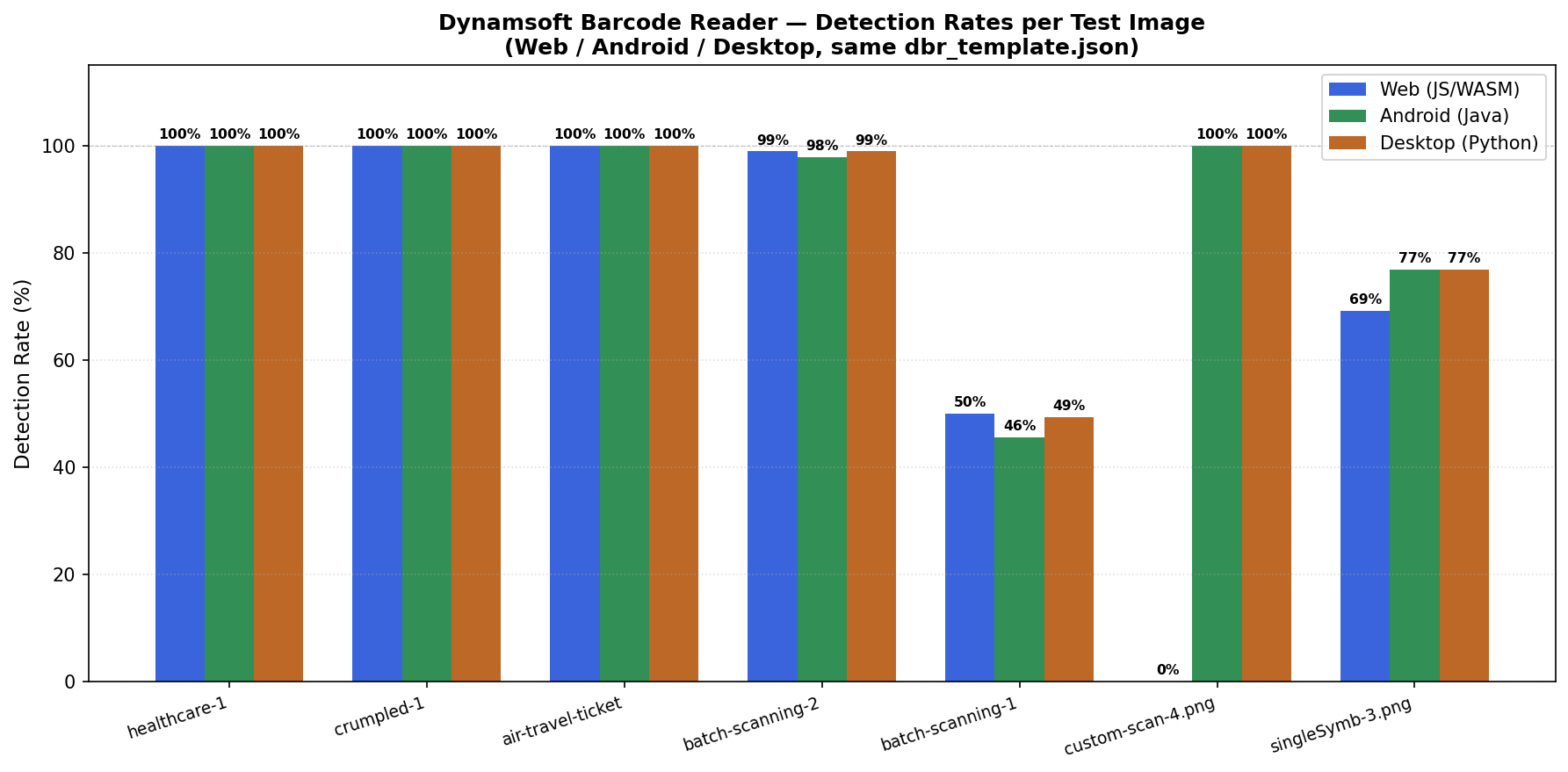
- Dynamsoft Barcode Reader achieves 100% detection on healthcare, crumpled, and air-travel-ticket images across all three platforms with zero configuration changes. Custom scan parameter images are mixed: most hit 100% on all platforms, but
custom-scan-parameters-4.pngscores 0% on web (100% on Android and Desktop), andcustom-scan-parameters-10.jpgscores 0% on all three platforms — a sub-pixel image that requires additional template tuning. - All three platforms share the same
dbr_template.json(exported from the desktop Python SDK viaoutput_settings()), so a template tuned on desktop carries over directly to Android and web for a fair apples-to-apples comparison. - Cross-platform results are highly consistent: batch-scanning detection rates differ by less than 1 percentage point between Web (98.9%), Android (97.9%), and Desktop (98.9%).
- The main platform-specific factor is processing speed per image, not accuracy: Desktop (Python) averages 86 ms/image, Android 116 ms/image, and Web (JS/WASM) 302 ms/image — a 3.5× range driven by runtime overhead, not the algorithm.
Common Developer Questions
How do I use the same dbr_template.json with the Dynamsoft JavaScript SDK, Android Java SDK, and Python SDK without modification?
Export the template from desktop with CaptureVisionRouter.output_settings(), then load the same dbr_template.json in the web and Android benchmarks. That keeps parameters like MirrorMode, MinResultConfidence, and ExpectedBarcodesCount identical across all three runtimes.
What is the real detection rate difference between the Dynamsoft JS barcode SDK (WASM) and the Android native SDK on challenging test images?
On the full challenging-image set, the overall detection rates stay very close: Web 81.5%, Android 80.2%, and Desktop 81.5%. The bigger difference is speed, not accuracy: Desktop averages 86 ms per image, Android 116 ms, and Web 302 ms.
Does Dynamsoft Barcode Reader return the same results on web, Android, and Python for healthcare barcodes and crumpled-label images?
Yes for the major healthcare and crumpled-label cases covered in this article. With the same template, all three platforms reached 100% detection on healthcare, crumpled, and air-travel-ticket images, while only a few custom-parameter edge cases required extra tuning.
Prerequisites
- Web: A modern browser (Chrome 90+, Edge 90+, Firefox 88+, Safari 15+). No install required — the SDK loads from CDN (
dynamsoft-barcode-reader-bundle@11.2.4000). - Android: Android Studio with minSdk 21+; the Gradle dependency
com.dynamsoft:barcodereaderbundle:11.4.1200. - Desktop: Python 3.8+;
pip install dynamsoft-barcode-reader-bundle opencv-python PySide6. - Shared dataset: Dynamsoft Challenging Images — annotated ground-truth JSON in
barcode-benchmark/1.0format.
Get a 30-day free trial license at dynamsoft.com/customer/license/trialLicense for Dynamsoft Barcode Reader.
Step 1: Understand the Shared Template
All three benchmark tools load the same dbr_template.json. This file was exported directly from the desktop Python barcode SDK — Dynamsoft Capture Vision saves the active template set to JSON via CaptureVisionRouter.output_settings(). Applying the identical file to the web and Android SDKs ensures that any difference in results reflects the platform runtime, not a difference in scan parameters.
The template defines four presets:
| Template Name | Use Case |
|---|---|
ReadBarcodes_Default |
General scanning, balanced speed and accuracy |
ReadBarcodes_ReadRateFirst |
Maximum recall, accepts slower processing |
ReadBarcodes_SpeedFirst |
Fastest scan, lower recall on difficult images |
ReadSingleBarcode |
Optimised for images containing exactly one barcode |
Each preset maps to a BarcodeReaderTaskSettingOptions entry. The ReadRateFirst preset, for example, sets ExpectedBarcodesCount: 999 and enables MirrorMode: MM_BOTH for 2D codes — the combination that recovers barcodes on crumpled and rotated labels.
{
  "Name": "task-read-barcodes-read-rate",
  "BarcodeFormatIds": ["BF_DEFAULT"],
  "BarcodeFormatSpecificationNameArray": ["bfs1-read-rate-first", "bfs2-read-rate-first"],
  "ExpectedBarcodesCount": 999,
  "MaxThreadsInOneTask": 0,
  "SectionArray": [...]
}
The BarcodeFormatSpecificationOptions for 2D codes (bfs1) sets MirrorMode: MM_BOTH, which is why Dynamsoft reliably recovers barcodes on crumpled labels and air-travel PDF417s.
Step 2: Run the Web Benchmark
The web tool is a single HTML page. Load it with a local server:
cd javascript-barcode-qr-code-scanner/examples/simple_barcode_scanner
python -m http.server
Then navigate to http://localhost:8000. Activate the Dynamsoft SDK from the settings panel, then switch to Benchmark mode. Load the challenging-image folder, import the ground-truth annotations.json, and click Run Benchmark.
Initialize the Dynamsoft SDK and Load the WASM Module
await Dynamsoft.License.LicenseManager.initLicense(licenseKey, true);
await Dynamsoft.Core.CoreModule.loadWasm(['DBR']);
cvr = await Dynamsoft.CVR.CaptureVisionRouter.createInstance();
Load a Custom JSON Template and Read Back the Active Task Name
async function applyDynamsoftTemplateContent(jsonContent) {
    await cvr.initSettings(jsonContent);
    const parsed = JSON.parse(jsonContent);
    const templates = parsed.CaptureVisionTemplates || parsed.CaptureVisionTemplate;
    if (Array.isArray(templates) && templates.length > 0 && templates[0].Name) {
        dynamsoftTemplate = templates[0].Name;
    }
    console.log('Dynamsoft custom template applied, task name:', dynamsoftTemplate);
}
Capture, Decode, and Score Each Image Against Ground Truth
async function benchmarkSingleSDK(sdk, testImg, groundTruth = null) {
    let barcodes = [];
    let startTime = performance.now();
    if (sdk === 'dynamsoft') {
        await resetOrReapplyDynamsoftSettings();
        let result = await cvr.capture(testImg.src, dynamsoftTemplate);
        if (result.items && result.items.length > 0) {
            for (let item of result.items) {
                if (item.type === Dynamsoft.Core.EnumCapturedResultItemType.CRIT_BARCODE) {
                    barcodes.push({ type: item.formatString || 'Unknown', text: item.text });
                }
            }
        }
    }
    let gtResult = groundTruth ? computeGTResult(barcodes.map(b => b.text), groundTruth) : null;
    return { barcodes, time: performance.now() - startTime, gtResult };
}
The benchmark loop iterates over all loaded images, calls benchmarkSingleSDK for Dynamsoft, computes TP/FP/FN against ground truth, and renders a per-image results table with detection rate and precision.
Step 3: Run the Android Benchmark
Open android-camera-barcode-mrz-document-scanner/examples/mlkit-dbr-benchmark in Android Studio. Update the license key in MainActivity.java:
LicenseManager.initLicense(
    "YOUR_LICENSE_KEY",
    this, (isSuccessful, error) -> { ... }
);
Build and install:
.\gradlew.bat assembleDebug
.\gradlew.bat installDebug
The app includes a built-in web server (NanoHTTPD). Enable Web Server on the home screen, then open the displayed URL from a desktop browser to upload images and view results remotely.
The app/build.gradle declares the SDK dependency:
dependencies {
    implementation 'com.dynamsoft:barcodereaderbundle:11.4.1200'
}
The Android benchmark supports three input modes: Image File, Video File, and Live Camera, comparing detection rates across all three at different frame sources.
Step 4: Run the Desktop Benchmark
Install dependencies:
pip install -r requirements.txt
# requirements: PySide6>=6.5, opencv-python>=4.8, dynamsoft-capture-vision-bundle>=10.0
Run the GUI:
python gui_benchmark.py
Edit config/benchmark_config.json to set your license key:
{
  "libraries": {
    "dynamsoft": { "enabled": true, "license": "YOUR_LICENSE_KEY" }
  }
}
The Python SDK wraps CaptureVisionRouter from the dynamsoft_capture_vision_bundle package:
from dynamsoft_capture_vision_bundle import (
    LicenseManager, CaptureVisionRouter, EnumErrorCode
)

def initialize(self) -> bool:
    error_code, error_message = LicenseManager.init_license(self.license)
    if error_code != EnumErrorCode.EC_OK and error_code != EnumErrorCode.EC_LICENSE_CACHE_USED:
        print(f"License init failed: {error_code}, {error_message}")
        return False
    self.cvr_instance = CaptureVisionRouter()
    return True
Decoding an image:
from dynamsoft_capture_vision_bundle import EnumPresetTemplate, EnumErrorCode

def decode_barcodes(self, image_path: str):
    image = cv2.imread(image_path)
    template = self._template_name if self._template_name else EnumPresetTemplate.PT_READ_BARCODES.value
    result = self.cvr_instance.capture(image, template)
    detected_barcodes = []
    if result.get_error_code() == EnumErrorCode.EC_OK:
        for item in result.get_items():
            barcode_text = item.get_text()
            barcode_format = item.get_format_string()
            location = item.get_location()
            points = location.points
            detected_barcodes.append({
                'data': barcode_text,
                'type': barcode_format,
                'position': {
                    'x': int(min(p.x for p in points)),
                    'y': int(min(p.y for p in points))
                }
            })
    return detected_barcodes, processing_time
After the run, the tool exports an HTML report in the same layout as the web benchmark — enabling direct side-by-side comparison of results from different platforms.
Step 5: Compare the Results
Running all three benchmarks against the same challenging-image dataset reveals the following pattern:
Processing Time per Image
Time cost differs dramatically across runtimes and is the primary practical differentiator once accuracy is equal:
| Platform | SDK | Avg ms/image | Notes |
|---|---|---|---|
| Desktop (Python) | dynamsoft-capture-vision-bundle |
86 ms | Fastest; native C++ extension, no JVM or WASM overhead |
| Android | barcodereaderbundle |
116 ms | Native .so via JNI; JNI overhead accounts for the difference vs desktop |
| Web (JS/WASM) | dynamsoft-barcode-reader-bundle |
302 ms | WASM runtime overhead accounts for ~200 ms of additional decode time per image compared to native |
For a high-throughput desktop pipeline (e.g., scanning a batch of 1,000 label images), the 86 ms/image rate translates to roughly 11.6 images/second. All three figures are measured on still images from the dataset; the 3.5× spread between Desktop and Web reflects runtime overhead (native C++ vs WASM), not a difference in the algorithm or template.
Where Dynamsoft is Consistent Across All Platforms
| Image Category | Web (JS) | Android | Desktop (Python) |
|---|---|---|---|
Healthcare barcodes (healthcare-1, healthcare-2) |
100% | 100% | 100% |
Crumpled barcodes (crumpled-barcodes-1, crumpled-barcodes-2) |
100% | 100% | 100% |
Air travel ticket (air-travel-ticket.jpg) |
100% | 100% | 100% |
Batch scanning (batch-scanning-2.jpg) |
98.9% | 97.9% | 98.9% |
Custom scan params (custom-scan-parameters-4.png) |
0% | 100% | 100% |
Custom scan params (custom-scan-parameters-10.jpg) |
0% | 0% | 0% |
| Overall (68 images, 514 GT barcodes) | 81.5% | 80.2% | 81.5% |
Dynamsoft’s detection engine is embedded in each platform SDK — the same algorithm runs in WASM in the browser, in a native .so on Android, and in a Python extension on desktop. Template-controlled parameters like MirrorMode, MinResultConfidence, and ExpectedBarcodesCount behave identically on all three.
Consistency Across Input Sources
On batch-scanning-2.jpg (a dense label sheet), the detection spread across the three platforms is less than 1 percentage point: Web (98.9%), Android (97.9%), Desktop (98.9%). This tight range holds because the same algorithm and template parameters are applied identically on all platforms.
Edge Case: Sub-Pixel Tiny Barcodes
tiny-barcodes-4.jpg is a documented edge case where the default template scores 0% on all platforms. This is a sub-pixel, high-density barcode that requires scale-up preprocessing. Switching from ReadBarcodes_Default to ReadBarcodes_ReadRateFirst and adding a ScaleUpModes stage in the image parameter configuration can recover detection on all three platforms.
Improving Detection with Custom Template Parameters
For any image that scores below 100%, the dbr_template.json can be customized to improve results. Dynamsoft’s JSON template system exposes individual algorithm stages — such as image pre-processing, barcode localisation, and decoding parameters — so you can tune them for specific image conditions without changing code. Once the template is updated on desktop, export it via output_settings() and load the same file in your web and Android benchmarks to verify the improvement carries across all three platforms. Refer to the Dynamsoft Capture Vision template documentation for the full parameter reference.
Common Issues & Edge Cases
- WASM download delay on first use (Web): The Dynamsoft JS SDK downloads a WASM module the first time it is activated. Subsequent page loads use the browser cache. Pre-warm by calling
Dynamsoft.Core.CoreModule.loadWasm(['DBR'])at app startup rather than on first scan. - Template name mismatch after
initSettings(Web/Python): After loading a custom template JSON viacvr.initSettings(json), the active task name changes to the first entry inCaptureVisionTemplates. Always readtemplates[0].Nameback from the parsed JSON and store it asdynamsoftTemplate— do not assumeReadBarcodes_Defaultremains active. - Camera permission on Android (API 23+): The benchmark app targets
minSdk 21but camera and storage runtime permissions must be granted at first launch. If the image benchmark silently returns zero barcodes, confirmREAD_EXTERNAL_STORAGEandCAMERApermissions are granted in device settings.
Choose the Right Deployment Platform
Dynamsoft Barcode Reader delivers near-identical accuracy across Web, Android, and Desktop deployments when driven by the same dbr_template.json. For teams targeting multiple platforms, the template is the single tuning artifact — tune it once on desktop where iteration is fastest, then ship it unchanged to Android and web. When choosing a deployment target, consider: Desktop for maximum throughput (86 ms/image on still images, ideal for batch pipelines); Android for mobile deployment (116 ms/image on still images); Web for zero-install browser deployment (302 ms/image on still images). The accuracy gap between platforms is under 1.5 percentage points. For the full official documentation, visit dynamsoft.com/barcode-reader.