


How to Generate MRZ Code Programmatically with Python, Pyodide, and HTML5
When developing or selecting an MRZ (Machine Readable Zone) recognition SDK, the primary challenge lies in finding an appropriate dataset for testing. Acquiring genuine MRZ images is challenging, and due to privacy concerns, they aren’t publicly accessible. Therefore, crafting MRZ images becomes a practical solution. Fortunately, there’s an open-source Python MRZ generator project, available for download from pypi, eliminating the need to start from scratch. This article aims to illustrate how to integrate and run Python scripts within web applications. First, We will showcase how to employ the Python MRZ SDK and Flet to construct a cross-platform MRZ generator. Subsequently, we will reuse the Python script with Pyodide, HTML5, and the Dynamsoft JavaScript MRZ SDK, creating an advanced online MRZ tool that can handle both MRZ creation and MRZ detection.
What you’ll build: A web-based MRZ generator that creates ICAO-compliant Machine Readable Zone strings for passports (TD3), ID cards (TD1/TD2), and visas — using Python, Pyodide, HTML5 Canvas, and the Dynamsoft JavaScript MRZ SDK for round-trip verification.
Key Takeaways
- The open-source Python
mrzpackage can generate ICAO 9303-compliant MRZ strings for TD1, TD2, TD3, MRVA, and MRVB document types. - Pyodide lets you run Python MRZ generation logic directly in the browser without a server, by loading the
mrzpackage viamicropip. - Drawing MRZ text onto an HTML5 Canvas with OCR-B font produces realistic test images that can be verified by any MRZ recognition SDK.
- Dynamsoft Label Recognizer JavaScript SDK can recognize MRZ from canvas-rendered images, enabling a full generate-then-verify workflow in a single web page.
Common Developer Questions
How do I generate MRZ code programmatically in Python?
Use the open-source Python mrz package to fill document fields such as names, dates, nationality, and document numbers, then let its TD1, TD2, TD3, MRVA, or MRVB generators compute the final ICAO-compliant MRZ lines. That saves you from manually implementing check digits and format rules.
How can I run Python MRZ generation in the browser without a backend server?
Load Pyodide in the page, install the mrz package through micropip, and execute the same Python generator code inside the browser runtime. That approach keeps the whole MRZ-generation workflow client-side with no backend service.
How do I create realistic MRZ test images for passport and ID card recognition?
Render the generated MRZ lines onto an HTML5 canvas with an OCR-B font and the correct line spacing for the target document type. The resulting synthetic images are realistic enough to feed directly into MRZ recognition SDKs for round-trip verification.
What Is a Machine Readable Zone (MRZ)?
A Machine Readable Zone (MRZ) is a standardized text block printed on identity documents — passports, ID cards, and visas — defined by ICAO Document 9303. The MRZ encodes the holder’s name, nationality, document number, date of birth, sex, and expiry date in a fixed-width format readable by optical character recognition (OCR) systems. There are several MRZ formats:
- TD1 — 3 lines of 30 characters, used on national ID cards.
- TD2 — 2 lines of 36 characters, used on some ID cards and travel documents.
- TD3 — 2 lines of 44 characters, used on passports.
- MRVA / MRVB — 2-line formats used on visa stickers (44 or 36 characters wide).
Each line contains check digits for error detection, making programmatic generation essential for producing valid test data.
Prerequisites
- Python 3.7 or later
- The
mrzandfletPython packages - A modern web browser (for the Pyodide-based online version)
- Get a 30-day free trial license for the Dynamsoft JavaScript MRZ SDK (required for the MRZ recognition step)
Build a Cross-Platform MRZ Generator with Python and Flet
Flet UI is powered by Flutter. It allows developers to build desktop, mobile, and web applications using Python.
Create a New Flet Project
-
Install
fletandmrzpackages usingpip:pip install flet pip install mrz -
Create a Flet project:
flet create mrz-generator -
Run the project for desktop:
 cd mrz-generator
 flet run
Design the MRZ Generator UI
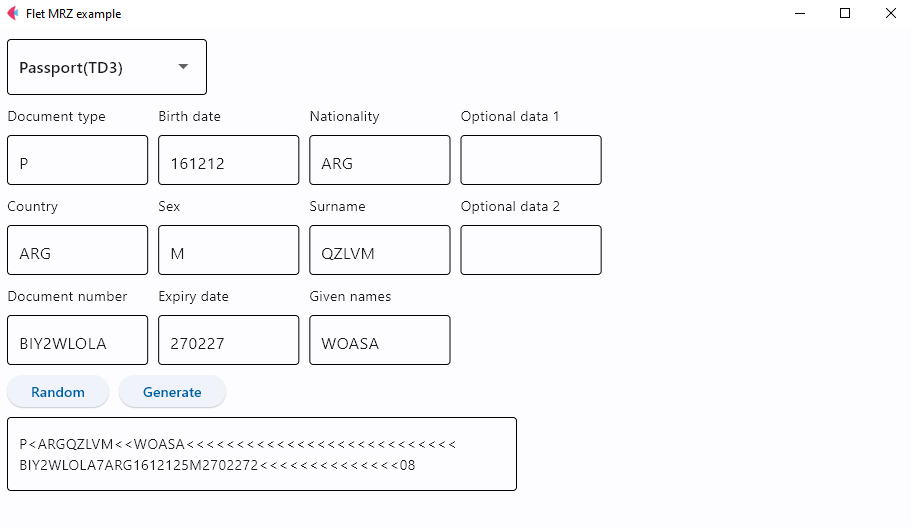
The UI of the MRZ generator is designed as follows:
-
The dropdown list is used for selecting MRZ type:
dropdown = ft.Dropdown(on_change=dropdown_changed, width=200, options=[ ft.dropdown.Option('Passport(TD3)'), ft.dropdown.Option('ID Card(TD1)'), ft.dropdown.Option('ID Card(TD2)'), ft.dropdown.Option('Visa(A)'), ft.dropdown.Option('Visa(B)'), ],) dropdown.value = 'Passport(TD3)' -
The input fields are used for entering passport, ID card, and visa information:
document_type = ft.Text('Document type') country_code = ft.Text('Country') document_number = ft.Text('Document number') birth_date = ft.Text('Birth date') sex = ft.Text('Sex') expiry_date = ft.Text('Expiry date') nationality = ft.Text('Nationality') surname = ft.Text('Surname') given_names = ft.Text('Given names') optional_data1 = ft.Text('Optional data 1') optional_data2 = ft.Text('Optional data 2') document_type_txt = ft.TextField( value='P', text_align=ft.TextAlign.LEFT, width=200, height=50) country_code_txt = ft.TextField( value='', text_align=ft.TextAlign.LEFT, width=200, height=50) document_number_txt = ft.TextField( value='', text_align=ft.TextAlign.LEFT, width=200, height=50) birth_date_txt = ft.TextField( value='', text_align=ft.TextAlign.LEFT, width=200, height=50) sex_txt = ft.TextField( value='', text_align=ft.TextAlign.LEFT, width=200, height=50) expiry_date_txt = ft.TextField( value='', text_align=ft.TextAlign.LEFT, width=200, height=50) nationality_txt = ft.TextField( value='', text_align=ft.TextAlign.LEFT, width=200, height=50) surname_txt = ft.TextField( value='', text_align=ft.TextAlign.LEFT, width=200, height=50) given_names_txt = ft.TextField( value='', text_align=ft.TextAlign.LEFT, width=200, height=50) optional_data1_txt = ft.TextField( value='', text_align=ft.TextAlign.LEFT, width=200, height=50) optional_data2_txt = ft.TextField( value='', text_align=ft.TextAlign.LEFT, width=200, height=50) container_loaded = ft.ResponsiveRow([ ft.Column(col=2, controls=[document_type, document_type_txt, country_code, country_code_txt, document_number, document_number_txt,]), ft.Column(col=2, controls=[birth_date, birth_date_txt, sex, sex_txt, expiry_date, expiry_date_txt,]), ft.Column(col=2, controls=[nationality, nationality_txt, surname, surname_txt, given_names, given_names_txt,]), ft.Column(col=2, controls=[optional_data1, optional_data1_txt, optional_data2, optional_data2_txt]) ]) -
The random button is used for generating information automatically:
  def generate_random_data():
      data = utils.random_mrz_data()
      surname_txt.value = data['Surname']
      given_names_txt.value = data['Given Name']
      nationality_txt.value = data['Nationality']
      country_code_txt.value = nationality_txt.value
      sex_txt.value = data['Sex']
      document_number_txt.value = data['Document Number']
      birth_date_txt.value = data['Birth Date']
      expiry_date_txt.value = data['Expiry Date']

  def generate_random(e):
      generate_random_data()
      page.update()

  button_random = ft.ElevatedButton(
      text='Random', on_click=generate_random)
The
random_mrz_data()function randomly generates surname, given names, nationality, country code, sex, document number, birth date and expiry date.import random import datetime VALID_COUNTRY_CODES = ['USA', 'CAN', 'GBR', 'AUS', 'FRA', 'CHN', 'IND', 'BRA', 'JPN', 'ZAF', 'RUS', 'MEX', 'ITA', 'ESP', 'NLD', 'SWE', 'ARG', 'BEL', 'CHE'] def random_date(start_year=1900, end_year=datetime.datetime.now().year): year = random.randint(start_year, end_year) month = random.randint(1, 12) if month in [1, 3, 5, 7, 8, 10, 12]: day = random.randint(1, 31) elif month in [4, 6, 9, 11]: day = random.randint(1, 30) else: # February if (year % 4 == 0 and year % 100 != 0) or (year % 400 == 0): # leap year day = random.randint(1, 29) else: day = random.randint(1, 28) return datetime.date(year, month, day) def random_string(length=10, allowed_chars='ABCDEFGHIJKLMNOPQRSTUVWXYZ'): return ''.join(random.choice(allowed_chars) for i in range(length)) def random_mrz_data(): surname = random_string(random.randint(3, 7)) given_name = random_string(random.randint(3, 7)) nationality = random.choice(VALID_COUNTRY_CODES) sex = random.choice(['M', 'F']) document_number = random_string(9, 'ABCDEFGHIJKLMNOPQRSTUVWXYZ0123456789') birth_date = random_date() expiry_date = random_date(start_year=datetime.datetime.now( ).year, end_year=datetime.datetime.now().year + 10) return { 'Surname': surname, 'Given Name': given_name, 'Nationality': nationality, 'Sex': sex, 'Document Number': document_number, 'Birth Date': birth_date.strftime('%y%m%d'), 'Expiry Date': expiry_date.strftime('%y%m%d') } -
The generate button is used for generating MRZ text:
  def generate_mrz(e):
      if dropdown.value == 'ID Card(TD1)':
          try:
              mrz_field.value = TD1CodeGenerator(
                  document_type_txt.value, country_code_txt.value, document_number_txt.value, birth_date_txt.value, sex_txt.value, expiry_date_txt.value, nationality_txt.value, surname_txt.value, given_names_txt.value, optional_data1_txt.value, optional_data2_txt.value)
          except Exception as e:
              page.snack_bar = ft.SnackBar(
                  content=ft.Text(str(e)),
                  action='OK',
              )
              page.snack_bar.open = True

      elif dropdown.value == 'ID Card(TD2)':

          try:
              mrz_field.value = TD2CodeGenerator(
                  document_type_txt.value, country_code_txt.value, surname_txt.value, given_names_txt.value, document_number_txt.value, nationality_txt.value, birth_date_txt.value, sex_txt.value, expiry_date_txt.value, optional_data1_txt.value)
          except Exception as e:
              page.snack_bar = ft.SnackBar(
                  content=ft.Text(str(e)),
                  action='OK',
              )
              page.snack_bar.open = True

      elif dropdown.value == 'Passport(TD3)':

          try:
              mrz_field.value = TD3CodeGenerator(
                  document_type_txt.value, country_code_txt.value, surname_txt.value, given_names_txt.value, document_number_txt.value, nationality_txt.value, birth_date_txt.value, sex_txt.value, expiry_date_txt.value, optional_data1_txt.value)
          except Exception as e:
              page.snack_bar = ft.SnackBar(
                  content=ft.Text(str(e)),
                  action='OK',
              )
              page.snack_bar.open = True
      elif dropdown.value == 'Visa(A)':

          try:
              mrz_field.value = MRVACodeGenerator(
                  document_type_txt.value, country_code_txt.value, surname_txt.value, given_names_txt.value, document_number_txt.value, nationality_txt.value, birth_date_txt.value, sex_txt.value, expiry_date_txt.value, optional_data1_txt.value)
          except Exception as e:
              page.snack_bar = ft.SnackBar(
                  content=ft.Text(str(e)),
                  action='OK',
              )
              page.snack_bar.open = True

      elif dropdown.value == 'Visa(B)':
          try:
              mrz_field.value = MRVBCodeGenerator(
                  document_type_txt.value, country_code_txt.value, surname_txt.value, given_names_txt.value, document_number_txt.value, nationality_txt.value, birth_date_txt.value, sex_txt.value, expiry_date_txt.value, optional_data1_txt.value)
          except Exception as e:
              page.snack_bar = ft.SnackBar(
                  content=ft.Text(str(e)),
                  action='OK',
              )
              page.snack_bar.open = True

      page.update()

  button_generate = ft.ElevatedButton(
      text='Generate', on_click=generate_mrz)
Deploy the MRZ Generator to GitHub Pages
After completing the MRZ generator, we can build it into static web pages by running:
flet publish main.py
The standalone web app is located in the dist folder. We can deploy it to GitHub Pages.
Here is the YAML file for GitHub Actions:
name: deploy mrz generator

on:
  push:
    branches: [ main ]
  pull_request:
    branches: [ main ]

jobs:
  deploy:

    runs-on: ubuntu-latest

    steps:
    - uses: actions/checkout@v3
    - name: Set up Python
      uses: actions/setup-python@v3
      with:
        python-version: '3.x'
    - name: Install dependencies
      run: |
        python -m pip install --upgrade pip
        pip install flet mrz
    - name: Build package
      run: flet publish main.py
    - name: Change base-tag in index.html from / to mrz-generator
      run: sed -i 's/<base href="\/">/<base href="\/mrz-generator\/">/g' dist/index.html
    - name: Commit dist to GitHub Pages
      uses: JamesIves/github-pages-deploy-action@3.7.1
      with:
          GITHUB_TOKEN: ${{ secrets.GITHUB_TOKEN }}
          BRANCH: gh-pages
          FOLDER: dist
The mrz-generator is the name of the repository. The sed command is used to change the base tag in index.html from / to /mrz-generator/.
Flet is a convenient choice for building cross-platform applications. However, it is still in the development phase and lacks several features. For instance, it does not support image drawing on a canvas for crafting MRZ images. Given that our objective is to create an online MRZ generator, we can integrate the Pyodide engine utilized by Flet into an HTML5 project to execute Python scripts. This integration of Python and JavaScript code can significantly enhance the capabilities of our MRZ generator.
Build an Online MRZ Generator with Python, Pyodide, and HTML5
Include the pyodide.js file in the HTML page and initialize the Pyodide engine as follows:
<script src="https://cdn.jsdelivr.net/pyodide/v0.24.1/full/pyodide.js"></script>

<script>
async function main() {
    pyodide = await loadPyodide();
    await pyodide.loadPackage("micropip");
    const micropip = pyodide.pyimport("micropip");
    await micropip.install('mrz');
}
main();
</script>
The mrz package is installed via micropip.
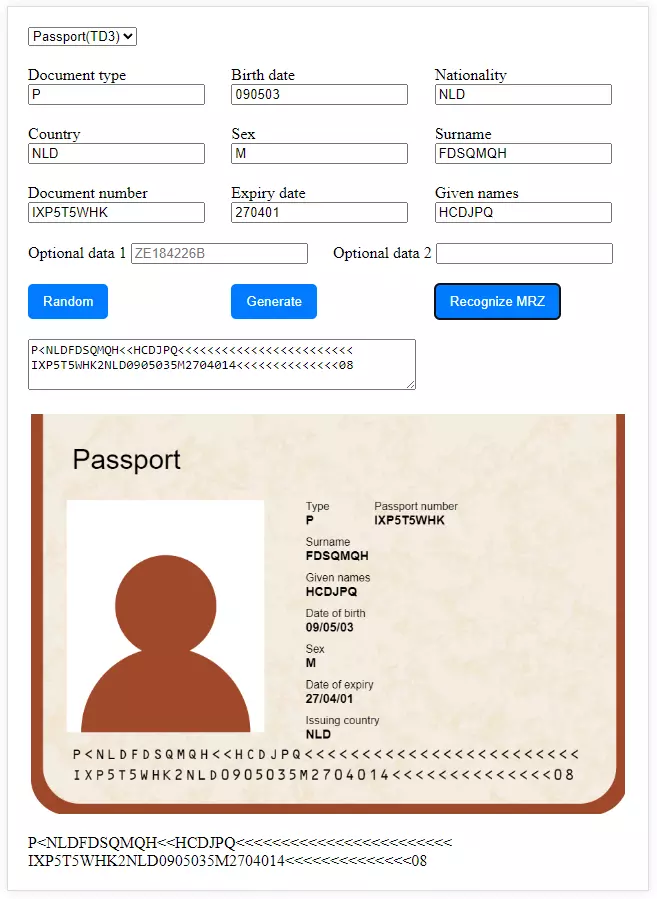
Construct the UI in HTML5. In addition to generating MRZ text, the web project can also create MRZ images by drawing lines, text, and background images on the canvas.
<div class="container">
    <div class="row">
        <div>
            <select onchange="selectChanged()" id="dropdown">
                <option value="Passport(TD3)">Passport(TD3)</option>
                <option value="ID Card(TD1)">ID Card(TD1)</option>
                <option value="ID Card(TD2)">ID Card(TD2)</option>
                <option value="Visa(A)">Visa(A)</option>
                <option value="Visa(B)">Visa(B)</option>
            </select>
        </div>
    </div>
    <div class="row">
        <div>
            <label for="docType">Document type</label>
            <input type="text" id="document_type_txt" placeholder="P">
        </div>
        <div>
            <label for="birthDate">Birth date</label>
            <input type="text" id="birth_date_txt" placeholder="210118">
        </div>
        <div>
            <label for="nationality">Nationality</label>
            <input type="text" id="nationality_txt" placeholder="GBR">
        </div>
    </div>

    <div class="row">
        <div>
            <label for="country">Country</label>
            <input type="text" id="country_code_txt" placeholder="GBR">
        </div>
        <div>
            <label for="sex">Sex</label>
            <input type="text" id="sex_txt" placeholder="F">
        </div>
        <div>
            <label for="surname">Surname</label>
            <input type="text" id="surname_txt" placeholder="SXNGND">
        </div>
    </div>

    <div class="row">
        <div>
            <label for="docNumber">Document number</label>
            <input type="text" id="document_number_txt" placeholder="K1RELFC7">
        </div>
        <div>
            <label for="expiryDate">Expiry date</label>
            <input type="text" id="expiry_date_txt" placeholder="240710">
        </div>
        <div>
            <label for="givenNames">Given names</label>
            <input type="text" id="given_names_txt" placeholder="MGGPJ">
        </div>
    </div>

    <div class="row">
        <div>
            <label for="optionalData1">Optional data 1</label>
            <input type="text" id="optional_data1_txt" placeholder="ZE184226B">
        </div>
        <div>
            <label for="optionalData2">Optional data 2</label>
            <input type="text" id="optional_data2_txt">
        </div>
    </div>

    <div class="row">
        <div>
            <button id="randomBtn" onclick="randomize()">Random</button>
        </div>
        <div>
            <button id="generateBtn" onclick="generate()">Generate</button>
        </div>
        <div>
            <button onclick="recognize()">Recognize MRZ</button>
        </div>

    </div>

    <div class="row">
        <div>
            <textarea rows="3" cols="50" readonly id="outputMRZ"></textarea>
        </div>
    </div>

    <div class="row">
        <div class="image-container">
            <canvas id="overlay"></canvas>
        </div>
    </div>


    <div id="mrz-result" class="right-sticky-content"></div>

</div>
To expedite development, we can utilize ChatGPT to efficiently port the Python code logic to JavaScript.
-
Randomize information for passport, ID card, and visa:
const VALID_COUNTRY_CODES = ['USA', 'CAN', 'GBR', 'AUS', 'FRA', 'CHN', 'IND', 'BRA', 'JPN', 'ZAF', 'RUS', 'MEX', 'ITA', 'ESP', 'NLD', 'SWE', 'ARG', 'BEL', 'CHE']; function randomIntFromInterval(min, max) { return Math.floor(Math.random() * (max - min + 1) + min); } function randomDate(startYear = 1900, endYear = new Date().getFullYear()) { let year = randomIntFromInterval(startYear, endYear); let month = randomIntFromInterval(1, 12); let day; if ([1, 3, 5, 7, 8, 10, 12].includes(month)) { day = randomIntFromInterval(1, 31); } else if ([4, 6, 9, 11].includes(month)) { day = randomIntFromInterval(1, 30); } else { // February if ((year % 4 === 0 && year % 100 !== 0) || (year % 400 === 0)) { // leap year day = randomIntFromInterval(1, 29); } else { day = randomIntFromInterval(1, 28); } } let date = new Date(year, month - 1, day); return date; } function formatDate(date) { return date.toISOString().slice(2, 10).replace(/-/g, ""); } function randomString(length = 10, allowedChars = 'ABCDEFGHIJKLMNOPQRSTUVWXYZ') { let result = ''; for (let i = 0; i < length; i++) { result += allowedChars.charAt(Math.floor(Math.random() * allowedChars.length)); } return result; } function randomMRZData() { let surname = randomString(randomIntFromInterval(3, 7)); let givenName = randomString(randomIntFromInterval(3, 7)); let nationality = VALID_COUNTRY_CODES[Math.floor(Math.random() * VALID_COUNTRY_CODES.length)]; let sex = Math.random() < 0.5 ? 'M' : 'F'; let documentNumber = randomString(9, 'ABCDEFGHIJKLMNOPQRSTUVWXYZ0123456789'); let birthDate = randomDate(); let expiryDate = randomDate(new Date().getFullYear(), new Date().getFullYear() + 10); return { 'Surname': surname, 'Given Name': givenName, 'Nationality': nationality, 'Sex': sex, 'Document Number': documentNumber, 'Birth Date': formatDate(birthDate), 'Expiry Date': formatDate(expiryDate) }; } -
Generate the MRZ text:
  function generate() {
      detectedLines = [];
      document.getElementById('mrz-result').innerText = '';
      if (!pyodide) return;

      pyodide.globals.set('dropdown', dropdown.value);
      pyodide.globals.set('document_type_txt', document_type_txt.value);
      pyodide.globals.set('country_code_txt', country_code_txt.value);
      pyodide.globals.set('birth_date_txt', birth_date_txt.value);
      pyodide.globals.set('document_number_txt', document_number_txt.value);
      pyodide.globals.set('sex_txt', sex_txt.value);
      pyodide.globals.set('expiry_date_txt', expiry_date_txt.value);
      pyodide.globals.set('nationality_txt', nationality_txt.value);
      pyodide.globals.set('surname_txt', surname_txt.value);
      pyodide.globals.set('given_names_txt', given_names_txt.value);
      pyodide.globals.set('optional_data1_txt', optional_data1_txt.value);
      pyodide.globals.set('optional_data2_txt', optional_data2_txt.value);

      pyodide.runPython(`
      from mrz.generator.td1 import TD1CodeGenerator
      from mrz.generator.td2 import TD2CodeGenerator
      from mrz.generator.td3 import TD3CodeGenerator
      from mrz.generator.mrva import MRVACodeGenerator
      from mrz.generator.mrvb import MRVBCodeGenerator

      if dropdown == 'ID Card(TD1)':

          try:
              txt = str(TD1CodeGenerator(
                  document_type_txt, country_code_txt, document_number_txt, birth_date_txt, sex_txt, expiry_date_txt, nationality_txt, surname_txt, given_names_txt, optional_data1_txt, optional_data2_txt))
          except Exception as e:
              txt = e

      elif dropdown == 'ID Card(TD2)':

          try:
              txt = str(TD2CodeGenerator(
                  document_type_txt, country_code_txt, surname_txt, given_names_txt, document_number_txt, nationality_txt, birth_date_txt, sex_txt, expiry_date_txt, optional_data1_txt))
          except Exception as e:
              txt = e

      elif dropdown == 'Passport(TD3)':

          try:
              txt = str(TD3CodeGenerator(
                  document_type_txt, country_code_txt, surname_txt, given_names_txt, document_number_txt, nationality_txt, birth_date_txt, sex_txt, expiry_date_txt, optional_data1_txt))
          except Exception as e:
              txt = e

      elif dropdown == 'Visa(A)':

          try:
              txt = str(MRVACodeGenerator(
                  document_type_txt, country_code_txt, surname_txt, given_names_txt, document_number_txt, nationality_txt, birth_date_txt, sex_txt, expiry_date_txt, optional_data1_txt))
          except Exception as e:
              txt = e

      elif dropdown == 'Visa(B)':
          try:
              txt = str(MRVBCodeGenerator(
                  document_type_txt, country_code_txt, surname_txt, given_names_txt, document_number_txt, nationality_txt, birth_date_txt, sex_txt, expiry_date_txt, optional_data1_txt))
          except Exception as e:
              txt = e
      `);
      dataFromPython = pyodide.globals.get('txt');
      document.getElementById("outputMRZ").value = dataFromPython;
  }
Lastly, we can render document information and MRZ text onto the canvas:
function drawImage() {
    let canvas = document.getElementById("overlay");
    let ctx = canvas.getContext("2d");
    ctx.clearRect(0, 0, canvas.width, canvas.height);

    var img = new Image();
    img.src = 'images/bg.jpg';

    img.onload = function () {
        canvas.width = img.width;
        canvas.height = img.height;
        ctx.fillStyle = '#FFFFFF';  // e.g., a shade of orange
        ctx.fillRect(0, 0, canvas.width, canvas.height);

        ctx.drawImage(img, 0, 0, img.width, img.height);

        lines = dataFromPython.split('\n');
        ctx.fillStyle = "black";

        // Title
        let x = 60;
        let y = 80;
        ctx.font = '40px "Arial", monospace';
        if (dropdown.value === 'ID Card(TD1)' || dropdown.value === 'ID Card(TD2)') {
            ctx.fillText('ID Card', x, y);
        }
        else if (dropdown.value === 'Passport(TD3)') {
            ctx.fillText('Passport', x, y);
        }
        else {
            ctx.fillText('Visa', x, y);
        }

        // Info area
        let delta = 21;
        let space = 10;
        x = 400;
        y = 140;

        ctx.font = '16px "Arial", monospace';
        ctx.fillText('Type', x, y);

        y += delta;
        ctx.font = 'bold 18px "Arial", monospace';
        ctx.fillText(document_type_txt.value, x, y);

        y += delta + space;
        ctx.font = '16px "Arial", monospace';
        ctx.fillText('Surname', x, y);

        y += delta;
        ctx.font = 'bold 18px "Arial", monospace';
        ctx.fillText(surname_txt.value, x, y);

        y += delta + space;
        ctx.font = '16px "Arial", monospace';
        ctx.fillText('Given names', x, y);

        y += delta;
        ctx.font = 'bold 18px "Arial", monospace';
        ctx.fillText(given_names_txt.value, x, y);

        y += delta + space;
        ctx.font = '16px "Arial", monospace';
        ctx.fillText('Date of birth', x, y);

        y += delta;
        ctx.font = 'bold 18px "Arial", monospace';
        ctx.fillText(`${birth_date_txt.value.slice(0, 2)}/${birth_date_txt.value.slice(2, 4)}/${birth_date_txt.value.slice(4, 6)}`, x, y);

        y += delta + space;
        ctx.font = '16px "Arial", monospace';
        ctx.fillText('Sex', x, y);

        y += delta;
        ctx.font = 'bold 18px "Arial", monospace';
        ctx.fillText(sex_txt.value, x, y);

        y += delta + space;
        ctx.font = '16px "Arial", monospace';
        ctx.fillText('Date of expiry', x, y);

        y += delta;
        ctx.font = 'bold 18px "Arial", monospace';
        ctx.fillText(`${expiry_date_txt.value.slice(0, 2)}/${expiry_date_txt.value.slice(2, 4)}/${expiry_date_txt.value.slice(4, 6)}`, x, y);

        y += delta + space;
        ctx.font = '16px "Arial", monospace';
        ctx.fillText('Issuing country', x, y);

        y += delta;
        ctx.font = 'bold 18px "Arial", monospace';
        ctx.fillText(country_code_txt.value, x, y);

        x = 500
        y = 140
        ctx.font = '16px "Arial", monospace';
        if (dropdown.value === 'ID Card(TD1)' || dropdown.value === 'ID Card(TD2)') {
            ctx.fillText('Document number', x, y);
        }
        else if (dropdown.value === 'Passport(TD3)') {
            ctx.fillText('Passport number', x, y);
        }
        else {
            ctx.fillText('Visa number', x, y);
        }

        y += delta;
        ctx.font = 'bold 18px "Arial", monospace';
        ctx.fillText(document_number_txt.value, x, y);

        // MRZ area
        ctx.font = '16px "OCR-B", monospace';
        x = 60;
        y = canvas.height - 80;
        let letterSpacing = 3;
        let index = 0;
        for (text of lines) {

            let currentX = x;
            let checkLine = '';

            if (detectedLines.length > 0) {
                checkLine = detectedLines[index];
            }

            for (let i = 0; i < text.length; i++) {
                ctx.fillText(text[i], currentX, y);

                if (checkLine !== '' && checkLine[i] !== text[i]) {
                    ctx.fillRect(currentX, y + 5, ctx.measureText(text[i]).width, 2);
                }

                currentX += ctx.measureText(text[i]).width + letterSpacing;
            }
            y += 30;
            index += 1;
        }

    }
}
Verify Generated MRZ with the Dynamsoft JavaScript MRZ SDK
After completing the MRZ generator, we can evaluate any JavaScript MRZ SDK with it. For example, we can use the Dynamsoft JavaScript MRZ SDK to recognize MRZ code from the generated MRZ images. A valid license key is required for the JavaScript MRZ detection SDK.
<script src="https://cdn.jsdelivr.net/npm/dynamsoft-label-recognizer@2.2.31/dist/dlr.js"></script>

<script>
async function main() {
    ...

    Dynamsoft.DLR.LabelRecognizer.initLicense("LICENSE-KEY");
    recognizer = await Dynamsoft.DLR.LabelRecognizer.createInstance({
        runtimeSettings: "MRZ"
    });
}
main();

function recognize() {

    if (recognizer) {
        let div = document.getElementById('mrz-result');
        div.textContent = 'Recognizing...';

        recognizer.recognize(document.getElementById("overlay")).then(function (results) {
            let hasResult = false;
            for (let result of results) {
                if (result.lineResults.length !== 2 && result.lineResults.length !== 3) {
                    continue;
                }
                let output = '';
                for (let line of result.lineResults) {
                    detectedLines.push(line.text);
                    output += line.text + '\n';
                }
                div.innerText = output;
                hasResult = true;
            }
            if (!hasResult) {
                div.innerText = 'Not found';
            }
            else {
                drawImage();
            }
        });
    }
}
</script>
Try the Online MRZ Generator
- Online MRZ generator: https://www.dynamsoft.com/codepool/demos/mrz-generator/ — generate TD1, TD2, TD3, MRVA and MRVB MRZ strings with valid check digits in the browser, and preview the result as a mock document image.
Common Issues and Edge Cases
- Invalid check digits: The
mrzPython package computes ICAO 9303 check digits automatically. If you supply a document number or date in the wrong format (e.g.,YYMMDDvs.YYYYMMDD), the generator will raise an exception. Always use two-digit year format (YYMMDD) for birth and expiry dates. - OCR-B font not installed: The canvas rendering uses the
OCR-Bfont family. If this font is not available in the browser, MRZ text falls back to a generic monospace font, which may cause recognition failures when scanning the generated image. Include a web font or use a system with OCR-B installed for realistic outputs. - Pyodide loading time: The first load of Pyodide downloads ~15 MB of WebAssembly. Users on slow connections may see a delay before the generator is ready. Consider showing a loading indicator and caching Pyodide assets via a service worker.
FAQ
How do I generate MRZ strings programmatically in Python?
Install the open-source mrz package (pip install mrz) and use TD3CodeGenerator for passports, TD1CodeGenerator / TD2CodeGenerator for ID cards, or MRVACodeGenerator / MRVBCodeGenerator for visas. Pass the document fields as arguments and the library returns a correctly formatted MRZ string with valid check digits.
Can I run Python MRZ generation in the browser without a server?
Yes. Use Pyodide to load a full CPython interpreter in WebAssembly. Install the mrz package at runtime with micropip.install('mrz'), then call the same Python generator classes from JavaScript via pyodide.runPython().
How do I create realistic MRZ test images for SDK evaluation?
Render the generated MRZ string onto an HTML5 Canvas using the OCR-B monospaced font, overlay personal data fields and a background image, then export the canvas as a PNG. This produces images realistic enough to benchmark MRZ recognition SDKs.