


JavaScript Web OCR Tutorial: Extract Text from Images and PDFs in the Browser
Building a web-based OCR (Optical Character Recognition) application has never been easier with modern JavaScript libraries. In this comprehensive tutorial, we’ll create a powerful OCR app that can process images, multi-page TIFFs, and PDFs, converting them into searchable PDF documents - all running entirely in the browser with free tools.
What you’ll build: A browser-only JavaScript OCR web app that extracts text from images, multi-page TIFFs, and PDFs using Tesseract.js and pdf.js, then outputs a downloadable searchable PDF built with jsPDF.
Key Takeaways
- This tutorial demonstrates how to build a fully client-side JavaScript OCR application — all document processing runs in the browser with no backend required.
- Tesseract.js handles image-to-text recognition; pdf.js renders PDF pages to canvas for OCR input; jsPDF embeds invisible text layers to produce searchable PDF output.
- The
convert2searchable()method inocr-lib.jsis framework-agnostic and reusable across any JavaScript web project. - Tesseract.js accuracy degrades on skewed, low-resolution, or multi-column scans — for production-grade accuracy, a dedicated OCR SDK is recommended.
Common Developer Questions
How do I extract text from an image or PDF in the browser using JavaScript?
Use Tesseract.js to OCR image pixels directly, and use pdf.js to render PDF pages onto canvas before passing those canvases into the OCR engine. Once the text is recognized, you can show it in the browser immediately or reuse it for searchable PDF export.
How accurate is Tesseract.js for OCR on scanned documents?
Tesseract.js works well for clean, high-resolution scans, but accuracy drops on skewed pages, dense multi-column layouts, or low-quality images. This tutorial also notes that large documents are slow in-browser, so production use may require a stronger OCR engine or smaller processing batches.
How do I create a searchable PDF from OCR text results using jsPDF?
Create a PDF page image from the original scan, then add the OCR text back as an invisible text layer positioned over the corresponding words with jsPDF. That is what turns the output from a flat image PDF into a searchable document.
Demo Video: JavaScript Web OCR App in Action
Online Demo
https://yushulx.me/web-twain-document-scan-management/examples/ocr/
What We’ll Build
Our OCR web app will feature:
- Multi-format support: JPEG, PNG, GIF, BMP, WEBP, TIFF, and PDF
- Multiple OCR engines: Tesseract.js, OCR.space, Google Vision API, Azure Computer Vision
- Drag & drop interface: Intuitive file upload
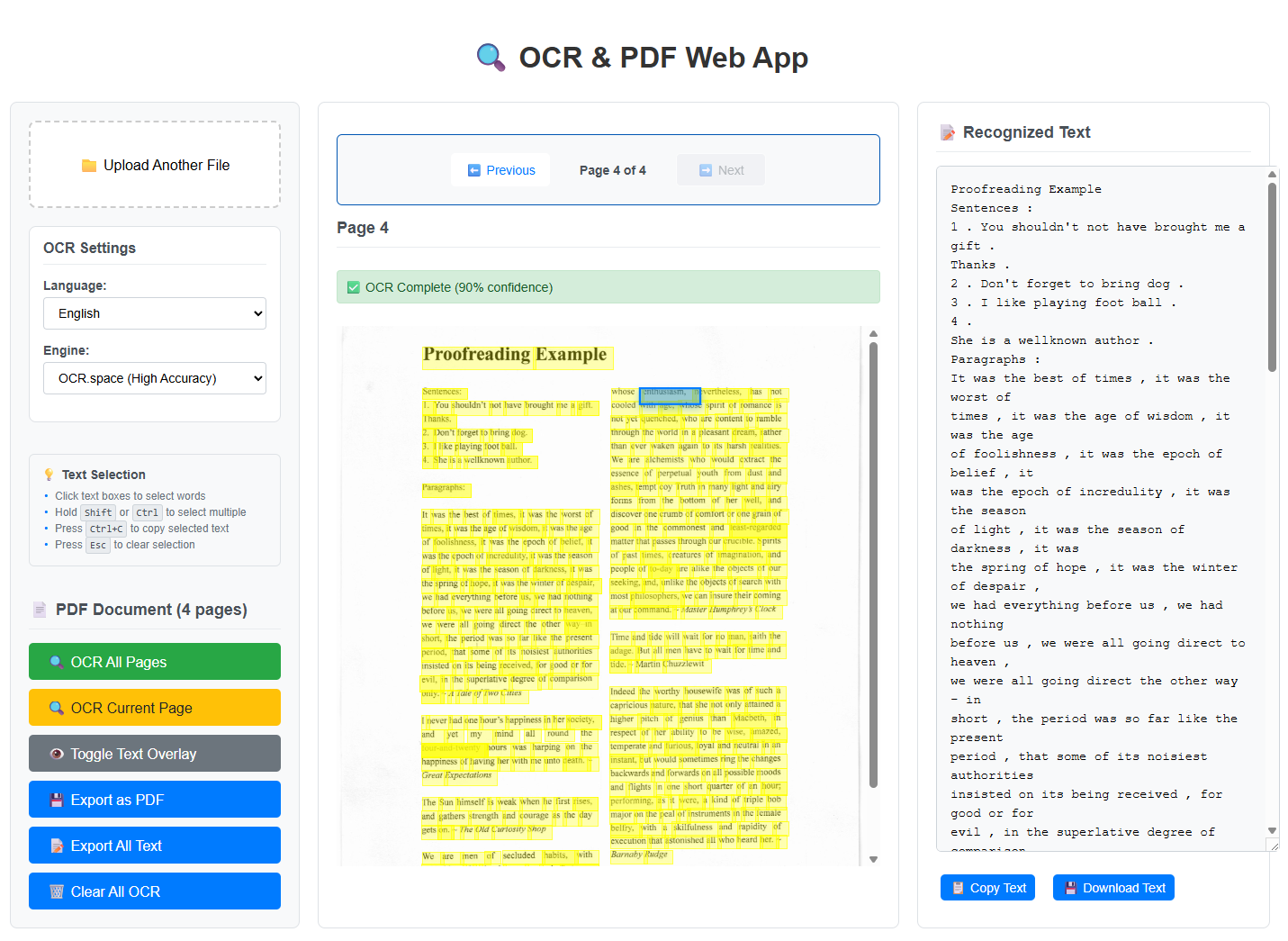
- Three-panel layout: Optimized horizontal workspace with controls, page display, and results
- Interactive text selection: Click to select words, multi-select with Shift/Ctrl, copy with Ctrl+C
- Real-time progress: Live progress tracking during processing
- Text overlay visualization: Visual bounding boxes with confidence indicators
- Smart filtering: Automatically excludes failed OCR pages
- Downloadable results: Export as searchable PDF or plain text
Prerequisites
- A modern browser (Chrome 90+ or Firefox 88+ recommended) with ES6+ support
- A basic understanding of HTML and JavaScript — no build tools or Node.js required
- No API key is needed for Tesseract.js; the OCR.space free tier requires a free registration key at ocr.space
Step 1: Set Up the Project Structure
Create the project as follows:
ocr-web-app/
├── index.html
├── main.css
├── main.js
├── ocr-lib.js
└── README.md
Create the HTML Structure with Library Dependencies
Let’s start with index.html:
<!DOCTYPE html>
<html lang="en">
<head>
    <meta charset="utf-8" />
    <meta name="viewport" content="width=device-width, initial-scale=1.0">
    <title>OCR & PDF Web App</title>

    <script src="https://unpkg.com/tesseract.js@5.0.2/dist/tesseract.min.js"></script>
    <script src="https://cdnjs.cloudflare.com/ajax/libs/pdf.js/3.11.174/pdf.min.js"></script>
    <script src="https://cdnjs.cloudflare.com/ajax/libs/jspdf/2.5.1/jspdf.umd.min.js"></script>
    <script src="https://unpkg.com/utif2@4.1.0/UTIF.js"></script>

    <link rel="stylesheet" type="text/css" href="main.css">
</head>
<body>
    <div class="container">
        <h1>🔍 OCR & PDF Web App</h1>

        <div class="upload-area" id="uploadArea">
            <p>📁 Click here or drag and drop an image or PDF to upload</p>
            <p class="supported-formats">Supported formats: JPG, PNG, GIF, BMP, WEBP, TIFF (multi-page), PDF</p>
            <input type="file" id="fileInput" accept="image/*,.pdf,.tiff,.tif">
        </div>

        <div class="config-section">
            <div class="language-select">
                <label for="languageSelect">OCR Language:</label>
                <select id="languageSelect">
                    <option value="eng">English</option>
                    <option value="chi_sim">Chinese (Simplified)</option>
                    <option value="chi_tra">Chinese (Traditional)</option>
                    <option value="spa">Spanish</option>
                    <option value="fra">French</option>
                    <option value="deu">German</option>
                    <option value="jpn">Japanese</option>
                    <option value="rus">Russian</option>
                </select>
            </div>

            <div class="ocr-engine-select">
                <label for="engineSelect">OCR Engine:</label>
                <select id="engineSelect">
                    <option value="tesseract">Tesseract.js (Free, Client-side)</option>
                    <option value="ocr.space">OCR.space (High Accuracy, 25k/month free)</option>
                    <option value="google">Google Vision API (Highest Accuracy, requires API key)</option>
                    <option value="azure">Azure Computer Vision (High Accuracy, requires API key)</option>
                </select>
            </div>
        </div>

        <div class="progress-container hidden" id="progressContainer">
            <div class="progress-bar">
                <div class="progress-fill" id="progressFill"></div>
            </div>
            <div class="progress-text" id="progressText">Ready...</div>
        </div>

        <div class="result-container hidden" id="resultContainer">
            <h3>📝 Extracted Text:</h3>
            <div class="result-text" id="resultText"></div>
            <div class="result-actions">
                <button class="btn" onclick="copyToClipboard()">📋 Copy Text</button>
                <button class="btn" onclick="downloadText()">💾 Download as TXT</button>
                <button class="btn primary" onclick="downloadPDF()">📄 Download Searchable PDF</button>
            </div>
        </div>

        <div id="errorContainer"></div>
    </div>

    <script src="ocr-lib.js"></script>
    <script src="main.js"></script>
</body>
</html>
JavaScript libraries:
- Tesseract.js: For client-side OCR processing.
- pdf.js: For handling PDF files.
- jsPDF: For generating PDF documents.
- UTIF: For handling TIFF files.
Step 2: Style the Upload Area and Results Panel
Create main.css for a modern, responsive design:
* {
    margin: 0;
    padding: 0;
    box-sizing: border-box;
}

body {
    font-family: -apple-system, BlinkMacSystemFont, 'Segoe UI', Roboto, sans-serif;
    line-height: 1.6;
    color: #333;
    background: linear-gradient(135deg, #667eea 0%, #764ba2 100%);
    min-height: 100vh;
    padding: 20px;
}

.container {
    max-width: 800px;
    margin: 0 auto;
    background: white;
    border-radius: 16px;
    box-shadow: 0 20px 40px rgba(0,0,0,0.1);
    overflow: hidden;
}

h1 {
    text-align: center;
    color: #2c3e50;
    font-size: 2.5rem;
    margin: 2rem 0;
    font-weight: 700;
}

.upload-area {
    margin: 2rem;
    padding: 4rem 2rem;
    border: 3px dashed #3498db;
    border-radius: 12px;
    text-align: center;
    background: #f8f9fa;
    transition: all 0.3s ease;
    cursor: pointer;
    position: relative;
}

.upload-area:hover {
    border-color: #2980b9;
    background: #e3f2fd;
    transform: translateY(-2px);
}

.upload-area.drag-over {
    border-color: #27ae60;
    background: #e8f5e8;
}

.upload-area input[type="file"] {
    position: absolute;
    inset: 0;
    opacity: 0;
    cursor: pointer;
}

.supported-formats {
    font-size: 0.9rem;
    color: #666;
    margin-top: 1rem;
}

.config-section {
    display: grid;
    grid-template-columns: 1fr 1fr;
    gap: 2rem;
    padding: 2rem;
    border-top: 1px solid #eee;
}

.language-select, .ocr-engine-select {
    display: flex;
    flex-direction: column;
    gap: 0.5rem;
}

label {
    font-weight: 600;
    color: #2c3e50;
}

select, input {
    padding: 0.75rem;
    border: 2px solid #ddd;
    border-radius: 8px;
    font-size: 1rem;
    transition: border-color 0.3s;
}

select:focus, input:focus {
    outline: none;
    border-color: #3498db;
}

.progress-container {
    padding: 2rem;
    border-top: 1px solid #eee;
}

.progress-bar {
    width: 100%;
    height: 8px;
    background: #ecf0f1;
    border-radius: 4px;
    overflow: hidden;
    margin-bottom: 1rem;
}

.progress-fill {
    height: 100%;
    background: linear-gradient(90deg, #3498db, #2ecc71);
    width: 0%;
    transition: width 0.3s ease;
}

.progress-text {
    text-align: center;
    color: #7f8c8d;
    font-weight: 500;
}

.result-container {
    padding: 2rem;
    border-top: 1px solid #eee;
}

.result-text {
    background: #f8f9fa;
    border: 1px solid #dee2e6;
    border-radius: 8px;
    padding: 1.5rem;
    max-height: 300px;
    overflow-y: auto;
    white-space: pre-wrap;
    font-family: 'Courier New', monospace;
    font-size: 0.9rem;
    line-height: 1.4;
    margin: 1rem 0;
}

.result-actions {
    display: flex;
    gap: 1rem;
    flex-wrap: wrap;
}

.btn {
    padding: 0.75rem 1.5rem;
    border: none;
    border-radius: 8px;
    font-size: 1rem;
    font-weight: 600;
    cursor: pointer;
    transition: all 0.3s ease;
    background: #ecf0f1;
    color: #2c3e50;
}

.btn:hover {
    transform: translateY(-2px);
    box-shadow: 0 4px 8px rgba(0,0,0,0.1);
}

.btn.primary {
    background: linear-gradient(135deg, #3498db, #2ecc71);
    color: white;
}

.btn.primary:hover {
    background: linear-gradient(135deg, #2980b9, #27ae60);
}

.error {
    background: #fee;
    border: 1px solid #fcc;
    color: #c66;
    padding: 1rem;
    border-radius: 8px;
    margin: 1rem 2rem;
}

.success {
    background: #efe;
    border: 1px solid #cfc;
    color: #6c6;
    padding: 1rem;
    border-radius: 8px;
    margin: 1rem 2rem;
}

.hidden {
    display: none;
}

@media (max-width: 768px) {
    .config-section {
        grid-template-columns: 1fr;
        gap: 1rem;
    }

    .result-actions {
        flex-direction: column;
    }

    .container {
        margin: 1rem;
    }
}
Step 3: Implement the JavaScript OCR Library
Create the core OCR functionality in ocr-lib.js, which includes four options:
- Tesseract.js: Open-source OCR engine with support for multiple languages
- OCR.space: Cloud-based OCR API with high accuracy
- Google Vision API: Google’s powerful OCR service with enterprise-grade features
- Azure Computer Vision: Microsoft’s cloud-based OCR solution with AI capabilities
The library is reusable and can be used in any web project that requires OCR functionality.
class OCRLibrary {
    constructor() {
        this.defaultConfig = {
            engine: 'tesseract',
            language: 'eng',
            apiKeys: {},
            compressionQuality: 0.7
        };
    }

    async convert2searchable(blob, apiConfig = {}, progressCallback = null) {
        try {
            const config = { ...this.defaultConfig, ...apiConfig };

            this._notifyProgress(progressCallback, 'Analyzing file type...', 5);

            const fileType = blob.type;
            let pageDataArray = [];

            if (fileType === 'application/pdf') {
                pageDataArray = await this._convertPDFToPageData(blob);
            } else if (fileType === 'image/tiff' || fileType === 'image/tif') {
                pageDataArray = await this._convertTIFFToPageData(blob);
            } else if (fileType.startsWith('image/')) {
                pageDataArray = await this._convertImageToPageData(blob);
            } else {
                throw new Error('Unsupported file type. Please provide an image, TIFF, or PDF file.');
            }

            if (!pageDataArray || pageDataArray.length === 0) {
                throw new Error('Failed to extract pages from the file.');
            }

            const successfulPages = [];
            let failedCount = 0;

            for (let i = 0; i < pageDataArray.length; i++) {
                const pageData = pageDataArray[i];
                const progress = 20 + (i / pageDataArray.length) * 60;

                this._notifyProgress(progressCallback, `OCR processing page ${i + 1}/${pageDataArray.length}...`, progress);

                try {
                    let ocrResult;

                    switch (config.engine) {
                        case 'tesseract':
                            ocrResult = await this._performTesseractOCR(pageData.dataURL, config.language);
                            break;
                        case 'ocr.space':
                            ocrResult = await this._performOCRSpaceOCR(await this._dataURLToBlob(pageData.dataURL), config.language);
                            break;
                        default:
                            throw new Error(`Unsupported OCR engine: ${config.engine}`);
                    }

                    if (ocrResult && ocrResult.text && ocrResult.text.trim().length > 0) {
                        successfulPages.push({
                            pageData: pageData,
                            ocrResult: ocrResult,
                            pageNumber: i + 1
                        });
                    } else {
                        failedCount++;
                    }
                } catch (ocrError) {
                    console.warn(`OCR failed for page ${i + 1}:`, ocrError);
                    failedCount++;
                }
            }

            if (successfulPages.length === 0) {
                throw new Error('OCR failed on all pages. No searchable content could be extracted.');
            }

            this._notifyProgress(progressCallback, 'Generating searchable PDF...', 85);
            const pdfBlob = await this._createSearchablePDF(successfulPages, config);

            pdfBlob.metadata = {
                totalPages: pageDataArray.length,
                successfulPages: successfulPages.length,
                failedPages: failedCount,
                engine: config.engine,
                language: config.language
            };

            this._notifyProgress(progressCallback, 'Conversion completed!', 100);
            return pdfBlob;

        } catch (error) {
            console.error('convert2searchable error:', error);
            throw new Error(`Failed to convert file to searchable PDF: ${error.message}`);
        }
    }

    _notifyProgress(callback, message, percentage) {
        if (typeof callback === 'function') {
            callback({ message, percentage });
        }
    }

    async _convertPDFToPageData(blob) {
        const arrayBuffer = await blob.arrayBuffer();
        const pdf = await pdfjsLib.getDocument(arrayBuffer).promise;
        const pageDataArray = [];

        for (let pageNum = 1; pageNum <= pdf.numPages; pageNum++) {
            const page = await pdf.getPage(pageNum);
            const viewport = page.getViewport({ scale: 1.5 });

            const canvas = document.createElement('canvas');
            const context = canvas.getContext('2d');
            canvas.height = viewport.height;
            canvas.width = viewport.width;

            await page.render({
                canvasContext: context,
                viewport: viewport
            }).promise;

            pageDataArray.push({
                dataURL: canvas.toDataURL(),
                width: canvas.width,
                height: canvas.height
            });
        }

        return pageDataArray;
    }

    async _convertTIFFToPageData(blob) {
        if (typeof UTIF === 'undefined') {
            throw new Error('UTIF library not available for TIFF processing');
        }

        const arrayBuffer = await blob.arrayBuffer();
        const uint8Array = new Uint8Array(arrayBuffer);
        const ifds = UTIF.decode(uint8Array);
        const pageDataArray = [];

        for (let i = 0; i < ifds.length; i++) {
            const ifd = ifds[i];
            UTIF.decodeImage(uint8Array, ifd);
            const rgba = UTIF.toRGBA8(ifd);

            const canvas = document.createElement('canvas');
            const ctx = canvas.getContext('2d');
            canvas.width = ifd.width;
            canvas.height = ifd.height;

            const imageData = new ImageData(new Uint8ClampedArray(rgba), ifd.width, ifd.height);
            ctx.putImageData(imageData, 0, 0);

            pageDataArray.push({
                dataURL: canvas.toDataURL('image/png'),
                width: canvas.width,
                height: canvas.height
            });
        }

        return pageDataArray;
    }

    async _convertImageToPageData(blob) {
        const dataURL = await new Promise((resolve, reject) => {
            const reader = new FileReader();
            reader.onload = () => resolve(reader.result);
            reader.onerror = reject;
            reader.readAsDataURL(blob);
        });

        const { width, height } = await new Promise((resolve, reject) => {
            const img = new Image();
            img.onload = () => resolve({ width: img.width, height: img.height });
            img.onerror = reject;
            img.src = dataURL;
        });

        return [{
            dataURL: dataURL,
            width: width,
            height: height
        }];
    }

    async _performTesseractOCR(imageData, language) {
        const worker = await Tesseract.createWorker(language, 1);
        const { data } = await worker.recognize(imageData);
        await worker.terminate();
        return data;
    }

    async _performOCRSpaceOCR(blob, language) {
        const langMap = {
            'eng': 'eng', 'chi_sim': 'chs', 'chi_tra': 'cht',
            'spa': 'spa', 'fra': 'fre', 'deu': 'ger',
            'jpn': 'jpn', 'rus': 'rus'
        };

        const formData = new FormData();
        formData.append('file', blob, 'image.png');
        formData.append('language', langMap[language] || 'eng');
        formData.append('isOverlayRequired', 'true');

        const response = await fetch('https://api.ocr.space/parse/image', {
            method: 'POST',
            headers: { 'apikey': 'helloworld' },
            body: formData
        });

        const result = await response.json();
        if (result.IsErroredOnProcessing) {
            throw new Error(result.ErrorMessage || 'OCR.space processing failed');
        }

        const parsedResult = result.ParsedResults[0];
        const lines = parsedResult.TextOverlay?.Lines || [];
        const words = [];
        let allText = '';

        lines.forEach(line => {
            line.Words.forEach(word => {
                words.push({
                    text: word.WordText,
                    confidence: 90,
                    bbox: {
                        x0: word.Left, y0: word.Top,
                        x1: word.Left + word.Width, y1: word.Top + word.Height
                    }
                });
                allText += word.WordText + ' ';
            });
            allText += '\n';
        });

        return { text: allText.trim(), confidence: 90, words: words };
    }

    async _createSearchablePDF(successfulPages, config) {
        const { jsPDF } = window.jspdf;
        const pdf = new jsPDF({ unit: 'pt', format: 'a4' });

        const pdfWidth = pdf.internal.pageSize.getWidth();
        const pdfHeight = pdf.internal.pageSize.getHeight();

        for (let i = 0; i < successfulPages.length; i++) {
            const { pageData, ocrResult } = successfulPages[i];

            if (i > 0) pdf.addPage();

            const imgAspect = pageData.width / pageData.height;
            const pdfAspect = pdfWidth / pdfHeight;

            let imgWidth, imgHeight, offsetX = 0, offsetY = 0;

            if (imgAspect > pdfAspect) {
                imgWidth = pdfWidth;
                imgHeight = pdfWidth / imgAspect;
                offsetY = (pdfHeight - imgHeight) / 2;
            } else {
                imgHeight = pdfHeight;
                imgWidth = pdfHeight * imgAspect;
                offsetX = (pdfWidth - imgWidth) / 2;
            }

            pdf.addImage(pageData.dataURL, 'JPEG', offsetX, offsetY, imgWidth, imgHeight);

            if (ocrResult && ocrResult.words) {
                const pdfScaleX = imgWidth / pageData.width;
                const pdfScaleY = imgHeight / pageData.height;

                pdf.setTextColor(0, 0, 0);

                ocrResult.words.forEach(word => {
                    if (word && word.confidence > 40 && word.bbox && word.text) {
                        const bbox = word.bbox;
                        const fontSize = Math.max(10, (bbox.y1 - bbox.y0) * pdfScaleY);

                        pdf.setFontSize(fontSize);
                        pdf.setFont('helvetica', 'normal');

                        const x = offsetX + (bbox.x0 * pdfScaleX);
                        const y = offsetY + (bbox.y0 * pdfScaleY) + ((bbox.y1 - bbox.y0) * pdfScaleY);

                        pdf.text(word.text, x, y, {
                            baseline: 'bottom',
                            renderingMode: 'invisible'
                        });
                    }
                });
            }
        }

        const pdfArrayBuffer = pdf.output('arraybuffer');
        return new Blob([pdfArrayBuffer], { type: 'application/pdf' });
    }

    async _dataURLToBlob(dataURL) {
        const response = await fetch(dataURL);
        return await response.blob();
    }
}

window.OCRLib = new OCRLibrary();
window.convert2searchable = (blob, apiConfig, progressCallback) => {
    return window.OCRLib.convert2searchable(blob, apiConfig, progressCallback);
};

if (typeof module !== 'undefined' && module.exports) {
    module.exports = OCRLibrary;
}
Step 4: Connect the UI Event Handlers in main.js
Now let’s build main.js to handle user interactions:
let currentBlob = null;
let currentResult = null;

const uploadArea = document.getElementById('uploadArea');
const fileInput = document.getElementById('fileInput');
const progressContainer = document.getElementById('progressContainer');
const progressFill = document.getElementById('progressFill');
const progressText = document.getElementById('progressText');
const resultContainer = document.getElementById('resultContainer');
const resultText = document.getElementById('resultText');
const errorContainer = document.getElementById('errorContainer');
const languageSelect = document.getElementById('languageSelect');
const engineSelect = document.getElementById('engineSelect');

document.addEventListener('DOMContentLoaded', function() {
    setupEventListeners();
    showMessage('Ready to process your documents!', 'info');
});

function setupEventListeners() {
    fileInput.addEventListener('change', handleFileSelect);

    uploadArea.addEventListener('dragover', handleDragOver);
    uploadArea.addEventListener('dragleave', handleDragLeave);
    uploadArea.addEventListener('drop', handleDrop);

    uploadArea.addEventListener('click', () => fileInput.click());
}

function handleFileSelect(event) {
    const file = event.target.files[0];
    if (file) {
        processFile(file);
    }
}

function handleDragOver(event) {
    event.preventDefault();
    uploadArea.classList.add('drag-over');
}

function handleDragLeave(event) {
    event.preventDefault();
    uploadArea.classList.remove('drag-over');
}

function handleDrop(event) {
    event.preventDefault();
    uploadArea.classList.remove('drag-over');

    const files = event.dataTransfer.files;
    if (files.length > 0) {
        processFile(files[0]);
    }
}

async function processFile(file) {
    try {
        const supportedTypes = [
            'image/jpeg', 'image/png', 'image/gif', 'image/bmp',
            'image/webp', 'image/tiff', 'image/tif', 'application/pdf'
        ];

        if (!supportedTypes.includes(file.type)) {
            throw new Error('Unsupported file type. Please select an image or PDF file.');
        }

        currentBlob = file;

        showProgress();

        const config = {
            engine: engineSelect.value,
            language: languageSelect.value
        };

        const result = await window.OCRLib.convert2searchable(
            file,
            config,
            updateProgress
        );

        currentResult = result;

        const extractedText = await extractTextFromResult(result);

        showResults(extractedText, result.metadata);

    } catch (error) {
        console.error('Processing error:', error);
        showError(error.message);
    } finally {
        hideProgress();
    }
}

function updateProgress(progressData) {
    const { message, percentage } = progressData;
    progressText.textContent = message;
    progressFill.style.width = percentage + '%';
}

function showProgress() {
    progressContainer.classList.remove('hidden');
    resultContainer.classList.add('hidden');
    clearMessages();
}

function hideProgress() {
    progressContainer.classList.add('hidden');
}

function showResults(text, metadata) {
    resultText.textContent = text;
    resultContainer.classList.remove('hidden');

    const summary = `Successfully processed ${metadata.successfulPages}/${metadata.totalPages} pages using ${metadata.engine}`;
    showMessage(summary, 'success');

    if (metadata.failedPages > 0) {
        showMessage(`Note: ${metadata.failedPages} pages failed OCR and were excluded`, 'warning');
    }
}

async function extractTextFromResult(pdfBlob) {
    try {
        const arrayBuffer = await pdfBlob.arrayBuffer();
        const pdf = await pdfjsLib.getDocument(arrayBuffer).promise;

        let fullText = '';
        for (let i = 1; i <= pdf.numPages; i++) {
            const page = await pdf.getPage(i);
            const textContent = await page.getTextContent();
            const pageText = textContent.items.map(item => item.str).join(' ');
            fullText += pageText + '\n\n';
        }

        return fullText.trim();
    } catch (error) {
        console.error('Error extracting text:', error);
        return 'Text extraction failed, but searchable PDF was created successfully.';
    }
}

function copyToClipboard() {
    const text = resultText.textContent;
    navigator.clipboard.writeText(text).then(() => {
        showMessage('Text copied to clipboard!', 'success');
    }).catch(err => {
        console.error('Failed to copy text:', err);
        showMessage('Failed to copy text to clipboard', 'error');
    });
}

function downloadText() {
    const text = resultText.textContent;
    const blob = new Blob([text], { type: 'text/plain' });
    const url = URL.createObjectURL(blob);

    const a = document.createElement('a');
    a.href = url;
    a.download = `ocr-result-${new Date().toISOString().slice(0, 10)}.txt`;
    document.body.appendChild(a);
    a.click();
    document.body.removeChild(a);

    URL.revokeObjectURL(url);
    showMessage('Text file downloaded!', 'success');
}

function downloadPDF() {
    if (!currentResult) {
        showError('No PDF result available');
        return;
    }

    const url = URL.createObjectURL(currentResult);

    const a = document.createElement('a');
    a.href = url;
    a.download = `searchable-document-${new Date().toISOString().slice(0, 10)}.pdf`;
    document.body.appendChild(a);
    a.click();
    document.body.removeChild(a);

    URL.revokeObjectURL(url);
    showMessage('Searchable PDF downloaded!', 'success');
}

function showMessage(message, type = 'info') {
    const messageDiv = document.createElement('div');
    messageDiv.className = type;
    messageDiv.textContent = message;

    errorContainer.appendChild(messageDiv);

    setTimeout(() => {
        if (messageDiv.parentNode) {
            messageDiv.parentNode.removeChild(messageDiv);
        }
    }, 5000);
}

function showError(message) {
    showMessage(message, 'error');
}

function clearMessages() {
    errorContainer.innerHTML = '';
}
Step 5: Run and Test the JavaScript OCR App Locally
-
Start a Local Server: Use a simple HTTP server to serve the files. You can use Python’s built-in HTTP server:
python -m http.server 8000 - Open the Application: Navigate to
http://localhost:8000in your browser. - Upload a Test File: Try different formats (image, PDF, TIFF).
- Monitor Progress: Watch the real-time progress updates.
- Download Results: Test both text and PDF downloads.
Testing Checklist
- ✅ Image files: JPG, PNG, GIF, BMP, WEBP
- ✅ Multi-page files: TIFF, PDF
- ✅ Different languages: Test various language settings
- ✅ OCR engines: Compare Tesseract.js vs OCR.space
- ✅ Error handling: Try unsupported files
Common Issues & Edge Cases
- Large PDFs are slow in-browser: Tesseract.js is single-threaded in the browser. PDFs with more than 10 pages can take several minutes to process. For large documents, switch to the OCR.space engine option or process pages in smaller batches.
- pdf.js fails on password-protected PDFs:
pdfjsLib.getDocument().promiserejects with no user-readable message for encrypted files. Wrap the call in a try/catch and surface a clear error message in theerrorContainer. - TIFF multi-page not detected: Some TIFF files store pages in non-standard IFD structures. If
UTIF.decode()returns a single entry for a known multi-page file, verify the TIFF was exported with standard multi-strip encoding, or pre-split it into individual frames before uploading.